Blogging: Getting Started ASBPE National Editorial Conference July 21, 2006 Martha Spizziri Web Editor, ASBPE Blogger, ASBPE Boston Blog [email_address]
Background Started as B2B magazine editor in 1984 at Cahners Publishing (now Reed Business Information) Web editor since 1996 – on B2B magazine, then freelance Started a personal blog first, then ASBPE Boston chapter blog
Why I Blog Started chapter blog as an experiment to help create community among Boston area editors More two-way  communication with members through comments—so bimonthly chapter meetings would not be only forum for area editors to communicate Wanted to post some local business press news (not just chapter news)—quick and easy with blog Other chapter officers can update, communicate with members Potential to make the blog the chapter page (soon to happen)
Results of Chapter Blog Not a lot of readers—averages 7 unique visitors a day—but did get some regular readers, and purpose of better engaging local editors was fulfilled Got a much better response to query for volunteers using blog than we ever did just posting it on static web page Chapter board doubled in size after request posted on blog Traffic slowly growing
Blogging Tools Easy, free (or cheap) to get started. Many blog tools out there. Three good ones for business: Blogger Typepad (minimal charge)/Moveable Type (free version, but more setup involved) WordPress
With Most Blogging Tools, You: Can make the blog private, so you can experiment with it before going live Can get comments automatically e-mailed to you Can upload photos easily onto their space Get a WYSIWYG editor for easy formatting Can keep track of who’s linking to you (trackback/backlinks) Prevent comment spam – either approve comments before they’re posted or use or word verification Post remotely—via email or phone. Easily have multiple people post to the blog Can tweak the existing template (though usually requires some HTML knowledge) Get an XML/RSS feed
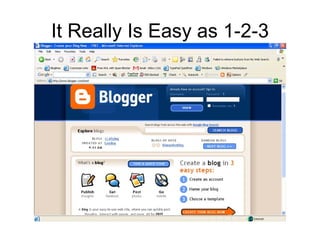
It Really Is Easy as 1-2-3
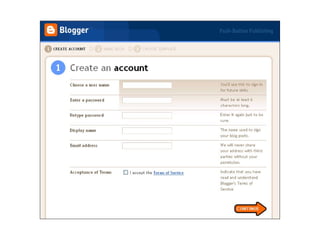
Blogger Signup -- Step 1
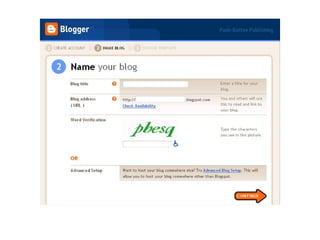
Blogger Signup -- Step 2
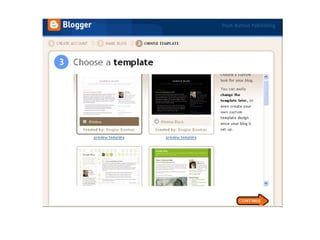
Blogger Signup -- Step 3
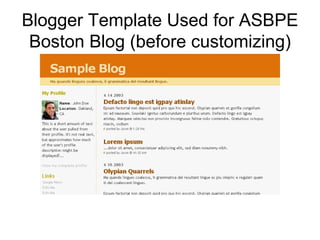
Blogger Template Used for ASBPE Boston Blog (before customizing)
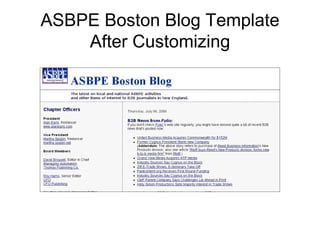
ASBPE Boston Blog Template After Customizing
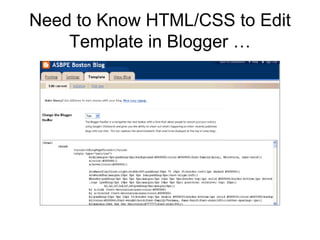
Need to Know HTML/CSS to Edit Template in Blogger …
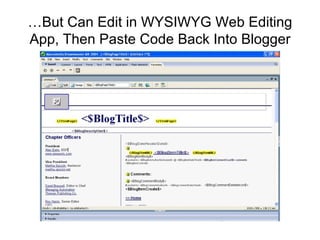
… But Can Edit in WYSIWYG Web Editing App, Then Paste Code Back Into Blogger
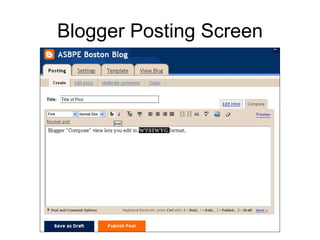
Blogger Posting Screen
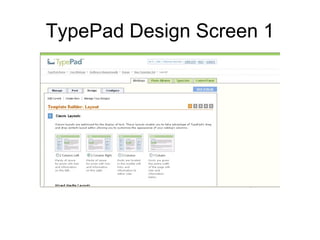
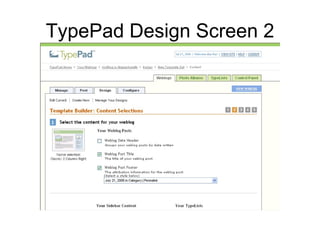
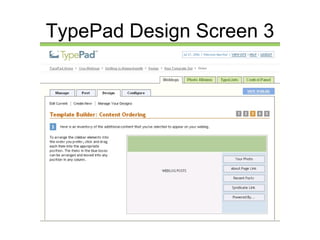
TypePad Minimal charge (starts at $4.95/month) If you use one of their standard templates, no need to know HTML—you can add content to template without it Has some bells and whistles—easy ability to add Amazon sales links, minimal traffic stats Some may find that navigating the interface for template changes, extras has a learning curve, but posting is easy, similar to Blogger
TypePad Design Screen 1
TypePad Design Screen 2
TypePad Design Screen 3
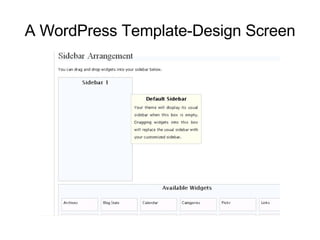
WordPress Free like Blogger, but like TypePad gives you ability to change template without HTML knowledge Template editing/design options perhaps a bit more intuitive than TypePad
A WordPress Template-Design Screen
Third-Party Blogging Tools Vs. Company Web Infrastructure Some publishing companies want make their pubs use their web infrastructure for blogs. This could change the game—possibly limiting flexibility and maneuverability, making blog feel more static and like a regular web page. For example: Email or phone posting may not be possible May not be able to have multiple posters May not be able to quickly change template when you want to Blog readers expect changes and activity Blogs using third-party tools can usually be hosted on corporate site
Blogging “Accessories” Statistics: StatCounter.com (free; can upgrade to paid version to get more features, history) MyBlogLog.com RSS Readers: FeedBlitz Newsgator Yahoo Google Countless others
Blogging “Accessories” (cont’d) Email updates for readers: FeedBlitz Bloglet Third-party Comment Tracking: HaloScan CoComment Search/publicity Technorati, del.icio.us let you assign tags to your blog; people can find your site in keyword search let you see who’s linking to you
Upsides of Blogging Forces you to keep up with industry news Dialogue with colleagues Opportunity to share ideas that spark your interest Keeps your publication/organization in front of people’s eyes
Downsides of Blogging Can be hard to find the time If you lose momentum, your audience doesn’t grow very fast

Blogging: Getting Started

  • 1.
    Blogging: Getting StartedASBPE National Editorial Conference July 21, 2006 Martha Spizziri Web Editor, ASBPE Blogger, ASBPE Boston Blog [email_address]
  • 2.
    Background Started asB2B magazine editor in 1984 at Cahners Publishing (now Reed Business Information) Web editor since 1996 – on B2B magazine, then freelance Started a personal blog first, then ASBPE Boston chapter blog
  • 3.
    Why I BlogStarted chapter blog as an experiment to help create community among Boston area editors More two-way communication with members through comments—so bimonthly chapter meetings would not be only forum for area editors to communicate Wanted to post some local business press news (not just chapter news)—quick and easy with blog Other chapter officers can update, communicate with members Potential to make the blog the chapter page (soon to happen)
  • 4.
    Results of ChapterBlog Not a lot of readers—averages 7 unique visitors a day—but did get some regular readers, and purpose of better engaging local editors was fulfilled Got a much better response to query for volunteers using blog than we ever did just posting it on static web page Chapter board doubled in size after request posted on blog Traffic slowly growing
  • 5.
    Blogging Tools Easy,free (or cheap) to get started. Many blog tools out there. Three good ones for business: Blogger Typepad (minimal charge)/Moveable Type (free version, but more setup involved) WordPress
  • 6.
    With Most BloggingTools, You: Can make the blog private, so you can experiment with it before going live Can get comments automatically e-mailed to you Can upload photos easily onto their space Get a WYSIWYG editor for easy formatting Can keep track of who’s linking to you (trackback/backlinks) Prevent comment spam – either approve comments before they’re posted or use or word verification Post remotely—via email or phone. Easily have multiple people post to the blog Can tweak the existing template (though usually requires some HTML knowledge) Get an XML/RSS feed
  • 7.
    It Really IsEasy as 1-2-3
  • 8.
  • 9.
  • 10.
  • 11.
    Blogger Template Usedfor ASBPE Boston Blog (before customizing)
  • 12.
    ASBPE Boston BlogTemplate After Customizing
  • 13.
    Need to KnowHTML/CSS to Edit Template in Blogger …
  • 14.
    … But CanEdit in WYSIWYG Web Editing App, Then Paste Code Back Into Blogger
  • 15.
  • 16.
    TypePad Minimal charge(starts at $4.95/month) If you use one of their standard templates, no need to know HTML—you can add content to template without it Has some bells and whistles—easy ability to add Amazon sales links, minimal traffic stats Some may find that navigating the interface for template changes, extras has a learning curve, but posting is easy, similar to Blogger
  • 17.
  • 18.
  • 19.
  • 20.
    WordPress Free likeBlogger, but like TypePad gives you ability to change template without HTML knowledge Template editing/design options perhaps a bit more intuitive than TypePad
  • 21.
  • 22.
    Third-Party Blogging ToolsVs. Company Web Infrastructure Some publishing companies want make their pubs use their web infrastructure for blogs. This could change the game—possibly limiting flexibility and maneuverability, making blog feel more static and like a regular web page. For example: Email or phone posting may not be possible May not be able to have multiple posters May not be able to quickly change template when you want to Blog readers expect changes and activity Blogs using third-party tools can usually be hosted on corporate site
  • 23.
    Blogging “Accessories” Statistics:StatCounter.com (free; can upgrade to paid version to get more features, history) MyBlogLog.com RSS Readers: FeedBlitz Newsgator Yahoo Google Countless others
  • 24.
    Blogging “Accessories” (cont’d)Email updates for readers: FeedBlitz Bloglet Third-party Comment Tracking: HaloScan CoComment Search/publicity Technorati, del.icio.us let you assign tags to your blog; people can find your site in keyword search let you see who’s linking to you
  • 25.
    Upsides of BloggingForces you to keep up with industry news Dialogue with colleagues Opportunity to share ideas that spark your interest Keeps your publication/organization in front of people’s eyes
  • 26.
    Downsides of BloggingCan be hard to find the time If you lose momentum, your audience doesn’t grow very fast