BIOS Basics
PRABATH SAMARASINGHE BSC(COL), MIT(COL)
Basic Input Output Systems (BIOS)
BIOS stands for basic input/output system, which consists of low-
level software that controls the system hardware and acts as an
interface between the operating system (OS) and the hardware.
The BIOS consists of software that interfaces the hardware to the OS.
The BIOS is unique compared to normal software in that some of it is
preloaded into read-only memory (or ROM), and some is loaded into
RAM from disk.
BIOS Operation
The BIOS in a running PC is loaded during the system startup from
three possible sources:
◦ Motherboard ROM
◦ Adapter card ROMs (such as that found on a video card)
◦ Loaded into RAM from disk (device drivers)
When the PC was introduced, the BIOS software containing all the
device drivers for the entire system was collectively burned into one
or more nonvolatile read-only memory (ROM) chips and placed on
the motherboard.
POST
This ROM chip also contained a power-on self test (POST) program
and a bootstrap loader.
The bootstrap program was designed to initiate the loading of an OS
by checking for and loading the boot sector from a floppy disk or, if
one was not present, a hard disk.
After the OS was loaded, it could call on the low-level routines
(device drivers) in the BIOS to interact with the system hardware.
Boot Process
If the device did not have an on-board ROM connected to the main system
bus, there had to be another way to add the necessary driver to the BIOS
collective.
A scheme was devised whereby, during the early stages of loading, the
MS-DOS startup file (IO.SYS) checked for a configuration file (called
CONFIG.SYS) that specified any additional drivers to load to support new
hardware.
The combination of the motherboard ROM, adapter card ROM, and device
drivers loaded from disk into RAM contributed to the BIOS as a whole. The
portion of the BIOS contained in ROM chips, both on the motherboard
and in some adapter cards, is sometimes called firmware, which is a name
given to software stored in ROM chips rather than on disk
Adding new drivers to motherboard
ROM
As the PC has evolved, more and more accessories and new
hardware have been devised to add to the system. This means that
more and more drivers have to be loaded to support this hardware.
Adding new drivers to the motherboard ROM is difficult because
ROM chips are relatively fixed (difficult to change) and limited space
is available.
most companies developing new hardware for the PC simply wrote
drivers designed to be loaded into RAM during the boot process.
Old and Modern OS
Windows 95 introduced a new hard disk driver that used 32-bit
code, which superseded the existing 16-bit driver that existed in the
motherboard ROM.
When modern 32-bit and 64-bit versions of Windows are run,
corresponding 32-bit and 64-bit drivers are loaded from disk to
replace all the drivers in the motherboard ROM.
Modern OSs cannot use any of the 16-bit drivers found in either the
motherboard ROMs or any adapter card ROMs and must use only
32-bit or 64-bit drivers, depending on the version.
PC System Levels
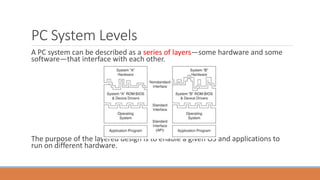
A PC system can be described as a series of layers—some hardware and some
software—that interface with each other.
The purpose of the layered design is to enable a given OS and applications to
run on different hardware.
Application Programming Interface
In this layered architecture, the application software programs talk to the
OS via what is called an application programming interface (API).
The API varies according to the OS you are using and consists of the
various commands and functions the OS can perform for an application.
For example, an application can call on the OS to load or save a file.
The OS then interfaces with or talks to the BIOS or driver layer. The BIOS
consists of all the individual driver programs that operate between the OS
and the actual hardware.
BIOS and CMOS RAM
They are, in fact, two separate components.
The BIOS on the motherboard is stored in a fixed ROM chip. Also on
the motherboard is a chip called the RTC/NVRAM chip, which stands
for real-time clock/nonvolatile memory.
This is where the settings in the BIOS Setup are stored, and it is
actually a clock chip with a few extra bytes of memory thrown in. It is
usually called the CMOS chip because it happens to be made using
CMOS (complementary metal-oxide semiconductor) technology.
BIOS and CMOS RAM
PC was the Motorola MC146818 chip, which had 64 bytes of storage, of
which 14 bytes were dedicated to the clock function, leaving 50 bytes to
store BIOS Setup settings.
Although it is called nonvolatile, the chip is actually volatile, meaning that
without power, the time/date settings and the data in the RAM portion
will in fact be erased.
Many consider this chip nonvolatile because it is designed using CMOS
technology, which results in a chip that requires little power compared to
other chips.
A small battery can provide that power when the system is unplugged.
This battery-powered clock/memory chip is commonly referred to as
“the” CMOS RAM chip;
BIOS Hardware/Software
Some important drivers must be active during boot time. For
example, how can you boot from a hard disk if the drivers necessary
to make the disk interface work must be loaded from that disk?
A few cards (adapter boards) almost always have a ROM onboard,
including the following:
◦ Video cards
◦ RAID
◦ Network cards
◦ ATA/Serial ATA (SATA) or floppy upgrade boards
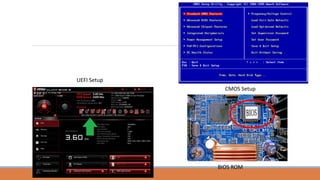
CMOS Setup
BIOS ROM
UEFI Setup
BIOS Basics of the digital computer systems

BIOS Basics of the digital computer systems

  • 1.
  • 2.
    Basic Input OutputSystems (BIOS) BIOS stands for basic input/output system, which consists of low- level software that controls the system hardware and acts as an interface between the operating system (OS) and the hardware. The BIOS consists of software that interfaces the hardware to the OS. The BIOS is unique compared to normal software in that some of it is preloaded into read-only memory (or ROM), and some is loaded into RAM from disk.
  • 3.
    BIOS Operation The BIOSin a running PC is loaded during the system startup from three possible sources: ◦ Motherboard ROM ◦ Adapter card ROMs (such as that found on a video card) ◦ Loaded into RAM from disk (device drivers) When the PC was introduced, the BIOS software containing all the device drivers for the entire system was collectively burned into one or more nonvolatile read-only memory (ROM) chips and placed on the motherboard.
  • 4.
    POST This ROM chipalso contained a power-on self test (POST) program and a bootstrap loader. The bootstrap program was designed to initiate the loading of an OS by checking for and loading the boot sector from a floppy disk or, if one was not present, a hard disk. After the OS was loaded, it could call on the low-level routines (device drivers) in the BIOS to interact with the system hardware.
  • 5.
    Boot Process If thedevice did not have an on-board ROM connected to the main system bus, there had to be another way to add the necessary driver to the BIOS collective. A scheme was devised whereby, during the early stages of loading, the MS-DOS startup file (IO.SYS) checked for a configuration file (called CONFIG.SYS) that specified any additional drivers to load to support new hardware. The combination of the motherboard ROM, adapter card ROM, and device drivers loaded from disk into RAM contributed to the BIOS as a whole. The portion of the BIOS contained in ROM chips, both on the motherboard and in some adapter cards, is sometimes called firmware, which is a name given to software stored in ROM chips rather than on disk
  • 6.
    Adding new driversto motherboard ROM As the PC has evolved, more and more accessories and new hardware have been devised to add to the system. This means that more and more drivers have to be loaded to support this hardware. Adding new drivers to the motherboard ROM is difficult because ROM chips are relatively fixed (difficult to change) and limited space is available. most companies developing new hardware for the PC simply wrote drivers designed to be loaded into RAM during the boot process.
  • 7.
    Old and ModernOS Windows 95 introduced a new hard disk driver that used 32-bit code, which superseded the existing 16-bit driver that existed in the motherboard ROM. When modern 32-bit and 64-bit versions of Windows are run, corresponding 32-bit and 64-bit drivers are loaded from disk to replace all the drivers in the motherboard ROM. Modern OSs cannot use any of the 16-bit drivers found in either the motherboard ROMs or any adapter card ROMs and must use only 32-bit or 64-bit drivers, depending on the version.
  • 8.
    PC System Levels APC system can be described as a series of layers—some hardware and some software—that interface with each other. The purpose of the layered design is to enable a given OS and applications to run on different hardware.
  • 9.
    Application Programming Interface Inthis layered architecture, the application software programs talk to the OS via what is called an application programming interface (API). The API varies according to the OS you are using and consists of the various commands and functions the OS can perform for an application. For example, an application can call on the OS to load or save a file. The OS then interfaces with or talks to the BIOS or driver layer. The BIOS consists of all the individual driver programs that operate between the OS and the actual hardware.
  • 10.
    BIOS and CMOSRAM They are, in fact, two separate components. The BIOS on the motherboard is stored in a fixed ROM chip. Also on the motherboard is a chip called the RTC/NVRAM chip, which stands for real-time clock/nonvolatile memory. This is where the settings in the BIOS Setup are stored, and it is actually a clock chip with a few extra bytes of memory thrown in. It is usually called the CMOS chip because it happens to be made using CMOS (complementary metal-oxide semiconductor) technology.
  • 11.
    BIOS and CMOSRAM PC was the Motorola MC146818 chip, which had 64 bytes of storage, of which 14 bytes were dedicated to the clock function, leaving 50 bytes to store BIOS Setup settings. Although it is called nonvolatile, the chip is actually volatile, meaning that without power, the time/date settings and the data in the RAM portion will in fact be erased. Many consider this chip nonvolatile because it is designed using CMOS technology, which results in a chip that requires little power compared to other chips. A small battery can provide that power when the system is unplugged. This battery-powered clock/memory chip is commonly referred to as “the” CMOS RAM chip;
  • 12.
    BIOS Hardware/Software Some importantdrivers must be active during boot time. For example, how can you boot from a hard disk if the drivers necessary to make the disk interface work must be loaded from that disk? A few cards (adapter boards) almost always have a ROM onboard, including the following: ◦ Video cards ◦ RAID ◦ Network cards ◦ ATA/Serial ATA (SATA) or floppy upgrade boards
  • 13.