Comparison of BIM software
Submitted To : Prof Shrutiniwas Sharma
Nitish Niwas
A13559016076
nitish.niwas2208
@gmail.com
R.V. Pavan
A13559016110
pandurpk@gmail
.com
A.Akhil
A13559016113
akhilabburu98@
gmail.com
V. Pavan
A13559016134
Vpavankumar3
@gmail.com
Kaustubh.U.Y
A13559016231
kuyelkar@gmail
.com
Aditya.P.S
A13559016205
adityagkp23@g
mail.com
CPM_F_GROUP1_TEAM 5
Building Information Modelling
Assignment 2
Plan
Of
Presentation
Buckets of BIM softwares
Relative comparsion between softwares
BIM usage in INDIA
Comparison of softwares
BIM WORKFLOW
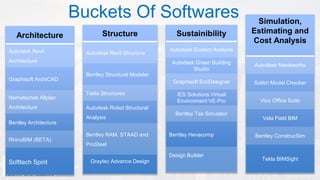
Architecture
Autodesk Revit
Architecture
Graphisoft ArchiCAD
Nemetschek Allplan
Architecture
Bentley Architecture
RhinoBIM (BETA)
Softtech Spirit
Structure
Autodesk Revit Structure
Bentley Structural Modeler
Tekla Structures
Autodesk Robot Structural
Analysis
Bentley RAM, STAAD and
ProSteel
Graytec Advance Design
Sustainibility
Autodesk Ecotect Analysis
Autodesk Green Building
Studio
Graphisoft EcoDesigner
IES Solutions Virtual
Environment VE-Pro
Bentley Tas Simulator
Bentley Hevacomp
Design Builder
Simulation,
Estimating and
Cost Analysis
Autodesk Navisworks
Solibri Model Checker
Vico Office Suite
Vela Field BIM
Bentley ConstrucSim
Tekla BIMSight
Buckets Of Softwares
BIM software usage in India
Relative Comparison Between various BIM software
Attribute Navisworks Synchro
Professional
Navigator ITwo Vico
Control
Ease of learning 2.5 3.5 2.5 3 2
Extent of 4D features 3.5 4.5 2.5 2.5 3
Animation Time 2.5 3.5 2.5 2.5 2.5
Animation Quality 4 3.5 2.5 2.5 3
Import & Export 4 4 4 4 3.5
Exchange with P6 & Auto
Linking
3 4.5 2.5 3 2.5
Clash Detection Rules 4 2 4 4 2
Multiple Users 1 5 1 1 4
5D & QTO capabilities 3 3 1 5 4
Source : https://www.linkedin.com/pulse/general-comparison-between-bim-4d-software-tamer-mohammed
REVIT
TEKLA
REVIT
TEKLA
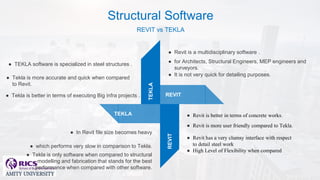
● Revit is a multidisciplinary software .
● for Architects, Structural Engineers, MEP engineers and
surveyors.
● It is not very quick for detailing purposes.
● Revit is better in terms of concrete works.
● Revit is more user friendly compared to Tekla.
● Revit has a very clumsy interface with respect
to detail steel work
● High Level of Flexibility when compared
● In Revit file size becomes heavy
● which performs very slow in comparison to Tekla.
● Tekla is only software when compared to structural
modelling and fabrication that stands for the best
performance when compared with other software.
● TEKLA software is specialized in steel structures .
● Tekla is more accurate and quick when compared
to Revit.
● Tekla is better in terms of executing Big infra projects .
Structural Software
REVIT vs TEKLA
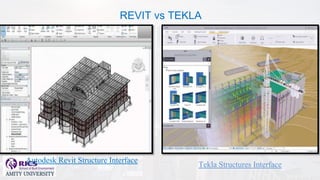
Autodesk Revit Structure Interface
Tekla Structures Interface
REVIT vs TEKLA
• Integrated, simultaneous
solution of thermal zone
conditions and HVAC system
• Heat balance-based solution
of radiant and convective
effects
• Sub-hourly, user-definable
time steps
• Combined heat and mass
transfer model
• Advanced fenestration models
• Illuminance and glare
calculations
• Component-based HVAC
• Built-in HVAC and lighting
control strategies
• Functional Mockup Interface
import and export for co-
simulation with other engines.
• Online energy, water, and
carbon-emission analysis
capabilities integrate with
desktop tools for visualizing and
simulating building performance
within the context of its
environment.
• Interaction with powerful 3D
feedback
• Solar, shadows and
reflections, and daylighting
analysis
.
• Detailed environmental
simulations
• ENERGY STAR® scoring
and analysis of potential for
LEED daylighting credits
.
Sustainibility Software
Autodesk Ecotech Vs EnergyPlus
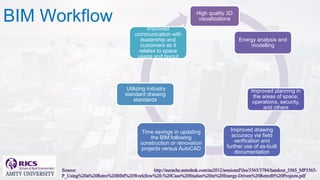
BIM Workflow High quality 3D
visualizations
Energy analysis and
modelling
Improved planning in
the areas of space,
operations, security,
and others
Improved drawing
accuracy via field
verification and
further use of as-built
documentation
Time savings in updating
the BIM following
construction or renovation
projects versus AutoCAD
Utilizing industry
standard drawing
standards
Improved
communication with
leadership and
customers as it
relates to space
usage and layout
BIM modified work flow
Thank you


Bim softwares comparisons

  • 1.
    Comparison of BIMsoftware Submitted To : Prof Shrutiniwas Sharma Nitish Niwas A13559016076 nitish.niwas2208 @gmail.com R.V. Pavan A13559016110 pandurpk@gmail .com A.Akhil A13559016113 akhilabburu98@ gmail.com V. Pavan A13559016134 Vpavankumar3 @gmail.com Kaustubh.U.Y A13559016231 kuyelkar@gmail .com Aditya.P.S A13559016205 adityagkp23@g mail.com CPM_F_GROUP1_TEAM 5 Building Information Modelling Assignment 2
  • 2.
    Plan Of Presentation Buckets of BIMsoftwares Relative comparsion between softwares BIM usage in INDIA Comparison of softwares BIM WORKFLOW
  • 3.
    Architecture Autodesk Revit Architecture Graphisoft ArchiCAD NemetschekAllplan Architecture Bentley Architecture RhinoBIM (BETA) Softtech Spirit Structure Autodesk Revit Structure Bentley Structural Modeler Tekla Structures Autodesk Robot Structural Analysis Bentley RAM, STAAD and ProSteel Graytec Advance Design Sustainibility Autodesk Ecotect Analysis Autodesk Green Building Studio Graphisoft EcoDesigner IES Solutions Virtual Environment VE-Pro Bentley Tas Simulator Bentley Hevacomp Design Builder Simulation, Estimating and Cost Analysis Autodesk Navisworks Solibri Model Checker Vico Office Suite Vela Field BIM Bentley ConstrucSim Tekla BIMSight Buckets Of Softwares
  • 4.
  • 5.
    Relative Comparison Betweenvarious BIM software Attribute Navisworks Synchro Professional Navigator ITwo Vico Control Ease of learning 2.5 3.5 2.5 3 2 Extent of 4D features 3.5 4.5 2.5 2.5 3 Animation Time 2.5 3.5 2.5 2.5 2.5 Animation Quality 4 3.5 2.5 2.5 3 Import & Export 4 4 4 4 3.5 Exchange with P6 & Auto Linking 3 4.5 2.5 3 2.5 Clash Detection Rules 4 2 4 4 2 Multiple Users 1 5 1 1 4 5D & QTO capabilities 3 3 1 5 4 Source : https://www.linkedin.com/pulse/general-comparison-between-bim-4d-software-tamer-mohammed
  • 6.
    REVIT TEKLA REVIT TEKLA ● Revit isa multidisciplinary software . ● for Architects, Structural Engineers, MEP engineers and surveyors. ● It is not very quick for detailing purposes. ● Revit is better in terms of concrete works. ● Revit is more user friendly compared to Tekla. ● Revit has a very clumsy interface with respect to detail steel work ● High Level of Flexibility when compared ● In Revit file size becomes heavy ● which performs very slow in comparison to Tekla. ● Tekla is only software when compared to structural modelling and fabrication that stands for the best performance when compared with other software. ● TEKLA software is specialized in steel structures . ● Tekla is more accurate and quick when compared to Revit. ● Tekla is better in terms of executing Big infra projects . Structural Software REVIT vs TEKLA
  • 7.
    Autodesk Revit StructureInterface Tekla Structures Interface REVIT vs TEKLA
  • 8.
    • Integrated, simultaneous solutionof thermal zone conditions and HVAC system • Heat balance-based solution of radiant and convective effects • Sub-hourly, user-definable time steps • Combined heat and mass transfer model • Advanced fenestration models • Illuminance and glare calculations • Component-based HVAC • Built-in HVAC and lighting control strategies • Functional Mockup Interface import and export for co- simulation with other engines. • Online energy, water, and carbon-emission analysis capabilities integrate with desktop tools for visualizing and simulating building performance within the context of its environment. • Interaction with powerful 3D feedback • Solar, shadows and reflections, and daylighting analysis . • Detailed environmental simulations • ENERGY STAR® scoring and analysis of potential for LEED daylighting credits . Sustainibility Software Autodesk Ecotech Vs EnergyPlus
  • 9.
    BIM Workflow Highquality 3D visualizations Energy analysis and modelling Improved planning in the areas of space, operations, security, and others Improved drawing accuracy via field verification and further use of as-built documentation Time savings in updating the BIM following construction or renovation projects versus AutoCAD Utilizing industry standard drawing standards Improved communication with leadership and customers as it relates to space usage and layout
  • 10.
  • 11.