Conquering BIM
Services: Top 7
Software Picks
for Your Next
AEC Project
Introduction:
• The world of BIM (Building
Information Modeling) is a
vibrant ecosystem, teeming with
software options.
• But navigating this can be
daunting!
• But there’s nothing to fret!
• Let’s compare the top 7 BIM
software platforms to choose
the perfect tool for your next
AEC project.
Contenders: 7 Software for BIM Services:
1. Revit
2. ArchiCAD
3. Tekla Structures
4. Bentley MicroStation
5. Etabs
6. Solibri Model Checker
7. Navisworks
Take a look at the Key BIM Services
required by AEC professionals.
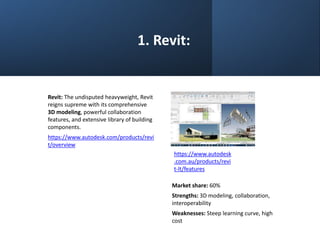
1. Revit:
Revit: The undisputed heavyweight, Revit
reigns supreme with its comprehensive
3D modeling, powerful collaboration
features, and extensive library of building
components.
https://www.autodesk.com/products/revi
t/overview
https://www.autodesk
.com.au/products/revi
t-lt/features
Market share: 60%
Strengths: 3D modeling, collaboration,
interoperability
Weaknesses: Steep learning curve, high
cost
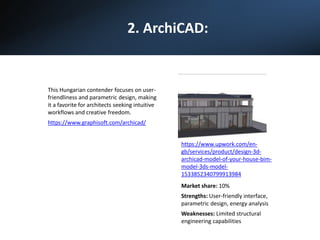
2. ArchiCAD:
This Hungarian contender focuses on user-
friendliness and parametric design, making
it a favorite for architects seeking intuitive
workflows and creative freedom.
https://www.graphisoft.com/archicad/
Market share: 10%
Strengths: User-friendly interface,
parametric design, energy analysis
Weaknesses: Limited structural
engineering capabilities
https://www.upwork.com/en-
gb/services/product/design-3d-
archicad-model-of-your-house-bim-
model-3ds-model-
1533852340799913984
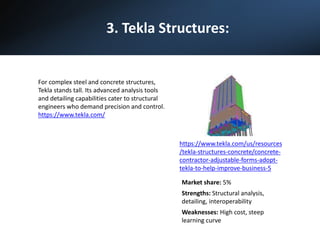
3. Tekla Structures:
For complex steel and concrete structures,
Tekla stands tall. Its advanced analysis tools
and detailing capabilities cater to structural
engineers who demand precision and control.
https://www.tekla.com/
https://www.tekla.com/us/resources
/tekla-structures-concrete/concrete-
contractor-adjustable-forms-adopt-
tekla-to-help-improve-business-5
Market share: 5%
Strengths: Structural analysis,
detailing, interoperability
Weaknesses: High cost, steep
learning curve
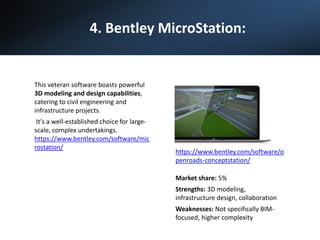
4. Bentley MicroStation:
This veteran software boasts powerful
3D modeling and design capabilities,
catering to civil engineering and
infrastructure projects.
It's a well-established choice for large-
scale, complex undertakings.
https://www.bentley.com/software/mic
rostation/
https://www.bentley.com/software/o
penroads-conceptstation/
Market share: 5%
Strengths: 3D modeling,
infrastructure design, collaboration
Weaknesses: Not specifically BIM-
focused, higher complexity
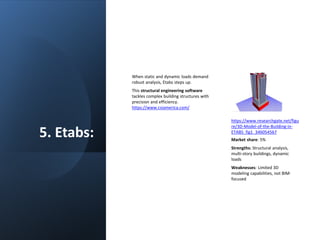
5. Etabs:
When static and dynamic loads demand
robust analysis, Etabs steps up.
This structural engineering software
tackles complex building structures with
precision and efficiency.
https://www.csiamerica.com/
Market share: 5%
Strengths: Structural analysis,
multi-story buildings, dynamic
loads
Weaknesses: Limited 3D
modeling capabilities, not BIM-
focused
https://www.researchgate.net/figu
re/3D-Model-of-the-Building-in-
ETABS_fig1_346054567
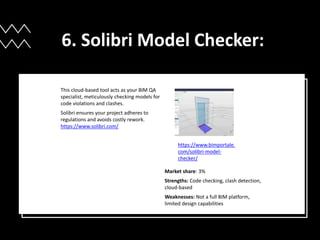
6. Solibri Model Checker:
This cloud-based tool acts as your BIM QA
specialist, meticulously checking models for
code violations and clashes.
Solibri ensures your project adheres to
regulations and avoids costly rework.
https://www.solibri.com/
https://www.bimportale.
com/solibri-model-
checker/
Market share: 3%
Strengths: Code checking, clash detection,
cloud-based
Weaknesses: Not a full BIM platform,
limited design capabilities
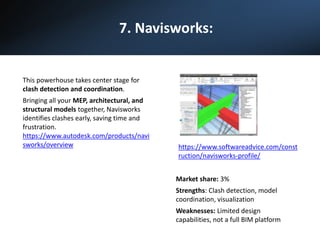
7. Navisworks:
This powerhouse takes center stage for
clash detection and coordination.
Bringing all your MEP, architectural, and
structural models together, Navisworks
identifies clashes early, saving time and
frustration.
https://www.autodesk.com/products/navi
sworks/overview
Market share: 3%
Strengths: Clash detection, model
coordination, visualization
Weaknesses: Limited design
capabilities, not a full BIM platform
https://www.softwareadvice.com/const
ruction/navisworks-profile/
Choosing the Right BIM
Software:
With so many options, selecting the perfect BIM software
for your project depends on several factors:
• Project complexity: Simple projects might favor
beginner-friendly tools like SketchUp, while complex
structures require robust platforms like Revit or
Tekla.
• Budget: Software costs vary significantly. Open-
source tools like SketchUp are budget-friendly, while
premium options like Revit come with higher price
tags.
• Team expertise: Choose software your team is
comfortable with to ensure smooth adoption and
workflow efficiency.
• Specific needs: Consider if you need advanced
analysis capabilities (RFEM), clash detection
(Navisworks), or user-friendly rendering
(Vectorworks).
Few Considerations:
• The best BIM software is the one that
empowers your team, enhances
collaboration, and ultimately leads to
successful project outcomes.
• Explore, compare, and choose the tool
that fits your needs like a glove!
• Share your experiences with different
BIM software in the comments below.
What challenges have you faced? What
tools have worked best for you?
Together, we can build a vibrant and
helpful community of BIM enthusiasts!
• Get in touch with our BIM consultants
in USA at 202-465-4830 or
info@tejjy.com.

Conquering BIM Services, Top 7 Software Picks for Your Next AEC Project​

  • 1.
    Conquering BIM Services: Top7 Software Picks for Your Next AEC Project
  • 2.
    Introduction: • The worldof BIM (Building Information Modeling) is a vibrant ecosystem, teeming with software options. • But navigating this can be daunting! • But there’s nothing to fret! • Let’s compare the top 7 BIM software platforms to choose the perfect tool for your next AEC project.
  • 3.
    Contenders: 7 Softwarefor BIM Services: 1. Revit 2. ArchiCAD 3. Tekla Structures 4. Bentley MicroStation 5. Etabs 6. Solibri Model Checker 7. Navisworks Take a look at the Key BIM Services required by AEC professionals.
  • 4.
    1. Revit: Revit: Theundisputed heavyweight, Revit reigns supreme with its comprehensive 3D modeling, powerful collaboration features, and extensive library of building components. https://www.autodesk.com/products/revi t/overview https://www.autodesk .com.au/products/revi t-lt/features Market share: 60% Strengths: 3D modeling, collaboration, interoperability Weaknesses: Steep learning curve, high cost
  • 5.
    2. ArchiCAD: This Hungariancontender focuses on user- friendliness and parametric design, making it a favorite for architects seeking intuitive workflows and creative freedom. https://www.graphisoft.com/archicad/ Market share: 10% Strengths: User-friendly interface, parametric design, energy analysis Weaknesses: Limited structural engineering capabilities https://www.upwork.com/en- gb/services/product/design-3d- archicad-model-of-your-house-bim- model-3ds-model- 1533852340799913984
  • 6.
    3. Tekla Structures: Forcomplex steel and concrete structures, Tekla stands tall. Its advanced analysis tools and detailing capabilities cater to structural engineers who demand precision and control. https://www.tekla.com/ https://www.tekla.com/us/resources /tekla-structures-concrete/concrete- contractor-adjustable-forms-adopt- tekla-to-help-improve-business-5 Market share: 5% Strengths: Structural analysis, detailing, interoperability Weaknesses: High cost, steep learning curve
  • 7.
    4. Bentley MicroStation: Thisveteran software boasts powerful 3D modeling and design capabilities, catering to civil engineering and infrastructure projects. It's a well-established choice for large- scale, complex undertakings. https://www.bentley.com/software/mic rostation/ https://www.bentley.com/software/o penroads-conceptstation/ Market share: 5% Strengths: 3D modeling, infrastructure design, collaboration Weaknesses: Not specifically BIM- focused, higher complexity
  • 8.
    5. Etabs: When staticand dynamic loads demand robust analysis, Etabs steps up. This structural engineering software tackles complex building structures with precision and efficiency. https://www.csiamerica.com/ Market share: 5% Strengths: Structural analysis, multi-story buildings, dynamic loads Weaknesses: Limited 3D modeling capabilities, not BIM- focused https://www.researchgate.net/figu re/3D-Model-of-the-Building-in- ETABS_fig1_346054567
  • 9.
    6. Solibri ModelChecker: This cloud-based tool acts as your BIM QA specialist, meticulously checking models for code violations and clashes. Solibri ensures your project adheres to regulations and avoids costly rework. https://www.solibri.com/ https://www.bimportale. com/solibri-model- checker/ Market share: 3% Strengths: Code checking, clash detection, cloud-based Weaknesses: Not a full BIM platform, limited design capabilities
  • 10.
    7. Navisworks: This powerhousetakes center stage for clash detection and coordination. Bringing all your MEP, architectural, and structural models together, Navisworks identifies clashes early, saving time and frustration. https://www.autodesk.com/products/navi sworks/overview Market share: 3% Strengths: Clash detection, model coordination, visualization Weaknesses: Limited design capabilities, not a full BIM platform https://www.softwareadvice.com/const ruction/navisworks-profile/
  • 11.
    Choosing the RightBIM Software: With so many options, selecting the perfect BIM software for your project depends on several factors: • Project complexity: Simple projects might favor beginner-friendly tools like SketchUp, while complex structures require robust platforms like Revit or Tekla. • Budget: Software costs vary significantly. Open- source tools like SketchUp are budget-friendly, while premium options like Revit come with higher price tags. • Team expertise: Choose software your team is comfortable with to ensure smooth adoption and workflow efficiency. • Specific needs: Consider if you need advanced analysis capabilities (RFEM), clash detection (Navisworks), or user-friendly rendering (Vectorworks).
  • 12.
    Few Considerations: • Thebest BIM software is the one that empowers your team, enhances collaboration, and ultimately leads to successful project outcomes. • Explore, compare, and choose the tool that fits your needs like a glove! • Share your experiences with different BIM software in the comments below. What challenges have you faced? What tools have worked best for you? Together, we can build a vibrant and helpful community of BIM enthusiasts! • Get in touch with our BIM consultants in USA at 202-465-4830 or info@tejjy.com.