Beyond the Intranet: Digital Workplace
Apps, Solutions and Bots
LiveTiles Webinar co-hosted with partner 2toLead
Richard Harbridge
CTO & MVP 2toLead
Richard@2tolead.com
www.livetiles.nyc30 July 2019 2
About us
LiveTiles is a global software company
headquartered in New York, with operations in
Seattle, Tri-Cities (Washington State), San
Francisco, Los Angeles, Chicago, Minneapolis,
North Carolina, Rochester, London, Sligo,
Copenhagen, Amsterdam, Sydney, Melbourne,
Brisbane, Geelong and Hobart.
LiveTiles offers intelligent workplace software for
the commercial, government and education
markets, and is an award-winning Microsoft
Partner.
LiveTiles’ products comprise LiveTiles Intelligent
Workplace, LiveTiles Mosaic for K-12, Hyperfish
and Wizdom.
LiveTiles’ customers represent a diverse range of
sectors and are spread throughout the United
States, United Kingdom, Europe, the Middle East
and Asia-Pacific.
www.livetiles.nyc30 July 2019 3
Now that your organization has implemented an Office 365 SharePoint
Intranet, what’s next?
How are you going to continue to drive user engagement across your corporate
Intranet and department specific sites? How are you going to ensure that your
users have a seamless experience as they connect with information and
applications from across your entire digital workplace?
In this webinar we will give you practical suggestions for how you can
respond to your users’ demands for powerful and integrated solutions that
seamlessly support their needs across the digital workplace.
What we will cover in this webinar:
- Why you need to create a connected digital workplace experience
- Real use cases and best practices for how you can deliver more value with
integrated solutions across your digital workplace and Intranet
- We will discuss Bots, Microsoft Flow, PowerApps, Microsoft Forms,
Integrations, Office 365 development, Industry innovation, and more
WEBINAR
AGENDA
RICHARD
HARBRIDGE
My twitter is @RHarbridge, I’m super friendly & I am proud to work at 2toLead.
CTO & MVP | SPEAKER & AUTHOR | SUPER FRIENDLY
DOWNLOAD OUR 100+ PAGE
WHITEPAPER ON INTRANETS
WITH OFFICE 365
It goes into much greater depth and can be found at Office365Intranets.com
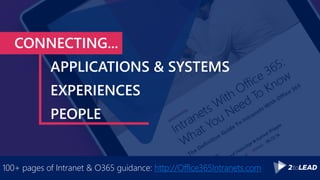
CONNECTING...
APPLICATIONS & SYSTEMS
EXPERIENCES
PEOPLE
100+ pages of Intranet & O365 guidance: http://Office365Intranets.com
CONNECTING...
APPLICATIONS & SYSTEMS
EXPERIENCES
PEOPLE
100+ pages of Intranet & O365 guidance: http://Office365Intranets.com
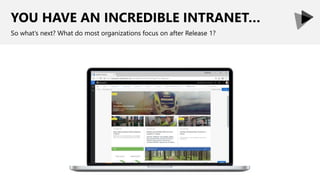
YOU HAVE AN INCREDIBLE INTRANET…
So what’s next? What do most organizations focus on after Release 1?
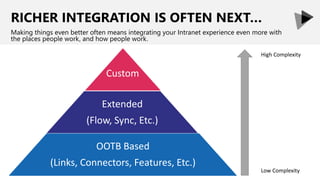
RICHER INTEGRATION IS OFTEN NEXT…
Making things even better often means integrating your Intranet experience even more with
the places people work, and how people work.
Extended
(Flow, Sync, Etc.)
OOTB Based
(Links, Connectors, Features, Etc.)
Custom
High Complexity
Low Complexity
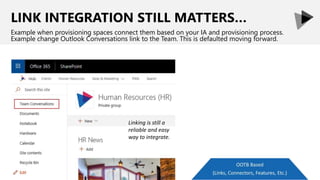
LINK INTEGRATION STILL MATTERS…
Example when provisioning spaces connect them based on your IA and provisioning process.
Example change Outlook Conversations link to the Team. This is defaulted moving forward.
Linking is still a
reliable and easy
way to integrate.
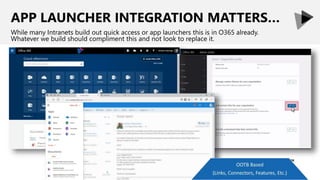
APP LAUNCHER INTEGRATION MATTERS…
While many Intranets build out quick access or app launchers this is in O365 already.
Whatever we build should compliment this and not look to replace it.
Out Of The Box
●
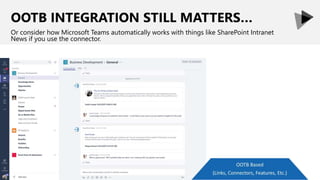
OOTB INTEGRATION STILL MATTERS…
Or consider how Microsoft Teams automatically works with things like SharePoint Intranet
News if you use the connector.
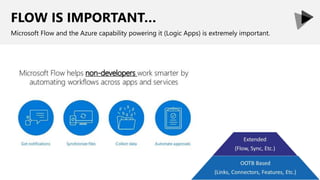
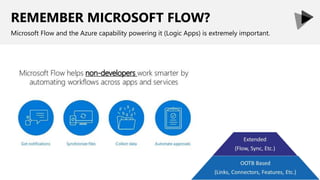
FLOW IS IMPORTANT…
Microsoft Flow and the Azure capability powering it (Logic Apps) is extremely important.
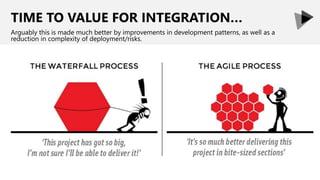
TIME TO VALUE FOR INTEGRATION…
Arguably this is made much better by improvements in development patterns, as well as a
reduction in complexity of deployment/risks.
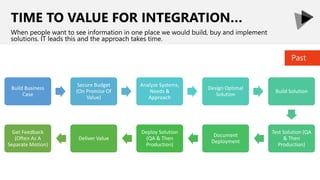
TIME TO VALUE FOR INTEGRATION…
When people want to see information in one place we would build, buy and implement
solutions. IT leads this and the approach takes time.
Build Business
Case
Secure Budget
(On Promise Of
Value)
Analyze Systems,
Needs &
Approach
Design Optimal
Solution
Build Solution
Test Solution (QA
& Then
Production)
Document
Deployment
Deploy Solution
(QA & Then
Production)
Deliver Value
Get Feedback
(Often As A
Separate Motion)
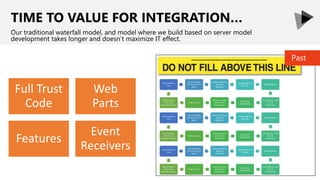
Past
Full Trust
Code
Web
Parts
Features
Event
Receivers
TIME TO VALUE FOR INTEGRATION…
Our traditional waterfall model, and model where we build based on server model
development takes longer and doesn’t maximize IT effect.
Past
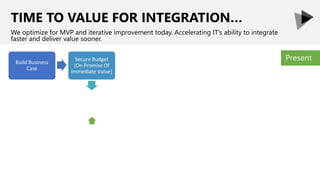
TIME TO VALUE FOR INTEGRATION…
We optimize for MVP and iterative improvement today. Accelerating IT’s ability to integrate
faster and deliver value sooner.
PresentSecure Budget
(On Promise Of
Immediate Value)
Build Business
Case
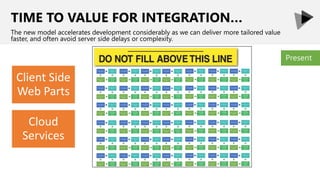
Client Side
Web Parts
Cloud
Services
TIME TO VALUE FOR INTEGRATION…
The new model accelerates development considerably as we can deliver more tailored value
faster, and often avoid server side delays or complexity.
Present
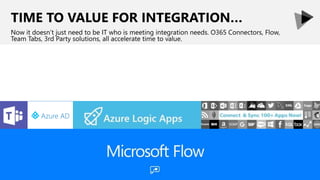
TIME TO VALUE FOR INTEGRATION…
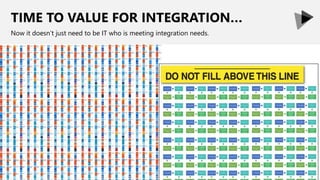
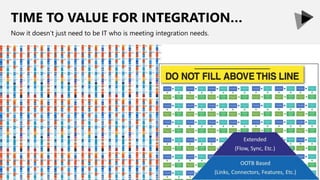
Now it doesn’t just need to be IT who is meeting integration needs. O365 Connectors, Flow,
Team Tabs, 3rd Party solutions, all accelerate time to value.
TIME TO VALUE FOR INTEGRATION…
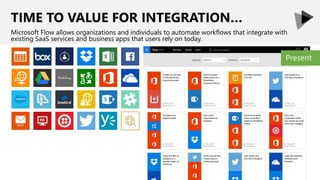
Microsoft Flow allows organizations and individuals to automate workflows that integrate with
existing SaaS services and business apps that users rely on today.
Present
TIME TO VALUE FOR INTEGRATION…
Now it doesn’t just need to be IT who is meeting integration needs.
TIME TO VALUE FOR INTEGRATION…
Now it doesn’t just need to be IT who is meeting integration needs.
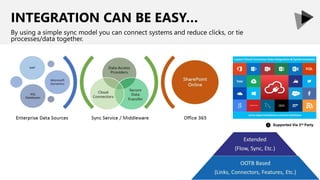
INTEGRATION CAN BE EASY…
By using a simple sync model you can connect systems and reduce clicks, or tie
processes/data together.
Supported Via 3rd Party
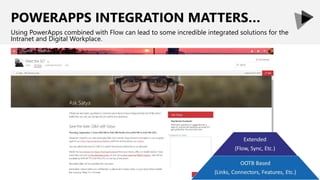
POWERAPPS INTEGRATION MATTERS…
Using PowerApps combined with Flow can lead to some incredible integrated solutions for the
Intranet and Digital Workplace.
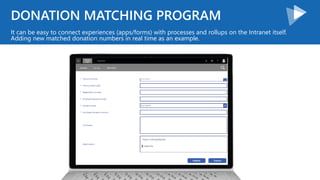
DONATION MATCHING PROGRAM
It can be easy to connect experiences (apps/forms) with processes and rollups on the Intranet itself.
Adding new matched donation numbers in real time as an example.
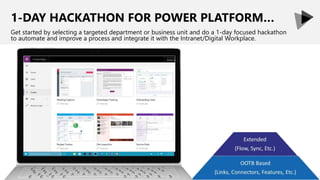
1-DAY HACKATHON FOR POWER PLATFORM…
Get started by selecting a targeted department or business unit and do a 1-day focused hackathon
to automate and improve a process and integrate it with the Intranet/Digital Workplace.
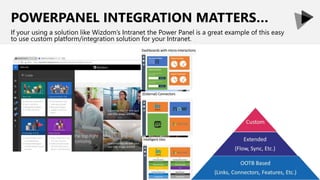
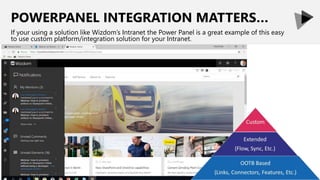
POWERPANEL INTEGRATION MATTERS…
If your using a solution like Wizdom’s Intranet the Power Panel is a great example of this easy
to use custom platform/integration solution for your Intranet.
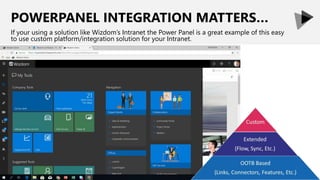
POWERPANEL INTEGRATION MATTERS…
If your using a solution like Wizdom’s Intranet the Power Panel is a great example of this easy
to use custom platform/integration solution for your Intranet.
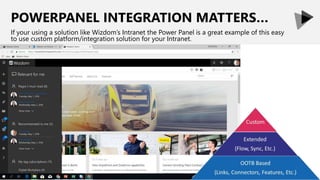
POWERPANEL INTEGRATION MATTERS…
If your using a solution like Wizdom’s Intranet the Power Panel is a great example of this easy
to use custom platform/integration solution for your Intranet.
POWERPANEL INTEGRATION MATTERS…
If your using a solution like Wizdom’s Intranet the Power Panel is a great example of this easy
to use custom platform/integration solution for your Intranet.
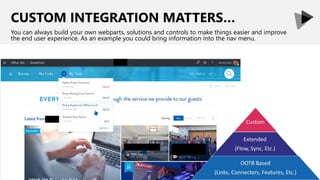
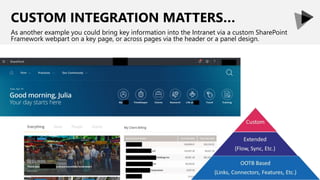
CUSTOM INTEGRATION MATTERS…
You can always build your own webparts, solutions and controls to make things easier and improve
the end user experience. As an example you could bring information into the nav menu.
CUSTOM INTEGRATION MATTERS…
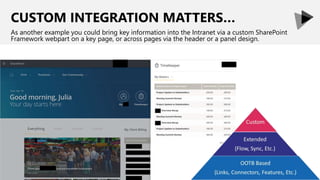
As another example you could bring key information into the Intranet via a custom SharePoint
Framework webpart on a key page, or across pages via the header or a panel design.
CUSTOM INTEGRATION MATTERS…
As another example you could bring key information into the Intranet via a custom SharePoint
Framework webpart on a key page, or across pages via the header or a panel design.
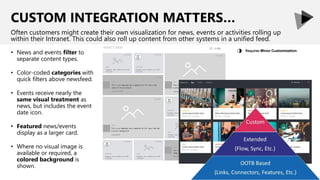
CUSTOM INTEGRATION MATTERS…
Often customers might create their own visualization for news, events or activities rolling up
within their Intranet. This could also roll up content from other systems in a unified feed.
Requires Minor Customization
◑• News and events filter to
separate content types.
• Color-coded categories with
quick filters above newsfeed.
• Events receive nearly the
same visual treatment as
news, but includes the event
date icon.
• Featured news/events
display as a larger card.
• Where no visual image is
available or required, a
colored background is
shown.
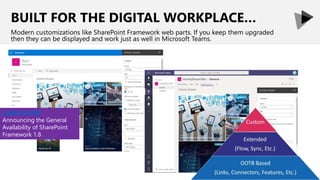
BUILT FOR THE DIGITAL WORKPLACE…
Modern customizations like SharePoint Framework web parts. If you keep them upgraded
then they can be displayed and work just as well in Microsoft Teams.
LEARN MORE
Announcing the General
Availability of SharePoint
Framework 1.8
CONNECTING...
APPLICATIONS & SYSTEMS
EXPERIENCES
PEOPLE
100+ pages of Intranet & O365 guidance: http://Office365Intranets.com
CONNECTING...
APPLICATIONS & SYSTEMS
EXPERIENCES
PEOPLE
100+ pages of Intranet & O365 guidance: http://Office365Intranets.com
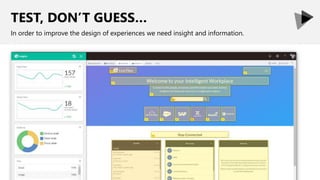
TEST, DON’T GUESS…
In order to improve the design of experiences we need insight and information.
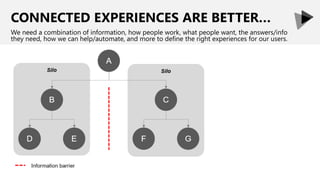
CONNECTED EXPERIENCES ARE BETTER…
We need a combination of information, how people work, what people want, the answers/info
they need, how we can help/automate, and more to define the right experiences for our users.
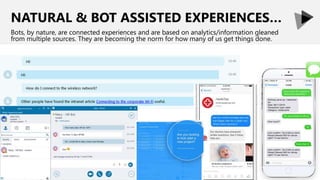
NATURAL & BOT ASSISTED EXPERIENCES…
Bots, by nature, are connected experiences and are based on analytics/information gleaned
from multiple sources. They are becoming the norm for how many of us get things done.
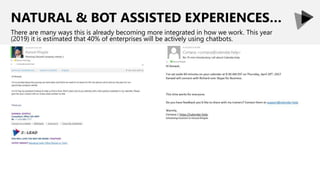
NATURAL & BOT ASSISTED EXPERIENCES…
There are many ways this is already becoming more integrated in how we work. This year
(2019) it is estimated that 40% of enterprises will be actively using chatbots.
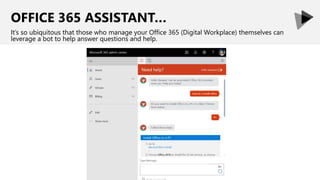
OFFICE 365 ASSISTANT…
It’s so ubiquitous that those who manage your Office 365 (Digital Workplace) themselves can
leverage a bot to help answer questions and help.
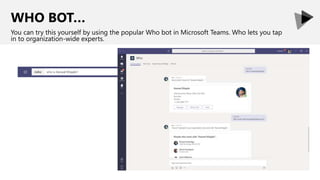
WHO BOT…
You can try this yourself by using the popular Who bot in Microsoft Teams. Who lets you tap
in to organization-wide experts.
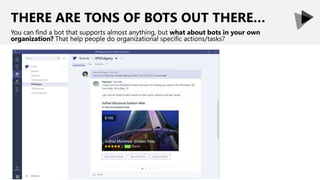
THERE ARE TONS OF BOTS OUT THERE…
You can find a bot that supports almost anything, but what about bots in your own
organization? That help people do organizational specific actions/tasks?
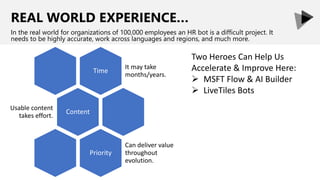
REAL WORLD EXPERIENCE…
In the real world for organizations of 100,000 employees an HR bot is a difficult project. It
needs to be highly accurate, work across languages and regions, and much more.
Time
It may take
months/years.
Content
Usable content
takes effort.
Priority
Can deliver value
throughout
evolution.
Two Heroes Can Help Us
Accelerate & Improve Here:
 MSFT Flow & AI Builder
 LiveTiles Bots
REMEMBER MICROSOFT FLOW?
Microsoft Flow and the Azure capability powering it (Logic Apps) is extremely important.
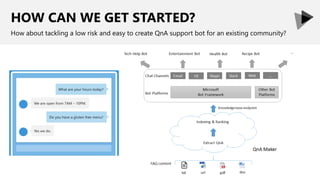
HOW CAN WE GET STARTED?
How about tackling a low risk and easy to create QnA support bot for an existing community?
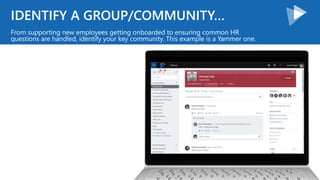
IDENTIFY A GROUP/COMMUNITY…
From supporting new employees getting onboarded to ensuring common HR
questions are handled, identify your key community. This example is a Yammer one.
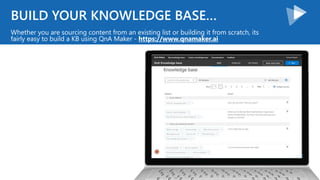
BUILD YOUR KNOWLEDGE BASE…
Whether you are sourcing content from an existing list or building it from scratch, its
fairly easy to build a KB using QnA Maker - https://www.qnamaker.ai
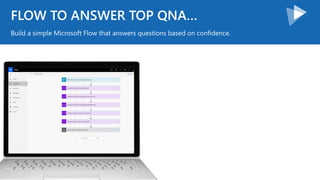
FLOW TO ANSWER TOP QNA…
Build a simple Microsoft Flow that answers questions based on confidence.
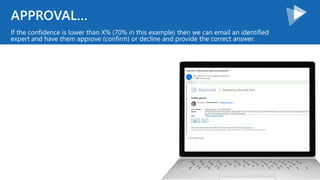
APPROVAL…
If the confidence is lower than X% (70% in this example) then we can email an identified
expert and have them approve (confirm) or decline and provide the correct answer.
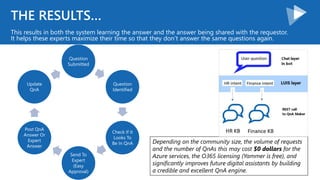
THE RESULTS…
This results in both the system learning the answer and the answer being shared with the requestor.
It helps these experts maximize their time so that they don’t answer the same questions again.
Question
Submitted
Question
Identified
Check If It
Looks To
Be In QnA
Send To
Expert
(Easy
Approval)
Post QnA
Answer Or
Expert
Answer
Update
QnA
Depending on the community size, the volume of requests
and the number of QnAs this may cost $0 dollars for the
Azure services, the O365 licensing (Yammer is free), and
significantly improves future digital assistants by building
a credible and excellent QnA engine.
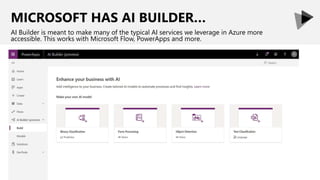
MICROSOFT HAS AI BUILDER…
AI Builder is meant to make many of the typical AI services we leverage in Azure more
accessible. This works with Microsoft Flow, PowerApps and more.
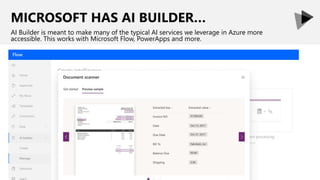
MICROSOFT HAS AI BUILDER…
AI Builder is meant to make many of the typical AI services we leverage in Azure more
accessible. This works with Microsoft Flow, PowerApps and more.
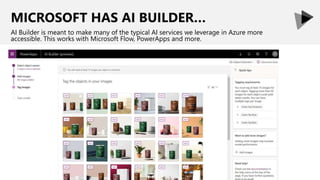
MICROSOFT HAS AI BUILDER…
AI Builder is meant to make many of the typical AI services we leverage in Azure more
accessible. This works with Microsoft Flow, PowerApps and more.
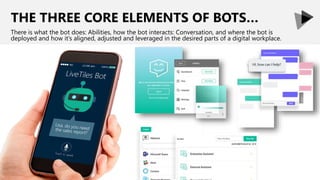
THE THREE CORE ELEMENTS OF BOTS…
There is what the bot does: Abilities, how the bot interacts: Conversation, and where the bot is
deployed and how it’s aligned, adjusted and leveraged in the desired parts of a digital workplace.
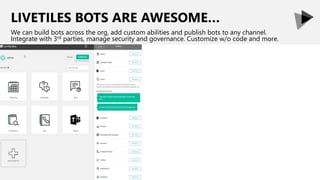
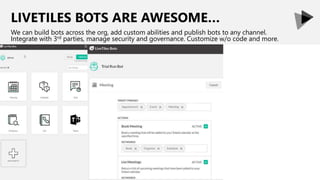
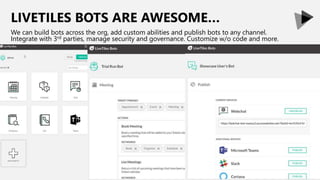
LIVETILES BOTS ARE AWESOME…
We can build bots across the org, add custom abilities and publish bots to any channel.
Integrate with 3rd parties, manage security and governance. Customize w/o code and more.
LIVETILES BOTS ARE AWESOME…
We can build bots across the org, add custom abilities and publish bots to any channel.
Integrate with 3rd parties, manage security and governance. Customize w/o code and more.
LIVETILES BOTS ARE AWESOME…
We can build bots across the org, add custom abilities and publish bots to any channel.
Integrate with 3rd parties, manage security and governance. Customize w/o code and more.
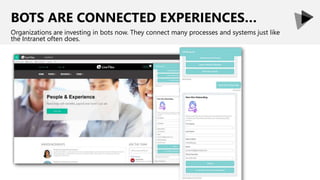
BOTS ARE CONNECTED EXPERIENCES…
Organizations are investing in bots now. They connect many processes and systems just like
the Intranet often does.
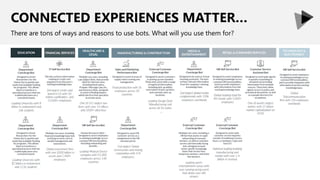
CONNECTED EXPERIENCES MATTER…
There are tons of ways and reasons to use bots. What will you use them for?
CONNECTING...
APPLICATIONS & SYSTEMS
EXPERIENCES
PEOPLE
100+ pages of Intranet & O365 guidance: http://Office365Intranets.com
CONNECTING...
APPLICATIONS & SYSTEMS
EXPERIENCES
PEOPLE
PERSONALIZATION MATTERS…
It’s one thing to have great integration and a connected experience. It’s another to ensure it
resonates and helps people connect with each other and what matters.
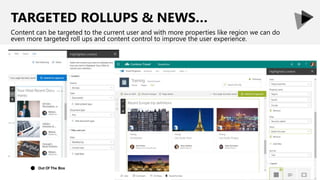
TARGETED ROLLUPS & NEWS…
Content can be targeted to the current user and with more properties like region we can do
even more targeted roll ups and content control to improve the user experience.
Out Of The Box●
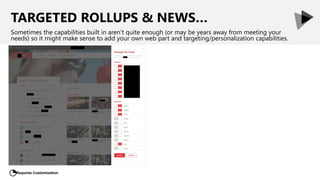
TARGETED ROLLUPS & NEWS…
Sometimes the capabilities built in aren’t quite enough (or may be years away from meeting your
needs) so it might make sense to add your own web part and targeting/personalization capabilities.
Requires Customization
◔
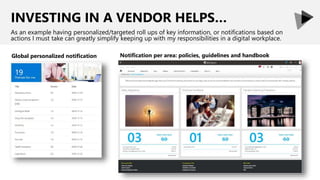
INVESTING IN A VENDOR HELPS…
As an example having personalized/targeted roll ups of key information, or notifications based on
actions I must take can greatly simplify keeping up with my responsibilities in a digital workplace.
Global personalized notification Notification per area: policies, guidelines and handbook
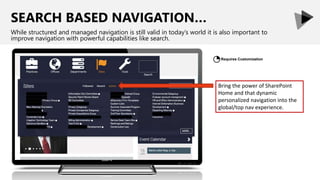
SEARCH BASED NAVIGATION…
While structured and managed navigation is still valid in today’s world it is also important to
improve navigation with powerful capabilities like search.
Bring the power of SharePoint
Home and that dynamic
personalized navigation into the
global/top nav experience.
Requires Customization
◔
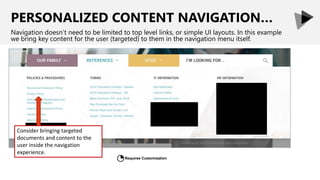
PERSONALIZED CONTENT NAVIGATION…
Navigation doesn’t need to be limited to top level links, or simple UI layouts. In this example
we bring key content for the user (targeted) to them in the navigation menu itself.
Consider bringing targeted
documents and content to the
user inside the navigation
experience.
Requires Customization
◔
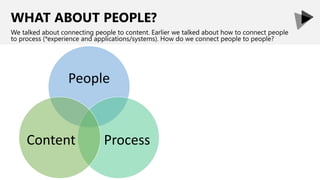
WHAT ABOUT PEOPLE?
We talked about connecting people to content. Earlier we talked about how to connect people
to process (*experience and applications/systems). How do we connect people to people?
People
ProcessContent
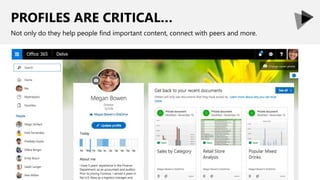
PROFILES ARE CRITICAL…
Not only do they help people find important content, connect with peers and more.
PROFILES ARE CRITICAL…
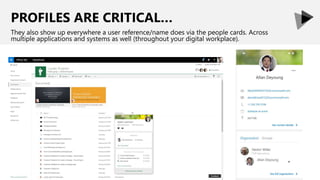
They also show up everywhere a user reference/name does via the people cards. Across
multiple applications and systems as well (throughout your digital workplace).
WE CAN CONNECT FURTHER…
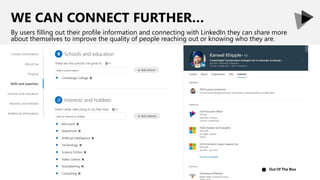
By users filling out their profile information and connecting with LinkedIn they can share more
about themselves to improve the quality of people reaching out or knowing who they are.
Out Of The Box●
WE CAN CONNECT FURTHER…
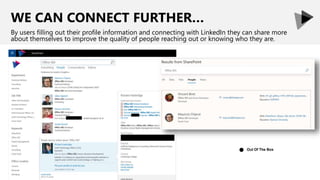
By users filling out their profile information and connecting with LinkedIn they can share more
about themselves to improve the quality of people reaching out or knowing who they are.
Out Of The Box●
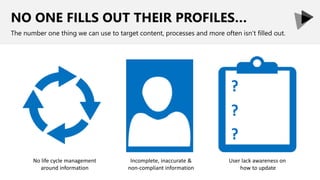
NO ONE FILLS OUT THEIR PROFILES…
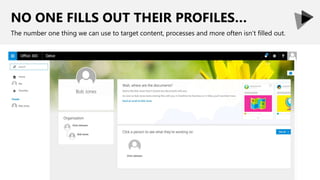
The number one thing we can use to target content, processes and more often isn’t filled out.
NO ONE FILLS OUT THEIR PROFILES…
The number one thing we can use to target content, processes and more often isn’t filled out.
No life cycle management
around information
Incomplete, inaccurate &
non-compliant information
User lack awareness on
how to update
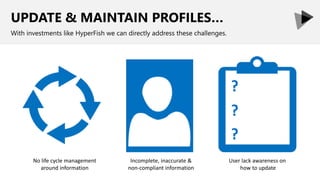
UPDATE & MAINTAIN PROFILES…
With investments like HyperFish we can directly address these challenges.
No life cycle management
around information
Incomplete, inaccurate &
non-compliant information
User lack awareness on
how to update
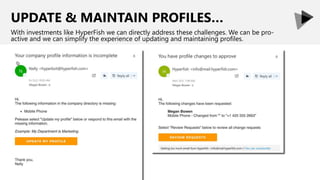
UPDATE & MAINTAIN PROFILES…
With investments like HyperFish we can directly address these challenges. We can be pro-
active and we can simplify the experience of updating and maintaining profiles.
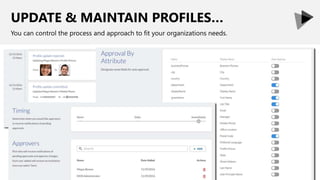
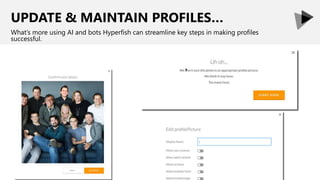
UPDATE & MAINTAIN PROFILES…
You can control the process and approach to fit your organizations needs.
UPDATE & MAINTAIN PROFILES…
What’s more using AI and bots Hyperfish can streamline key steps in making profiles
successful.
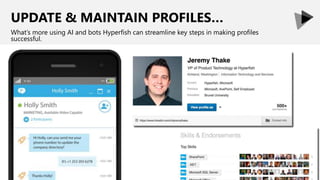
UPDATE & MAINTAIN PROFILES…
What’s more using AI and bots Hyperfish can streamline key steps in making profiles
successful.
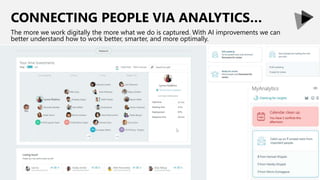
CONNECTING PEOPLE VIA ANALYTICS…
The more we work digitally the more what we do is captured. With AI improvements we can
better understand how to work better, smarter, and more optimally.
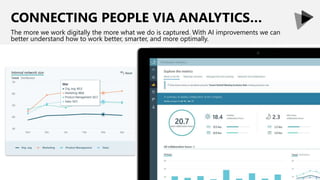
CONNECTING PEOPLE VIA ANALYTICS…
The more we work digitally the more what we do is captured. With AI improvements we can
better understand how to work better, smarter, and more optimally.
100+ pages of Intranet & O365 guidance: http://Office365Intranets.com
CONNECTING...
APPLICATIONS & SYSTEMS
EXPERIENCES
PEOPLE
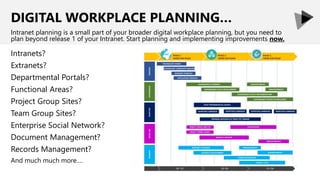
DIGITAL WORKPLACE PLANNING…
Intranets?
Extranets?
Departmental Portals?
Functional Areas?
Project Group Sites?
Team Group Sites?
Enterprise Social Network?
Document Management?
Records Management?
And much much more….
Intranet planning is a small part of your broader digital workplace planning, but you need to
plan beyond release 1 of your Intranet. Start planning and implementing improvements now.
Thank You!
LiveTiles&YouForMakingThisPossible…
200+AwesomePresentationsAt.. Slideshare.Net/RHarbridge
600+PagesOfWhitepapersAt.. 2toLead.com/Whitepapers
WhenToUseWhat.com Office365Intranets.com
Office365Metrics.com Office365Campaigns.com
Office365Extranets.com Office365Resources.com
Message Me On LinkedIn or Email Richard@2toLead.com
CTO & MVP | SPEAKER & AUTHOR | SUPER FRIENDLY
Let’s connect and find ways to do more and work together.
www.livetiles.nyc30 July 2019 101
What’s Next
LiveTiles website:
www.livetiles.nyc
LiveTiles Social:
www.linkedin.com/company/livetiles
www.instagram.com/livetiles
www.facebook.com/livetiles
www.twitter.com/livetiles
Request a Demo:
https://www.livetiles.nyc/request-demo

Beyond The Intranet: Digital Workplace Apps, Solutions & Bots

  • 1.
    Beyond the Intranet:Digital Workplace Apps, Solutions and Bots LiveTiles Webinar co-hosted with partner 2toLead Richard Harbridge CTO & MVP 2toLead Richard@2tolead.com
  • 2.
    www.livetiles.nyc30 July 20192 About us LiveTiles is a global software company headquartered in New York, with operations in Seattle, Tri-Cities (Washington State), San Francisco, Los Angeles, Chicago, Minneapolis, North Carolina, Rochester, London, Sligo, Copenhagen, Amsterdam, Sydney, Melbourne, Brisbane, Geelong and Hobart. LiveTiles offers intelligent workplace software for the commercial, government and education markets, and is an award-winning Microsoft Partner. LiveTiles’ products comprise LiveTiles Intelligent Workplace, LiveTiles Mosaic for K-12, Hyperfish and Wizdom. LiveTiles’ customers represent a diverse range of sectors and are spread throughout the United States, United Kingdom, Europe, the Middle East and Asia-Pacific.
  • 3.
    www.livetiles.nyc30 July 20193 Now that your organization has implemented an Office 365 SharePoint Intranet, what’s next? How are you going to continue to drive user engagement across your corporate Intranet and department specific sites? How are you going to ensure that your users have a seamless experience as they connect with information and applications from across your entire digital workplace? In this webinar we will give you practical suggestions for how you can respond to your users’ demands for powerful and integrated solutions that seamlessly support their needs across the digital workplace. What we will cover in this webinar: - Why you need to create a connected digital workplace experience - Real use cases and best practices for how you can deliver more value with integrated solutions across your digital workplace and Intranet - We will discuss Bots, Microsoft Flow, PowerApps, Microsoft Forms, Integrations, Office 365 development, Industry innovation, and more WEBINAR AGENDA
  • 4.
    RICHARD HARBRIDGE My twitter is@RHarbridge, I’m super friendly & I am proud to work at 2toLead. CTO & MVP | SPEAKER & AUTHOR | SUPER FRIENDLY
  • 5.
    DOWNLOAD OUR 100+PAGE WHITEPAPER ON INTRANETS WITH OFFICE 365 It goes into much greater depth and can be found at Office365Intranets.com
  • 6.
    CONNECTING... APPLICATIONS & SYSTEMS EXPERIENCES PEOPLE 100+pages of Intranet & O365 guidance: http://Office365Intranets.com
  • 7.
    CONNECTING... APPLICATIONS & SYSTEMS EXPERIENCES PEOPLE 100+pages of Intranet & O365 guidance: http://Office365Intranets.com
  • 8.
    YOU HAVE ANINCREDIBLE INTRANET… So what’s next? What do most organizations focus on after Release 1?
  • 9.
    RICHER INTEGRATION ISOFTEN NEXT… Making things even better often means integrating your Intranet experience even more with the places people work, and how people work. Extended (Flow, Sync, Etc.) OOTB Based (Links, Connectors, Features, Etc.) Custom High Complexity Low Complexity
  • 10.
    LINK INTEGRATION STILLMATTERS… Example when provisioning spaces connect them based on your IA and provisioning process. Example change Outlook Conversations link to the Team. This is defaulted moving forward. Linking is still a reliable and easy way to integrate.
  • 11.
    APP LAUNCHER INTEGRATIONMATTERS… While many Intranets build out quick access or app launchers this is in O365 already. Whatever we build should compliment this and not look to replace it. Out Of The Box ●
  • 12.
    OOTB INTEGRATION STILLMATTERS… Or consider how Microsoft Teams automatically works with things like SharePoint Intranet News if you use the connector.
  • 13.
    FLOW IS IMPORTANT… MicrosoftFlow and the Azure capability powering it (Logic Apps) is extremely important.
  • 14.
    TIME TO VALUEFOR INTEGRATION… Arguably this is made much better by improvements in development patterns, as well as a reduction in complexity of deployment/risks.
  • 15.
    TIME TO VALUEFOR INTEGRATION… When people want to see information in one place we would build, buy and implement solutions. IT leads this and the approach takes time. Build Business Case Secure Budget (On Promise Of Value) Analyze Systems, Needs & Approach Design Optimal Solution Build Solution Test Solution (QA & Then Production) Document Deployment Deploy Solution (QA & Then Production) Deliver Value Get Feedback (Often As A Separate Motion) Past
  • 16.
    Full Trust Code Web Parts Features Event Receivers TIME TOVALUE FOR INTEGRATION… Our traditional waterfall model, and model where we build based on server model development takes longer and doesn’t maximize IT effect. Past
  • 17.
    TIME TO VALUEFOR INTEGRATION… We optimize for MVP and iterative improvement today. Accelerating IT’s ability to integrate faster and deliver value sooner. PresentSecure Budget (On Promise Of Immediate Value) Build Business Case
  • 18.
    Client Side Web Parts Cloud Services TIMETO VALUE FOR INTEGRATION… The new model accelerates development considerably as we can deliver more tailored value faster, and often avoid server side delays or complexity. Present
  • 19.
    TIME TO VALUEFOR INTEGRATION… Now it doesn’t just need to be IT who is meeting integration needs. O365 Connectors, Flow, Team Tabs, 3rd Party solutions, all accelerate time to value.
  • 20.
    TIME TO VALUEFOR INTEGRATION… Microsoft Flow allows organizations and individuals to automate workflows that integrate with existing SaaS services and business apps that users rely on today. Present
  • 21.
    TIME TO VALUEFOR INTEGRATION… Now it doesn’t just need to be IT who is meeting integration needs.
  • 22.
    TIME TO VALUEFOR INTEGRATION… Now it doesn’t just need to be IT who is meeting integration needs.
  • 23.
    INTEGRATION CAN BEEASY… By using a simple sync model you can connect systems and reduce clicks, or tie processes/data together. Supported Via 3rd Party
  • 24.
    POWERAPPS INTEGRATION MATTERS… UsingPowerApps combined with Flow can lead to some incredible integrated solutions for the Intranet and Digital Workplace.
  • 25.
    DONATION MATCHING PROGRAM Itcan be easy to connect experiences (apps/forms) with processes and rollups on the Intranet itself. Adding new matched donation numbers in real time as an example.
  • 26.
    1-DAY HACKATHON FORPOWER PLATFORM… Get started by selecting a targeted department or business unit and do a 1-day focused hackathon to automate and improve a process and integrate it with the Intranet/Digital Workplace.
  • 27.
    POWERPANEL INTEGRATION MATTERS… Ifyour using a solution like Wizdom’s Intranet the Power Panel is a great example of this easy to use custom platform/integration solution for your Intranet.
  • 28.
    POWERPANEL INTEGRATION MATTERS… Ifyour using a solution like Wizdom’s Intranet the Power Panel is a great example of this easy to use custom platform/integration solution for your Intranet.
  • 29.
    POWERPANEL INTEGRATION MATTERS… Ifyour using a solution like Wizdom’s Intranet the Power Panel is a great example of this easy to use custom platform/integration solution for your Intranet.
  • 30.
    POWERPANEL INTEGRATION MATTERS… Ifyour using a solution like Wizdom’s Intranet the Power Panel is a great example of this easy to use custom platform/integration solution for your Intranet.
  • 31.
    CUSTOM INTEGRATION MATTERS… Youcan always build your own webparts, solutions and controls to make things easier and improve the end user experience. As an example you could bring information into the nav menu.
  • 32.
    CUSTOM INTEGRATION MATTERS… Asanother example you could bring key information into the Intranet via a custom SharePoint Framework webpart on a key page, or across pages via the header or a panel design.
  • 33.
    CUSTOM INTEGRATION MATTERS… Asanother example you could bring key information into the Intranet via a custom SharePoint Framework webpart on a key page, or across pages via the header or a panel design.
  • 34.
    CUSTOM INTEGRATION MATTERS… Oftencustomers might create their own visualization for news, events or activities rolling up within their Intranet. This could also roll up content from other systems in a unified feed. Requires Minor Customization ◑• News and events filter to separate content types. • Color-coded categories with quick filters above newsfeed. • Events receive nearly the same visual treatment as news, but includes the event date icon. • Featured news/events display as a larger card. • Where no visual image is available or required, a colored background is shown.
  • 35.
    BUILT FOR THEDIGITAL WORKPLACE… Modern customizations like SharePoint Framework web parts. If you keep them upgraded then they can be displayed and work just as well in Microsoft Teams. LEARN MORE Announcing the General Availability of SharePoint Framework 1.8
  • 36.
    CONNECTING... APPLICATIONS & SYSTEMS EXPERIENCES PEOPLE 100+pages of Intranet & O365 guidance: http://Office365Intranets.com
  • 37.
    CONNECTING... APPLICATIONS & SYSTEMS EXPERIENCES PEOPLE 100+pages of Intranet & O365 guidance: http://Office365Intranets.com
  • 38.
    TEST, DON’T GUESS… Inorder to improve the design of experiences we need insight and information.
  • 39.
    CONNECTED EXPERIENCES AREBETTER… We need a combination of information, how people work, what people want, the answers/info they need, how we can help/automate, and more to define the right experiences for our users.
  • 40.
    NATURAL & BOTASSISTED EXPERIENCES… Bots, by nature, are connected experiences and are based on analytics/information gleaned from multiple sources. They are becoming the norm for how many of us get things done.
  • 41.
    NATURAL & BOTASSISTED EXPERIENCES… There are many ways this is already becoming more integrated in how we work. This year (2019) it is estimated that 40% of enterprises will be actively using chatbots.
  • 42.
    OFFICE 365 ASSISTANT… It’sso ubiquitous that those who manage your Office 365 (Digital Workplace) themselves can leverage a bot to help answer questions and help.
  • 43.
    WHO BOT… You cantry this yourself by using the popular Who bot in Microsoft Teams. Who lets you tap in to organization-wide experts.
  • 44.
    THERE ARE TONSOF BOTS OUT THERE… You can find a bot that supports almost anything, but what about bots in your own organization? That help people do organizational specific actions/tasks?
  • 45.
    REAL WORLD EXPERIENCE… Inthe real world for organizations of 100,000 employees an HR bot is a difficult project. It needs to be highly accurate, work across languages and regions, and much more. Time It may take months/years. Content Usable content takes effort. Priority Can deliver value throughout evolution. Two Heroes Can Help Us Accelerate & Improve Here:  MSFT Flow & AI Builder  LiveTiles Bots
  • 46.
    REMEMBER MICROSOFT FLOW? MicrosoftFlow and the Azure capability powering it (Logic Apps) is extremely important.
  • 47.
    HOW CAN WEGET STARTED? How about tackling a low risk and easy to create QnA support bot for an existing community?
  • 48.
    IDENTIFY A GROUP/COMMUNITY… Fromsupporting new employees getting onboarded to ensuring common HR questions are handled, identify your key community. This example is a Yammer one.
  • 49.
    BUILD YOUR KNOWLEDGEBASE… Whether you are sourcing content from an existing list or building it from scratch, its fairly easy to build a KB using QnA Maker - https://www.qnamaker.ai
  • 50.
    FLOW TO ANSWERTOP QNA… Build a simple Microsoft Flow that answers questions based on confidence.
  • 51.
    APPROVAL… If the confidenceis lower than X% (70% in this example) then we can email an identified expert and have them approve (confirm) or decline and provide the correct answer.
  • 52.
    THE RESULTS… This resultsin both the system learning the answer and the answer being shared with the requestor. It helps these experts maximize their time so that they don’t answer the same questions again. Question Submitted Question Identified Check If It Looks To Be In QnA Send To Expert (Easy Approval) Post QnA Answer Or Expert Answer Update QnA Depending on the community size, the volume of requests and the number of QnAs this may cost $0 dollars for the Azure services, the O365 licensing (Yammer is free), and significantly improves future digital assistants by building a credible and excellent QnA engine.
  • 53.
    MICROSOFT HAS AIBUILDER… AI Builder is meant to make many of the typical AI services we leverage in Azure more accessible. This works with Microsoft Flow, PowerApps and more.
  • 54.
    MICROSOFT HAS AIBUILDER… AI Builder is meant to make many of the typical AI services we leverage in Azure more accessible. This works with Microsoft Flow, PowerApps and more.
  • 55.
    MICROSOFT HAS AIBUILDER… AI Builder is meant to make many of the typical AI services we leverage in Azure more accessible. This works with Microsoft Flow, PowerApps and more.
  • 56.
    THE THREE COREELEMENTS OF BOTS… There is what the bot does: Abilities, how the bot interacts: Conversation, and where the bot is deployed and how it’s aligned, adjusted and leveraged in the desired parts of a digital workplace.
  • 57.
    LIVETILES BOTS AREAWESOME… We can build bots across the org, add custom abilities and publish bots to any channel. Integrate with 3rd parties, manage security and governance. Customize w/o code and more.
  • 58.
    LIVETILES BOTS AREAWESOME… We can build bots across the org, add custom abilities and publish bots to any channel. Integrate with 3rd parties, manage security and governance. Customize w/o code and more.
  • 59.
    LIVETILES BOTS AREAWESOME… We can build bots across the org, add custom abilities and publish bots to any channel. Integrate with 3rd parties, manage security and governance. Customize w/o code and more.
  • 60.
    BOTS ARE CONNECTEDEXPERIENCES… Organizations are investing in bots now. They connect many processes and systems just like the Intranet often does.
  • 61.
    CONNECTED EXPERIENCES MATTER… Thereare tons of ways and reasons to use bots. What will you use them for?
  • 62.
    CONNECTING... APPLICATIONS & SYSTEMS EXPERIENCES PEOPLE 100+pages of Intranet & O365 guidance: http://Office365Intranets.com
  • 63.
    100+ pages ofIntranet & O365 guidance: http://Office365Intranets.com CONNECTING... APPLICATIONS & SYSTEMS EXPERIENCES PEOPLE
  • 64.
    PERSONALIZATION MATTERS… It’s onething to have great integration and a connected experience. It’s another to ensure it resonates and helps people connect with each other and what matters.
  • 65.
    TARGETED ROLLUPS &NEWS… Content can be targeted to the current user and with more properties like region we can do even more targeted roll ups and content control to improve the user experience. Out Of The Box●
  • 66.
    TARGETED ROLLUPS &NEWS… Sometimes the capabilities built in aren’t quite enough (or may be years away from meeting your needs) so it might make sense to add your own web part and targeting/personalization capabilities. Requires Customization ◔
  • 67.
    INVESTING IN AVENDOR HELPS… As an example having personalized/targeted roll ups of key information, or notifications based on actions I must take can greatly simplify keeping up with my responsibilities in a digital workplace. Global personalized notification Notification per area: policies, guidelines and handbook
  • 68.
    SEARCH BASED NAVIGATION… Whilestructured and managed navigation is still valid in today’s world it is also important to improve navigation with powerful capabilities like search. Bring the power of SharePoint Home and that dynamic personalized navigation into the global/top nav experience. Requires Customization ◔
  • 69.
    PERSONALIZED CONTENT NAVIGATION… Navigationdoesn’t need to be limited to top level links, or simple UI layouts. In this example we bring key content for the user (targeted) to them in the navigation menu itself. Consider bringing targeted documents and content to the user inside the navigation experience. Requires Customization ◔
  • 70.
    WHAT ABOUT PEOPLE? Wetalked about connecting people to content. Earlier we talked about how to connect people to process (*experience and applications/systems). How do we connect people to people? People ProcessContent
  • 71.
    PROFILES ARE CRITICAL… Notonly do they help people find important content, connect with peers and more.
  • 72.
    PROFILES ARE CRITICAL… Theyalso show up everywhere a user reference/name does via the people cards. Across multiple applications and systems as well (throughout your digital workplace).
  • 73.
    WE CAN CONNECTFURTHER… By users filling out their profile information and connecting with LinkedIn they can share more about themselves to improve the quality of people reaching out or knowing who they are. Out Of The Box●
  • 74.
    WE CAN CONNECTFURTHER… By users filling out their profile information and connecting with LinkedIn they can share more about themselves to improve the quality of people reaching out or knowing who they are. Out Of The Box●
  • 75.
    NO ONE FILLSOUT THEIR PROFILES… The number one thing we can use to target content, processes and more often isn’t filled out.
  • 76.
    NO ONE FILLSOUT THEIR PROFILES… The number one thing we can use to target content, processes and more often isn’t filled out. No life cycle management around information Incomplete, inaccurate & non-compliant information User lack awareness on how to update
  • 77.
    UPDATE & MAINTAINPROFILES… With investments like HyperFish we can directly address these challenges. No life cycle management around information Incomplete, inaccurate & non-compliant information User lack awareness on how to update
  • 78.
    UPDATE & MAINTAINPROFILES… With investments like HyperFish we can directly address these challenges. We can be pro- active and we can simplify the experience of updating and maintaining profiles.
  • 79.
    UPDATE & MAINTAINPROFILES… You can control the process and approach to fit your organizations needs.
  • 80.
    UPDATE & MAINTAINPROFILES… What’s more using AI and bots Hyperfish can streamline key steps in making profiles successful.
  • 81.
    UPDATE & MAINTAINPROFILES… What’s more using AI and bots Hyperfish can streamline key steps in making profiles successful.
  • 82.
    CONNECTING PEOPLE VIAANALYTICS… The more we work digitally the more what we do is captured. With AI improvements we can better understand how to work better, smarter, and more optimally.
  • 83.
    CONNECTING PEOPLE VIAANALYTICS… The more we work digitally the more what we do is captured. With AI improvements we can better understand how to work better, smarter, and more optimally.
  • 84.
    100+ pages ofIntranet & O365 guidance: http://Office365Intranets.com CONNECTING... APPLICATIONS & SYSTEMS EXPERIENCES PEOPLE
  • 85.
    DIGITAL WORKPLACE PLANNING… Intranets? Extranets? DepartmentalPortals? Functional Areas? Project Group Sites? Team Group Sites? Enterprise Social Network? Document Management? Records Management? And much much more…. Intranet planning is a small part of your broader digital workplace planning, but you need to plan beyond release 1 of your Intranet. Start planning and implementing improvements now.
  • 86.
    Thank You! LiveTiles&YouForMakingThisPossible… 200+AwesomePresentationsAt.. Slideshare.Net/RHarbridge 600+PagesOfWhitepapersAt..2toLead.com/Whitepapers WhenToUseWhat.com Office365Intranets.com Office365Metrics.com Office365Campaigns.com Office365Extranets.com Office365Resources.com Message Me On LinkedIn or Email Richard@2toLead.com CTO & MVP | SPEAKER & AUTHOR | SUPER FRIENDLY Let’s connect and find ways to do more and work together.
  • 87.
    www.livetiles.nyc30 July 2019101 What’s Next LiveTiles website: www.livetiles.nyc LiveTiles Social: www.linkedin.com/company/livetiles www.instagram.com/livetiles www.facebook.com/livetiles www.twitter.com/livetiles Request a Demo: https://www.livetiles.nyc/request-demo

Editor's Notes

  • #5 Richard Harbridge is the Chief Technology Officer and an owner at 2toLead. Richard works as a trusted advisor with hundreds of organizations, helping them understand their current needs, their Soon needs, and what actions they should take in order to grow and achieve their bold ambitions.   Richard remains hands on in his work and has led, architected, and implemented hundreds of business and technology solutions that have helped organizations transform both digitally and organizationally. Richard has a passion for helping organizations achieve more; whether it is helping an organization build beautiful websites to support great content and social strategy, or helping an organization leverage emerging cloud and mobile technology to better service their members or the communities that they serve.   Richard is an author and an internationally recognized expert in Microsoft technology, marketing and professional services. As a sought-after speaker, Richard has often had the opportunity to share his insights, experiences, and advice around branding, partner management, social networking, collaboration, ROI,  technology/process adoption, and business development at numerous industry events in around the globe. When not speaking at industry events, Richard works with Microsoft, partners, and customers as an advisor around business and technology, and serves on multiple committees, leads user groups, and is a Board Member of the Microsoft Community Leadership Board.
  • #26 Priya opens a custom form built with PowerApps and SharePoint to start the onboarding process by providing basic information for Bryan.
  • #28 At this point, a flow in Microsoft Flow receives the initial data from Priya and starts the onboarding process. Conceptual but with screen shots of doc -> Email -> options for yes/no -> approved doc
  • #30 Once the account is created, a series of tasks can be configured to: Schedule onboarding training events Send emails on schedule based on employee start date to provide information on the first day, first week, and so forth to keep the employee supported though the process.
  • #31 These tasks are organized into buckets per department for easy identification
  • #32 Each person assigned a task will perform their requested activity and mark the task as complete.