


















Beyond HTML
Scriptsprachen, Frameworks, Templatesprachen und
                    vieles mehr


                  9. Mai 2012
             Jens-Christian Fischer
                  @jcfischer
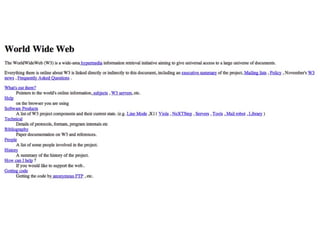
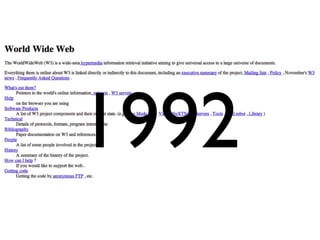
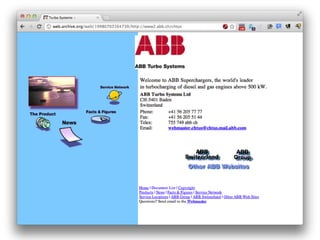
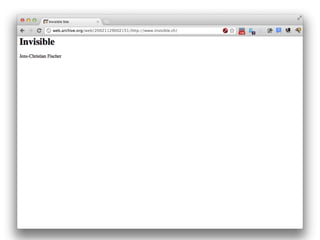
1992
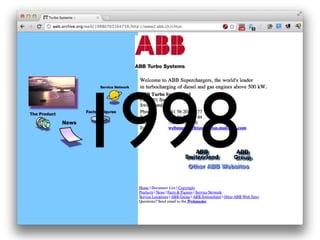
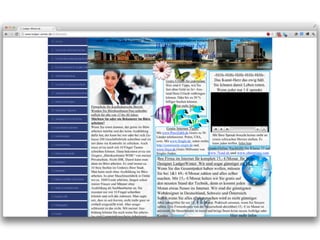
1998
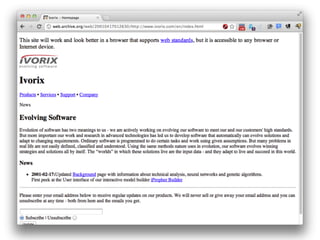
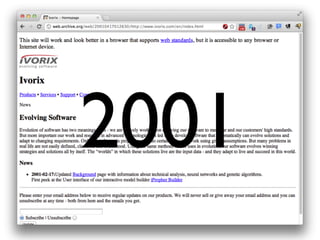
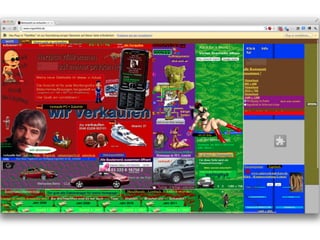
2001
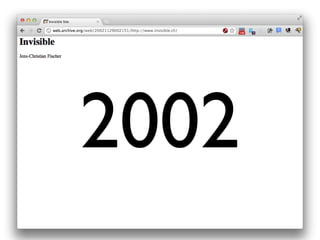
2002
2012
Best of Swiss Web 2012
       ausser einer Seite
HTML
   CSS
JavaScript
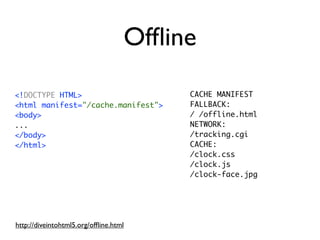
Offline
<!DOCTYPE HTML>                         CACHE MANIFEST
<html manifest="/cache.manifest">       FALLBACK:
<body>                                  / /offline.html
...                                     NETWORK:
</body>                                 /tracking.cgi
</html>                                 CACHE:
                                        /clock.css
                                        /clock.js
                                        /clock-face.jpg


http://diveintohtml5.org/offline.html
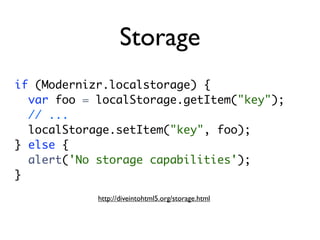
Storage
if (Modernizr.localstorage) {
  var foo = localStorage.getItem("key");
  // ...
  localStorage.setItem("key", foo);
} else {
  alert('No storage capabilities');
}
            http://diveintohtml5.org/storage.html
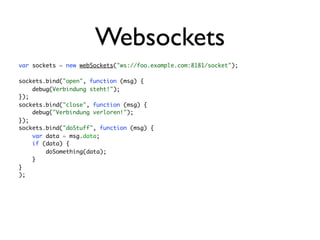
Websockets
var sockets = new webSockets("ws://foo.example.com:8181/socket");

sockets.bind("open", function (msg) {
    debug(Verbindung steht!");
});
sockets.bind("close", function (msg) {
    debug("Verbindung verloren!");
});
sockets.bind("doStuff", function (msg) {
    var data = msg.data;
    if (data) {
        doSomething(data);
    }
}
);
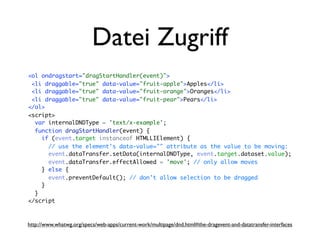
Datei Zugriff
<ol ondragstart="dragStartHandler(event)">
 <li draggable="true" data-value="fruit-apple">Apples</li>
 <li draggable="true" data-value="fruit-orange">Oranges</li>
 <li draggable="true" data-value="fruit-pear">Pears</li>
</ol>
<script>
  var internalDNDType = 'text/x-example';
  function dragStartHandler(event) {
    if (event.target instanceof HTMLLIElement) {
      // use the element's data-value="" attribute as the value to be moving:
      event.dataTransfer.setData(internalDNDType, event.target.dataset.value);
      event.dataTransfer.effectAllowed = 'move'; // only allow moves
    } else {
      event.preventDefault(); // don't allow selection to be dragged
    }
  }
</script


http://www.whatwg.org/specs/web-apps/current-work/multipage/dnd.html#the-dragevent-and-datatransfer-interfaces
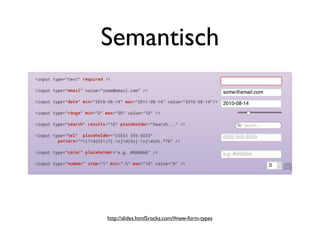
Semantisch


http://slides.html5rocks.com/#new-form-types
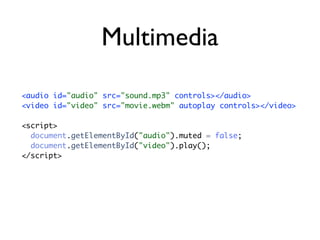
Multimedia

<audio id="audio" src="sound.mp3" controls></audio>
<video id="video" src="movie.webm" autoplay controls></video>

<script>
  document.getElementById("audio").muted = false;
  document.getElementById("video").play();
</script>
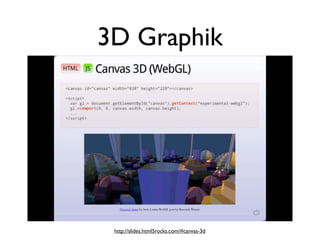
3D Graphik


 http://slides.html5rocks.com/#canvas-3d
Präsentation (CSS 3)
           Typographie (Webfonts)
Präsentation (CSS 3)
                     Typographie (Webfonts)


Rotation (2D / 3D)
http://flickr.com/photos/glennharper/49536169/
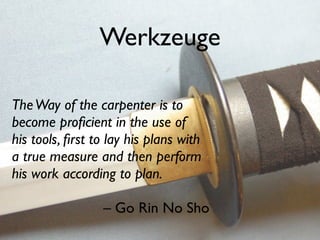
Werkzeuge

The Way of the carpenter is to
become proficient in the use of
his tools, first to lay his plans with
a true measure and then perform
his work according to plan.

                 – Go Rin No Sho
HTML Tools


 http://www.flickr.com/photos/lynnfriedman/5570720402/
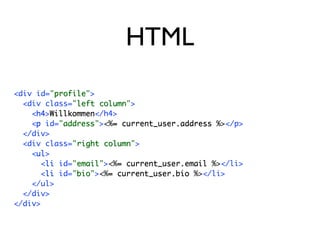
HTML
<div id="profile">
           profile
  <div class="left column">
                left column
    <h4>Willkommen</h4>
     h4 Willkommen
    <p id="address"><%= current_user.address %></p>
     p       address     =
  </div>
  <div class="right column">
                right column
    <ul>
     ul
       <li id="email"><%= current_user.email %></li>
        li      email     =
       <li id="bio"><%= current_user.bio %></li>
        li      bio    =
    </ul>
  </div>
</div>
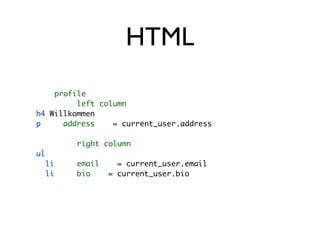
HTML
    profile
         left column
h4 Willkommen
p     address    = current_user.address

          right column
ul
     li   email     = current_user.email
     li   bio     = current_user.bio
HAML

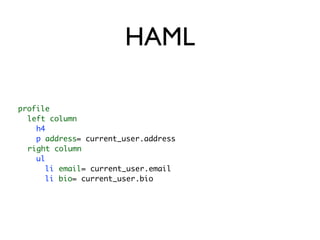
profile
  left column
    h4
    p address= current_user.address
  right column
    ul
      li email= current_user.email
      li bio= current_user.bio
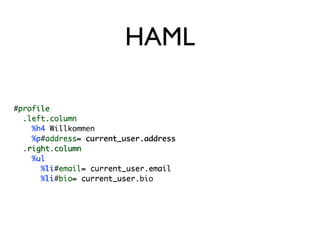
HAML

#profile
 profile
  .left.column
   left column
    %h4 Willkommen
     h4
    %p#address= current_user.address
     p address=
  .right.column
   right column
    %ul
     ul
      %li#email= current_user.email
       li email=
      %li#bio= current_user.bio
       li bio= current_user
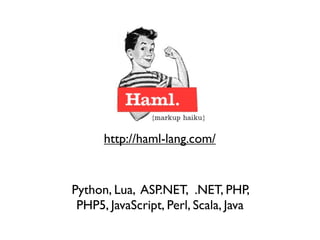
http://haml-lang.com/


Python, Lua, ASP.NET, .NET, PHP,
 PHP5, JavaScript, Perl, Scala, Java
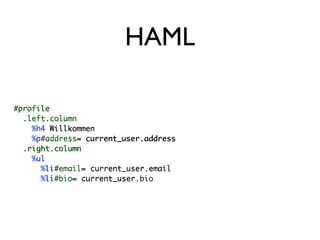
HAML

#profile
 profile
  .left.column
   left column
    %h4 Willkommen
     h4
    %p#address= current_user.address
     p address=
  .right.column
   right column
    %ul
     ul
      %li#email= current_user.email
       li email=
      %li#bio= current_user.bio
       li bio= current_user
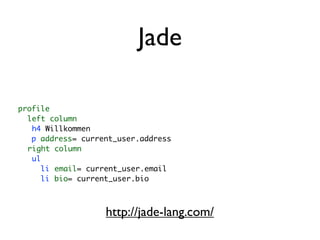
Jade

profile
  left column
   h4 Willkommen
   p address= current_user.address
  right column
   ul
     li email= current_user.email
     li bio= current_user.bio


                   http://jade-lang.com/
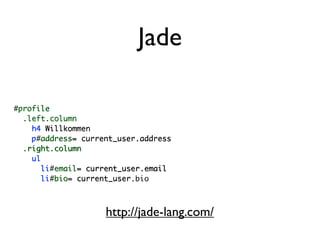
Jade

#profile
 profile
  .left.column
   left column
    h4 Willkommen
    p address= current_user.address
    p#address=
  .right.column
   right column
    ul
      li email= current_user.email
       li#email=
      li bio= current_user
       li#bio= current_user.bio


                    http://jade-lang.com/
Templates


 http://www.flickr.com/photos/jima/460348206/
Mustache


{{ }}
http://mustache.github.com/
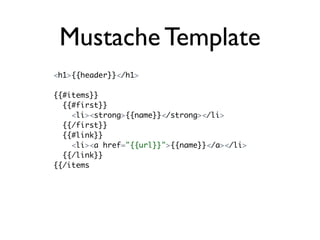
Mustache Template
<h1>{{header}}</h1>

{{#items}}
  {{#first}}
    <li><strong>{{name}}</strong></li>
  {{/first}}
  {{#link}}
    <li><a href="{{url}}">{{name}}</a></li>
  {{/link}}
{{/items
JSON Daten

{
    "header": "Colors",
    "items": [
        {"name": "red", "first": true, "url": "#Red"},
        {"name": "green", "link": true, "url": "#Green"},
        {"name": "blue", "link": true, "url": "#Blue"}
    ],
}
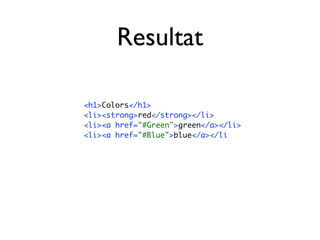
Resultat

<h1>Colors</h1>
<li><strong>red</strong></li>
<li><a href="#Green">green</a></li>
<li><a href="#Blue">blue</a></li
CSS Tools


http://www.flickr.com/photos/the-meir/2201434695/
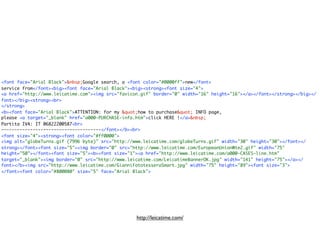
<font face="Arial Black">&nbsp;Google search, a <font color="#0000ff">new</font>
service from</font><big><font face="Arial Black"><big><strong><font size="4">
<a href="http://www.leicatime.com"><img src="favicon.gif" border="0" width="16" height="16"></a></font></strong></big></
font></big><strong><br>
</strong>
<b><font face="Arial Black">ATTENTION: for my &quot;how to purchase&quot; INFO page,
please <a target="_blank" href="a000-PURCHASE-info.htm">click HERE !</a>&nbsp;
Partita IVA: IT 06822200587<br>
--------------------------------------</font></b><br>
<font size="4"><strong><font color="#ff0000">
<img alt="globeTurns.gif (7996 byte)" src="http://www.leicatime.com/globeTurns.gif" width="30" height="30"></font></
strong></font><font size="5"><img border="0" src="http://www.leicatime.com/EuropeanUnionWte2.gif" width="75"
height="50"></font><font size="5"><b><font size="1"><a href="http://www.leicatime.com/a000-CASES-line.htm"
target="_blank"><img border="0" src="http://www.leicatime.com/LeicatimeBannerOK.jpg" width="141" height="75"></a></
font></b><img src="http://www.leicatime.com/GianniFototesseraSmart.jpg" width="75" height="89"><font size="3">
</font><font color="#800080" size="5" face="Arial Black">


                                                   http://leicatime.com/
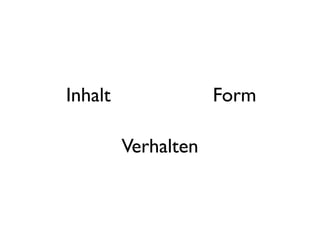
Inhalt
  Form
Verhalten
Inhalt               Form

         Verhalten
html                css

       javascript
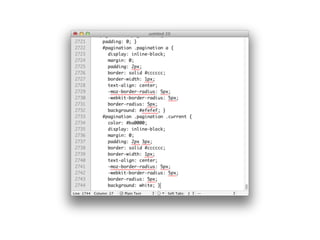
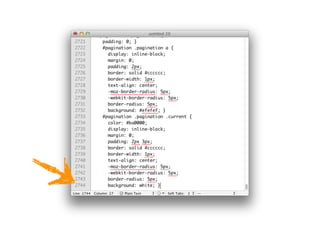
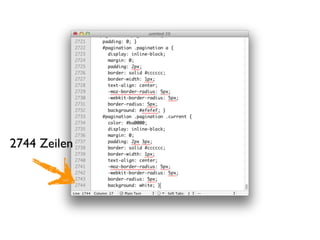
2744 Zeilen
„Besseres“ CSS
„Besseres“ CSS


     SCSS
http://sass-lang.com/
„Besseres“ CSS


     SCSS
http://sass-lang.com/   http://lesscss.org/
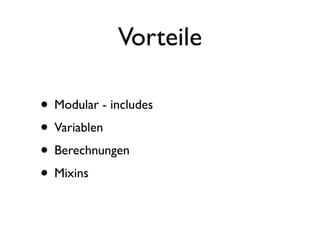
Vorteile

• Modular - includes
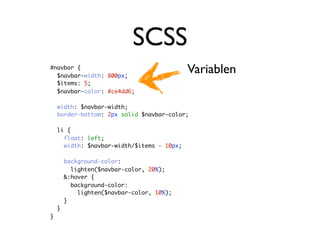
• Variablen
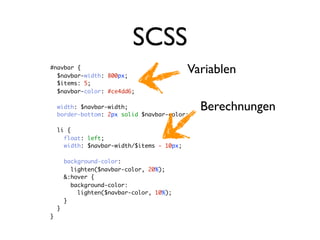
• Berechnungen
• Mixins
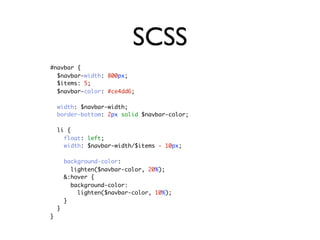
SCSS
#navbar {
  $navbar-width: 800px;
  $items: 5;
  $navbar-color: #ce4dd6;

    width: $navbar-width;
    border-bottom: 2px solid $navbar-color;

    li {
      float: left;
      width: $navbar-width/$items - 10px;

        background-color:
          lighten($navbar-color, 20%);
        &:hover {
          background-color:
            lighten($navbar-color, 10%);
        }
    }
}
SCSS
#navbar {
  $navbar-width: 800px;
                                            Variablen
  $items: 5;
  $navbar-color: #ce4dd6;

    width: $navbar-width;
    border-bottom: 2px solid $navbar-color;

    li {
      float: left;
      width: $navbar-width/$items - 10px;

        background-color:
          lighten($navbar-color, 20%);
        &:hover {
          background-color:
            lighten($navbar-color, 10%);
        }
    }
}
SCSS
#navbar {
  $navbar-width: 800px;
                                            Variablen
  $items: 5;
  $navbar-color: #ce4dd6;

    width: $navbar-width;
    border-bottom: 2px solid $navbar-color;
                                              Berechnungen
    li {
      float: left;
      width: $navbar-width/$items - 10px;

        background-color:
          lighten($navbar-color, 20%);
        &:hover {
          background-color:
            lighten($navbar-color, 10%);
        }
    }
}
SCSS
#navbar {
  $navbar-width: 800px;
                                            Variablen
  $items: 5;
  $navbar-color: #ce4dd6;

    width: $navbar-width;
    border-bottom: 2px solid $navbar-color;
                                              Berechnungen
    li {
      float: left;
      width: $navbar-width/$items - 10px;

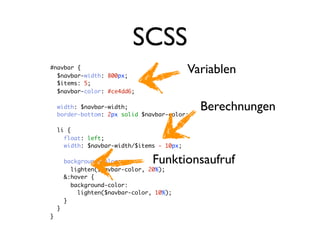
        background-color:         Funktionsaufruf
          lighten($navbar-color, 20%);
        &:hover {
          background-color:
            lighten($navbar-color, 10%);
        }
    }
}
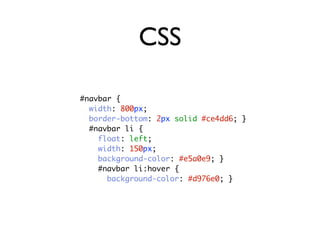
CSS

#navbar {
  width: 800px;
  border-bottom: 2px solid #ce4dd6; }
  #navbar li {
    float: left;
    width: 150px;
    background-color: #e5a0e9; }
    #navbar li:hover {
      background-color: #d976e0; }
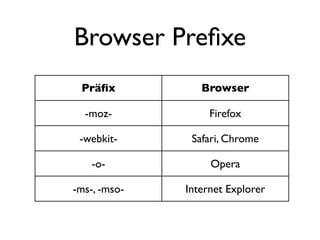
Browser Prefixe
 Präfix           Browser

  -moz-            Firefox

 -webkit-      Safari, Chrome

    -o-            Opera

-ms-, -mso-   Internet Explorer
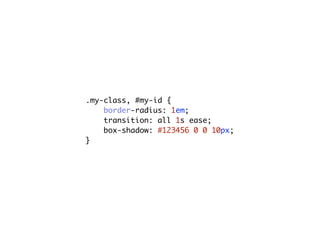
.my-class, #my-id {
    border-radius: 1em;
    transition: all 1s ease;
    box-shadow: #123456 0 0 10px;
}
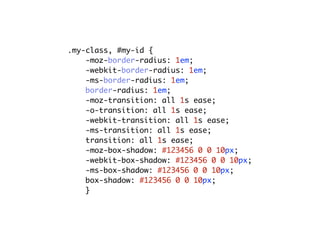
.my-class, #my-id {
    -moz-border-radius: 1em;
    -webkit-border-radius: 1em;
    -ms-border-radius: 1em;
    border-radius: 1em;
    -moz-transition: all 1s ease;
    -o-transition: all 1s ease;
    -webkit-transition: all 1s ease;
    -ms-transition: all 1s ease;
    transition: all 1s ease;
    -moz-box-shadow: #123456 0 0 10px;
    -webkit-box-shadow: #123456 0 0 10px;
    -ms-box-shadow: #123456 0 0 10px;
    box-shadow: #123456 0 0 10px;
    }
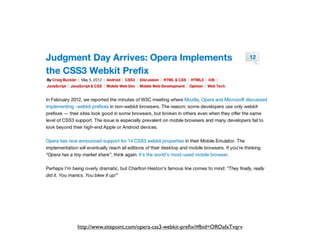
http://www.sitepoint.com/opera-css3-webkit-prefix/#fbid=OROafxTvqrv
WebKit
WebKit

                         E 6
                      e I
              n e u
      d e r
ist
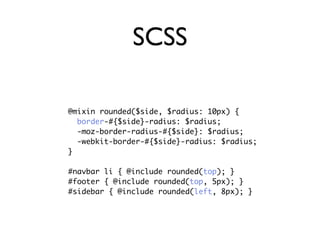
SCSS

@mixin rounded($side, $radius: 10px) {
  border-#{$side}-radius: $radius;
  -moz-border-radius-#{$side}: $radius;
  -webkit-border-#{$side}-radius: $radius;
}

#navbar li { @include rounded(top); }
#footer { @include rounded(top, 5px); }
#sidebar { @include rounded(left, 8px); }
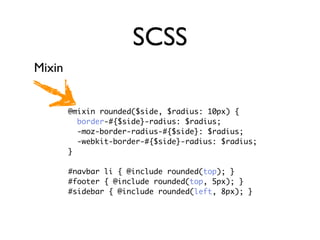
SCSS
Mixin


        @mixin rounded($side, $radius: 10px) {
          border-#{$side}-radius: $radius;
          -moz-border-radius-#{$side}: $radius;
          -webkit-border-#{$side}-radius: $radius;
        }

        #navbar li { @include rounded(top); }
        #footer { @include rounded(top, 5px); }
        #sidebar { @include rounded(left, 8px); }
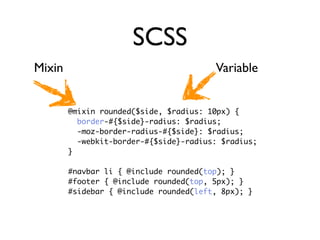
SCSS
Mixin                                   Variable


        @mixin rounded($side, $radius: 10px) {
          border-#{$side}-radius: $radius;
          -moz-border-radius-#{$side}: $radius;
          -webkit-border-#{$side}-radius: $radius;
        }

        #navbar li { @include rounded(top); }
        #footer { @include rounded(top, 5px); }
        #sidebar { @include rounded(left, 8px); }
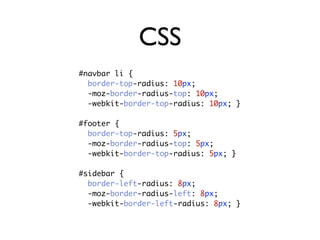
CSS
#navbar li {
  border-top-radius: 10px;
  -moz-border-radius-top: 10px;
  -webkit-border-top-radius: 10px; }

#footer {
  border-top-radius: 5px;
  -moz-border-radius-top: 5px;
  -webkit-border-top-radius: 5px; }

#sidebar {
  border-left-radius: 8px;
  -moz-border-radius-left: 8px;
  -webkit-border-left-radius: 8px; }
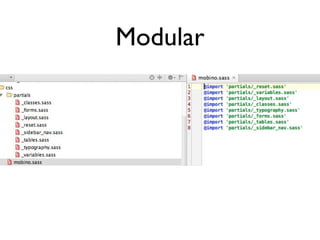
Modular
JavaScript Tools
JS DOM Frameworks
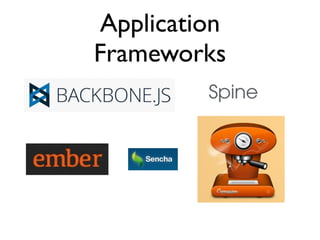
Application
Frameworks
Tools


 Socketstream
Testing
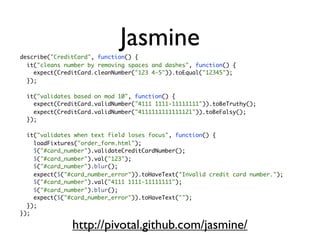
Jasmine
describe("CreditCard", function() {
  it("cleans number by removing spaces and dashes", function() {
    expect(CreditCard.cleanNumber("123 4-5")).toEqual("12345");
  });

  it("validates based on mod 10", function() {
    expect(CreditCard.validNumber("4111 1111-11111111")).toBeTruthy();
    expect(CreditCard.validNumber("4111111111111121")).toBeFalsy();
  });

  it("validates when text field loses focus", function() {
    loadFixtures("order_form.html");
    $("#card_number").validateCreditCardNumber();
    $("#card_number").val("123");
    $("#card_number").blur();
    expect($("#card_number_error")).toHaveText("Invalid credit card number.");
    $("#card_number").val("4111 1111-11111111");
    $("#card_number").blur();
    expect($("#card_number_error")).toHaveText("");
  });
});

               http://pivotal.github.com/jasmine/
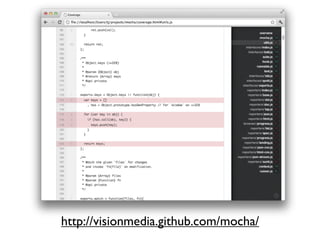
http://visionmedia.github.com/mocha/
Server
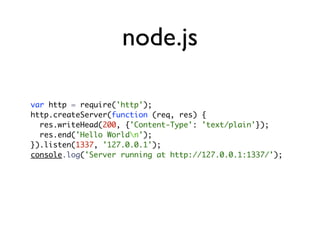
node.js

var http = require('http');
http.createServer(function (req, res) {
  res.writeHead(200, {'Content-Type': 'text/plain'});
  res.end('Hello Worldn');
}).listen(1337, '127.0.0.1');
console.log('Server running at http://127.0.0.1:1337/');
CoffeeScript
number   = 42
opposite = true

number = -42 if opposite

square = (x) -> x * x

list = [1, 2, 3, 4, 5]

math =
  root:   Math.sqrt
  square: square
  cube:   (x) -> x * square x

race = (winner, runners...) ->
  print winner, runners

alert "I knew it!" if elvis?

cubes = (math.cube num for num in list)
var cubes, list, math, num, number,        race = function() {
     opposite, race, square,                  var runners, winner;
     __slice = [].slice;                      winner = arguments[0], runners = 2 <=
                                           arguments.length ? __slice.call(arguments, 1) : [];
number = 42;                                  return print(winner, runners);
                                           };
opposite = true;
                                           if (typeof elvis !== "undefined" && elvis !== null) {
if (opposite) {                              alert("I knew it!");
  number = -42;                            }
}
                                           cubes = (function() {
square = function(x) {                       var _i, _len, _results;
   return x * x;                             _results = [];
};                                           for (_i = 0, _len = list.length; _i < _len; _i++) {
                                               num = list[_i];
list = [1, 2, 3, 4, 5];                        _results.push(math.cube(num));
                                             }
math = {                                     return _results;
   root: Math.sqrt,                        })();
   square: square,
   cube: function(x) {
     return x * square(x);
   }
};


                                 http://coffeescript.org/
http://www.flickr.com/photos/gruts/4612133889/
Jens-Christian Fischer
jens-christian.fischer@simplificator.com
                @jcfischer
Beyond HTML Präsentation an ONE Konferenz 2012 von Jens-Christian Fischer steht unter einer
Creative Commons Namensnennung - Weitergabe unter gleichen Bedingungen 3.0 Schweiz Lizenz.

Beyond HTML - Scriptsprachen, Frameworks, Templatesprachen und vieles mehr

  • 1.
    Beyond HTML Scriptsprachen, Frameworks,Templatesprachen und vieles mehr 9. Mai 2012 Jens-Christian Fischer @jcfischer
  • 3.
  • 5.
  • 7.
  • 9.
  • 13.
  • 23.
    Best of SwissWeb 2012 ausser einer Seite
  • 25.
    HTML CSS JavaScript
  • 27.
    Offline <!DOCTYPE HTML> CACHE MANIFEST <html manifest="/cache.manifest"> FALLBACK: <body> / /offline.html ... NETWORK: </body> /tracking.cgi </html> CACHE: /clock.css /clock.js /clock-face.jpg http://diveintohtml5.org/offline.html
  • 28.
    Storage if (Modernizr.localstorage) { var foo = localStorage.getItem("key"); // ... localStorage.setItem("key", foo); } else { alert('No storage capabilities'); } http://diveintohtml5.org/storage.html
  • 29.
    Websockets var sockets =new webSockets("ws://foo.example.com:8181/socket"); sockets.bind("open", function (msg) { debug(Verbindung steht!"); }); sockets.bind("close", function (msg) { debug("Verbindung verloren!"); }); sockets.bind("doStuff", function (msg) { var data = msg.data; if (data) { doSomething(data); } } );
  • 30.
    Datei Zugriff <ol ondragstart="dragStartHandler(event)"> <li draggable="true" data-value="fruit-apple">Apples</li> <li draggable="true" data-value="fruit-orange">Oranges</li> <li draggable="true" data-value="fruit-pear">Pears</li> </ol> <script> var internalDNDType = 'text/x-example'; function dragStartHandler(event) { if (event.target instanceof HTMLLIElement) { // use the element's data-value="" attribute as the value to be moving: event.dataTransfer.setData(internalDNDType, event.target.dataset.value); event.dataTransfer.effectAllowed = 'move'; // only allow moves } else { event.preventDefault(); // don't allow selection to be dragged } } </script http://www.whatwg.org/specs/web-apps/current-work/multipage/dnd.html#the-dragevent-and-datatransfer-interfaces
  • 31.
  • 32.
    Multimedia <audio id="audio" src="sound.mp3"controls></audio> <video id="video" src="movie.webm" autoplay controls></video> <script> document.getElementById("audio").muted = false; document.getElementById("video").play(); </script>
  • 33.
  • 34.
  • 35.
    Präsentation (CSS 3) Typographie (Webfonts)
  • 36.
    Präsentation (CSS 3) Typographie (Webfonts) Rotation (2D / 3D)
  • 37.
  • 39.
    Werkzeuge The Way ofthe carpenter is to become proficient in the use of his tools, first to lay his plans with a true measure and then perform his work according to plan. – Go Rin No Sho
  • 40.
  • 41.
    HTML <div id="profile"> profile <div class="left column"> left column <h4>Willkommen</h4> h4 Willkommen <p id="address"><%= current_user.address %></p> p address = </div> <div class="right column"> right column <ul> ul <li id="email"><%= current_user.email %></li> li email = <li id="bio"><%= current_user.bio %></li> li bio = </ul> </div> </div>
  • 42.
    HTML profile left column h4 Willkommen p address = current_user.address right column ul li email = current_user.email li bio = current_user.bio
  • 43.
    HAML profile leftcolumn h4 p address= current_user.address right column ul li email= current_user.email li bio= current_user.bio
  • 44.
    HAML #profile profile .left.column left column %h4 Willkommen h4 %p#address= current_user.address p address= .right.column right column %ul ul %li#email= current_user.email li email= %li#bio= current_user.bio li bio= current_user
  • 45.
    http://haml-lang.com/ Python, Lua, ASP.NET,.NET, PHP, PHP5, JavaScript, Perl, Scala, Java
  • 46.
    HAML #profile profile .left.column left column %h4 Willkommen h4 %p#address= current_user.address p address= .right.column right column %ul ul %li#email= current_user.email li email= %li#bio= current_user.bio li bio= current_user
  • 47.
    Jade profile leftcolumn h4 Willkommen p address= current_user.address right column ul li email= current_user.email li bio= current_user.bio http://jade-lang.com/
  • 48.
    Jade #profile profile .left.column left column h4 Willkommen p address= current_user.address p#address= .right.column right column ul li email= current_user.email li#email= li bio= current_user li#bio= current_user.bio http://jade-lang.com/
  • 49.
  • 53.
  • 54.
    Mustache Template <h1>{{header}}</h1> {{#items}} {{#first}} <li><strong>{{name}}</strong></li> {{/first}} {{#link}} <li><a href="{{url}}">{{name}}</a></li> {{/link}} {{/items
  • 55.
    JSON Daten { "header": "Colors", "items": [ {"name": "red", "first": true, "url": "#Red"}, {"name": "green", "link": true, "url": "#Green"}, {"name": "blue", "link": true, "url": "#Blue"} ], }
  • 56.
  • 57.
  • 58.
    <font face="Arial Black">&nbsp;Googlesearch, a <font color="#0000ff">new</font> service from</font><big><font face="Arial Black"><big><strong><font size="4"> <a href="http://www.leicatime.com"><img src="favicon.gif" border="0" width="16" height="16"></a></font></strong></big></ font></big><strong><br> </strong> <b><font face="Arial Black">ATTENTION: for my &quot;how to purchase&quot; INFO page, please <a target="_blank" href="a000-PURCHASE-info.htm">click HERE !</a>&nbsp; Partita IVA: IT 06822200587<br> --------------------------------------</font></b><br> <font size="4"><strong><font color="#ff0000"> <img alt="globeTurns.gif (7996 byte)" src="http://www.leicatime.com/globeTurns.gif" width="30" height="30"></font></ strong></font><font size="5"><img border="0" src="http://www.leicatime.com/EuropeanUnionWte2.gif" width="75" height="50"></font><font size="5"><b><font size="1"><a href="http://www.leicatime.com/a000-CASES-line.htm" target="_blank"><img border="0" src="http://www.leicatime.com/LeicatimeBannerOK.jpg" width="141" height="75"></a></ font></b><img src="http://www.leicatime.com/GianniFototesseraSmart.jpg" width="75" height="89"><font size="3"> </font><font color="#800080" size="5" face="Arial Black"> http://leicatime.com/
  • 59.
  • 60.
    Inhalt Form Verhalten
  • 61.
    html css javascript
  • 64.
  • 65.
  • 66.
    „Besseres“ CSS SCSS http://sass-lang.com/
  • 67.
    „Besseres“ CSS SCSS http://sass-lang.com/ http://lesscss.org/
  • 68.
    Vorteile • Modular -includes • Variablen • Berechnungen • Mixins
  • 69.
    SCSS #navbar { $navbar-width: 800px; $items: 5; $navbar-color: #ce4dd6; width: $navbar-width; border-bottom: 2px solid $navbar-color; li { float: left; width: $navbar-width/$items - 10px; background-color: lighten($navbar-color, 20%); &:hover { background-color: lighten($navbar-color, 10%); } } }
  • 70.
    SCSS #navbar { $navbar-width: 800px; Variablen $items: 5; $navbar-color: #ce4dd6; width: $navbar-width; border-bottom: 2px solid $navbar-color; li { float: left; width: $navbar-width/$items - 10px; background-color: lighten($navbar-color, 20%); &:hover { background-color: lighten($navbar-color, 10%); } } }
  • 71.
    SCSS #navbar { $navbar-width: 800px; Variablen $items: 5; $navbar-color: #ce4dd6; width: $navbar-width; border-bottom: 2px solid $navbar-color; Berechnungen li { float: left; width: $navbar-width/$items - 10px; background-color: lighten($navbar-color, 20%); &:hover { background-color: lighten($navbar-color, 10%); } } }
  • 72.
    SCSS #navbar { $navbar-width: 800px; Variablen $items: 5; $navbar-color: #ce4dd6; width: $navbar-width; border-bottom: 2px solid $navbar-color; Berechnungen li { float: left; width: $navbar-width/$items - 10px; background-color: Funktionsaufruf lighten($navbar-color, 20%); &:hover { background-color: lighten($navbar-color, 10%); } } }
  • 73.
    CSS #navbar { width: 800px; border-bottom: 2px solid #ce4dd6; } #navbar li { float: left; width: 150px; background-color: #e5a0e9; } #navbar li:hover { background-color: #d976e0; }
  • 74.
    Browser Prefixe Präfix Browser -moz- Firefox -webkit- Safari, Chrome -o- Opera -ms-, -mso- Internet Explorer
  • 75.
    .my-class, #my-id { border-radius: 1em; transition: all 1s ease; box-shadow: #123456 0 0 10px; }
  • 76.
    .my-class, #my-id { -moz-border-radius: 1em; -webkit-border-radius: 1em; -ms-border-radius: 1em; border-radius: 1em; -moz-transition: all 1s ease; -o-transition: all 1s ease; -webkit-transition: all 1s ease; -ms-transition: all 1s ease; transition: all 1s ease; -moz-box-shadow: #123456 0 0 10px; -webkit-box-shadow: #123456 0 0 10px; -ms-box-shadow: #123456 0 0 10px; box-shadow: #123456 0 0 10px; }
  • 77.
  • 78.
  • 79.
    WebKit E 6 e I n e u d e r ist
  • 80.
    SCSS @mixin rounded($side, $radius:10px) { border-#{$side}-radius: $radius; -moz-border-radius-#{$side}: $radius; -webkit-border-#{$side}-radius: $radius; } #navbar li { @include rounded(top); } #footer { @include rounded(top, 5px); } #sidebar { @include rounded(left, 8px); }
  • 81.
    SCSS Mixin @mixin rounded($side, $radius: 10px) { border-#{$side}-radius: $radius; -moz-border-radius-#{$side}: $radius; -webkit-border-#{$side}-radius: $radius; } #navbar li { @include rounded(top); } #footer { @include rounded(top, 5px); } #sidebar { @include rounded(left, 8px); }
  • 82.
    SCSS Mixin Variable @mixin rounded($side, $radius: 10px) { border-#{$side}-radius: $radius; -moz-border-radius-#{$side}: $radius; -webkit-border-#{$side}-radius: $radius; } #navbar li { @include rounded(top); } #footer { @include rounded(top, 5px); } #sidebar { @include rounded(left, 8px); }
  • 83.
    CSS #navbar li { border-top-radius: 10px; -moz-border-radius-top: 10px; -webkit-border-top-radius: 10px; } #footer { border-top-radius: 5px; -moz-border-radius-top: 5px; -webkit-border-top-radius: 5px; } #sidebar { border-left-radius: 8px; -moz-border-radius-left: 8px; -webkit-border-left-radius: 8px; }
  • 84.
  • 85.
  • 86.
  • 87.
  • 89.
  • 90.
  • 91.
    Jasmine describe("CreditCard", function() { it("cleans number by removing spaces and dashes", function() { expect(CreditCard.cleanNumber("123 4-5")).toEqual("12345"); }); it("validates based on mod 10", function() { expect(CreditCard.validNumber("4111 1111-11111111")).toBeTruthy(); expect(CreditCard.validNumber("4111111111111121")).toBeFalsy(); }); it("validates when text field loses focus", function() { loadFixtures("order_form.html"); $("#card_number").validateCreditCardNumber(); $("#card_number").val("123"); $("#card_number").blur(); expect($("#card_number_error")).toHaveText("Invalid credit card number."); $("#card_number").val("4111 1111-11111111"); $("#card_number").blur(); expect($("#card_number_error")).toHaveText(""); }); }); http://pivotal.github.com/jasmine/
  • 92.
  • 93.
  • 94.
    node.js var http =require('http'); http.createServer(function (req, res) { res.writeHead(200, {'Content-Type': 'text/plain'}); res.end('Hello Worldn'); }).listen(1337, '127.0.0.1'); console.log('Server running at http://127.0.0.1:1337/');
  • 96.
    CoffeeScript number = 42 opposite = true number = -42 if opposite square = (x) -> x * x list = [1, 2, 3, 4, 5] math = root: Math.sqrt square: square cube: (x) -> x * square x race = (winner, runners...) -> print winner, runners alert "I knew it!" if elvis? cubes = (math.cube num for num in list)
  • 97.
    var cubes, list,math, num, number, race = function() { opposite, race, square, var runners, winner; __slice = [].slice; winner = arguments[0], runners = 2 <= arguments.length ? __slice.call(arguments, 1) : []; number = 42; return print(winner, runners); }; opposite = true; if (typeof elvis !== "undefined" && elvis !== null) { if (opposite) { alert("I knew it!"); number = -42; } } cubes = (function() { square = function(x) { var _i, _len, _results; return x * x; _results = []; }; for (_i = 0, _len = list.length; _i < _len; _i++) { num = list[_i]; list = [1, 2, 3, 4, 5]; _results.push(math.cube(num)); } math = { return _results; root: Math.sqrt, })(); square: square, cube: function(x) { return x * square(x); } }; http://coffeescript.org/
  • 99.
  • 100.
  • 101.
    Beyond HTML Präsentationan ONE Konferenz 2012 von Jens-Christian Fischer steht unter einer Creative Commons Namensnennung - Weitergabe unter gleichen Bedingungen 3.0 Schweiz Lizenz.

Editor's Notes