开发   论热点   对

               ?


      kejun
1.
     -                                console


2.
     -            JS            API


3.
     -          : Microsoft vs. W3C
     - W3C: HTML 4.01, CSS 2.1, DOM Level 2, ...
     - ECMA-262 Edition 5, javascript 1.5, 1.6, ...


4.
     -          CSSHack Fallback
     -          Hack              XSS/CSRF


5.                (HTML/CSS/Javascript)
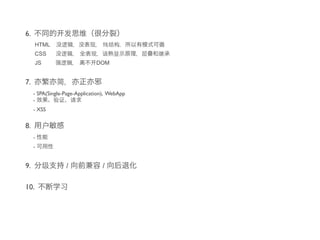
6.
      HTML
      CSS
      JS                       DOM


7.
     - SPA(Single-Page-Application), WebApp
     -
     - XSS


8.
     -
     -


9.                /              /

10.
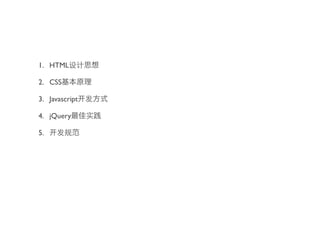
1. HTML

2. CSS

3. Javascript

4. jQuery

5.
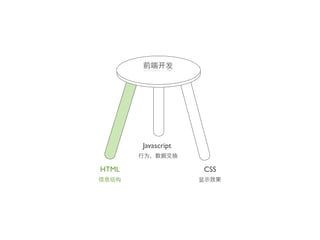
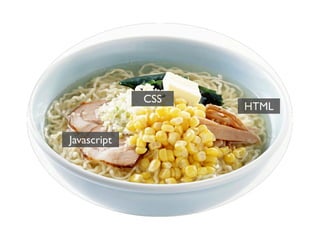
Javascript


HTML                CSS
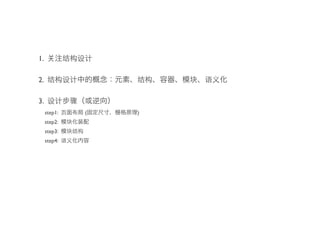
1.

2.

3.
     step1:   (   )
     step2:
     step3:
     step4:
100%

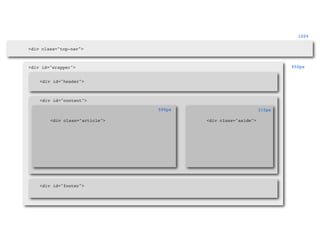
<div class="top-nav">


<div id="wrapper">                                                    950px


    <div id="header">


    <div id="content">

                                590px                         310px

        <div class="article">           <div class="aside">


    <div id="footer">
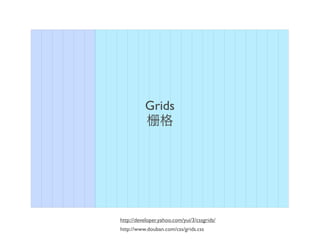
Grids


http://developer.yahoo.com/yui/3/cssgrids/
http://www.douban.com/css/grids.css
8
2
20
    8
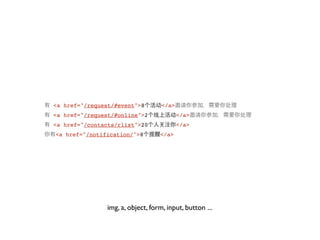
<a href="/request/#event">8        </a>
<a href="/request/#online">2              </a>
<a href="/contacts/rlist">20              </a>
<a href="/notification/">8        </a>


               img, a, object, form, input, button ...
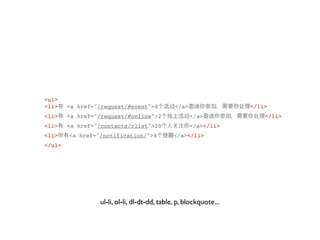
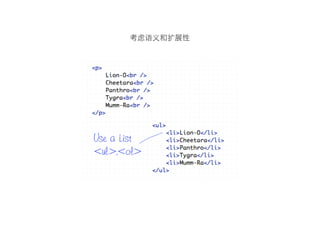
<ul>
<li>    <a href="/request/#event">8           </a>                 </li>
<li>    <a href="/request/#online">2                 </a>              </li>
<li>    <a href="/contacts/rlist">20                 </a></li>
<li>    <a href="/notification/">8           </a></li>
</ul>


                 ul-li, ol-li, dl-dt-dd, table, p, blockquote...
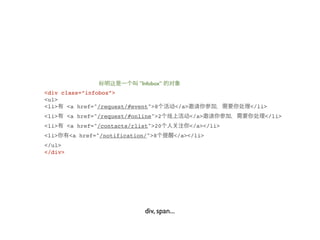
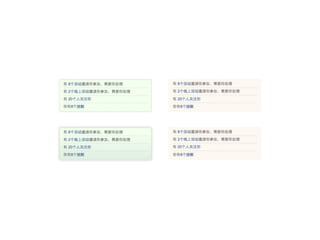
”Infobox”
<div class=”infobox”>
<ul>
<li>   <a href="/request/#event">8             </a>               </li>
<li>     <a href="/request/#online">2                 </a>            </li>
<li>     <a href="/contacts/rlist">20                 </a></li>
<li>     <a href="/notification/">8        </a></li>
</ul>
</div>


                                div, span...
CLASS&ID
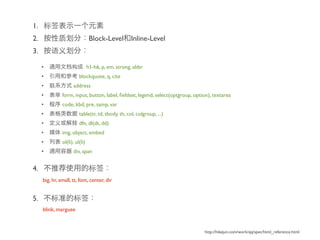
1.
2.                               Block-Level Inline-Level
3.

     •                          h1-h6, p, em, strong, abbr
     •                   blockquote, q, cite
     •               address
     •         form, input, button, label, fieldset, legend, select(optgroup, option), textarea
     •         code, kbd, pre, samp, var
     •                   table(tr, td, tbody, th, col, colgroup, ...)
     •                   dfn, dl(dt, dd)
     •         img, object, embed
     •         ol(li), ul(li)
     •               div, span


4.
     big, hr, small, tt, font, center, dir


5.
     blink, marguee


                                                                                 http://hikejun.com/work/qq/spec/html_reference.html
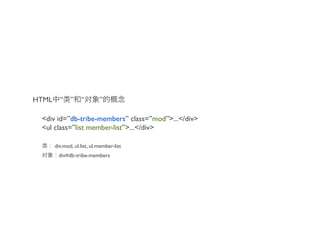
HTML     “ ” “              ”

 <div id=”db-tribe-members” class=”mod”>...</div>
 <ul class=”list member-list”>...</div>

       div.mod, ul.list, ul.member-list
        div#db-tribe-members
1.                    “    ”

2.
                                 ......

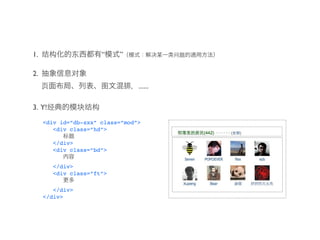
3. Y!
     <div id=”db-xxx” class=”mod”>
        <div class=”hd”>

        </div>
        <div class=”bd”>

        </div>
        <div class=”ft”>

        </div>
     </div>
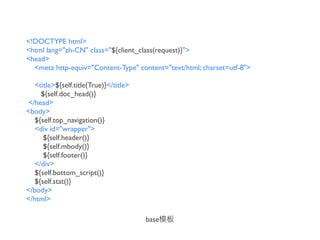
<!DOCTYPE html>
<html lang="zh-CN" class="${client_class(request)}">
<head>
  <meta http-equiv="Content-Type" content="text/html; charset=utf-8">

  <title>${self.title(True)}</title>
    ${self.doc_head()}
</head>
<body>
  ${self.top_navigation()}
  <div id="wrapper">
     ${self.header()}
     ${self.mbody()}
     ${self.footer()}
  </div>
  ${self.bottom_script()}
  ${self.stat()}
</body>
</html>

                                       base
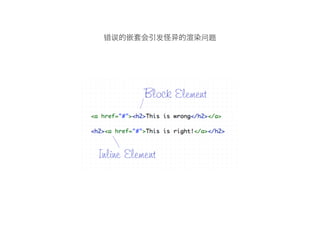
http://line25.com/articles/10-html-tag-crimes-you-really-shouldnt-commit
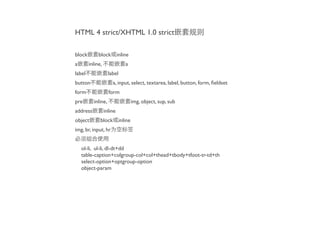
HTML 4 strict/XHTML 1.0 strict

block        block inline
a       inline,             a
label               label
button                a, input, select, textarea, label, button, form, fieldset
form                form
pre       inline,               img, object, sup, sub
address           inline
object        block inline
img, br, input, hr


    ol-li, ul-li, dl-dt+dd
    table-caption+colgroup-col+col+thead+tbody+tfoot-tr-td+th
    select-option+optgroup-option
    object-param
CSS   HTML


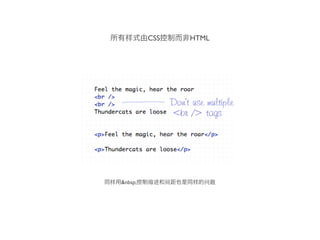
&nbsp;
CSS   style
CSS
H1-H6
marguee
DHTML / XHTML / HTML / HTML5
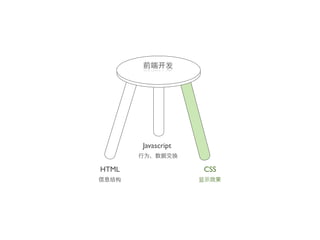
Javascript


HTML                CSS
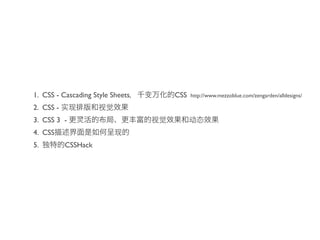
1. CSS - Cascading Style Sheets   CSS   http://www.mezzoblue.com/zengarden/alldesigns/

2. CSS -
3. CSS 3 -
4. CSS
5.         CSSHack
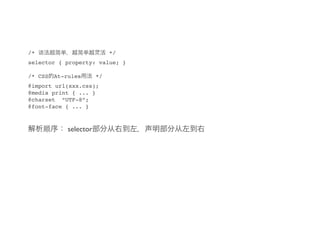
/*                           */
selector { property: value; }

/* CSS   At-rules       */
@import url(xxx.css);
@media print { ... }
@charset “UTF-8”;
@font-face { ... }


             selector
CSS

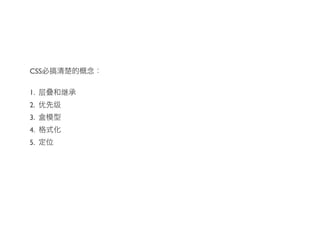
1.
2.
3.
4.
5.
margin-bottom:20px;
<div class=”content note-content”>             .content p { margin:0;font-size:14px; }
                                                                                                         font-size:14px
   <p>      </p>                               .note-content p { margin:0 0 20px 0; }
</div>                                                                                                     margin:0


                                                                                                          color:#666
<div class=”content comment-content”>          .comment-content p { font-size:12px;color:#666; }
   <p>      </p>                                                                                        font-size:12px;
</div>                                                                                                   font-size:14px
                                                                                                           margin:0


<div class=”content note-content note-full”>   .note-full p { text-indent:2em;margin-bottom:40px; }   margin-bottom:40px
   <p>      </p>
                                                                                                        text-indent:2em
</div>
                                                                                                      margin-bottom:20px;
                                                                                                         font-size:14px
                                                                                                           margin:0

                                               .note-content p,
<div class=”note-content”>
                                               .content p { margin:0;font-size:14px; }                margin-bottom:20px;
   <p>      </p>
                                               .note-content p { margin:0 0 20px 0; }
</div>                                                                                                   font-size:14px

                                                                                                           margin:0
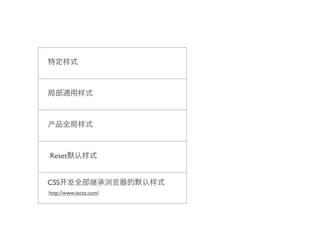
Reset


CSS
http://www.iecss.com/
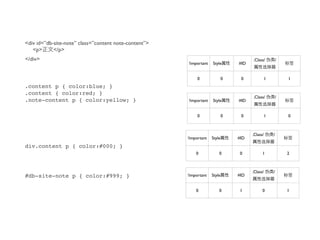
<div id=”db-site-note” class=”content note-content”>
   <p>      </p>
</div>                                                                                .Class/           /
                                                       !important   Style       #ID


                                                            0               0    0              1           1
.content p { color:blue; }
.content { color:red; }
                                                                                      .Class/           /
.note-content p { color:yellow; }                      !important   Style       #ID


                                                            0               0    0              1           0


                                                                                      .Class/       /
                                                       !important   Style       #ID
div.content p { color:#000; }
                                                           0            0        0          1               2


                                                                                      .Class/       /
#db-site-note p { color:#999; }                        !important   Style       #ID


                                                           0            0        1          0               1
.Class/           /
                                                                           !important   Style       #ID
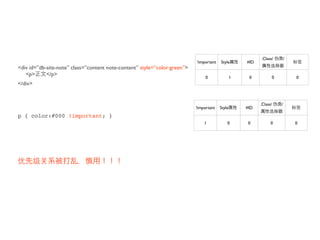
<div id=”db-site-note” class=”content note-content” style=”color:green”>
   <p>      </p>
                                                                                0               1    0              0           0
</div>


                                                                                                          .Class/       /
                                                                           !important   Style       #ID
p { color:#000 !important; }
                                                                               1            0        0          0               0
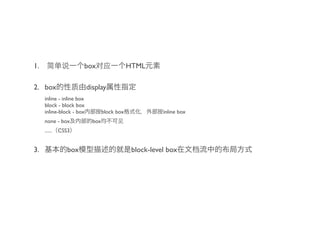
1.                     box                     HTML

2. box                     display
     inline - inline box
     block - block box
     inline-block - box            block box              inline box
     none - box              box
     ......   CSS3


3.               box                            block-level box
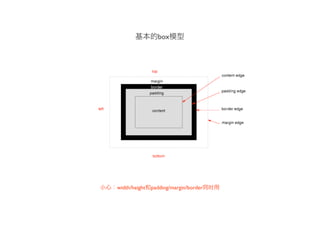
box


width/height   padding/margin/border
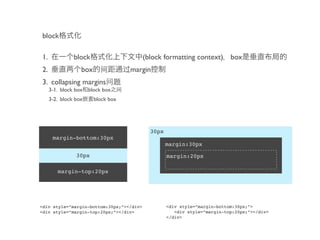
block

1.             block                      (block formatting context) box
2.                box               margin
3. collapsing margins
     3-1. block box block box
     3-2. block box     block box


                                            30px
      margin-bottom:30px
                                                   margin:30px

                30px                               margin:20px

        margin-top:20px


<div style=”margin-bottom:30px;”></div>            <div style=”margin-bottom:30px;”>
<div style=”margin-top:20px;”></div>                  <div style=”margin-top:20px;”></div>
                                                   </div>
inline

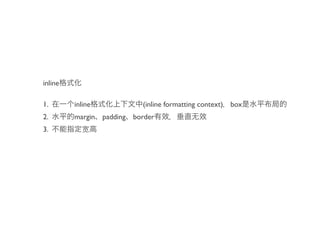
1.       inline            (inline formatting context) box
2.       margin padding border
3.
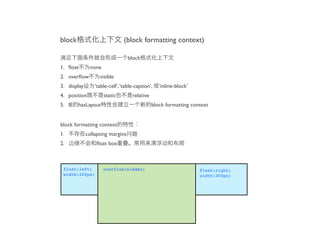
block                           (block formatting context)

                                  block
1. float        none
2. overflow         visible
3. display       ‘table-cell’, ‘table-caption’,   ‘inline-block’
4. position           static        relative
5. IE hasLayout                                block formatting context


block formatting context
1.           collapsing margins
2.               float box


 float:left;          overflow:hidden;                             float:right;
 width:200px;                                                      width:300px;
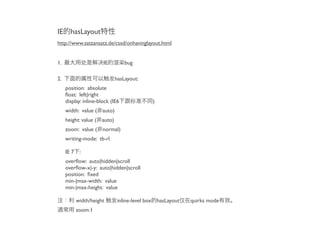
IE     hasLayout
http://www.satzansatz.de/cssd/onhavinglayout.html


1.                     IE         bug

2.                           hasLayout:
     position: absolute
     float: left|right
     display: inline-block (IE6            )
     width: value ( auto)
     height: value ( auto)
     zoom: value ( normal)
     writing-mode: tb-rl

     IE 7 :
     overflow: auto|hidden|scroll
     overflow-x|-y: auto|hidden|scroll
     position: fixed
     min-|max-width: value
     min-|max-height: value

          width/height       inline-level box hasLayout   quirks mode
          zoom:1
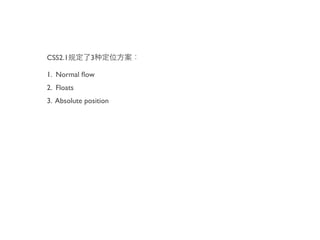
CSS2.1        3

1. Normal flow
2. Floats
3. Absolute position
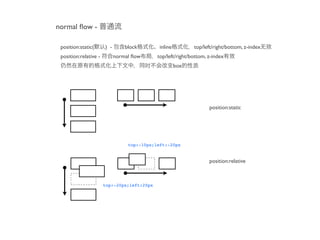
normal flow -

 position:static(      ) -       block        inline         top/left/right/bottom, z-index
 position:relative -         normal flow      top/left/right/bottom, z-index
                                                       box


                                                                    position:static


                                  top:-10px;left:-20px


                                                                    position:relative


                       top:-20px;left:20px
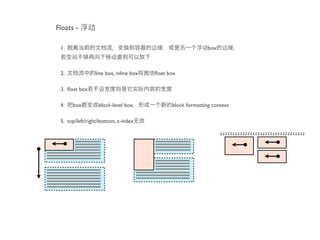
Floats -

 1.                                                         box


 2.             line box, inline box   float box

 3. float box

 4.   box         block-level box            block formatting context

 5. top/left/right/bottom, z-index
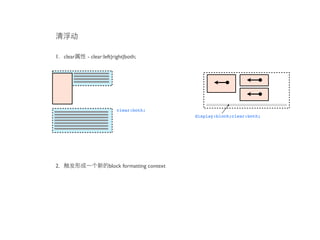
1. clear   - clear:left|right|both;


                         clear:both;
                                                display:block;clear:both;


2.                   block formatting context
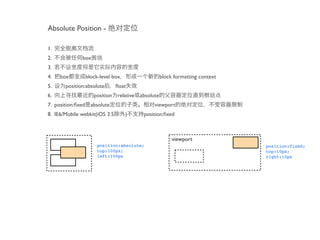
Absolute Position -

1.
2.            box
3.
4.   box       block-level box                   block formatting context
5.     position:absolute       float
6.                  position relative absolute
7. position:fixed absolute                   viewport
8. IE6/Mobile webkit(iOS 3.5      )    position:fixed


                                                      viewport
                     position:absolute;                                     position:fixed;
                     top:100px;                                             top:10px;
                     left:100px                                             right:10px
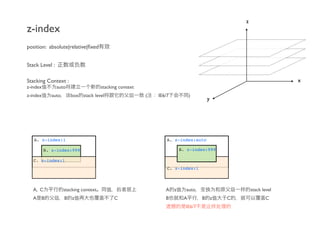
z
z-index
position: absolute|relative|fixed


Stack Level :

Stacking Context :                                                                                            x
z-index         auto                   stacking context
z-index      auto      box stack level                    (   IE6/7         )
                                                                                    y


   A. z-index:1                                                   A. z-index:auto

          B. z-index:999                                               B. z-index:999

   C. z-index:1
                                                                  C. z-index:1


  A, C              stacking context                             A z     auto                   stack level
  A B               B z                      C                   B      A        B z    C               C
                                                                         IE6/7
CSS


http://csslint.net/
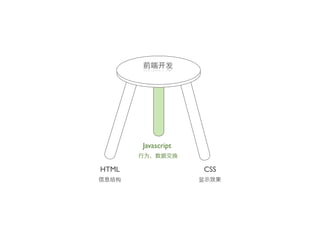
Javascript


HTML                CSS
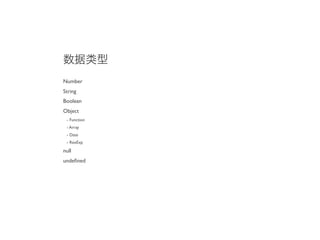
Function
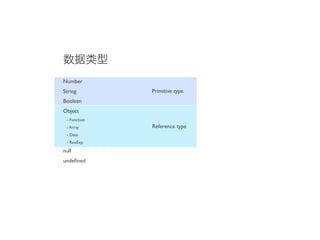
Number
String
Boolean
Object
 - Function
 - Array
 - Date
 - RexExp

null
undefined
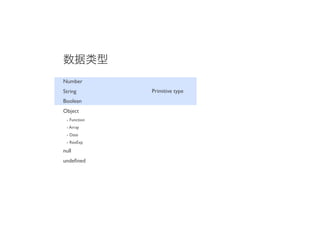
Number
String        Primitive type
Boolean
Object
 - Function
 - Array
 - Date
 - RexExp

null
undefined
Number
String        Primitive type
Boolean
Object
 - Function
 - Array      Reference type
 - Date
 - RexExp

null
undefined
1.                                                                    4.
 3*'3'                                                                0, “”, NaN, null, undefined false             true
 >9
                                                                       !!null
 3+'3'                                                                 > false
 > "33"                                                                !!undefined
                                                                       > false
 +'3'                                                                  !![]
 >3                                                                    > true
                                                                       !!{}
 +new Date                                                             > true
 > 1314181420537
                                                                      5. reference
 '010'|0
                                                                       var obj1 = {a:1};
 > 10
                                                                       var obj2 = obj1;
                                                                       obj2.a
 parseInt('010')
                                                                       >1
 >8
                                                                       obj1.a = 2
                                                                       obj2.a
 parseInt('010',10)
                                                                       >2
 > 10
                                                                       var obj1 = [1,2,3];
2.             "double-precision 64-bit format IEEE 754 values"
                                                                       var obj2 = obj1;
 0.1+0.2                                                               obj1[0] = 99;
 > 0.30000000000000004                                                 obj2
                                                                       > [99, 2, 3]
3.                                                                    6.        prototype-base
 true.toString()
                                                                       Object.prototype.newMethod = function() {
 > "true"
                                                                        console.log('      ');
 (2).toString()
 > "2"                                                                 }
                                                                       (2).newMethod()
 'test'.split('')                                                      >“        ”
 > ["t", "e", "s", "t"]                                                (2).hasOwnProperty(newMethod)
 'test'.charAt(0)                                                      > false
 > "t"

 Number.prototype.length = function(){ return (this + '').length; }
 (10086).length()
 >5
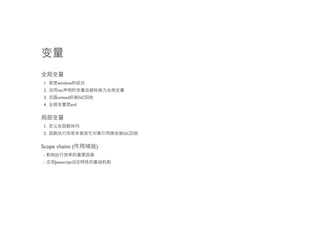
1.    window
 2.    var
 3.    unload          GC
 4.             evil


 1.
 2.                             GC


Scope chains (              )
 -
 -    Javascript
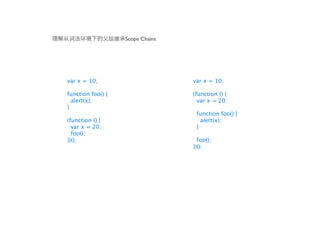
Scope Chains
                                                                                     ➃ Activation Object (            )
                                                                                                                          Scope Chains


                                                                                         Activation Object
                                   ➂ Scope Chains
                                                                                         this          context
                                                 Scope Chains                        arguments         [items]
                                            [AO ➃].concat([[Scope]])
➀     Execution Context
                                           Scope Chains

     Execution Context                      0                                                     Global
                                            1                                        document          (object)
     [[Scope]]
                                                                                       window          (object)
                                                                                      navigator        (object)
     ➁ Execution Context   Scope Chains

                                                                                     ➄ Global Variable Object


                                                                                     ➅               ReferenceError


                                   http://dmitrysoshnikov.com/ecmascript/chapter-4-scope-chain/
Scope Chains


var x = 10;                       var x = 10;

function foo() {                  (function () {
  alert(x);                         var x = 20;
}
                                   function foo() {
(function () {                       alert(x);
  var x = 20;                      }
  foo();
})();                               foo();
                                  })();
with, try-catch         scope chains


function addImageTitle(options) {
  try {
    var root = document.getElementById('content'),
    images = root.getElementsByTagName('img');
    for (var i = 0, len = images.length; i < len; i++) {
      images[i].addEventListener('mouseover', function(e){
        this.title = this.src;
      }, false);
    }
  catch(error) {
    log(error);
  }
}
                                                                              Activation Object
                                             addImageTitle   Scope Chains     this         window
                                          [[Scope]]           0             arguments          [items]
                                                              1               root        undefined
                                                                             images       undefined
                                                                                i         undefined
                                                                               len        undefined

                                                                                      Global
                                                                            document       (object)
                                                                             window        (object)
                                                                            navigator      (object)
Variable Object
                                            document       (object)

                                              Activation Object
            try-catch        Scope Chains     this         window
     [[Scope]]                0             arguments          [items]
                              1               root        undefined
                              2              images       undefined
                                                i         undefined
                                               len        undefined

                                                      Global
                                            document       (object)
                                             window        (object)
                                            navigator      (object)


                                              Activation Object
                                              this              img
                                            arguments          [items]
                                               e               (event)

                                              Activation Object
   Event Handler        Scope Chains          this         window
[[Scope]]                0                  arguments          [items]
                         1                    root        undefined
                         2                   images       undefined
                                                i         undefined
                                               len        undefined

                                                      Global
                                            document       (object)
                                             window        (object)
                                            navigator      (object)
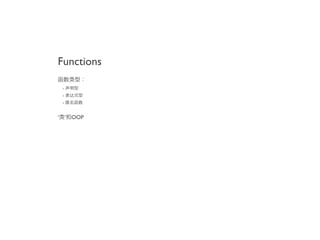
Functions

    -
    -
    -


‘       ’   OOP
1.
2.


3.
4.        Variable Object
5.
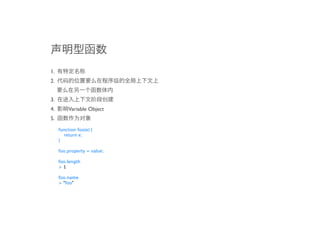
     function foo(e) {
       return e;
     }

     foo.property = value;

     foo.length
     >1

     foo.name
     > "foo"
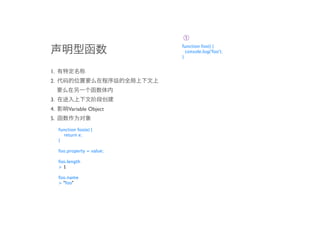
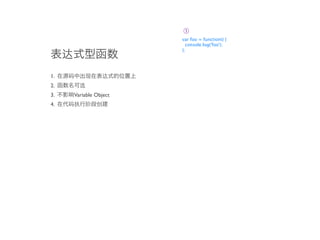
➀
                             function foo() {
                               console.log('foo');
                             }


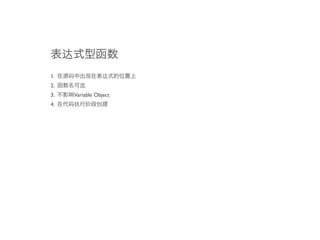
1.
2.


3.
4.        Variable Object
5.
     function foo(e) {
       return e;
     }

     foo.property = value;

     foo.length
     >1

     foo.name
     > "foo"
➀
                             function foo() {
                               console.log('foo');
                             }


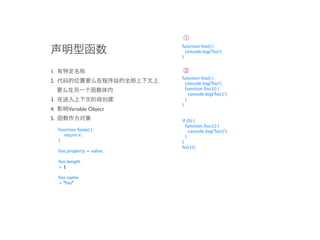
1.                           ➁
                             function foo() {
2.                             console.log('foo');
                               function foo1() {
                                 console.log('foo1');
3.                             }
                             }
4.        Variable Object
5.                           if (0) {
                               function foo1() {
     function foo(e) {           console.log('foo1');
       return e;               }
     }                       }
                             foo1();
     foo.property = value;

     foo.length
     >1

     foo.name
     > "foo"
➀
                             function foo() {
                               console.log('foo');
                             }


1.                           ➁
                             function foo() {
2.                             console.log('foo');
                               function foo1() {
                                 console.log('foo1');
3.                             }
                             }
4.        Variable Object
5.                           if (0) {
                               function foo1() {
     function foo(e) {           console.log('foo1');
       return e;               }
     }                       }
                             foo1();
     foo.property = value;

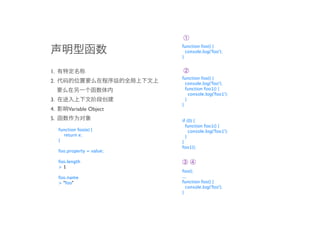
     foo.length              ➂➃
     >1
                             foo();
     foo.name                ...
     > "foo"                 function foo() {
                               console.log('foo');
                             }
1.
2.
3.   Variable Object
4.
➀
                       var foo = function() {
                         console.log('foo');
                       };


1.
2.
3.   Variable Object
4.
➀
                       var foo = function() {
                         console.log('foo');
                       };


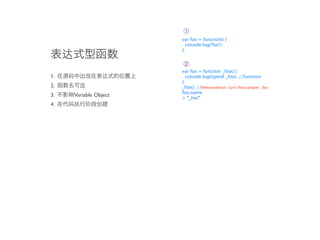
                       ➁
                       var foo = function _foo() {
1.                       console.log(typeof _foo); //function
                       };
2.                     _foo(); //ReferenceError: Can't find variable: _foo
                       foo.name
3.   Variable Object   > “_foo”
4.
➀
                       var foo = function() {
                         console.log('foo');
                       };


                       ➁
                       var foo = function _foo() {
1.                       console.log(typeof _foo); //function
                       };
2.                     _foo(); //ReferenceError: Can't find variable: _foo
                       foo.name
3.   Variable Object   > “_foo”
4.
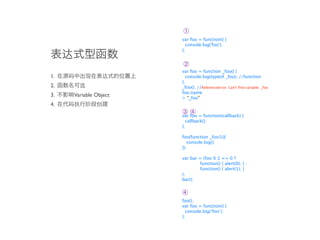
                       ➂ ➃ = function(callback) {
                       var foo
                         callback();
                       };

                       foo(function _foo1(){
                          console.log();
                       });

                       var bar = (foo % 2 == 0 ?
                                function() { alert(0); } :
                                function() { alert(1); }
                       );
                       bar();


                       ➃
                       foo();
                       var foo = function() {
                         console.log(‘foo’);
                       };
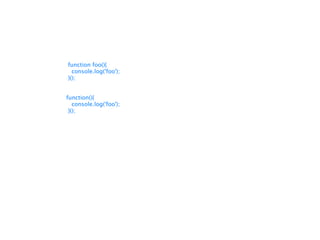
function foo(){
  console.log('foo');
}();


function(){
   console.log('foo');
 }();
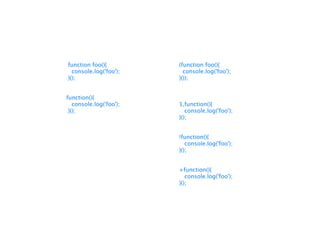
function foo(){          (function foo(){
  console.log('foo');      console.log('foo');
}();                     }());


function(){
   console.log('foo');   1,function(){
 }();                       console.log('foo');
                         }();


                         !function(){
                            console.log('foo');
                         }();


                         +function(){
                            console.log('foo');
                         }();
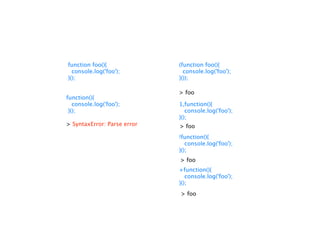
function foo(){              (function foo(){
  console.log('foo');          console.log('foo');
}();                         }());

                             > foo
function(){
   console.log('foo');       1,function(){
 }();                           console.log('foo');
                             }();
> SyntaxError: Parse error   > foo
                             !function(){
                                console.log('foo');
                             }();
                             > foo
                             +function(){
                                console.log('foo');
                             }();
                             > foo
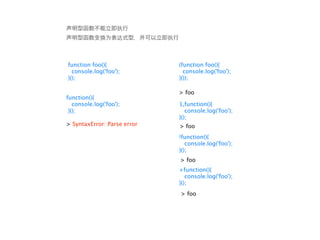
function foo(){              (function foo(){
  console.log('foo');          console.log('foo');
}();                         }());

                             > foo
function(){
   console.log('foo');       1,function(){
 }();                           console.log('foo');
                             }();
> SyntaxError: Parse error   > foo
                             !function(){
                                console.log('foo');
                             }();
                             > foo
                             +function(){
                                console.log('foo');
                             }();
                             > foo
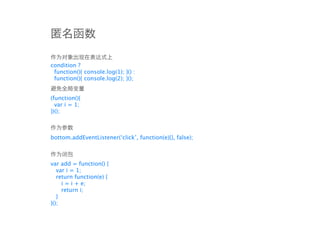
condition ?
 function(){ console.log(1); }() :
 function(){ console.log(2); }();


(function(){
  var i = 1;
})();


bottom.addEventListener(‘click’, function(e){}, false);


var add = function() {
   var i = 1;
   return function(e) {
     i = i + e;
     return i;
   }
}();
“ ” OO
1.


2. OO
3. Javascript   OO
1.
     this

2.          call   apply
sample 1:

                           var obj = {
                             input: function() {
                                return this.handle(arguments[0], arguments[1]);
                             },
                             handle: function(inp1, inp2){
                               return inp1 + inp2;
                             }
                           };

1.                         var obj1 = {
                             handle: function(inp1, inp2) {
     this
                               return inp1 * inp2;
                             }
2.          call   apply   }

                           alert(obj.input(10,20));
                           alert(obj.input.call(obj1, 10,20));


                           sample 2:

                           function A(){
                             this.method = function() { alert(1); };
                           }

                           function B(){
                             A.call(this, arguments);
                             this.method = function() { alert(2); };
                           }

                           function C(){
                             A.call(this, arguments);
                             this.method = function() { alert(3); };
                           }

                           (new A).method();
                           (new B).method();
                           (new C).method();
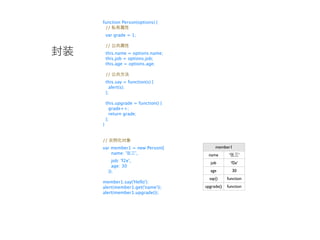
function Person(options) {
 //
    var grade = 1;

    //
    this.name = options.name;
    this.job = options.job;
    this.age = options.age;

    //
    this.say = function(s) {
      alert(s);
    };

    this.upgrade = function() {
      grade++;
      return grade;
    };
}


//
var member1 = new Person({             member1
    name: '  ',                    name        ‘           ’
       job: 'f2e',                   job           ‘f2e’
       age: 30
     });                            age             30
                                    say()     function
member1.say('Hello');
alert(member1.get('name'));       upgrade()   function
alert(member1.upgrade());
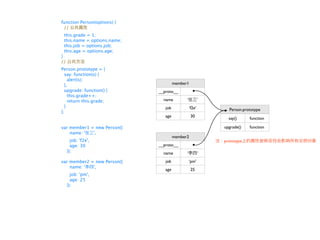
function Person(options) {
 //
 this.grade = 1;
 this.name = options.name;
 this.job = options.job;
 this.age = options.age;
}
//
Person.prototype = {
  say: function(s) {
    alert(s);
  },                                  member1
  upgrade: function() {      __proto__
    this.grade++;
    return this.grade;         name         ‘           ’
  }                             job             ‘f2e’
};                                                            Person.prototype
                                age              30
                                                              say()     function

var member1 = new Person({                                  upgrade()   function
    name: '  ',
                                      member2
       job: 'f2e',                                          prototype
       age: 30               __proto__
     });                       name         ‘           ’
var member2 = new Person({      job             ‘pm’
    name: '  ',
                                age              25
       job: 'pm',
       age: 25
     });
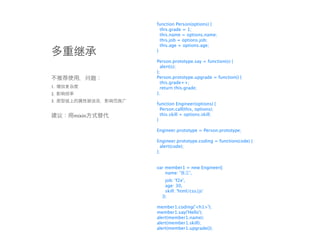
function Person(options) {
               this.grade = 1;
               this.name = options.name;
               this.job = options.job;
               this.age = options.age;
             }

             Person.prototype.say = function(s) {
               alert(s);
             };
             Person.prototype.upgrade = function() {
               this.grade++;
1.             return this.grade;
2.           };
3.
             function Engineer(options) {
               Person.call(this, options);
     mixin     this.skill = options.skill;
             }

             Engineer.prototype = Person.prototype;

             Engineer.prototype.coding = function(code) {
               alert(code);
             };


             var member1 = new Engineer({
                 name: '  ',
                 job: 'f2e',
                 age: 30,
                 skill: 'html/css/js'
               });

             member1.coding('<h1>');
             member1.say('Hello');
             alert(member1.name);
             alert(member1.skill);
             alert(member1.upgrade());
function extend(target, source) {
                                       for (var i in source) {
                                         if (source.hasOwnProperty(i)) {
                                           target[i] = source[i];
                                         }
                                       }
                                     }

                                     function Person(options) {
                                       this.grade = 1;
                                       this.name = options.name;
                                       this.job = options.job;
                                       this.age = options.age;
                      mixin          }

                                     Person.prototype = {
                                       say: function(s) {
                                         alert(s);                                   member1.coding('<h1>');
                                       },                                            member1.prd('update');
                                       upgrade: function(s) {                        member1.say('Hello');
                                         this.grade++;                               alert(member1.name);
                                         return this.grade;                          alert(member1.skill);
                                       }                                             alert(member1.upgrade());
                                     };
                                                                                     Person.prototype.say = function() {};
function PM(options) {               function Engineer(options) {                    member1.say('hi'); //
  Person.call(this, options);          Person.call(this, options);
  this.skill = options.skill;          this.skill = options.skill;
}                                    }

PM.prototype.prd = function(prd) {   Engineer.prototype.coding = function(code) {
  alert(prd);                          alert(code);
};                                   };

                                     extend(Engineer.prototype, Person.prototype);
                                     extend(Engineer.prototype, PM.prototype);

                                     var member1 = new Engineer({
                                         name: '  ',
                                           job: 'f2e',
                                           age: 30,
                                           skill: 'html/css/js'
                                     });
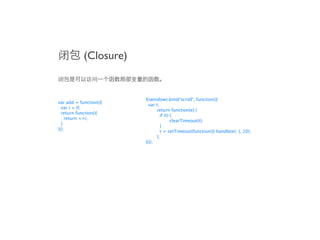
(Closure)


                        $(window).bind('scroll', function(){
var add = function(){
                          var t;
  var i = 0;
                        
     return function(e) {
  return function(){
                        
        if (t) {
    return ++i;
                        
     
         clearTimeout(t);
  }
                        
        }
}();
                        
        t = setTimeout(function(){ handle(e); }, 20);
                        
     };
                        }());
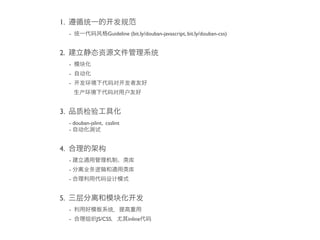
CSS
                   HTML

Javascript
1.
     -                 Guideline (bit.ly/douban-javascript, bit.ly/douban-css)


2.
     -
     -
     -


3.
     - douban-jslint, csslint
     -


4.
     -
     -
     -


5.
     -
     -            JS/CSS        inline
skype: kejunz
mail/GTalk: listenpro@gmail.com

前端开发理论热点面对面:从怎么看,到怎么做?

  • 1.
    开发 论热点 对 ? kejun
  • 2.
    1. - console 2. - JS API 3. - : Microsoft vs. W3C - W3C: HTML 4.01, CSS 2.1, DOM Level 2, ... - ECMA-262 Edition 5, javascript 1.5, 1.6, ... 4. - CSSHack Fallback - Hack XSS/CSRF 5. (HTML/CSS/Javascript)
  • 3.
    6. HTML CSS JS DOM 7. - SPA(Single-Page-Application), WebApp - - XSS 8. - - 9. / / 10.
  • 4.
    1. HTML 2. CSS 3.Javascript 4. jQuery 5.
  • 5.
  • 6.
    1. 2. 3. step1: ( ) step2: step3: step4:
  • 7.
    100% <div class="top-nav"> <div id="wrapper"> 950px <div id="header"> <div id="content"> 590px 310px <div class="article"> <div class="aside"> <div id="footer">
  • 8.
  • 10.
  • 11.
    <a href="/request/#event">8 </a> <a href="/request/#online">2 </a> <a href="/contacts/rlist">20 </a> <a href="/notification/">8 </a> img, a, object, form, input, button ...
  • 12.
    <ul> <li> <a href="/request/#event">8 </a> </li> <li> <a href="/request/#online">2 </a> </li> <li> <a href="/contacts/rlist">20 </a></li> <li> <a href="/notification/">8 </a></li> </ul> ul-li, ol-li, dl-dt-dd, table, p, blockquote...
  • 13.
    ”Infobox” <div class=”infobox”> <ul> <li> <a href="/request/#event">8 </a> </li> <li> <a href="/request/#online">2 </a> </li> <li> <a href="/contacts/rlist">20 </a></li> <li> <a href="/notification/">8 </a></li> </ul> </div> div, span...
  • 15.
  • 16.
    1. 2. Block-Level Inline-Level 3. • h1-h6, p, em, strong, abbr • blockquote, q, cite • address • form, input, button, label, fieldset, legend, select(optgroup, option), textarea • code, kbd, pre, samp, var • table(tr, td, tbody, th, col, colgroup, ...) • dfn, dl(dt, dd) • img, object, embed • ol(li), ul(li) • div, span 4. big, hr, small, tt, font, center, dir 5. blink, marguee http://hikejun.com/work/qq/spec/html_reference.html
  • 17.
    HTML “ ” “ ” <div id=”db-tribe-members” class=”mod”>...</div> <ul class=”list member-list”>...</div> div.mod, ul.list, ul.member-list div#db-tribe-members
  • 18.
    1. “ ” 2. ...... 3. Y! <div id=”db-xxx” class=”mod”> <div class=”hd”> </div> <div class=”bd”> </div> <div class=”ft”> </div> </div>
  • 19.
    <!DOCTYPE html> <html lang="zh-CN"class="${client_class(request)}"> <head> <meta http-equiv="Content-Type" content="text/html; charset=utf-8"> <title>${self.title(True)}</title> ${self.doc_head()} </head> <body> ${self.top_navigation()} <div id="wrapper"> ${self.header()} ${self.mbody()} ${self.footer()} </div> ${self.bottom_script()} ${self.stat()} </body> </html> base
  • 20.
  • 22.
    HTML 4 strict/XHTML1.0 strict block block inline a inline, a label label button a, input, select, textarea, label, button, form, fieldset form form pre inline, img, object, sup, sub address inline object block inline img, br, input, hr ol-li, ul-li, dl-dt+dd table-caption+colgroup-col+col+thead+tbody+tfoot-tr-td+th select-option+optgroup-option object-param
  • 26.
    CSS HTML &nbsp;
  • 28.
    CSS style
  • 29.
  • 30.
  • 31.
  • 32.
    DHTML / XHTML/ HTML / HTML5
  • 33.
  • 34.
    1. CSS -Cascading Style Sheets CSS http://www.mezzoblue.com/zengarden/alldesigns/ 2. CSS - 3. CSS 3 - 4. CSS 5. CSSHack
  • 35.
    /* */ selector { property: value; } /* CSS At-rules */ @import url(xxx.css); @media print { ... } @charset “UTF-8”; @font-face { ... } selector
  • 36.
  • 37.
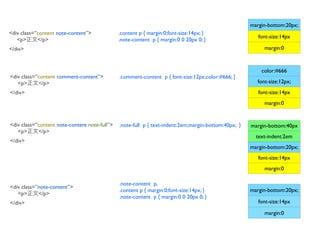
    margin-bottom:20px; <div class=”content note-content”> .content p { margin:0;font-size:14px; } font-size:14px <p> </p> .note-content p { margin:0 0 20px 0; } </div> margin:0 color:#666 <div class=”content comment-content”> .comment-content p { font-size:12px;color:#666; } <p> </p> font-size:12px; </div> font-size:14px margin:0 <div class=”content note-content note-full”> .note-full p { text-indent:2em;margin-bottom:40px; } margin-bottom:40px <p> </p> text-indent:2em </div> margin-bottom:20px; font-size:14px margin:0 .note-content p, <div class=”note-content”> .content p { margin:0;font-size:14px; } margin-bottom:20px; <p> </p> .note-content p { margin:0 0 20px 0; } </div> font-size:14px margin:0
  • 38.
  • 39.
    <div id=”db-site-note” class=”contentnote-content”> <p> </p> </div> .Class/ / !important Style #ID 0 0 0 1 1 .content p { color:blue; } .content { color:red; } .Class/ / .note-content p { color:yellow; } !important Style #ID 0 0 0 1 0 .Class/ / !important Style #ID div.content p { color:#000; } 0 0 0 1 2 .Class/ / #db-site-note p { color:#999; } !important Style #ID 0 0 1 0 1
  • 40.
    .Class/ / !important Style #ID <div id=”db-site-note” class=”content note-content” style=”color:green”> <p> </p> 0 1 0 0 0 </div> .Class/ / !important Style #ID p { color:#000 !important; } 1 0 0 0 0
  • 41.
    1. box HTML 2. box display inline - inline box block - block box inline-block - box block box inline box none - box box ...... CSS3 3. box block-level box
  • 42.
    box width/height padding/margin/border
  • 43.
    block 1. block (block formatting context) box 2. box margin 3. collapsing margins 3-1. block box block box 3-2. block box block box 30px margin-bottom:30px margin:30px 30px margin:20px margin-top:20px <div style=”margin-bottom:30px;”></div> <div style=”margin-bottom:30px;”> <div style=”margin-top:20px;”></div> <div style=”margin-top:20px;”></div> </div>
  • 44.
    inline 1. inline (inline formatting context) box 2. margin padding border 3.
  • 45.
    block (block formatting context) block 1. float none 2. overflow visible 3. display ‘table-cell’, ‘table-caption’, ‘inline-block’ 4. position static relative 5. IE hasLayout block formatting context block formatting context 1. collapsing margins 2. float box float:left; overflow:hidden; float:right; width:200px; width:300px;
  • 46.
    IE hasLayout http://www.satzansatz.de/cssd/onhavinglayout.html 1. IE bug 2. hasLayout: position: absolute float: left|right display: inline-block (IE6 ) width: value ( auto) height: value ( auto) zoom: value ( normal) writing-mode: tb-rl IE 7 : overflow: auto|hidden|scroll overflow-x|-y: auto|hidden|scroll position: fixed min-|max-width: value min-|max-height: value width/height inline-level box hasLayout quirks mode zoom:1
  • 47.
    CSS2.1 3 1. Normal flow 2. Floats 3. Absolute position
  • 48.
    normal flow - position:static( ) - block inline top/left/right/bottom, z-index position:relative - normal flow top/left/right/bottom, z-index box position:static top:-10px;left:-20px position:relative top:-20px;left:20px
  • 49.
    Floats - 1. box 2. line box, inline box float box 3. float box 4. box block-level box block formatting context 5. top/left/right/bottom, z-index
  • 50.
    1. clear - clear:left|right|both; clear:both; display:block;clear:both; 2. block formatting context
  • 51.
    Absolute Position - 1. 2. box 3. 4. box block-level box block formatting context 5. position:absolute float 6. position relative absolute 7. position:fixed absolute viewport 8. IE6/Mobile webkit(iOS 3.5 ) position:fixed viewport position:absolute; position:fixed; top:100px; top:10px; left:100px right:10px
  • 52.
    z z-index position: absolute|relative|fixed Stack Level: Stacking Context : x z-index auto stacking context z-index auto box stack level ( IE6/7 ) y A. z-index:1 A. z-index:auto B. z-index:999 B. z-index:999 C. z-index:1 C. z-index:1 A, C stacking context A z auto stack level A B B z C B A B z C C IE6/7
  • 53.
  • 54.
  • 55.
  • 56.
    Number String Boolean Object - Function - Array - Date - RexExp null undefined
  • 57.
    Number String Primitive type Boolean Object - Function - Array - Date - RexExp null undefined
  • 58.
    Number String Primitive type Boolean Object - Function - Array Reference type - Date - RexExp null undefined
  • 59.
    1. 4. 3*'3' 0, “”, NaN, null, undefined false true >9 !!null 3+'3' > false > "33" !!undefined > false +'3' !![] >3 > true !!{} +new Date > true > 1314181420537 5. reference '010'|0 var obj1 = {a:1}; > 10 var obj2 = obj1; obj2.a parseInt('010') >1 >8 obj1.a = 2 obj2.a parseInt('010',10) >2 > 10 var obj1 = [1,2,3]; 2. "double-precision 64-bit format IEEE 754 values" var obj2 = obj1; 0.1+0.2 obj1[0] = 99; > 0.30000000000000004 obj2 > [99, 2, 3] 3. 6. prototype-base true.toString() Object.prototype.newMethod = function() { > "true" console.log(' '); (2).toString() > "2" } (2).newMethod() 'test'.split('') >“ ” > ["t", "e", "s", "t"] (2).hasOwnProperty(newMethod) 'test'.charAt(0) > false > "t" Number.prototype.length = function(){ return (this + '').length; } (10086).length() >5
  • 60.
    1. window 2. var 3. unload GC 4. evil 1. 2. GC Scope chains ( ) - - Javascript
  • 61.
    Scope Chains ➃ Activation Object ( ) Scope Chains Activation Object ➂ Scope Chains this context Scope Chains arguments [items] [AO ➃].concat([[Scope]]) ➀ Execution Context Scope Chains Execution Context 0 Global 1 document (object) [[Scope]] window (object) navigator (object) ➁ Execution Context Scope Chains ➄ Global Variable Object ➅ ReferenceError http://dmitrysoshnikov.com/ecmascript/chapter-4-scope-chain/
  • 62.
    Scope Chains var x= 10; var x = 10; function foo() { (function () { alert(x); var x = 20; } function foo() { (function () { alert(x); var x = 20; } foo(); })(); foo(); })();
  • 63.
    with, try-catch scope chains function addImageTitle(options) { try { var root = document.getElementById('content'), images = root.getElementsByTagName('img'); for (var i = 0, len = images.length; i < len; i++) { images[i].addEventListener('mouseover', function(e){ this.title = this.src; }, false); } catch(error) { log(error); } } Activation Object addImageTitle Scope Chains this window [[Scope]] 0 arguments [items] 1 root undefined images undefined i undefined len undefined Global document (object) window (object) navigator (object)
  • 64.
    Variable Object document (object) Activation Object try-catch Scope Chains this window [[Scope]] 0 arguments [items] 1 root undefined 2 images undefined i undefined len undefined Global document (object) window (object) navigator (object) Activation Object this img arguments [items] e (event) Activation Object Event Handler Scope Chains this window [[Scope]] 0 arguments [items] 1 root undefined 2 images undefined i undefined len undefined Global document (object) window (object) navigator (object)
  • 65.
    Functions - - - ‘ ’ OOP
  • 66.
    1. 2. 3. 4. Variable Object 5. function foo(e) { return e; } foo.property = value; foo.length >1 foo.name > "foo"
  • 67.
    function foo() { console.log('foo'); } 1. 2. 3. 4. Variable Object 5. function foo(e) { return e; } foo.property = value; foo.length >1 foo.name > "foo"
  • 68.
    function foo() { console.log('foo'); } 1. ➁ function foo() { 2. console.log('foo'); function foo1() { console.log('foo1'); 3. } } 4. Variable Object 5. if (0) { function foo1() { function foo(e) { console.log('foo1'); return e; } } } foo1(); foo.property = value; foo.length >1 foo.name > "foo"
  • 69.
    function foo() { console.log('foo'); } 1. ➁ function foo() { 2. console.log('foo'); function foo1() { console.log('foo1'); 3. } } 4. Variable Object 5. if (0) { function foo1() { function foo(e) { console.log('foo1'); return e; } } } foo1(); foo.property = value; foo.length ➂➃ >1 foo(); foo.name ... > "foo" function foo() { console.log('foo'); }
  • 70.
    1. 2. 3. Variable Object 4.
  • 71.
    var foo = function() { console.log('foo'); }; 1. 2. 3. Variable Object 4.
  • 72.
    var foo = function() { console.log('foo'); }; ➁ var foo = function _foo() { 1. console.log(typeof _foo); //function }; 2. _foo(); //ReferenceError: Can't find variable: _foo foo.name 3. Variable Object > “_foo” 4.
  • 73.
    var foo = function() { console.log('foo'); }; ➁ var foo = function _foo() { 1. console.log(typeof _foo); //function }; 2. _foo(); //ReferenceError: Can't find variable: _foo foo.name 3. Variable Object > “_foo” 4. ➂ ➃ = function(callback) { var foo callback(); }; foo(function _foo1(){ console.log(); }); var bar = (foo % 2 == 0 ? function() { alert(0); } : function() { alert(1); } ); bar(); ➃ foo(); var foo = function() { console.log(‘foo’); };
  • 74.
    function foo(){ console.log('foo'); }(); function(){ console.log('foo'); }();
  • 75.
    function foo(){ (function foo(){ console.log('foo'); console.log('foo'); }(); }()); function(){ console.log('foo'); 1,function(){ }(); console.log('foo'); }(); !function(){ console.log('foo'); }(); +function(){ console.log('foo'); }();
  • 76.
    function foo(){ (function foo(){ console.log('foo'); console.log('foo'); }(); }()); > foo function(){ console.log('foo'); 1,function(){ }(); console.log('foo'); }(); > SyntaxError: Parse error > foo !function(){ console.log('foo'); }(); > foo +function(){ console.log('foo'); }(); > foo
  • 77.
    function foo(){ (function foo(){ console.log('foo'); console.log('foo'); }(); }()); > foo function(){ console.log('foo'); 1,function(){ }(); console.log('foo'); }(); > SyntaxError: Parse error > foo !function(){ console.log('foo'); }(); > foo +function(){ console.log('foo'); }(); > foo
  • 78.
    condition ? function(){console.log(1); }() : function(){ console.log(2); }(); (function(){ var i = 1; })(); bottom.addEventListener(‘click’, function(e){}, false); var add = function() { var i = 1; return function(e) { i = i + e; return i; } }();
  • 79.
    “ ” OO 1. 2.OO 3. Javascript OO
  • 80.
    1. this 2. call apply
  • 81.
    sample 1: var obj = { input: function() { return this.handle(arguments[0], arguments[1]); }, handle: function(inp1, inp2){ return inp1 + inp2; } }; 1. var obj1 = { handle: function(inp1, inp2) { this return inp1 * inp2; } 2. call apply } alert(obj.input(10,20)); alert(obj.input.call(obj1, 10,20)); sample 2: function A(){ this.method = function() { alert(1); }; } function B(){ A.call(this, arguments); this.method = function() { alert(2); }; } function C(){ A.call(this, arguments); this.method = function() { alert(3); }; } (new A).method(); (new B).method(); (new C).method();
  • 82.
    function Person(options) { // var grade = 1; // this.name = options.name; this.job = options.job; this.age = options.age; // this.say = function(s) { alert(s); }; this.upgrade = function() { grade++; return grade; }; } // var member1 = new Person({ member1 name: ' ', name ‘ ’ job: 'f2e', job ‘f2e’ age: 30 }); age 30 say() function member1.say('Hello'); alert(member1.get('name')); upgrade() function alert(member1.upgrade());
  • 83.
    function Person(options) { // this.grade = 1; this.name = options.name; this.job = options.job; this.age = options.age; } // Person.prototype = { say: function(s) { alert(s); }, member1 upgrade: function() { __proto__ this.grade++; return this.grade; name ‘ ’ } job ‘f2e’ }; Person.prototype age 30 say() function var member1 = new Person({ upgrade() function name: ' ', member2 job: 'f2e', prototype age: 30 __proto__ }); name ‘ ’ var member2 = new Person({ job ‘pm’ name: ' ', age 25 job: 'pm', age: 25 });
  • 84.
    function Person(options) { this.grade = 1; this.name = options.name; this.job = options.job; this.age = options.age; } Person.prototype.say = function(s) { alert(s); }; Person.prototype.upgrade = function() { this.grade++; 1. return this.grade; 2. }; 3. function Engineer(options) { Person.call(this, options); mixin this.skill = options.skill; } Engineer.prototype = Person.prototype; Engineer.prototype.coding = function(code) { alert(code); }; var member1 = new Engineer({ name: ' ', job: 'f2e', age: 30, skill: 'html/css/js' }); member1.coding('<h1>'); member1.say('Hello'); alert(member1.name); alert(member1.skill); alert(member1.upgrade());
  • 85.
    function extend(target, source){ for (var i in source) { if (source.hasOwnProperty(i)) { target[i] = source[i]; } } } function Person(options) { this.grade = 1; this.name = options.name; this.job = options.job; this.age = options.age; mixin } Person.prototype = { say: function(s) { alert(s); member1.coding('<h1>'); }, member1.prd('update'); upgrade: function(s) { member1.say('Hello'); this.grade++; alert(member1.name); return this.grade; alert(member1.skill); } alert(member1.upgrade()); }; Person.prototype.say = function() {}; function PM(options) { function Engineer(options) { member1.say('hi'); // Person.call(this, options); Person.call(this, options); this.skill = options.skill; this.skill = options.skill; } } PM.prototype.prd = function(prd) { Engineer.prototype.coding = function(code) { alert(prd); alert(code); }; }; extend(Engineer.prototype, Person.prototype); extend(Engineer.prototype, PM.prototype); var member1 = new Engineer({ name: ' ', job: 'f2e', age: 30, skill: 'html/css/js' });
  • 86.
    (Closure) $(window).bind('scroll', function(){ var add = function(){ var t; var i = 0; return function(e) { return function(){ if (t) { return ++i; clearTimeout(t); } } }(); t = setTimeout(function(){ handle(e); }, 20); }; }());
  • 87.
    CSS HTML Javascript
  • 88.
    1. - Guideline (bit.ly/douban-javascript, bit.ly/douban-css) 2. - - - 3. - douban-jslint, csslint - 4. - - - 5. - - JS/CSS inline
  • 89.