Best practices for building
webforms with Bonita BPM
Vivecca Yong Tim & Sapna Maheswari

©2013 Bonitasoft
Agenda
Why choose Bonita BPM
Tips & best practices for building web
forms
Demonstration of the best practices
Questions Addressed

#BonitaBPM
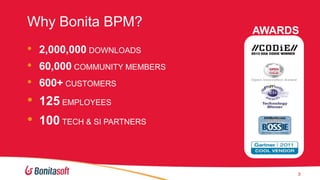
Why Bonita BPM?

AWARDS

• 2,000,000 DOWNLOADS
• 60,000 COMMUNITY MEMBERS
• 600+ CUSTOMERS

•
•

125 EMPLOYEES

100 TECH & SI PARTNERS

3
600 customers in 60 countries
5
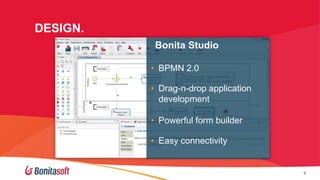
DESIGN.
Bonita Studio
• BPMN 2.0
• Drag-n-drop application
development
• Powerful form builder
• Easy connectivity

6

6
CONNECT.

… to almost any Information System
7

7
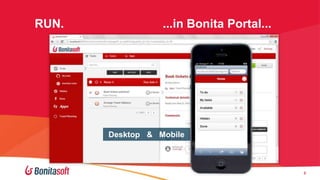
RUN.

...in Bonita Portal...

Desktop & Mobile

8

8
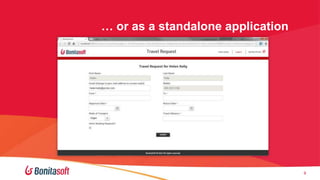
… or as a standalone application

9

9
Commercial Offerings

11
Commercial offerings
We support your projects and accelerate their success

• Professional Services
- Training
- Certification in development and administration
- Consulting: On-Site or Remote

• Annual Subscriptions
- Gold or Platinum Technical Support
- Features to facilitate collaboration, speed development,
aid testing, deployment and administration,
advanced portal features
12
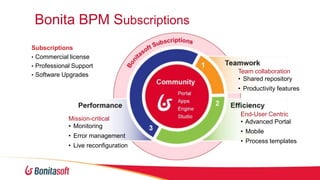
Bonita BPM Subscriptions
Subscriptions
• Commercial license
• Professional Support
• Software Upgrades

Team collaboration
• Shared repository
• Productivity features

Mission-critical
• Monitoring

• Error management
• Live reconfiguration

End-User Centric
• Advanced Portal
• Mobile
• Process templates
Best practices for building Bonita Web
Forms
©2013 Bonitasoft

14
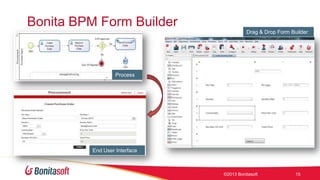
Bonita BPM Form Builder
Drag & Drop Form Builder

Process

End User Interface

©2013 Bonitasoft

15
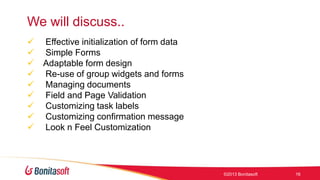
We will discuss..










Effective initialization of form data
Simple Forms
Adaptable form design
Re-use of group widgets and forms
Managing documents
Field and Page Validation
Customizing task labels
Customizing confirmation message
Look n Feel Customization

©2013 Bonitasoft

16
Data variable scopes
 Process Variable
Available throughout the process and are persisted in Bonita
database
 Task Variable
 Available for the task and its outgoing transitions. Can be

transient or persisted
 Form Variable

Available only in the form and is transient

©2013 Bonitasoft

17
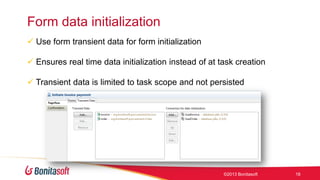
Form data initialization
 Use form transient data for form initialization
 Ensures real time data initialization instead of at task creation
 Transient data is limited to task scope and not persisted

©2013 Bonitasoft

18
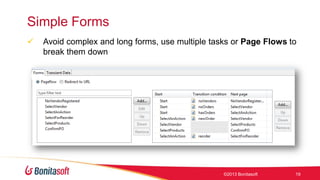
Simple Forms


Avoid complex and long forms, use multiple tasks or Page Flows to
break them down

©2013 Bonitasoft

19
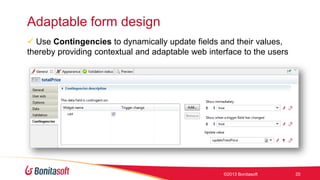
Adaptable form design
 Use Contingencies to dynamically update fields and their values,
thereby providing contextual and adaptable web interface to the users

©2013 Bonitasoft

20
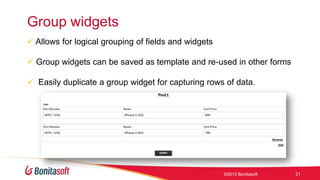
Group widgets
 Allows for logical grouping of fields and widgets
 Group widgets can be saved as template and re-used in other forms
 Easily duplicate a group widget for capturing rows of data.

©2013 Bonitasoft

21
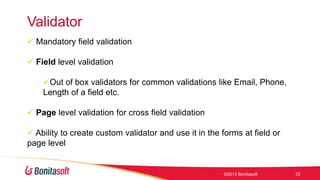
Validator
 Mandatory field validation
 Field level validation
Out of box validators for common validations like Email, Phone,
Length of a field etc.
 Page level validation for cross field validation

 Ability to create custom validator and use it in the forms at field or
page level

©2013 Bonitasoft

22
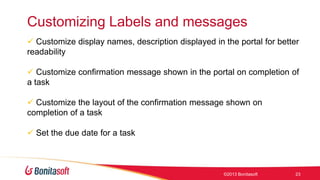
Customizing Labels and messages
 Customize display names, description displayed in the portal for better
readability
 Customize confirmation message shown in the portal on completion of
a task
 Customize the layout of the confirmation message shown on
completion of a task

 Set the due date for a task

©2013 Bonitasoft

23
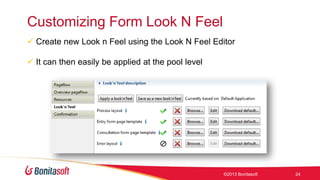
Customizing Form Look N Feel
 Create new Look n Feel using the Look N Feel Editor
 It can then easily be applied at the pool level

©2013 Bonitasoft

24
Thank you, and…
STAY CONNECTED WITH US!

CORPORATE WEBSITE
Product & Services descriptions,
References, Webinars, White papers

youtube.com/
bonitasoft

twitter.com/
bonitasoft

OPEN SOURCE COMMUNITY
Forums, Contributions, Source
Code

linkedin.com/groups?
gid=3182097

facebook.com/
bonitasoftbpm

©2013 Bonitasoft

25

Best practices for building poweful, user friendly webforms

  • 1.
    Best practices forbuilding webforms with Bonita BPM Vivecca Yong Tim & Sapna Maheswari ©2013 Bonitasoft
  • 2.
    Agenda Why choose BonitaBPM Tips & best practices for building web forms Demonstration of the best practices Questions Addressed #BonitaBPM
  • 3.
    Why Bonita BPM? AWARDS •2,000,000 DOWNLOADS • 60,000 COMMUNITY MEMBERS • 600+ CUSTOMERS • • 125 EMPLOYEES 100 TECH & SI PARTNERS 3
  • 4.
    600 customers in60 countries
  • 5.
  • 6.
    DESIGN. Bonita Studio • BPMN2.0 • Drag-n-drop application development • Powerful form builder • Easy connectivity 6 6
  • 7.
    CONNECT. … to almostany Information System 7 7
  • 8.
  • 9.
    … or asa standalone application 9 9
  • 10.
  • 11.
    Commercial offerings We supportyour projects and accelerate their success • Professional Services - Training - Certification in development and administration - Consulting: On-Site or Remote • Annual Subscriptions - Gold or Platinum Technical Support - Features to facilitate collaboration, speed development, aid testing, deployment and administration, advanced portal features 12
  • 12.
    Bonita BPM Subscriptions Subscriptions •Commercial license • Professional Support • Software Upgrades Team collaboration • Shared repository • Productivity features Mission-critical • Monitoring • Error management • Live reconfiguration End-User Centric • Advanced Portal • Mobile • Process templates
  • 13.
    Best practices forbuilding Bonita Web Forms ©2013 Bonitasoft 14
  • 14.
    Bonita BPM FormBuilder Drag & Drop Form Builder Process End User Interface ©2013 Bonitasoft 15
  • 15.
    We will discuss..          Effectiveinitialization of form data Simple Forms Adaptable form design Re-use of group widgets and forms Managing documents Field and Page Validation Customizing task labels Customizing confirmation message Look n Feel Customization ©2013 Bonitasoft 16
  • 16.
    Data variable scopes Process Variable Available throughout the process and are persisted in Bonita database  Task Variable  Available for the task and its outgoing transitions. Can be transient or persisted  Form Variable Available only in the form and is transient ©2013 Bonitasoft 17
  • 17.
    Form data initialization Use form transient data for form initialization  Ensures real time data initialization instead of at task creation  Transient data is limited to task scope and not persisted ©2013 Bonitasoft 18
  • 18.
    Simple Forms  Avoid complexand long forms, use multiple tasks or Page Flows to break them down ©2013 Bonitasoft 19
  • 19.
    Adaptable form design Use Contingencies to dynamically update fields and their values, thereby providing contextual and adaptable web interface to the users ©2013 Bonitasoft 20
  • 20.
    Group widgets  Allowsfor logical grouping of fields and widgets  Group widgets can be saved as template and re-used in other forms  Easily duplicate a group widget for capturing rows of data. ©2013 Bonitasoft 21
  • 21.
    Validator  Mandatory fieldvalidation  Field level validation Out of box validators for common validations like Email, Phone, Length of a field etc.  Page level validation for cross field validation  Ability to create custom validator and use it in the forms at field or page level ©2013 Bonitasoft 22
  • 22.
    Customizing Labels andmessages  Customize display names, description displayed in the portal for better readability  Customize confirmation message shown in the portal on completion of a task  Customize the layout of the confirmation message shown on completion of a task  Set the due date for a task ©2013 Bonitasoft 23
  • 23.
    Customizing Form LookN Feel  Create new Look n Feel using the Look N Feel Editor  It can then easily be applied at the pool level ©2013 Bonitasoft 24
  • 24.
    Thank you, and… STAYCONNECTED WITH US! CORPORATE WEBSITE Product & Services descriptions, References, Webinars, White papers youtube.com/ bonitasoft twitter.com/ bonitasoft OPEN SOURCE COMMUNITY Forums, Contributions, Source Code linkedin.com/groups? gid=3182097 facebook.com/ bonitasoftbpm ©2013 Bonitasoft 25

Editor's Notes

  • #6 Let’s take a look at what Bonita BPM can do for you. There are three components to Bonita BPM a Studio for modeling processes, a java based