Mobile Grid Setup
Belfast Selenium Meetup
October 15, 2015
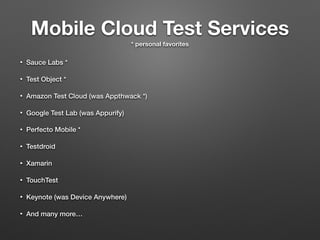
Mobile Cloud Test Services
* personal favorites
• Sauce Labs *
• Test Object *
• Amazon Test Cloud (was Appthwack *)
• Google Test Lab (was Appurify)
• Perfecto Mobile *
• Testdroid
• Xamarin
• TouchTest
• Keynote (was Device Anywhere)
• And many more…
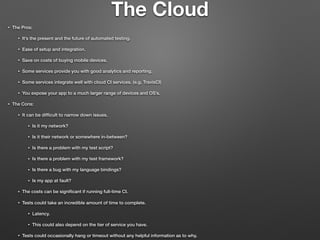
The Cloud
• The Pros:
• It’s the present and the future of automated testing.
• Ease of setup and integration.
• Save on costs of buying mobile devices.
• Some services provide you with good analytics and reporting.
• Some services integrate well with cloud CI services. (e.g. TravisCI)
• You expose your app to a much larger range of devices and OS’s.
• The Cons:
• It can be difficult to narrow down issues.
• Is it my network?
• Is it their network or somewhere in-between?
• Is there a problem with my test script?
• Is there a problem with my test framework?
• Is there a bug with my language bindings?
• Is my app at fault?
• The costs can be significant if running full-time CI.
• Tests could take an incredible amount of time to complete.
• Latency.
• This could also depend on the tier of service you have.
• Tests could occasionally hang or timeout without any helpful information as to why.
The Mobile Grid
• The Pros:
• It’s not that difficult once you know how.
• The awesome Appium developers baked a grid node into the Appium server.
• appium —nodeconfig android.json -p 4000 -bp 2250 —udid emulator-5554 (or device udid)
• In the long run you will save money.
• You have all you're critical test data local for debugging.
• You’re not handcuffed to a cloud test services 24/7 availability.
• Outages.
• Bugs in their software.
• Acquired by another company.
• You have a bit more flexibility capturing data to include in test reports.
• e.g. You have full access to every connected device.
• The Cons:
• It can be difficult to know where to begin.
• Tough finding documentation or examples.
• Takes a bit of time to setup and smoothing out.
• Require some degree of dev-ops knowledge.
• Random device issue. (I’ll cover this later.)
What I’ll demo…
• Getting connected devices programmatically.
• Launching Appium nodes programmatically.
• Running tests distributed.
• Running tests in parallel.
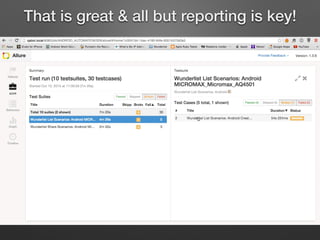
• Feeding test data into Allure.
• Generating the Allure report.
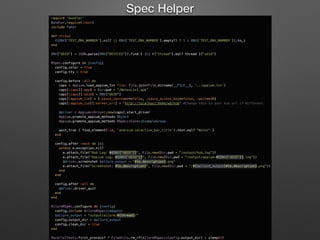
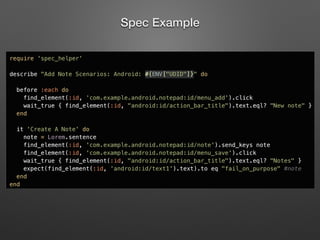
• Lets briefly look at the code…
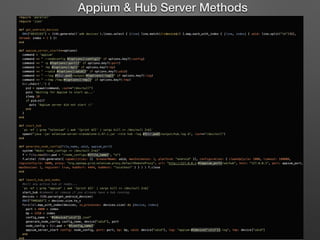
Appium & Hub Server Methods
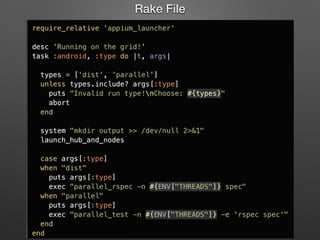
Rake File
Spec Helper
Spec Example
• Run the examples:
• Distributed: rake android[dist]
• https://www.dropbox.com/s/8md7ihp2i6pc5pw/distributed.mov?dl=0
• Parallel: rake android[parallel]
• https://www.dropbox.com/s/o7f6gb7chq51xya/parallel.mov?dl=0
• Generate the Allure report.
• allure generate report output/allure/*
• allure report open
• https://www.dropbox.com/s/a8g0erkabpa5zny/signup_failure.mov?dl=0
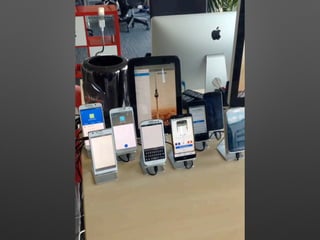
• Wunderlist Mobile Grid
• https://www.dropbox.com/s/y5xsmnxfldguzr0/grid-trimmed.mov?dl=0
The Demo
Wunderlist Mobile Grid
That is great & all but reporting is key!
Challenges
• Random adb disconnects.
• Solved this by programmatically rebooting USB hubs before every test run.
• Random WiFi disconnects.
• Possible Solutions:
• Reverse USB tethering.
• WiFi connection apps.
• Using multiple routers on different channels.
• Spreading the devices apart.
• Alternatives to real devices:
• Using emulators with VNC clients. Facebook does this.
• Using Genymotion emulators. It’s the closest software to a real device.
• Using Docker containers with android emulators as nodes to connect to a hub.
• Some devices behave erratically.
• Finding relavent documentation.
• Finding solid examples.
Thank You!
• email: justin.ison@gmail.com
• twitter: @isonic1
• https://github.com/isonic1/selenium-conf-2015

Belfast Selenium Meetup

  • 1.
    Mobile Grid Setup BelfastSelenium Meetup October 15, 2015
  • 2.
    Mobile Cloud TestServices * personal favorites • Sauce Labs * • Test Object * • Amazon Test Cloud (was Appthwack *) • Google Test Lab (was Appurify) • Perfecto Mobile * • Testdroid • Xamarin • TouchTest • Keynote (was Device Anywhere) • And many more…
  • 3.
    The Cloud • ThePros: • It’s the present and the future of automated testing. • Ease of setup and integration. • Save on costs of buying mobile devices. • Some services provide you with good analytics and reporting. • Some services integrate well with cloud CI services. (e.g. TravisCI) • You expose your app to a much larger range of devices and OS’s. • The Cons: • It can be difficult to narrow down issues. • Is it my network? • Is it their network or somewhere in-between? • Is there a problem with my test script? • Is there a problem with my test framework? • Is there a bug with my language bindings? • Is my app at fault? • The costs can be significant if running full-time CI. • Tests could take an incredible amount of time to complete. • Latency. • This could also depend on the tier of service you have. • Tests could occasionally hang or timeout without any helpful information as to why.
  • 4.
    The Mobile Grid •The Pros: • It’s not that difficult once you know how. • The awesome Appium developers baked a grid node into the Appium server. • appium —nodeconfig android.json -p 4000 -bp 2250 —udid emulator-5554 (or device udid) • In the long run you will save money. • You have all you're critical test data local for debugging. • You’re not handcuffed to a cloud test services 24/7 availability. • Outages. • Bugs in their software. • Acquired by another company. • You have a bit more flexibility capturing data to include in test reports. • e.g. You have full access to every connected device. • The Cons: • It can be difficult to know where to begin. • Tough finding documentation or examples. • Takes a bit of time to setup and smoothing out. • Require some degree of dev-ops knowledge. • Random device issue. (I’ll cover this later.)
  • 5.
    What I’ll demo… •Getting connected devices programmatically. • Launching Appium nodes programmatically. • Running tests distributed. • Running tests in parallel. • Feeding test data into Allure. • Generating the Allure report. • Lets briefly look at the code…
  • 6.
    Appium & HubServer Methods
  • 7.
  • 8.
  • 9.
  • 10.
    • Run theexamples: • Distributed: rake android[dist] • https://www.dropbox.com/s/8md7ihp2i6pc5pw/distributed.mov?dl=0 • Parallel: rake android[parallel] • https://www.dropbox.com/s/o7f6gb7chq51xya/parallel.mov?dl=0 • Generate the Allure report. • allure generate report output/allure/* • allure report open • https://www.dropbox.com/s/a8g0erkabpa5zny/signup_failure.mov?dl=0 • Wunderlist Mobile Grid • https://www.dropbox.com/s/y5xsmnxfldguzr0/grid-trimmed.mov?dl=0 The Demo
  • 11.
  • 13.
    That is great& all but reporting is key!
  • 14.
    Challenges • Random adbdisconnects. • Solved this by programmatically rebooting USB hubs before every test run. • Random WiFi disconnects. • Possible Solutions: • Reverse USB tethering. • WiFi connection apps. • Using multiple routers on different channels. • Spreading the devices apart. • Alternatives to real devices: • Using emulators with VNC clients. Facebook does this. • Using Genymotion emulators. It’s the closest software to a real device. • Using Docker containers with android emulators as nodes to connect to a hub. • Some devices behave erratically. • Finding relavent documentation. • Finding solid examples.
  • 15.
    Thank You! • email:justin.ison@gmail.com • twitter: @isonic1 • https://github.com/isonic1/selenium-conf-2015