UNIT - 4
TESTING IN THE AGILE ENVIRONMENT
• Agile software testing is a methodology that
helps developers test their code continuously
and rapidly.
• This methodology also allows testers to get
immediate feedback from customers.
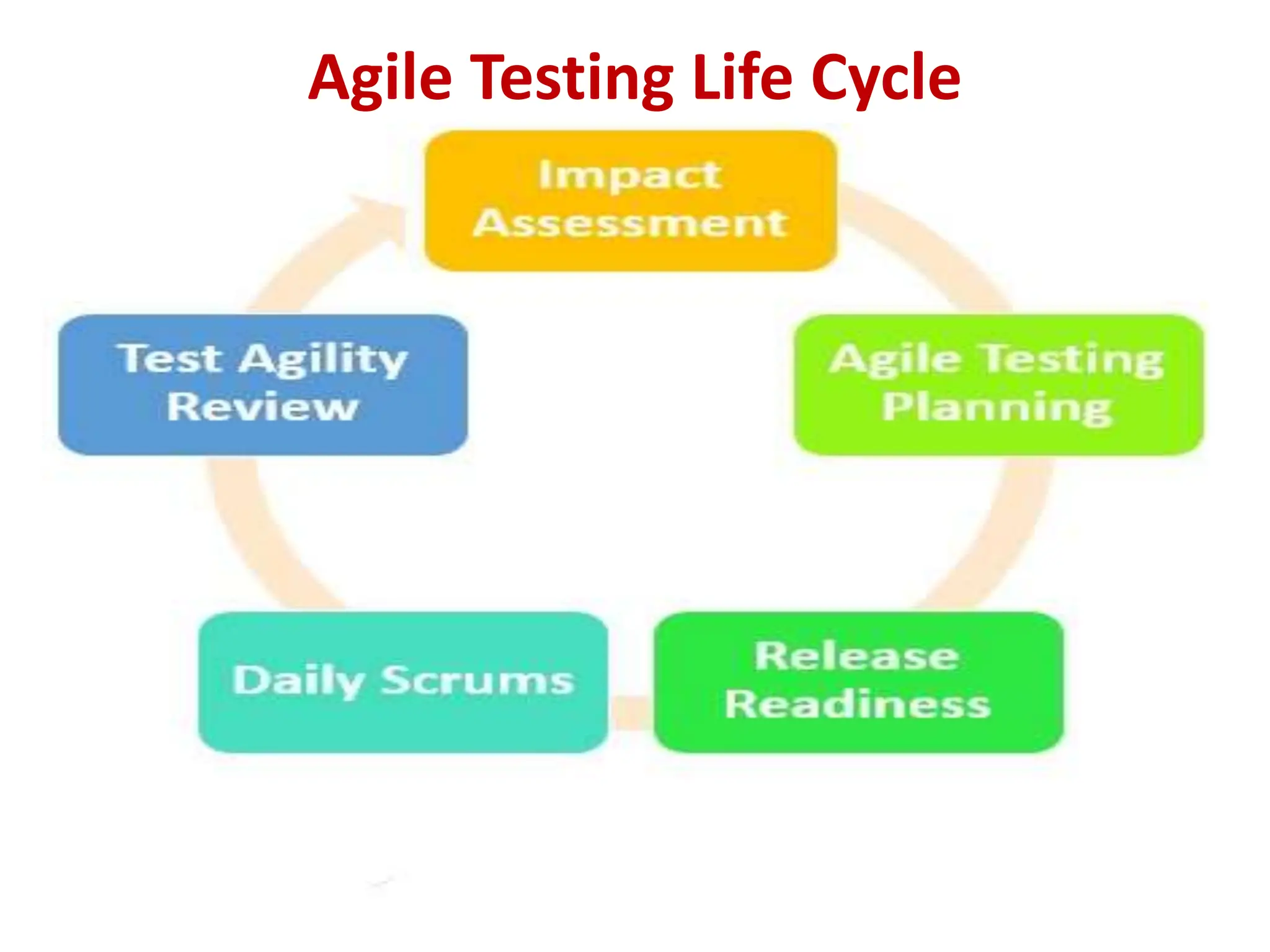
Agile Testing Life Cycle
Agile Testing Methodologies
• Writing Test Cases to express the behavior of the
system.
• Early Defect Prevention, detection and removal.
• Ensuring that the right test types are run at the
right time and as part of the right test level.
The other commonly used Agile Testing Methodologies
are −
• Test-Driven Development (TDD) − Test-Driven
Development (TDD) is based on coding guided by
tests.
• Acceptance Test-Driven Development (ATDD) −
Acceptance Test-Driven Development (ATDD) is based
on communication between the customers,
developers and testers and driven by pre-defined
Acceptance Criteria and Acceptance Test Cases.
• Behavior-Driven Development (BDD) − In Behavior-
Driven Development (BDD) testing is based on the
expected behavior of the software being developed.
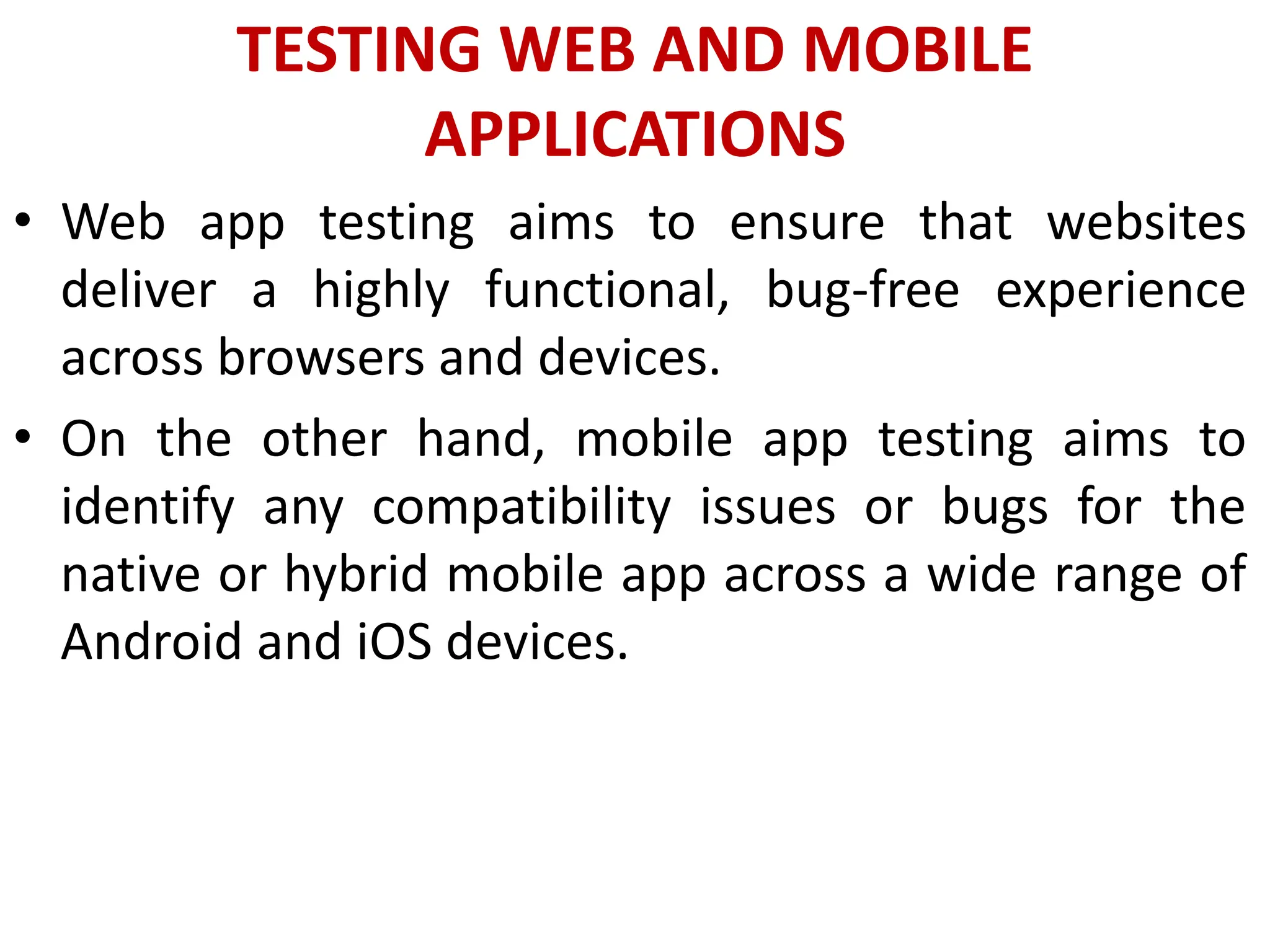
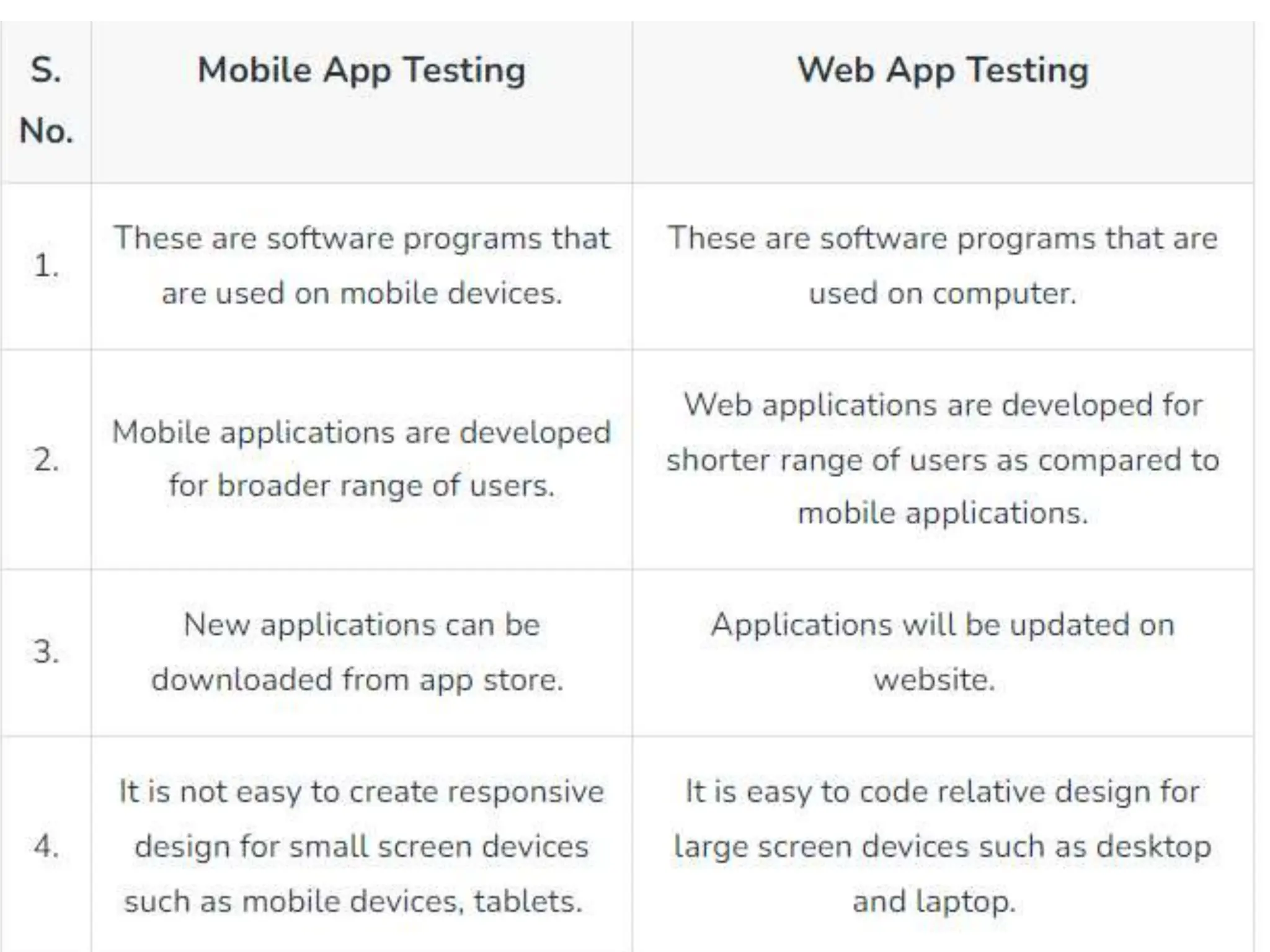
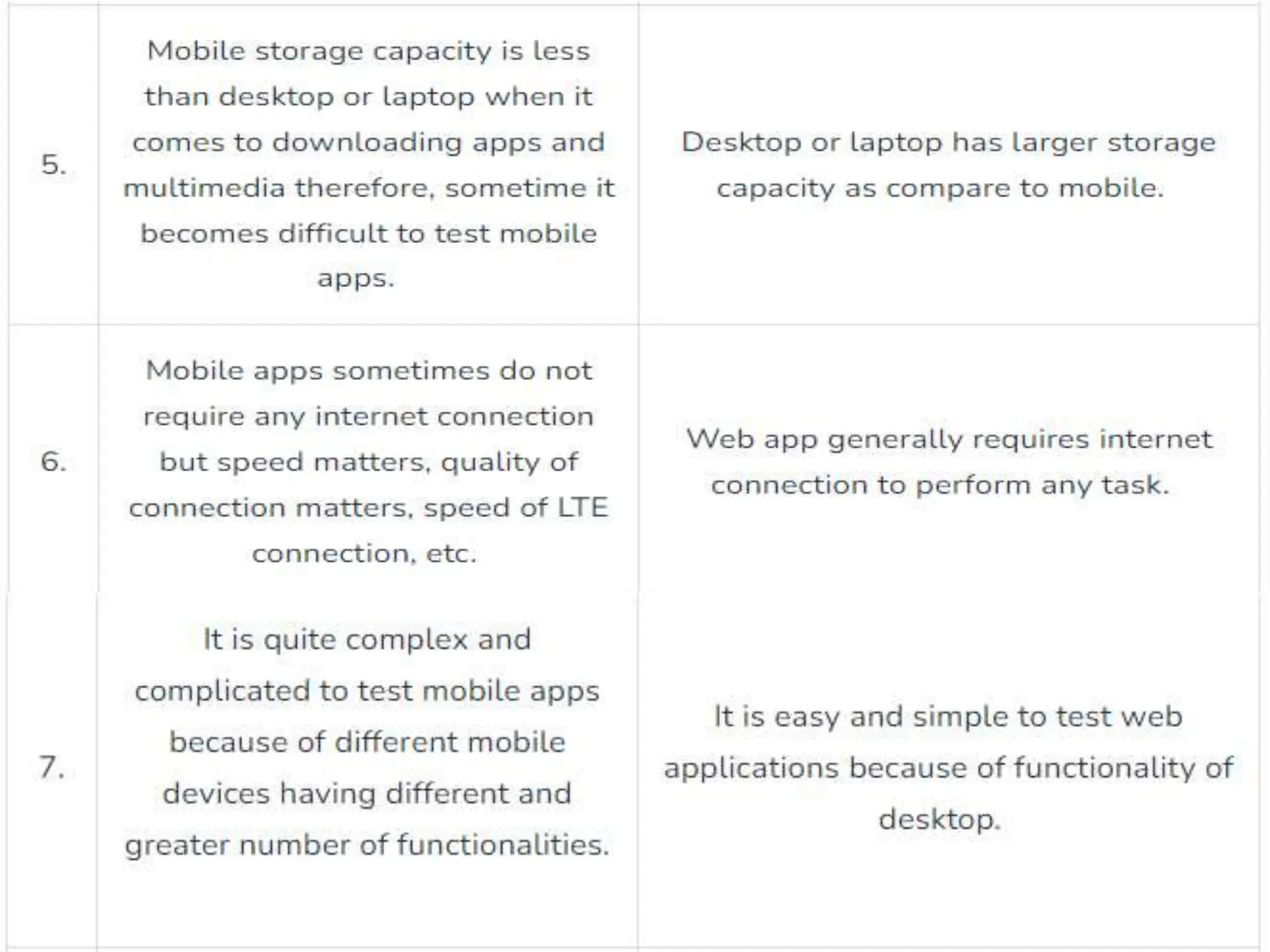
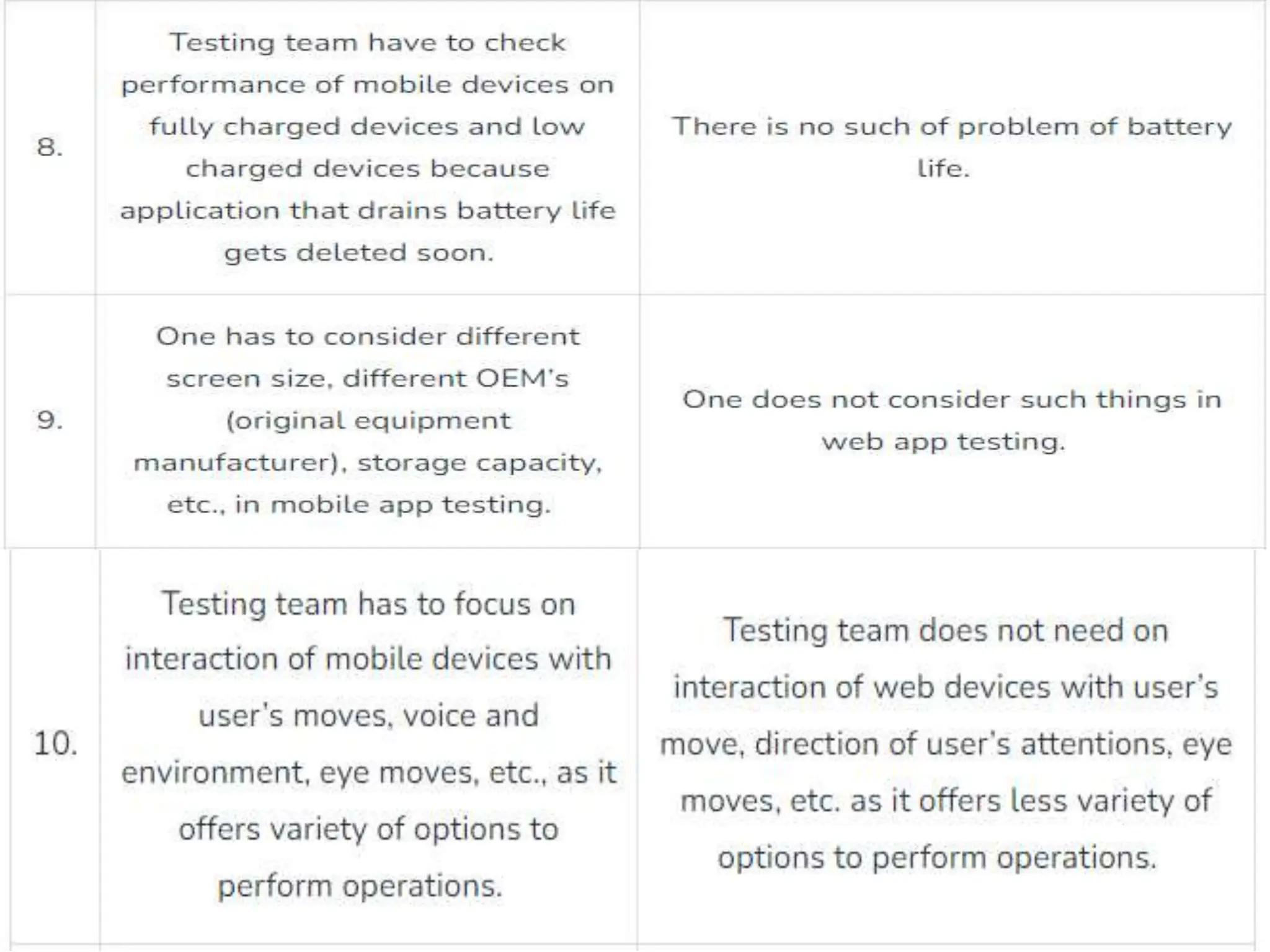
TESTING WEB AND MOBILE
APPLICATIONS
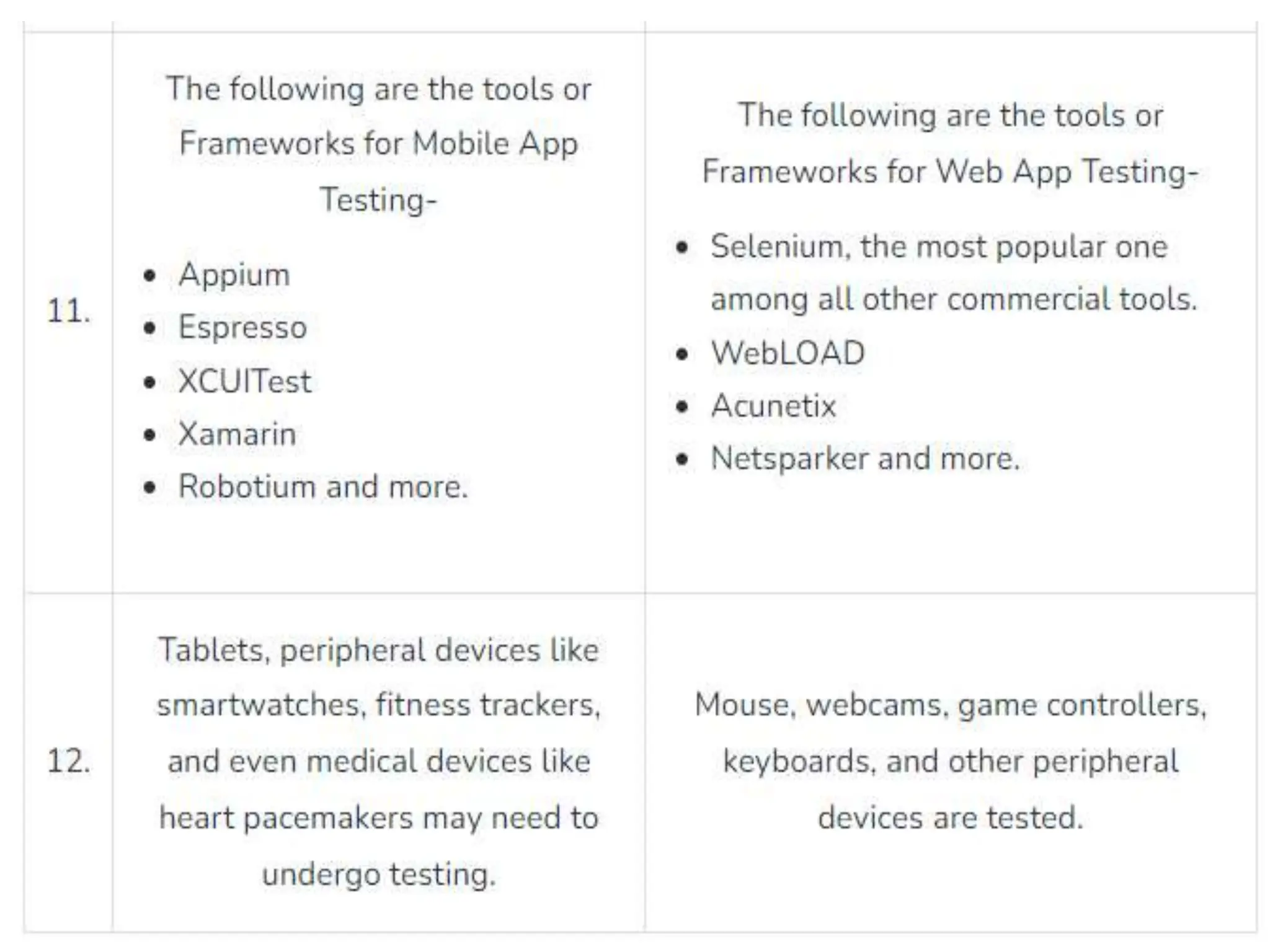
• Web app testing aims to ensure that websites
deliver a highly functional, bug-free experience
across browsers and devices.
• On the other hand, mobile app testing aims to
identify any compatibility issues or bugs for the
native or hybrid mobile app across a wide range of
Android and iOS devices.
UNIT - 5
TEST AUTOMATION AND
TOOLS
AUTOMATED SOFTWARE TESTING
• Automated testing is the application of software
tools to automate a human-driven manual process
of reviewing and validating a software product.
• Most modern agile and DevOps software projects
now include automated testing from inception.
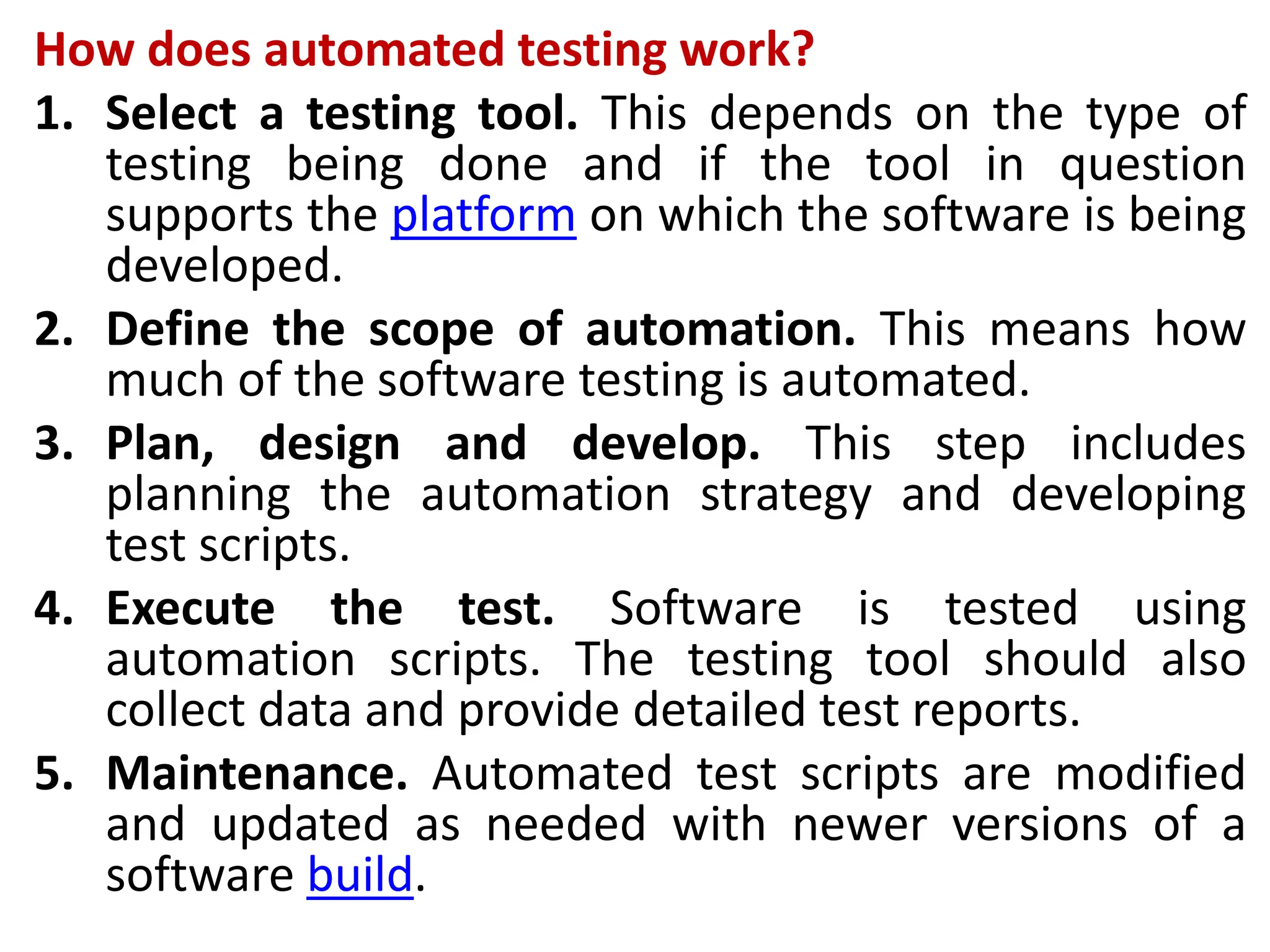
How does automated testing work?
1. Select a testing tool. This depends on the type of
testing being done and if the tool in question
supports the platform on which the software is being
developed.
2. Define the scope of automation. This means how
much of the software testing is automated.
3. Plan, design and develop. This step includes
planning the automation strategy and developing
test scripts.
4. Execute the test. Software is tested using
automation scripts. The testing tool should also
collect data and provide detailed test reports.
5. Maintenance. Automated test scripts are modified
and updated as needed with newer versions of a
software build.
Tests that are normally automated include the
following:
• Acceptance tests.
• API tests.
• Integration tests.
• Regression tests.
• Smoke tests.
• System tests.
• Unit tests.
• User interface (UI) tests.
Benefits of automated testing
• Better reporting capabilities.
• More frequent tests.
• Enhanced resource efficiency.
• Faster than manual testing and has a faster feedback
cycle
• Higher accuracy.
• Improved bug detection.
• Improved return on investment over manual testing.
• Increased coverage.
• Reusable test scripts.
• Scalability.
• Automated testing best practices
1. Tests that are performed on different hardware or
software configurations or platforms.
2. Repetitive tests that are used for various builds.
3. Tests with multiple data sets.
4. Tests that are impossible to perform manually.
5. Tests that are too laborious and time-consuming
when performed manually.
6. Tests for frequently used functionalities.
7. Tests that frequently generate human error.
AUTOMATE TESTING OF WEB
APPLICATIONS
• Automated web application testing is a process in
which testing is performed using a set of
automated testing tools.
• Automating web applications saves time and
money as the same set of automated test cases
can be reused multiple times in various agile
sprints.
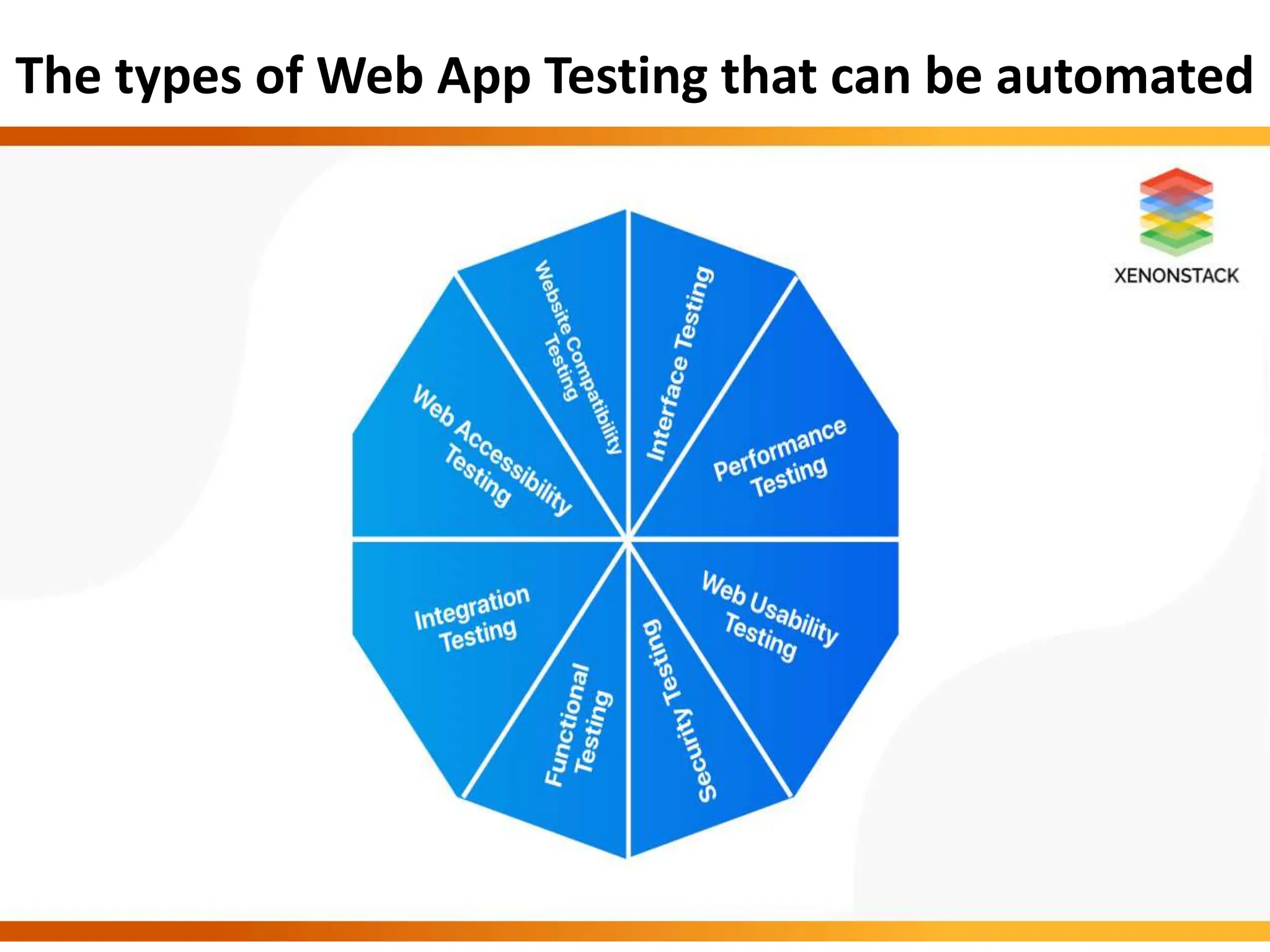
The types of Web App Testing that can be automated
What are the best tools for it?
Katalon Studio
• What do we like?
• It is convenient and accessible to different types of
testers(inclusive and exclusive of both programmings).
• It is flexible and easy to use with its quick, powerful
features(robust).
• It also supports image-based testing, which is quite an enhanced
and new feature.
• It’s known for its hassle-free, customizable execution workflow.
• It can support web application automation, API Testing, Mobile
Testing.
• It has built-in support for creating test cases, generating test
scripts, reporting results, recording actions. It is famous for its
built-in support for groovy(java) scripting languages.
• It can be integrated with CI/DevOps workflow and other tools.
• What do we dislike?
• It only supports groovy(java). So it is feasible for
java users only.
• It is not an open-source tool. It is closed source
code, and it further results in a small community.
• There are some performance issues, like more
interruption causing the device to slow down.
Cucumber
• What do we like?
• It is a collaborative tool based on behavior-driven
development.
• It is an open-source automated software testing tool.
• It helps in writing acceptance tests for our web
applications.
• It provides the amalgamation of both test
documentation and its specification(specs).
• It supports multi-languages like python,perl,ruby,.net
etc.
• It is provided with cross-platform compatibility.
• It can be integrated with DevOps tools like GIT,
Jenkins, etc., for better enhancement.
• What do we dislike?
• Integration and its dependency on generating
reports through plugins can be challenging
enough.
• Every time a new attribute or feature undergoes
it, we have to ensure all current steps and validate
them to see if they can be used.
Selenium
• What do we like?
• It is the most versatile automated software testing tool.
• This tool is open-source and widely supports all languages
and frameworks.
• It comes with heavy library packages.
• It supports cross-browser automation, API automation, and
database automation.
• Testers can use it for regression, exploratory testing, and
quick reproduction of bugs.
• It can be beneficial in parallel test execution techniques.
• It is highly known for its flexibility with ease of
implementation.
• Its integration with gauge automation framework, Galen
framework, lambda test, etc., is trending nowadays.
• What do we dislike?
• Test Maintenance in selenium can become
cumbersome and even expensive sometimes.
• Selenium requires coding skills, if not exceptional
but above average, though.
• It is only supported for web applications, though.
• Technical support and its reliability can cause
problems, though.
• Flaky tests can be a big problem as they generate
false negatives and false positives or vice versa.
SELENIUM: Introducing Web Driver and
Web Elements
• Selenium WebDriver is a programming interface that
can be used to create and execute test cases.
• It allows you to test across all major programming
languages, browsers, and operating systems.
• What is web driver and web element?
• The WebDriver class focuses on driving the browser in
a broad sense. It loads pages, it switches to different
windows/frames, gets the page title etc. Broad actions
that aren't specific to an element on the page.
• WebElement concentrates on interacting with a
specific element that you've located.
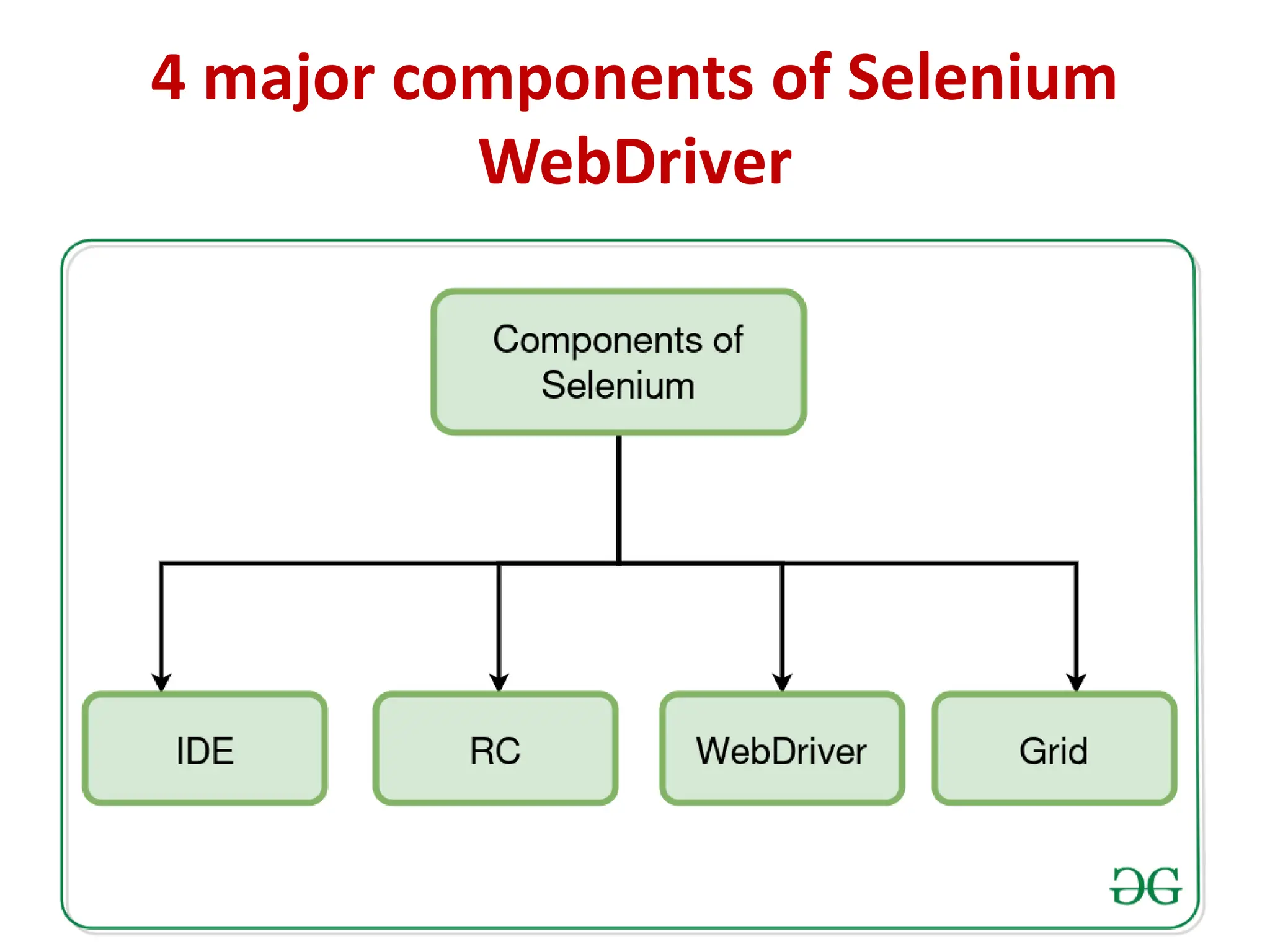
4 major components of Selenium
WebDriver
1. Selenium IDE
• Selenium IDE (Integrated Development
Environment) is the major tool in the Selenium
Suite. It is a complete integrated development
environment (IDE) for Selenium tests.
• It is implemented as a Firefox Add-On and as a
Chrome Extension. It allows for recording, editing
and debugging of functional tests.
2. Selenium RC (Remote control)
• Selenium Remote Control (RC) is a server, written
in Java, that accepts commands for the browser
via HTTP.
• RC makes it possible to write automated tests for
a web application in any programming language,
which allows for better integration of Selenium in
existing unit test frameworks.
• To make writing tests easier, Selenium project
currently provides client drivers for PHP, Python,
Ruby, .NET, Perl and Java.
3. Selenium Web Driver
• Selenium WebDriver is the successor to Selenium
RC. Selenium WebDriver accepts commands (sent
in Selenese, or via a Client API) and sends them to
a browser.
• Most browser drivers actually launch and access a
browser application (such as Firefox, Google
Chrome, Internet Explorer, Safari, or Microsoft
Edge);
4. Selenium GRID
• Selenium Grid is a server that allows tests to use
web browser instances running on remote
machines. With Selenium Grid, one server acts as
the hub.
• Selenium Grid allows running tests in parallel on
multiple machines and to manage different
browser versions and browser configurations
centrally (instead of in each individual test).

4&5.pptx SOFTWARE TESTING UNIT-4 AND UNIT-5

  • 1.
  • 2.
    TESTING IN THEAGILE ENVIRONMENT • Agile software testing is a methodology that helps developers test their code continuously and rapidly. • This methodology also allows testers to get immediate feedback from customers.
  • 3.
  • 4.
    Agile Testing Methodologies •Writing Test Cases to express the behavior of the system. • Early Defect Prevention, detection and removal. • Ensuring that the right test types are run at the right time and as part of the right test level.
  • 5.
    The other commonlyused Agile Testing Methodologies are − • Test-Driven Development (TDD) − Test-Driven Development (TDD) is based on coding guided by tests. • Acceptance Test-Driven Development (ATDD) − Acceptance Test-Driven Development (ATDD) is based on communication between the customers, developers and testers and driven by pre-defined Acceptance Criteria and Acceptance Test Cases. • Behavior-Driven Development (BDD) − In Behavior- Driven Development (BDD) testing is based on the expected behavior of the software being developed.
  • 6.
    TESTING WEB ANDMOBILE APPLICATIONS • Web app testing aims to ensure that websites deliver a highly functional, bug-free experience across browsers and devices. • On the other hand, mobile app testing aims to identify any compatibility issues or bugs for the native or hybrid mobile app across a wide range of Android and iOS devices.
  • 11.
    UNIT - 5 TESTAUTOMATION AND TOOLS
  • 12.
    AUTOMATED SOFTWARE TESTING •Automated testing is the application of software tools to automate a human-driven manual process of reviewing and validating a software product. • Most modern agile and DevOps software projects now include automated testing from inception.
  • 13.
    How does automatedtesting work? 1. Select a testing tool. This depends on the type of testing being done and if the tool in question supports the platform on which the software is being developed. 2. Define the scope of automation. This means how much of the software testing is automated. 3. Plan, design and develop. This step includes planning the automation strategy and developing test scripts. 4. Execute the test. Software is tested using automation scripts. The testing tool should also collect data and provide detailed test reports. 5. Maintenance. Automated test scripts are modified and updated as needed with newer versions of a software build.
  • 14.
    Tests that arenormally automated include the following: • Acceptance tests. • API tests. • Integration tests. • Regression tests. • Smoke tests. • System tests. • Unit tests. • User interface (UI) tests.
  • 15.
    Benefits of automatedtesting • Better reporting capabilities. • More frequent tests. • Enhanced resource efficiency. • Faster than manual testing and has a faster feedback cycle • Higher accuracy. • Improved bug detection. • Improved return on investment over manual testing. • Increased coverage. • Reusable test scripts. • Scalability.
  • 16.
    • Automated testingbest practices 1. Tests that are performed on different hardware or software configurations or platforms. 2. Repetitive tests that are used for various builds. 3. Tests with multiple data sets. 4. Tests that are impossible to perform manually. 5. Tests that are too laborious and time-consuming when performed manually. 6. Tests for frequently used functionalities. 7. Tests that frequently generate human error.
  • 17.
    AUTOMATE TESTING OFWEB APPLICATIONS • Automated web application testing is a process in which testing is performed using a set of automated testing tools. • Automating web applications saves time and money as the same set of automated test cases can be reused multiple times in various agile sprints.
  • 18.
    The types ofWeb App Testing that can be automated
  • 19.
    What are thebest tools for it? Katalon Studio • What do we like? • It is convenient and accessible to different types of testers(inclusive and exclusive of both programmings). • It is flexible and easy to use with its quick, powerful features(robust). • It also supports image-based testing, which is quite an enhanced and new feature. • It’s known for its hassle-free, customizable execution workflow. • It can support web application automation, API Testing, Mobile Testing. • It has built-in support for creating test cases, generating test scripts, reporting results, recording actions. It is famous for its built-in support for groovy(java) scripting languages. • It can be integrated with CI/DevOps workflow and other tools.
  • 20.
    • What dowe dislike? • It only supports groovy(java). So it is feasible for java users only. • It is not an open-source tool. It is closed source code, and it further results in a small community. • There are some performance issues, like more interruption causing the device to slow down.
  • 21.
    Cucumber • What dowe like? • It is a collaborative tool based on behavior-driven development. • It is an open-source automated software testing tool. • It helps in writing acceptance tests for our web applications. • It provides the amalgamation of both test documentation and its specification(specs). • It supports multi-languages like python,perl,ruby,.net etc. • It is provided with cross-platform compatibility. • It can be integrated with DevOps tools like GIT, Jenkins, etc., for better enhancement.
  • 22.
    • What dowe dislike? • Integration and its dependency on generating reports through plugins can be challenging enough. • Every time a new attribute or feature undergoes it, we have to ensure all current steps and validate them to see if they can be used.
  • 23.
    Selenium • What dowe like? • It is the most versatile automated software testing tool. • This tool is open-source and widely supports all languages and frameworks. • It comes with heavy library packages. • It supports cross-browser automation, API automation, and database automation. • Testers can use it for regression, exploratory testing, and quick reproduction of bugs. • It can be beneficial in parallel test execution techniques. • It is highly known for its flexibility with ease of implementation. • Its integration with gauge automation framework, Galen framework, lambda test, etc., is trending nowadays.
  • 24.
    • What dowe dislike? • Test Maintenance in selenium can become cumbersome and even expensive sometimes. • Selenium requires coding skills, if not exceptional but above average, though. • It is only supported for web applications, though. • Technical support and its reliability can cause problems, though. • Flaky tests can be a big problem as they generate false negatives and false positives or vice versa.
  • 25.
    SELENIUM: Introducing WebDriver and Web Elements • Selenium WebDriver is a programming interface that can be used to create and execute test cases. • It allows you to test across all major programming languages, browsers, and operating systems. • What is web driver and web element? • The WebDriver class focuses on driving the browser in a broad sense. It loads pages, it switches to different windows/frames, gets the page title etc. Broad actions that aren't specific to an element on the page. • WebElement concentrates on interacting with a specific element that you've located.
  • 26.
    4 major componentsof Selenium WebDriver
  • 27.
    1. Selenium IDE •Selenium IDE (Integrated Development Environment) is the major tool in the Selenium Suite. It is a complete integrated development environment (IDE) for Selenium tests. • It is implemented as a Firefox Add-On and as a Chrome Extension. It allows for recording, editing and debugging of functional tests.
  • 28.
    2. Selenium RC(Remote control) • Selenium Remote Control (RC) is a server, written in Java, that accepts commands for the browser via HTTP. • RC makes it possible to write automated tests for a web application in any programming language, which allows for better integration of Selenium in existing unit test frameworks. • To make writing tests easier, Selenium project currently provides client drivers for PHP, Python, Ruby, .NET, Perl and Java.
  • 29.
    3. Selenium WebDriver • Selenium WebDriver is the successor to Selenium RC. Selenium WebDriver accepts commands (sent in Selenese, or via a Client API) and sends them to a browser. • Most browser drivers actually launch and access a browser application (such as Firefox, Google Chrome, Internet Explorer, Safari, or Microsoft Edge);
  • 30.
    4. Selenium GRID •Selenium Grid is a server that allows tests to use web browser instances running on remote machines. With Selenium Grid, one server acts as the hub. • Selenium Grid allows running tests in parallel on multiple machines and to manage different browser versions and browser configurations centrally (instead of in each individual test).