


Connecting Hardware to the Web
with the BeagleBone
Frank Hunleth
Twitter: @fhunleth
Pi Masters Meetup 11/21/13
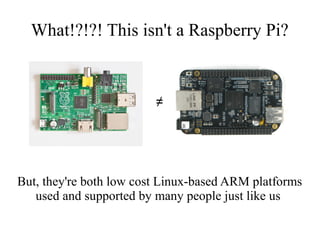
What!?!?! This isn't a Raspberry Pi?

≠

But, they're both low cost Linux-based ARM platforms
used and supported by many people just like us
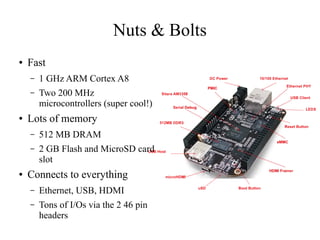
Nuts & Bolts
â—Ź

Fast
–
–

â—Ź

1 GHz ARM Cortex A8
Two 200 MHz
microcontrollers (super cool!)

Lots of memory
–
–

â—Ź

512 MB DRAM
2 GB Flash and MicroSD card
slot

Connects to everything
–

Ethernet, USB, HDMI

–

Tons of I/Os via the 2 46 pin
headers
What You “Need”
â—Ź

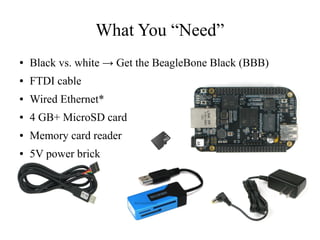
Black vs. white → Get the BeagleBone Black (BBB)

â—Ź

FTDI cable

â—Ź

Wired Ethernet*

â—Ź

4 GB+ MicroSD card

â—Ź

Memory card reader

â—Ź

5V power brick
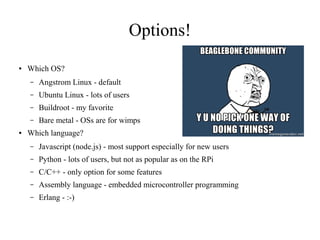
Options!
â—Ź

Which OS?
–
–

Ubuntu Linux - lots of users

–

Buildroot - my favorite

–
â—Ź

Angstrom Linux - default

Bare metal - OSs are for wimps

Which language?
–

Javascript (node.js) - most support especially for new users

–

Python - lots of users, but not as popular as on the RPi

–

C/C++ - only option for some features

–

Assembly language - embedded microcontroller programming

–

Erlang - :-)
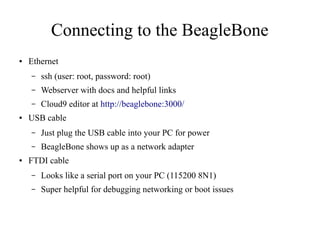
Connecting to the BeagleBone
â—Ź

Ethernet
–
–

Webserver with docs and helpful links

–
â—Ź

ssh (user: root, password: root)
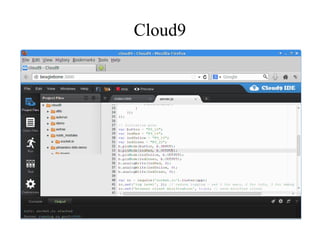
Cloud9 editor at http://beaglebone:3000/

USB cable
–
–

â—Ź

Just plug the USB cable into your PC for power
BeagleBone shows up as a network adapter

FTDI cable
–

Looks like a serial port on your PC (115200 8N1)

–

Super helpful for debugging networking or boot issues
Cloud9
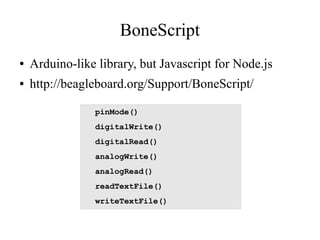
BoneScript
â—Ź

Arduino-like library, but Javascript for Node.js

â—Ź

http://beagleboard.org/Support/BoneScript/
pinMode()
digitalWrite()
digitalRead()
analogWrite()
analogRead()
readTextFile()
writeTextFile()
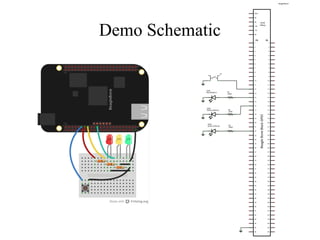
Demo Demo Demo
Demo Schematic
Code Walk-through
â—Ź

https://github.com/fhunleth/pimasters-bbb-demo
Going Further
BeagleBone capes
– Tons of pre-made daughterboards available
– Custom ones are not that hard to make!
â—Ź BeagleBone microcontroller programming
– Real-time logic
– Assembly language (but not too hard)
â—Ź Nerves
– My project for using the Erlang programming language to build
embedded systems
– http://nerves-project.org/
â—Ź
Connecting Hardware to the Web
with the BeagleBone
Frank Hunleth
Twitter: @fhunleth
Pi Masters Meetup 11/21/13

Connecting Hardware to the Web with the BeagleBone

  • 1.
    Connecting Hardware tothe Web with the BeagleBone Frank Hunleth Twitter: @fhunleth Pi Masters Meetup 11/21/13
  • 2.
    What!?!?! This isn'ta Raspberry Pi? ≠ But, they're both low cost Linux-based ARM platforms used and supported by many people just like us
  • 3.
    Nuts & Bolts ● Fast – – ● 1GHz ARM Cortex A8 Two 200 MHz microcontrollers (super cool!) Lots of memory – – ● 512 MB DRAM 2 GB Flash and MicroSD card slot Connects to everything – Ethernet, USB, HDMI – Tons of I/Os via the 2 46 pin headers
  • 4.
    What You “Need” ● Blackvs. white → Get the BeagleBone Black (BBB) ● FTDI cable ● Wired Ethernet* ● 4 GB+ MicroSD card ● Memory card reader ● 5V power brick
  • 5.
    Options! ● Which OS? – – Ubuntu Linux- lots of users – Buildroot - my favorite – ● Angstrom Linux - default Bare metal - OSs are for wimps Which language? – Javascript (node.js) - most support especially for new users – Python - lots of users, but not as popular as on the RPi – C/C++ - only option for some features – Assembly language - embedded microcontroller programming – Erlang - :-)
  • 6.
    Connecting to theBeagleBone ● Ethernet – – Webserver with docs and helpful links – ● ssh (user: root, password: root) Cloud9 editor at http://beaglebone:3000/ USB cable – – ● Just plug the USB cable into your PC for power BeagleBone shows up as a network adapter FTDI cable – Looks like a serial port on your PC (115200 8N1) – Super helpful for debugging networking or boot issues
  • 7.
  • 8.
    BoneScript â—Ź Arduino-like library, butJavascript for Node.js â—Ź http://beagleboard.org/Support/BoneScript/ pinMode() digitalWrite() digitalRead() analogWrite() analogRead() readTextFile() writeTextFile()
  • 9.
  • 10.
  • 11.
  • 12.
    Going Further BeagleBone capes –Tons of pre-made daughterboards available – Custom ones are not that hard to make! ● BeagleBone microcontroller programming – Real-time logic – Assembly language (but not too hard) ● Nerves – My project for using the Erlang programming language to build embedded systems – http://nerves-project.org/ ●
  • 13.
    Connecting Hardware tothe Web with the BeagleBone Frank Hunleth Twitter: @fhunleth Pi Masters Meetup 11/21/13

Editor's Notes

  • #8 Use Firefox - not Chrome
  • #9 pinMode() - set whether a pin is an input or output digitalWrite() - set a pin to high or low digitalRead() - read whether a pin is high or low analogWrite() - set the PWM period and duration analogRead() - sample an ADC readTextFile() - read a Linux kernel driver's sysfs file (or any other file) writeTextFile() - write to a sysfs file to interact with a Linux kernel driver