© 2012-14 SysPlay Workshops <workshop@sysplay.in>
All Rights Reserved.
BeagleBoard Booting Process
2© 2012-14 SysPlay Workshops <workshop@sysplay.in>
All Rights Reserved.
What to Expect?
PC Booting Process
Beagle Booting Process
Booting through SD Card
Partitioning & Creating Root Filesystem
W's of Bootloaders
UBoot
Booting through Serial
3© 2012-14 SysPlay Workshops <workshop@sysplay.in>
All Rights Reserved.
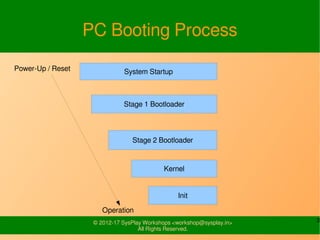
PC Booting Process
System Startup
Stage 2 Bootloader
Stage 1 Bootloader
Kernel
Init
Power-Up /
Reset
Operation
4© 2012-14 SysPlay Workshops <workshop@sysplay.in>
All Rights Reserved.
General Booting of BeagleBoard
Image under “CC BY-SA 3.0 US” from http://omappedia.org/wiki/Bootloader_Project
5© 2012-14 SysPlay Workshops <workshop@sysplay.in>
All Rights Reserved.
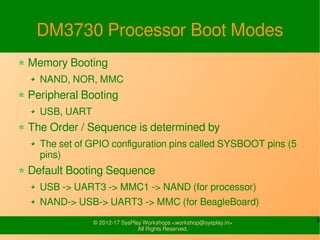
DM3730 Processor Boot Modes
Memory Booting
NAND, NOR, MMC
Peripheral Booting
USB, UART
The Order / Sequence is determined by
The set of GPIO configuration pins called SYSBOOT pins (5
pins)
Default Booting Sequence
USB -> UART3 -> MMC1 -> NAND (for processor)
NAND-> USB-> UART3 -> MMC (for BeagleBoard)
6© 2012-14 SysPlay Workshops <workshop@sysplay.in>
All Rights Reserved.
Beagle Booting Process
(SD Card)
ROM code loads x-loader (MLO)
Performs External DRAM configuration
X-loader loads u-boot
Default location is /media/mmcblkp01/u-boot.bin
U-boot executes default environment/commands
Default location is /mmcblkp01/uEnv.txt
Commands load the Kernel
Default location is /media/mmcblkop2/boot/uImage
Kernel reads root file system
7© 2012-14 SysPlay Workshops <workshop@sysplay.in>
All Rights Reserved.
Recovering the Board
Copy the user.txt and u-boot.bin
tftp -g <serverip> -r u-boot_destroy.bin -l u-
boot.bin
tftp -g <serverip> -r user.txt -l user.txt
Change the ip address in user.txt
Delete the kernel - /boot/uImage
Delete the Root Filesystem.
Reboot the sytem.
8© 2012-14 SysPlay Workshops <workshop@sysplay.in>
All Rights Reserved.
SD Card Partitioning
Fdisk /dev/mmcblk0
Create a window partition of 116MB
Make it bootable
Create two primary Linux partitions of sizes
3GB and 1GB aprox.
9© 2012-14 SysPlay Workshops <workshop@sysplay.in>
All Rights Reserved.
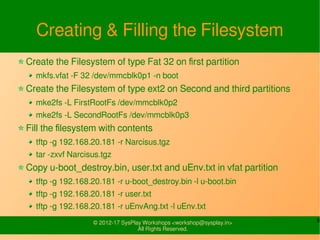
Creating & Filling the Filesystem
Create the Filesystem of type Fat 32 on first partition
mkfs.vfat -F 32 /dev/mmcblk0p1 -n boot
Create the Filesystem of type ext2 on Second and third partitions
mke2fs -L FirstRootFs /dev/mmcblk0p2
mke2fs -L SecondRootFs /dev/mmcblk0p3
Fill the filesystem with contents
tftp -g 192.168.20.181 -r Narcisus.tgz
tar -zxvf Narcisus.tgz
Copy u-boot_destroy.bin, user.txt and uEnv.txt in vfat partition
tftp -g 192.168.20.181 -r u-boot_destroy.bin -l u-boot.bin
tftp -g 192.168.20.181 -r user.txt
tftp -g 192.168.20.181 -r uEnvAng.txt -l uEnv.txt
10© 2012-14 SysPlay Workshops <workshop@sysplay.in>
All Rights Reserved.
What is a Bootloader?
Also, referred to as boot monitor, is a small
piece of software that executes soon after
powering up a system
Simply, a loader (program), which boots up
(starts) the system
A Customized Program started by
Controller's Internal Code in Embedded
Systems, Or
External Pre-programmed Code (like BIOS) in
Desktops
11© 2012-14 SysPlay Workshops <workshop@sysplay.in>
All Rights Reserved.
Tasks of a Bootloader
Initialization Tasks
Memory Setup & Initialization
System Peripheral Initialization
for the kernel
Actual Task
Load the RAM-based File System, like initrd, initramfs, ...
Load the Kernel with proper arguments
Jump to the start of the Kernel
Additional Tasks
Multiple Kernel Boots
12© 2012-14 SysPlay Workshops <workshop@sysplay.in>
All Rights Reserved.
Design of Bootloaders
As Bootloader is started by a fixed code
It needs to be placed at a hard-coded
location
Hard-coded locations are not big enough for
the complete code (/ logic / tasks) of the
bootloader
Hence, it is typically split into 2 portions
Stage 1 – Small enough to load Stage 2 from our
desired location
Stage 2 – The actual bootloader we want to have
13© 2012-14 SysPlay Workshops <workshop@sysplay.in>
All Rights Reserved.
Bootloader Comparisons
On Desktops
Initialization Tasks are done by BIOS
Bootloader is to just Boot the Kernel
On Embedded Systems
All needs to be done by the Bootloader
But in an optimized way
Hence, the 2 bootloaders are
Quite different from each other
Later being more board dependent & constrained
14© 2012-14 SysPlay Workshops <workshop@sysplay.in>
All Rights Reserved.
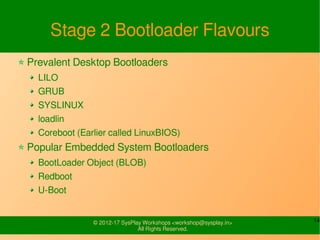
Stage 2 Bootloader Flavours
Prevalent Desktop Bootloaders
LILO
GRUB
SYSLINUX
loadlin
Coreboot (Earlier called LinuxBIOS)
Popular Embedded System Bootloaders
BootLoader Object (BLOB)
Redboot
U-Boot
15© 2012-14 SysPlay Workshops <workshop@sysplay.in>
All Rights Reserved.
Check
Name the Stage 1 & Stage 2 bootloaders
Desktops
Embedded Systems
16© 2012-14 SysPlay Workshops <workshop@sysplay.in>
All Rights Reserved.
U-Boot
17© 2012-14 SysPlay Workshops <workshop@sysplay.in>
All Rights Reserved.
W's of U-Boot
Universal Bootloader (U-Boot)
An Open Source Bootloader
With minimal changes, can be ported for any
board
GRUB/LILO
Designed with x-86 in mind
Huge in Size
Needs to be changed drastically for porting on
other architecture
18© 2012-14 SysPlay Workshops <workshop@sysplay.in>
All Rights Reserved.
U-Boot Source Tree
arch – Architecture dependent Code
board – Board dependent Code
common – Environment & Command Line Code
doc – Documentation
drivers – Device specific Drivers
fs – File System support Code
include – Headers
lib – Compression, Encryption related Code
net – Minimal Network Stack
tools – U-Boot Utilities (mkimage is here)
19© 2012-14 SysPlay Workshops <workshop@sysplay.in>
All Rights Reserved.
U-boot Hands-on
Stopping at the U-Boot
Help - “?”
Commands
Booting: bootp, bootm, boot, ...
NOR Flash: erase, cp, protect, …
NAND Flash: nand
Miscellaneous: reset, ...
...
Environment Variables
printenv
setenv
saveenv
20© 2012-14 SysPlay Workshops <workshop@sysplay.in>
All Rights Reserved.
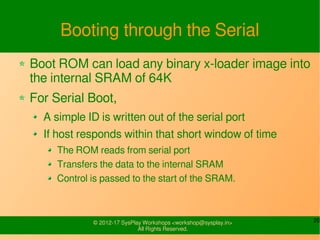
Booting through the Serial
Boot ROM can load any binary x-loader
image into the internal SRAM of 64K
For Serial Boot,
A simple ID is written out of the serial port
If host responds within that short window of
time
The ROM reads from serial port
Transfers the data to the internal SRAM
Control is passed to the start of the SRAM.
21© 2012-14 SysPlay Workshops <workshop@sysplay.in>
All Rights Reserved.
Steps For Serial Booting
Remove the SD Card
Load the X-loader
./pserial -p /dev/ttyS0 -f x-load.bin
Load the U-boot
./ukermit -p /dev/ttyS0 -f u-boot.bin
Prepare the board for the using Ethernet
usb start
setenv serverip 192.168.20.181
setenv ipaddr <ipaddr>
Load & Import the Environmental Variables
tftpboot EnvSerial.txt
run importbootenv
Run the command – run uenvcmd
22© 2012-14 SysPlay Workshops <workshop@sysplay.in>
All Rights Reserved.
U-Boot Compiling
Preparing the Makefile
Setup CROSS_COMPILE for cross compilation
Or, invoke make with these options
Configuring for a particular board
make <board>_config
Compiling for the configured board
make (Output would be u-boot.bin)
Cleaning up
make clean
23© 2012-14 SysPlay Workshops <workshop@sysplay.in>
All Rights Reserved.
Adding the Command in uboot
Create the file cmd_<file>.c
Fill the Macro 'U_BOOT_CMD()'
name : the name of the command
maxargs: the maximum number of arguments this function takes
command : function pointer (*cmd)(struct cmd_tbl_s *, int, int, char
*[])
usage : Short Description
help : Long description
Add the entry into common/Makefile
COBJS-$(CONFIG_CMD_<NAME>) += cmd_<file>.o
Include the macro CONFIG_CMD_<NAME> in board.h file
24© 2012-14 SysPlay Workshops <workshop@sysplay.in>
All Rights Reserved.
What all have learnt?
PC Booting Process
Beagle Booting Process
Booting through SD Card
Booting through Serial
Partitioning & Creating Root Filesystem
W's of Bootloaders
UBoot
25© 2012-14 SysPlay Workshops <workshop@sysplay.in>
All Rights Reserved.
Any Queries?

BeagleBoard-xM Booting Process

  • 1.
    © 2012-14 SysPlayWorkshops <workshop@sysplay.in> All Rights Reserved. BeagleBoard Booting Process
  • 2.
    2© 2012-14 SysPlayWorkshops <workshop@sysplay.in> All Rights Reserved. What to Expect? PC Booting Process Beagle Booting Process Booting through SD Card Partitioning & Creating Root Filesystem W's of Bootloaders UBoot Booting through Serial
  • 3.
    3© 2012-14 SysPlayWorkshops <workshop@sysplay.in> All Rights Reserved. PC Booting Process System Startup Stage 2 Bootloader Stage 1 Bootloader Kernel Init Power-Up / Reset Operation
  • 4.
    4© 2012-14 SysPlayWorkshops <workshop@sysplay.in> All Rights Reserved. General Booting of BeagleBoard Image under “CC BY-SA 3.0 US” from http://omappedia.org/wiki/Bootloader_Project
  • 5.
    5© 2012-14 SysPlayWorkshops <workshop@sysplay.in> All Rights Reserved. DM3730 Processor Boot Modes Memory Booting NAND, NOR, MMC Peripheral Booting USB, UART The Order / Sequence is determined by The set of GPIO configuration pins called SYSBOOT pins (5 pins) Default Booting Sequence USB -> UART3 -> MMC1 -> NAND (for processor) NAND-> USB-> UART3 -> MMC (for BeagleBoard)
  • 6.
    6© 2012-14 SysPlayWorkshops <workshop@sysplay.in> All Rights Reserved. Beagle Booting Process (SD Card) ROM code loads x-loader (MLO) Performs External DRAM configuration X-loader loads u-boot Default location is /media/mmcblkp01/u-boot.bin U-boot executes default environment/commands Default location is /mmcblkp01/uEnv.txt Commands load the Kernel Default location is /media/mmcblkop2/boot/uImage Kernel reads root file system
  • 7.
    7© 2012-14 SysPlayWorkshops <workshop@sysplay.in> All Rights Reserved. Recovering the Board Copy the user.txt and u-boot.bin tftp -g <serverip> -r u-boot_destroy.bin -l u- boot.bin tftp -g <serverip> -r user.txt -l user.txt Change the ip address in user.txt Delete the kernel - /boot/uImage Delete the Root Filesystem. Reboot the sytem.
  • 8.
    8© 2012-14 SysPlayWorkshops <workshop@sysplay.in> All Rights Reserved. SD Card Partitioning Fdisk /dev/mmcblk0 Create a window partition of 116MB Make it bootable Create two primary Linux partitions of sizes 3GB and 1GB aprox.
  • 9.
    9© 2012-14 SysPlayWorkshops <workshop@sysplay.in> All Rights Reserved. Creating & Filling the Filesystem Create the Filesystem of type Fat 32 on first partition mkfs.vfat -F 32 /dev/mmcblk0p1 -n boot Create the Filesystem of type ext2 on Second and third partitions mke2fs -L FirstRootFs /dev/mmcblk0p2 mke2fs -L SecondRootFs /dev/mmcblk0p3 Fill the filesystem with contents tftp -g 192.168.20.181 -r Narcisus.tgz tar -zxvf Narcisus.tgz Copy u-boot_destroy.bin, user.txt and uEnv.txt in vfat partition tftp -g 192.168.20.181 -r u-boot_destroy.bin -l u-boot.bin tftp -g 192.168.20.181 -r user.txt tftp -g 192.168.20.181 -r uEnvAng.txt -l uEnv.txt
  • 10.
    10© 2012-14 SysPlayWorkshops <workshop@sysplay.in> All Rights Reserved. What is a Bootloader? Also, referred to as boot monitor, is a small piece of software that executes soon after powering up a system Simply, a loader (program), which boots up (starts) the system A Customized Program started by Controller's Internal Code in Embedded Systems, Or External Pre-programmed Code (like BIOS) in Desktops
  • 11.
    11© 2012-14 SysPlayWorkshops <workshop@sysplay.in> All Rights Reserved. Tasks of a Bootloader Initialization Tasks Memory Setup & Initialization System Peripheral Initialization for the kernel Actual Task Load the RAM-based File System, like initrd, initramfs, ... Load the Kernel with proper arguments Jump to the start of the Kernel Additional Tasks Multiple Kernel Boots
  • 12.
    12© 2012-14 SysPlayWorkshops <workshop@sysplay.in> All Rights Reserved. Design of Bootloaders As Bootloader is started by a fixed code It needs to be placed at a hard-coded location Hard-coded locations are not big enough for the complete code (/ logic / tasks) of the bootloader Hence, it is typically split into 2 portions Stage 1 – Small enough to load Stage 2 from our desired location Stage 2 – The actual bootloader we want to have
  • 13.
    13© 2012-14 SysPlayWorkshops <workshop@sysplay.in> All Rights Reserved. Bootloader Comparisons On Desktops Initialization Tasks are done by BIOS Bootloader is to just Boot the Kernel On Embedded Systems All needs to be done by the Bootloader But in an optimized way Hence, the 2 bootloaders are Quite different from each other Later being more board dependent & constrained
  • 14.
    14© 2012-14 SysPlayWorkshops <workshop@sysplay.in> All Rights Reserved. Stage 2 Bootloader Flavours Prevalent Desktop Bootloaders LILO GRUB SYSLINUX loadlin Coreboot (Earlier called LinuxBIOS) Popular Embedded System Bootloaders BootLoader Object (BLOB) Redboot U-Boot
  • 15.
    15© 2012-14 SysPlayWorkshops <workshop@sysplay.in> All Rights Reserved. Check Name the Stage 1 & Stage 2 bootloaders Desktops Embedded Systems
  • 16.
    16© 2012-14 SysPlayWorkshops <workshop@sysplay.in> All Rights Reserved. U-Boot
  • 17.
    17© 2012-14 SysPlayWorkshops <workshop@sysplay.in> All Rights Reserved. W's of U-Boot Universal Bootloader (U-Boot) An Open Source Bootloader With minimal changes, can be ported for any board GRUB/LILO Designed with x-86 in mind Huge in Size Needs to be changed drastically for porting on other architecture
  • 18.
    18© 2012-14 SysPlayWorkshops <workshop@sysplay.in> All Rights Reserved. U-Boot Source Tree arch – Architecture dependent Code board – Board dependent Code common – Environment & Command Line Code doc – Documentation drivers – Device specific Drivers fs – File System support Code include – Headers lib – Compression, Encryption related Code net – Minimal Network Stack tools – U-Boot Utilities (mkimage is here)
  • 19.
    19© 2012-14 SysPlayWorkshops <workshop@sysplay.in> All Rights Reserved. U-boot Hands-on Stopping at the U-Boot Help - “?” Commands Booting: bootp, bootm, boot, ... NOR Flash: erase, cp, protect, … NAND Flash: nand Miscellaneous: reset, ... ... Environment Variables printenv setenv saveenv
  • 20.
    20© 2012-14 SysPlayWorkshops <workshop@sysplay.in> All Rights Reserved. Booting through the Serial Boot ROM can load any binary x-loader image into the internal SRAM of 64K For Serial Boot, A simple ID is written out of the serial port If host responds within that short window of time The ROM reads from serial port Transfers the data to the internal SRAM Control is passed to the start of the SRAM.
  • 21.
    21© 2012-14 SysPlayWorkshops <workshop@sysplay.in> All Rights Reserved. Steps For Serial Booting Remove the SD Card Load the X-loader ./pserial -p /dev/ttyS0 -f x-load.bin Load the U-boot ./ukermit -p /dev/ttyS0 -f u-boot.bin Prepare the board for the using Ethernet usb start setenv serverip 192.168.20.181 setenv ipaddr <ipaddr> Load & Import the Environmental Variables tftpboot EnvSerial.txt run importbootenv Run the command – run uenvcmd
  • 22.
    22© 2012-14 SysPlayWorkshops <workshop@sysplay.in> All Rights Reserved. U-Boot Compiling Preparing the Makefile Setup CROSS_COMPILE for cross compilation Or, invoke make with these options Configuring for a particular board make <board>_config Compiling for the configured board make (Output would be u-boot.bin) Cleaning up make clean
  • 23.
    23© 2012-14 SysPlayWorkshops <workshop@sysplay.in> All Rights Reserved. Adding the Command in uboot Create the file cmd_<file>.c Fill the Macro 'U_BOOT_CMD()' name : the name of the command maxargs: the maximum number of arguments this function takes command : function pointer (*cmd)(struct cmd_tbl_s *, int, int, char *[]) usage : Short Description help : Long description Add the entry into common/Makefile COBJS-$(CONFIG_CMD_<NAME>) += cmd_<file>.o Include the macro CONFIG_CMD_<NAME> in board.h file
  • 24.
    24© 2012-14 SysPlayWorkshops <workshop@sysplay.in> All Rights Reserved. What all have learnt? PC Booting Process Beagle Booting Process Booting through SD Card Booting through Serial Partitioning & Creating Root Filesystem W's of Bootloaders UBoot
  • 25.
    25© 2012-14 SysPlayWorkshops <workshop@sysplay.in> All Rights Reserved. Any Queries?