Tips 
Gaurav Kakkar (HCL Technologies) 
@gauravkakkar82 
Search Engine Optimization
Search Engine Optimization 
Importance of SEO 
1 
2 
3 
4 
5 
Defining SEO Objectives 
Keyword Research 
SEO in Action 
Site Audit
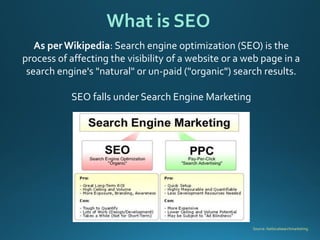
What is SEO 
Source: Getlocalsearchmarketing. 
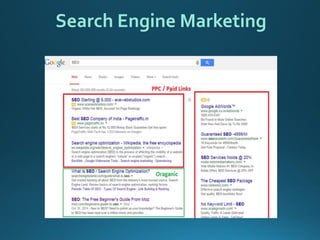
As per Wikipedia: Search engine optimization (SEO) is the process of affecting the visibility of a website or a web page in a search engine's "natural" or un-paid ("organic") search results. 
SEO falls under Search Engine Marketing
Search Engine Marketing
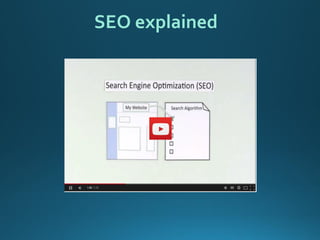
SEO explained
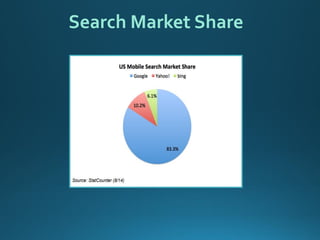
Search Market Share
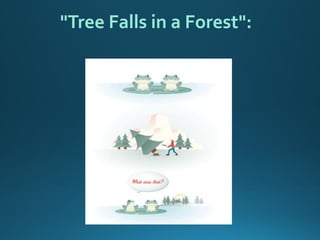
"Tree Falls in a Forest":
Google Penalty Hits eBay’s Bottom Line, May Cost Up To $200 Million In Revenue
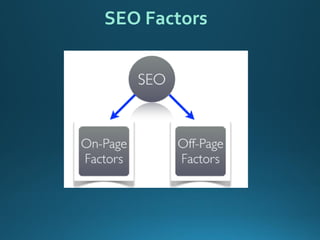
SEO Factors
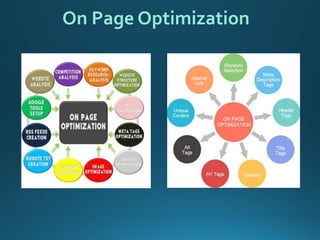
On Page Optimization
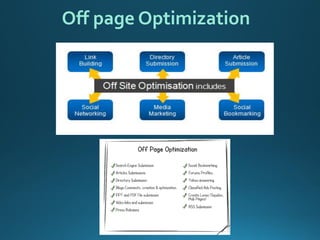
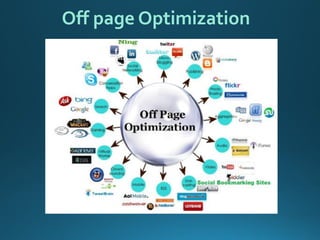
Off page Optimization
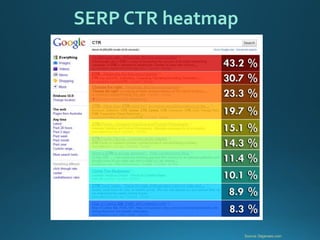
Source: Dejanseo.com 
SERP CTR heatmap
Search Engine Optimization 
Importance of SEO 
1 
2 
3 
4 
5 
Defining SEO Objectives 
Keyword Research 
SEO in Action 
Site Audit
Strategic Goals: 
Expand Reach 
Beating Competition 
Customer Interaction 
Increasing Brand Value 
Other Goals: 
Visibility (Branding) 
Website Traffic 
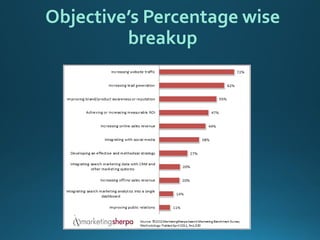
Determining Your SEO Objectives
Objective’s Percentage wise breakup
Navigational query 
Ifthepersonperformthesearchtoreachtospecificpage,destinationorwebsitethenitistreatedasNavigationalquery.Forexample,ifoneislookingtoreachtoBloombergwebsite 
Informational query 
Webisfullofinformation.Ifthesearchisperformedinordertogettheanswertoaspecificquery,thenitisinformationalquery.Thereisnospecificsourcewhichtheuserswantstolandsto.Forexample“CloudComputing” 
Transactional query 
If the search is performed with the intent to ultimately to take an action like buying the laptop, then is istransactional query. 
Understanding Search Engine Traffic and Visitor Intent
Developing an SEO Plan Prior to Site Development 
Business Factors that Affect the SEO Plan 
1.Revenue/business model 
2.Target customers 
3.Competitor strategies 
4.Branding goals 
5.Budget for content development 
6.How your potential customers search for products like yours
Search Engine Optimization 
Importance of SEO 
1 
2 
3 
4 
5 
Defining SEO Objectives 
SEO in Action 
Keyword Research 
Site Audit
1.WordTracker 
2.GoogleAdwords 
3.Microsoft’s adCenter Keyword Generation Tool 
4.KeywordDiscovery 
5.Google Trends 
6.Quintura 
Tools for Keywords Research
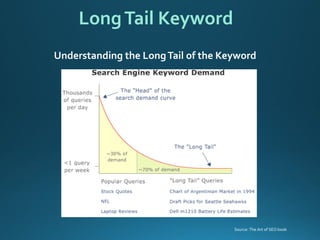
Understanding the Long Tail of the Keyword 
Long Tail Keyword 
Source: The Art of SEO book
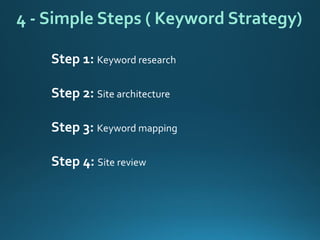
Step 1: Keyword research 
Step 2: Site architecture 
Step 3: Keyword mapping 
Step 4: Site review 
4 -Simple Steps ( Keyword Strategy)
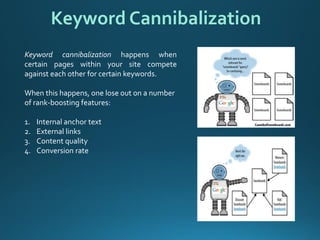
Keywordcannibalizationhappenswhencertainpageswithinyoursitecompeteagainsteachotherforcertainkeywords. 
When this happens, one lose out on a number of rank-boosting features: 
1.Internal anchor text 
2.External links 
3.Content quality 
4.Conversion rate 
Keyword Cannibalization
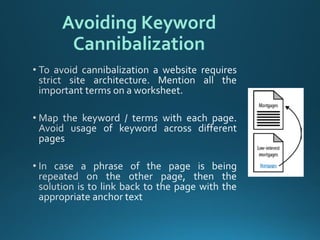
Avoiding Keyword Cannibalization
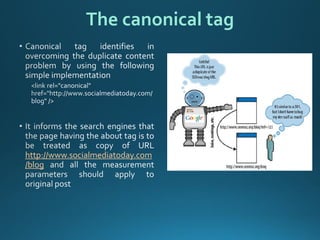
http://www.socialmediatoday.com/blog 
The canonical tag
Search Engine Optimization 
Importance of SEO 
1 
2 
3 
4 
5 
Defining SEO Objectives 
Keyword Research 
SEO in Action 
Site Audit
Define the Site’s Information Architecture which depends on 
Technology decisions : 
1.Dynamic URLs 
2.Session IDs or user IDs in the URL 
3.Superfluous flags in the URL 
4.Links or content based in JavaScript, Java, or Flash 
5.Content behind forms (including pull-down lists) 
6.Temporary (302) redirects 
Structural decisions : 
1.Internal linking 
2.Navigational structures 
3.Home page Linkage 
4.Top-level categories 
5.Use anchor text 
6.Use breadcrumb navigation 
7.Minimize link depth 
First Stages of SEO 
Source: The Art of SEO book
Site’s Information Architecture 
Source: The Art of SEO book
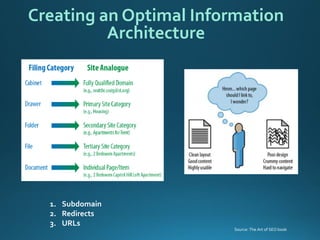
1.Subdomain 
2.Redirects 
3.URLs 
Creating an Optimal Information Architecture 
Source: The Art of SEO book
Designing site architecture 
Source: The Art of SEO book
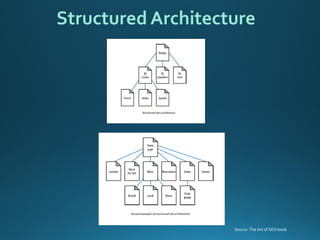
Structured Architecture 
Source: The Art of SEO book
Deep Architecture 
Source: The Art of SEO book
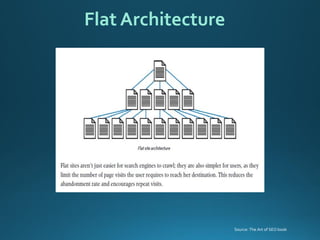
Flat Architecture 
Source: The Art of SEO book
1.Ithelpsvisitorsquicklyfindthecontenttheywant. 
2.Helpsearchenginesunderstandwhatcontentthewebmasterthinksisimportant 
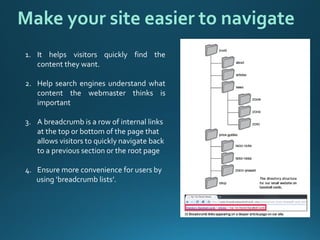
3.A breadcrumb is a row of internal links at the top or bottom of the page that allows visitors to quickly navigate back to a previous section or the root page 
4.Ensure more convenience for users by 
using ‘breadcrumb lists’. 
Make your site easier to navigate
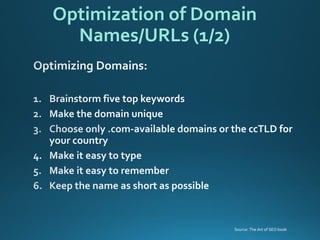
Optimization of Domain Names/URLs (1/2) 
Source: The Art of SEO book
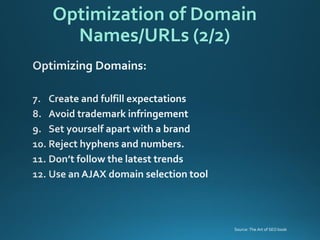
Optimization of Domain Names/URLs (2/2) 
Source: The Art of SEO book
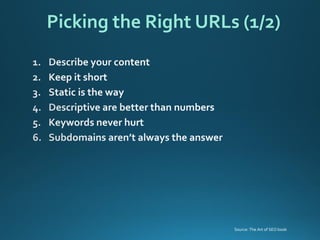
Picking the Right URLs (1/2) 
Source: The Art of SEO book
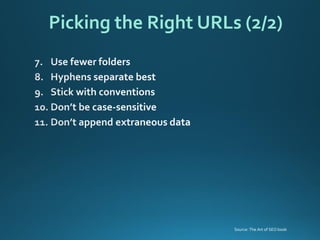
Picking the Right URLs (2/2) 
Source: The Art of SEO book
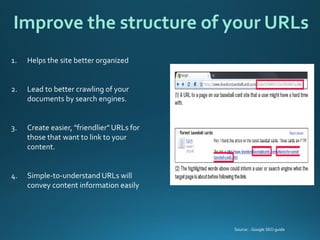
Improve the structure of your URLs 
1.Helpsthesitebetterorganized 
2.Lead to better crawling of your documents by search engines. 
3.Create easier, "friendlier" URLs for those that want to link to your content. 
4.Simple-to-understand URLs will convey content information easily 
Source: : Google SEO guide
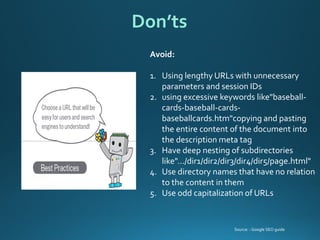
Don’ts 
Avoid: 
1.Using lengthy URLs with unnecessary parameters and session IDs 
2.using excessive keywords like"baseball- cards-baseball-cards- baseballcards.htm"copyingand pasting the entire content of the document into the description meta tag 
3.Have deep nesting of subdirectories like".../dir1/dir2/dir3/dir4/dir5/page.html" 
4.Use directory names that have no relation to the content in them 
5.Use odd capitalization of URLs 
Source: : Google SEO guide
7.Don’temploydescriptionsuniversally 
Meta Description Tags 
Source: The Art of SEO book
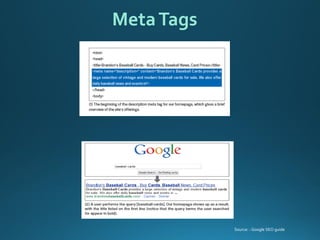
Meta Tags 
Source: : Google SEO guide
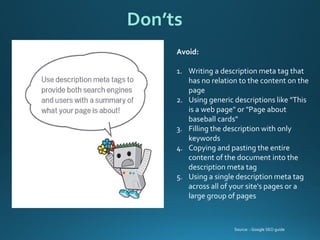
Avoid: 
1.Writing a description meta tag that has no relation to the content on the page 
2.Using generic descriptions like "This is a web page" or "Page about baseball cards" 
3.Filling the description with only keywords 
4.Copying and pasting the entire content of the document into the description meta tag 
5.Using a single description meta tag across all of your site's pages or a large group of pages 
Don’ts 
Source: : Google SEO guide
Heading (H1, H2, H3) Tags & Document Text 
DocumentText: 
Source: The Art of SEO book
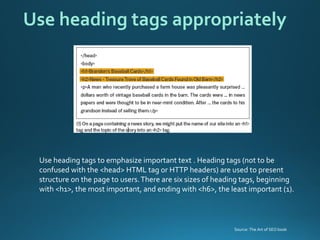
Use heading tags to emphasize important text . Heading tags (not to be confused with the <head> HTML tag or HTTP headers) are used to present structure on the page to users. There are six sizes of heading tags, beginning with <h1>, the most important, and ending with <h6>, the least important (1). 
Use heading tags appropriately 
Source: The Art of SEO book
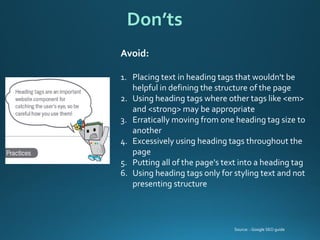
Avoid: 
1.Placing text in heading tags that wouldn't be helpful in defining the structure of the page 
2.Using heading tags where other tags like <em> and <strong> may be appropriate 
3.Erratically moving from one heading tag size to another 
4.Excessively using heading tags throughout the page 
5.Putting all of the page's text into a heading tag 
6.Using heading tags only for styling text and not presenting structure 
Don’ts 
Source: : Google SEO guide
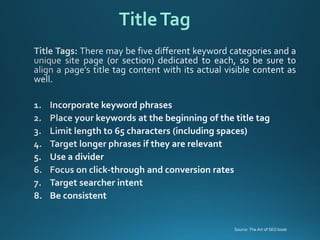
Title Tag 
Source: The Art of SEO book
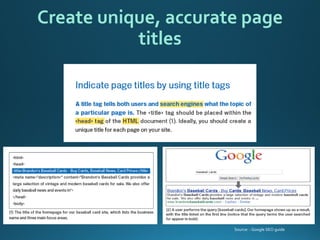
Create unique, accurate page titles 
Source: : Google SEO guide
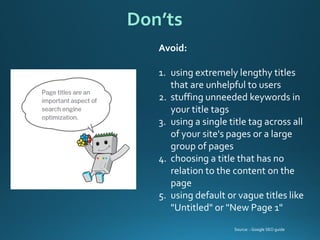
Avoid: 
1.using extremely lengthy titles that are unhelpful to users 
2.stuffing unneeded keywords in your title tags 
3.using a single title tag across all of your site's pages or a large group of pages 
4.choosing a title that has no relation to the content on the page 
5.using default or vague titles like "Untitled" or "New Page 1" 
Don’ts 
Source: : Google SEO guide
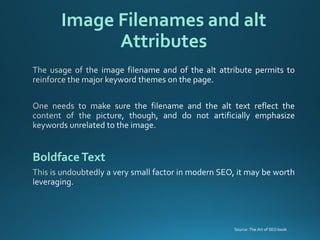
Image Filenames and alt Attributes 
BoldfaceText 
Source: The Art of SEO book
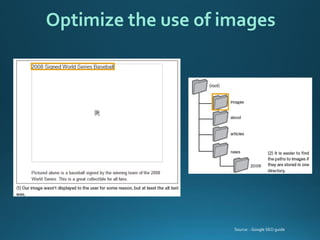
Optimize the use of images 
Source: : Google SEO guide
Use brief, but descriptive filenames and alt text 
Avoid: 
1.Using generic filenames like "image1.jpg", "pic.gif", "1.jpg" when possible—some sites with thousands of images might consider automating the naming of images 
2.Writing extremely lengthy filenames 
3.Stuffing keywords into alt text or copying and pasting entire sentences 
4.Writing excessively long alt text that would be considered spammy 
5.using only image links for your site's navigation 
Source: : Google SEO guide
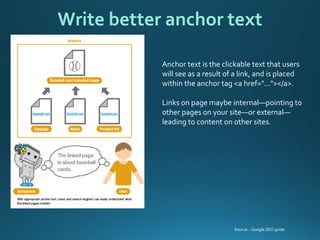
Anchor text is the clickable text that users will see as a result of a link, and is placed within the anchor tag <a href="..."></a>. 
Links on page maybe internal—pointing to other pages on your site—or external— leading to content on other sites. 
Write better anchor text 
Source: : Google SEO guide
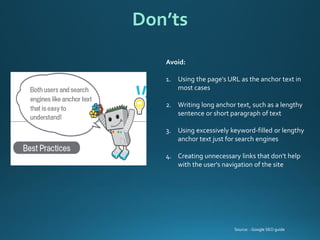
Avoid: 
1.Using the page's URL as the anchor text in most cases 
2.Writing long anchor text, such as a lengthy sentence or short paragraph of text 
3.Using excessively keyword-filled or lengthy anchor text just for search engines 
4.Creating unnecessary links that don't help with the user's navigation of the site 
Don’ts 
Source: : Google SEO guide
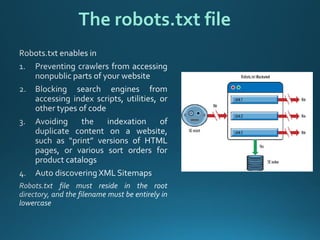
The robots.txt file
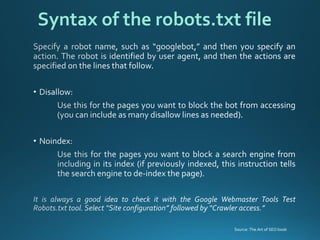
Syntax of the robots.txt file 
Source: The Art of SEO book
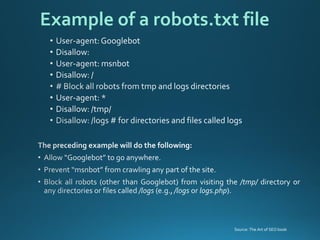
Example of a robots.txt file 
Source: The Art of SEO book
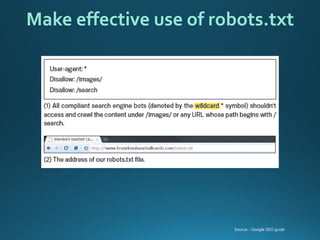
Make effective use of robots.txt 
Source: : Google SEO guide
http://www.google.com 
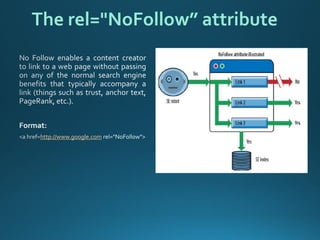
The rel="NoFollow” attribute
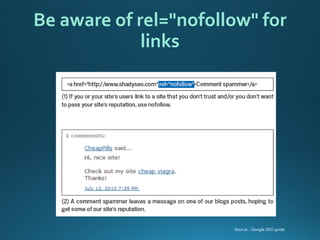
Be aware of rel="nofollow" for links 
Source: : Google SEO guide
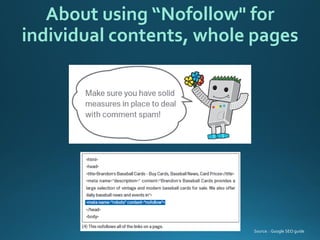
About using “Nofollow" for individual contents, whole pages 
Source: : Google SEO guide
Aredirectisusedtoindicatewhencontenthasmovedfromonelocationtoanother. 
GoodandBadRedirects: 
•“301 moved permanently ”This status code tells the browser (or search engine crawler) that the resource has been permanently moved to another location, and there is no intent to ever bring it back. 
•“302 moved temporarily” This status code tells the browser (or search engine crawler) that the resource has been temporarily moved to another location, and that the move should not be treated as permanent. 
Redirect 
Source: The Art of SEO book
Search Engine Optimization 
Importance of SEO 
1 
2 
3 
4 
5 
Defining SEO Objectives 
Keyword Research 
SEO in Action 
Site Audit
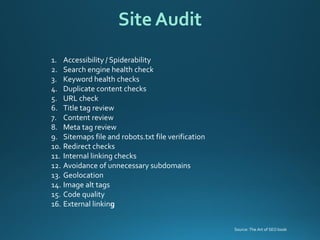
1.Accessibility / Spiderability 
2.Search engine health check 
3.Keyword health checks 
4.Duplicate content checks 
5.URL check 
6.Title tag review 
7.Content review 
8.Meta tag review 
9.Sitemaps file and robots.txt file verification 
10.Redirect checks 
11.Internal linking checks 
12.Avoidance of unnecessary subdomains 
13.Geolocation 
14.Image alt tags 
15.Code quality 
16.External linking 
Site Audit 
Source: The Art of SEO book
Thanks! 
Contact at@gauravkakkar82

Basic Search Engine Optimization techniques & tips

  • 1.
    Tips Gaurav Kakkar(HCL Technologies) @gauravkakkar82 Search Engine Optimization
  • 2.
    Search Engine Optimization Importance of SEO 1 2 3 4 5 Defining SEO Objectives Keyword Research SEO in Action Site Audit
  • 3.
    What is SEO Source: Getlocalsearchmarketing. As per Wikipedia: Search engine optimization (SEO) is the process of affecting the visibility of a website or a web page in a search engine's "natural" or un-paid ("organic") search results. SEO falls under Search Engine Marketing
  • 4.
  • 5.
  • 6.
  • 7.
    "Tree Falls ina Forest":
  • 8.
    Google Penalty HitseBay’s Bottom Line, May Cost Up To $200 Million In Revenue
  • 9.
  • 10.
  • 11.
  • 12.
  • 13.
  • 14.
    Search Engine Optimization Importance of SEO 1 2 3 4 5 Defining SEO Objectives Keyword Research SEO in Action Site Audit
  • 15.
    Strategic Goals: ExpandReach Beating Competition Customer Interaction Increasing Brand Value Other Goals: Visibility (Branding) Website Traffic Determining Your SEO Objectives
  • 16.
  • 17.
    Navigational query Ifthepersonperformthesearchtoreachtospecificpage,destinationorwebsitethenitistreatedasNavigationalquery.Forexample,ifoneislookingtoreachtoBloombergwebsite Informational query Webisfullofinformation.Ifthesearchisperformedinordertogettheanswertoaspecificquery,thenitisinformationalquery.Thereisnospecificsourcewhichtheuserswantstolandsto.Forexample“CloudComputing” Transactional query If the search is performed with the intent to ultimately to take an action like buying the laptop, then is istransactional query. Understanding Search Engine Traffic and Visitor Intent
  • 18.
    Developing an SEOPlan Prior to Site Development Business Factors that Affect the SEO Plan 1.Revenue/business model 2.Target customers 3.Competitor strategies 4.Branding goals 5.Budget for content development 6.How your potential customers search for products like yours
  • 19.
    Search Engine Optimization Importance of SEO 1 2 3 4 5 Defining SEO Objectives SEO in Action Keyword Research Site Audit
  • 20.
    1.WordTracker 2.GoogleAdwords 3.Microsoft’sadCenter Keyword Generation Tool 4.KeywordDiscovery 5.Google Trends 6.Quintura Tools for Keywords Research
  • 21.
    Understanding the LongTail of the Keyword Long Tail Keyword Source: The Art of SEO book
  • 22.
    Step 1: Keywordresearch Step 2: Site architecture Step 3: Keyword mapping Step 4: Site review 4 -Simple Steps ( Keyword Strategy)
  • 23.
    Keywordcannibalizationhappenswhencertainpageswithinyoursitecompeteagainsteachotherforcertainkeywords. When thishappens, one lose out on a number of rank-boosting features: 1.Internal anchor text 2.External links 3.Content quality 4.Conversion rate Keyword Cannibalization
  • 24.
  • 25.
  • 26.
    Search Engine Optimization Importance of SEO 1 2 3 4 5 Defining SEO Objectives Keyword Research SEO in Action Site Audit
  • 27.
    Define the Site’sInformation Architecture which depends on Technology decisions : 1.Dynamic URLs 2.Session IDs or user IDs in the URL 3.Superfluous flags in the URL 4.Links or content based in JavaScript, Java, or Flash 5.Content behind forms (including pull-down lists) 6.Temporary (302) redirects Structural decisions : 1.Internal linking 2.Navigational structures 3.Home page Linkage 4.Top-level categories 5.Use anchor text 6.Use breadcrumb navigation 7.Minimize link depth First Stages of SEO Source: The Art of SEO book
  • 28.
    Site’s Information Architecture Source: The Art of SEO book
  • 29.
    1.Subdomain 2.Redirects 3.URLs Creating an Optimal Information Architecture Source: The Art of SEO book
  • 30.
    Designing site architecture Source: The Art of SEO book
  • 31.
  • 32.
    Deep Architecture Source:The Art of SEO book
  • 33.
    Flat Architecture Source:The Art of SEO book
  • 34.
    1.Ithelpsvisitorsquicklyfindthecontenttheywant. 2.Helpsearchenginesunderstandwhatcontentthewebmasterthinksisimportant 3.Abreadcrumb is a row of internal links at the top or bottom of the page that allows visitors to quickly navigate back to a previous section or the root page 4.Ensure more convenience for users by using ‘breadcrumb lists’. Make your site easier to navigate
  • 35.
    Optimization of DomainNames/URLs (1/2) Source: The Art of SEO book
  • 36.
    Optimization of DomainNames/URLs (2/2) Source: The Art of SEO book
  • 37.
    Picking the RightURLs (1/2) Source: The Art of SEO book
  • 38.
    Picking the RightURLs (2/2) Source: The Art of SEO book
  • 39.
    Improve the structureof your URLs 1.Helpsthesitebetterorganized 2.Lead to better crawling of your documents by search engines. 3.Create easier, "friendlier" URLs for those that want to link to your content. 4.Simple-to-understand URLs will convey content information easily Source: : Google SEO guide
  • 40.
    Don’ts Avoid: 1.Usinglengthy URLs with unnecessary parameters and session IDs 2.using excessive keywords like"baseball- cards-baseball-cards- baseballcards.htm"copyingand pasting the entire content of the document into the description meta tag 3.Have deep nesting of subdirectories like".../dir1/dir2/dir3/dir4/dir5/page.html" 4.Use directory names that have no relation to the content in them 5.Use odd capitalization of URLs Source: : Google SEO guide
  • 41.
  • 42.
    Meta Tags Source:: Google SEO guide
  • 43.
    Avoid: 1.Writing adescription meta tag that has no relation to the content on the page 2.Using generic descriptions like "This is a web page" or "Page about baseball cards" 3.Filling the description with only keywords 4.Copying and pasting the entire content of the document into the description meta tag 5.Using a single description meta tag across all of your site's pages or a large group of pages Don’ts Source: : Google SEO guide
  • 44.
    Heading (H1, H2,H3) Tags & Document Text DocumentText: Source: The Art of SEO book
  • 45.
    Use heading tagsto emphasize important text . Heading tags (not to be confused with the <head> HTML tag or HTTP headers) are used to present structure on the page to users. There are six sizes of heading tags, beginning with <h1>, the most important, and ending with <h6>, the least important (1). Use heading tags appropriately Source: The Art of SEO book
  • 46.
    Avoid: 1.Placing textin heading tags that wouldn't be helpful in defining the structure of the page 2.Using heading tags where other tags like <em> and <strong> may be appropriate 3.Erratically moving from one heading tag size to another 4.Excessively using heading tags throughout the page 5.Putting all of the page's text into a heading tag 6.Using heading tags only for styling text and not presenting structure Don’ts Source: : Google SEO guide
  • 47.
    Title Tag Source:The Art of SEO book
  • 48.
    Create unique, accuratepage titles Source: : Google SEO guide
  • 49.
    Avoid: 1.using extremelylengthy titles that are unhelpful to users 2.stuffing unneeded keywords in your title tags 3.using a single title tag across all of your site's pages or a large group of pages 4.choosing a title that has no relation to the content on the page 5.using default or vague titles like "Untitled" or "New Page 1" Don’ts Source: : Google SEO guide
  • 50.
    Image Filenames andalt Attributes BoldfaceText Source: The Art of SEO book
  • 51.
    Optimize the useof images Source: : Google SEO guide
  • 52.
    Use brief, butdescriptive filenames and alt text Avoid: 1.Using generic filenames like "image1.jpg", "pic.gif", "1.jpg" when possible—some sites with thousands of images might consider automating the naming of images 2.Writing extremely lengthy filenames 3.Stuffing keywords into alt text or copying and pasting entire sentences 4.Writing excessively long alt text that would be considered spammy 5.using only image links for your site's navigation Source: : Google SEO guide
  • 53.
    Anchor text isthe clickable text that users will see as a result of a link, and is placed within the anchor tag <a href="..."></a>. Links on page maybe internal—pointing to other pages on your site—or external— leading to content on other sites. Write better anchor text Source: : Google SEO guide
  • 54.
    Avoid: 1.Using thepage's URL as the anchor text in most cases 2.Writing long anchor text, such as a lengthy sentence or short paragraph of text 3.Using excessively keyword-filled or lengthy anchor text just for search engines 4.Creating unnecessary links that don't help with the user's navigation of the site Don’ts Source: : Google SEO guide
  • 55.
  • 56.
    Syntax of therobots.txt file Source: The Art of SEO book
  • 57.
    Example of arobots.txt file Source: The Art of SEO book
  • 58.
    Make effective useof robots.txt Source: : Google SEO guide
  • 59.
  • 60.
    Be aware ofrel="nofollow" for links Source: : Google SEO guide
  • 61.
    About using “Nofollow"for individual contents, whole pages Source: : Google SEO guide
  • 62.
    Aredirectisusedtoindicatewhencontenthasmovedfromonelocationtoanother. GoodandBadRedirects: •“301moved permanently ”This status code tells the browser (or search engine crawler) that the resource has been permanently moved to another location, and there is no intent to ever bring it back. •“302 moved temporarily” This status code tells the browser (or search engine crawler) that the resource has been temporarily moved to another location, and that the move should not be treated as permanent. Redirect Source: The Art of SEO book
  • 63.
    Search Engine Optimization Importance of SEO 1 2 3 4 5 Defining SEO Objectives Keyword Research SEO in Action Site Audit
  • 64.
    1.Accessibility / Spiderability 2.Search engine health check 3.Keyword health checks 4.Duplicate content checks 5.URL check 6.Title tag review 7.Content review 8.Meta tag review 9.Sitemaps file and robots.txt file verification 10.Redirect checks 11.Internal linking checks 12.Avoidance of unnecessary subdomains 13.Geolocation 14.Image alt tags 15.Code quality 16.External linking Site Audit Source: The Art of SEO book
  • 65.