BASIC HTML & CSS
0. Introduction
[ 2017.01.03. Tue ]
Introduction
WHY?Why should we study?
WHAT?What do you want to learn?
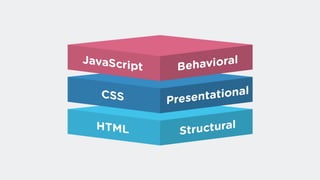
HTML( HyperText Markup Language )
CSS( Cascading Style Sheets )
HTML
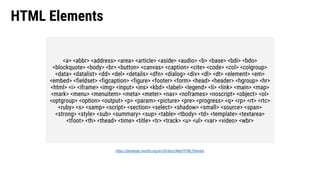
HTML Elements
https://developer.mozilla.org/en-US/docs/Web/HTML/Element
<a> <abbr> <address> <area> <article> <aside> <audio> <b> <base> <bdi> <bdo>
<blockquote> <body> <br> <button> <canvas> <caption> <cite> <code> <col> <colgroup>
<data> <datalist> <dd> <del> <details> <dfn> <dialog> <div> <dl> <dt> <element> <em>
<embed> <fieldset> <figcaption> <figure> <footer> <form> <head> <header> <hgroup> <hr>
<html> <i> <iframe> <img> <input> <ins> <kbd> <label> <legend> <li> <link> <main> <map>
<mark> <menu> <menuitem> <meta> <meter> <nav> <noframes> <noscript> <object> <ol>
<optgroup> <option> <output> <p> <param> <picture> <pre> <progress> <q> <rp> <rt> <rtc>
<ruby> <s> <samp> <script> <section> <select> <shadow> <small> <source> <span>
<strong> <style> <sub> <summary> <sup> <table> <tbody> <td> <template> <textarea>
<tfoot> <th> <thead> <time> <title> <tr> <track> <u> <ul> <var> <video> <wbr>
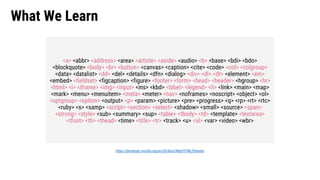
What We Learn
<a> <abbr> <address> <area> <article> <aside> <audio> <b> <base> <bdi> <bdo>
<blockquote> <body> <br> <button> <canvas> <caption> <cite> <code> <col> <colgroup>
<data> <datalist> <dd> <del> <details> <dfn> <dialog> <div> <dl> <dt> <element> <em>
<embed> <fieldset> <figcaption> <figure> <footer> <form> <head> <header> <hgroup> <hr>
<html> <i> <iframe> <img> <input> <ins> <kbd> <label> <legend> <li> <link> <main> <map>
<mark> <menu> <menuitem> <meta> <meter> <nav> <noframes> <noscript> <object> <ol>
<optgroup> <option> <output> <p> <param> <picture> <pre> <progress> <q> <rp> <rt> <rtc>
<ruby> <s> <samp> <script> <section> <select> <shadow> <small> <source> <span>
<strong> <style> <sub> <summary> <sup> <table> <tbody> <td> <template> <textarea>
<tfoot> <th> <thead> <time> <title> <tr> <track> <u> <ul> <var> <video> <wbr>
https://developer.mozilla.org/en-US/docs/Web/HTML/Element
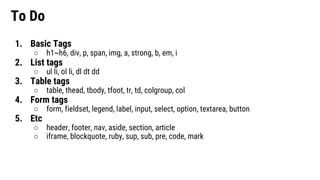
To Do
1. Basic Tags
○ h1~h6, div, p, span, img, a, strong, b, em, i
2. List tags
○ ul li, ol li, dl dt dd
3. Table tags
○ table, thead, tbody, tfoot, tr, td, colgroup, col
4. Form tags
○ form, fieldset, legend, label, input, select, option, textarea, button
5. Etc
○ header, footer, nav, aside, section, article
○ iframe, blockquote, ruby, sup, sub, pre, code, mark
CSS
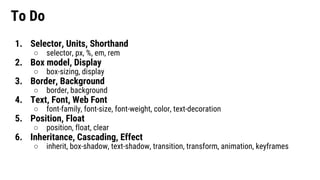
To Do
1. Selector, Units, Shorthand
○ selector, px, %, em, rem
2. Box model, Display
○ box-sizing, display
3. Border, Background
○ border, background
4. Text, Font, Web Font
○ font-family, font-size, font-weight, color, text-decoration
5. Position, Float
○ position, float, clear
6. Inheritance, Cascading, Effect
○ inherit, box-shadow, text-shadow, transition, transform, animation, keyframes
Schedule
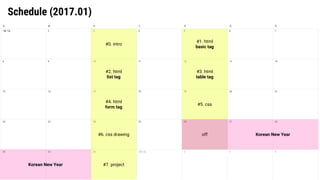
Schedule (2017.01)
#0. intro
#2. html
list tag
#4. html
form tag
#6. css drawing
#7. project
#1. html
basic tag
#3. html
table tag
#5. css
off Korean New Year
Korean New Year
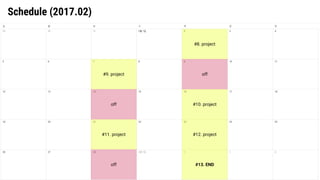
Schedule (2017.02)
#9. project
#13. END
#11. project
#8. project
#10. project
#12. project
off
off
off
Dev. Environment
(Browser, Editor, Hosting, FTP)
Browser
chrome
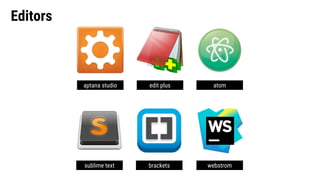
Editors
atom
sublime text brackets webstrom
aptana studio edit plus
Editors
atom
sublime text webstrom
aptana studio edit plus
brackets
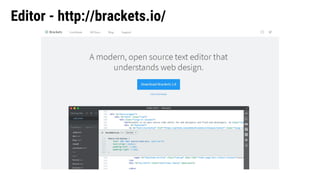
Editor - http://brackets.io/
Hosting - http://www.dothome.co.kr/
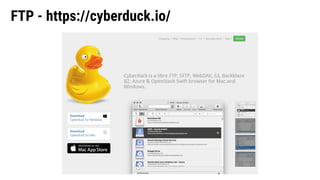
FTP - https://cyberduck.io/
Reference
• http://poiemaweb.com/
• https://opentutorials.org/module/1892
• https://opentutorials.org/module/2367/13339
• [Book] Do it! HTML5+CSS3 (2017 Edition)
Facebook / Twitter / Codepen
@zineeworld

[Basic HTML/CSS] 0. introduction

  • 1.
    BASIC HTML &CSS 0. Introduction [ 2017.01.03. Tue ]
  • 2.
  • 3.
  • 4.
    WHAT?What do youwant to learn?
  • 5.
  • 6.
  • 8.
  • 9.
    HTML Elements https://developer.mozilla.org/en-US/docs/Web/HTML/Element <a> <abbr><address> <area> <article> <aside> <audio> <b> <base> <bdi> <bdo> <blockquote> <body> <br> <button> <canvas> <caption> <cite> <code> <col> <colgroup> <data> <datalist> <dd> <del> <details> <dfn> <dialog> <div> <dl> <dt> <element> <em> <embed> <fieldset> <figcaption> <figure> <footer> <form> <head> <header> <hgroup> <hr> <html> <i> <iframe> <img> <input> <ins> <kbd> <label> <legend> <li> <link> <main> <map> <mark> <menu> <menuitem> <meta> <meter> <nav> <noframes> <noscript> <object> <ol> <optgroup> <option> <output> <p> <param> <picture> <pre> <progress> <q> <rp> <rt> <rtc> <ruby> <s> <samp> <script> <section> <select> <shadow> <small> <source> <span> <strong> <style> <sub> <summary> <sup> <table> <tbody> <td> <template> <textarea> <tfoot> <th> <thead> <time> <title> <tr> <track> <u> <ul> <var> <video> <wbr>
  • 10.
    What We Learn <a><abbr> <address> <area> <article> <aside> <audio> <b> <base> <bdi> <bdo> <blockquote> <body> <br> <button> <canvas> <caption> <cite> <code> <col> <colgroup> <data> <datalist> <dd> <del> <details> <dfn> <dialog> <div> <dl> <dt> <element> <em> <embed> <fieldset> <figcaption> <figure> <footer> <form> <head> <header> <hgroup> <hr> <html> <i> <iframe> <img> <input> <ins> <kbd> <label> <legend> <li> <link> <main> <map> <mark> <menu> <menuitem> <meta> <meter> <nav> <noframes> <noscript> <object> <ol> <optgroup> <option> <output> <p> <param> <picture> <pre> <progress> <q> <rp> <rt> <rtc> <ruby> <s> <samp> <script> <section> <select> <shadow> <small> <source> <span> <strong> <style> <sub> <summary> <sup> <table> <tbody> <td> <template> <textarea> <tfoot> <th> <thead> <time> <title> <tr> <track> <u> <ul> <var> <video> <wbr> https://developer.mozilla.org/en-US/docs/Web/HTML/Element
  • 11.
    To Do 1. BasicTags ○ h1~h6, div, p, span, img, a, strong, b, em, i 2. List tags ○ ul li, ol li, dl dt dd 3. Table tags ○ table, thead, tbody, tfoot, tr, td, colgroup, col 4. Form tags ○ form, fieldset, legend, label, input, select, option, textarea, button 5. Etc ○ header, footer, nav, aside, section, article ○ iframe, blockquote, ruby, sup, sub, pre, code, mark
  • 12.
  • 14.
    To Do 1. Selector,Units, Shorthand ○ selector, px, %, em, rem 2. Box model, Display ○ box-sizing, display 3. Border, Background ○ border, background 4. Text, Font, Web Font ○ font-family, font-size, font-weight, color, text-decoration 5. Position, Float ○ position, float, clear 6. Inheritance, Cascading, Effect ○ inherit, box-shadow, text-shadow, transition, transform, animation, keyframes
  • 15.
  • 16.
    Schedule (2017.01) #0. intro #2.html list tag #4. html form tag #6. css drawing #7. project #1. html basic tag #3. html table tag #5. css off Korean New Year Korean New Year
  • 17.
    Schedule (2017.02) #9. project #13.END #11. project #8. project #10. project #12. project off off off
  • 18.
  • 19.
  • 20.
    Editors atom sublime text bracketswebstrom aptana studio edit plus
  • 21.
  • 22.
  • 23.
  • 24.
  • 25.
    Reference • http://poiemaweb.com/ • https://opentutorials.org/module/1892 •https://opentutorials.org/module/2367/13339 • [Book] Do it! HTML5+CSS3 (2017 Edition)
  • 26.
    Facebook / Twitter/ Codepen @zineeworld