




Backing up Data with MMS
Daniel Coupal
Technical Services Engineer, Palo Alto, CA
#MongoDB
2
1. Methods for backing up MongoDB
2. Some concepts
3. MMS Backup
4. Sizing up the MMS On-Prem servers
5. Wrapping up
6. Q&A
Agenda
3
• Introduction to MMS
http://www.mongodb.com/presentations/webinar-understanding-mms-
getting-started-mms
• Going into the details of MMS Monitoring
http://www.mongodb.com/presentations/webinar-performance-tuning-and-
monitoring-using-mms-0
• Telling you should do backups
https://www.mongodb.com/presentations/run-mongodb-confidence-
backing-and-monitoring-mms
This webinar is not about…
1. Methods for backing up
MongoDB
5
A. mongodump/mongorestore
B. Storage level backups
C. Backup with MongoDB Management
Service (MMS)
Methods for backing up MongoDB
6
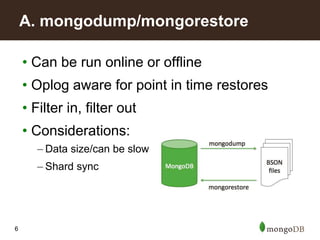
• Can be run online or offline
• Oplog aware for point in time restores
• Filter in, filter out
• Considerations:
– Data size/can be slow
– Shard sync
A. mongodump/mongorestore
7
• Flavors:
– Copy files in your data directory (e.g. /data/db)
– File system or block storage snapshots
• Fastest way to backup/restore
• Considerations:
– Journal/consistency
– Backup granularity (whole file system back up?)
– Ops expertise
– Storage of snapshots or data file backups
B. Storage level backups
8
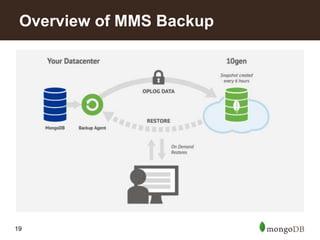
• Based off Oplogs
• In the cloud, via mms.mongodb.com
• Or in your own hosted environment
– For customers with Enterprise or Standard
subscriptions
– Available on a variety of operating systems:
• RedHat
• CentOS
• SUSE
• Ubuntu
• Windows (soon)
C. Backup with MongoDB Management Service
9
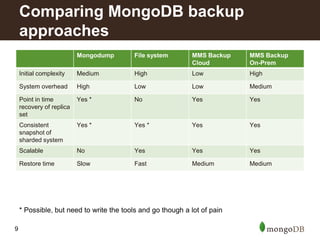
Mongodump File system MMS Backup
Cloud
MMS Backup
On-Prem
Initial complexity Medium High Low High
System overhead High Low Low Medium
Point in time
recovery of replica
set
Yes * No Yes Yes
Consistent
snapshot of
sharded system
Yes * Yes * Yes Yes
Scalable No Yes Yes Yes
Restore time Slow Fast Medium Medium
Comparing MongoDB backup
approaches
* Possible, but need to write the tools and go though a lot of pain
2. Some concepts
11
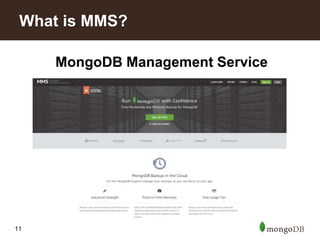
MongoDB Management Service
What is MMS?
12
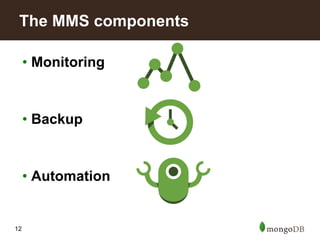
• Monitoring
• Backup
• Automation
The MMS components
13
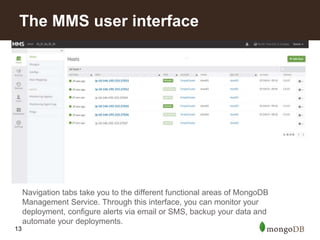
Navigation tabs take you to the different functional areas of MongoDB
Management Service. Through this interface, you can monitor your
deployment, configure alerts via email or SMS, backup your data and
automate your deployments.
The MMS user interface
14
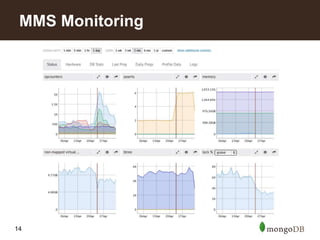
MMS Monitoring
15
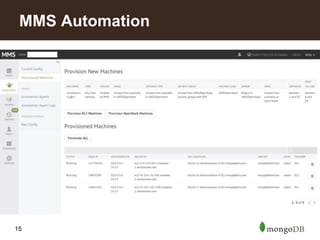
MMS Automation
16
• A capped collection that stores an ordered
history of logical writes to a MongoDB
database
– Does not store operations like increment, add to set,
etc. Those are translated to the final document.
– Safe to replay old oplogs. Needs to play all of them in
the right order.
• Enables replication
• Enables backups
What is a Replica Set Oplog?
17
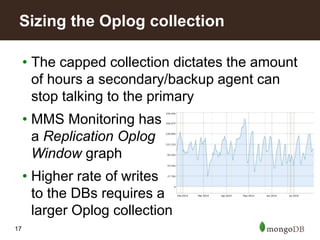
• The capped collection dictates the amount
of hours a secondary/backup agent can
stop talking to the primary
• MMS Monitoring has
a Replication Oplog
Window graph
• Higher rate of writes
to the DBs requires a
larger Oplog collection
Sizing the Oplog collection
3. MMS Backup
19
Overview of MMS Backup
20
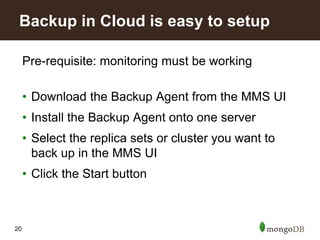
Pre-requisite: monitoring must be working
• Download the Backup Agent from the MMS UI
• Install the Backup Agent onto one server
• Select the replica sets or cluster you want to
back up in the MMS UI
• Click the Start button
Backup in Cloud is easy to setup
21
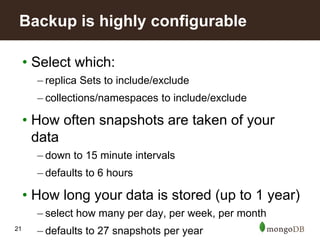
• Select which:
– replica Sets to include/exclude
– collections/namespaces to include/exclude
• How often snapshots are taken of your
data
– down to 15 minute intervals
– defaults to 6 hours
• How long your data is stored (up to 1 year)
– select how many per day, per week, per month
– defaults to 27 snapshots per year
Backup is highly configurable
22
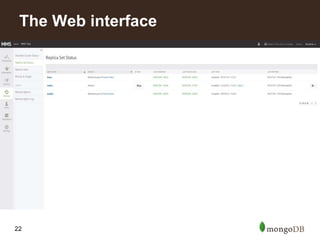
The Web interface
23
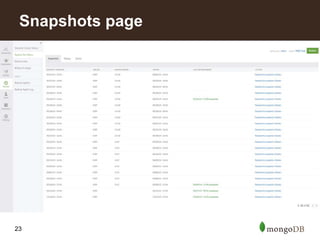
Snapshots page
24
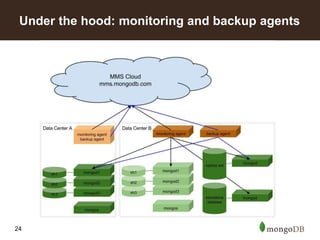
Under the hood: monitoring and backup agents
25
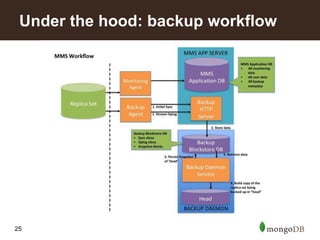
Under the hood: backup workflow
26
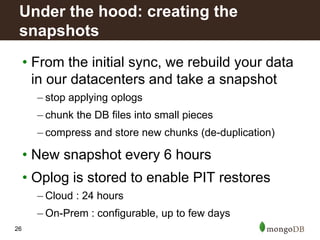
• From the initial sync, we rebuild your data
in our datacenters and take a snapshot
– stop applying oplogs
– chunk the DB files into small pieces
– compress and store new chunks (de-duplication)
• New snapshot every 6 hours
• Oplog is stored to enable PIT restores
– Cloud : 24 hours
– On-Prem : configurable, up to few days
Under the hood: creating the
snapshots
27
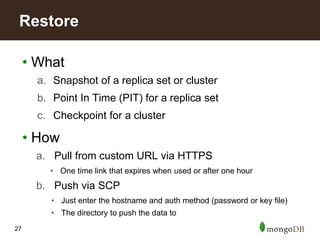
• What
a. Snapshot of a replica set or cluster
b. Point In Time (PIT) for a replica set
c. Checkpoint for a cluster
• How
a. Pull from custom URL via HTTPS
• One time link that expires when used or after one hour
b. Push via SCP
• Just enter the hostname and auth method (password or key file)
• The directory to push the data to
Restore
28
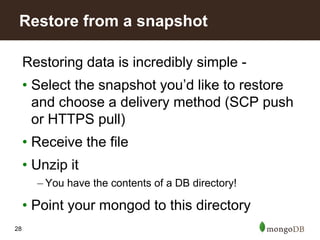
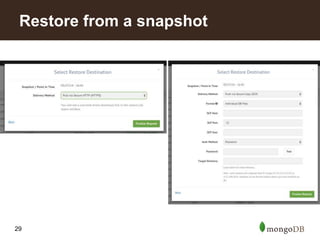
Restoring data is incredibly simple -
• Select the snapshot you’d like to restore
and choose a delivery method (SCP push
or HTTPS pull)
• Receive the file
• Unzip it
– You have the contents of a DB directory!
• Point your mongod to this directory
Restore from a snapshot
29
Restore from a snapshot
30
Restoring data is only a few extra steps
• Select your cluster in the MMS UI
• Restore from a pre-build snapshot or request a
checkpoint restore (15 minute window)
• You will receive one data file to download for
each shard, and one for the config server(s)
• Follow the same process as before for moving
the data files to the server
Restoring a MongoDB Sharded
Cluster
31
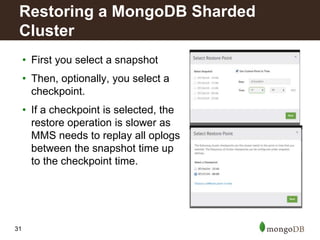
• First you select a snapshot
• Then, optionally, you select a
checkpoint.
• If a checkpoint is selected, the
restore operation is slower as
MMS needs to replay all oplogs
between the snapshot time up
to the checkpoint time.
Restoring a MongoDB Sharded
Cluster
32
• Behind the scenes:
– MongoDB Balancer paused every 6 hours
• Or 15/30/45 min if you enable checkpoints
– A no-op token is inserted across all shards and config
servers
– Oplog applied to replica sets until point at which token
was inserted
• Provides a consistent state of database
across shards
How does MMS backup a Sharded
Cluster?
33
• 500 GB DB (150 GB compressed)
– Conservative estimates for download times:
• 2 hours @ 20 MB/sec (MMS OnPrem)
• 4 hours @ 10 MB/sec (MMS Cloud)
• Faster restores with
– More shards, but smaller
• Restore shards in parallel
– SCP files
• Parallel SCP processes, files don’t need to be uncompress as a
separate step
Restore considerations
34
• Simplest means of backing up your
database
• Peace of mind, it just works. Trust the
experts and free yourself from backup pain
• Point-in-time restores for replica
sets/checkpoint restores for clusters
• Spin up QA environments quickly from
snapshots
Recap: MongoDB backup with MMS
4. Sizing up the MMS On-Prem
servers
36
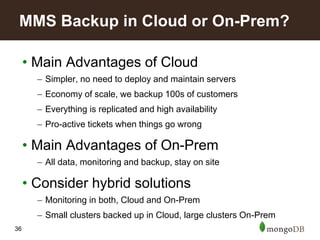
• Main Advantages of Cloud
– Simpler, no need to deploy and maintain servers
– Economy of scale, we backup 100s of customers
– Everything is replicated and high availability
– Pro-active tickets when things go wrong
• Main Advantages of On-Prem
– All data, monitoring and backup, stay on site
• Consider hybrid solutions
– Monitoring in both, Cloud and On-Prem
– Small clusters backed up in Cloud, large clusters On-Prem
MMS Backup in Cloud or On-Prem?
37
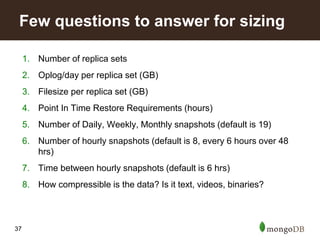
1. Number of replica sets
2. Oplog/day per replica set (GB)
3. Filesize per replica set (GB)
4. Point In Time Restore Requirements (hours)
5. Number of Daily, Weekly, Monthly snapshots (default is 19)
6. Number of hourly snapshots (default is 8, every 6 hours over 48
hrs)
7. Time between hourly snapshots (default is 6 hrs)
8. How compressible is the data? Is it text, videos, binaries?
Few questions to answer for sizing
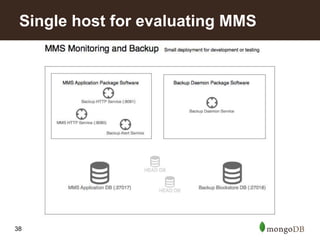
38
Single host for evaluating MMS
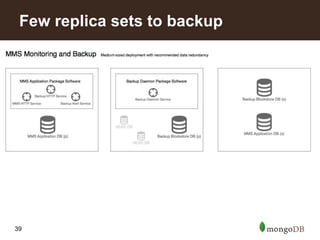
39
Few replica sets to backup
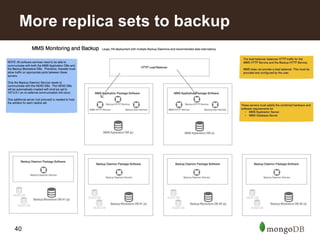
40
More replica sets to backup
5. Wrapping up
42
• MMS On-Prem software download available on the subscription
downloads page
• MMS Cloud mms.mongodb.com
• MMS Cloud Documentation mms.mongodb.com/help/
• MMS On-Prem Documentation mms.mongodb.com/help-hosted/
• Restore from a point in time snapshot documentation
https://mms.mongodb.com/help/tutorial/restore-from-point-in-time-
snapshot/
• Restore from a stored snapshot
https://mms.mongodb.com/help/tutorial/restore-from-snapshot/
• Configure your backup data delivery method
https://mms.mongodb.com/help/tutorial/restore-select-delivery-
format/
Resources
43
• MMS Backup is the best solution for
backups, especially for sharded clusters
• Cloud solution is inexpensive and easy
Try it: mms-sales@mongodb.com for one
month free!
• On-Prem version is free for Standard and
Enterprise customers
• Trust the Experts and free yourself from
backup pain
Summary
6. Q&A
Thank you for using
Daniel Coupal, Technical Services Engineer
Appendix
47
• Oplog stored for 48 hours
• Restore your replica set to any point-in-
time in the last 24 hours by creating a
custom snapshot
• Configurable!
Point in Time Recovery
48
• Every 6 hours for 48 hours
• Every day for 1 week
• Every week for for a month
• Every month for a year
• Configurable!
Number of Snapshots
49
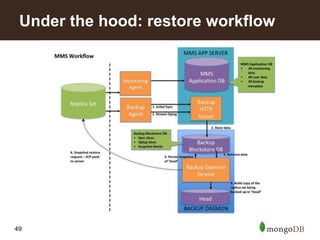
Under the hood: restore workflow

Backing Up Data with MMS

  • 1.
    Backing up Datawith MMS Daniel Coupal Technical Services Engineer, Palo Alto, CA #MongoDB
  • 2.
    2 1. Methods forbacking up MongoDB 2. Some concepts 3. MMS Backup 4. Sizing up the MMS On-Prem servers 5. Wrapping up 6. Q&A Agenda
  • 3.
    3 • Introduction toMMS http://www.mongodb.com/presentations/webinar-understanding-mms- getting-started-mms • Going into the details of MMS Monitoring http://www.mongodb.com/presentations/webinar-performance-tuning-and- monitoring-using-mms-0 • Telling you should do backups https://www.mongodb.com/presentations/run-mongodb-confidence- backing-and-monitoring-mms This webinar is not about…
  • 4.
    1. Methods forbacking up MongoDB
  • 5.
    5 A. mongodump/mongorestore B. Storagelevel backups C. Backup with MongoDB Management Service (MMS) Methods for backing up MongoDB
  • 6.
    6 • Can berun online or offline • Oplog aware for point in time restores • Filter in, filter out • Considerations: – Data size/can be slow – Shard sync A. mongodump/mongorestore
  • 7.
    7 • Flavors: – Copyfiles in your data directory (e.g. /data/db) – File system or block storage snapshots • Fastest way to backup/restore • Considerations: – Journal/consistency – Backup granularity (whole file system back up?) – Ops expertise – Storage of snapshots or data file backups B. Storage level backups
  • 8.
    8 • Based offOplogs • In the cloud, via mms.mongodb.com • Or in your own hosted environment – For customers with Enterprise or Standard subscriptions – Available on a variety of operating systems: • RedHat • CentOS • SUSE • Ubuntu • Windows (soon) C. Backup with MongoDB Management Service
  • 9.
    9 Mongodump File systemMMS Backup Cloud MMS Backup On-Prem Initial complexity Medium High Low High System overhead High Low Low Medium Point in time recovery of replica set Yes * No Yes Yes Consistent snapshot of sharded system Yes * Yes * Yes Yes Scalable No Yes Yes Yes Restore time Slow Fast Medium Medium Comparing MongoDB backup approaches * Possible, but need to write the tools and go though a lot of pain
  • 10.
  • 11.
  • 12.
    12 • Monitoring • Backup •Automation The MMS components
  • 13.
    13 Navigation tabs takeyou to the different functional areas of MongoDB Management Service. Through this interface, you can monitor your deployment, configure alerts via email or SMS, backup your data and automate your deployments. The MMS user interface
  • 14.
  • 15.
  • 16.
    16 • A cappedcollection that stores an ordered history of logical writes to a MongoDB database – Does not store operations like increment, add to set, etc. Those are translated to the final document. – Safe to replay old oplogs. Needs to play all of them in the right order. • Enables replication • Enables backups What is a Replica Set Oplog?
  • 17.
    17 • The cappedcollection dictates the amount of hours a secondary/backup agent can stop talking to the primary • MMS Monitoring has a Replication Oplog Window graph • Higher rate of writes to the DBs requires a larger Oplog collection Sizing the Oplog collection
  • 18.
  • 19.
  • 20.
    20 Pre-requisite: monitoring mustbe working • Download the Backup Agent from the MMS UI • Install the Backup Agent onto one server • Select the replica sets or cluster you want to back up in the MMS UI • Click the Start button Backup in Cloud is easy to setup
  • 21.
    21 • Select which: –replica Sets to include/exclude – collections/namespaces to include/exclude • How often snapshots are taken of your data – down to 15 minute intervals – defaults to 6 hours • How long your data is stored (up to 1 year) – select how many per day, per week, per month – defaults to 27 snapshots per year Backup is highly configurable
  • 22.
  • 23.
  • 24.
    24 Under the hood:monitoring and backup agents
  • 25.
    25 Under the hood:backup workflow
  • 26.
    26 • From theinitial sync, we rebuild your data in our datacenters and take a snapshot – stop applying oplogs – chunk the DB files into small pieces – compress and store new chunks (de-duplication) • New snapshot every 6 hours • Oplog is stored to enable PIT restores – Cloud : 24 hours – On-Prem : configurable, up to few days Under the hood: creating the snapshots
  • 27.
    27 • What a. Snapshotof a replica set or cluster b. Point In Time (PIT) for a replica set c. Checkpoint for a cluster • How a. Pull from custom URL via HTTPS • One time link that expires when used or after one hour b. Push via SCP • Just enter the hostname and auth method (password or key file) • The directory to push the data to Restore
  • 28.
    28 Restoring data isincredibly simple - • Select the snapshot you’d like to restore and choose a delivery method (SCP push or HTTPS pull) • Receive the file • Unzip it – You have the contents of a DB directory! • Point your mongod to this directory Restore from a snapshot
  • 29.
  • 30.
    30 Restoring data isonly a few extra steps • Select your cluster in the MMS UI • Restore from a pre-build snapshot or request a checkpoint restore (15 minute window) • You will receive one data file to download for each shard, and one for the config server(s) • Follow the same process as before for moving the data files to the server Restoring a MongoDB Sharded Cluster
  • 31.
    31 • First youselect a snapshot • Then, optionally, you select a checkpoint. • If a checkpoint is selected, the restore operation is slower as MMS needs to replay all oplogs between the snapshot time up to the checkpoint time. Restoring a MongoDB Sharded Cluster
  • 32.
    32 • Behind thescenes: – MongoDB Balancer paused every 6 hours • Or 15/30/45 min if you enable checkpoints – A no-op token is inserted across all shards and config servers – Oplog applied to replica sets until point at which token was inserted • Provides a consistent state of database across shards How does MMS backup a Sharded Cluster?
  • 33.
    33 • 500 GBDB (150 GB compressed) – Conservative estimates for download times: • 2 hours @ 20 MB/sec (MMS OnPrem) • 4 hours @ 10 MB/sec (MMS Cloud) • Faster restores with – More shards, but smaller • Restore shards in parallel – SCP files • Parallel SCP processes, files don’t need to be uncompress as a separate step Restore considerations
  • 34.
    34 • Simplest meansof backing up your database • Peace of mind, it just works. Trust the experts and free yourself from backup pain • Point-in-time restores for replica sets/checkpoint restores for clusters • Spin up QA environments quickly from snapshots Recap: MongoDB backup with MMS
  • 35.
    4. Sizing upthe MMS On-Prem servers
  • 36.
    36 • Main Advantagesof Cloud – Simpler, no need to deploy and maintain servers – Economy of scale, we backup 100s of customers – Everything is replicated and high availability – Pro-active tickets when things go wrong • Main Advantages of On-Prem – All data, monitoring and backup, stay on site • Consider hybrid solutions – Monitoring in both, Cloud and On-Prem – Small clusters backed up in Cloud, large clusters On-Prem MMS Backup in Cloud or On-Prem?
  • 37.
    37 1. Number ofreplica sets 2. Oplog/day per replica set (GB) 3. Filesize per replica set (GB) 4. Point In Time Restore Requirements (hours) 5. Number of Daily, Weekly, Monthly snapshots (default is 19) 6. Number of hourly snapshots (default is 8, every 6 hours over 48 hrs) 7. Time between hourly snapshots (default is 6 hrs) 8. How compressible is the data? Is it text, videos, binaries? Few questions to answer for sizing
  • 38.
    38 Single host forevaluating MMS
  • 39.
  • 40.
  • 41.
  • 42.
    42 • MMS On-Premsoftware download available on the subscription downloads page • MMS Cloud mms.mongodb.com • MMS Cloud Documentation mms.mongodb.com/help/ • MMS On-Prem Documentation mms.mongodb.com/help-hosted/ • Restore from a point in time snapshot documentation https://mms.mongodb.com/help/tutorial/restore-from-point-in-time- snapshot/ • Restore from a stored snapshot https://mms.mongodb.com/help/tutorial/restore-from-snapshot/ • Configure your backup data delivery method https://mms.mongodb.com/help/tutorial/restore-select-delivery- format/ Resources
  • 43.
    43 • MMS Backupis the best solution for backups, especially for sharded clusters • Cloud solution is inexpensive and easy Try it: mms-sales@mongodb.com for one month free! • On-Prem version is free for Standard and Enterprise customers • Trust the Experts and free yourself from backup pain Summary
  • 44.
  • 45.
    Thank you forusing Daniel Coupal, Technical Services Engineer
  • 46.
  • 47.
    47 • Oplog storedfor 48 hours • Restore your replica set to any point-in- time in the last 24 hours by creating a custom snapshot • Configurable! Point in Time Recovery
  • 48.
    48 • Every 6hours for 48 hours • Every day for 1 week • Every week for for a month • Every month for a year • Configurable! Number of Snapshots
  • 49.
    49 Under the hood:restore workflow