
• bWAPP, or a buggy web application, is a free and open source 
deliberately insecure web application. 
It helps security enthusiasts, developers and students to 
discover and to prevent web vulnerabilities. 
bWAPP prepares one to conduct successful penetration 
testing and ethical hacking projects. 
• 
It covers all major known web bugs, including all risks from 
the OWASP Top 10 project. 
• I will now show you how to install bWAPP two different ways. 
– Option 1: Windows with IIS and MySQL, with XAMPP 
– Option 2: Using bee-box, a custom Linux VM pre-installed 
with bWAPP.
• Download Page: 
• http://sourceforge.net/projects/bwapp/files/? 
source=navbar
Step 1 Windows – bWAPP & 
XAMPP 
• Download the latest version of bWAPP from 
SourceForge and XAMPP from apachefriends. 
– http://sourceforge.net/projects/bwapp/files/bWA 
PP/ 
– https://www.apachefriends.org/download.html 
• Unzip XAMPP within the C: Drive and install
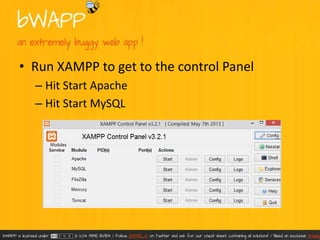
• Run XAMPP to get to the control Panel 
– Hit Start Apache 
– Hit Start MySQL
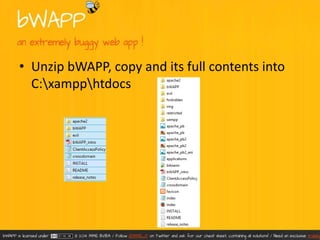
• Unzip bWAPP, copy and its full contents into 
C:xampphtdocs
• Edit the file 'admin/settings.php' with your 
own database connection settings.
• Open the Security console XAMPP directory
• Set the the MYSQL password within the 
MYSQL SECTION: "ROOT" PASSWORD
• Browse to the file 'install.php' in the directory 
'bWAPP'. 
• Login with the default credentials, or make a 
new user. 
– default credentials: bee/bug
Step 2: VMware Bee-Box and 
local Windows 
• Bee-box is a custom Linux VM pre-installed with 
bWAPP. Bee-box is a custom Linux VM (virtual 
machine) pre-installed with bWAPP. 
• Bee-box gives you several ways to hack and deface the 
bWAPP website. It's also possible to hack the bee-box 
to get root access... 
• With bee-box you have the opportunity to explore all 
bWAPP vulnerabilities! 
• Download the latest version of bWAPP from 
SourceForge 
– http://sourceforge.net/projects/bwapp/files/bee-box/
• Unzip bee-box and double click on the bee-box 
– VMware virtual machine configuration 
this will load the config file into VMware
• From here it is ready to use, although we will 
be making some changes.
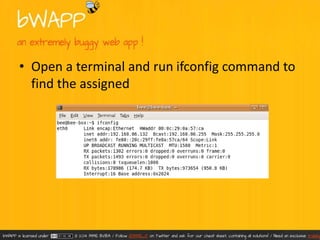
• Open a terminal and run ifconfig command to 
find the assigned
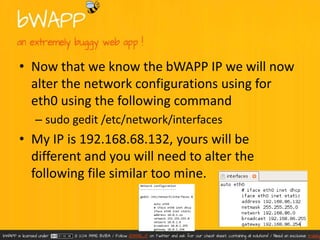
• Now that we know the bWAPP IP we will now 
alter the network configurations using for 
eth0 using the following command 
– sudo gedit /etc/network/interfaces 
• My IP is 192.168.68.132, yours will be 
different and you will need to alter the 
following file similar too mine.
• Once the network configuration for Bee-Bug is 
complete carry out a network restart. 
– sudo /etc/init.d/networking restart 
• 
• The last step is too paste the following in a Windows 
file explorer and choose notepad to open the hosts file. 
– C:WindowsSystem32Driversetchosts 
• 
• Enter the IP obtained within Bee-Bug – again mine was 
192.168.68.132 so mines look like the following and 
save.
• The process is now compete and simply type 
itsecgames.com into the windows browser 
and start hacking.
• This project is part of the ITSEC GAMES 
project. ITSEC GAMES are a fun approach to IT 
security education. IT security, ethical hacking, 
training and fun... all mixed together. 
– https://twitter.com/MME_IT

B wapp – bee bug – installation

  • 2.
    • bWAPP, ora buggy web application, is a free and open source deliberately insecure web application. It helps security enthusiasts, developers and students to discover and to prevent web vulnerabilities. bWAPP prepares one to conduct successful penetration testing and ethical hacking projects. • It covers all major known web bugs, including all risks from the OWASP Top 10 project. • I will now show you how to install bWAPP two different ways. – Option 1: Windows with IIS and MySQL, with XAMPP – Option 2: Using bee-box, a custom Linux VM pre-installed with bWAPP.
  • 3.
    • Download Page: • http://sourceforge.net/projects/bwapp/files/? source=navbar
  • 4.
    Step 1 Windows– bWAPP & XAMPP • Download the latest version of bWAPP from SourceForge and XAMPP from apachefriends. – http://sourceforge.net/projects/bwapp/files/bWA PP/ – https://www.apachefriends.org/download.html • Unzip XAMPP within the C: Drive and install
  • 5.
    • Run XAMPPto get to the control Panel – Hit Start Apache – Hit Start MySQL
  • 6.
    • Unzip bWAPP,copy and its full contents into C:xampphtdocs
  • 7.
    • Edit thefile 'admin/settings.php' with your own database connection settings.
  • 8.
    • Open theSecurity console XAMPP directory
  • 9.
    • Set thethe MYSQL password within the MYSQL SECTION: "ROOT" PASSWORD
  • 10.
    • Browse tothe file 'install.php' in the directory 'bWAPP'. • Login with the default credentials, or make a new user. – default credentials: bee/bug
  • 11.
    Step 2: VMwareBee-Box and local Windows • Bee-box is a custom Linux VM pre-installed with bWAPP. Bee-box is a custom Linux VM (virtual machine) pre-installed with bWAPP. • Bee-box gives you several ways to hack and deface the bWAPP website. It's also possible to hack the bee-box to get root access... • With bee-box you have the opportunity to explore all bWAPP vulnerabilities! • Download the latest version of bWAPP from SourceForge – http://sourceforge.net/projects/bwapp/files/bee-box/
  • 12.
    • Unzip bee-boxand double click on the bee-box – VMware virtual machine configuration this will load the config file into VMware
  • 13.
    • From hereit is ready to use, although we will be making some changes.
  • 14.
    • Open aterminal and run ifconfig command to find the assigned
  • 15.
    • Now thatwe know the bWAPP IP we will now alter the network configurations using for eth0 using the following command – sudo gedit /etc/network/interfaces • My IP is 192.168.68.132, yours will be different and you will need to alter the following file similar too mine.
  • 16.
    • Once thenetwork configuration for Bee-Bug is complete carry out a network restart. – sudo /etc/init.d/networking restart • • The last step is too paste the following in a Windows file explorer and choose notepad to open the hosts file. – C:WindowsSystem32Driversetchosts • • Enter the IP obtained within Bee-Bug – again mine was 192.168.68.132 so mines look like the following and save.
  • 17.
    • The processis now compete and simply type itsecgames.com into the windows browser and start hacking.
  • 18.
    • This projectis part of the ITSEC GAMES project. ITSEC GAMES are a fun approach to IT security education. IT security, ethical hacking, training and fun... all mixed together. – https://twitter.com/MME_IT