B-Trees 2
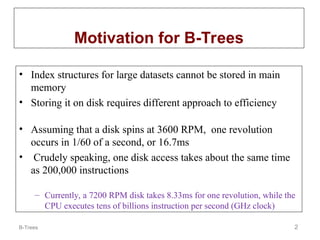
Motivation forB-Trees
• Index structures for large datasets cannot be stored in main
memory
• Storing it on disk requires different approach to efficiency
• Assuming that a disk spins at 3600 RPM, one revolution
occurs in 1/60 of a second, or 16.7ms
• Crudely speaking, one disk access takes about the same time
as 200,000 instructions
– Currently, a 7200 RPM disk takes 8.33ms for one revolution, while the
CPU executes tens of billions instruction per second (GHz clock)
3.
B-Trees 3
Motivation (cont.)
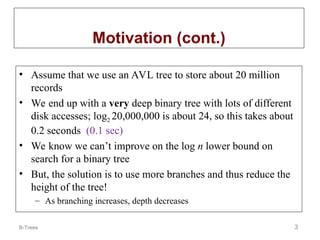
•Assume that we use an AVL tree to store about 20 million
records
• We end up with a very deep binary tree with lots of different
disk accesses; log2 20,000,000 is about 24, so this takes about
0.2 seconds (0.1 sec)
• We know we can’t improve on the log n lower bound on
search for a binary tree
• But, the solution is to use more branches and thus reduce the
height of the tree!
– As branching increases, depth decreases
4.
B-Trees 4
Definition ofa B-tree
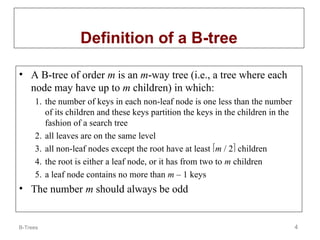
• A B-tree of order m is an m-way tree (i.e., a tree where each
node may have up to m children) in which:
1. the number of keys in each non-leaf node is one less than the number
of its children and these keys partition the keys in the children in the
fashion of a search tree
2. all leaves are on the same level
3. all non-leaf nodes except the root have at least m / 2 children
4. the root is either a leaf node, or it has from two to m children
5. a leaf node contains no more than m – 1 keys
• The number m should always be odd
5.
B-Trees 5
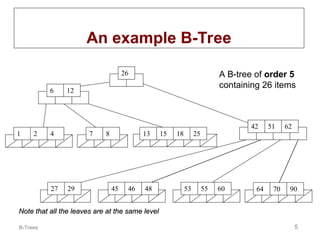
An exampleB-Tree
51 62
42
6 12
26
55 60 70
64 90
45
1 2 4 7 8 13 15 18 25
27 29 46 48 53
A B-tree of order 5
containing 26 items
Note that all the leaves are at the same level
Note that all the leaves are at the same level
6.
B-Trees 6
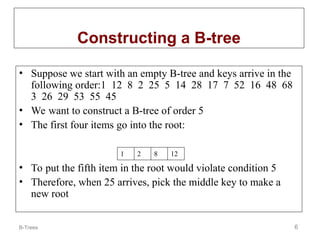
• Supposewe start with an empty B-tree and keys arrive in the
following order:1 12 8 2 25 5 14 28 17 7 52 16 48 68
3 26 29 53 55 45
• We want to construct a B-tree of order 5
• The first four items go into the root:
• To put the fifth item in the root would violate condition 5
• Therefore, when 25 arrives, pick the middle key to make a
new root
Constructing a B-tree
1 2 8 12
7.
B-Trees 7
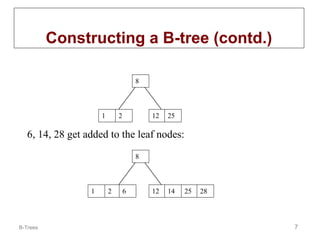
Constructing aB-tree (contd.)
1 2
8
12 25
6, 14, 28 get added to the leaf nodes:
1 2
8
12 14
6 25 28
8.
B-Trees 8
Constructing aB-tree (contd.)
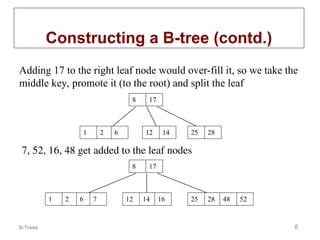
Adding 17 to the right leaf node would over-fill it, so we take the
middle key, promote it (to the root) and split the leaf
8 17
12 14 25 28
1 2 6
7, 52, 16, 48 get added to the leaf nodes
8 17
12 14 25 28
1 2 6 16 48 52
7
9.
B-Trees 9
Constructing aB-tree (contd.)
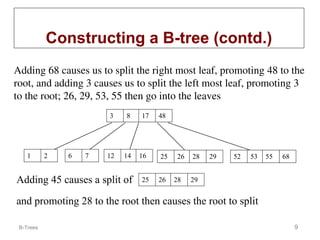
Adding 68 causes us to split the right most leaf, promoting 48 to the
root, and adding 3 causes us to split the left most leaf, promoting 3
to the root; 26, 29, 53, 55 then go into the leaves
3 8 17 48
52 53 55 68
25 26 28 29
1 2 6 7 12 14 16
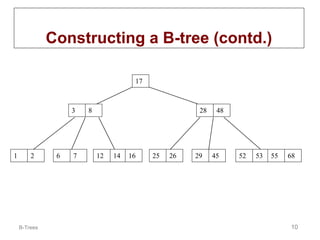
Adding 45 causes a split of 25 26 28 29
and promoting 28 to the root then causes the root to split
B-Trees 11
Inserting intoa B-Tree
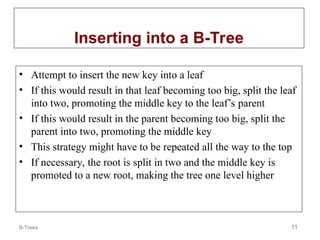
• Attempt to insert the new key into a leaf
• If this would result in that leaf becoming too big, split the leaf
into two, promoting the middle key to the leaf’s parent
• If this would result in the parent becoming too big, split the
parent into two, promoting the middle key
• This strategy might have to be repeated all the way to the top
• If necessary, the root is split in two and the middle key is
promoted to a new root, making the tree one level higher
12.
B-Trees 12
Exercise inInserting a B-Tree
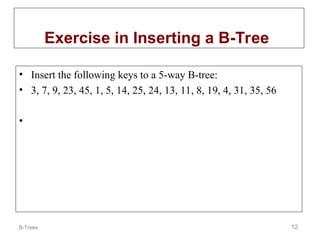
• Insert the following keys to a 5-way B-tree:
• 3, 7, 9, 23, 45, 1, 5, 14, 25, 24, 13, 11, 8, 19, 4, 31, 35, 56
•
13.
B-Trees 13
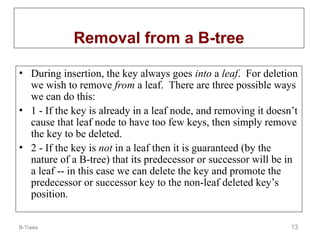
Removal froma B-tree
• During insertion, the key always goes into a leaf. For deletion
we wish to remove from a leaf. There are three possible ways
we can do this:
• 1 - If the key is already in a leaf node, and removing it doesn’t
cause that leaf node to have too few keys, then simply remove
the key to be deleted.
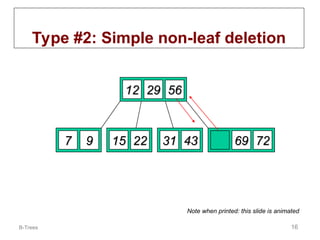
• 2 - If the key is not in a leaf then it is guaranteed (by the
nature of a B-tree) that its predecessor or successor will be in
a leaf -- in this case we can delete the key and promote the
predecessor or successor key to the non-leaf deleted key’s
position.
14.
B-Trees 14
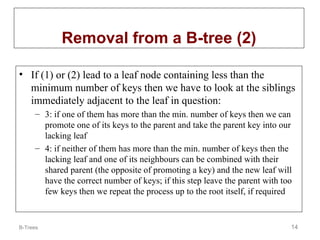
Removal froma B-tree (2)
• If (1) or (2) lead to a leaf node containing less than the
minimum number of keys then we have to look at the siblings
immediately adjacent to the leaf in question:
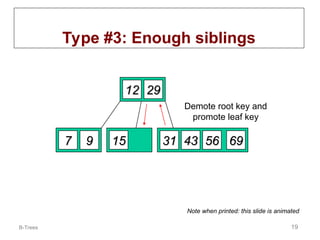
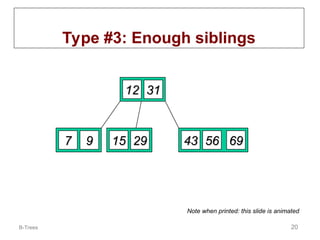
– 3: if one of them has more than the min. number of keys then we can
promote one of its keys to the parent and take the parent key into our
lacking leaf
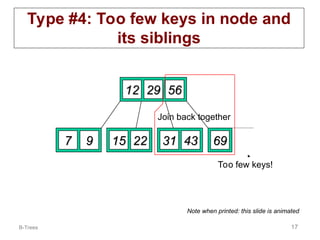
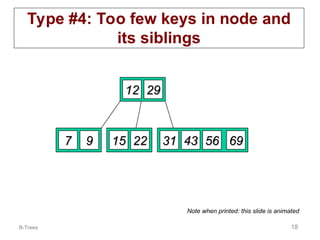
– 4: if neither of them has more than the min. number of keys then the
lacking leaf and one of its neighbours can be combined with their
shared parent (the opposite of promoting a key) and the new leaf will
have the correct number of keys; if this step leave the parent with too
few keys then we repeat the process up to the root itself, if required
15.
B-Trees 15
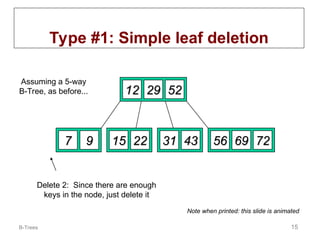
Type #1:Simple leaf deletion
12
12 29
29 52
52
2
2 7
7 9
9 15
15 22
22 56
56 69
69 72
72
31
31 43
43
Delete 2: Since there are enough
keys in the node, just delete it
Assuming a 5-way
B-Tree, as before...
Note when printed: this slide is animated
16.
B-Trees 16
Type #2:Simple non-leaf deletion
12
12 29
29 52
52
7
7 9
9 15
15 22
22 56
56 69
69 72
72
31
31 43
43
Delete 52
Borrow the predecessor
or (in this case) successor
56
56
Note when printed: this slide is animated
17.
B-Trees 17
Type #4:Too few keys in node and
its siblings
12
12 29
29 56
56
7
7 9
9 15
15 22
22 69
69 72
72
31
31 43
43
Delete 72
Too few keys!
Join back together
Note when printed: this slide is animated
18.
B-Trees 18
Type #4:Too few keys in node and
its siblings
12
12 29
29
7
7 9
9 15
15 22
22 69
69
56
56
31
31 43
43
Note when printed: this slide is animated
19.
B-Trees 19
Type #3:Enough siblings
12
12 29
29
7
7 9
9 15
15 22
22 69
69
56
56
31
31 43
43
Delete 22
Demote root key and
promote leaf key
Note when printed: this slide is animated
20.
B-Trees 20
Type #3:Enough siblings
12
12
29
29
7
7 9
9 15
15
31
31
69
69
56
56
43
43
Note when printed: this slide is animated
21.
B-Trees 21
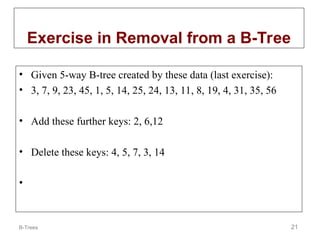
Exercise inRemoval from a B-Tree
• Given 5-way B-tree created by these data (last exercise):
• 3, 7, 9, 23, 45, 1, 5, 14, 25, 24, 13, 11, 8, 19, 4, 31, 35, 56
• Add these further keys: 2, 6,12
• Delete these keys: 4, 5, 7, 3, 14
•
22.
B-Trees 22
Analysis ofB-Trees
• The maximum number of items in a B-tree of order m and height h:
root m – 1
level 1 m(m – 1)
level 2 m2
(m – 1)
. . .
level h mh
(m – 1)
• So, the total number of items is
(1 + m + m2
+ m3
+ … + mh
)(m – 1) =
[(mh+1
– 1)/ (m – 1)] (m – 1) = m
mh
h+1
+1
– 1
– 1
• When m = 5 and h = 2 this gives 53
– 1 = 124
23.
B-Trees 23
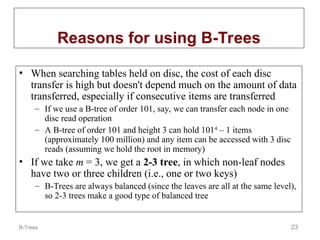
Reasons forusing B-Trees
• When searching tables held on disc, the cost of each disc
transfer is high but doesn't depend much on the amount of data
transferred, especially if consecutive items are transferred
– If we use a B-tree of order 101, say, we can transfer each node in one
disc read operation
– A B-tree of order 101 and height 3 can hold 1014
– 1 items
(approximately 100 million) and any item can be accessed with 3 disc
reads (assuming we hold the root in memory)
• If we take m = 3, we get a 2-3 tree, in which non-leaf nodes
have two or three children (i.e., one or two keys)
– B-Trees are always balanced (since the leaves are all at the same level),
so 2-3 trees make a good type of balanced tree
24.
B-Trees 24
Comparing Trees
•Binary trees
– Can become unbalanced and lose their good time complexity (big O)
– AVL trees are strict binary trees that overcome the balance problem
– Heaps remain balanced but only prioritise (not order) the keys
• Multi-way trees
– B-Trees can be m-way, they can have any (odd) number of children
– One B-Tree, the 2-3 (or 3-way) B-Tree, approximates a permanently
balanced binary tree, exchanging the AVL tree’s balancing operations
for insertion and (more complex) deletion operations
Editor's Notes
#3 AVL tree: Balanced binary search tree
Average element access time = 24 access x 8.33/2 ms = 0.1 sec
Linear speed up significant in practice (even if we cannot improve asymtotic complexity)
#4 B-tree: Balanced search tree for disk storage management
Lucene implements this
B-nodes mapped to file system blocks
same height implies smallest average number of comparisons
restrictions to enable balancing for inserts/deletes
![B-Trees 22
Analysis of B-Trees
• The maximum number of items in a B-tree of order m and height h:
root m – 1
level 1 m(m – 1)
level 2 m2
(m – 1)
. . .
level h mh
(m – 1)
• So, the total number of items is
(1 + m + m2
+ m3
+ … + mh
)(m – 1) =
[(mh+1
– 1)/ (m – 1)] (m – 1) = m
mh
h+1
+1
– 1
– 1
• When m = 5 and h = 2 this gives 53
– 1 = 124](https://image.slidesharecdn.com/l04-x-b-trees-250514142539-d0c3e88a/85/B-tree-and-application-B-tree-and-application-22-320.jpg)


![Presentation on b trees [autosaved]](https://cdn.slidesharecdn.com/ss_thumbnails/presentationonbtreesautosaved-210209155822-thumbnail.jpg?width=640&height=640&fit=bounds)


