AWS SSO
Introduction
• Amazon web service also provide single sign on
solution to increase the security and make
password more stronger.
• It enables users to sign in to a user portal with
their existing corporate credentials and access all
of their assigned accounts and applications from
one place.
• With the help of this we can easily manage the
access and user permissions.
• For AWS SSO we have to create AWS Organization
where we collect all the user.
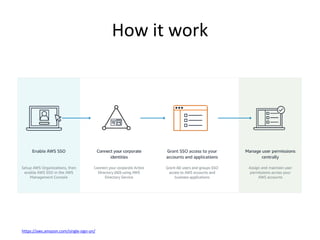
How it work
https://aws.amazon.com/single-sign-on/
Benefits
• Easy to use.
• Integration with AWS Organizations.
• We can add user using active directory.
• Easy to set up and monitor usage, etc.
AWS Inspector
Introduction
• It is automatic security assessment service
that helps us increasing security of our
product.
• It will scan our application and then generate
detailed report about vulnerability.
• It will also provide best practice for security
related issues.
Benefits
• Streamline security compliance
• Enforce security standards
• Identify application security issues
• Integrate security into DevOps
• Increase development agility
• Integration with other AWS services
https://www.digitalmarketplace.service.gov.uk/g-cloud/services/903253036390347
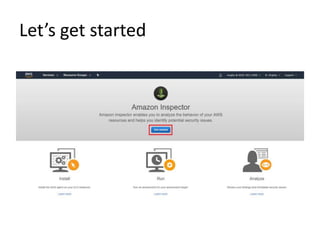
Let’s get started
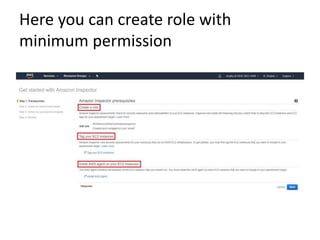
Here you can create role with
minimum permission
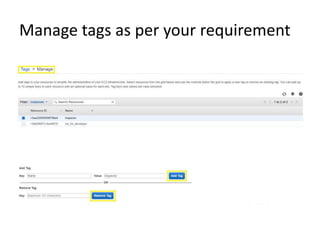
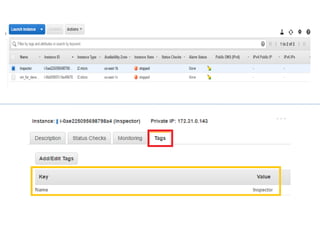
Manage tags as per your requirement
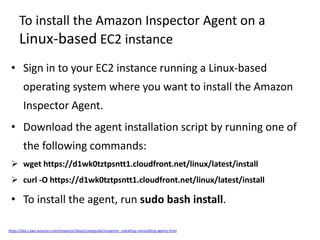
To install the Amazon Inspector Agent on a
Linux-based EC2 instance
• Sign in to your EC2 instance running a Linux-based
operating system where you want to install the Amazon
Inspector Agent.
• Download the agent installation script by running one of
the following commands:
 wget https://d1wk0tztpsntt1.cloudfront.net/linux/latest/install
 curl -O https://d1wk0tztpsntt1.cloudfront.net/linux/latest/install
• To install the agent, run sudo bash install.
https://docs.aws.amazon.com/inspector/latest/userguide/inspector_installing-uninstalling-agents.html
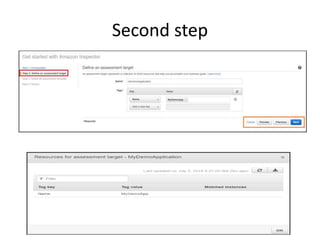
Second step
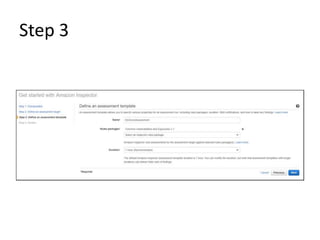
Step 3
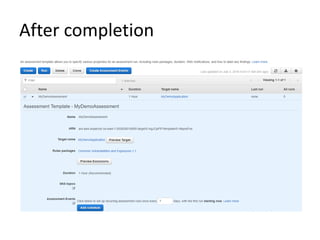
After completion
Aws

Aws

  • 1.
  • 2.
    Introduction • Amazon webservice also provide single sign on solution to increase the security and make password more stronger. • It enables users to sign in to a user portal with their existing corporate credentials and access all of their assigned accounts and applications from one place. • With the help of this we can easily manage the access and user permissions. • For AWS SSO we have to create AWS Organization where we collect all the user.
  • 3.
  • 4.
    Benefits • Easy touse. • Integration with AWS Organizations. • We can add user using active directory. • Easy to set up and monitor usage, etc.
  • 5.
  • 6.
    Introduction • It isautomatic security assessment service that helps us increasing security of our product. • It will scan our application and then generate detailed report about vulnerability. • It will also provide best practice for security related issues.
  • 7.
    Benefits • Streamline securitycompliance • Enforce security standards • Identify application security issues • Integrate security into DevOps • Increase development agility • Integration with other AWS services https://www.digitalmarketplace.service.gov.uk/g-cloud/services/903253036390347
  • 8.
  • 9.
    Here you cancreate role with minimum permission
  • 10.
    Manage tags asper your requirement
  • 12.
    To install theAmazon Inspector Agent on a Linux-based EC2 instance • Sign in to your EC2 instance running a Linux-based operating system where you want to install the Amazon Inspector Agent. • Download the agent installation script by running one of the following commands:  wget https://d1wk0tztpsntt1.cloudfront.net/linux/latest/install  curl -O https://d1wk0tztpsntt1.cloudfront.net/linux/latest/install • To install the agent, run sudo bash install. https://docs.aws.amazon.com/inspector/latest/userguide/inspector_installing-uninstalling-agents.html
  • 13.
  • 14.
  • 15.