Study Group: AWS SAA Guide
Chapter 09 -
Storage Option
Shaq
2020.May
Chapter.9
Storage Option
Data-driven companies like Formula One are great
examples of how much profit a billion dollar company can
make by the adoption of big data and data processing
technologies.
"During each race, 120 sensors on each car generate 3 GB
of data, and 1,500 data points are generated each second".
Storage Solutions
• Understand the main storage options in AWS
• Relational Database service
• Simple Storage Service
• DynamoDB
RDS
The Relational Database Service (RDS) is compatible with the following
engines and acts as a drop in replacement for the following engines:
• PostgreSQL
• MariaDB
• MySQL
• Oracle Database
• Microsoft SQL Server
• Aurora (serverless)
RDS
RDS - Instances
• Instance types such as db.t2, db.m4, db.r4, and so on,
depending of the database engine chosen.
• The storage type can be
• General Purpose SSD
• Provisioned IOPS.
• The allocated storage starts with
• a minimum of 100(?) GiB and
• a maximum of 16 TiB.
RDS - Parameter Groups
• Parameter groups are containers for configuration
parameters specific to every database engine and
version.
• Via parameter groups the database runtime can be
modified, several changes can be influenced or specific
behaviors can be set. (Example: character_set_server:
latin -> utf8)
RDS - Option Groups
• DB engines have the option to run plugins or extensions
that enhance the engine behavior. For example,
• Oracle Database can enable the Oracle Spatial
package to work with spatial indexes
• Transparent Data Encryption (TDE) to improve security
and manageability.
RDS - Snapshots
• Snapshots are a way to restore in a point in time the
database by performing a volume snapshot.
• This is a managed activity that uses S3 managed
buckets.
RDS - Events
• RDS can publish all the database activity happening at
the instance and API level via SNS topics pushed via
email subscription.
• There are several event categories that can be
subscribed, for example, DBAs get notifications from
configuration changes and automatic backups, and
operations receive availability and failover events.
RDS - Multi-AZ
• Multi-AZ gives customers the ability to deploy a secondary instance
running in another Availability Zone independent from the master database.
• Primary, and secondary are always up to date and automatic failover is
taken by the service in the following scenarios:
• Loss of availability in primary
• Availability Zone Loss of network connectivity to primary
• Compute unit failure on primary
• Storage failure on primary
• Maintenance Windows
RDS - Read Replicas
• RDS can be scaled horizontally by creating up to 5 read
replicas (15 for Amazon Aurora) to offload read workloads.
• These replicas can be used to increase the read
throughput.
• For example, reporting and business intelligence. Read
replicas are replicated asynchronously which means
that certain replication lag is present and are eventually
consistent.
RDS - Caching
• Several patterns can be found in your databases,
• for example, a higher rate of ReadThroughput than
WriteThroughput reported from CloudWatch.
• Amazon Elasticache is an in-memory datastore that
can help to alleviate the frequent use of views,
complicated queries or read-only data as catalogs or
the top selling products.
S3
• Simple Storage Service aka S3 is an Object Storage.
• S3 provides a key-value store for objects; think of it as a
really big HashMap in which you provide a key and store
a blob of data as is.
• Buckets are created with the regional scope and bucket
names need to be unique because they are global and
DNS compliant.
S3 - Data organization
• Data is organized logically via object keys, these keys
need to be unique at the bucket level.
• To list keys in a bucket, you need to provide the bucket
name and the region, the list operation by default will
retrieve 1000 keys where you have the option to paginate
and retrieve a subset of the keys.
S3 - Integrity
• AWS constantly compares objects with the MD5
database to validate consistency.
• When inconsistencies are detected the object is repaired
automatically. Buckets can also be versioned, providing
data integrity by keeping multiple versions of every object
as they are changed through time.
S3 - Availability
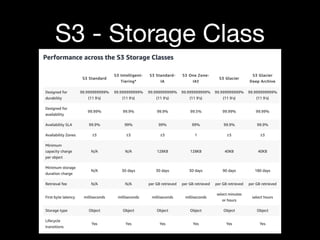
• Availability can vary depending of the type of storage
being used with different service-level agreements.
S3 - Storage Class
• Standard (Standard)
• S3 Intelligent-Tiering
• S3 Standard-Infrequent Access (S3 Standard-IA)
• S3 One Zone-Infrequent Access (S3 One Zone-IA)
• S3 Glacier (S3 Glacier)
• S3 Glacier Deep Archive (S3 Glacier Deep Archive)
S3 - Storage Class
S3 - Cost dimensions
• The S3 doesn't charge you for the data ingress.
• You pay for the storage volume per month, for the use of
your data calculated per request (PUT, COPY, POST,
LIST, and GET requests) and for the transfer out of cross
region requests.
S3 - Cost dimensions
S3 - Reducing cost
• To find opportunities for costs you can use the Analytics
feature under Management in the console to find usage
patterns for candidate objects to transition to Infrequent
Access (IA).
• This analysis feature groups objects by age and creates a
CSV file with detailed information about every object
access pattern.
S3 - Durability
• AWS S3 provides four kinds of storage and one option in order to optimize for costs.
• For maximum durability, you can use
• STANDARD,
• STANDARD_IA,
• or GLACIER.
• If you can afford to lose objects and cost is the primary objective then you should use
• STANDARD_IA,
• ONEZONE_IA,
• RRS option.
S3 - Maximum durability
• Every object by default is stored with STANDARD storage
class with 119s of durability. Use this storage layer for
objects that require real-time access and cannot be lost
under any circumstance.
• The STANDARD_IA layer provides a balance between
cost optimization, availability, and durability. It provides
the same durability of STANDARD, but with lower costs
because data is classified for infrequent access.
S3 - Limited durability
• The ONEZONE_IA offers the best alternative for low cost
and real-time access but at the cost of a higher
probability to lose your data. This storage layer will only
replicate objects at the AZ level with 119s but it is not
resilient to the complete loss of the AZ.
• The RSS (REDUCED_REDUNDANCY) layer provides low
cost and low replication ratio, RRS objects have an
average annual expected loss of 0.01% of objects. If an
RRS object is lost, when requests are made to that
object, S3 returns a 405 error.
S3 - Consistency
• To achieve high availability S3 uses multiple distributed
partitions (servers) to service requests.
• The eventual consistency model of S3 is the way of how
changes committed to the system become visible to
every actor and is an important trade-off in distributed
storage systems.
S3 - Storage Optimization
• There are three forms to change the storage class in S3:
• When the object is created (upload a file)
• Performing a copy of an existent object with a new
storage type
• Using lifecycle policies
S3 - Upload file
• Change the storage when upload a file
S3 - Copy File
• Change the storage when copy a file by AWS CLI
S3 - Lifecycle policies
• Lifecycle policies are a great way to manage all the object
lifecycles and achieve compliance.
S3 - Lifecycle policies
• Change the storage by Lifecycle Policies
S3 - Lifecycle policies
• Change the storage by Lifecycle Policies
S3 - Lifecycle policies
• Change the storage by Lifecycle Policies
DynamoDB
• DynamoDB is a fully managed NoSQL database and is
part of the AWS offering to non-relational products.
• DynamoDB gives end users all the flexibility required to
store unlimited amounts of data, provides strong
consistency, low cost, predictable performance with a
single digit millisecond latency, and high availability.
DynamoDB - Control Plane
• The control plane provides interaction with high-level
operations to manage objects as tables and indexes.
• The AWS CLI could also be used to control the tables
management.
DynamoDB - Control Plane
DynamoDB - AWS CLI
• DynamoDB Create/Update/Delete table instructions
• aws dynamodb create-table --table-name Music
--attribute-definitions AttributeName=Artist,AttributeType=S
--key-schema AttributeName=Artist,KeyType=HASH
--provisioned-throughput
ReadCapacityUnits=5,WriteCapacityUnits=5
• aws dynamodb update-table --table-name Music
--provisioned-throughput
ReadCapacityUnits=10,WriteCapacityUnits=10
• aws dynamodb delete-table --table-name Music
DynamoDB - AWS CLI
DynamoDB - Consistency
• DynamoDB guarantees durability and reliability. When a write operation
has been made, it has already been replicated in three AZs in less than
a second.
• DynamoDB provides customers with the full control of the consistency
model when reading data.
• Eventually consistent reads, Consistency across all copies
of data is USUALLY reached within a second. Repeating a read after
a short time should return the updated data. It's best read
performance
• Strongly consistent. A strongly consistent read returns a result
that reflects all writes that received a successful response prior to
the end.
DynamoDB Streams
• DynamoDB streams are an event-based notification
system that can resemble traditional database triggers.
• Lambda functions can poll for changes in the DynamoDB
stream which once activated for a table provides a service
endpoint where all the ordered table changes are
recorded and persisted up to 24 hours.

AWS Study Group - Chapter 09 - Storage Option [Solution Architect Associate Guide]

  • 1.
    Study Group: AWSSAA Guide Chapter 09 - Storage Option Shaq 2020.May
  • 2.
  • 3.
    Data-driven companies likeFormula One are great examples of how much profit a billion dollar company can make by the adoption of big data and data processing technologies. "During each race, 120 sensors on each car generate 3 GB of data, and 1,500 data points are generated each second".
  • 4.
    Storage Solutions • Understandthe main storage options in AWS • Relational Database service • Simple Storage Service • DynamoDB
  • 5.
    RDS The Relational DatabaseService (RDS) is compatible with the following engines and acts as a drop in replacement for the following engines: • PostgreSQL • MariaDB • MySQL • Oracle Database • Microsoft SQL Server • Aurora (serverless)
  • 6.
  • 7.
    RDS - Instances •Instance types such as db.t2, db.m4, db.r4, and so on, depending of the database engine chosen. • The storage type can be • General Purpose SSD • Provisioned IOPS. • The allocated storage starts with • a minimum of 100(?) GiB and • a maximum of 16 TiB.
  • 8.
    RDS - ParameterGroups • Parameter groups are containers for configuration parameters specific to every database engine and version. • Via parameter groups the database runtime can be modified, several changes can be influenced or specific behaviors can be set. (Example: character_set_server: latin -> utf8)
  • 9.
    RDS - OptionGroups • DB engines have the option to run plugins or extensions that enhance the engine behavior. For example, • Oracle Database can enable the Oracle Spatial package to work with spatial indexes • Transparent Data Encryption (TDE) to improve security and manageability.
  • 10.
    RDS - Snapshots •Snapshots are a way to restore in a point in time the database by performing a volume snapshot. • This is a managed activity that uses S3 managed buckets.
  • 11.
    RDS - Events •RDS can publish all the database activity happening at the instance and API level via SNS topics pushed via email subscription. • There are several event categories that can be subscribed, for example, DBAs get notifications from configuration changes and automatic backups, and operations receive availability and failover events.
  • 12.
    RDS - Multi-AZ •Multi-AZ gives customers the ability to deploy a secondary instance running in another Availability Zone independent from the master database. • Primary, and secondary are always up to date and automatic failover is taken by the service in the following scenarios: • Loss of availability in primary • Availability Zone Loss of network connectivity to primary • Compute unit failure on primary • Storage failure on primary • Maintenance Windows
  • 13.
    RDS - ReadReplicas • RDS can be scaled horizontally by creating up to 5 read replicas (15 for Amazon Aurora) to offload read workloads. • These replicas can be used to increase the read throughput. • For example, reporting and business intelligence. Read replicas are replicated asynchronously which means that certain replication lag is present and are eventually consistent.
  • 14.
    RDS - Caching •Several patterns can be found in your databases, • for example, a higher rate of ReadThroughput than WriteThroughput reported from CloudWatch. • Amazon Elasticache is an in-memory datastore that can help to alleviate the frequent use of views, complicated queries or read-only data as catalogs or the top selling products.
  • 15.
    S3 • Simple StorageService aka S3 is an Object Storage. • S3 provides a key-value store for objects; think of it as a really big HashMap in which you provide a key and store a blob of data as is. • Buckets are created with the regional scope and bucket names need to be unique because they are global and DNS compliant.
  • 16.
    S3 - Dataorganization • Data is organized logically via object keys, these keys need to be unique at the bucket level. • To list keys in a bucket, you need to provide the bucket name and the region, the list operation by default will retrieve 1000 keys where you have the option to paginate and retrieve a subset of the keys.
  • 17.
    S3 - Integrity •AWS constantly compares objects with the MD5 database to validate consistency. • When inconsistencies are detected the object is repaired automatically. Buckets can also be versioned, providing data integrity by keeping multiple versions of every object as they are changed through time.
  • 18.
    S3 - Availability •Availability can vary depending of the type of storage being used with different service-level agreements.
  • 19.
    S3 - StorageClass • Standard (Standard) • S3 Intelligent-Tiering • S3 Standard-Infrequent Access (S3 Standard-IA) • S3 One Zone-Infrequent Access (S3 One Zone-IA) • S3 Glacier (S3 Glacier) • S3 Glacier Deep Archive (S3 Glacier Deep Archive)
  • 20.
  • 21.
    S3 - Costdimensions • The S3 doesn't charge you for the data ingress. • You pay for the storage volume per month, for the use of your data calculated per request (PUT, COPY, POST, LIST, and GET requests) and for the transfer out of cross region requests.
  • 22.
    S3 - Costdimensions
  • 23.
    S3 - Reducingcost • To find opportunities for costs you can use the Analytics feature under Management in the console to find usage patterns for candidate objects to transition to Infrequent Access (IA). • This analysis feature groups objects by age and creates a CSV file with detailed information about every object access pattern.
  • 24.
    S3 - Durability •AWS S3 provides four kinds of storage and one option in order to optimize for costs. • For maximum durability, you can use • STANDARD, • STANDARD_IA, • or GLACIER. • If you can afford to lose objects and cost is the primary objective then you should use • STANDARD_IA, • ONEZONE_IA, • RRS option.
  • 25.
    S3 - Maximumdurability • Every object by default is stored with STANDARD storage class with 119s of durability. Use this storage layer for objects that require real-time access and cannot be lost under any circumstance. • The STANDARD_IA layer provides a balance between cost optimization, availability, and durability. It provides the same durability of STANDARD, but with lower costs because data is classified for infrequent access.
  • 26.
    S3 - Limiteddurability • The ONEZONE_IA offers the best alternative for low cost and real-time access but at the cost of a higher probability to lose your data. This storage layer will only replicate objects at the AZ level with 119s but it is not resilient to the complete loss of the AZ. • The RSS (REDUCED_REDUNDANCY) layer provides low cost and low replication ratio, RRS objects have an average annual expected loss of 0.01% of objects. If an RRS object is lost, when requests are made to that object, S3 returns a 405 error.
  • 27.
    S3 - Consistency •To achieve high availability S3 uses multiple distributed partitions (servers) to service requests. • The eventual consistency model of S3 is the way of how changes committed to the system become visible to every actor and is an important trade-off in distributed storage systems.
  • 28.
    S3 - StorageOptimization • There are three forms to change the storage class in S3: • When the object is created (upload a file) • Performing a copy of an existent object with a new storage type • Using lifecycle policies
  • 29.
    S3 - Uploadfile • Change the storage when upload a file
  • 30.
    S3 - CopyFile • Change the storage when copy a file by AWS CLI
  • 31.
    S3 - Lifecyclepolicies • Lifecycle policies are a great way to manage all the object lifecycles and achieve compliance.
  • 32.
    S3 - Lifecyclepolicies • Change the storage by Lifecycle Policies
  • 33.
    S3 - Lifecyclepolicies • Change the storage by Lifecycle Policies
  • 34.
    S3 - Lifecyclepolicies • Change the storage by Lifecycle Policies
  • 35.
    DynamoDB • DynamoDB isa fully managed NoSQL database and is part of the AWS offering to non-relational products. • DynamoDB gives end users all the flexibility required to store unlimited amounts of data, provides strong consistency, low cost, predictable performance with a single digit millisecond latency, and high availability.
  • 36.
    DynamoDB - ControlPlane • The control plane provides interaction with high-level operations to manage objects as tables and indexes. • The AWS CLI could also be used to control the tables management.
  • 37.
  • 38.
  • 39.
    DynamoDB - AWSCLI • DynamoDB Create/Update/Delete table instructions • aws dynamodb create-table --table-name Music --attribute-definitions AttributeName=Artist,AttributeType=S --key-schema AttributeName=Artist,KeyType=HASH --provisioned-throughput ReadCapacityUnits=5,WriteCapacityUnits=5 • aws dynamodb update-table --table-name Music --provisioned-throughput ReadCapacityUnits=10,WriteCapacityUnits=10 • aws dynamodb delete-table --table-name Music
  • 40.
  • 41.
    DynamoDB - Consistency •DynamoDB guarantees durability and reliability. When a write operation has been made, it has already been replicated in three AZs in less than a second. • DynamoDB provides customers with the full control of the consistency model when reading data. • Eventually consistent reads, Consistency across all copies of data is USUALLY reached within a second. Repeating a read after a short time should return the updated data. It's best read performance • Strongly consistent. A strongly consistent read returns a result that reflects all writes that received a successful response prior to the end.
  • 42.
    DynamoDB Streams • DynamoDBstreams are an event-based notification system that can resemble traditional database triggers. • Lambda functions can poll for changes in the DynamoDB stream which once activated for a table provides a service endpoint where all the ordered table changes are recorded and persisted up to 24 hours.