Presented By: Aayush Srivastava
& Divyank Saxena
Custom ML Model
Deployment using
AWS Sagemaker
Lack of etiquette and manners is a huge turn off.
KnolX Etiquettes
Punctuality
Join the session 5 minutes prior to
the session start time. We start on
time and conclude on time!
Feedback
Make sure to submit a constructive
feedback for all sessions as it is
very helpful for the presenter.
Silent Mode
Keep your mobile devices in silent
mode, feel free to move out of
session in case you need to attend
an urgent call.
Avoid Disturbance
Avoid unwanted chit chat during
the session.
Our Agenda
01 What is Machine Learning
02 What is AWS Sagemaker
03
How Does Sagemaker Work
04
Deploying Custom ML Model
05
Demo
05
06
Benefits of AWS Sagemaker
.
What is Machine Learning ?
● According to Arthur Samuel(1959), Machine Learning algorithms enable the computers to learn from
data, and even improve themselves, without being explicitly programmed.
● Few Day to Day Applications of Machine learning
1.Image recognition
2.Speech Recognition
3.Product Recommendation
4.Virtual Personal Assistant
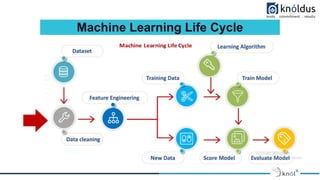
Machine Learning Life Cycle
● Amazon Web Services (AWS) is an on-demand cloud platform offered by Amazon, that provides
service over the internet. AWS services can be used to build, monitor, and deploy any application type
in the cloud. Here's where the AWS Sagemaker comes into play.
● AWS is a broadly adopted cloud platform that offers several on-demand operations like compute
power, database storage, content delivery, etc., to help corporates scale and grow.
What is AWS
● Amazon SageMaker is a managed service in the Amazon Web Services (AWS) public cloud. It
provides the tools to build, train and deploy machine learning models for predictive analytics
applications. The platform automates the tedious work of building a production-ready artificial
intelligence (AI) pipeline.
● Deploying ML models is challenging, even for experienced application developers. Amazon
SageMaker aims to simplify the process.
● AutoML is also supported by sagemaker. It process of automating the tasks of applying machine
learning to real-world problems.
What is Amazon Sagemaker
Some Benefits of Using AWS SageMaker
•Highly Scalable
•It helps in creating and managing compute instance with the least amount of time
•It helps in storing all ML components in one place
•All your logs get easily stored in CloudWatch logs
• Amazon’s own pre-built models are highly optimized to run on AWS
•Maintains Uptime — Process keeps on running without any stoppage.
•High Data Security
Benefits of Amazon Sagemaker
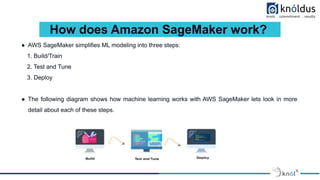
● AWS SageMaker simplifies ML modeling into three steps:
1. Build/Train
2. Test and Tune
3. Deploy
● The following diagram shows how machine learning works with AWS SageMaker lets look in more
detail about each of these steps.
How does Amazon SageMaker work?
Train
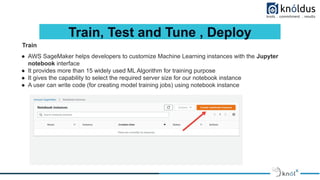
● AWS SageMaker helps developers to customize Machine Learning instances with the Jupyter
notebook interface
● It provides more than 15 widely used ML Algorithm for training purpose
● It gives the capability to select the required server size for our notebook instance
● A user can write code (for creating model training jobs) using notebook instance
Train, Test and Tune , Deploy
Train
● After creating a notebook instance a user can select type of environments he will be using.
● The necessary libraries will come pre-installed according to your notebook instance type
Train, Test and Tune , Deploy
Tune
● Set up and import required libraries
● Define a few environment variables and manage them for training the model
● Train and tune the inbuilt Sagemaker Algorithm by tweaking the hyperparameters according to your
need
Train, Test and Tune , Deploy
Tune
● Hyperparameter tuning is achieved by adding a suitable combination of algorithm parameters like:
Train, Test and Tune , Deploy
Testing
● It helps us in managing the model performance by using manual testing
● Evaluating the accuracy of the ML model
● It helps us to make sure that the achieved loss is acceptable for your task
● Helpful in checking model performance on real data
Train, Test and Tune , Deploy
Deploy
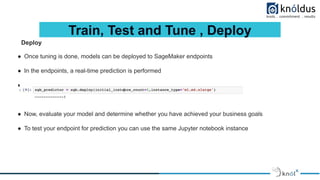
● Once tuning is done, models can be deployed to SageMaker endpoints
● In the endpoints, a real-time prediction is performed
● For deployment use:
● Now, evaluate your model and determine whether you have achieved your business goals
● To test your endpoint for prediction you can use the same Jupyter notebook instance
Train, Test and Tune , Deploy
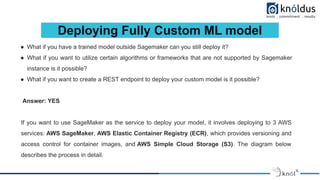
Deploying Fully Custom ML model
● What if you have a trained model outside Sagemaker can you still deploy it?
● What if you want to utilize certain algorithms or frameworks that are not supported by Sagemaker
instance is it possible?
● What if you want to create a REST endpoint to deploy your custom model is it possible?
Answer: YES
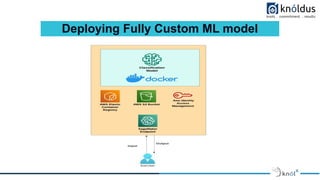
If you want to use SageMaker as the service to deploy your model, it involves deploying to 3 AWS
services: AWS SageMaker, AWS Elastic Container Registry (ECR), which provides versioning and
access control for container images, and AWS Simple Cloud Storage (S3). The diagram below
describes the process in detail.
Deploying Fully Custom ML model
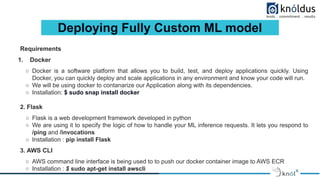
Requirements
1. Docker
○ Docker is a software platform that allows you to build, test, and deploy applications quickly. Using
Docker, you can quickly deploy and scale applications in any environment and know your code will run.
○ We will be using docker to contanarize our Application along with its dependencies.
○ Installation: $ sudo snap install docker
2. Flask
○ Flask is a web development framework developed in python
○ We are using it to specify the logic of how to handle your ML inference requests. It lets you respond to
/ping and /invocations
○ Installation : pip install Flask
3. AWS CLI
○ AWS command line interface is being used to to push our docker container image to AWS ECR
○ Installation : $ sudo apt-get install awscli
Deploying Fully Custom ML model
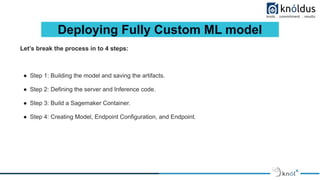
Let’s break the process in to 4 steps:
● Step 1: Building the model and saving the artifacts.
● Step 2: Defining the server and Inference code.
● Step 3: Build a Sagemaker Container.
● Step 4: Creating Model, Endpoint Configuration, and Endpoint.
Deploying Fully Custom ML model
Step 1: Building the model and saving the artifacts.
● Build the model and serialize the object, which is used for prediction. In this demo we are using rasa to
train a NLU model.
● Once you train the model, save that artifact in tar.gz. You can upload the artifact in S3 bucket or you can
include it in a the container.
Deploying Fully Custom ML model
Step 2: Defining the server and inference code.
● When an endpoint is invoked Sagemaker interacts with the Docker container, which runs the inference
code for hosting services and processes the request and returns the response.Containers need to
implement a web server that responds to /invocations and /ping on port 8080.
● Inference code in the container will receive GET requests from the infrastructure and it should respond to
Sagemaker with an HTTP 200 status code and an empty body, which indicates that the container is ready
to accept inference requests at invocations endpoint.
● And invocations is the endpoint that receives POST requests and responds according to the format
specified in the algorithm. To make the model REST API, you need Flask, which is WSGI(Web Server
Gateway Interface) application framework.
Deploying Fully Custom ML model
Step 3: Sagemaker Container.
● Sagemaker uses docker containers extensively. You can put your scripts, algorithms, and inference code
for your models in the containers, which includes the runtime, system tools, libraries and other code to
deploy your models, which provides flexibility to run your own model.
● You create Docker containers from images that are saved in a repository. You build the images from
scripted instructions provided in a Dockerfile.
● The Dockerfile describes the image that you want to build with complete operating system installation of
the system that you want to run.
● And you need to copy the project folder where you have to /opt/code and make it as a working directory.
● The Amazon Sagemaker Containers library places the scripts that the container will run in the /opt/code/
directory
Deploying Fully Custom ML model
● How SageMaker Runs Your Inference Image
To configure a container to run as an executable, use an ENTRYPOINT instruction in a Dockerfile. Note the
following:
For model inference, SageMaker runs the container as:
● Docker run image serve
SageMaker overrides default CMD statements in a container by specifying the serve argument after the
image name. The serve argument overrides arguments that you provide with the CMD command in the
Dockerfile. We recommend that you use the exec form of the ENTRYPOINT instruction:
● ENTRYPOINT ["executable", "param1", "param2"]
For example:
ENTRYPOINT ["python", "k_means_inference.py"]
Deploying Fully Custom ML model
Step 4: Creating Model, Endpoint Configuration, and Endpoint.
● Creating models can be done by API or AWS management console . Provide Model name and IAM role.
● In Container definition, choose to provide artifacts and inference image location and provide the S3
location of the artifacts and Image URI.
● After creating the model, create Endpoint Configuration and add the model which has been created.
● Create Endpoint using the existing configuration.
● Now your custom model has been deployed and you can hit the “invocation api” via postman.
Demo
Thank You !
Get in touch with us:
Lorem Studio, Lord Building
D4456, LA, USA

AWS ML Model Deployment

  • 1.
    Presented By: AayushSrivastava & Divyank Saxena Custom ML Model Deployment using AWS Sagemaker
  • 2.
    Lack of etiquetteand manners is a huge turn off. KnolX Etiquettes Punctuality Join the session 5 minutes prior to the session start time. We start on time and conclude on time! Feedback Make sure to submit a constructive feedback for all sessions as it is very helpful for the presenter. Silent Mode Keep your mobile devices in silent mode, feel free to move out of session in case you need to attend an urgent call. Avoid Disturbance Avoid unwanted chit chat during the session.
  • 3.
    Our Agenda 01 Whatis Machine Learning 02 What is AWS Sagemaker 03 How Does Sagemaker Work 04 Deploying Custom ML Model 05 Demo 05 06 Benefits of AWS Sagemaker
  • 4.
    . What is MachineLearning ? ● According to Arthur Samuel(1959), Machine Learning algorithms enable the computers to learn from data, and even improve themselves, without being explicitly programmed. ● Few Day to Day Applications of Machine learning 1.Image recognition 2.Speech Recognition 3.Product Recommendation 4.Virtual Personal Assistant
  • 5.
  • 6.
    ● Amazon WebServices (AWS) is an on-demand cloud platform offered by Amazon, that provides service over the internet. AWS services can be used to build, monitor, and deploy any application type in the cloud. Here's where the AWS Sagemaker comes into play. ● AWS is a broadly adopted cloud platform that offers several on-demand operations like compute power, database storage, content delivery, etc., to help corporates scale and grow. What is AWS
  • 7.
    ● Amazon SageMakeris a managed service in the Amazon Web Services (AWS) public cloud. It provides the tools to build, train and deploy machine learning models for predictive analytics applications. The platform automates the tedious work of building a production-ready artificial intelligence (AI) pipeline. ● Deploying ML models is challenging, even for experienced application developers. Amazon SageMaker aims to simplify the process. ● AutoML is also supported by sagemaker. It process of automating the tasks of applying machine learning to real-world problems. What is Amazon Sagemaker
  • 8.
    Some Benefits ofUsing AWS SageMaker •Highly Scalable •It helps in creating and managing compute instance with the least amount of time •It helps in storing all ML components in one place •All your logs get easily stored in CloudWatch logs • Amazon’s own pre-built models are highly optimized to run on AWS •Maintains Uptime — Process keeps on running without any stoppage. •High Data Security Benefits of Amazon Sagemaker
  • 9.
    ● AWS SageMakersimplifies ML modeling into three steps: 1. Build/Train 2. Test and Tune 3. Deploy ● The following diagram shows how machine learning works with AWS SageMaker lets look in more detail about each of these steps. How does Amazon SageMaker work?
  • 10.
    Train ● AWS SageMakerhelps developers to customize Machine Learning instances with the Jupyter notebook interface ● It provides more than 15 widely used ML Algorithm for training purpose ● It gives the capability to select the required server size for our notebook instance ● A user can write code (for creating model training jobs) using notebook instance Train, Test and Tune , Deploy
  • 11.
    Train ● After creatinga notebook instance a user can select type of environments he will be using. ● The necessary libraries will come pre-installed according to your notebook instance type Train, Test and Tune , Deploy
  • 12.
    Tune ● Set upand import required libraries ● Define a few environment variables and manage them for training the model ● Train and tune the inbuilt Sagemaker Algorithm by tweaking the hyperparameters according to your need Train, Test and Tune , Deploy
  • 13.
    Tune ● Hyperparameter tuningis achieved by adding a suitable combination of algorithm parameters like: Train, Test and Tune , Deploy
  • 14.
    Testing ● It helpsus in managing the model performance by using manual testing ● Evaluating the accuracy of the ML model ● It helps us to make sure that the achieved loss is acceptable for your task ● Helpful in checking model performance on real data Train, Test and Tune , Deploy
  • 15.
    Deploy ● Once tuningis done, models can be deployed to SageMaker endpoints ● In the endpoints, a real-time prediction is performed ● For deployment use: ● Now, evaluate your model and determine whether you have achieved your business goals ● To test your endpoint for prediction you can use the same Jupyter notebook instance Train, Test and Tune , Deploy
  • 16.
    Deploying Fully CustomML model ● What if you have a trained model outside Sagemaker can you still deploy it? ● What if you want to utilize certain algorithms or frameworks that are not supported by Sagemaker instance is it possible? ● What if you want to create a REST endpoint to deploy your custom model is it possible? Answer: YES If you want to use SageMaker as the service to deploy your model, it involves deploying to 3 AWS services: AWS SageMaker, AWS Elastic Container Registry (ECR), which provides versioning and access control for container images, and AWS Simple Cloud Storage (S3). The diagram below describes the process in detail.
  • 17.
  • 18.
    Deploying Fully CustomML model Requirements 1. Docker ○ Docker is a software platform that allows you to build, test, and deploy applications quickly. Using Docker, you can quickly deploy and scale applications in any environment and know your code will run. ○ We will be using docker to contanarize our Application along with its dependencies. ○ Installation: $ sudo snap install docker 2. Flask ○ Flask is a web development framework developed in python ○ We are using it to specify the logic of how to handle your ML inference requests. It lets you respond to /ping and /invocations ○ Installation : pip install Flask 3. AWS CLI ○ AWS command line interface is being used to to push our docker container image to AWS ECR ○ Installation : $ sudo apt-get install awscli
  • 19.
    Deploying Fully CustomML model Let’s break the process in to 4 steps: ● Step 1: Building the model and saving the artifacts. ● Step 2: Defining the server and Inference code. ● Step 3: Build a Sagemaker Container. ● Step 4: Creating Model, Endpoint Configuration, and Endpoint.
  • 20.
    Deploying Fully CustomML model Step 1: Building the model and saving the artifacts. ● Build the model and serialize the object, which is used for prediction. In this demo we are using rasa to train a NLU model. ● Once you train the model, save that artifact in tar.gz. You can upload the artifact in S3 bucket or you can include it in a the container.
  • 21.
    Deploying Fully CustomML model Step 2: Defining the server and inference code. ● When an endpoint is invoked Sagemaker interacts with the Docker container, which runs the inference code for hosting services and processes the request and returns the response.Containers need to implement a web server that responds to /invocations and /ping on port 8080. ● Inference code in the container will receive GET requests from the infrastructure and it should respond to Sagemaker with an HTTP 200 status code and an empty body, which indicates that the container is ready to accept inference requests at invocations endpoint. ● And invocations is the endpoint that receives POST requests and responds according to the format specified in the algorithm. To make the model REST API, you need Flask, which is WSGI(Web Server Gateway Interface) application framework.
  • 22.
    Deploying Fully CustomML model Step 3: Sagemaker Container. ● Sagemaker uses docker containers extensively. You can put your scripts, algorithms, and inference code for your models in the containers, which includes the runtime, system tools, libraries and other code to deploy your models, which provides flexibility to run your own model. ● You create Docker containers from images that are saved in a repository. You build the images from scripted instructions provided in a Dockerfile. ● The Dockerfile describes the image that you want to build with complete operating system installation of the system that you want to run. ● And you need to copy the project folder where you have to /opt/code and make it as a working directory. ● The Amazon Sagemaker Containers library places the scripts that the container will run in the /opt/code/ directory
  • 23.
    Deploying Fully CustomML model ● How SageMaker Runs Your Inference Image To configure a container to run as an executable, use an ENTRYPOINT instruction in a Dockerfile. Note the following: For model inference, SageMaker runs the container as: ● Docker run image serve SageMaker overrides default CMD statements in a container by specifying the serve argument after the image name. The serve argument overrides arguments that you provide with the CMD command in the Dockerfile. We recommend that you use the exec form of the ENTRYPOINT instruction: ● ENTRYPOINT ["executable", "param1", "param2"] For example: ENTRYPOINT ["python", "k_means_inference.py"]
  • 24.
    Deploying Fully CustomML model Step 4: Creating Model, Endpoint Configuration, and Endpoint. ● Creating models can be done by API or AWS management console . Provide Model name and IAM role. ● In Container definition, choose to provide artifacts and inference image location and provide the S3 location of the artifacts and Image URI. ● After creating the model, create Endpoint Configuration and add the model which has been created. ● Create Endpoint using the existing configuration. ● Now your custom model has been deployed and you can hit the “invocation api” via postman.
  • 25.
  • 26.
    Thank You ! Getin touch with us: Lorem Studio, Lord Building D4456, LA, USA