







Demystifying Amazon
Sagemaker
Jayesh Bapu Ahire
@Jayesh_Ahire1
Jayesh Bapu Ahire
➢ Organizer,
Twilio India Community, AWS UG Pune, Elasticsearch UG Pune,
Alexa UG Nashik
➢ Research Assistant, Stanford AI Lab
➢ Research Associate, Tsinghua AI Lab & ETH Research
➢ Author, Blogger, Speaker, Student, Poet
Let’s try something fun
What is Machine Learning?
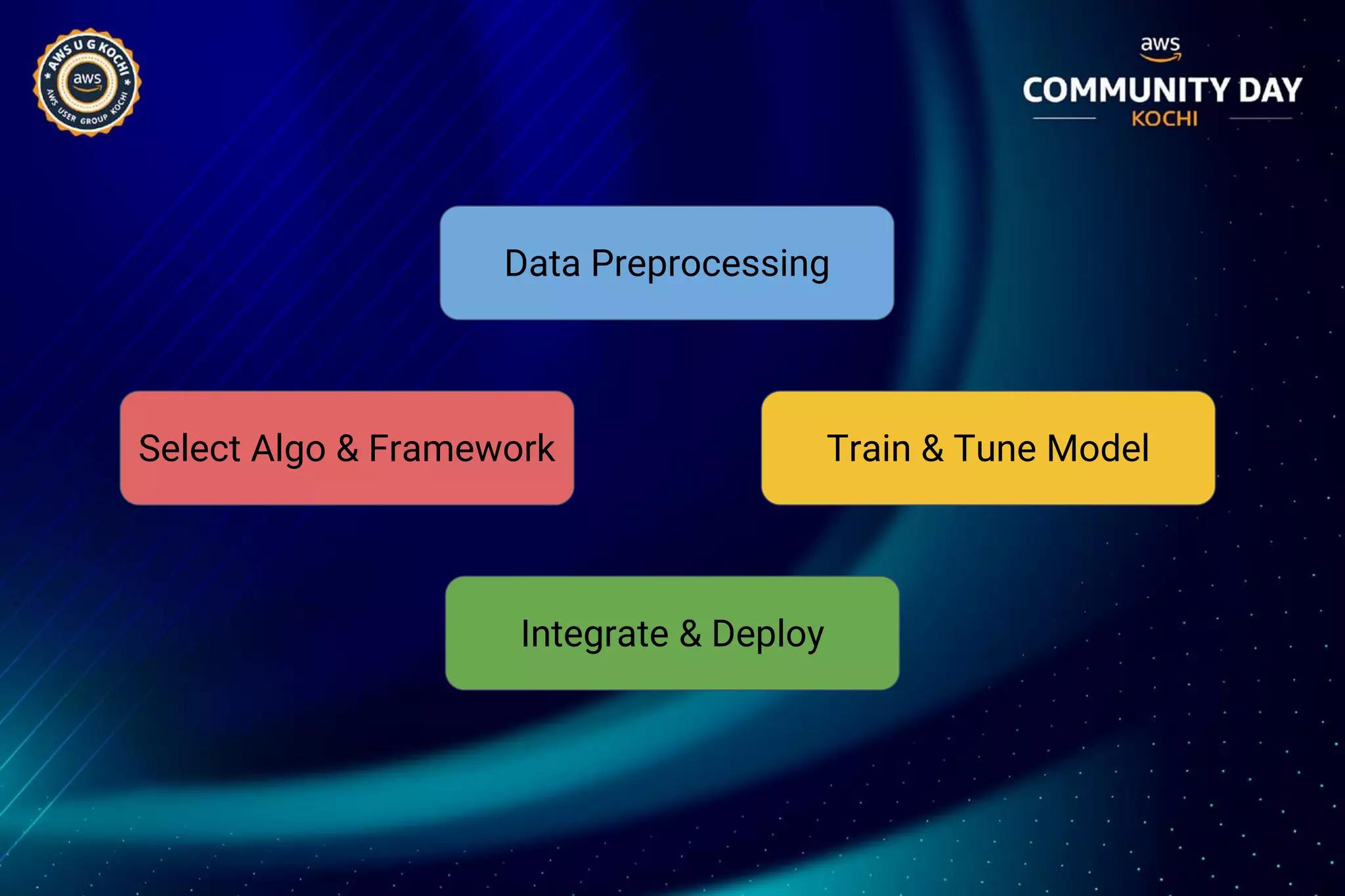
Select Algo & Framework
Integrate & Deploy
Data Preprocessing
Train & Tune Model
Machine Learning in Cloud
● The cloud’s pay-per-use model
● Easy for enterprises to experiment, scale and go in
production.
● Intelligent capabilities accessible without requiring
advanced skills in AI.
● Don’t require deep knowledge of AI, machine learning
theory, or a team of data scientists.
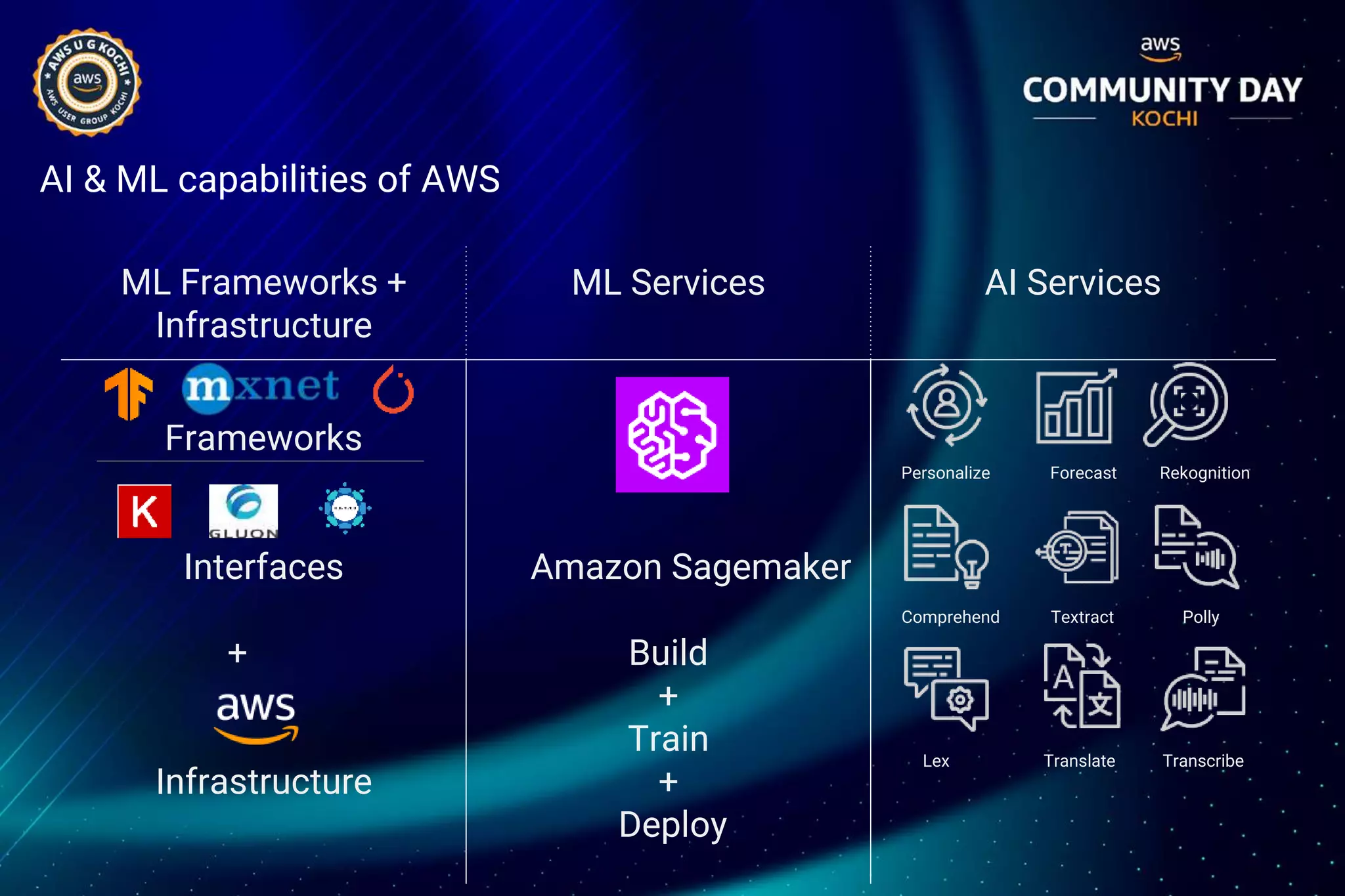
AI & ML capabilities of AWS
ML Frameworks +
Infrastructure
ML Services AI Services
Frameworks
Interfaces
+
Infrastructure
Amazon Sagemaker
Build
+
Train
+
Deploy
Personalize Forecast Rekognition
Comprehend Textract Polly
Lex Translate Transcribe
Let’s explore more about Amazon
Sagemaker
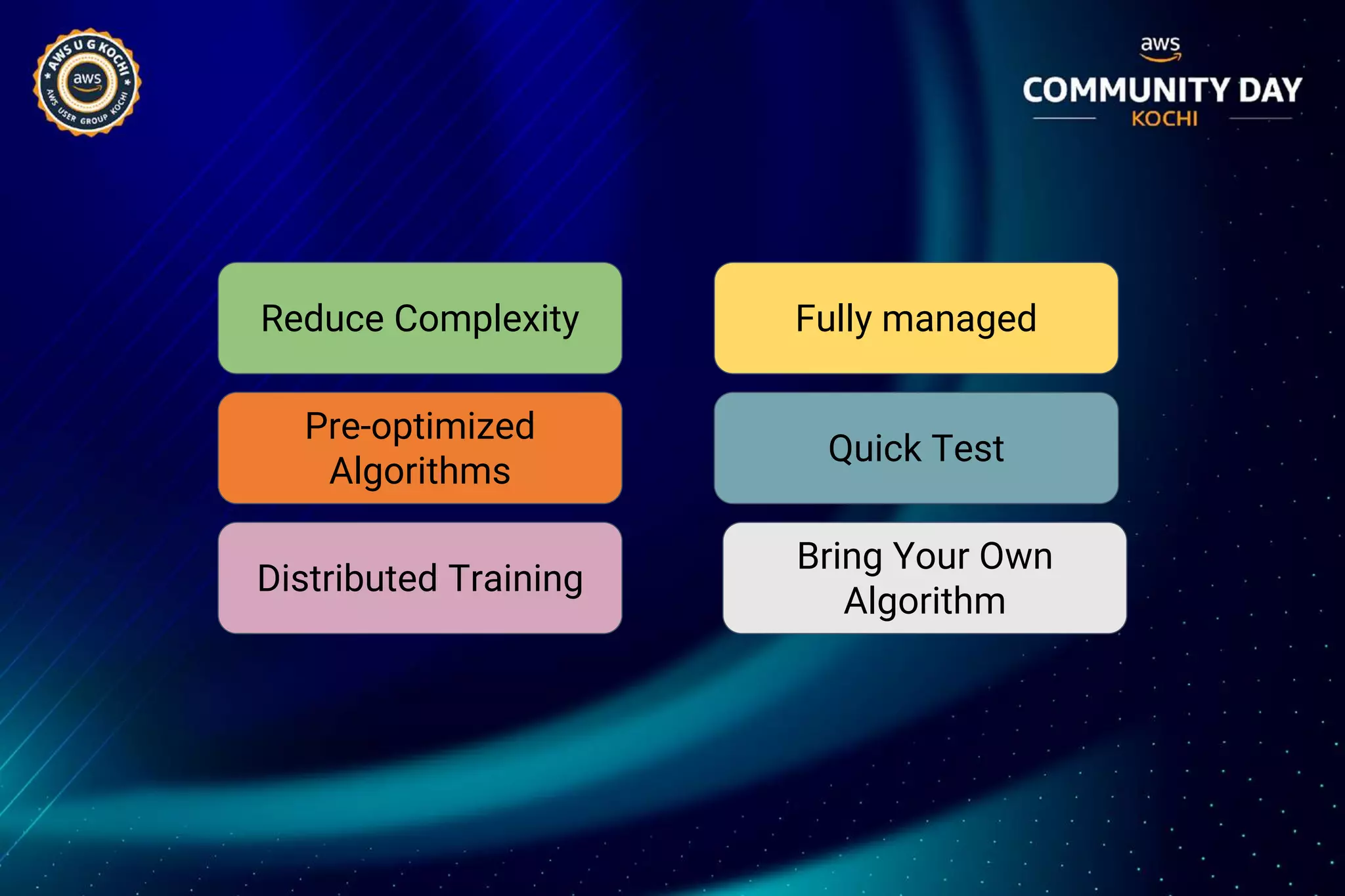
Reduce Complexity Fully managed
Quick Test
Pre-optimized
Algorithms
Bring Your Own
Algorithm
Distributed Training
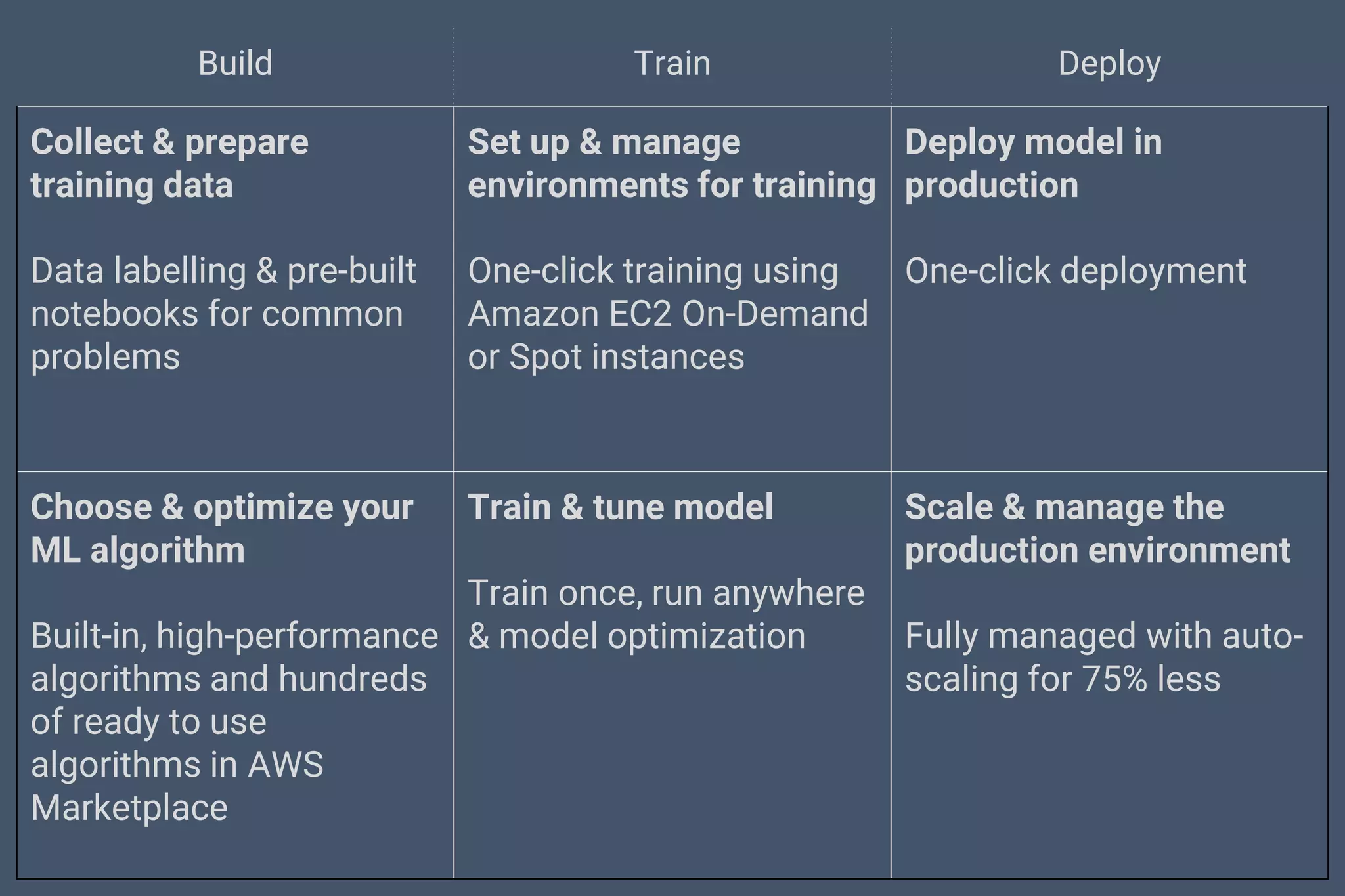
Build Train Deploy
Collect & prepare
training data
Data labelling & pre-built
notebooks for common
problems
Set up & manage
environments for training
One-click training using
Amazon EC2 On-Demand
or Spot instances
Deploy model in
production
One-click deployment
Choose & optimize your
ML algorithm
Built-in, high-performance
algorithms and hundreds
of ready to use
algorithms in AWS
Marketplace
Train & tune model
Train once, run anywhere
& model optimization
Scale & manage the
production environment
Fully managed with auto-
scaling for 75% less
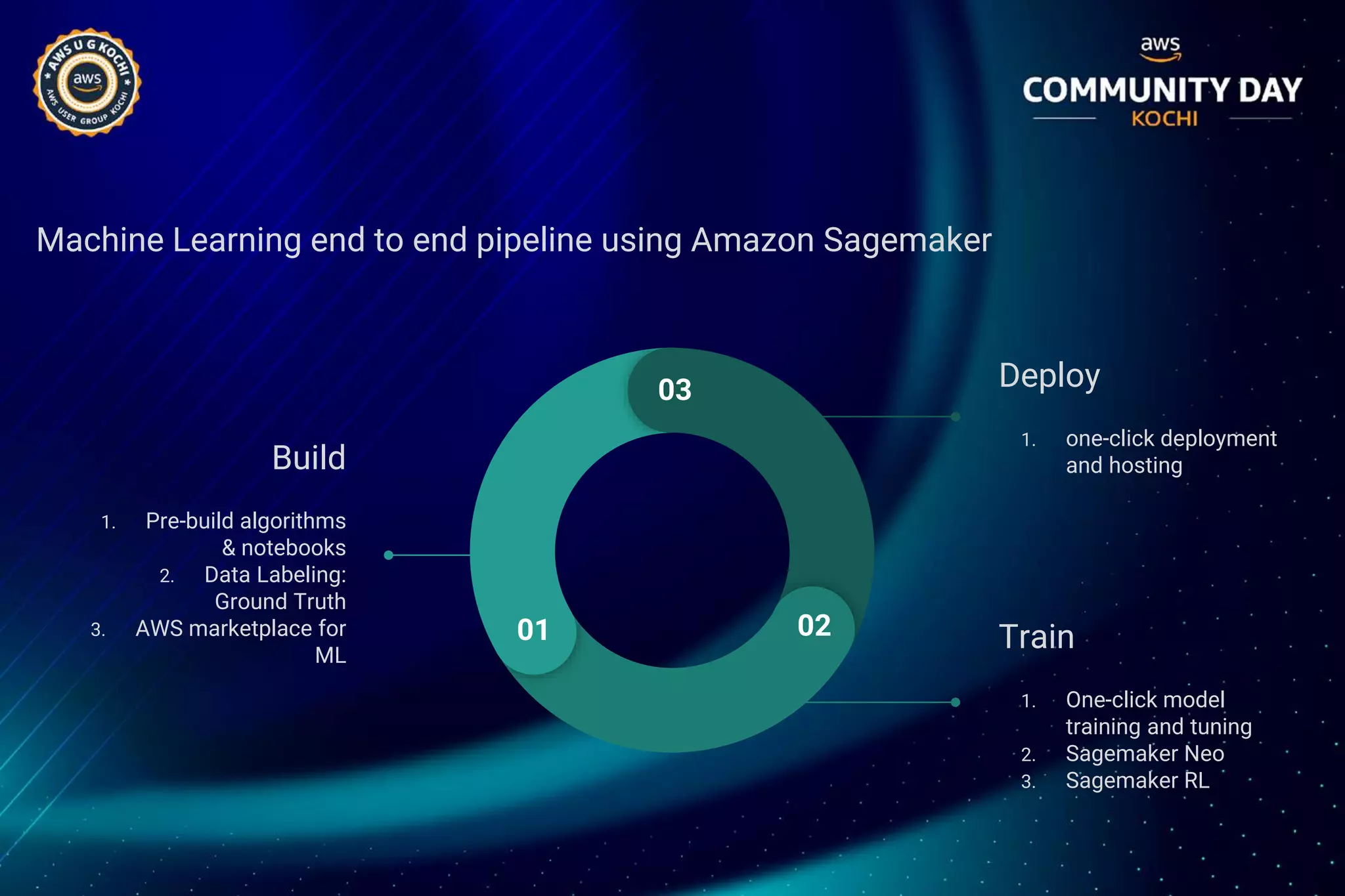
Machine Learning end to end pipeline using Amazon Sagemaker
Build
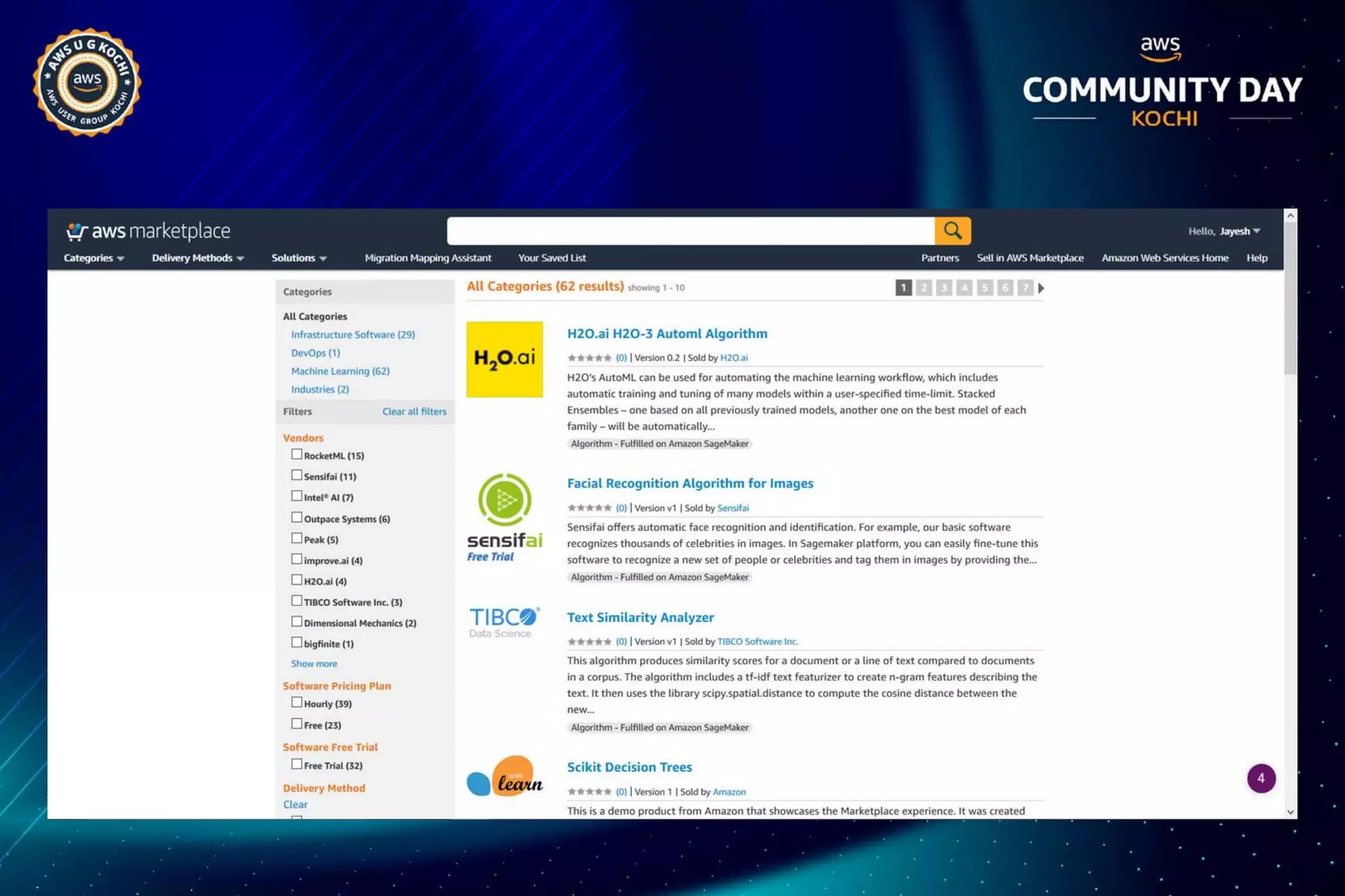
1. Pre-build algorithms
& notebooks
2. Data Labeling:
Ground Truth
3. AWS marketplace for
ML
Deploy
1. one-click deployment
and hosting
Train
1. One-click model
training and tuning
2. Sagemaker Neo
3. Sagemaker RL
03
01 02
Amazon SageMaker: Open Source Containers
● Customize them
● Run them locally for development and testing
● Run them on SageMaker for training and prediction at scale
https://github.com/aws/sagemaker-tensorflow-containers
https://github.com/aws/sagemaker-mxnet-containers
Amazon SageMaker: Bring Your Own Container
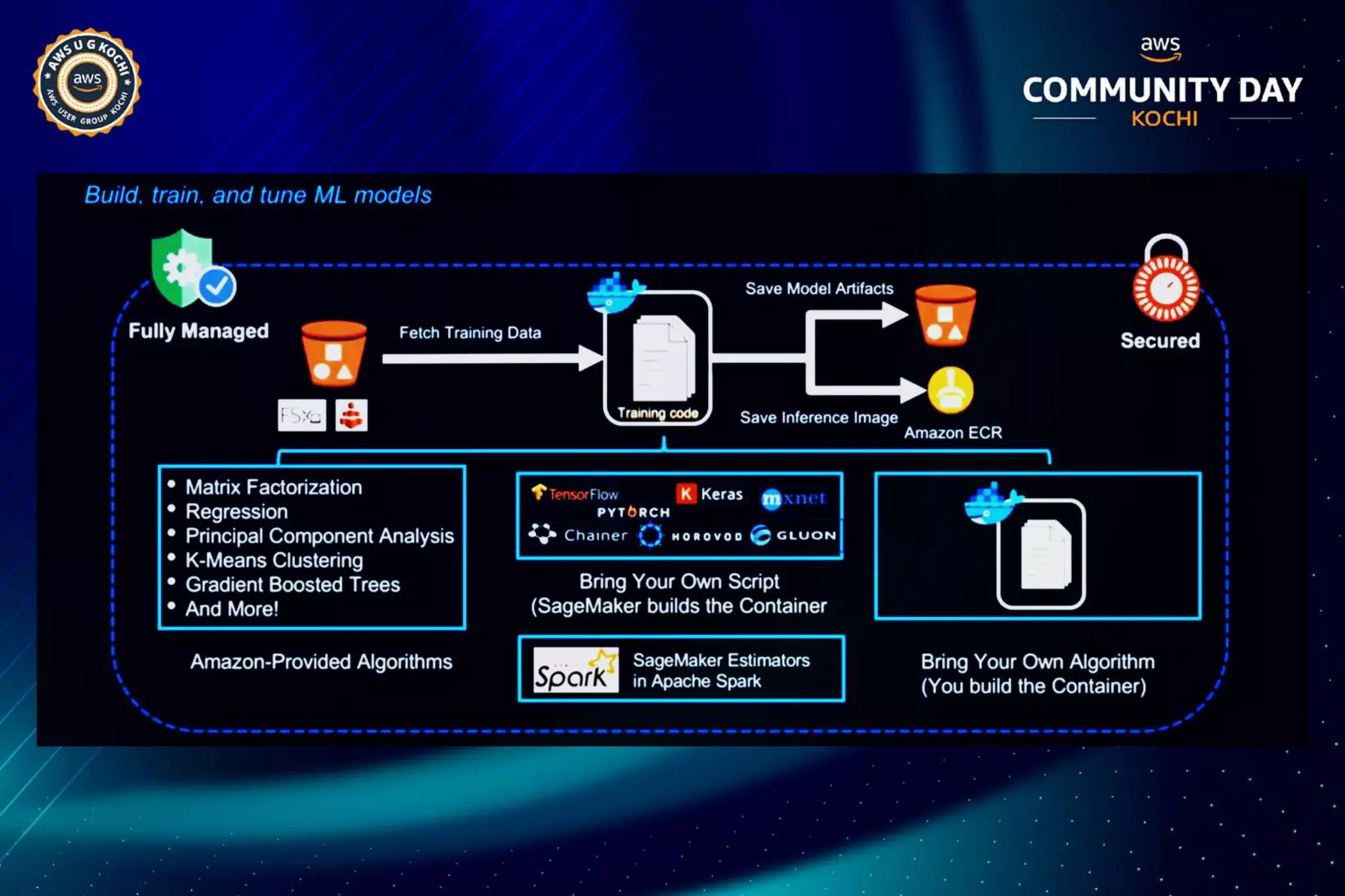
● Prepare the training code in Docker container
● Upload container image to Amazon Elastic Container Registry (ECR)
● Upload training dataset to Amazon S3/FSx/EFS
● Invoke Create Training Job API to execute a SageMaker training job
SageMaker training job pulls the container image from Amazon ECR, reads
the training data from the data source, configures the training job with
hyperparameter inputs, trains a model, and saves the model to model_dir so
that it can be deployed for inference later.
https://github.com/aws/sagemaker-container-support
Distributed Training At Scale on Amazon SageMaker
● Training on Amazon SageMaker can automatically distribute processing
across a number of nodes - including P3 instances
● You can choose from two data distribution types for training ML models
○ Fully Replicated - This will pass every file in the input to every
machine
○ Sharded S3 Key - This will separate and distribute the files in the input
across the training nodes
Overall, sharding can run faster but it depends on the algorithm
Amazon SageMaker: Local Mode Training
Enabling experimentation speed
● Train with local notebooks
● Train on notebook instances
● Iterate faster a small sample of the dataset locally no waiting for a new
● training cluster to be built each time
● Emulate CPU (single and multi-instance) and GPU (single instance) in local
mode
● Go distributed with a single line of code
Automatic Model Tuning on Amazon SageMaker
Hyperparameter Optimizer
● Amazon SageMaker automatic model tuning predicts hyperparameter
values, which might be most effective at improving fit.
● Automatic model tuning can be used with the Amazon SageMaker
○ Built-in algorithms,
○ Pre-built deep learning frameworks, and
○ Bring-your-own-algorithm containers
http://github.com/awslabs/amazon-sagemakerexamples/tree/master/hyperparameter tuning
Amazon SageMaker: Accelerating ML Training
Faster start times and training job execution time
● Two modes: File Mode and Pipe Mode
○ input mode parameter in sagemaker.estimator.estimator
● File Mode: S3 data source or file system data source
○ When using S3 as data source, training data set is downloaded to EBS volumes
○ Use file system data source (Amazon EFS or Amazon FSx for Lustre) for faster
training
○ startup and execution time. Different data formats supported: CSV, protobuf, JSON,
libsvm (check algo docs!)
● Pipe Mode streams the data set to training instances
○ This allows you to process large data sets and training starts faster
○ Dataset must be in recordio-encoded protobuf or csv format
Amazon SageMaker: Fully-Managed Spot Training
Reduce training costs at scale
● Managed Spot training on SageMaker to reduce training costs by up to 90%
● Managed Spot Training is available in all training configurations:
○ All instance types supported by Amazon SageMaker
○ All models: built-in algorithms, built-in frameworks, and custom models
○ All configurations: single instance training, distributed training, and
automatic model tuning.
● Setting it up is extremely simple
○ If you're using the console, just switch the feature on.
○ If you're working with the Amazon SageMaker SDK just set
train_use_spot_instances to true in the Estimator constructor.
Amazon SageMaker: Secure Machine Learning
● No retention of customers data
● SageMaker provides encryption in transit
● Encryption at rest everywhere
● Compute isolation - instances allocated for computation are never shared with
others
● Network isolation: all compute instances run inside private service managed
VPCs
● Secure, fully managed infrastructure: Amazon Sagemaker take care of patching
and keeping instances up-to-date
● Notebook security - Jupyter notebooks can be operated without internet access
and bound to secure customer VPCs
Amazon SageMaker Training: Getting Started
To train a model in Amazon SageMaker, you will need the following:
● A dataset. Here we will use the MNIST (Modified National Institute of Standards and
Technology database) dataset. This dataset provides a training set of 50,000 example
images of handwritten single-digit numbers, a validation set of 10,000 images, and a test
dataset of 10,000 images.
● An algorithm. Here we will use the Linear Learner algorithm provided by Amazon
● An Amazon Simple Storage Service (Amazon S3) bucket to store the training data and the
model artifacts
● An Amazon SageMaker notebook instance to prepare and process data and to train and
deploy a machine learning model.
● A Jupyter notebook to use with the notebook instance
● For model training, deployment, and validation, I will use the high-level Amazon
SageMaker Python SDK
Amazon SageMaker Training: Getting Started
● Create the S3 bucket
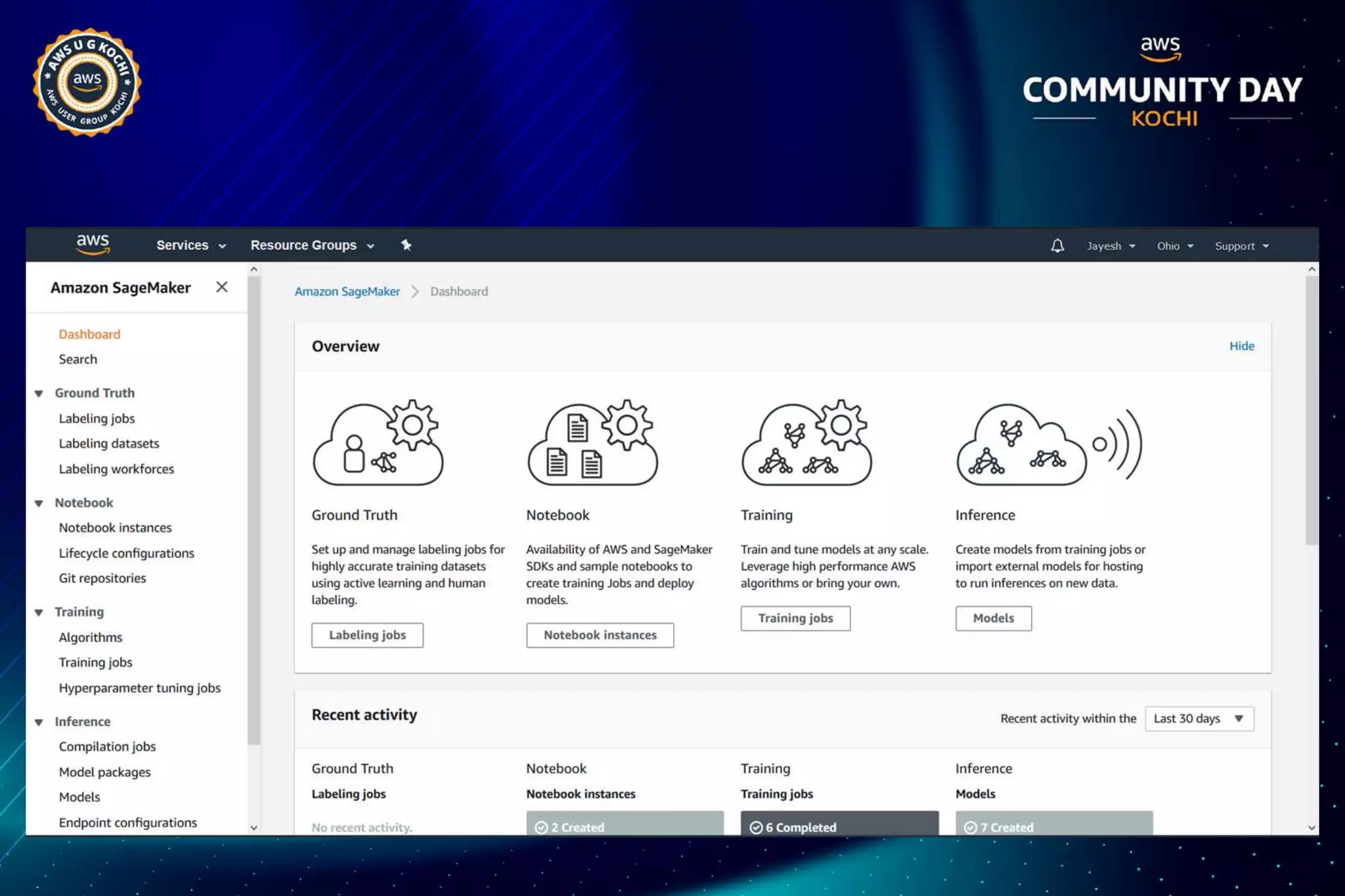
● Create an Amazon SageMaker Notebook instance by going here:
https://console.aws.amazon.com/sagemaker/
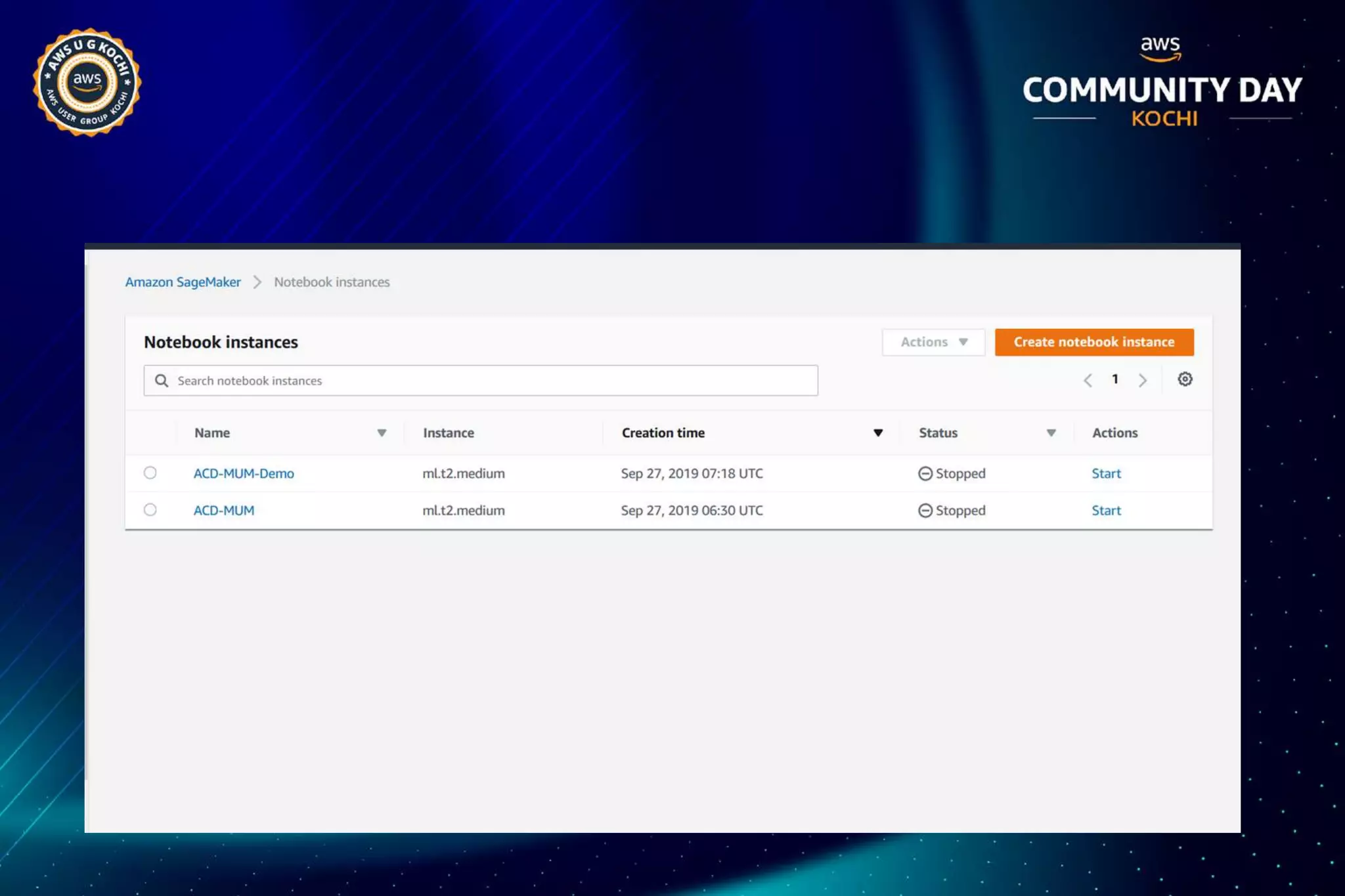
● Choose Notebook instances, then choose Create notebook instance.
● On the Create notebook instance page, provide the Notebook instance name,
choose ml.t2.medium for instance type (least expensive instance) For IAM role,
choose Create a new role, then choose Create role.
● Choose Create notebook instance.
In a few minutes, Amazon SageMaker launches an ML compute instance
and attaches an ML storage volume to it. The notebook instance has a
preconfigured Jupyter notebook server and a set of Anaconda libraries.
How To Train a Model With Amazon SageMaker
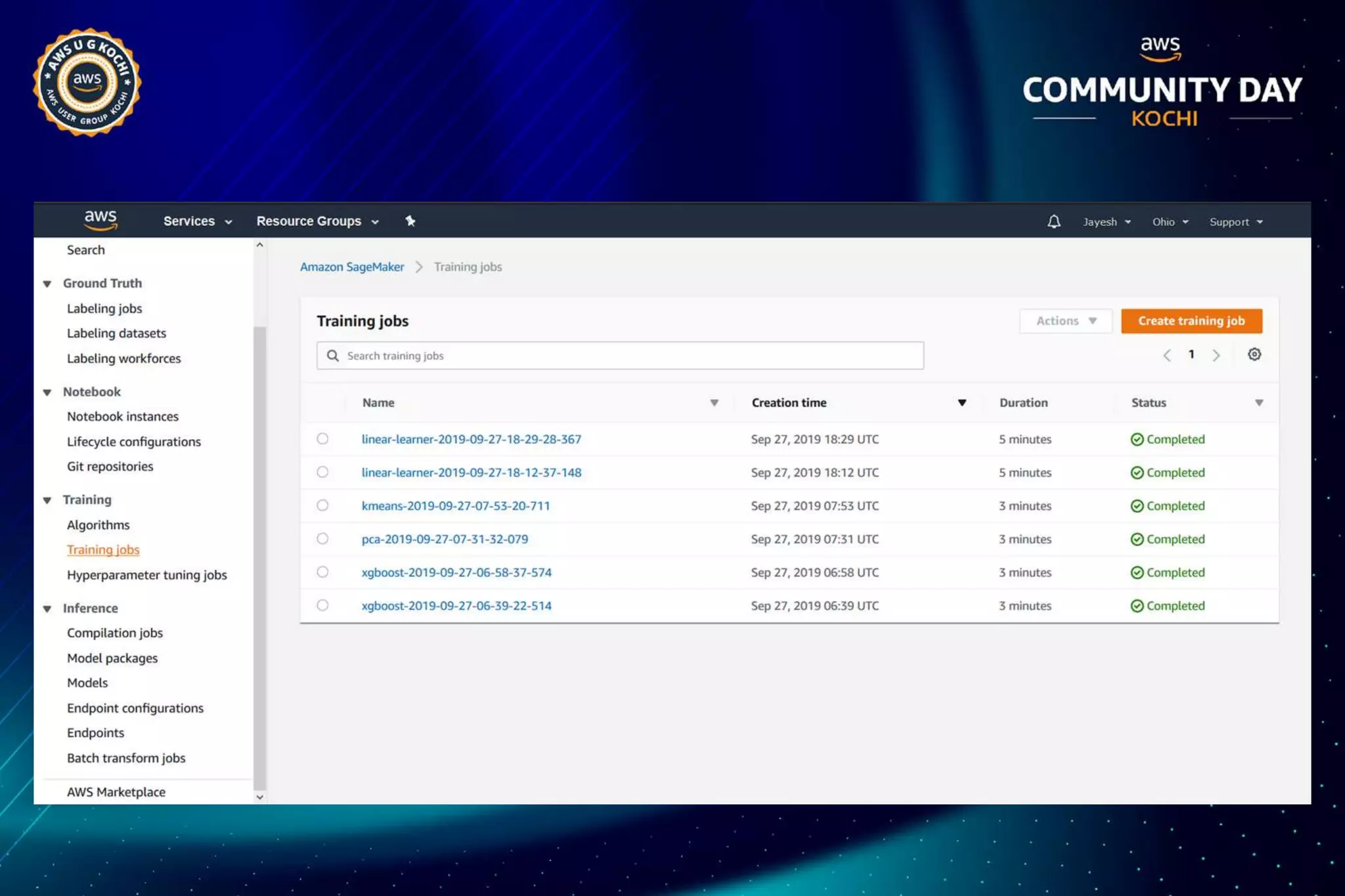
To train a model in Amazon SageMaker, you create a training job. The training job
includes the following information:
● The URL of the Amazon Simple Storage Service (Amazon S3) bucket or the file
● system id of the file system where you've stored the training data.
● The compute resources that you want Amazon SageMaker to use for model
training. Compute resources are ML compute instances that are managed by
Amazon SageMaker.
● The URL of the S3 bucket where you want to store the output of the job.
● The Amazon Elastic Container Registry path where the training code is stored.
Linear Learner with MNIST dataset example
● Provide the S3 bucket and prefix that you want to use for training and model
artifacts. This should be within the same region as the Notebook instance,
training, and hosting
● The IAM role arn used to give training and hosting access to your data
● Download the MNIST dataset
● Amazon SageMaker implementation of Linear Learner takes recordio wrapped
protobuf, where as the data we have is a pickle-ized numpy array on disk.
● This data conversion will be handled by the Amazon SageMaker Python SDK,
imported as sagemaker
Train the model
Create and Run a Training Job with Amazon SageMaker Python SDK
● To train a model in Amazon Sagemaker, you can use
○ Amazon SageMaker Python SDK or
○ AWS SDK for Python (Boto 3) or
○ AWS console
● For this exercise, I will use the notebook instance and the Python SDK
● The Amazon SageMaker Python SDK includes the
sagemaker.estimator.Estimator estimator, which can be used with any
algorithm.
● To run a model training job import the Amazon SageMaker Python SDK and get
the Linear Learner container
Demo
What Next?
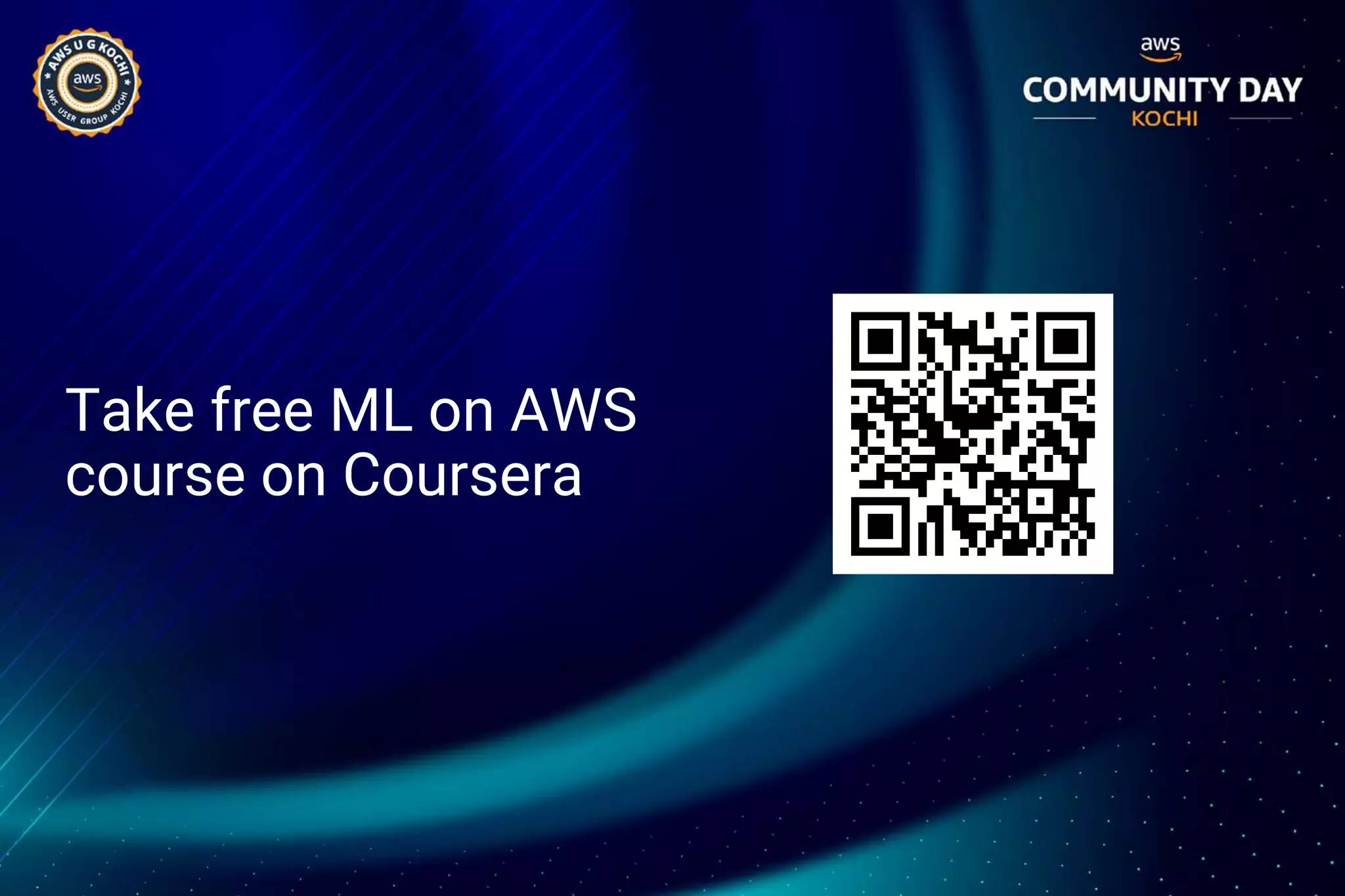
Take free ML on AWS
course on Coursera
Links
● https://github.com/aws/sagemaker-tensorflow-
containers
● https://github.com/aws/sagemaker-mxnet-containers
● https://github.com/aws/sagemaker-container-support
● http://github.com/awslabs/amazon-
sagemakerexamples/
● https://docs.aws.amazon.com/sagemaker/index.html
Thank You!
@Jayesh_Ahire1 @jayeshbahire @jbahire

ACDKOCHI19 - Demystifying amazon sagemaker

  • 1.
  • 2.
    Jayesh Bapu Ahire ➢Organizer, Twilio India Community, AWS UG Pune, Elasticsearch UG Pune, Alexa UG Nashik ➢ Research Assistant, Stanford AI Lab ➢ Research Associate, Tsinghua AI Lab & ETH Research ➢ Author, Blogger, Speaker, Student, Poet
  • 3.
  • 5.
    What is MachineLearning?
  • 7.
    Select Algo &Framework Integrate & Deploy Data Preprocessing Train & Tune Model
  • 8.
    Machine Learning inCloud ● The cloud’s pay-per-use model ● Easy for enterprises to experiment, scale and go in production. ● Intelligent capabilities accessible without requiring advanced skills in AI. ● Don’t require deep knowledge of AI, machine learning theory, or a team of data scientists.
  • 9.
    AI & MLcapabilities of AWS ML Frameworks + Infrastructure ML Services AI Services Frameworks Interfaces + Infrastructure Amazon Sagemaker Build + Train + Deploy Personalize Forecast Rekognition Comprehend Textract Polly Lex Translate Transcribe
  • 10.
    Let’s explore moreabout Amazon Sagemaker
  • 11.
    Reduce Complexity Fullymanaged Quick Test Pre-optimized Algorithms Bring Your Own Algorithm Distributed Training
  • 12.
    Build Train Deploy Collect& prepare training data Data labelling & pre-built notebooks for common problems Set up & manage environments for training One-click training using Amazon EC2 On-Demand or Spot instances Deploy model in production One-click deployment Choose & optimize your ML algorithm Built-in, high-performance algorithms and hundreds of ready to use algorithms in AWS Marketplace Train & tune model Train once, run anywhere & model optimization Scale & manage the production environment Fully managed with auto- scaling for 75% less
  • 13.
    Machine Learning endto end pipeline using Amazon Sagemaker Build 1. Pre-build algorithms & notebooks 2. Data Labeling: Ground Truth 3. AWS marketplace for ML Deploy 1. one-click deployment and hosting Train 1. One-click model training and tuning 2. Sagemaker Neo 3. Sagemaker RL 03 01 02
  • 19.
    Amazon SageMaker: OpenSource Containers ● Customize them ● Run them locally for development and testing ● Run them on SageMaker for training and prediction at scale https://github.com/aws/sagemaker-tensorflow-containers https://github.com/aws/sagemaker-mxnet-containers
  • 20.
    Amazon SageMaker: BringYour Own Container ● Prepare the training code in Docker container ● Upload container image to Amazon Elastic Container Registry (ECR) ● Upload training dataset to Amazon S3/FSx/EFS ● Invoke Create Training Job API to execute a SageMaker training job SageMaker training job pulls the container image from Amazon ECR, reads the training data from the data source, configures the training job with hyperparameter inputs, trains a model, and saves the model to model_dir so that it can be deployed for inference later. https://github.com/aws/sagemaker-container-support
  • 21.
    Distributed Training AtScale on Amazon SageMaker ● Training on Amazon SageMaker can automatically distribute processing across a number of nodes - including P3 instances ● You can choose from two data distribution types for training ML models ○ Fully Replicated - This will pass every file in the input to every machine ○ Sharded S3 Key - This will separate and distribute the files in the input across the training nodes Overall, sharding can run faster but it depends on the algorithm
  • 22.
    Amazon SageMaker: LocalMode Training Enabling experimentation speed ● Train with local notebooks ● Train on notebook instances ● Iterate faster a small sample of the dataset locally no waiting for a new ● training cluster to be built each time ● Emulate CPU (single and multi-instance) and GPU (single instance) in local mode ● Go distributed with a single line of code
  • 23.
    Automatic Model Tuningon Amazon SageMaker Hyperparameter Optimizer ● Amazon SageMaker automatic model tuning predicts hyperparameter values, which might be most effective at improving fit. ● Automatic model tuning can be used with the Amazon SageMaker ○ Built-in algorithms, ○ Pre-built deep learning frameworks, and ○ Bring-your-own-algorithm containers http://github.com/awslabs/amazon-sagemakerexamples/tree/master/hyperparameter tuning
  • 24.
    Amazon SageMaker: AcceleratingML Training Faster start times and training job execution time ● Two modes: File Mode and Pipe Mode ○ input mode parameter in sagemaker.estimator.estimator ● File Mode: S3 data source or file system data source ○ When using S3 as data source, training data set is downloaded to EBS volumes ○ Use file system data source (Amazon EFS or Amazon FSx for Lustre) for faster training ○ startup and execution time. Different data formats supported: CSV, protobuf, JSON, libsvm (check algo docs!) ● Pipe Mode streams the data set to training instances ○ This allows you to process large data sets and training starts faster ○ Dataset must be in recordio-encoded protobuf or csv format
  • 25.
    Amazon SageMaker: Fully-ManagedSpot Training Reduce training costs at scale ● Managed Spot training on SageMaker to reduce training costs by up to 90% ● Managed Spot Training is available in all training configurations: ○ All instance types supported by Amazon SageMaker ○ All models: built-in algorithms, built-in frameworks, and custom models ○ All configurations: single instance training, distributed training, and automatic model tuning. ● Setting it up is extremely simple ○ If you're using the console, just switch the feature on. ○ If you're working with the Amazon SageMaker SDK just set train_use_spot_instances to true in the Estimator constructor.
  • 26.
    Amazon SageMaker: SecureMachine Learning ● No retention of customers data ● SageMaker provides encryption in transit ● Encryption at rest everywhere ● Compute isolation - instances allocated for computation are never shared with others ● Network isolation: all compute instances run inside private service managed VPCs ● Secure, fully managed infrastructure: Amazon Sagemaker take care of patching and keeping instances up-to-date ● Notebook security - Jupyter notebooks can be operated without internet access and bound to secure customer VPCs
  • 27.
    Amazon SageMaker Training:Getting Started To train a model in Amazon SageMaker, you will need the following: ● A dataset. Here we will use the MNIST (Modified National Institute of Standards and Technology database) dataset. This dataset provides a training set of 50,000 example images of handwritten single-digit numbers, a validation set of 10,000 images, and a test dataset of 10,000 images. ● An algorithm. Here we will use the Linear Learner algorithm provided by Amazon ● An Amazon Simple Storage Service (Amazon S3) bucket to store the training data and the model artifacts ● An Amazon SageMaker notebook instance to prepare and process data and to train and deploy a machine learning model. ● A Jupyter notebook to use with the notebook instance ● For model training, deployment, and validation, I will use the high-level Amazon SageMaker Python SDK
  • 28.
    Amazon SageMaker Training:Getting Started ● Create the S3 bucket ● Create an Amazon SageMaker Notebook instance by going here: https://console.aws.amazon.com/sagemaker/ ● Choose Notebook instances, then choose Create notebook instance. ● On the Create notebook instance page, provide the Notebook instance name, choose ml.t2.medium for instance type (least expensive instance) For IAM role, choose Create a new role, then choose Create role. ● Choose Create notebook instance. In a few minutes, Amazon SageMaker launches an ML compute instance and attaches an ML storage volume to it. The notebook instance has a preconfigured Jupyter notebook server and a set of Anaconda libraries.
  • 29.
    How To Traina Model With Amazon SageMaker To train a model in Amazon SageMaker, you create a training job. The training job includes the following information: ● The URL of the Amazon Simple Storage Service (Amazon S3) bucket or the file ● system id of the file system where you've stored the training data. ● The compute resources that you want Amazon SageMaker to use for model training. Compute resources are ML compute instances that are managed by Amazon SageMaker. ● The URL of the S3 bucket where you want to store the output of the job. ● The Amazon Elastic Container Registry path where the training code is stored.
  • 30.
    Linear Learner withMNIST dataset example ● Provide the S3 bucket and prefix that you want to use for training and model artifacts. This should be within the same region as the Notebook instance, training, and hosting ● The IAM role arn used to give training and hosting access to your data ● Download the MNIST dataset ● Amazon SageMaker implementation of Linear Learner takes recordio wrapped protobuf, where as the data we have is a pickle-ized numpy array on disk. ● This data conversion will be handled by the Amazon SageMaker Python SDK, imported as sagemaker
  • 31.
    Train the model Createand Run a Training Job with Amazon SageMaker Python SDK ● To train a model in Amazon Sagemaker, you can use ○ Amazon SageMaker Python SDK or ○ AWS SDK for Python (Boto 3) or ○ AWS console ● For this exercise, I will use the notebook instance and the Python SDK ● The Amazon SageMaker Python SDK includes the sagemaker.estimator.Estimator estimator, which can be used with any algorithm. ● To run a model training job import the Amazon SageMaker Python SDK and get the Linear Learner container
  • 32.
  • 33.
  • 34.
    Take free MLon AWS course on Coursera
  • 35.
    Links ● https://github.com/aws/sagemaker-tensorflow- containers ● https://github.com/aws/sagemaker-mxnet-containers ●https://github.com/aws/sagemaker-container-support ● http://github.com/awslabs/amazon- sagemakerexamples/ ● https://docs.aws.amazon.com/sagemaker/index.html
  • 36.