













AI Stack on AWS: Amazon
SageMaker and Beyond
Presented by:
Stepan Pushkarev, CTO @ Provectus
Chris Burns, Senior AI/ML Solutions Architect @ AWS
Pritpal Sahota, Technical Account Executive @ Provectus
Introductions
This webinar is brought to you by Provectus & AWS
Pritpal Sahota
Technical Account
Executive, Provectus
Chris Burns
Senior AI/ML Solutions
Architect, AWS
Stepan Pushkarev
Chief Technology Officer,
Provectus
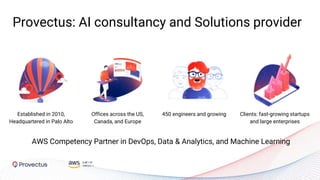
Provectus: AI consultancy and Solutions provider
Established in 2010,
Headquartered in Palo Alto
450 engineers and growingOffices across the US,
Canada, and Europe
Clients: fast-growing startups
and large enterprises
AWS Competency Partner in DevOps, Data & Analytics, and Machine Learning
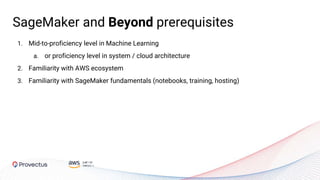
1. Mid-to-proficiency level in Machine Learning
a. or proficiency level in system / cloud architecture
2. Familiarity with AWS ecosystem
3. Familiarity with SageMaker fundamentals (notebooks, training, hosting)
SageMaker and Beyond prerequisites
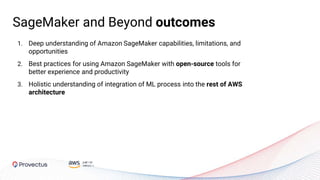
1. Deep understanding of Amazon SageMaker capabilities, limitations, and
opportunities
2. Best practices for using Amazon SageMaker with open-source tools for
better experience and productivity
3. Holistic understanding of integration of ML process into the rest of AWS
architecture
SageMaker and Beyond outcomes
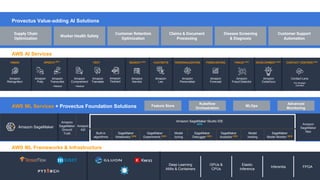
VISION SPEECH TEXT SEARCH NEW CHATBOTS PERSONALIZATION FORECASTING FRAUD NEW DEVELOPMENT NEW CONTACT CENTERS
Amazon SageMaker
Amazon
SageMaker
Ground
Truth
Amazon
A2I
Amazon
SageMaker
Neo
Built-in
algorithms
SageMaker
Notebooks NEW
SageMaker
Experiments NEW
Model
tuning
SageMaker
Debugger NEW
SageMaker
Autopilot NEW
Model
hosting
SageMaker
Model Monitor NEW
Deep Learning
AMIs & Containers
GPUs &
CPUs
Elastic
Inference
Inferentia FPGA
Amazon
Rekognition
Amazon
Polly
Amazon
Transcribe
+Medical
Amazon
Comprehend
+Medical
Amazon
Translate
Amazon
Lex
Amazon
Personalize
Amazon
Forecast
Amazon
Fraud Detector
Amazon
CodeGuru
AWS AI Services
AWS ML Services + Provectus Foundation Solutions
AWS ML Frameworks & Infrastructure
Amazon
Textract
Amazon
Kendra
Contact Lens
For Amazon
Connect
Amazon SageMaker Studio IDE
NEW
NEW
Supply Chain
Optimization
Customer Support
Automation
Disease Screening
& Diagnosis
Worker Health Safety
Customer Retention
Optimization
Claims & Document
Processing
Provectus Value-adding AI Solutions
Feature Store
Kubeflow
Orchestration
MLOps
Advanced
Monitoring
NEW
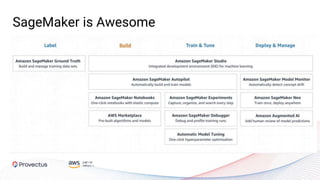
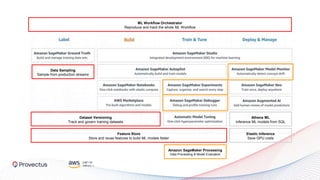
SageMaker is Awesome
Feature Store
Store and reuse features to build ML models faster
ML Workflow Orchestrator
Reproduce and track the whole ML Workflow
Athena ML
Inference ML models from SQL
Dataset Versioning
Track and govern training datasets
Data Sampling
Sample from production streams
Elastic Inference
Save GPU costs
Amazon SageMaker Processing
Data Processing & Model Evaluation
ML Infrastructure - Nice to Have or Must-Have?
Must-Have Use Case:
FDA Compliant Disease Screening
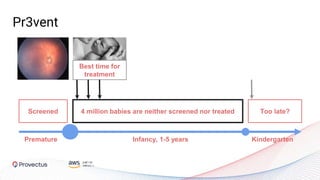
Screening at birth for potential
pathologies helps find an
expert ophthalmologist who
can evaluate, treat and prevent
disease.
Pr3vent
Pr3vent
Best time for
treatment
Screened Too late?4 million babies are neither screened nor treated
Infancy, 1-5 years KindergartenPremature
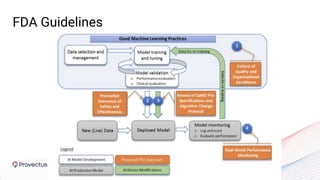
FDA Guidelines
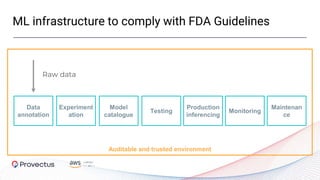
ML infrastructure to comply with FDA Guidelines
Auditable and trusted environment
Data
annotation
Raw data
Experiment
ation
Model
catalogue
Testing
Production
inferencing
Monitoring
Maintenan
ce
Start with Data: Data Lake for ML
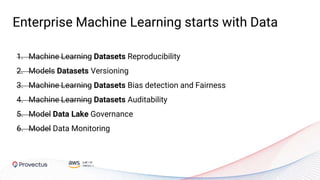
Enterprise Machine Learning starts with Data
1. Machine Learning Datasets Reproducibility
2. Models Datasets Versioning
3. Machine Learning Datasets Bias detection and Fairness
4. Machine Learning Datasets Auditability
5. Model Data Lake Governance
6. Model Data Monitoring
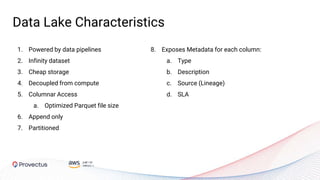
Data Lake Characteristics
1. Powered by data pipelines
2. Infinity dataset
3. Cheap storage
4. Decoupled from compute
5. Columnar Access
a. Optimized Parquet file size
6. Append only
7. Partitioned
8. Exposes Metadata for each column:
a. Type
b. Description
c. Source (Lineage)
d. SLA
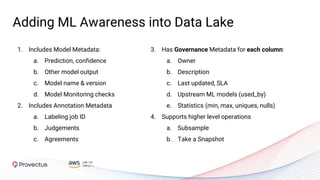
1. Includes Model Metadata:
a. Prediction, confidence
b. Other model output
c. Model name & version
d. Model Monitoring checks
2. Includes Annotation Metadata
a. Labeling job ID
b. Judgements
c. Agreements
3. Has Governance Metadata for each column:
a. Owner
b. Description
c. Last updated, SLA
d. Upstream ML models (used_by)
e. Statistics (min, max, uniques, nulls)
4. Supports higher level operations
a. Subsample
b. Take a Snapshot
Adding ML Awareness into Data Lake
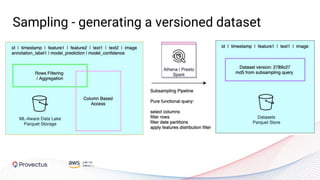
Sampling - generating a versioned dataset
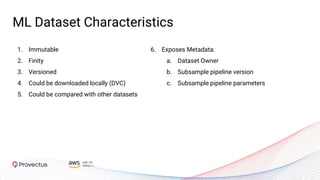
ML Dataset Characteristics
1. Immutable
2. Finity
3. Versioned
4. Could be downloaded locally (DVC)
5. Could be compared with other datasets
6. Exposes Metadata:
a. Dataset Owner
b. Subsample pipeline version
c. Subsample pipeline parameters
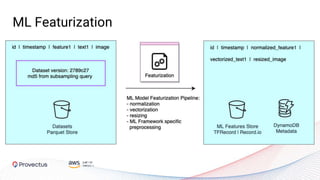
ML Featurization
Feature Store Characteristics
1. Where ML Training job starts
2. Where ML adoption is accelerated
3. Immutable
4. Versioned
5. Each version could be downloaded
locally
6. Could be compared with other versions
5. Exposes Metadata:
a. Owner
b. Subsample pipeline version
c. Subsample pipeline parameters
d. Upstream models
e. Feature descriptions
f. Feature versions
Data Layer for ML: Summary
1. Add ML Awareness into Data Lake by enriching it with ML specific metadata
2. Invest into reusable sampling, featurization and other steps of the pipeline
3. Build it yourself with AWS tools like Amazon EMR, Athena, DynamoDB, AWS Glue Catalogue
4. Amplify the adoption of ML by introducing a centralized feature store
Build: SageMaker Experiments
Experimentation Flow
Data Preprocessing
Model Training
Model Evaluation
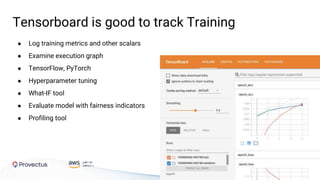
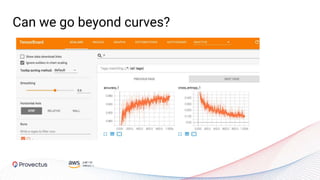
Tensorboard is good to track Training
● Log training metrics and other scalars
● Examine execution graph
● TensorFlow, PyTorch
● Hyperparameter tuning
● What-IF tool
● Evaluate model with fairness indicators
● Profiling tool
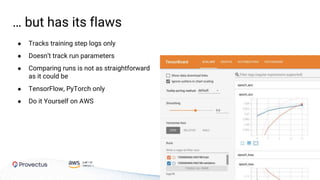
… but has its flaws
● Tracks training step logs only
● Doesn’t track run parameters
● Comparing runs is not as straightforward
as it could be
● TensorFlow, PyTorch only
● Do it Yourself on AWS
Amazon SageMaker Experiments
● Offers seamless integration into the existing ML workflow
● Offers a structured organization scheme to help users group and organize
their machine learning iterations
● Provides tracking and analytics of experiments
● Facilitates decomposition of monolithic workflow into multiple steps
Tracking Capabilities
● Parameters
● Inputs
● Outputs
● Artifacts
● Metrics
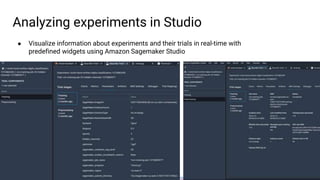
Analyzing experiments in Studio
● Visualize information about experiments and their trials in real-time with
predefined widgets using Amazon Sagemaker Studio
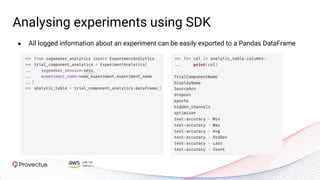
Analysing experiments using SDK
● All logged information about an experiment can be easily exported to a Pandas DataFrame
AWS Sagemaker Experiments: Summary
Pros
○ Fully managed
○ Ability to track a rich set of
parameters
○ Ability to build complex plots
from Studio
○ Ability to extract all logged
information for custom analysis
○ Native integration with Amazon
SageMaker Autopilot, Amazon
SageMaker Endpoints
Current limitations / things to be aware of
○ Does not allow building complex
DAGs, i.e. sequential execution
only
○ Lack of instruments for
configuring robust pipelines
○ Available within AWS
Sagemaker Studio only - per
user context, can not compare
runs by different users
○ Can not compare trials from
different runs
Build & Train: Orchestration
Beyond SageMaker Experiments
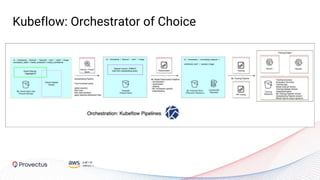
Kubeflow: Orchestrator of Choice
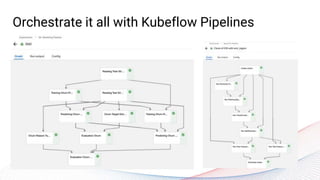
Orchestrate it all with Kubeflow Pipelines
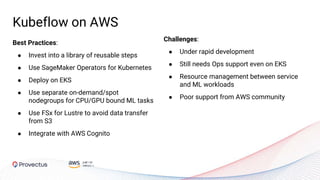
Kubeflow on AWS
Best Practices:
● Invest into a library of reusable components
● Use SageMaker Operators for Kubernetes
● Deploy on EKS
● Use separate on-demand/spot nodegroups for CPU/GPU
bound ML tasks
● Use Amazon FSx for Lustre to avoid data transfer from
Amazon S3
● Integrate with Amazon Cognito
Kubeflow on AWS
Challenges:
● Under rapid development
● Still needs Ops support even on EKS
● Resource management between service
and ML workloads
● Poor support from AWS community
Best Practices:
● Invest into a library of reusable steps
● Use SageMaker Operators for Kubernetes
● Deploy on EKS
● Use separate on-demand/spot
nodegroups for CPU/GPU bound ML tasks
● Use FSx for Lustre to avoid data transfer
from S3
● Integrate with AWS Cognito
Kubeflow Pipelines: Summary
● Extends beyond SageMaker ecosystem
● Built on top of Argo Workflows, facilitates GitOps
● Allows building complex processing DAGs
● Rich purposely built UI
● Growing opensource community
● Requires deep Kubernetes/Ops expertise
Build: SageMaker Debugger
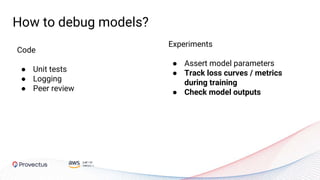
Code
● Unit tests
● Logging
● Peer review
How to debug models?
Experiments
● Assert model parameters
● Track loss curves / metrics
during training
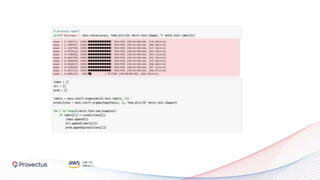
● Check model outputs
Can we go beyond curves?
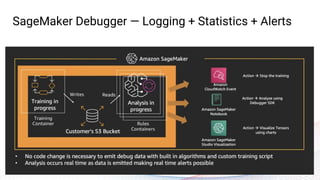
SageMaker Debugger — Logging + Statistics + Alerts
● Vanishing gradients
● Overfitting
● Poor weight initialization
● Saturated activations
● Overpruned trees
Out of the box Rules
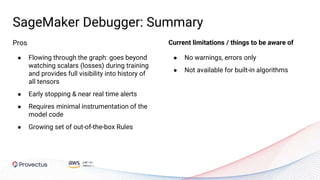
SageMaker Debugger: Summary
● No warnings, errors only
● Not available for built-in algorithms
Pros
● Flowing through the graph: goes beyond
watching scalars (losses) during training
and provides full visibility into history of
all tensors
● Early stopping & near real time alerts
● Requires minimal instrumentation of the
model code
● Growing set of out-of-the-box Rules
Current limitations / things to be aware of
Deploy: SageMaker Model
Monitor
Monitoring Production
Data Quality
Alerts when issues
appear
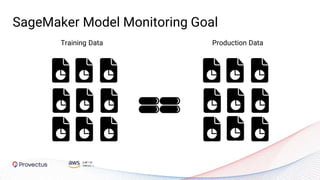
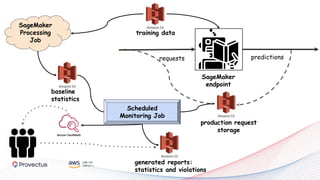
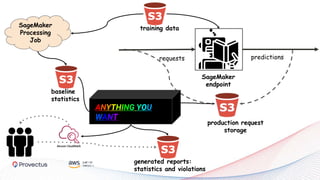
SageMaker Model Monitoring Goal
Training Data Production Data
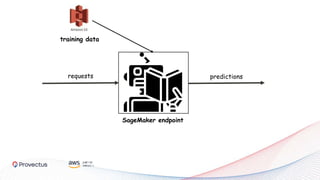
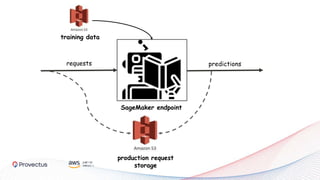
SageMaker endpoint
requests predictions
training data
SageMaker endpoint
requests predictions
production request
storage
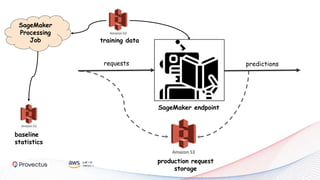
training data
SageMaker endpoint
requests predictions
production request
storage
training data
baseline
statistics
SageMaker
Processing
Job
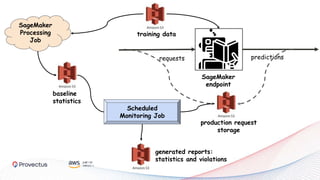
SageMaker
endpoint
requests predictions
training data
baseline
statistics
SageMaker
Processing
Job
Scheduled
Monitoring Job
generated reports:
statistics and violations
production request
storage
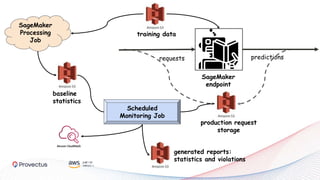
SageMaker
endpoint
requests predictions
SageMaker
Processing
Job
Scheduled
Monitoring Job
generated reports:
statistics and violations
training data
baseline
statistics
production request
storage
SageMaker
endpoint
requests predictions
training data
baseline
statistics
SageMaker
Processing
Job
Scheduled
Monitoring Job
generated reports:
statistics and violations
production request
storage
What is
REALLY
SageMaker Model Monitoring?
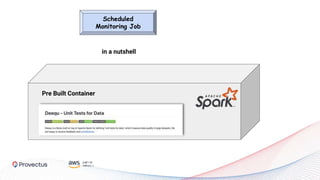
Scheduled
Monitoring Job
Pre Built Container
in a nutshell
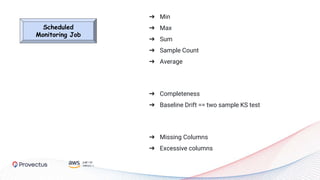
Scheduled
Monitoring Job
➔ Min
➔ Max
➔ Sum
➔ Sample Count
➔ Average
➔ Completeness
➔ Baseline Drift == two sample KS test
➔ Missing Columns
➔ Excessive columns
SageMaker
endpoint
requests predictions
production request
storage
training data
baseline
statistics
SageMaker
Processing
Job
generated reports:
statistics and violations
ANYTHING YOU
WANT
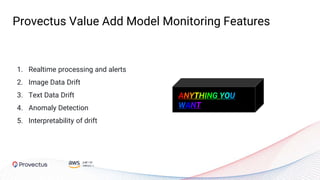
1. Realtime processing and alerts
2. Image Data Drift
3. Text Data Drift
4. Anomaly Detection
5. Interpretability of drift
Provectus Value Add Model Monitoring Features
ANYTHING YOU
WANT
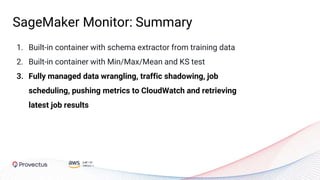
1. Built-in container with schema extractor from training data
2. Built-in container with Min/Max/Mean and KS test
3. Fully managed data wrangling, traffic shadowing, job
scheduling, pushing metrics to CloudWatch and retrieving
latest job results
SageMaker Monitor: Summary
● Modern ML infrastructure accelerates time to value for ML initiatives and
increases trust from the business
● Amazon SageMaker has the broadest and deepest set of fully managed
tools for building and managing AI applications at scale
● Complement it with the rest of AWS tools for data processing, storage &
metadata management
● Complement it with mature opensource tools to go beyond main offerings
Webinar Takeaways
125 University Avenue
Suite 290, Palo Alto
California, 94301
hello@provectus.com
Questions, details?
We would be happy to answer!

AI Stack on AWS: Amazon SageMaker and Beyond

  • 1.
    AI Stack onAWS: Amazon SageMaker and Beyond Presented by: Stepan Pushkarev, CTO @ Provectus Chris Burns, Senior AI/ML Solutions Architect @ AWS Pritpal Sahota, Technical Account Executive @ Provectus
  • 2.
    Introductions This webinar isbrought to you by Provectus & AWS Pritpal Sahota Technical Account Executive, Provectus Chris Burns Senior AI/ML Solutions Architect, AWS Stepan Pushkarev Chief Technology Officer, Provectus
  • 3.
    Provectus: AI consultancyand Solutions provider Established in 2010, Headquartered in Palo Alto 450 engineers and growingOffices across the US, Canada, and Europe Clients: fast-growing startups and large enterprises AWS Competency Partner in DevOps, Data & Analytics, and Machine Learning
  • 4.
    1. Mid-to-proficiency levelin Machine Learning a. or proficiency level in system / cloud architecture 2. Familiarity with AWS ecosystem 3. Familiarity with SageMaker fundamentals (notebooks, training, hosting) SageMaker and Beyond prerequisites
  • 5.
    1. Deep understandingof Amazon SageMaker capabilities, limitations, and opportunities 2. Best practices for using Amazon SageMaker with open-source tools for better experience and productivity 3. Holistic understanding of integration of ML process into the rest of AWS architecture SageMaker and Beyond outcomes
  • 6.
    VISION SPEECH TEXTSEARCH NEW CHATBOTS PERSONALIZATION FORECASTING FRAUD NEW DEVELOPMENT NEW CONTACT CENTERS Amazon SageMaker Amazon SageMaker Ground Truth Amazon A2I Amazon SageMaker Neo Built-in algorithms SageMaker Notebooks NEW SageMaker Experiments NEW Model tuning SageMaker Debugger NEW SageMaker Autopilot NEW Model hosting SageMaker Model Monitor NEW Deep Learning AMIs & Containers GPUs & CPUs Elastic Inference Inferentia FPGA Amazon Rekognition Amazon Polly Amazon Transcribe +Medical Amazon Comprehend +Medical Amazon Translate Amazon Lex Amazon Personalize Amazon Forecast Amazon Fraud Detector Amazon CodeGuru AWS AI Services AWS ML Services + Provectus Foundation Solutions AWS ML Frameworks & Infrastructure Amazon Textract Amazon Kendra Contact Lens For Amazon Connect Amazon SageMaker Studio IDE NEW NEW Supply Chain Optimization Customer Support Automation Disease Screening & Diagnosis Worker Health Safety Customer Retention Optimization Claims & Document Processing Provectus Value-adding AI Solutions Feature Store Kubeflow Orchestration MLOps Advanced Monitoring NEW
  • 7.
  • 8.
    Feature Store Store andreuse features to build ML models faster ML Workflow Orchestrator Reproduce and track the whole ML Workflow Athena ML Inference ML models from SQL Dataset Versioning Track and govern training datasets Data Sampling Sample from production streams Elastic Inference Save GPU costs Amazon SageMaker Processing Data Processing & Model Evaluation
  • 9.
    ML Infrastructure -Nice to Have or Must-Have?
  • 10.
    Must-Have Use Case: FDACompliant Disease Screening
  • 11.
    Screening at birthfor potential pathologies helps find an expert ophthalmologist who can evaluate, treat and prevent disease. Pr3vent
  • 12.
    Pr3vent Best time for treatment ScreenedToo late?4 million babies are neither screened nor treated Infancy, 1-5 years KindergartenPremature
  • 13.
  • 14.
    ML infrastructure tocomply with FDA Guidelines Auditable and trusted environment Data annotation Raw data Experiment ation Model catalogue Testing Production inferencing Monitoring Maintenan ce
  • 15.
    Start with Data:Data Lake for ML
  • 16.
    Enterprise Machine Learningstarts with Data 1. Machine Learning Datasets Reproducibility 2. Models Datasets Versioning 3. Machine Learning Datasets Bias detection and Fairness 4. Machine Learning Datasets Auditability 5. Model Data Lake Governance 6. Model Data Monitoring
  • 17.
    Data Lake Characteristics 1.Powered by data pipelines 2. Infinity dataset 3. Cheap storage 4. Decoupled from compute 5. Columnar Access a. Optimized Parquet file size 6. Append only 7. Partitioned 8. Exposes Metadata for each column: a. Type b. Description c. Source (Lineage) d. SLA
  • 18.
    1. Includes ModelMetadata: a. Prediction, confidence b. Other model output c. Model name & version d. Model Monitoring checks 2. Includes Annotation Metadata a. Labeling job ID b. Judgements c. Agreements 3. Has Governance Metadata for each column: a. Owner b. Description c. Last updated, SLA d. Upstream ML models (used_by) e. Statistics (min, max, uniques, nulls) 4. Supports higher level operations a. Subsample b. Take a Snapshot Adding ML Awareness into Data Lake
  • 19.
    Sampling - generatinga versioned dataset
  • 20.
    ML Dataset Characteristics 1.Immutable 2. Finity 3. Versioned 4. Could be downloaded locally (DVC) 5. Could be compared with other datasets 6. Exposes Metadata: a. Dataset Owner b. Subsample pipeline version c. Subsample pipeline parameters
  • 21.
  • 22.
    Feature Store Characteristics 1.Where ML Training job starts 2. Where ML adoption is accelerated 3. Immutable 4. Versioned 5. Each version could be downloaded locally 6. Could be compared with other versions 5. Exposes Metadata: a. Owner b. Subsample pipeline version c. Subsample pipeline parameters d. Upstream models e. Feature descriptions f. Feature versions
  • 23.
    Data Layer forML: Summary 1. Add ML Awareness into Data Lake by enriching it with ML specific metadata 2. Invest into reusable sampling, featurization and other steps of the pipeline 3. Build it yourself with AWS tools like Amazon EMR, Athena, DynamoDB, AWS Glue Catalogue 4. Amplify the adoption of ML by introducing a centralized feature store
  • 24.
  • 25.
  • 26.
    Tensorboard is goodto track Training ● Log training metrics and other scalars ● Examine execution graph ● TensorFlow, PyTorch ● Hyperparameter tuning ● What-IF tool ● Evaluate model with fairness indicators ● Profiling tool
  • 27.
    … but hasits flaws ● Tracks training step logs only ● Doesn’t track run parameters ● Comparing runs is not as straightforward as it could be ● TensorFlow, PyTorch only ● Do it Yourself on AWS
  • 28.
    Amazon SageMaker Experiments ●Offers seamless integration into the existing ML workflow ● Offers a structured organization scheme to help users group and organize their machine learning iterations ● Provides tracking and analytics of experiments ● Facilitates decomposition of monolithic workflow into multiple steps
  • 29.
    Tracking Capabilities ● Parameters ●Inputs ● Outputs ● Artifacts ● Metrics
  • 30.
    Analyzing experiments inStudio ● Visualize information about experiments and their trials in real-time with predefined widgets using Amazon Sagemaker Studio
  • 31.
    Analysing experiments usingSDK ● All logged information about an experiment can be easily exported to a Pandas DataFrame
  • 32.
    AWS Sagemaker Experiments:Summary Pros ○ Fully managed ○ Ability to track a rich set of parameters ○ Ability to build complex plots from Studio ○ Ability to extract all logged information for custom analysis ○ Native integration with Amazon SageMaker Autopilot, Amazon SageMaker Endpoints Current limitations / things to be aware of ○ Does not allow building complex DAGs, i.e. sequential execution only ○ Lack of instruments for configuring robust pipelines ○ Available within AWS Sagemaker Studio only - per user context, can not compare runs by different users ○ Can not compare trials from different runs
  • 33.
    Build & Train:Orchestration Beyond SageMaker Experiments
  • 34.
  • 35.
    Orchestrate it allwith Kubeflow Pipelines
  • 36.
    Kubeflow on AWS BestPractices: ● Invest into a library of reusable components ● Use SageMaker Operators for Kubernetes ● Deploy on EKS ● Use separate on-demand/spot nodegroups for CPU/GPU bound ML tasks ● Use Amazon FSx for Lustre to avoid data transfer from Amazon S3 ● Integrate with Amazon Cognito
  • 37.
    Kubeflow on AWS Challenges: ●Under rapid development ● Still needs Ops support even on EKS ● Resource management between service and ML workloads ● Poor support from AWS community Best Practices: ● Invest into a library of reusable steps ● Use SageMaker Operators for Kubernetes ● Deploy on EKS ● Use separate on-demand/spot nodegroups for CPU/GPU bound ML tasks ● Use FSx for Lustre to avoid data transfer from S3 ● Integrate with AWS Cognito
  • 38.
    Kubeflow Pipelines: Summary ●Extends beyond SageMaker ecosystem ● Built on top of Argo Workflows, facilitates GitOps ● Allows building complex processing DAGs ● Rich purposely built UI ● Growing opensource community ● Requires deep Kubernetes/Ops expertise
  • 39.
  • 40.
    Code ● Unit tests ●Logging ● Peer review How to debug models? Experiments ● Assert model parameters ● Track loss curves / metrics during training ● Check model outputs
  • 42.
    Can we gobeyond curves?
  • 43.
    SageMaker Debugger —Logging + Statistics + Alerts
  • 44.
    ● Vanishing gradients ●Overfitting ● Poor weight initialization ● Saturated activations ● Overpruned trees Out of the box Rules
  • 45.
    SageMaker Debugger: Summary ●No warnings, errors only ● Not available for built-in algorithms Pros ● Flowing through the graph: goes beyond watching scalars (losses) during training and provides full visibility into history of all tensors ● Early stopping & near real time alerts ● Requires minimal instrumentation of the model code ● Growing set of out-of-the-box Rules Current limitations / things to be aware of
  • 46.
  • 47.
  • 48.
    SageMaker Model MonitoringGoal Training Data Production Data
  • 49.
  • 50.
  • 51.
    SageMaker endpoint requests predictions productionrequest storage training data baseline statistics SageMaker Processing Job
  • 52.
  • 53.
    SageMaker endpoint requests predictions SageMaker Processing Job Scheduled Monitoring Job generatedreports: statistics and violations training data baseline statistics production request storage
  • 54.
  • 55.
  • 56.
    Scheduled Monitoring Job Pre BuiltContainer in a nutshell
  • 57.
    Scheduled Monitoring Job ➔ Min ➔Max ➔ Sum ➔ Sample Count ➔ Average ➔ Completeness ➔ Baseline Drift == two sample KS test ➔ Missing Columns ➔ Excessive columns
  • 59.
    SageMaker endpoint requests predictions production request storage trainingdata baseline statistics SageMaker Processing Job generated reports: statistics and violations ANYTHING YOU WANT
  • 60.
    1. Realtime processingand alerts 2. Image Data Drift 3. Text Data Drift 4. Anomaly Detection 5. Interpretability of drift Provectus Value Add Model Monitoring Features ANYTHING YOU WANT
  • 61.
    1. Built-in containerwith schema extractor from training data 2. Built-in container with Min/Max/Mean and KS test 3. Fully managed data wrangling, traffic shadowing, job scheduling, pushing metrics to CloudWatch and retrieving latest job results SageMaker Monitor: Summary
  • 62.
    ● Modern MLinfrastructure accelerates time to value for ML initiatives and increases trust from the business ● Amazon SageMaker has the broadest and deepest set of fully managed tools for building and managing AI applications at scale ● Complement it with the rest of AWS tools for data processing, storage & metadata management ● Complement it with mature opensource tools to go beyond main offerings Webinar Takeaways
  • 63.
    125 University Avenue Suite290, Palo Alto California, 94301 hello@provectus.com Questions, details? We would be happy to answer!