
Container Cluster
Management with AWS
ECS
Anshul Patel
Talentica DevOps Engineering
Team
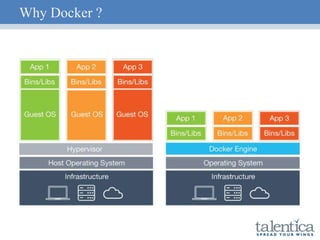
What is Docker container ?
 Open platform to build, ship and run distributed applications
 Groups application with all the dependencies, shared libs
 Compared to Traditional Virtualized system, which encapsulates
OS + Kernel, Docker has same Kernel Space
 Isolation between different containers is done through
Namespaces, Cgroups, Network Interfaces
 Current Docker Engine Stable version 1.11.2 (2016-05-31)
 Default Engine Execution Driver : libcontainer
 Docker uses libcontainer to manipulate Namespaces, Cgroups,
Network Interfaces
Why Docker ?
 Lightweight, Open and Secure
 Portable and efficient in comparison to VM
 Accelerates Developer onboarding
 Empower Developer creativity
 Eliminates Environmental Inconsistencies
 Ability to scale quickly
 Reduces time to market of your application
Why Docker ?
Why Container Cluster Management System ?
 Provides clustering layer for controlling the deployment of your
containers onto the underlying hosts
 Manages container lifecycle within the cluster
 Scheduling Containers across the cluster
 Abstracting developers away from underlying machines
 Scaling containers
 Increases robustness and resilience of distributed containerized
application
What is AWS ECS (EC2 Container Service) ?
 Highly scalable, fast, container management service from Amazon
Web Services.
 Easily run, stop and manage Docker containers on cluster of
Amazon EC2 instances
 Schedules the placement of Docker containers across your cluster
based on resource needs, availability and requirements
 Eliminates need for you to operate your own cluster management
systems or write wrappers/logic for scaling your underlying
infrastructure
Components of ECS
 Cluster - Logical group of container instances
 Container Instance - Runs ECS agents and is registered to
cluster
 Task Definition - Description of application to be deployed
 Scheduler - Method of placing task on container instance
 Task - An instantiation of task definition running on container
instance
 Service - Runs and maintains predefined tasks simultaneously
 Container - Docker Container created during task instantiation
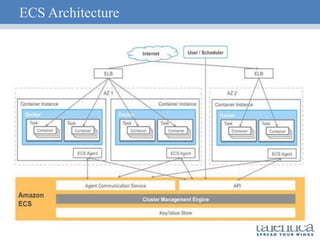
ECS Architecture
ECS Architecture
Key Components
 Agent Communication Service - Gateway between ECS agents
and ECS backend cluster management engine
 API - Provides cluster state information
 Cluster Management Engine - Provides cluster coordination and
state management
 Key/Value Store - It is used to storing cluster state information
ECS Architecture
 It isn’t a blackbox, runs on your own EC2(Container) instances
 ECS cluster is collection of EC2(Container) Instances
 ECS agent is installed on each of EC2(Container) Instances
 ECS agent registers instance to centralised ECS service
 ECS agent handles incoming requests for container deployment
 ECS agent handles the lifecycle of container
Creating ECS Cluster
 Cluster can be created using AWS Console, alternatively you can
create using aws ecs CLI
 AWS Container Instance Requirement
 Linux Kernel > = 3.10
 Docker > = 1.5.0
 ECS container agent
 Nanny process to monitor ECS agent (For eg: ecs-init )
 Amazon ECS optimized AMI is preconfigured with these
requirements
Launching EC2 container Instances
Points to remember
 ec2InstanceRole must be created
 If the EC2 instance is required to be part of pre-defined cluster,
following should be added in user data
#/bin/bash
echo ECS_CLUSTER=your_cluster_name >> /etc/ecs/ecs.config
 During the launch of AMI, it will consist of two EBS, one for OS
and another for Docker’s use.
ECS Task Definition
 Task definition is 1 or more container definitions
 It defines
 Docker Images to use
 Port and Drive Volume Mapping
 CPU and memory to use with container
 Whether containers are linked
 Environmental variable which is required to be passed to
container
 Whether task should continue if container finishes or fails
ECS Scheduler
 By default, AWS supports two ways for scheduling
 Running Tasks
 Services
 Apart from the above, StartTask API of ECS can be used to write
custom scheduler. Currently Amazon has developed PoC scheduler
for Mesos
ECS Running Tasks
 Instantiation of Task Definition
 Task can be either short lived or long lived. (For eg: event-driven-
data task or batch jobs)
 Architecturally all containers belonging to same task, have to run
on the same machine. In order to run container on different
machine, new task should be created.
 Co-location of containers can be achieved by grouping them in the
same task
ECS services
 Allows you to run and maintain a specified/desired number of
instances ( For eg : webservers )
 If any tasks should fail or stop for any reason, ECS service
scheduler launches another instance of your task definition to
maintain desired count
Deploying ECS Cluster
 Create a Load Balancer
 Create a Launch configuration
 Create a Autoscaling group, which specifies the desired number of
instances
 Create a task definition
 Create a service
ECS Container Instance Autoscaling
 ECS provides cluster-level parameters which can give the cluster
utilization statistics
 MemoryReservation - Current % of reserved memory by
cluster
 MemoryUtilization - Current % of utilized memory by cluster
 CPUReservation - Current % of reserved CPU by cluster
 CPUUtilization - Current % of utilized CPU by cluster
 CloudWatch Alarms on the above parameters enables to Scale
Up/Down the ECS cluster
ECS Task Autoscaling
 ECS also provides the facility to scale up the tasks in the service.
 Tasks can be autoscaled on following ECS service parameters
 CPUUtilization - Current % CPU utilization by ECS service
 MemoryUtilization - Current % Memory Utilization by ECS
service
EC2 Container Registry
 AWS managed Docker container registry
 Stores and Manages Docker Images
 Hosts images in a highly available and scalable architecture
 It is integrated with ECS
 No upfront fee, pay only for the data stored
Key Advantages of ECS Service
 ECS is monitoring status of Docker containers, so if it goes down it
will be deployed automatically
 ASG is monitoring your EC2 instances, if one instance goes down,
it will spawn new instance
 ECS can do zero-downtime deployments of new version ( Blue -
Green deployments )
 Updation requires two things
 Create new revision of task
 Update the revision in the service
Key Challenges
 No direct relation between EC2 Autoscaling and Task Autoscaling
 ELB works with 1:1 port mapping, so if the number of tasks is
equal to the number of instances, scheduler will not attempt to
deploy another task
 Service Discovery
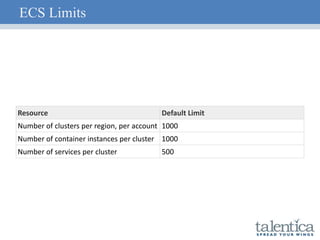
ECS Limits
Resource Default Limit
Number of clusters per region, per account 1000
Number of container instances per cluster 1000
Number of services per cluster 500
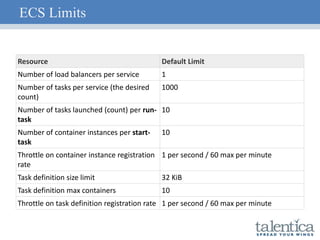
ECS Limits
Resource Default Limit
Number of load balancers per service 1
Number of tasks per service (the desired
count)
1000
Number of tasks launched (count) per run-
task
10
Number of container instances per start-
task
10
Throttle on container instance registration
rate
1 per second / 60 max per minute
Task definition size limit 32 KiB
Task definition max containers 10
Throttle on task definition registration rate 1 per second / 60 max per minute
Thanks & Questions ?

AWS ECS Meetup Talentica

  • 1.
    Container Cluster Management withAWS ECS Anshul Patel Talentica DevOps Engineering Team
  • 2.
    What is Dockercontainer ?  Open platform to build, ship and run distributed applications  Groups application with all the dependencies, shared libs  Compared to Traditional Virtualized system, which encapsulates OS + Kernel, Docker has same Kernel Space  Isolation between different containers is done through Namespaces, Cgroups, Network Interfaces  Current Docker Engine Stable version 1.11.2 (2016-05-31)  Default Engine Execution Driver : libcontainer  Docker uses libcontainer to manipulate Namespaces, Cgroups, Network Interfaces
  • 3.
    Why Docker ? Lightweight, Open and Secure  Portable and efficient in comparison to VM  Accelerates Developer onboarding  Empower Developer creativity  Eliminates Environmental Inconsistencies  Ability to scale quickly  Reduces time to market of your application
  • 4.
  • 5.
    Why Container ClusterManagement System ?  Provides clustering layer for controlling the deployment of your containers onto the underlying hosts  Manages container lifecycle within the cluster  Scheduling Containers across the cluster  Abstracting developers away from underlying machines  Scaling containers  Increases robustness and resilience of distributed containerized application
  • 6.
    What is AWSECS (EC2 Container Service) ?  Highly scalable, fast, container management service from Amazon Web Services.  Easily run, stop and manage Docker containers on cluster of Amazon EC2 instances  Schedules the placement of Docker containers across your cluster based on resource needs, availability and requirements  Eliminates need for you to operate your own cluster management systems or write wrappers/logic for scaling your underlying infrastructure
  • 7.
    Components of ECS Cluster - Logical group of container instances  Container Instance - Runs ECS agents and is registered to cluster  Task Definition - Description of application to be deployed  Scheduler - Method of placing task on container instance  Task - An instantiation of task definition running on container instance  Service - Runs and maintains predefined tasks simultaneously  Container - Docker Container created during task instantiation
  • 8.
  • 9.
    ECS Architecture Key Components Agent Communication Service - Gateway between ECS agents and ECS backend cluster management engine  API - Provides cluster state information  Cluster Management Engine - Provides cluster coordination and state management  Key/Value Store - It is used to storing cluster state information
  • 10.
    ECS Architecture  Itisn’t a blackbox, runs on your own EC2(Container) instances  ECS cluster is collection of EC2(Container) Instances  ECS agent is installed on each of EC2(Container) Instances  ECS agent registers instance to centralised ECS service  ECS agent handles incoming requests for container deployment  ECS agent handles the lifecycle of container
  • 11.
    Creating ECS Cluster Cluster can be created using AWS Console, alternatively you can create using aws ecs CLI  AWS Container Instance Requirement  Linux Kernel > = 3.10  Docker > = 1.5.0  ECS container agent  Nanny process to monitor ECS agent (For eg: ecs-init )  Amazon ECS optimized AMI is preconfigured with these requirements
  • 12.
    Launching EC2 containerInstances Points to remember  ec2InstanceRole must be created  If the EC2 instance is required to be part of pre-defined cluster, following should be added in user data #/bin/bash echo ECS_CLUSTER=your_cluster_name >> /etc/ecs/ecs.config  During the launch of AMI, it will consist of two EBS, one for OS and another for Docker’s use.
  • 13.
    ECS Task Definition Task definition is 1 or more container definitions  It defines  Docker Images to use  Port and Drive Volume Mapping  CPU and memory to use with container  Whether containers are linked  Environmental variable which is required to be passed to container  Whether task should continue if container finishes or fails
  • 14.
    ECS Scheduler  Bydefault, AWS supports two ways for scheduling  Running Tasks  Services  Apart from the above, StartTask API of ECS can be used to write custom scheduler. Currently Amazon has developed PoC scheduler for Mesos
  • 15.
    ECS Running Tasks Instantiation of Task Definition  Task can be either short lived or long lived. (For eg: event-driven- data task or batch jobs)  Architecturally all containers belonging to same task, have to run on the same machine. In order to run container on different machine, new task should be created.  Co-location of containers can be achieved by grouping them in the same task
  • 16.
    ECS services  Allowsyou to run and maintain a specified/desired number of instances ( For eg : webservers )  If any tasks should fail or stop for any reason, ECS service scheduler launches another instance of your task definition to maintain desired count
  • 17.
    Deploying ECS Cluster Create a Load Balancer  Create a Launch configuration  Create a Autoscaling group, which specifies the desired number of instances  Create a task definition  Create a service
  • 18.
    ECS Container InstanceAutoscaling  ECS provides cluster-level parameters which can give the cluster utilization statistics  MemoryReservation - Current % of reserved memory by cluster  MemoryUtilization - Current % of utilized memory by cluster  CPUReservation - Current % of reserved CPU by cluster  CPUUtilization - Current % of utilized CPU by cluster  CloudWatch Alarms on the above parameters enables to Scale Up/Down the ECS cluster
  • 19.
    ECS Task Autoscaling ECS also provides the facility to scale up the tasks in the service.  Tasks can be autoscaled on following ECS service parameters  CPUUtilization - Current % CPU utilization by ECS service  MemoryUtilization - Current % Memory Utilization by ECS service
  • 20.
    EC2 Container Registry AWS managed Docker container registry  Stores and Manages Docker Images  Hosts images in a highly available and scalable architecture  It is integrated with ECS  No upfront fee, pay only for the data stored
  • 21.
    Key Advantages ofECS Service  ECS is monitoring status of Docker containers, so if it goes down it will be deployed automatically  ASG is monitoring your EC2 instances, if one instance goes down, it will spawn new instance  ECS can do zero-downtime deployments of new version ( Blue - Green deployments )  Updation requires two things  Create new revision of task  Update the revision in the service
  • 22.
    Key Challenges  Nodirect relation between EC2 Autoscaling and Task Autoscaling  ELB works with 1:1 port mapping, so if the number of tasks is equal to the number of instances, scheduler will not attempt to deploy another task  Service Discovery
  • 23.
    ECS Limits Resource DefaultLimit Number of clusters per region, per account 1000 Number of container instances per cluster 1000 Number of services per cluster 500
  • 24.
    ECS Limits Resource DefaultLimit Number of load balancers per service 1 Number of tasks per service (the desired count) 1000 Number of tasks launched (count) per run- task 10 Number of container instances per start- task 10 Throttle on container instance registration rate 1 per second / 60 max per minute Task definition size limit 32 KiB Task definition max containers 10 Throttle on task definition registration rate 1 per second / 60 max per minute
  • 25.

Editor's Notes

  • #3 Apart from the libcontainer, docker is compatible with Openvz Systemd-nspawn Libvirt-lxc Libvirt-sandbox qemu/kvm BSD jails Solaris zones LXC What does a driver do ? Provides a way to manipulate namespaces, control groups, network interfaces, firewall rules, apparmor profiles Why libcontainer ? Can manipulate the above mentioned things in a consistent and predictable way, without depending on userland packages.
  • #13 AMI  US-WEST-2 : amzn-ami-2016.03.c-amazon-ecs-optimized
  • #19  1 core = 1,024 CPU units Calculation Memory MemoryReservation = ( Total MB of memory reserved by tasks in cluster * 100 )/ Total MB registered by container instances in cluster MemoryUtilization = ( Total MB of memory used by tasks in cluster * 100 ) / Total MB of memory registered by container instances in cluster CPU CPUReservavtion = ( Total CPU units reserved by tasks in cluster * 100 )/ Total CPU units registered by containers instances in cluster CPUUtilization = (Total CPU units used by tasks in cluster * 100)/ Total CPU units registered by container instances in cluster in cluster
  • #20  CPU Service CPU Utilization = ( Total CPU units used by tasks in service * 100 ) / ( Total CPU units reserved in task definition * number of tasks in service ) Memory Service Memory Utilization = ( Total MB of memory used by tasks in service * 100)/(Total MB of memory reserved in task definition * number of tasks)
  • #23 First point : Set tasks much higher than EC2 instances, so if the EC2 Instance scaling happens, it will automatically schedule the tasks Second point : Use HAProxy or Traefik LB