Walk-through: Amazon ECS
Prashant Goel
Software Consultant
Knoldus software LLP
Agenda
 What is Amazon ECS?
 Brief about Docker container
 ECS Features
 Why did we build Amazon ECS?
 Key Components
 Demo
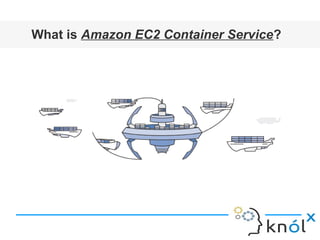
What is Amazon EC2 Container Service?
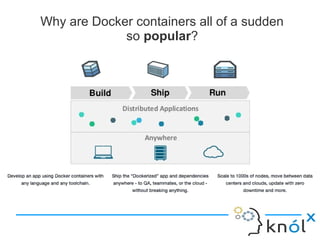
Why are Docker containers all of a sudden
so popular?
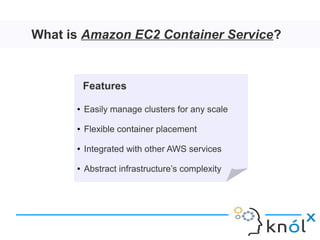
What is Amazon EC2 Container Service?
Features
● Easily manage clusters for any scale
● Flexible container placement
● Integrated with other AWS services
● Abstract infrastructure’s complexity
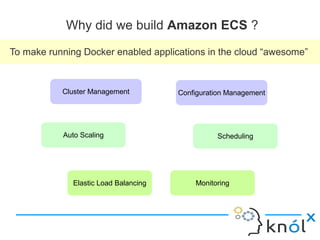
Why did we build Amazon ECS ?
To make running Docker enabled applications in the cloud “awesome”
Cluster Management Configuration Management
Auto Scaling Scheduling
MonitoringElastic Load Balancing
Key Components
 Cluster: A cluster is a logical grouping of EC2 instances on which ECS tasks are run.
 Task Definition: The task definition is a text file, in JSON format, describing the
containers that together form an application. Task definitions specify various parameters
for the application e.g. container image repositories, ports, storage etc.
 Service: A service is a group of tasks that are created and maintained as instances of a
task definition.
 Tasks and Scheduler: A task is an instance of a task definition, created at runtime on a
container instance within the cluster. The task scheduler is responsible for placing tasks
on container instances across your clusters based on your resource needs.
 Container Agent: The container agent runs on each EC2 instance within an ECS cluster.
The agent sends telemetry data about the instance’s tasks and resource utilization to
Amazon ECS. It will also start and stop tasks based on requests from ECS.
 Image Repository: Amazon ECS downloads container images from container registries,
which may exist within or outside of AWS, such as a accessible private Docker registry or
Docker Hub.
CHECKOUT !!!
 AWS | Introduction to Amazon ECS
https://blog.knoldus.com/2016/12/30/introduction-to-amazon-ec2-container-service/
 AWS | Launch Amazon ECS cluster through First Run Wizard
https://blog.knoldus.com/2017/01/04/walk-through-amazon-ecs-first-run-wizard/
 AWS | Scaling Container and EC2 instances in a cluster
https://blog.knoldus.com/2017/01/05/aws-scaling-with-amazon-ecs/
 AWS | Deploy updated task definition / docker images
https://blog.knoldus.com/2017/01/06/aws-amazon-ecs-deploy-updated-task-definitiondocke
 AWS | Cleaning up Amazon ECS resources
https://blog.knoldus.com/2017/01/15/aws-cleaning-up-your-amazon-ecs-resources/
References
http://docs.aws.amazon.com/AmazonECS/latest/developerguide/Welcome.html
https://aws.amazon.com/ecs/
Thank You

Walk-through: Amazon ECS

  • 1.
    Walk-through: Amazon ECS PrashantGoel Software Consultant Knoldus software LLP
  • 2.
    Agenda  What isAmazon ECS?  Brief about Docker container  ECS Features  Why did we build Amazon ECS?  Key Components  Demo
  • 3.
    What is AmazonEC2 Container Service?
  • 4.
    Why are Dockercontainers all of a sudden so popular?
  • 5.
    What is AmazonEC2 Container Service? Features ● Easily manage clusters for any scale ● Flexible container placement ● Integrated with other AWS services ● Abstract infrastructure’s complexity
  • 6.
    Why did webuild Amazon ECS ? To make running Docker enabled applications in the cloud “awesome” Cluster Management Configuration Management Auto Scaling Scheduling MonitoringElastic Load Balancing
  • 7.
    Key Components  Cluster:A cluster is a logical grouping of EC2 instances on which ECS tasks are run.  Task Definition: The task definition is a text file, in JSON format, describing the containers that together form an application. Task definitions specify various parameters for the application e.g. container image repositories, ports, storage etc.  Service: A service is a group of tasks that are created and maintained as instances of a task definition.  Tasks and Scheduler: A task is an instance of a task definition, created at runtime on a container instance within the cluster. The task scheduler is responsible for placing tasks on container instances across your clusters based on your resource needs.  Container Agent: The container agent runs on each EC2 instance within an ECS cluster. The agent sends telemetry data about the instance’s tasks and resource utilization to Amazon ECS. It will also start and stop tasks based on requests from ECS.  Image Repository: Amazon ECS downloads container images from container registries, which may exist within or outside of AWS, such as a accessible private Docker registry or Docker Hub.
  • 8.
    CHECKOUT !!!  AWS| Introduction to Amazon ECS https://blog.knoldus.com/2016/12/30/introduction-to-amazon-ec2-container-service/  AWS | Launch Amazon ECS cluster through First Run Wizard https://blog.knoldus.com/2017/01/04/walk-through-amazon-ecs-first-run-wizard/  AWS | Scaling Container and EC2 instances in a cluster https://blog.knoldus.com/2017/01/05/aws-scaling-with-amazon-ecs/  AWS | Deploy updated task definition / docker images https://blog.knoldus.com/2017/01/06/aws-amazon-ecs-deploy-updated-task-definitiondocke  AWS | Cleaning up Amazon ECS resources https://blog.knoldus.com/2017/01/15/aws-cleaning-up-your-amazon-ecs-resources/
  • 9.
  • 10.

Editor's Notes

  • #5 Build, ship and run Scaling is a hassle we will how we can resolve this with ECS Resolve the problem of dependency hell NO need to configure the envionment, no need to install software, and dependencies that are required to run your application, as everything is containerized. No need to worry about deploying your appliation after developing it: Have a break, Go on vaccation, spend time with family Help with microservices
  • #6 The same Docker containers that you currently use will run exactly the same on Amazon ECS. Eliminate the need to install, operate and scale your own cluster management. Amazon ECS lets you launch and stop container-based applications with simple API calls. It gives you features available within other EC2 services like Auto scaling, Elastic load balancing, VPC, Launch configuration, EBS volumes and security groups. Abstract all the complexity of the infrastructure, so you can focus on designing, building and running containerized applications. Save time Enables you to grow a single container to thousand of containers across hundreds of instances without any additional complexity It is a very flexible approach for placing containers. Repeat features then first half covered by container and then the rest by ECS
  • #7 In the last: No worries