Running Docker Containers on
AWS (with ECS)
Vladimir Simek, Solutions Architect @ AWS
20 September 2017
Agenda
Why Containers?
Cluster Management
Running Services
Placement Options
Security and Monitoring
Demo
Why Containers?
What are Containers?
OS virtualization
Process isolation
Images
AutomationServer
Guest OS
Bins/Libs Bins/Libs
App2App1
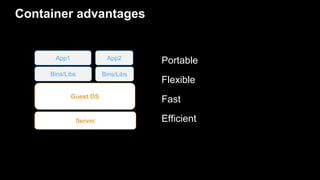
Container advantages
Portable
Flexible
Fast
EfficientServer
Guest OS
Bins/Libs Bins/Libs
App2App1
Services evolve to microservices
Monolithic Application
Order UI User UI Shipping UI
Order
Service
User
Service
Shipping
Service
Data
Access
Host 1
Service A
Service B
Host 2
Service B
Service D
Host 3
Service A
Service C
Host 4
Service B
Service C
Containers are natural for microservices
Simple to model
Any app, any language
Image is the version
Test & deploy same artifact
Stateless servers decrease change risk
Scheduling
Server
Guest OS
Bins/Libs Bins/Libs
App2App1
Scheduling one resource is straightforward
Scheduling a cluster is hard
Server
Guest OS
Server
Guest OS
Server
Guest OS
Server
Guest OS
Server
Guest OS
Server
Guest OS
Server
Guest OS
Server
Guest OS
Server
Guest OS
Server
Guest OS
Server
Guest OS
Server
Guest OS
Server
Guest OS
Server
Guest OS
Server
Guest OS
Server
Guest OS
Server
Guest OS
Server
Guest OS
Server
Guest OS
Server
Guest OS
Server
Guest OS
Server
Guest OS
Server
Guest OS
Server
Guest OS
Server
Guest OS
Server
Guest OS
Server
Guest OS
Server
Guest OS
Server
Guest OS
Server
Guest OS
Server
Guest OS
Server
Guest OS
Server
Guest OS
Server
Guest OS
Server
Guest OS
Server
Guest OS
Server
Guest OS
Server
Guest OS
Server
Guest OS
Server
Guest OS
Server
Guest OS
Server
Guest OS
Server
Guest OS
Server
Guest OS
Server
Guest OS
Server
Guest OS
Server
Guest OS
Server
Guest OS
Server
Guest OS
Server
Guest OS
Server
Guest OS
Server
Guest OS
Server
Guest OS
Server
Guest OS
Server
Guest OS
Server
Guest OS
Server
Guest OS
Server
Guest OS
Server
Guest OS
Server
Guest OS
What is Amazon ECS?
Amazon EC2 Container Service (ECS) is a highly scalable,
high performance container management service. You
can use Amazon ECS to schedule the placement of
containers across your cluster. You can also integrate your
own scheduler or third-party scheduler to meet business
or application specific requirements.
Cluster Management
Cluster Management: Resource Management
Docker
Task
EC2 Instance
Container
Docker
Task
EC2 Instance
Container
Task
Container
Docker
EC2 Instance
Task
Container
AZ 1 AZ 2
Cluster Management: Scheduling
Docker
Task
EC2 Instance
Container
Docker
Task
EC2 Instance
Container
Task
Container
Docker
EC2 Instance
Task
Container
AZ 1 AZ 2
Amazon ECS: Resource Management
Docker
Task
Container Instance
Container
Task
Container
Docker
Task
Container Instance
Container
Task
Container
Docker
Task
Container Instance
Container
Task
Container
AZ 1 AZ 2
Cluster Management Engine
Amazon ECS: Agent Communication
Docker
Task
Container Instance
Container
ECS Agent
Task
Container
Docker
Task
Container Instance
Container
ECS Agent
Task
Container
Docker
Task
Container Instance
Container
ECS Agent
Task
Container
AZ 1 AZ 2
Cluster Management Engine
Agent Communication Service
Amazon ECS: Key/Value Store
Docker
Task
Container Instance
Container
ECS Agent
ELB
Internet
ELB
Task
Container
Docker
Task
Container Instance
Container
ECS Agent
Task
Container
Docker
Task
Container Instance
Container
ECS Agent
Task
Container
AZ 1 AZ 2
Key/Value Store
Cluster Management Engine
Agent Communication Service
Amazon ECS: APIs
Docker
Task
Container Instance
Container
ECS Agent
ELB
Internet
ELB
User /
Scheduler
API
Cluster Management Engine
Task
Container
Docker
Task
Container Instance
Container
ECS Agent
Task
Container
Docker
Task
Container Instance
Container
ECS Agent
Task
Container
AZ 1 AZ 2
Key/Value Store
Agent Communication Service
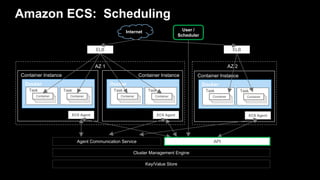
Amazon ECS: Scheduling
Docker
Task
Container Instance
Container
ECS Agent
ELB
Internet
ELB
User /
Scheduler
API
Cluster Management Engine
Task
Container
Docker
Task
Container Instance
Container
ECS Agent
Task
Container
Docker
Task
Container Instance
Container
ECS Agent
Task
Container
AZ 1 AZ 2
Key/Value Store
Agent Communication Service
Benefits
Easily Manage Clusters for Any Scale
Nothing to run
Complete state
Control and monitoring
Scale
Scalable
Flexible Container Placement
Applications
Batch jobs
Multiple schedulers
Designed for use with other AWS services
Elastic Load Balancing
Amazon Elastic Block Store
Amazon Virtual Private Cloud
Amazon CloudWatch
AWS Identity and Access Management
AWS CloudTrail
Extensible
Comprehensive APIs
Custom schedulers
Open source agent and CLI
Amazon ECS
Docker
Task
Container Instance
Amazon
ECS
Container
ECS Agent
ELB
Internet
ELB
User /
Scheduler
API
Cluster Management Engine
Task
Container
Docker
Task
Container Instance
Container
ECS Agent
Task
Container
Docker
Task
Container Instance
Container
ECS Agent
Task
Container
AZ 1 AZ 2
Key/Value Store
Agent Communication Service
ECS Workflow
Typical User Workflow
I have a Docker
image, and I want to
run the image on a
cluster
Typical User Workflow
Push Image(s) Amazon ECR
Push Image to ECR
$ docker push my-account.dkr.ecr.us-east-
1.amazonaws.com/myImage
Typical User Workflow
Create Task Definition Amazon ECS
Declare resource
requirements
Register task definition
$ aws ecs register-task-definition --cli-
input-json file://task-defintion.json
Task definition
{
"taskDefinition": {
"status": "INACTIVE",
"family": "curler",
"volumes": [],
"taskDefinitionArn": "arn:aws:ecs:us-west-2:123456778901:task-definition/curler:1",
"containerDefinitions": [
{
"environment": [],
"name": "curler",
"mountPoints": [],
"image": "curl:latest",
"cpu": 100,
"portMappings": [],
"entryPoint": [],
"memory": 256,
"command": [
"curl -v http://example.com/"
],
"essential": true,
"volumesFrom": []
}
],
"revision": 1
}
}
Typical User Workflow
Run Instances EC2
Use custom AMI with
Docker support and
ECS Agent. Instances
will register with
default cluster.
Create cluster
$ aws ecs create-cluster --cluster-name
"my_cluster"
Typical User Workflow
Run Task or
Create Service Amazon ECS
Using the task definition
created above
Create service
$ aws ecs create-service --service-name ecs-simple-service
--task-definition ecs-demo --desired-count 10
Create Service
Load Balance traffic across containers
Automatically recover unhealthy containers
Discover services
Elastic Load Balancing
Shared Data Volume
Containers
Shared Data Volume
Containers
Shared Data Volume
Containers
Scale Service
Scale out
Scale in
Elastic Load Balancing
Shared Data Volume
Containers
Shared Data Volume
Containers
Shared Data Volume
Containers
Shared Data Volume
Containers
Scale Service
Update Service
Deploy new version
Drain connections
new new new
Elastic Load Balancing
Shared Data
Volume
Containers
old old old
Shared Data
Volume
Containers
Shared Data
Volume
Containers
Shared Data
Volume
Containers
Shared Data
Volume
Containers
Shared Data
Volume
Containers
Update Service (cont.)
Deploy new version
Drain connections
new new new
Elastic Load Balancing
Shared Data
Volume
Containers
old old old
Shared Data
Volume
Containers
Shared Data
Volume
Containers
Shared Data
Volume
Containers
Shared Data
Volume
Containers
Shared Data
Volume
Containers
Update Service (cont.)
Deploy new version
Drain connections
Elastic Load Balancing
Shared Data Volume
Containers
Shared Data Volume
Containers
Shared Data Volume
Containers
new new new
Update Service (cont.)
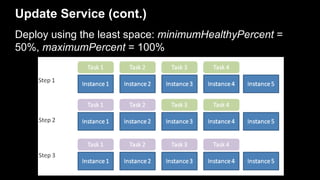
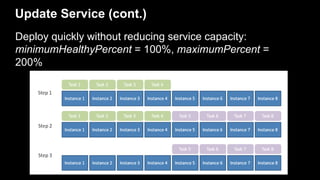
Specify a deployment configuration for your service:
• minimumHealthyPercent: lower limit (as a percentage of
the service's desiredCount) of the number of running
tasks that must remain running in a service during a
deployment.
• maximumPercent: upper limit (as a percentage of the
service's desiredCount) of the number of running tasks
that can be running in a service during a deployment.
Update Service (cont.)
Deploy using the least space: minimumHealthyPercent =
50%, maximumPercent = 100%
Update Service (cont.)
Deploy quickly without reducing service capacity:
minimumHealthyPercent = 100%, maximumPercent =
200%
Task Placement Examples
Supported Placement Strategies
Binpacking Spread Affinity Distinct Instance
g2.2xlarge t2.small g2.2xlarge g2.2xlarge
Placement: Targeting Instance Type
g2.2xlarge t2.small t2.micro t2.medium
t2.medium t2.small g2.2xlarge
t2.small
t2.small t2.medium
us-east-1aus-east-1d
Placement: Targeting Instance Type & Zone
g2.2xlarge t2.small t2.micro t2.medium
t2.medium t2.small g2.2xlarge t2.small
us-east-1aus-east-1d
g2.2xlarge t2.medium
t2.micro t2.small
us-east-1c
Placement: Availability Zone Spread
Security
IAM Roles
IAM roles for container instances:
• Bound to the ECS container instance
• Applies to all containers running on the host
• Pulling images from ECR
• CloudWatch Logs
IAM roles for tasks:
• Bound to specific ECS tasks
• Task-specific access to AWS services
Tip Use principle of least privilege – prefer IAM roles for tasks where applicable
IAM Roles For Tasks
ECS Cluster
EC2 Instance EC2 Instance
TASK A
TASK B
TASK B
Amazon
DynamoDB
Amazon
S3
Monitoring & Logging
Monitoring with CloudWatch
Centralized Logging with CloudWatch Logs
{
"image": ”nginx:latest",
...
"logConfiguration": {
"logDriver": "awslogs",
"options": {
"awslogs-group": ”nginx",
"awslogs-region": "us-east-1"
}
}
}
• Defined within the task definition
• Available log drivers
• awslogs
• fluentd
• gelf
• journald
• json-file
• splunk
• Syslog
• Submit a pull request on ECS agent
GitHub repo if you would like others
Centralized Logging with CloudWatch Logs
Demo
AWS Customers using ECS in production
• 50 Microservices - 10 containers/service
• Costs down 40% by using Spot Instances
• Faster Deployment Times
“ In November 2015 we moved our Docker container architecture to Amazon ECS, and for the first time ever in December
we were able to celebrate a new year in which our system could handle the huge number of requests without any crashes or
interruptions—an accomplishment that we were extremely proud of. We had faced the biggest night on the calendar without
any downtime.”
Docker on AWS – just ECS?
AWS & CNCF
Questions?
Thank you
vladsim@amazon.com

Running Docker Containers on AWS

  • 1.
    Running Docker Containerson AWS (with ECS) Vladimir Simek, Solutions Architect @ AWS 20 September 2017
  • 2.
    Agenda Why Containers? Cluster Management RunningServices Placement Options Security and Monitoring Demo
  • 3.
  • 4.
    What are Containers? OSvirtualization Process isolation Images AutomationServer Guest OS Bins/Libs Bins/Libs App2App1
  • 5.
  • 6.
    Services evolve tomicroservices Monolithic Application Order UI User UI Shipping UI Order Service User Service Shipping Service Data Access Host 1 Service A Service B Host 2 Service B Service D Host 3 Service A Service C Host 4 Service B Service C
  • 7.
    Containers are naturalfor microservices Simple to model Any app, any language Image is the version Test & deploy same artifact Stateless servers decrease change risk
  • 8.
  • 9.
  • 10.
    Scheduling a clusteris hard Server Guest OS Server Guest OS Server Guest OS Server Guest OS Server Guest OS Server Guest OS Server Guest OS Server Guest OS Server Guest OS Server Guest OS Server Guest OS Server Guest OS Server Guest OS Server Guest OS Server Guest OS Server Guest OS Server Guest OS Server Guest OS Server Guest OS Server Guest OS Server Guest OS Server Guest OS Server Guest OS Server Guest OS Server Guest OS Server Guest OS Server Guest OS Server Guest OS Server Guest OS Server Guest OS Server Guest OS Server Guest OS Server Guest OS Server Guest OS Server Guest OS Server Guest OS Server Guest OS Server Guest OS Server Guest OS Server Guest OS Server Guest OS Server Guest OS Server Guest OS Server Guest OS Server Guest OS Server Guest OS Server Guest OS Server Guest OS Server Guest OS Server Guest OS Server Guest OS Server Guest OS Server Guest OS Server Guest OS Server Guest OS Server Guest OS Server Guest OS Server Guest OS Server Guest OS Server Guest OS
  • 11.
    What is AmazonECS? Amazon EC2 Container Service (ECS) is a highly scalable, high performance container management service. You can use Amazon ECS to schedule the placement of containers across your cluster. You can also integrate your own scheduler or third-party scheduler to meet business or application specific requirements.
  • 12.
  • 13.
    Cluster Management: ResourceManagement Docker Task EC2 Instance Container Docker Task EC2 Instance Container Task Container Docker EC2 Instance Task Container AZ 1 AZ 2
  • 14.
    Cluster Management: Scheduling Docker Task EC2Instance Container Docker Task EC2 Instance Container Task Container Docker EC2 Instance Task Container AZ 1 AZ 2
  • 15.
    Amazon ECS: ResourceManagement Docker Task Container Instance Container Task Container Docker Task Container Instance Container Task Container Docker Task Container Instance Container Task Container AZ 1 AZ 2 Cluster Management Engine
  • 16.
    Amazon ECS: AgentCommunication Docker Task Container Instance Container ECS Agent Task Container Docker Task Container Instance Container ECS Agent Task Container Docker Task Container Instance Container ECS Agent Task Container AZ 1 AZ 2 Cluster Management Engine Agent Communication Service
  • 17.
    Amazon ECS: Key/ValueStore Docker Task Container Instance Container ECS Agent ELB Internet ELB Task Container Docker Task Container Instance Container ECS Agent Task Container Docker Task Container Instance Container ECS Agent Task Container AZ 1 AZ 2 Key/Value Store Cluster Management Engine Agent Communication Service
  • 18.
    Amazon ECS: APIs Docker Task ContainerInstance Container ECS Agent ELB Internet ELB User / Scheduler API Cluster Management Engine Task Container Docker Task Container Instance Container ECS Agent Task Container Docker Task Container Instance Container ECS Agent Task Container AZ 1 AZ 2 Key/Value Store Agent Communication Service
  • 19.
    Amazon ECS: Scheduling Docker Task ContainerInstance Container ECS Agent ELB Internet ELB User / Scheduler API Cluster Management Engine Task Container Docker Task Container Instance Container ECS Agent Task Container Docker Task Container Instance Container ECS Agent Task Container AZ 1 AZ 2 Key/Value Store Agent Communication Service
  • 20.
  • 21.
    Easily Manage Clustersfor Any Scale Nothing to run Complete state Control and monitoring Scale
  • 22.
  • 23.
  • 24.
    Designed for usewith other AWS services Elastic Load Balancing Amazon Elastic Block Store Amazon Virtual Private Cloud Amazon CloudWatch AWS Identity and Access Management AWS CloudTrail
  • 25.
  • 26.
    Amazon ECS Docker Task Container Instance Amazon ECS Container ECSAgent ELB Internet ELB User / Scheduler API Cluster Management Engine Task Container Docker Task Container Instance Container ECS Agent Task Container Docker Task Container Instance Container ECS Agent Task Container AZ 1 AZ 2 Key/Value Store Agent Communication Service
  • 27.
  • 28.
    Typical User Workflow Ihave a Docker image, and I want to run the image on a cluster
  • 29.
    Typical User Workflow PushImage(s) Amazon ECR
  • 30.
    Push Image toECR $ docker push my-account.dkr.ecr.us-east- 1.amazonaws.com/myImage
  • 31.
    Typical User Workflow CreateTask Definition Amazon ECS Declare resource requirements
  • 32.
    Register task definition $aws ecs register-task-definition --cli- input-json file://task-defintion.json
  • 33.
    Task definition { "taskDefinition": { "status":"INACTIVE", "family": "curler", "volumes": [], "taskDefinitionArn": "arn:aws:ecs:us-west-2:123456778901:task-definition/curler:1", "containerDefinitions": [ { "environment": [], "name": "curler", "mountPoints": [], "image": "curl:latest", "cpu": 100, "portMappings": [], "entryPoint": [], "memory": 256, "command": [ "curl -v http://example.com/" ], "essential": true, "volumesFrom": [] } ], "revision": 1 } }
  • 34.
    Typical User Workflow RunInstances EC2 Use custom AMI with Docker support and ECS Agent. Instances will register with default cluster.
  • 35.
    Create cluster $ awsecs create-cluster --cluster-name "my_cluster"
  • 36.
    Typical User Workflow RunTask or Create Service Amazon ECS Using the task definition created above
  • 37.
    Create service $ awsecs create-service --service-name ecs-simple-service --task-definition ecs-demo --desired-count 10
  • 38.
    Create Service Load Balancetraffic across containers Automatically recover unhealthy containers Discover services Elastic Load Balancing Shared Data Volume Containers Shared Data Volume Containers Shared Data Volume Containers
  • 39.
    Scale Service Scale out Scalein Elastic Load Balancing Shared Data Volume Containers Shared Data Volume Containers Shared Data Volume Containers Shared Data Volume Containers
  • 40.
  • 41.
    Update Service Deploy newversion Drain connections new new new Elastic Load Balancing Shared Data Volume Containers old old old Shared Data Volume Containers Shared Data Volume Containers Shared Data Volume Containers Shared Data Volume Containers Shared Data Volume Containers
  • 42.
    Update Service (cont.) Deploynew version Drain connections new new new Elastic Load Balancing Shared Data Volume Containers old old old Shared Data Volume Containers Shared Data Volume Containers Shared Data Volume Containers Shared Data Volume Containers Shared Data Volume Containers
  • 43.
    Update Service (cont.) Deploynew version Drain connections Elastic Load Balancing Shared Data Volume Containers Shared Data Volume Containers Shared Data Volume Containers new new new
  • 44.
    Update Service (cont.) Specifya deployment configuration for your service: • minimumHealthyPercent: lower limit (as a percentage of the service's desiredCount) of the number of running tasks that must remain running in a service during a deployment. • maximumPercent: upper limit (as a percentage of the service's desiredCount) of the number of running tasks that can be running in a service during a deployment.
  • 45.
    Update Service (cont.) Deployusing the least space: minimumHealthyPercent = 50%, maximumPercent = 100%
  • 46.
    Update Service (cont.) Deployquickly without reducing service capacity: minimumHealthyPercent = 100%, maximumPercent = 200%
  • 47.
  • 48.
    Supported Placement Strategies BinpackingSpread Affinity Distinct Instance
  • 49.
    g2.2xlarge t2.small g2.2xlargeg2.2xlarge Placement: Targeting Instance Type
  • 50.
    g2.2xlarge t2.small t2.microt2.medium t2.medium t2.small g2.2xlarge t2.small t2.small t2.medium us-east-1aus-east-1d Placement: Targeting Instance Type & Zone
  • 51.
    g2.2xlarge t2.small t2.microt2.medium t2.medium t2.small g2.2xlarge t2.small us-east-1aus-east-1d g2.2xlarge t2.medium t2.micro t2.small us-east-1c Placement: Availability Zone Spread
  • 52.
  • 53.
    IAM Roles IAM rolesfor container instances: • Bound to the ECS container instance • Applies to all containers running on the host • Pulling images from ECR • CloudWatch Logs IAM roles for tasks: • Bound to specific ECS tasks • Task-specific access to AWS services Tip Use principle of least privilege – prefer IAM roles for tasks where applicable
  • 54.
    IAM Roles ForTasks ECS Cluster EC2 Instance EC2 Instance TASK A TASK B TASK B Amazon DynamoDB Amazon S3
  • 55.
  • 56.
  • 57.
    Centralized Logging withCloudWatch Logs { "image": ”nginx:latest", ... "logConfiguration": { "logDriver": "awslogs", "options": { "awslogs-group": ”nginx", "awslogs-region": "us-east-1" } } } • Defined within the task definition • Available log drivers • awslogs • fluentd • gelf • journald • json-file • splunk • Syslog • Submit a pull request on ECS agent GitHub repo if you would like others
  • 58.
    Centralized Logging withCloudWatch Logs
  • 59.
  • 60.
    AWS Customers usingECS in production
  • 62.
    • 50 Microservices- 10 containers/service • Costs down 40% by using Spot Instances • Faster Deployment Times “ In November 2015 we moved our Docker container architecture to Amazon ECS, and for the first time ever in December we were able to celebrate a new year in which our system could handle the huge number of requests without any crashes or interruptions—an accomplishment that we were extremely proud of. We had faced the biggest night on the calendar without any downtime.”
  • 63.
    Docker on AWS– just ECS?
  • 64.
  • 65.
  • 66.