


Presented By:
Azmat Hasan
Software Consultant
Automate Your Deployment with
AWS
CODE-DEPLOY
Our Agenda
01 Why Deployment Service?
02 CodeDeploy and its benefits
03 Deployment Types
04 Deployment Configuration
05 Steps
06 Demo
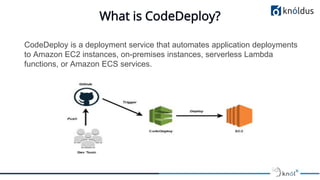
What is CodeDeploy?
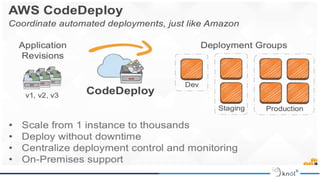
CodeDeploy is a deployment service that automates application deployments
to Amazon EC2 instances, on-premises instances, serverless Lambda
functions, or Amazon ECS services.
Benefits
● Server, serverless, and container applications
● Automated deployments
● Minimize downtime
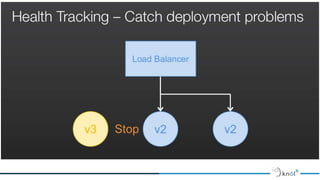
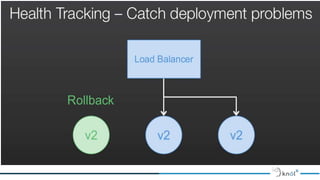
● Stop and roll back
● Centralized control
● Easy to adopt
● Concurrent deployments
What types of applications can be deployed
with AWS CodeDeploy?
Deployment Types:
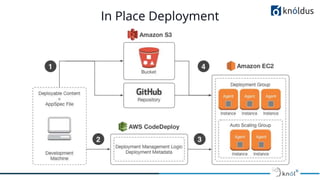
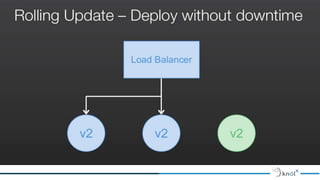
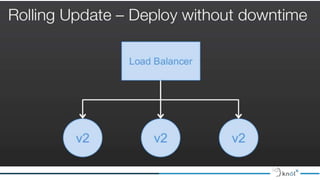
● In-place deployment:
The application on each instance in the deployment group is stopped,
the latest application revision is installed, and the new version of the
application is started and validated.
● Blue/green deployment:
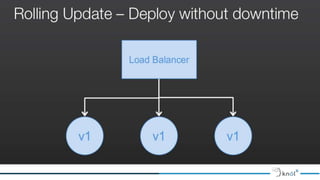
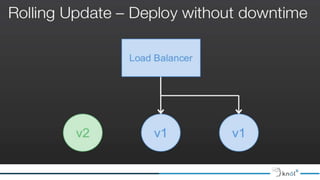
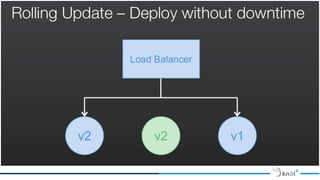
A blue/green deployment reroutes traffic from your application's
original environment to a replacement environment.
In Place Deployment
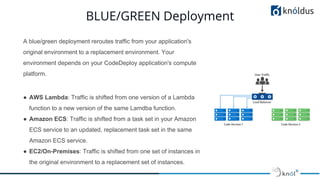
BLUE/GREEN Deployment
A blue/green deployment reroutes traffic from your application's
original environment to a replacement environment. Your
environment depends on your CodeDeploy application's compute
platform.
● AWS Lambda: Traffic is shifted from one version of a Lambda
function to a new version of the same Lamdba function.
● Amazon ECS: Traffic is shifted from a task set in your Amazon
ECS service to an updated, replacement task set in the same
Amazon ECS service.
● EC2/On-Premises: Traffic is shifted from one set of instances in
the original environment to a replacement set of instances.
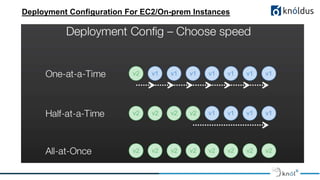
Deployment Configuration For EC2/On-prem Instances
Deployment Configuration For ECS
If you're using the Amazon ECS compute platform, production traffic
shifts from your Amazon ECS service's original task set to a
replacement task set all at once.
Deployment Configuration For AWS Lambda
● Canary: Traffic is shifted in two increments. You can choose from predefined canary options
that specify the percentage of traffic shifted to your updated Lambda function version in the
first increment and the interval, in minutes, before the remaining traffic is shifted in the second
increment.
● Linear: Traffic is shifted in equal increments with an equal number of minutes between each
increment. You can choose from predefined linear options that specify the percentage of
traffic shifted in each increment and the number of minutes between each increment.
● All-at-once: All traffic is shifted from the original Lambda function to the updated Lambda
function version all at once.
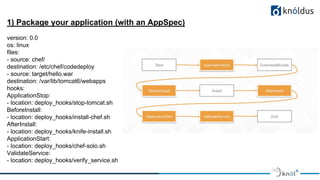
1) Package your application (with an AppSpec)
version: 0.0
os: linux
files:
- source: chef/
destination: /etc/chef/codedeploy
- source: target/hello.war
destination: /var/lib/tomcat6/webapps
hooks:
ApplicationStop:
- location: deploy_hooks/stop-tomcat.sh
BeforeInstall:
- location: deploy_hooks/install-chef.sh
AfterInstall:
- location: deploy_hooks/knife-install.sh
ApplicationStart:
- location: deploy_hooks/chef-solo.sh
ValidateService:
- location: deploy_hooks/verify_service.sh
References:
1. https://docs.aws.amazon.com/codedeploy
2. https://www.slideshare.net/AmazonWebServices/aws-april-webinar-series-getting-started-with-aws-codedeploy
3. https://www.slideshare.net/AmazonWebServices/aws-code-deploy
Thank You !

AWS Code-Deploy

  • 1.
    Presented By: Azmat Hasan SoftwareConsultant Automate Your Deployment with AWS CODE-DEPLOY
  • 2.
    Our Agenda 01 WhyDeployment Service? 02 CodeDeploy and its benefits 03 Deployment Types 04 Deployment Configuration 05 Steps 06 Demo
  • 5.
    What is CodeDeploy? CodeDeployis a deployment service that automates application deployments to Amazon EC2 instances, on-premises instances, serverless Lambda functions, or Amazon ECS services.
  • 6.
    Benefits ● Server, serverless,and container applications ● Automated deployments ● Minimize downtime ● Stop and roll back ● Centralized control ● Easy to adopt ● Concurrent deployments
  • 8.
    What types ofapplications can be deployed with AWS CodeDeploy?
  • 9.
    Deployment Types: ● In-placedeployment: The application on each instance in the deployment group is stopped, the latest application revision is installed, and the new version of the application is started and validated. ● Blue/green deployment: A blue/green deployment reroutes traffic from your application's original environment to a replacement environment.
  • 10.
  • 11.
    BLUE/GREEN Deployment A blue/greendeployment reroutes traffic from your application's original environment to a replacement environment. Your environment depends on your CodeDeploy application's compute platform. ● AWS Lambda: Traffic is shifted from one version of a Lambda function to a new version of the same Lamdba function. ● Amazon ECS: Traffic is shifted from a task set in your Amazon ECS service to an updated, replacement task set in the same Amazon ECS service. ● EC2/On-Premises: Traffic is shifted from one set of instances in the original environment to a replacement set of instances.
  • 12.
    Deployment Configuration ForEC2/On-prem Instances
  • 13.
    Deployment Configuration ForECS If you're using the Amazon ECS compute platform, production traffic shifts from your Amazon ECS service's original task set to a replacement task set all at once.
  • 14.
    Deployment Configuration ForAWS Lambda ● Canary: Traffic is shifted in two increments. You can choose from predefined canary options that specify the percentage of traffic shifted to your updated Lambda function version in the first increment and the interval, in minutes, before the remaining traffic is shifted in the second increment. ● Linear: Traffic is shifted in equal increments with an equal number of minutes between each increment. You can choose from predefined linear options that specify the percentage of traffic shifted in each increment and the number of minutes between each increment. ● All-at-once: All traffic is shifted from the original Lambda function to the updated Lambda function version all at once.
  • 15.
    1) Package yourapplication (with an AppSpec) version: 0.0 os: linux files: - source: chef/ destination: /etc/chef/codedeploy - source: target/hello.war destination: /var/lib/tomcat6/webapps hooks: ApplicationStop: - location: deploy_hooks/stop-tomcat.sh BeforeInstall: - location: deploy_hooks/install-chef.sh AfterInstall: - location: deploy_hooks/knife-install.sh ApplicationStart: - location: deploy_hooks/chef-solo.sh ValidateService: - location: deploy_hooks/verify_service.sh
  • 26.
  • 27.