CI & CD ON AWS
Build and deliver products using AWS
AWS Meetup - Roma
15 Oct 2016
Paolo Latella

XPeppers - Cloud & DevOps

paolo.latella@xpeppers.com
@LatellaPaolo
WHAT ARE CI AND CD ?
• Continuous Integration: ?
• Continuous Delivery: ?
WHAT ARE CI AND CD ?
• Continuous Integration: every time somebody
commits any change, the entire application is built
and a comprehensive set of automated tests is run
against it.
• Continuous Delivery: more than just a new
delivery methodology. It is a whole new paradigm
for running a business that depends on software.
Continuous Delivery - Jez Humble, David Farley
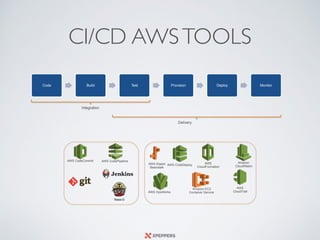
CI/CD AWSTOOLS
Code Build Test Provision Deploy Monitor
Integration
Delivery
AWS CodePipelineAWS CodeCommit
AWS CodeDeploy
AWS
CloudFormation
AWS OpsWorks
Amazon EC2
Container Service
AWS Elastic
Beanstalk
Amazon
CloudWatch
AWS

CloudTrail
CODECOMMIT
• Fully managed.
• Repositories of any size and any file type.
• Has highly available repositories.
• Choose the region where your repository should reside.
• Supports the standard functionality of Git
• Online code tools to browse, edit, and collaborate on projects.
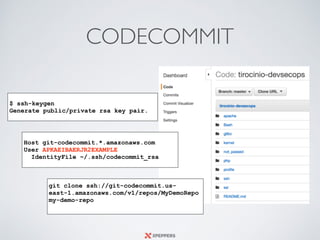
CODECOMMIT
Host git-codecommit.*.amazonaws.com
User APKAEIBAERJR2EXAMPLE
IdentityFile ~/.ssh/codecommit_rsa
git clone ssh://git-codecommit.us-
east-1.amazonaws.com/v1/repos/MyDemoRepo
my-demo-repo
$ ssh-keygen
Generate public/private rsa key pair.
CODEPIPELINE
• Graphical user interface to create, configure, and
manage your pipeline Fully managed.
• Parallel Execution
• Integration with CodeDeploy, Lambda, S3,
CodeCommit, Beanstalk, Opsworks and third-party
tools
• Custom action, manual approval, retry,
https://aws.amazon.com/codepipeline/product-integrations/
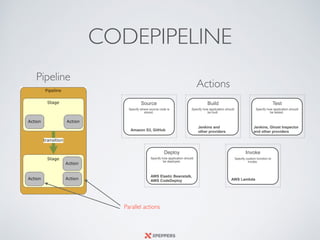
CODEPIPELINE
Source
Specify where source code is
stored.
Amazon S3, GitHub
Build
Specify how application should
be built.
Jenkins and
other providers
Test
Specify how application should
be tested.
Jenkins, Ghost Inspector
and other providers
Deploy
Specify how application should
be deployed.
AWS Elastic Beanstalk,
AWS CodeDeploy
Invoke
Specify custom function to
invoke.
AWS Lambda
Actions
Pipeline
Parallel actions
CODEDEPLOY
• Coordinates application deployments to Amazon
EC2 instances.
• Deploy from a GitHub repository or from any local
codebase.
• Manage deployments across environments, upgrade
applications, and perform rolling updates.
• Supports Linux and Windows deployments.
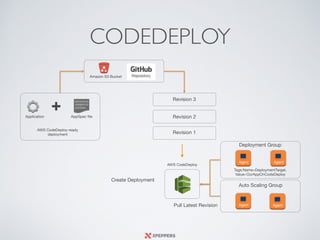
Deployment Group
Auto Scaling Group
Agent Agent
Agent Agent
Tags:Name=DeploymentTarget,

Value=OurAppOnCodeDeploy
Create Deployment
AWS CodeDeploy
Pull Latest Revision
AWS CodeDeploy-ready
deployment
AppSpec fileApplication
+
Revision 1
Revision 2
Revision 3
Amazon S3 Bucket
CODEDEPLOY
CODEDEPLOY
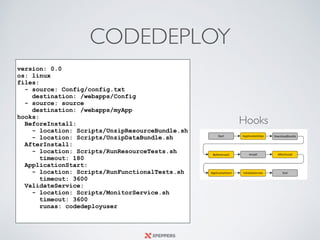
version: 0.0
os: linux
files:
- source: Config/config.txt
destination: /webapps/Config
- source: source
destination: /webapps/myApp
hooks:
BeforeInstall:
- location: Scripts/UnzipResourceBundle.sh
- location: Scripts/UnzipDataBundle.sh
AfterInstall:
- location: Scripts/RunResourceTests.sh
timeout: 180
ApplicationStart:
- location: Scripts/RunFunctionalTests.sh
timeout: 3600
ValidateService:
- location: Scripts/MonitorService.sh
timeout: 3600
runas: codedeployuser
Hooks
CODEDEPLOY
#!/usr/bin/python
import boto3
import urllib2
import time
CONNECTION_DRAINING_TIMEOUT = 60
print "Get metadata for instance"
instance_id=urllib2.urlopen('http://169.254.169.254/latest/meta-data/instance-id').read()
availability_zone=urllib2.urlopen('http://169.254.169.254/latest/meta-data/placement/availability-zone').read()
region = availability_zone[:-1]
asg = boto3.client('autoscaling',region)
print 'Trying to move instance ' + instance_id + ' in stand-by'
res_asg_of_instance = asg.describe_auto_scaling_instances(InstanceIds=[instance_id])
name_asg_of_instance = res_asg_of_instance['AutoScalingInstances'][0]['AutoScalingGroupName']
state_of_instance = res_asg_of_instance['AutoScalingInstances'][0]['LifecycleState']
if (state_of_instance == 'InService'):
res_enter_in_standby =
asg.enter_standby(InstanceIds=[instance_id],AutoScalingGroupName=name_asg_of_instance,ShouldDecrementDesiredCapac
ity=True)
print 'Instance ' + instance_id + 'entering in stand-by'
print res_enter_in_standby
time.sleep(CONNECTION_DRAINING_TIMEOUT)
exit(0)
if (state_of_instance == 'Standby'):
print 'Instance ' + instance_id + ' already in stand-by'
time.sleep(10)
exit(0)
else:
print 'Instance ' + instance_id + ' is in ' + state_of_instance + ' ignoring ...'
exit(0)
Application Stop
there is a best way
BLUE/GREEN DEPLOYMENT
AND
CANARY RELEASE
TWO CONSTRAINTS: YOUR DATA AND OTHERS SYSTEMS!
CLOUDFORMATION
• Simplify infrastructure management in the cloud
• Perform predictable, repeatable, and automated
deployments.
• Easily control and track changes to your infrastructure.
• Simply JSON orYAML formatted text file that describes
the AWS infrastructure
Infrastructure as Code = Cloudformation + Chef/Puppet/Ansible
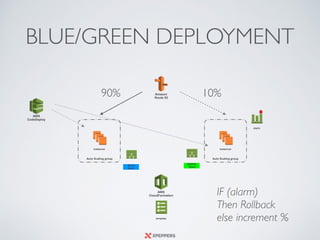
Amazon

Route 53
BLUE/GREEN DEPLOYMENT
Auto Scaling group Auto Scaling group
instances instances
template
BLUE

Stack
AWS

CloudFormation
GREEN

Stack
90% 10%
alarm
IF (alarm) 

Then Rollback
else increment %
AWS 

CodeDeploy
GRAZIE!
Q&A
Paolo Latella

XPeppers - Cloud & DevOps

paolo.latella@xpeppers.com
@LatellaPaolo

CI&CD on AWS - Meetup Roma Oct 2016

  • 1.
    CI & CDON AWS Build and deliver products using AWS AWS Meetup - Roma 15 Oct 2016 Paolo Latella
 XPeppers - Cloud & DevOps
 paolo.latella@xpeppers.com @LatellaPaolo
  • 2.
    WHAT ARE CIAND CD ? • Continuous Integration: ? • Continuous Delivery: ?
  • 3.
    WHAT ARE CIAND CD ? • Continuous Integration: every time somebody commits any change, the entire application is built and a comprehensive set of automated tests is run against it. • Continuous Delivery: more than just a new delivery methodology. It is a whole new paradigm for running a business that depends on software. Continuous Delivery - Jez Humble, David Farley
  • 4.
    CI/CD AWSTOOLS Code BuildTest Provision Deploy Monitor Integration Delivery AWS CodePipelineAWS CodeCommit AWS CodeDeploy AWS CloudFormation AWS OpsWorks Amazon EC2 Container Service AWS Elastic Beanstalk Amazon CloudWatch AWS
 CloudTrail
  • 5.
    CODECOMMIT • Fully managed. •Repositories of any size and any file type. • Has highly available repositories. • Choose the region where your repository should reside. • Supports the standard functionality of Git • Online code tools to browse, edit, and collaborate on projects.
  • 6.
    CODECOMMIT Host git-codecommit.*.amazonaws.com User APKAEIBAERJR2EXAMPLE IdentityFile~/.ssh/codecommit_rsa git clone ssh://git-codecommit.us- east-1.amazonaws.com/v1/repos/MyDemoRepo my-demo-repo $ ssh-keygen Generate public/private rsa key pair.
  • 7.
    CODEPIPELINE • Graphical userinterface to create, configure, and manage your pipeline Fully managed. • Parallel Execution • Integration with CodeDeploy, Lambda, S3, CodeCommit, Beanstalk, Opsworks and third-party tools • Custom action, manual approval, retry, https://aws.amazon.com/codepipeline/product-integrations/
  • 8.
    CODEPIPELINE Source Specify where sourcecode is stored. Amazon S3, GitHub Build Specify how application should be built. Jenkins and other providers Test Specify how application should be tested. Jenkins, Ghost Inspector and other providers Deploy Specify how application should be deployed. AWS Elastic Beanstalk, AWS CodeDeploy Invoke Specify custom function to invoke. AWS Lambda Actions Pipeline Parallel actions
  • 9.
    CODEDEPLOY • Coordinates applicationdeployments to Amazon EC2 instances. • Deploy from a GitHub repository or from any local codebase. • Manage deployments across environments, upgrade applications, and perform rolling updates. • Supports Linux and Windows deployments.
  • 10.
    Deployment Group Auto ScalingGroup Agent Agent Agent Agent Tags:Name=DeploymentTarget, Value=OurAppOnCodeDeploy Create Deployment AWS CodeDeploy Pull Latest Revision AWS CodeDeploy-ready deployment AppSpec fileApplication + Revision 1 Revision 2 Revision 3 Amazon S3 Bucket CODEDEPLOY
  • 11.
    CODEDEPLOY version: 0.0 os: linux files: -source: Config/config.txt destination: /webapps/Config - source: source destination: /webapps/myApp hooks: BeforeInstall: - location: Scripts/UnzipResourceBundle.sh - location: Scripts/UnzipDataBundle.sh AfterInstall: - location: Scripts/RunResourceTests.sh timeout: 180 ApplicationStart: - location: Scripts/RunFunctionalTests.sh timeout: 3600 ValidateService: - location: Scripts/MonitorService.sh timeout: 3600 runas: codedeployuser Hooks
  • 12.
    CODEDEPLOY #!/usr/bin/python import boto3 import urllib2 importtime CONNECTION_DRAINING_TIMEOUT = 60 print "Get metadata for instance" instance_id=urllib2.urlopen('http://169.254.169.254/latest/meta-data/instance-id').read() availability_zone=urllib2.urlopen('http://169.254.169.254/latest/meta-data/placement/availability-zone').read() region = availability_zone[:-1] asg = boto3.client('autoscaling',region) print 'Trying to move instance ' + instance_id + ' in stand-by' res_asg_of_instance = asg.describe_auto_scaling_instances(InstanceIds=[instance_id]) name_asg_of_instance = res_asg_of_instance['AutoScalingInstances'][0]['AutoScalingGroupName'] state_of_instance = res_asg_of_instance['AutoScalingInstances'][0]['LifecycleState'] if (state_of_instance == 'InService'): res_enter_in_standby = asg.enter_standby(InstanceIds=[instance_id],AutoScalingGroupName=name_asg_of_instance,ShouldDecrementDesiredCapac ity=True) print 'Instance ' + instance_id + 'entering in stand-by' print res_enter_in_standby time.sleep(CONNECTION_DRAINING_TIMEOUT) exit(0) if (state_of_instance == 'Standby'): print 'Instance ' + instance_id + ' already in stand-by' time.sleep(10) exit(0) else: print 'Instance ' + instance_id + ' is in ' + state_of_instance + ' ignoring ...' exit(0) Application Stop there is a best way
  • 13.
    BLUE/GREEN DEPLOYMENT AND CANARY RELEASE TWOCONSTRAINTS: YOUR DATA AND OTHERS SYSTEMS!
  • 14.
    CLOUDFORMATION • Simplify infrastructuremanagement in the cloud • Perform predictable, repeatable, and automated deployments. • Easily control and track changes to your infrastructure. • Simply JSON orYAML formatted text file that describes the AWS infrastructure Infrastructure as Code = Cloudformation + Chef/Puppet/Ansible
  • 15.
    Amazon
 Route 53 BLUE/GREEN DEPLOYMENT AutoScaling group Auto Scaling group instances instances template BLUE
 Stack AWS
 CloudFormation GREEN
 Stack 90% 10% alarm IF (alarm) 
 Then Rollback else increment % AWS 
 CodeDeploy
  • 16.
    GRAZIE! Q&A Paolo Latella
 XPeppers -Cloud & DevOps
 paolo.latella@xpeppers.com @LatellaPaolo