CI CD using AWS Developer Tools
Bhuvaneswari Subramani
Oct 2019
Bhuvaneswari Subramani (Bhuvana)
Director, Engineering Operations, Infor
AWS Community Hero
Currently working on Cloud Computing, DevOps &, Performance QA
https://installjournal.blogspot.com
Agenda
• AWS CI CD Services Overview
• Use case leveraging AWS CI CD Services
• Infrastructure Rollouts + WebApp Deployment
• buildspec, appspec
• Debugging Build & Deployment
• Rollback Deployments
• Metrics to gauge DevOps
AWS CI CD Services
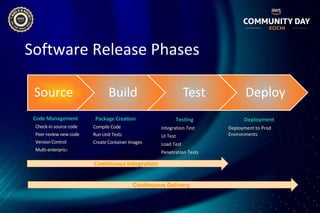
Software Release Phases
Source Build Test Deploy
Testing
• Integration Test
• UI Test
• Load Test
• Penetration Tests
Deployment
Deployment to Prod
Environments
Code Management
• Check-in source code
• Peer review new code
• Version Control
• Multi-enterprise
Package Creation
• Compile Code
• Run Unit Tests
• Create Container Images
Continuous Integration
Continuous Delivery
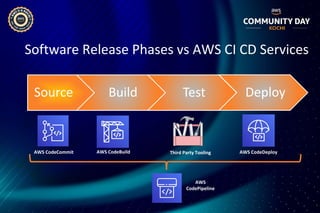
Software Release Phases vs AWS CI CD Services
Source Build Test Deploy
AWS CodeCommit AWS CodeBuild Third Party Tooling AWS CodeDeploy
AWS
CodePipeline
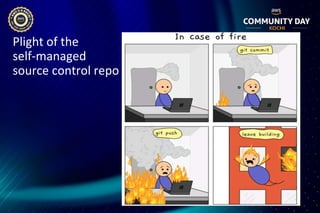
Plight of the
self-managed
source control repo
AWS CodeCommit
• Secure, Scalable, and managed Git Source
control
• Use Standard git tools
• Scalability, availability and durability of Amazon
S3 & Amazon Dynamo DB
• No repo size limit
• Post commit hooks to call out to SNS / Lambda
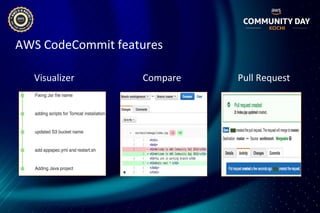
AWS CodeCommit features
Visualizer Compare Pull Request
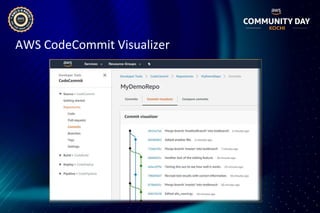
AWS CodeCommit Visualizer
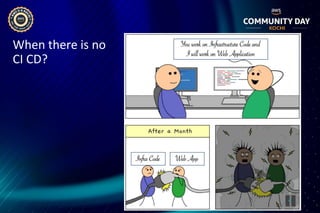
When there is no
CI CD?
AWS Code Build
• Fully managed build service that compiles
source code, run tests, and produces
software packages
• Scales continuously and processes multiple
builds
• You can provide custom build environments
suited to your needs via Docker images
• Only pay by the minute for the compute
resources you use
• Launched with Services like CodePipeline or
Jenkins
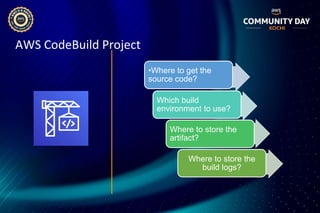
AWS CodeBuild Project
•Where to get the
source code?
Which build
environment to use?
Where to store the
artifact?
Where to store the
build logs?
AWS CodeDeploy
• Automates code deployments to EC2 / On-prem
• Handles the complexity of updating your
applications
• Minimal deployment downtime
• Rollback automatically, if failure detected
• Supports varied languages and operating systems
• Integrates with third-party tools like Jenkins
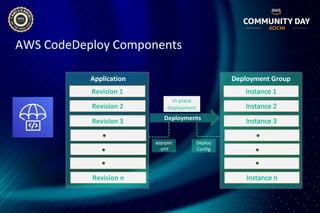
AWS CodeDeploy Components
Revision 1
Application
Revision 2
Revision 3
Revision n
Deployment Group
Deployments
Deploy
Config
appspec
.yml
In-place
deployment
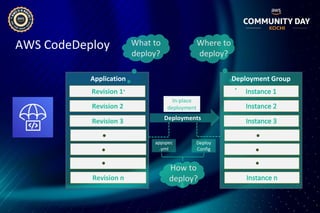
AWS CodeDeploy
Revision 1
Application
Revision 2
Revision 3
Revision n
Deployment Group
Deployments
Deploy
Config
appspec
.yml
In-place
deployment
What to
deploy?
Where to
deploy?
How to
deploy?
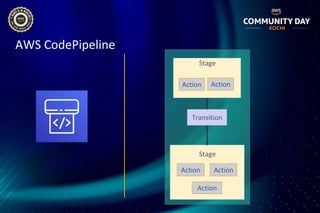
AWS CodePipeline
• Continuous delivery service for fast and reliable
application updates
• Model and visualize your software release
process
• Builds, tests and deploys your code on every
commit
• Integrates with third-party tools
AWS CodePipeline
Action Action
Stage
Action Action
Stage
Action
Transition
Quick look @ pricing*
• AWS CodeCommit: Anyone with an AWS account can get started with
AWS CodeCommit for free. Your account gets 5 active users per month for
free (within limits), after which you pay $1 per additional active user per
month.
• AWS CodeBuild: Only pay by minute for the compute resources you use.
• AWS CodeDeploy: There is no additional charge for code deployments to
Amazon EC2 instances through AWS CodeDeploy. You pay $0.02 per on-
premises instance update using AWS CodeDeploy.
• AWS CodePipeline: You pay only for what you use. AWS CodePipeline
costs $1 per active pipeline* per month. To encourage experimentation,
pipelines are free for the first 30 days after creation.
* Pricing as on Sep 2019
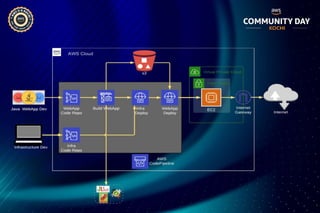
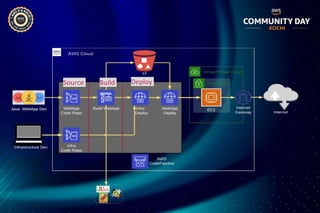
AWS CI CD Workflow
Use Case
• IaC using Cloud Formation Template
• Create an EC2 Instance
• Install CodeDeploy agent through UserData
• Add specific tag `Name = WebApp`
• Deploy Web Application
• Install Tomcat & deploy WebApp through instructions from
appspec.yml
Source Build Deploy
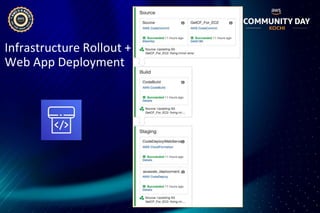
Infrastructure Rollout +
Web App Deployment
buildspec.yml & appspec.yml files
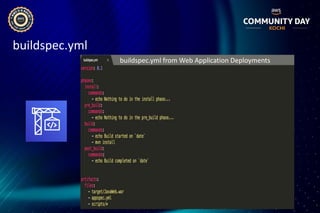
buildspec.yml
buildspec.yml from Web Application Deployments
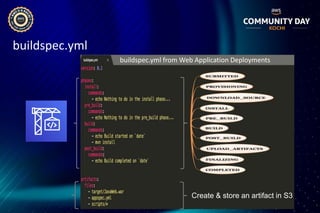
buildspec.yml
buildspec.yml from Web Application Deployments
Create & store an artifact in S3
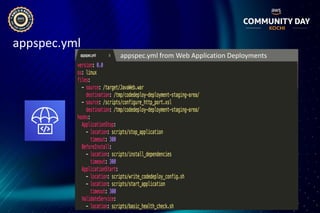
appspec.yml
appspec.yml from Web Application Deployments
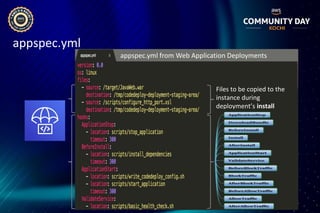
appspec.yml
Files to be copied to the
instance during
deployment’s install
appspec.yml from Web Application Deployments
Debugging, Rollback & Metrics
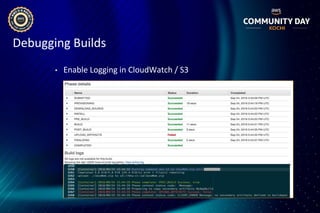
Debugging Builds
• Enable Logging in CloudWatch / S3
Debugging Builds
• Enable Logging in CloudWatch / S3
• Local Build Support for AWS CodeBuild
• Get the AWS CodeBuild docker image file from AWS Github
• Build the CodeBuild image locally
• Setup CodeBuild local Agent
• Use the local agent to build your project
Debugging Deployments
• CodeDeploy agent generates agent, updater & deployment logs
• Send them to CloudWatch for debugging
• CodeDeploy agent logs [EC2/On-prem only]
• /var/log/aws/codedeploy-agent/codedeploy-agent.log
Debugging Deployments
• CodeDeploy agent generates agent, updater & deployment logs
• Send them to CloudWatch for debugging
• CodeDeploy agent logs [EC2/On-prem only]
• /var/log/aws/codedeploy-agent/codedeploy-agent.log
• CodeDeploy deployment logs
• /opt/codedeploy-agent/deployment-root/deployment-logs/
• CodeDeploy updater logs
• /tmp/codedeploy-agent.update.log
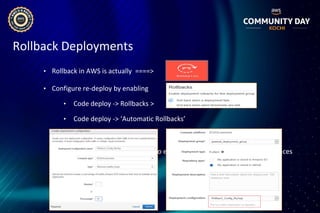
Rollback Deployments
• Rollback in AWS is actually ====>
• Configure re-deploy by enabling
• Code deploy -> Rollbacks >
• Code deploy -> ‘Automatic Rollbacks’
• Deployment Configuration to enable rollback based on healthy instances
Metrics to gauge DevOps
• Rapid Delivery with Increased Efficiency
• Increased Feature releases with reduced TTM
• Quicker feedback (system/user) to teams & stake
holders
• Greater % of defects detected in testing (Unit & SIT
Cycles)
• Ticket / Incidents volume reduction in PreProd & Prod
• High Availability
• Elastic & Scalable Infrastructure
DevOps Journey begins
https://installjournal.blogspot.com
https://www.linkedin.com/in/bhuvanas/
@installjournal

ACDKOCHI19 - CI / CD using AWS Developer Tools

  • 1.
    CI CD usingAWS Developer Tools Bhuvaneswari Subramani Oct 2019
  • 2.
    Bhuvaneswari Subramani (Bhuvana) Director,Engineering Operations, Infor AWS Community Hero Currently working on Cloud Computing, DevOps &, Performance QA https://installjournal.blogspot.com
  • 3.
    Agenda • AWS CICD Services Overview • Use case leveraging AWS CI CD Services • Infrastructure Rollouts + WebApp Deployment • buildspec, appspec • Debugging Build & Deployment • Rollback Deployments • Metrics to gauge DevOps
  • 4.
    AWS CI CDServices
  • 5.
    Software Release Phases SourceBuild Test Deploy Testing • Integration Test • UI Test • Load Test • Penetration Tests Deployment Deployment to Prod Environments Code Management • Check-in source code • Peer review new code • Version Control • Multi-enterprise Package Creation • Compile Code • Run Unit Tests • Create Container Images Continuous Integration Continuous Delivery
  • 6.
    Software Release Phasesvs AWS CI CD Services Source Build Test Deploy AWS CodeCommit AWS CodeBuild Third Party Tooling AWS CodeDeploy AWS CodePipeline
  • 7.
  • 8.
    AWS CodeCommit • Secure,Scalable, and managed Git Source control • Use Standard git tools • Scalability, availability and durability of Amazon S3 & Amazon Dynamo DB • No repo size limit • Post commit hooks to call out to SNS / Lambda
  • 9.
  • 10.
  • 11.
    When there isno CI CD?
  • 12.
    AWS Code Build •Fully managed build service that compiles source code, run tests, and produces software packages • Scales continuously and processes multiple builds • You can provide custom build environments suited to your needs via Docker images • Only pay by the minute for the compute resources you use • Launched with Services like CodePipeline or Jenkins
  • 13.
    AWS CodeBuild Project •Whereto get the source code? Which build environment to use? Where to store the artifact? Where to store the build logs?
  • 14.
    AWS CodeDeploy • Automatescode deployments to EC2 / On-prem • Handles the complexity of updating your applications • Minimal deployment downtime • Rollback automatically, if failure detected • Supports varied languages and operating systems • Integrates with third-party tools like Jenkins
  • 15.
    AWS CodeDeploy Components Revision1 Application Revision 2 Revision 3 Revision n Deployment Group Deployments Deploy Config appspec .yml In-place deployment
  • 16.
    AWS CodeDeploy Revision 1 Application Revision2 Revision 3 Revision n Deployment Group Deployments Deploy Config appspec .yml In-place deployment What to deploy? Where to deploy? How to deploy?
  • 17.
    AWS CodePipeline • Continuousdelivery service for fast and reliable application updates • Model and visualize your software release process • Builds, tests and deploys your code on every commit • Integrates with third-party tools
  • 18.
    AWS CodePipeline Action Action Stage ActionAction Stage Action Transition
  • 19.
    Quick look @pricing* • AWS CodeCommit: Anyone with an AWS account can get started with AWS CodeCommit for free. Your account gets 5 active users per month for free (within limits), after which you pay $1 per additional active user per month. • AWS CodeBuild: Only pay by minute for the compute resources you use. • AWS CodeDeploy: There is no additional charge for code deployments to Amazon EC2 instances through AWS CodeDeploy. You pay $0.02 per on- premises instance update using AWS CodeDeploy. • AWS CodePipeline: You pay only for what you use. AWS CodePipeline costs $1 per active pipeline* per month. To encourage experimentation, pipelines are free for the first 30 days after creation. * Pricing as on Sep 2019
  • 20.
    AWS CI CDWorkflow
  • 21.
    Use Case • IaCusing Cloud Formation Template • Create an EC2 Instance • Install CodeDeploy agent through UserData • Add specific tag `Name = WebApp` • Deploy Web Application • Install Tomcat & deploy WebApp through instructions from appspec.yml
  • 23.
  • 24.
  • 25.
  • 26.
    buildspec.yml buildspec.yml from WebApplication Deployments
  • 27.
    buildspec.yml buildspec.yml from WebApplication Deployments Create & store an artifact in S3
  • 28.
    appspec.yml appspec.yml from WebApplication Deployments
  • 29.
    appspec.yml Files to becopied to the instance during deployment’s install appspec.yml from Web Application Deployments
  • 30.
  • 31.
    Debugging Builds • EnableLogging in CloudWatch / S3
  • 32.
    Debugging Builds • EnableLogging in CloudWatch / S3 • Local Build Support for AWS CodeBuild • Get the AWS CodeBuild docker image file from AWS Github • Build the CodeBuild image locally • Setup CodeBuild local Agent • Use the local agent to build your project
  • 33.
    Debugging Deployments • CodeDeployagent generates agent, updater & deployment logs • Send them to CloudWatch for debugging • CodeDeploy agent logs [EC2/On-prem only] • /var/log/aws/codedeploy-agent/codedeploy-agent.log
  • 34.
    Debugging Deployments • CodeDeployagent generates agent, updater & deployment logs • Send them to CloudWatch for debugging • CodeDeploy agent logs [EC2/On-prem only] • /var/log/aws/codedeploy-agent/codedeploy-agent.log • CodeDeploy deployment logs • /opt/codedeploy-agent/deployment-root/deployment-logs/ • CodeDeploy updater logs • /tmp/codedeploy-agent.update.log
  • 35.
    Rollback Deployments • Rollbackin AWS is actually ====> • Configure re-deploy by enabling • Code deploy -> Rollbacks > • Code deploy -> ‘Automatic Rollbacks’ • Deployment Configuration to enable rollback based on healthy instances
  • 36.
    Metrics to gaugeDevOps • Rapid Delivery with Increased Efficiency • Increased Feature releases with reduced TTM • Quicker feedback (system/user) to teams & stake holders • Greater % of defects detected in testing (Unit & SIT Cycles) • Ticket / Incidents volume reduction in PreProd & Prod • High Availability • Elastic & Scalable Infrastructure
  • 37.