AWS CodeDeploy
By
Ratan Das
Agenda
✓ What is AWS CodeDeploy?
✓ Benefits
✓ Deployment Types
✓ Overview of In-Place Deployment
✓ Overview of Blue/Green Deployment
✓ Benefit of Blue/Green with AWS
✓ Getting Start with Codedeploy
✓
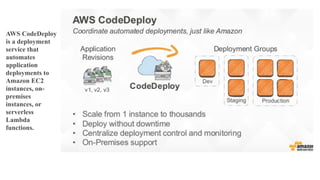
AWS CodeDeploy
is a deployment
service that
automates
application
deployments to
Amazon EC2
instances, on-
premises
instances, or
serverless
Lambda
functions.
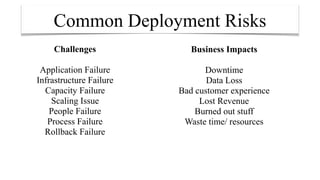
Common Deployment Risks
Challenges
Application Failure
Infrastructure Failure
Capacity Failure
Scaling Issue
People Failure
Process Failure
Rollback Failure
Business Impacts
Downtime
Data Loss
Bad customer experience
Lost Revenue
Burned out stuff
Waste time/ resources
Code Deploy Benefits
‣Server and serverless applications.
‣Automated deployments.
‣Minimize downtime.
‣Stop and roll back.
‣Centralized control.
‣Easy to adopt.
AWS CodeDeploy Deployment Types
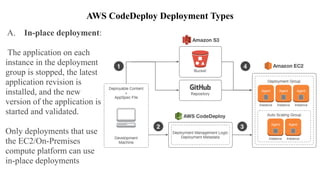
A. In-place deployment:
The application on each
instance in the deployment
group is stopped, the latest
application revision is
installed, and the new
version of the application is
started and validated.
Only deployments that use
the EC2/On-Premises
compute platform can use
in-place deployments
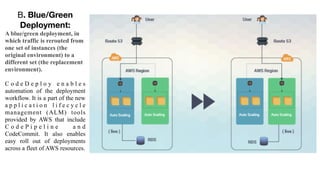
B. Blue/Green
Deployment:
A blue/green deployment, in
which traffic is rerouted from
one set of instances (the
original environment) to a
different set (the replacement
environment).
C o d e D e p l o y e n a b l e s
automation of the deployment
workflow. It is a part of the new
a p p l i c a t i o n l i f e c y c l e
management (ALM) tools
provided by AWS that include
C o d e P i p e l i n e a n d
CodeCommit. It also enables
easy roll out of deployments
across a fleet of AWS resources.
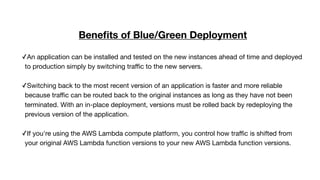
Benefits of Blue/Green Deployment
✓An application can be installed and tested on the new instances ahead of time and deployed
to production simply by switching traffic to the new servers.

✓Switching back to the most recent version of an application is faster and more reliable
because traffic can be routed back to the original instances as long as they have not been
terminated. With an in-place deployment, versions must be rolled back by redeploying the
previous version of the application.

✓If you're using the AWS Lambda compute platform, you control how traffic is shifted from
your original AWS Lambda function versions to your new AWS Lambda function versions.
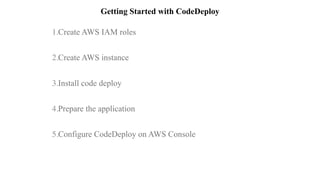
Getting Started with CodeDeploy
1.Create AWS IAM roles 

2.Create AWS instance 

3.Install code deploy 

4.Prepare the application 

5.Configure CodeDeploy on AWS Console 

1. Create AWS IAM roles
The first step towards setting up codedeploy is to setup two IAM roles. One for codedeploy to talk to EC2 instances and other for EC2
instance to
access s3.
• Go to IAM -> roles -> create new Role 

• Give a name for the role “code-deploy” and Goto Next Step 

• In Role Type -> select -> Amazon EC2 below AWS service Roles 

• In Attach Policy select -> AWSCodeDeployRole 

• Create Role 

• Edit the Trust relationship and update the content to the following one
Policy :
{

"Version": "2012-10-17", "Statement": [
{

"Sid": "", "Effect": "Allow", "Principal": {
"Service": "codedeploy.amazonaws.com" },
"Action": "sts:AssumeRole" }
] }
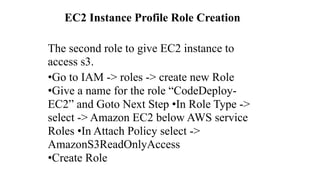
EC2 Instance Profile Role Creation
The second role to give EC2 instance to
access s3.
•Go to IAM -> roles -> create new Role

•Give a name for the role “CodeDeploy-
EC2” and Goto Next Step •In Role Type ->
select -> Amazon EC2 below AWS service
Roles •In Attach Policy select ->
AmazonS3ReadOnlyAccess

•Create Role
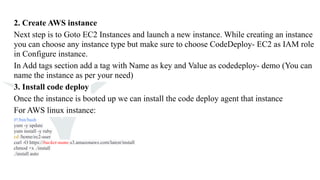
2. Create AWS instance
Next step is to Goto EC2 Instances and launch a new instance. While creating an instance
you can choose any instance type but make sure to choose CodeDeploy- EC2 as IAM role
in Configure instance.
In Add tags section add a tag with Name as key and Value as codedeploy- demo (You can
name the instance as per your need)
3. Install code deploy
Once the instance is booted up we can install the code deploy agent that instance
For AWS linux instance:
#!/bin/bash
yum -y update
yum install -y ruby
cd /home/ec2-user
curl -O https://bucket-name.s3.amazonaws.com/latest/install
chmod +x ./install
./install auto
4. Prepare the application
Next is to add the appspec.yml file to the application,
appspec.yml file will have information on what to
install on to instances and what lifecycle events to
run.
AppSpec Sections:
Version – AWS / CodeDeploy specific.

OS – Target operating system

Files – Source / Destination mappings
Permissions – File ownership and permissions
Hooks – Entry points for executing scripts
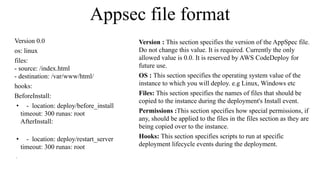
Appsec file format
Version 0.0
os: linux
files:

- source: /index.html

- destination: /var/www/html/
hooks:
BeforeInstall:
• - location: deploy/before_install 

timeout: 300 runas: root 

AfterInstall: 

• - location: deploy/restart_server 

timeout: 300 runas: root 

•
Version : This section specifies the version of the AppSpec file.
Do not change this value. It is required. Currently the only
allowed value is 0.0. It is reserved by AWS CodeDeploy for
future use.
OS : This section specifies the operating system value of the
instance to which you will deploy. e.g Linux, Windows etc
Files: This section specifies the names of files that should be
copied to the instance during the deployment's Install event.
Permissions :This section specifies how special permissions, if
any, should be applied to the files in the files section as they are
being copied over to the instance.
Hooks: This section specifies scripts to run at specific
deployment lifecycle events during the deployment.
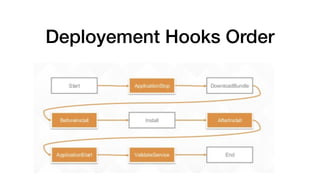
Deployement Hooks Order
Validating AppSpec files
We can use Any online YML parser
http://yaml-online-parser.appspot.com/
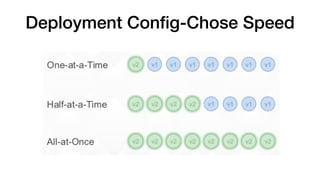
Deployment Config-Chose Speed
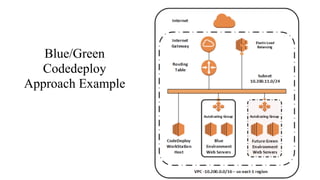
Blue/Green
Codedeploy
Approach Example
AWS Blue/Green Approaches
• Single EC2 instance with Elastic IP

• Multiple EC2 instance behind an ELB

• DNS redirection using Route53

• Environment swap with Elastic Beanstalk
Blue-Green Deployment Best Practices for Seamless Switching
•Choose Load Balancing Over DNS Switching
•Execute a Rolling Update
•Monitor Your Environments With the Correct Alerts
•Automate, Automate, Automate
•Make Your Code Backward and Forward Compatible
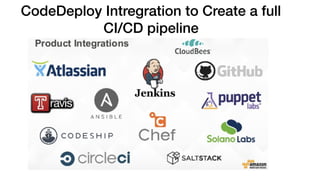
CodeDeploy Intregration to Create a full
CI/CD pipeline
????
Thank You All:-)
23

AWS CodeDeploy

  • 1.
  • 2.
    Agenda ✓ What isAWS CodeDeploy? ✓ Benefits ✓ Deployment Types ✓ Overview of In-Place Deployment ✓ Overview of Blue/Green Deployment ✓ Benefit of Blue/Green with AWS ✓ Getting Start with Codedeploy ✓
  • 3.
    AWS CodeDeploy is adeployment service that automates application deployments to Amazon EC2 instances, on- premises instances, or serverless Lambda functions.
  • 4.
    Common Deployment Risks Challenges ApplicationFailure Infrastructure Failure Capacity Failure Scaling Issue People Failure Process Failure Rollback Failure Business Impacts Downtime Data Loss Bad customer experience Lost Revenue Burned out stuff Waste time/ resources
  • 5.
    Code Deploy Benefits ‣Serverand serverless applications. ‣Automated deployments. ‣Minimize downtime. ‣Stop and roll back. ‣Centralized control. ‣Easy to adopt.
  • 6.
    AWS CodeDeploy DeploymentTypes A. In-place deployment: The application on each instance in the deployment group is stopped, the latest application revision is installed, and the new version of the application is started and validated. Only deployments that use the EC2/On-Premises compute platform can use in-place deployments
  • 7.
    B. Blue/Green Deployment: A blue/greendeployment, in which traffic is rerouted from one set of instances (the original environment) to a different set (the replacement environment). C o d e D e p l o y e n a b l e s automation of the deployment workflow. It is a part of the new a p p l i c a t i o n l i f e c y c l e management (ALM) tools provided by AWS that include C o d e P i p e l i n e a n d CodeCommit. It also enables easy roll out of deployments across a fleet of AWS resources.
  • 8.
    Benefits of Blue/GreenDeployment ✓An application can be installed and tested on the new instances ahead of time and deployed to production simply by switching traffic to the new servers.
 ✓Switching back to the most recent version of an application is faster and more reliable because traffic can be routed back to the original instances as long as they have not been terminated. With an in-place deployment, versions must be rolled back by redeploying the previous version of the application.
 ✓If you're using the AWS Lambda compute platform, you control how traffic is shifted from your original AWS Lambda function versions to your new AWS Lambda function versions.
  • 9.
    Getting Started withCodeDeploy 1.Create AWS IAM roles 
 2.Create AWS instance 
 3.Install code deploy 
 4.Prepare the application 
 5.Configure CodeDeploy on AWS Console 

  • 10.
    1. Create AWSIAM roles The first step towards setting up codedeploy is to setup two IAM roles. One for codedeploy to talk to EC2 instances and other for EC2 instance to access s3. • Go to IAM -> roles -> create new Role 
 • Give a name for the role “code-deploy” and Goto Next Step 
 • In Role Type -> select -> Amazon EC2 below AWS service Roles 
 • In Attach Policy select -> AWSCodeDeployRole 
 • Create Role 
 • Edit the Trust relationship and update the content to the following one Policy : {
 "Version": "2012-10-17", "Statement": [ {
 "Sid": "", "Effect": "Allow", "Principal": { "Service": "codedeploy.amazonaws.com" }, "Action": "sts:AssumeRole" } ] }
  • 11.
    EC2 Instance ProfileRole Creation The second role to give EC2 instance to access s3. •Go to IAM -> roles -> create new Role
 •Give a name for the role “CodeDeploy- EC2” and Goto Next Step •In Role Type -> select -> Amazon EC2 below AWS service Roles •In Attach Policy select -> AmazonS3ReadOnlyAccess
 •Create Role
  • 12.
    2. Create AWSinstance Next step is to Goto EC2 Instances and launch a new instance. While creating an instance you can choose any instance type but make sure to choose CodeDeploy- EC2 as IAM role in Configure instance. In Add tags section add a tag with Name as key and Value as codedeploy- demo (You can name the instance as per your need) 3. Install code deploy Once the instance is booted up we can install the code deploy agent that instance For AWS linux instance: #!/bin/bash yum -y update yum install -y ruby cd /home/ec2-user curl -O https://bucket-name.s3.amazonaws.com/latest/install chmod +x ./install ./install auto
  • 13.
    4. Prepare theapplication Next is to add the appspec.yml file to the application, appspec.yml file will have information on what to install on to instances and what lifecycle events to run. AppSpec Sections: Version – AWS / CodeDeploy specific.
 OS – Target operating system
 Files – Source / Destination mappings Permissions – File ownership and permissions Hooks – Entry points for executing scripts
  • 14.
    Appsec file format Version0.0 os: linux files:
 - source: /index.html
 - destination: /var/www/html/ hooks: BeforeInstall: • - location: deploy/before_install 
 timeout: 300 runas: root 
 AfterInstall: 
 • - location: deploy/restart_server 
 timeout: 300 runas: root 
 • Version : This section specifies the version of the AppSpec file. Do not change this value. It is required. Currently the only allowed value is 0.0. It is reserved by AWS CodeDeploy for future use. OS : This section specifies the operating system value of the instance to which you will deploy. e.g Linux, Windows etc Files: This section specifies the names of files that should be copied to the instance during the deployment's Install event. Permissions :This section specifies how special permissions, if any, should be applied to the files in the files section as they are being copied over to the instance. Hooks: This section specifies scripts to run at specific deployment lifecycle events during the deployment.
  • 15.
  • 16.
    Validating AppSpec files Wecan use Any online YML parser http://yaml-online-parser.appspot.com/
  • 17.
  • 18.
  • 19.
    AWS Blue/Green Approaches •Single EC2 instance with Elastic IP • Multiple EC2 instance behind an ELB • DNS redirection using Route53 • Environment swap with Elastic Beanstalk
  • 20.
    Blue-Green Deployment BestPractices for Seamless Switching •Choose Load Balancing Over DNS Switching •Execute a Rolling Update •Monitor Your Environments With the Correct Alerts •Automate, Automate, Automate •Make Your Code Backward and Forward Compatible
  • 21.
    CodeDeploy Intregration toCreate a full CI/CD pipeline
  • 22.
  • 23.