Presented By: Deeksha Tripathi
AWS CODEDEPLOY
Lack of etiquette and manners is a huge turn off.
KnolX Etiquettes
Punctuality
Respect Knolx session timings,
you are requested not to join
sessions after a 5 minutes
threshold post the session start
time.
Feedback
Make sure to submit a
constructive feedback for all
sessions as it is very helpful for
the presenter.
Silent Mode
Keep your mobile devices in
silent mode, feel free to move
out of session in case you need
to attend an urgent call.
Avoid Disturbance
Avoid unwanted chit chat during
the session.
Agenda
01 What is Continuous Deployment
02 What is AWS CodeDeploy
03 Components of AWS Code Deploy
04 Deployment Types
05 Advantages & Disadvantages
06 Demo
Continuous Deployment
Continuous deployment is a strategy in software development where code changes to an
application are released automatically into the production environment.
This automation is driven by a series of predefined tests.
With this practice, every change that passes all stages of your production pipeline is released to
your customers.
Key Elements :
● Deploy to production
● Testing and verification
● Monitoring
● Response and Recover
What is AWS Code Deploy
● AWS CodeDeploy is a fully managed deployment service that
automates software deployments to a variety of compute
services such as Amazon EC2, AWS Fargate, AWS Lambda,
and your on-premises servers.
● CodeDeploy has the ability to deploy content within the
application that is present in many locations.
● CodeDeploy works with various systems for configuration
management, source control, continuous integration,
continuous delivery, and continuous deployment.
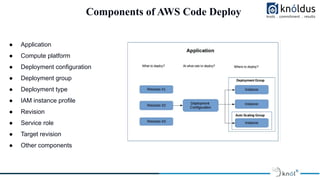
Components of AWS Code Deploy
● Application
● Compute platform
● Deployment configuration
● Deployment group
● Deployment type
● IAM instance profile
● Revision
● Service role
● Target revision
● Other components
Deployment Types
● In place Deployments:
The application on each instance in the deployment group is stopped, the latest application
revision in installed, and the new version of the application is started and validated .
● Blue-green Deployments:
A blue/green deployments helps in re routing the traffics from your application’s original
environment to a replacement environment .
Features of AWS CodeDeploy
● It can be used to deploy applications which require servers (traditional applications), applications
which are server less, and applications such as Amazon ECS (container applications).
● CodeDeploy is a fully managed, automated service which automatically deploys the user
application in development, test and production environments.
● It is highly scalable with the user infrastructure and can be used to deploy one or thousand
instances.
● CodeDeploy is an easy to use, and easy-to-adopt platform that works with any application. The
setup code can be conveniently reused.
Advantages & Disadvantages
❖ Advantages:
● Server , serverless & container application
● Automated Deployments
● Minimize Downtime
● Stop and roll back
● Centralized control
● Easy to adopt
● Concurrent Deployments
Advantages & Disadvantages
❖ Disadvantages:
● Struggles When Dealing With Multi-Tier Applications
● Limited Deployments Available
● Better Code Deployment service Exists
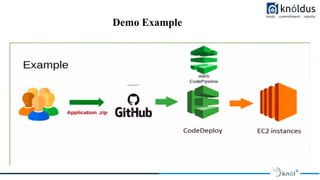
Demo Example
Demo
Steps For The Demo
STEP 1 - created a role for ec2 code deploy
STEP 2 - Create code deploy role
STEP 3 - create instance and add user data
///
#!/bin/bash
sudo yum -y update
sudo yum -y install ruby
sudo yum -y install wget
cd /home/ec2-user
wget https://aws-codedeploy-ap-south-1.s3.ap-south-1.amazonaws.com/latest/install
sudo chmod +x ./install
sudo ./install auto
sudo yum install -y python-pip
sudo pip install awscli
///
STEP 4 - next go to code deploy and go to applications and create an app
STEP 5 - next create deployment group
STEP 6 - next click on the codepipeline and create a codepipeline
STEP 7 - After the codepipeline push your changes to github.
Thank You !

Knolx - AWS Code Deploy.pdf

  • 1.
    Presented By: DeekshaTripathi AWS CODEDEPLOY
  • 2.
    Lack of etiquetteand manners is a huge turn off. KnolX Etiquettes Punctuality Respect Knolx session timings, you are requested not to join sessions after a 5 minutes threshold post the session start time. Feedback Make sure to submit a constructive feedback for all sessions as it is very helpful for the presenter. Silent Mode Keep your mobile devices in silent mode, feel free to move out of session in case you need to attend an urgent call. Avoid Disturbance Avoid unwanted chit chat during the session.
  • 3.
    Agenda 01 What isContinuous Deployment 02 What is AWS CodeDeploy 03 Components of AWS Code Deploy 04 Deployment Types 05 Advantages & Disadvantages 06 Demo
  • 4.
    Continuous Deployment Continuous deploymentis a strategy in software development where code changes to an application are released automatically into the production environment. This automation is driven by a series of predefined tests. With this practice, every change that passes all stages of your production pipeline is released to your customers. Key Elements : ● Deploy to production ● Testing and verification ● Monitoring ● Response and Recover
  • 5.
    What is AWSCode Deploy ● AWS CodeDeploy is a fully managed deployment service that automates software deployments to a variety of compute services such as Amazon EC2, AWS Fargate, AWS Lambda, and your on-premises servers. ● CodeDeploy has the ability to deploy content within the application that is present in many locations. ● CodeDeploy works with various systems for configuration management, source control, continuous integration, continuous delivery, and continuous deployment.
  • 6.
    Components of AWSCode Deploy ● Application ● Compute platform ● Deployment configuration ● Deployment group ● Deployment type ● IAM instance profile ● Revision ● Service role ● Target revision ● Other components
  • 7.
    Deployment Types ● Inplace Deployments: The application on each instance in the deployment group is stopped, the latest application revision in installed, and the new version of the application is started and validated . ● Blue-green Deployments: A blue/green deployments helps in re routing the traffics from your application’s original environment to a replacement environment .
  • 8.
    Features of AWSCodeDeploy ● It can be used to deploy applications which require servers (traditional applications), applications which are server less, and applications such as Amazon ECS (container applications). ● CodeDeploy is a fully managed, automated service which automatically deploys the user application in development, test and production environments. ● It is highly scalable with the user infrastructure and can be used to deploy one or thousand instances. ● CodeDeploy is an easy to use, and easy-to-adopt platform that works with any application. The setup code can be conveniently reused.
  • 9.
    Advantages & Disadvantages ❖Advantages: ● Server , serverless & container application ● Automated Deployments ● Minimize Downtime ● Stop and roll back ● Centralized control ● Easy to adopt ● Concurrent Deployments
  • 10.
    Advantages & Disadvantages ❖Disadvantages: ● Struggles When Dealing With Multi-Tier Applications ● Limited Deployments Available ● Better Code Deployment service Exists
  • 11.
  • 12.
  • 13.
    Steps For TheDemo STEP 1 - created a role for ec2 code deploy STEP 2 - Create code deploy role STEP 3 - create instance and add user data /// #!/bin/bash sudo yum -y update sudo yum -y install ruby sudo yum -y install wget cd /home/ec2-user wget https://aws-codedeploy-ap-south-1.s3.ap-south-1.amazonaws.com/latest/install sudo chmod +x ./install sudo ./install auto sudo yum install -y python-pip sudo pip install awscli /// STEP 4 - next go to code deploy and go to applications and create an app STEP 5 - next create deployment group STEP 6 - next click on the codepipeline and create a codepipeline STEP 7 - After the codepipeline push your changes to github.
  • 14.