© 2020, Amazon Web Services, Inc. or its Affiliates. @ziniman
AWS Cost Optimization
Boaz Ziniman
Principal Technical Evangelist - Amazon Web Services
@ziniman
boaz.ziniman.aws
bziniman
boaz.work
t.me/CloudNewsIsrael
© 2020, Amazon Web Services, Inc. or its Affiliates. @ziniman
Today’s focus
Tools and approaches
that you can use to
optimize AWS costs
© 2020, Amazon Web Services, Inc. or its Affiliates. @ziniman© 2020, Amazon Web Services, Inc. or its Affiliates.
Before we start…
© 2020, Amazon Web Services, Inc. or its Affiliates. @ziniman
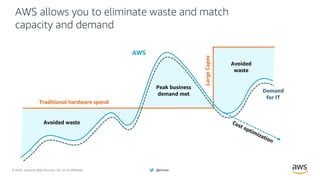
AWS allows you to eliminate waste and match
capacity and demand
Traditional hardware spend
Demand
for IT
AWS
Peak business
demand met
Avoided
waste
Avoided waste
LargeCapex
Cost optimization
© 2020, Amazon Web Services, Inc. or its Affiliates. @ziniman
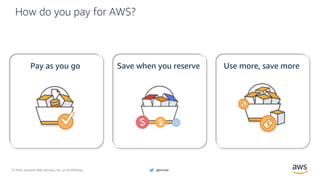
How do you pay for AWS?
Pay as you go Save when you reserve Use more, save more
© 2020, Amazon Web Services, Inc. or its Affiliates. @ziniman
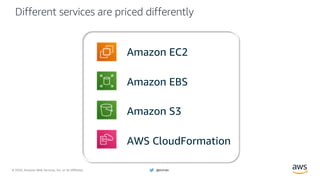
Different services are priced differently
Amazon EC2
Amazon EBS
Amazon S3
AWS CloudFormation
© 2020, Amazon Web Services, Inc. or its Affiliates. @ziniman
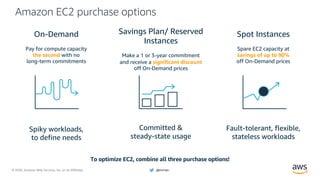
Amazon EC2 purchase options
Spot Instances
Spare EC2 capacity at
savings of up to 90%
off On-Demand prices
Fault-tolerant, flexible,
stateless workloads
Savings Plan/ Reserved
Instances
Make a 1 or 3-year commitment
and receive a significant discount
off On-Demand prices
Committed &
steady-state usage
On-Demand
Pay for compute capacity
the second with no
long-term commitments
Spiky workloads,
to define needs
To optimize EC2, combine all three purchase options!
© 2020, Amazon Web Services, Inc. or its Affiliates. @ziniman
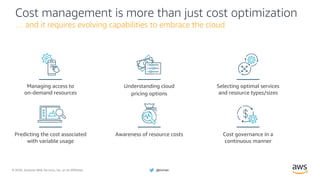
Cost management is more than just cost optimization
… and it requires evolving capabilities to embrace the cloud
Managing access to
on-demand resources
Understanding cloud
pricing options
Selecting optimal services
and resource types/sizes
Predicting the cost associated
with variable usage
Awareness of resource costs Cost governance in a
continuous manner
© 2020, Amazon Web Services, Inc. or its Affiliates. @ziniman
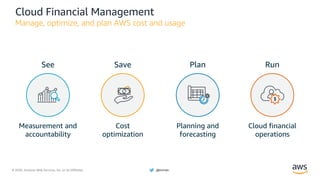
Cloud Financial Management
Manage, optimize, and plan AWS cost and usage
PlanSave RunSee
Planning and
forecasting
Cost
optimization
Cloud financial
operations
Measurement and
accountability
© 2020, Amazon Web Services, Inc. or its Affiliates. @ziniman
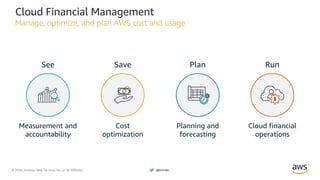
Cloud Financial Management
Manage, optimize, and plan AWS cost and usage
PlanSave RunSee
Planning and
forecasting
Cost
optimization
Cloud financial
operations
Measurement and
accountability
© 2020, Amazon Web Services, Inc. or its Affiliates. @ziniman
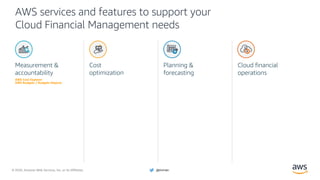
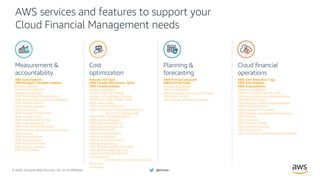
AWS services and features to support your
Cloud Financial Management needs
Planning &
forecasting
Measurement &
accountability
Cost
optimization
Cloud financial
operations
AWS Cost Explorer
AWS Budgets / Budgets Reports
© 2020, Amazon Web Services, Inc. or its Affiliates. @ziniman
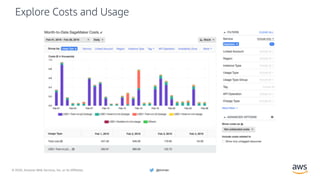
Explore Costs and Usage
© 2020, Amazon Web Services, Inc. or its Affiliates. @ziniman
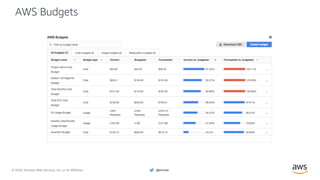
AWS Budgets
© 2020, Amazon Web Services, Inc. or its Affiliates. @ziniman
AWS services and features to support your
Cloud Financial Management needs
Planning &
forecasting
Measurement &
accountability
Cost
optimization
Cloud financial
operations
AWS Cost Explorer
AWS Budgets / Budgets Reports
Amazon EC2 Spot
AWS Fargate (Serverless, Spot)
AWS Trusted Advisor
AWS Pricing Calculator
AWS Pricing Pages
AWS Cost Allocation Tags
AWS Cost Explorer
AWS Organizations
© 2020, Amazon Web Services, Inc. or its Affiliates. @ziniman
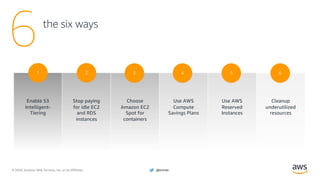
Use AWS
Reserved
Instances
5
the six ways
6
Stop paying
for idle EC2
and RDS
instances
2
Choose
Amazon EC2
Spot for
containers
3
Use AWS
Compute
Savings Plans
4
Cleanup
underutilized
resources
6
Enable S3
Intelligent-
Tiering
1
© 2020, Amazon Web Services, Inc. or its Affiliates. @ziniman
Enable S3
Intelligent-Tiering
Implementation time: Minutes
1
© 2020, Amazon Web Services, Inc. or its Affiliates. @ziniman© 2020, Amazon Web Services, Inc. or its Affiliates.
Scenario
• You are using S3 standard storage class
• You might be paying for S3 storage you
don’t use
Solution: S3 Intelligent-Tiering
© 2020, Amazon Web Services, Inc. or its Affiliates. @ziniman
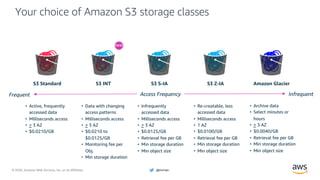
Your choice of Amazon S3 storage classes
Access FrequencyFrequent Infrequent
• Active, frequently
accessed data
• Milliseconds access
• > 3 AZ
• $0.0210/GB
• Data with changing
access patterns
• Milliseconds access
• > 3 AZ
• $0.0210 to
$0.0125/GB
• Monitoring fee per
Obj.
• Min storage duration
• Infrequently
accessed data
• Milliseconds access
• > 3 AZ
• $0.0125/GB
• Retrieval fee per GB
• Min storage duration
• Min object size
S3 Standard S3 S-IA S3 Z-IA Amazon Glacier
• Re-creatable, less
accessed data
• Milliseconds access
• 1 AZ
• $0.0100/GB
• Retrieval fee per GB
• Min storage duration
• Min object size
• Archive data
• Select minutes or
hours
• > 3 AZ
• $0.0040/GB
• Retrieval fee per GB
• Min storage duration
• Min object size
S3 INT
© 2020, Amazon Web Services, Inc. or its Affiliates. @ziniman
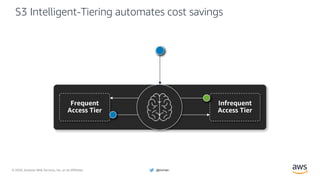
S3 Intelligent-Tiering automates cost savings
© 2020, Amazon Web Services, Inc. or its Affiliates. @ziniman
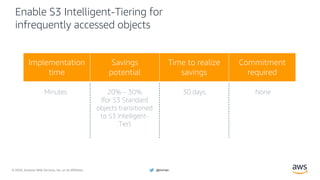
Enable S3 Intelligent-Tiering for
infrequently accessed objects
Minutes 20% – 30%
(for S3 Standard
objects transitioned
to S3 Intelligent-
Tier)
30 days None
Implementation
time
Savings
potential
Time to realize
savings
Commitment
required
© 2020, Amazon Web Services, Inc. or its Affiliates. @ziniman
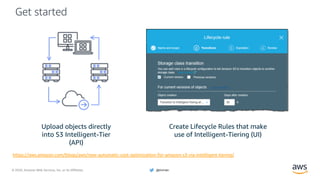
Get started
Upload objects directly
into S3 Intelligent-Tier
(API)
Create Lifecycle Rules that make
use of Intelligent-Tiering (UI)
https://aws.amazon.com/blogs/aws/new-automatic-cost-optimization-for-amazon-s3-via-intelligent-tiering/
© 2020, Amazon Web Services, Inc. or its Affiliates. @ziniman
Stop paying for idle
EC2 and RDS instances
Implementation time: Minutes to hours
2
© 2020, Amazon Web Services, Inc. or its Affiliates. @ziniman© 2020, Amazon Web Services, Inc. or its Affiliates.
Scenario
• You leave instances running during
evenings, weekends, and holidays
• You might be paying for EC2 and RDS
instances even when they are idle
Solution: AWS Instance Scheduler
© 2020, Amazon Web Services, Inc. or its Affiliates. @ziniman
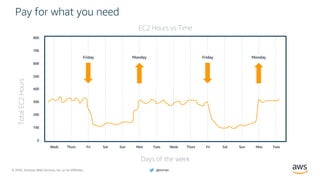
800
700
600
500
400
300
200
100
0
TotalEC2Hours
EC2 Hours vs Time
Days of the week
MondayFriday
Weds Thurs Fri Sat Sun Mon Tues Weds
Pay for what you need
Thurs Fri Sat Sun Mon Tues
MondayFriday
© 2020, Amazon Web Services, Inc. or its Affiliates. @ziniman
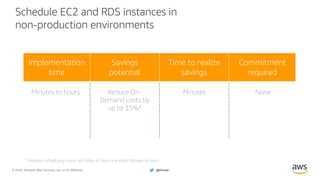
Schedule EC2 and RDS instances in
non-production environments
Minutes to hours Reduce On-
Demand costs by
up to 35%*
Minutes None
Implementation
time
Savings
potential
Time to realize
savings
Commitment
required
* Instance scheduling starts on Friday at 6pm and ends Monday at 6am
© 2020, Amazon Web Services, Inc. or its Affiliates. @ziniman
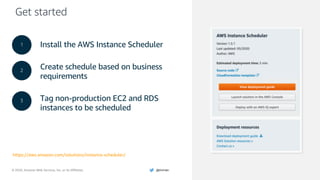
Get started
https://aws.amazon.com/solutions/instance-scheduler/
1
2
Install the AWS Instance Scheduler
Create schedule based on business
requirements
Tag non-production EC2 and RDS
instances to be scheduled
1
2
3
© 2020, Amazon Web Services, Inc. or its Affiliates. @ziniman
Choose Amazon EC2
Spot for containers
Implementation time: Hours/days to weeks
3
© 2020, Amazon Web Services, Inc. or its Affiliates. @ziniman© 2020, Amazon Web Services, Inc. or its Affiliates.
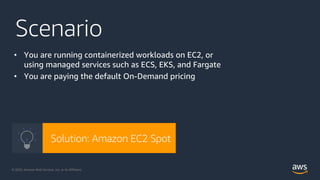
Scenario
• You are running containerized workloads on EC2, or
using managed services such as ECS, EKS, and Fargate
• You are paying the default On-Demand pricing
Solution: Amazon EC2 Spot
© 2020, Amazon Web Services, Inc. or its Affiliates. @ziniman
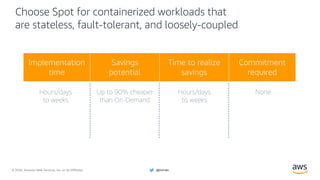
Choose Spot for containerized workloads that
are stateless, fault-tolerant, and loosely-coupled
Hours/days
to weeks
Up to 90% cheaper
than On-Demand
Hours/days
to weeks
None
Implementation
time
Savings
potential
Time to realize
savings
Commitment
required
© 2020, Amazon Web Services, Inc. or its Affiliates. @ziniman
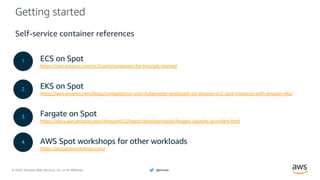
Getting started
ECS on Spot
https://aws.amazon.com/ec2/spot/containers-for-less/get-started/
EKS on Spot
https://aws.amazon.com/blogs/compute/run-your-kubernetes-workloads-on-amazon-ec2-spot-instances-with-amazon-eks/
Fargate on Spot
https://docs.aws.amazon.com/AmazonECS/latest/developerguide/fargate-capacity-providers.html
AWS Spot workshops for other workloads
https://ec2spotworkshops.com/
1
2
3
4
Self-service container references
© 2020, Amazon Web Services, Inc. or its Affiliates. @ziniman
Use AWS Compute
Savings Plans
Implementation time: Hours
4
© 2020, Amazon Web Services, Inc. or its Affiliates. @ziniman© 2020, Amazon Web Services, Inc. or its Affiliates.
Scenario
• You have EC2 or Fargate workloads that are always on
• You are leveraging Lambda in your architecture
• You are paying the default On-Demand pricing
Solution: AWS Compute Savings Plans
© 2020, Amazon Web Services, Inc. or its Affiliates. @ziniman
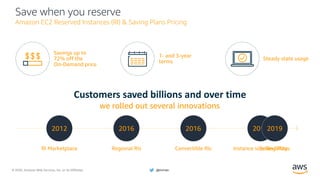
Save when you reserve
Amazon EC2 Reserved Instances (RI) & Saving Plans Pricing
Steady state usage
Savings up to
72% off the
On-Demand price
Customers saved billions and over time
we rolled out several innovations
RI Marketplace
2012
Regional RIs
2016
Convertible RIs
2016
Instance size flexibility
2017
1- and 3-year
terms
Saving Plans
2019
© 2020, Amazon Web Services, Inc. or its Affiliates. @ziniman
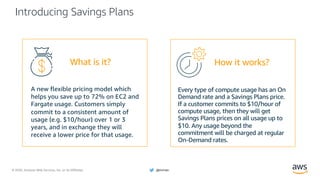
Introducing Savings Plans
A new flexible pricing model which
helps you save up to 72% on EC2 and
Fargate usage. Customers simply
commit to a consistent amount of
usage (e.g. $10/hour) over 1 or 3
years, and in exchange they will
receive a lower price for that usage.
Every type of compute usage has an On
Demand rate and a Savings Plans price.
If a customer commits to $10/hour of
compute usage, then they will get
Savings Plans prices on all usage up to
$10. Any usage beyond the
commitment will be charged at regular
On-Demand rates.
How it works?What is it?
© 2020, Amazon Web Services, Inc. or its Affiliates. @ziniman
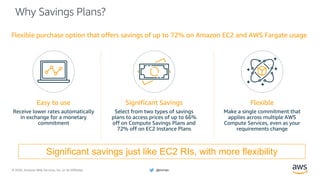
Why Savings Plans?
Flexible purchase option that offers savings of up to 72% on Amazon EC2 and AWS Fargate usage
Easy to use
Receive lower rates automatically
in exchange for a monetary
commitment
Flexible
Make a single commitment that
applies across multiple AWS
Compute Services, even as your
requirements change
Significant Savings
Select from two types of savings
plans to access prices of up to 66%
off on Compute Savings Plans and
72% off on EC2 Instance Plans
Significant savings just like EC2 RIs, with more flexibility
© 2020, Amazon Web Services, Inc. or its Affiliates. @ziniman
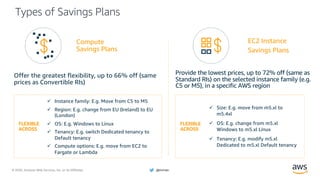
Types of Savings Plans
Provide the lowest prices, up to 72% off (same as
Standard RIs) on the selected instance family (e.g.
C5 or M5), in a specific AWS region
Offer the greatest flexibility, up to 66% off (same
prices as Convertible RIs)
FLEXIBLE
ACROSS
ü Instance family: E.g. Move from C5 to M5
ü Region: E.g. change from EU (Ireland) to EU
(London)
ü OS: E.g. Windows to Linux
ü Tenancy: E.g. switch Dedicated tenancy to
Default tenancy
ü Compute options: E.g. move from EC2 to
Fargate or Lambda
FLEXIBLE
ACROSS
ü Size: E.g. move from m5.xl to
m5.4xl
ü OS: E.g. change from m5.xl
Windows to m5.xl Linux
ü Tenancy: E.g. modify m5.xl
Dedicated to m5.xl Default tenancy
Compute
Savings Plans
EC2 Instance
Savings Plans
© 2020, Amazon Web Services, Inc. or its Affiliates. @ziniman
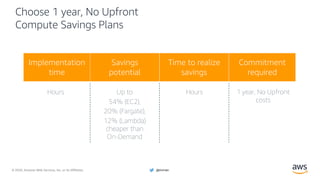
Choose 1 year, No Upfront
Compute Savings Plans
Hours Up to
54% (EC2),
20% (Fargate),
12% (Lambda)
cheaper than
On-Demand
Hours 1 year, No Upfront
costs
Savings
potential
Time to realize
savings
Commitment
required
Implementation
time
© 2020, Amazon Web Services, Inc. or its Affiliates. @ziniman
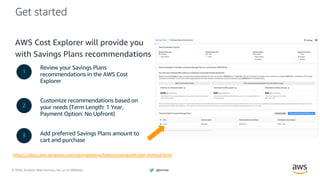
Get started
AWS Cost Explorer will provide you
with Savings Plans recommendations
Review your Savings Plans
recommendations in the AWS Cost
Explorer
Customize recommendations based on
your needs (Term Length: 1 Year,
Payment Option: No Upfront)
Add preferred Savings Plans amount to
cart and purchase
1
2
3
https://docs.aws.amazon.com/savingsplans/latest/userguide/get-started.html
© 2020, Amazon Web Services, Inc. or its Affiliates. @ziniman
Use AWS
Reserved Instances
Implementation time: Hours
5
© 2020, Amazon Web Services, Inc. or its Affiliates. @ziniman© 2020, Amazon Web Services, Inc. or its Affiliates.
Scenario
• You have RDS, Redshift, ElastiCache and
Elasticsearch workloads that are always on
• You are paying the default On-Demand pricing
Solution: AWS Reserved Instances
© 2020, Amazon Web Services, Inc. or its Affiliates. @ziniman
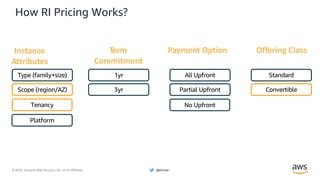
How RI Pricing Works?
Instance
Attributes
Term
Commitment
Payment Option Offering Class
Type (family+size)
Scope (region/AZ)
Tenancy
Platform
1yr
3yr
All Upfront
Partial Upfront
No Upfront
Standard
Convertible
© 2020, Amazon Web Services, Inc. or its Affiliates. @ziniman
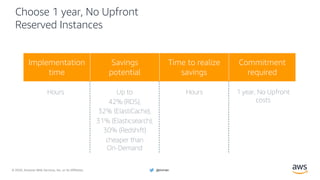
Choose 1 year, No Upfront
Reserved Instances
Hours Up to
42% (RDS),
32% (ElastiCache),
31% (Elasticsearch),
30% (Redshift)
cheaper than
On-Demand
Hours 1 year, No Upfront
costs
Savings
potential
Time to realize
savings
Commitment
required
Implementation
time
© 2020, Amazon Web Services, Inc. or its Affiliates. @ziniman
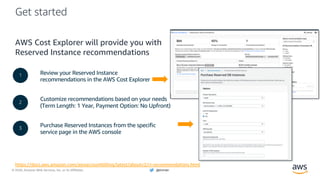
Get started
AWS Cost Explorer will provide you with
Reserved Instance recommendations
Review your Reserved Instance
recommendations in the AWS Cost Explorer
Customize recommendations based on your needs
(Term Length: 1 Year, Payment Option: No Upfront)
Purchase Reserved Instances from the specific
service page in the AWS console
1
2
3
https://docs.aws.amazon.com/awsaccountbilling/latest/aboutv2/ri-recommendations.html
© 2020, Amazon Web Services, Inc. or its Affiliates. @ziniman
Cleanup underutilized
resources
Implementation time: Hours/days
6
© 2020, Amazon Web Services, Inc. or its Affiliates. @ziniman© 2020, Amazon Web Services, Inc. or its Affiliates.
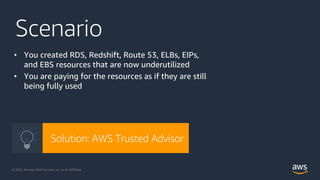
Scenario
• You created RDS, Redshift, Route 53, ELBs, EIPs,
and EBS resources that are now underutilized
• You are paying for the resources as if they are still
being fully used
Solution: AWS Trusted Advisor
© 2020, Amazon Web Services, Inc. or its Affiliates. @ziniman
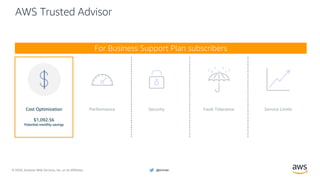
Cost Optimization
$1,092.56
Potential monthly savings
AWS Trusted Advisor
For Business Support Plan subscribers
© 2020, Amazon Web Services, Inc. or its Affiliates. @ziniman
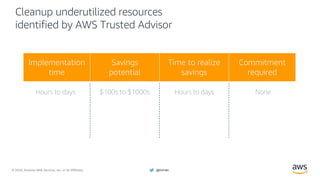
Cleanup underutilized resources
identified by AWS Trusted Advisor
Hours to days $100s to $1000s Hours to days None
Implementation
time
Savings
potential
Time to realize
savings
Commitment
required
© 2020, Amazon Web Services, Inc. or its Affiliates. @ziniman
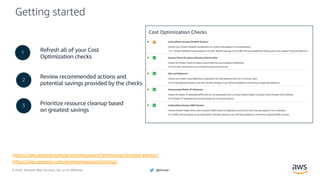
Getting started
Refresh all of your Cost
Optimization checks
Review recommended actions and
potential savings provided by the checks
Prioritize resource cleanup based
on greatest savings
https://aws.amazon.com/premiumsupport/technology/trusted-advisor/
https://aws.amazon.com/premiumsupport/pricing/
1
2
3
Cost Optimization Checks
© 2020, Amazon Web Services, Inc. or its Affiliates. @ziniman
Final thoughts
© 2020, Amazon Web Services, Inc. or its Affiliates. @ziniman
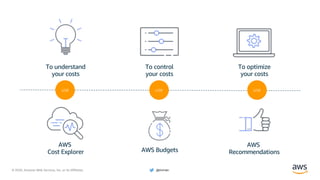
To understand
your costs
AWS
Cost Explorer
To control
your costs
AWS Budgets
To optimize
your costs
AWS
Recommendations
use use use
© 2020, Amazon Web Services, Inc. or its Affiliates. @ziniman
Every solution is different
You may not have seen your particular
scenario in this presentation. If you didn’t,
there are other AWS resources available.
We’re here to help.
© 2020, Amazon Web Services, Inc. or its Affiliates. @ziniman
We don’t want to make money from
customers that aren’t getting value
from us… How many of your
partners call you up and say ‘stop
spending money with us’?
Andy Jassy
CEO, AWS
© 2020, Amazon Web Services, Inc. or its Affiliates. @ziniman
Thank You
Boaz Ziniman
Principal Technical Evangelist - Amazon Web Services
@ziniman
boaz.ziniman.aws
bziniman
boaz.work
t.me/CloudNewsIsrael

AWS Cost Optimization - JLM

  • 1.
    © 2020, AmazonWeb Services, Inc. or its Affiliates. @ziniman AWS Cost Optimization Boaz Ziniman Principal Technical Evangelist - Amazon Web Services @ziniman boaz.ziniman.aws bziniman boaz.work t.me/CloudNewsIsrael
  • 2.
    © 2020, AmazonWeb Services, Inc. or its Affiliates. @ziniman Today’s focus Tools and approaches that you can use to optimize AWS costs
  • 3.
    © 2020, AmazonWeb Services, Inc. or its Affiliates. @ziniman© 2020, Amazon Web Services, Inc. or its Affiliates. Before we start…
  • 4.
    © 2020, AmazonWeb Services, Inc. or its Affiliates. @ziniman AWS allows you to eliminate waste and match capacity and demand Traditional hardware spend Demand for IT AWS Peak business demand met Avoided waste Avoided waste LargeCapex Cost optimization
  • 5.
    © 2020, AmazonWeb Services, Inc. or its Affiliates. @ziniman How do you pay for AWS? Pay as you go Save when you reserve Use more, save more
  • 6.
    © 2020, AmazonWeb Services, Inc. or its Affiliates. @ziniman Different services are priced differently Amazon EC2 Amazon EBS Amazon S3 AWS CloudFormation
  • 7.
    © 2020, AmazonWeb Services, Inc. or its Affiliates. @ziniman Amazon EC2 purchase options Spot Instances Spare EC2 capacity at savings of up to 90% off On-Demand prices Fault-tolerant, flexible, stateless workloads Savings Plan/ Reserved Instances Make a 1 or 3-year commitment and receive a significant discount off On-Demand prices Committed & steady-state usage On-Demand Pay for compute capacity the second with no long-term commitments Spiky workloads, to define needs To optimize EC2, combine all three purchase options!
  • 8.
    © 2020, AmazonWeb Services, Inc. or its Affiliates. @ziniman Cost management is more than just cost optimization … and it requires evolving capabilities to embrace the cloud Managing access to on-demand resources Understanding cloud pricing options Selecting optimal services and resource types/sizes Predicting the cost associated with variable usage Awareness of resource costs Cost governance in a continuous manner
  • 9.
    © 2020, AmazonWeb Services, Inc. or its Affiliates. @ziniman Cloud Financial Management Manage, optimize, and plan AWS cost and usage PlanSave RunSee Planning and forecasting Cost optimization Cloud financial operations Measurement and accountability
  • 10.
    © 2020, AmazonWeb Services, Inc. or its Affiliates. @ziniman Cloud Financial Management Manage, optimize, and plan AWS cost and usage PlanSave RunSee Planning and forecasting Cost optimization Cloud financial operations Measurement and accountability
  • 11.
    © 2020, AmazonWeb Services, Inc. or its Affiliates. @ziniman AWS services and features to support your Cloud Financial Management needs Planning & forecasting Measurement & accountability Cost optimization Cloud financial operations AWS Cost Explorer AWS Budgets / Budgets Reports
  • 12.
    © 2020, AmazonWeb Services, Inc. or its Affiliates. @ziniman Explore Costs and Usage
  • 13.
    © 2020, AmazonWeb Services, Inc. or its Affiliates. @ziniman AWS Budgets
  • 14.
    © 2020, AmazonWeb Services, Inc. or its Affiliates. @ziniman AWS services and features to support your Cloud Financial Management needs Planning & forecasting Measurement & accountability Cost optimization Cloud financial operations AWS Cost Explorer AWS Budgets / Budgets Reports Amazon EC2 Spot AWS Fargate (Serverless, Spot) AWS Trusted Advisor AWS Pricing Calculator AWS Pricing Pages AWS Cost Allocation Tags AWS Cost Explorer AWS Organizations
  • 15.
    © 2020, AmazonWeb Services, Inc. or its Affiliates. @ziniman Use AWS Reserved Instances 5 the six ways 6 Stop paying for idle EC2 and RDS instances 2 Choose Amazon EC2 Spot for containers 3 Use AWS Compute Savings Plans 4 Cleanup underutilized resources 6 Enable S3 Intelligent- Tiering 1
  • 16.
    © 2020, AmazonWeb Services, Inc. or its Affiliates. @ziniman Enable S3 Intelligent-Tiering Implementation time: Minutes 1
  • 17.
    © 2020, AmazonWeb Services, Inc. or its Affiliates. @ziniman© 2020, Amazon Web Services, Inc. or its Affiliates. Scenario • You are using S3 standard storage class • You might be paying for S3 storage you don’t use Solution: S3 Intelligent-Tiering
  • 18.
    © 2020, AmazonWeb Services, Inc. or its Affiliates. @ziniman Your choice of Amazon S3 storage classes Access FrequencyFrequent Infrequent • Active, frequently accessed data • Milliseconds access • > 3 AZ • $0.0210/GB • Data with changing access patterns • Milliseconds access • > 3 AZ • $0.0210 to $0.0125/GB • Monitoring fee per Obj. • Min storage duration • Infrequently accessed data • Milliseconds access • > 3 AZ • $0.0125/GB • Retrieval fee per GB • Min storage duration • Min object size S3 Standard S3 S-IA S3 Z-IA Amazon Glacier • Re-creatable, less accessed data • Milliseconds access • 1 AZ • $0.0100/GB • Retrieval fee per GB • Min storage duration • Min object size • Archive data • Select minutes or hours • > 3 AZ • $0.0040/GB • Retrieval fee per GB • Min storage duration • Min object size S3 INT
  • 19.
    © 2020, AmazonWeb Services, Inc. or its Affiliates. @ziniman S3 Intelligent-Tiering automates cost savings
  • 20.
    © 2020, AmazonWeb Services, Inc. or its Affiliates. @ziniman Enable S3 Intelligent-Tiering for infrequently accessed objects Minutes 20% – 30% (for S3 Standard objects transitioned to S3 Intelligent- Tier) 30 days None Implementation time Savings potential Time to realize savings Commitment required
  • 21.
    © 2020, AmazonWeb Services, Inc. or its Affiliates. @ziniman Get started Upload objects directly into S3 Intelligent-Tier (API) Create Lifecycle Rules that make use of Intelligent-Tiering (UI) https://aws.amazon.com/blogs/aws/new-automatic-cost-optimization-for-amazon-s3-via-intelligent-tiering/
  • 22.
    © 2020, AmazonWeb Services, Inc. or its Affiliates. @ziniman Stop paying for idle EC2 and RDS instances Implementation time: Minutes to hours 2
  • 23.
    © 2020, AmazonWeb Services, Inc. or its Affiliates. @ziniman© 2020, Amazon Web Services, Inc. or its Affiliates. Scenario • You leave instances running during evenings, weekends, and holidays • You might be paying for EC2 and RDS instances even when they are idle Solution: AWS Instance Scheduler
  • 24.
    © 2020, AmazonWeb Services, Inc. or its Affiliates. @ziniman 800 700 600 500 400 300 200 100 0 TotalEC2Hours EC2 Hours vs Time Days of the week MondayFriday Weds Thurs Fri Sat Sun Mon Tues Weds Pay for what you need Thurs Fri Sat Sun Mon Tues MondayFriday
  • 25.
    © 2020, AmazonWeb Services, Inc. or its Affiliates. @ziniman Schedule EC2 and RDS instances in non-production environments Minutes to hours Reduce On- Demand costs by up to 35%* Minutes None Implementation time Savings potential Time to realize savings Commitment required * Instance scheduling starts on Friday at 6pm and ends Monday at 6am
  • 26.
    © 2020, AmazonWeb Services, Inc. or its Affiliates. @ziniman Get started https://aws.amazon.com/solutions/instance-scheduler/ 1 2 Install the AWS Instance Scheduler Create schedule based on business requirements Tag non-production EC2 and RDS instances to be scheduled 1 2 3
  • 27.
    © 2020, AmazonWeb Services, Inc. or its Affiliates. @ziniman Choose Amazon EC2 Spot for containers Implementation time: Hours/days to weeks 3
  • 28.
    © 2020, AmazonWeb Services, Inc. or its Affiliates. @ziniman© 2020, Amazon Web Services, Inc. or its Affiliates. Scenario • You are running containerized workloads on EC2, or using managed services such as ECS, EKS, and Fargate • You are paying the default On-Demand pricing Solution: Amazon EC2 Spot
  • 29.
    © 2020, AmazonWeb Services, Inc. or its Affiliates. @ziniman Choose Spot for containerized workloads that are stateless, fault-tolerant, and loosely-coupled Hours/days to weeks Up to 90% cheaper than On-Demand Hours/days to weeks None Implementation time Savings potential Time to realize savings Commitment required
  • 30.
    © 2020, AmazonWeb Services, Inc. or its Affiliates. @ziniman Getting started ECS on Spot https://aws.amazon.com/ec2/spot/containers-for-less/get-started/ EKS on Spot https://aws.amazon.com/blogs/compute/run-your-kubernetes-workloads-on-amazon-ec2-spot-instances-with-amazon-eks/ Fargate on Spot https://docs.aws.amazon.com/AmazonECS/latest/developerguide/fargate-capacity-providers.html AWS Spot workshops for other workloads https://ec2spotworkshops.com/ 1 2 3 4 Self-service container references
  • 31.
    © 2020, AmazonWeb Services, Inc. or its Affiliates. @ziniman Use AWS Compute Savings Plans Implementation time: Hours 4
  • 32.
    © 2020, AmazonWeb Services, Inc. or its Affiliates. @ziniman© 2020, Amazon Web Services, Inc. or its Affiliates. Scenario • You have EC2 or Fargate workloads that are always on • You are leveraging Lambda in your architecture • You are paying the default On-Demand pricing Solution: AWS Compute Savings Plans
  • 33.
    © 2020, AmazonWeb Services, Inc. or its Affiliates. @ziniman Save when you reserve Amazon EC2 Reserved Instances (RI) & Saving Plans Pricing Steady state usage Savings up to 72% off the On-Demand price Customers saved billions and over time we rolled out several innovations RI Marketplace 2012 Regional RIs 2016 Convertible RIs 2016 Instance size flexibility 2017 1- and 3-year terms Saving Plans 2019
  • 34.
    © 2020, AmazonWeb Services, Inc. or its Affiliates. @ziniman Introducing Savings Plans A new flexible pricing model which helps you save up to 72% on EC2 and Fargate usage. Customers simply commit to a consistent amount of usage (e.g. $10/hour) over 1 or 3 years, and in exchange they will receive a lower price for that usage. Every type of compute usage has an On Demand rate and a Savings Plans price. If a customer commits to $10/hour of compute usage, then they will get Savings Plans prices on all usage up to $10. Any usage beyond the commitment will be charged at regular On-Demand rates. How it works?What is it?
  • 35.
    © 2020, AmazonWeb Services, Inc. or its Affiliates. @ziniman Why Savings Plans? Flexible purchase option that offers savings of up to 72% on Amazon EC2 and AWS Fargate usage Easy to use Receive lower rates automatically in exchange for a monetary commitment Flexible Make a single commitment that applies across multiple AWS Compute Services, even as your requirements change Significant Savings Select from two types of savings plans to access prices of up to 66% off on Compute Savings Plans and 72% off on EC2 Instance Plans Significant savings just like EC2 RIs, with more flexibility
  • 36.
    © 2020, AmazonWeb Services, Inc. or its Affiliates. @ziniman Types of Savings Plans Provide the lowest prices, up to 72% off (same as Standard RIs) on the selected instance family (e.g. C5 or M5), in a specific AWS region Offer the greatest flexibility, up to 66% off (same prices as Convertible RIs) FLEXIBLE ACROSS ü Instance family: E.g. Move from C5 to M5 ü Region: E.g. change from EU (Ireland) to EU (London) ü OS: E.g. Windows to Linux ü Tenancy: E.g. switch Dedicated tenancy to Default tenancy ü Compute options: E.g. move from EC2 to Fargate or Lambda FLEXIBLE ACROSS ü Size: E.g. move from m5.xl to m5.4xl ü OS: E.g. change from m5.xl Windows to m5.xl Linux ü Tenancy: E.g. modify m5.xl Dedicated to m5.xl Default tenancy Compute Savings Plans EC2 Instance Savings Plans
  • 37.
    © 2020, AmazonWeb Services, Inc. or its Affiliates. @ziniman Choose 1 year, No Upfront Compute Savings Plans Hours Up to 54% (EC2), 20% (Fargate), 12% (Lambda) cheaper than On-Demand Hours 1 year, No Upfront costs Savings potential Time to realize savings Commitment required Implementation time
  • 38.
    © 2020, AmazonWeb Services, Inc. or its Affiliates. @ziniman Get started AWS Cost Explorer will provide you with Savings Plans recommendations Review your Savings Plans recommendations in the AWS Cost Explorer Customize recommendations based on your needs (Term Length: 1 Year, Payment Option: No Upfront) Add preferred Savings Plans amount to cart and purchase 1 2 3 https://docs.aws.amazon.com/savingsplans/latest/userguide/get-started.html
  • 39.
    © 2020, AmazonWeb Services, Inc. or its Affiliates. @ziniman Use AWS Reserved Instances Implementation time: Hours 5
  • 40.
    © 2020, AmazonWeb Services, Inc. or its Affiliates. @ziniman© 2020, Amazon Web Services, Inc. or its Affiliates. Scenario • You have RDS, Redshift, ElastiCache and Elasticsearch workloads that are always on • You are paying the default On-Demand pricing Solution: AWS Reserved Instances
  • 41.
    © 2020, AmazonWeb Services, Inc. or its Affiliates. @ziniman How RI Pricing Works? Instance Attributes Term Commitment Payment Option Offering Class Type (family+size) Scope (region/AZ) Tenancy Platform 1yr 3yr All Upfront Partial Upfront No Upfront Standard Convertible
  • 42.
    © 2020, AmazonWeb Services, Inc. or its Affiliates. @ziniman Choose 1 year, No Upfront Reserved Instances Hours Up to 42% (RDS), 32% (ElastiCache), 31% (Elasticsearch), 30% (Redshift) cheaper than On-Demand Hours 1 year, No Upfront costs Savings potential Time to realize savings Commitment required Implementation time
  • 43.
    © 2020, AmazonWeb Services, Inc. or its Affiliates. @ziniman Get started AWS Cost Explorer will provide you with Reserved Instance recommendations Review your Reserved Instance recommendations in the AWS Cost Explorer Customize recommendations based on your needs (Term Length: 1 Year, Payment Option: No Upfront) Purchase Reserved Instances from the specific service page in the AWS console 1 2 3 https://docs.aws.amazon.com/awsaccountbilling/latest/aboutv2/ri-recommendations.html
  • 44.
    © 2020, AmazonWeb Services, Inc. or its Affiliates. @ziniman Cleanup underutilized resources Implementation time: Hours/days 6
  • 45.
    © 2020, AmazonWeb Services, Inc. or its Affiliates. @ziniman© 2020, Amazon Web Services, Inc. or its Affiliates. Scenario • You created RDS, Redshift, Route 53, ELBs, EIPs, and EBS resources that are now underutilized • You are paying for the resources as if they are still being fully used Solution: AWS Trusted Advisor
  • 46.
    © 2020, AmazonWeb Services, Inc. or its Affiliates. @ziniman Cost Optimization $1,092.56 Potential monthly savings AWS Trusted Advisor For Business Support Plan subscribers
  • 47.
    © 2020, AmazonWeb Services, Inc. or its Affiliates. @ziniman Cleanup underutilized resources identified by AWS Trusted Advisor Hours to days $100s to $1000s Hours to days None Implementation time Savings potential Time to realize savings Commitment required
  • 48.
    © 2020, AmazonWeb Services, Inc. or its Affiliates. @ziniman Getting started Refresh all of your Cost Optimization checks Review recommended actions and potential savings provided by the checks Prioritize resource cleanup based on greatest savings https://aws.amazon.com/premiumsupport/technology/trusted-advisor/ https://aws.amazon.com/premiumsupport/pricing/ 1 2 3 Cost Optimization Checks
  • 49.
    © 2020, AmazonWeb Services, Inc. or its Affiliates. @ziniman Final thoughts
  • 50.
    © 2020, AmazonWeb Services, Inc. or its Affiliates. @ziniman To understand your costs AWS Cost Explorer To control your costs AWS Budgets To optimize your costs AWS Recommendations use use use
  • 51.
    © 2020, AmazonWeb Services, Inc. or its Affiliates. @ziniman Every solution is different You may not have seen your particular scenario in this presentation. If you didn’t, there are other AWS resources available. We’re here to help.
  • 52.
    © 2020, AmazonWeb Services, Inc. or its Affiliates. @ziniman We don’t want to make money from customers that aren’t getting value from us… How many of your partners call you up and say ‘stop spending money with us’? Andy Jassy CEO, AWS
  • 53.
    © 2020, AmazonWeb Services, Inc. or its Affiliates. @ziniman Thank You Boaz Ziniman Principal Technical Evangelist - Amazon Web Services @ziniman boaz.ziniman.aws bziniman boaz.work t.me/CloudNewsIsrael