Archived
How AWS Pricing Works
AWS Pricing Overview
October 30, 2020
This paper has been archived.
For the latest technical guidance on How AWS Pricing
Works, see
https://docs.aws.amazon.com/whitepapers/latest/how-
aws-pricing-works/welcome.html
Archived
Notices
Customers are responsible for making their own independent assessment of the
information in this document. This document: (a) is for informational purposes only, (b)
represents current AWS product offerings and practices, which are subject to change
without notice, and (c) does not create any commitments or assurances from AWS and
its affiliates, suppliers or licensors. AWS products or services are provided “as is”
without warranties, representations, or conditions of any kind, whether express or
implied. The responsibilities and liabilities of AWS to its customers are controlled by
AWS agreements, and this document is not part of, nor does it modify, any agreement
between AWS and its customers.
© 2020 Amazon Web Services, Inc. or its affiliates. All rights reserved.
Archived
Contents
Introduction..........................................................................................................................1
Key principles ......................................................................................................................1
Understand the fundamentals of pricing..........................................................................1
Start early with cost optimization .....................................................................................2
Maximize the power of flexibility ......................................................................................2
Use the right pricing model for the job.............................................................................2
Get started with the AWS Free Tier....................................................................................3
12 Months Free ................................................................................................................3
Always Free......................................................................................................................4
Trials.................................................................................................................................4
AWS Pricing/TCO Tools......................................................................................................4
AWS Pricing Calculator....................................................................................................5
Migration Evaluator ..........................................................................................................5
Pricing details for individual services..................................................................................6
Amazon Elastic Compute Cloud (Amazon EC2).............................................................6
AWS Lambda .................................................................................................................10
Amazon Elastic Block Store (Amazon EBS) .................................................................11
Amazon Simple Storage Service (Amazon S3) ............................................................12
Amazon S3 Glacier ........................................................................................................13
AWS Outposts................................................................................................................14
AWS Snow Family..........................................................................................................16
Amazon RDS..................................................................................................................18
Amazon DynamoDB.......................................................................................................19
Amazon CloudFront .......................................................................................................23
Amazon Kendra..............................................................................................................23
Amazon Kinesis..............................................................................................................25
Archived
AWS IoT Events .............................................................................................................27
AWS Cost Optimization.....................................................................................................28
Choose the right pricing models ....................................................................................28
Match Capacity with Demand........................................................................................28
Implement processes to identify resource waste ..........................................................29
AWS Support Plan Pricing ................................................................................................30
Cost calculation examples ................................................................................................30
AWS Cloud cost calculation example............................................................................30
Hybrid cloud cost calculation example ..........................................................................33
Conclusion .........................................................................................................................37
Contributors .......................................................................................................................38
Further Reading.................................................................................................................38
Document Revisions..........................................................................................................39
Archived
Abstract
Amazon Web Services (AWS) helps you move faster, reduce IT costs, and attain global
scale through a broad set of global compute, storage, database, analytics, application,
and deployment services. One of the main benefits of cloud services is the ability it
gives you to optimize costs to match your needs, even as those needs change over
time.
Archived
Amazon Web Services How AWS Pricing Works
Page 1
Introduction
AWS has the services to help you build sophisticated applications with increased
flexibility, scalability and reliability. Whether you're looking for compute power, database
storage, content delivery, or other functionality, with AWS you pay only for the individual
services you need, for as long as you use them, without complex licensing. AWS offers
you a variety of pricing models for over 160 cloud services. You only pay for the
services you consume, and once you stop using them, there are no additional costs or
termination fees. This whitepaper provides an overview of how AWS pricing works
across some of the most widely used services. The latest pricing information for each
AWS service is available at http://aws.amazon.com/pricing/.
Key principles
Although pricing models vary across services, it’s worthwhile to review key principles
and best practices that are broadly applicable.
Understand the fundamentals of pricing
There are three fundamental drivers of cost with AWS: compute, storage, and outbound
data transfer. These characteristics vary somewhat, depending on the AWS product
and pricing model you choose.
In most cases, there is no charge for inbound data transfer or for data transfer between
other AWS services within the same Region. There are some exceptions, so be sure to
verify data transfer rates before beginning. Outbound data transfer is aggregated across
services and then charged at the outbound data transfer rate. This charge appears on
the monthly statement as AWS Data Transfer Out. The more data you transfer, the less
you pay per GB. For compute resources, you pay hourly from the time you launch a
resource until the time you terminate it, unless you have made a reservation for which
the cost is agreed upon beforehand. For data storage and transfer, you typically pay per
GB.
Except as otherwise noted, AWS prices are exclusive of applicable taxes and duties,
including VAT and sales tax. For customers with a Japanese billing address, use of
AWS is subject to Japanese Consumption Tax. For more information, see Amazon Web
Services Consumption Tax FAQ.
Archived
Amazon Web Services How AWS Pricing Works
Page 2
Start early with cost optimization
The cloud allows you to trade fixed expenses (such as data centers and physical
servers) for variable expenses, and only pay for IT as you consume it. And, because of
the economies of scale, the variable expenses are much lower than what you would pay
to do it yourself. Whether you started in the cloud, or you are just starting your migration
journey to the cloud, AWS has a set of solutions to help you manage and optimize your
spend. This includes services, tools, and resources to organize and track cost and
usage data, enhance control through consolidated billing and access permission,
enable better planning through budgeting and forecasts, and further lower cost with
resources and pricing optimizations. To learn how you can optimize and save costs
today, visit AWS Cost Optimization.
Maximize the power of flexibility
AWS services are priced independently, transparently, and available on-demand, so
you can choose and pay for exactly what you need. You may also choose to save
money through a reservation model. By paying for services on an as-needed basis, you
can redirect your focus to innovation and invention, reducing procurement complexity
and enabling your business to be fully elastic.
One of the key advantages of cloud-based resources is that you don’t pay for them
when they’re not running. By turning off instances you don’t use, you can reduce costs
by 70 percent or more compared to using them 24/7. This enables you to be cost
efficient and, at the same time, have all the power you need when workloads are active.
Use the right pricing model for the job
AWS offers several pricing models depending on product. These include:
• On-Demand Instances let you pay for compute or database capacity by the
hour or second (minimum of 60 seconds) depending on which instances you run
with no long-term commitments or upfront payments.
• Savings Plans are a flexible pricing model that offer low prices on Amazon
EC2, AWS Lambda and AWS Fargate usage, in exchange for a commitment to
a consistent amount of usage (measured in $/hour) for a one- or three-year
term.
Archived
Amazon Web Services How AWS Pricing Works
Page 3
• Spot Instances are an Amazon EC2 pricing mechanism that let you request
spare computing capacity with no upfront commitment and at discounted hourly
rate (up to 90% off the on-demand price).
• Reservations provide you with the ability to receive a greater discount, up to 75
percent, by paying for capacity ahead of time. For more details, see the
Optimizing costs with reservations section.
Get started with the AWS Free Tier
The AWS Free Tier enables you to gain free, hands-on experience with more than 60
products on AWS platform. AWS Free Tier includes the following free offer types:
• 12 Months Free – These tier offers include 12 months free usage following your
initial sign-up date to AWS. When your 12 month free usage term expires, or if
your application use exceeds the tiers, you simply pay standard, pay-as-you-go
service rates.
• Always Free – These free tier offers do not expire and are available to all AWS
customers.
• Trials – These offers are short term free trials starting from date you activate a
particular service. Once the trial period expires, you simply pay standard, pay-as-
you-go service rates.
This section lists some of the most commonly used AWS Free Tier services. Terms and
conditions apply. For the full list of AWS Free Tier services, see AWS Free Tier.
12 Months Free
• Amazon Elastic Compute Cloud (Amazon EC2): 750 hours per month of Linux,
RHEL, or SLES t2.micro/t3.micro instance usage or 750 hours per month of
Windows t2.micro/t3.micro instance usage dependent on Region.
• Amazon Simple Storage Service (Amazon S3): 5 GB of Amazon S3 standard
storage, 20,000 Get Requests, and 2,000 Put Requests.
• Amazon Relational Database Service (Amazon RDS): 750 hours of Amazon
RDS Single-AZ db.t2.micro database usage for running MySQL, PostgreSQL,
MariaDB, Oracle BYOL, or SQL Server (running SQL Server Express Edition);
20 GB of general purpose SSD database storage and 20 GB of storage for
database backup and DB snapshots.
Archived
Amazon Web Services How AWS Pricing Works
Page 4
• Amazon CloudFront: 50 GB Data Transfer Out and 2,000,000 HTTP and
HTTPS Requests each month.
Always Free
• Amazon DynamoDB: Up to 200 million requests per month (25 Write Capacity
units and 25 Read Capacity units); 25 GB of storage.
• Amazon S3 Glacier: Retrieve up to 10 GB of your Amazon S3 Glacier data per
month for free (applies to standard retrievals using the Glacier API only).
• AWS Lambda: 1 million free requests per month; up to 3.2 million seconds of
compute time per month.
Trials
• Amazon SageMaker: 250 hours per month of t2.medium notebook,50 hours per
month of m4.xlarge for training, 125 hours per month of m4.xlarge for hosting
for the first two months.
• Amazon Redshift: 750 hours per month for free, enough hours to continuously
run one DC2.Large node with 160GB of compressed SSD storage. You can
also build clusters with multiple nodes to test larger data sets, which will
consume your free hours more quickly. Once your two month free trial expires
or your usage exceeds 750 hours per month, you can shut down your cluster to
avoid any charges, or keep it running at the standard On-Demand Rate.
The AWS Free Tier is not available in the AWS GovCloud (US) Regions or the China
(Beijing) Region at this time. The Lambda Free Tier is available in the AWS GovCloud
(US) Region.
AWS Pricing/TCO Tools
To get the most out of your estimates, you should have a good idea of your basic
requirements. For example, if you're going to try Amazon Elastic Compute Cloud
(Amazon EC2), it might help if you know what kind of operating system you need, what
your memory requirements are, and how much I/O you need. You should also decide
whether you need storage, such as if you're going to run a database and how long you
intend to use the servers. You don't need to make these decisions before generating an
estimate, though. You can play around with the service configuration and parameters to
Archived
Amazon Web Services How AWS Pricing Works
Page 5
see which options fit your use case and budget best. For more information about AWS
service pricing, see AWS Services Pricing.
AWS offers couple of tools (free of cost) for you to use. If the workload details and
services to be used are identified, AWS pricing calculator can help with calculating the
total cost of ownership. Migration Evaluator helps with inventorying your existing
environment, identifying workload information, and designing and planning your AWS
migration.
AWS Pricing Calculator
AWS Pricing Calculator is a web based service that you can use to create cost
estimates to suit your AWS use cases. AWS Pricing Calculator is useful both for people
who have never used AWS and for those who want to reorganize or expand their
usage.
AWS Pricing Calculator allows you to explore AWS services based on your use cases
and create a cost estimate. You can model your solutions before building them, explore
the price points and calculations behind your estimate, and find the available instance
types and contract terms that meet your needs. This enables you to make informed
decisions about using AWS. You can plan your AWS costs and usage or price out
setting up a new set of instances and services.
AWS Pricing Calculator is free for use. It provides an estimate of your AWS fees and
charges. The estimate doesn't include any taxes that might apply to the fees and
charges. AWS Pricing Calculator provides pricing details for your information only. AWS
Pricing Calculator provides a console interface at https://calculator.aws/#/.
Migration Evaluator
Migration Evaluator (Formerly TSO Logic) is a complimentary service to create data-
driven business cases for AWS Cloud planning and migration.
Creating business cases on your own can be a time-consuming process and does not
always identify the most cost-effective deployment and purchasing options. Migration
Evaluator quickly provides a business case to make sound AWS planning and migration
decisions. With Migration Evaluator, your organization can build a data-driven business
case for AWS, gets access to AWS expertise, visibility into the costs associated with
multiple migration strategies, and insights on how reusing existing software licensing
reduces costs further.
Archived
Amazon Web Services How AWS Pricing Works
Page 6
A business case is the first step in the AWS migration journey. Beginning with on-
premises inventory discovery, you can choose to upload exports from 3rd party tools or
install a complimentary agentless collector to monitor Windows, Linux and SQL Server
footprints. As part of a white-gloved experience, Migration Evaluator includes a team of
program managers and solution architects to capture your migration objective and use
analytics to narrow down the subset of migration patterns best suited to your business
needs. The results are captured in a transparent business case which aligns business
and technology stakeholders to provide a prescriptive next step in your migration
journey.
Migration Evaluator service analyzes an enterprise’s compute footprint, including server
configuration, utilization, annual costs to operate, eligibility for bring-your-own-license,
and hundreds of other parameters. It then statistically models utilization patterns,
matching each workload with optimized placements in the AWS Amazon Elastic Cloud
Compute and Amazon Elastic Block Store. Finally, it outputs a business case with a
comparison of the current-state against multiple future-state configurations showing the
flexibility of AWS.
For more information, see Migration Evaluator.
Pricing details for individual services
Different types of services lend themselves to different pricing models. For example,
Amazon EC2 pricing varies by instance type, whereas the Amazon Aurora database
service includes charges for data input/output (I/O) and storage. This section provides
an overview of pricing concepts and examples for few AWS services. You can always
find current price information for each AWS service at AWS Pricing.
Amazon Elastic Compute Cloud (Amazon EC2)
Amazon Elastic Compute Cloud (Amazon EC2) is a web service that provides secure,
resizable compute capacity in the cloud. It is designed to make web-scale cloud
computing easier for developers. The simple web service interface of Amazon EC2
allows you to obtain and configure capacity with minimal friction with complete control of
your computing resources.
Amazon EC2 reduces the time required to obtain and boot new server instances in
minutes, allowing you to quickly scale capacity, both up and down, as your computing
requirements change.
Archived
Amazon Web Services How AWS Pricing Works
Page 7
Pricing models for Amazon EC2
There are five ways to pay for Amazon EC2 instances: On-Demand Instances, Savings
Plans, Reserved Instances, and Spot Instances.
On-Demand Instances
With On-Demand Instances, you pay for compute capacity per hour or per second,
depending on which instances you run. No long-term commitments or upfront payments
are required. You can increase or decrease your compute capacity to meet the
demands of your application and only pay the specified hourly rates for the instance you
use. On-Demand Instances are recommended for the following use cases:
• Users who prefer the low cost and flexibility of Amazon EC2 without upfront
payment or long-term commitments
• Applications with short-term, spiky, or unpredictable workloads that cannot be
interrupted
• Applications being developed or tested on Amazon EC2 for the first time
Savings Plans
Savings Plans are a flexible pricing model that offer low prices on Amazon EC2, AWS
Lambda, and AWS Fargate usage, in exchange for a commitment to a consistent
amount of usage (measured in $/hour) for a 1 or 3 year term. Savings Plans is a flexible
pricing model that provides savings of up to 72% on your AWS compute usage. This
pricing model offers lower prices on Amazon EC2 instances usage, regardless of
instance family, size, OS, tenancy or AWS Region, and also applies to AWS Fargate
and AWS Lambda usage.
For workloads that have predictable and consistent usage, Savings Plans can provide
significant savings compared to On-Demand Instances. it is recommended for:
• Workloads with a consistent and steady-state usage
• Customers who want to use different instance types and compute solutions
across different locations
• Customers who can make monetary commitment to use EC2 over a one-or
three-year term
Archived
Amazon Web Services How AWS Pricing Works
Page 8
Spot Instances
Amazon EC2 Spot Instances allow you to request spare Amazon EC2 computing
capacity for up to 90 percent off the On-Demand price. Spot Instances are
recommended for:
• Applications that have flexible start and end times
• Applications that are only feasible at very low compute prices
• Users with fault-tolerant and/or stateless workloads
Spot Instance prices are set by Amazon EC2 and adjust gradually based
on long-term trends in supply and demand for Spot Instance capacity.
Reserved Instances
Amazon EC2 Reserved Instances provide you with a significant discount (up to 75
percent) compared to On-Demand Instance pricing. In addition, when Reserved
Instances are assigned to a specific Availability Zone, they provide a capacity
reservation, giving you additional confidence in your ability to launch instances when
you need them.
Per-second billing
Per-second billing saves money and has a minimum of 60 seconds billing. It is
particularly effective for resources that have periods of low and high usage such as
development and testing, data processing, analytics, batch processing, and gaming
applications. Learn more about per-second billing.
Estimating Amazon EC2 costs
When you begin to estimate the cost of using Amazon EC2, consider the following:
• Clock hours of server time: Resources incur charges when they are running—
for example, from the time Amazon EC2 instances are launched until they are
terminated, or from the time Elastic IP addresses are allocated until the time they
are de-allocated.
Archived
Amazon Web Services How AWS Pricing Works
Page 9
• Instance type: Amazon EC2 provides a wide selection of instance types
optimized to fit different use cases. Instance types comprise varying
combinations of CPU, memory, storage, and networking capacity and give you
the flexibility to choose the appropriate mix of resources for your applications.
Each instance type includes at least one instance size, allowing you to scale your
resources to the requirements of your target workload.
• Pricing model: With On-Demand Instances, you pay for compute capacity by
the hour with no required minimum commitments.
• Number of instances: You can provision multiple instances of your Amazon
EC2 and Amazon EBS resources to handle peak loads.
• Load balancing: You can use Elastic Load Balancing to distribute traffic among
Amazon EC2 Instances. The number of hours Elastic Load Balancing runs and
the amount of data it processes contribute to the monthly cost.
• Detailed monitoring: You can use Amazon CloudWatch to monitor your EC2
instances. By default, basic monitoring is enabled. For a fixed monthly rate, you
can opt for detailed monitoring, which includes seven preselected metrics
recorded once a minute. Partial months are charged on an hourly pro rata basis,
at a per instance-hour rate.
• Amazon EC2 Auto Scaling: Amazon EC2 Auto Scaling automatically adjusts
the number of Amazon EC2 instances in your deployment according to the
scaling policies you define. This service is available at no additional charge
beyond Amazon CloudWatch fees.
• Elastic IP addresses: You can have one Elastic IP address associated with a
running instance at no charge.
• Licensing: To run operating systems and applications on AWS, you can obtain
variety of software licenses from AWS on a pay-as-you-go basis that are fully-
compliant and do not require you to manage complex licensing terms and
conditions. However, if you have existing licensing agreements with software
vendors, you can bring your eligible licenses to the cloud to reduce total cost of
ownership (TCO). AWS offers License Manager which makes it easier to
manage your software licenses from vendors such as Microsoft, SAP, Oracle,
and IBM across AWS and on-premises environments.
For more information, see Amazon EC2 pricing.
Archived
Amazon Web Services How AWS Pricing Works
Page 10
AWS Lambda
AWS Lambda lets you run code without provisioning or managing servers. You pay only
for the compute time you consume—there is no charge when your code is not running.
With Lambda, you can run code for virtually any type of application or backend
service—all with zero administration. Just upload your code and Lambda takes care of
everything required to run and scale your code with high availability.
AWS Lambda pricing
With AWS Lambda, you pay only for what you use. You are charged based on the
number of requests for your functions and the time it takes for your code to execute.
Lambda registers a request each time it starts executing in response to an event
notification or invoke call, including test invokes from the console. You are charged for
the total number of requests across all your functions.
Duration is calculated from the time your code begins executing until it returns or
otherwise terminates, rounded up to the nearest 100 milliseconds. The price depends
on the amount of memory you allocate to your function.
AWS Lambda participates in Compute Savings Plans, a flexible pricing model that
offers low prices on Amazon EC2, AWS Fargate, and AWS Lambda usage, in exchange
for a commitment to a consistent amount of usage (measured in $/hour) for a 1 or 3
year term. With Compute Savings Plans, you can save up to 17% on AWS Lambda.
Savings apply to Duration, Provisioned Concurrency, and Duration (Provisioned
Concurrency).
Request pricing
• Free Tier: 1 million requests per month, 400,000 GB-seconds of compute time
per month
• $0.20 per 1 million requests thereafter, or $0.0000002 per request
Duration pricing
• 400,000 GB-seconds per month free, up to 3.2 million seconds of compute time
• $0.00001667 for every GB-second used thereafter
Archived
Amazon Web Services How AWS Pricing Works
Page 11
Additional charges
You may incur additional charges if your Lambda function uses other AWS services or
transfers data. For example, if your Lambda function reads and writes data to or from
Amazon S3, you will be billed for the read/write requests and the data stored in Amazon
S3. Data transferred into and out of your AWS Lambda functions from outside the
Region the function executed in will be charged at the EC2 data transfer rates as listed
on Amazon EC2 On-Demand Pricing under Data Transfer.
Amazon Elastic Block Store (Amazon EBS)
Amazon Elastic Block Store (Amazon EBS) an easy to use, high performance block
storage service designed for use with Amazon EC2 instances. Amazon EBS volumes
are off-instance storage that persists independently from the life of an instance. They
are analogous to virtual disks in the cloud. Amazon EBS provides two volume types:
• SSD-backed volumes are optimized for transactional workloads involving
frequent read/write operations with small I/O size, where the dominant
performance attribute is IOPS.
• HDD-backed volumes are optimized for large streaming workloads where
throughput (measured in megabits per second) is a better performance measure
than IOPS.
How Amazon EBS is priced
Amazon EBS pricing includes three factors:
• Volumes: Volume storage for all EBS volume types is charged by the amount of
GB you provision per month, until you release the storage.
• Snapshots: Snapshot storage is based on the amount of space your data
consumes in Amazon S3. Because Amazon EBS does not save empty blocks, it
is likely that the snapshot size will be considerably less than your volume size.
Copying EBS snapshots is charged based on the volume of data transferred
across Regions. For the first snapshot of a volume, Amazon EBS saves a full
copy of your data to Amazon S3. For each incremental snapshot, only the
changed part of your Amazon EBS volume is saved. After the snapshot is
copied, standard EBS snapshot charges apply for storage in the destination
Region.
Archived
Amazon Web Services How AWS Pricing Works
Page 12
• EBS Fast Snapshot Restore (FSR): This is charged in Date Services Unit-
Hours (DSUs) for each Availability Zone in which it is enabled. DSUs are billed
per minute with a 1 hour minimum. The price of 1 FSR DSU-hour is $0.75 per
Availability Zone. (pricing based on us-east-1 (N.Virginia)).
• EBS direct APIs for Snapshots: EBS direct APIs for Snapshots provide access
to directly read EBS snapshot data and identify differences between two
snapshots. The following charges apply for these APIs.
o ListChangedBlocks and ListSnapshotBlocks APIs are charged per request.
o GetSnapshotBlock API is charged per SnapshotAPIUnit (block size 512 KiB)
• Data transfer: Consider the amount of data transferred out of your application.
Inbound data transfer is free, and outbound data transfer charges are tiered. If
you use external or cross-region data transfers, additional EC2 data transfer
charges will apply.
For more information, see the Amazon EBS pricing page.
Amazon Simple Storage Service (Amazon S3)
Amazon Simple Storage Service (Amazon S3) is object storage built to store and
retrieve any amount of data from anywhere: websites, mobile apps, corporate
applications, and data from IoT sensors or devices. It is designed to deliver
99.999999999 percent durability, and stores data for millions of applications used by
market leaders in every industry. As with other AWS services, Amazon S3 provides the
simplicity and cost-effectiveness of pay-as-you-go pricing.
Estimating Amazon S3 storage costs
With Amazon S3, you pay only for the storage you use, with no minimum fee. Prices are
based on the location of your Amazon S3 bucket. When you begin to estimate the cost
of Amazon S3, consider the following:
Archived
Amazon Web Services How AWS Pricing Works
Page 13
• Storage class: Amazon S3 offers a range of storage classes designed for
different use cases. These include S3 Standard for general-purpose storage of
frequently accessed data; S3 Intelligent-Tiering for data with unknown or
changing access patterns; S3 Standard-Infrequent Access (S3 Standard-
IA) and S3 One Zone-Infrequent Access (S3 One Zone-IA) for long-lived, but less
frequently accessed data; and Amazon S3 Glacier (S3 Glacier) and Amazon S3
Glacier Deep Archive (S3 Glacier Deep Archive) for long-term archive and digital
preservation. Amazon S3 also offers capabilities to manage your data throughout
its lifecycle. Once an S3 Lifecycle policy is set, your data will automatically
transfer to a different storage class without any changes to your application.
• Storage: Costs vary with number and size of objects stored in your Amazon S3
buckets as well as type of storage.
• Requests and Data retrievals: Requests costs made against S3 buckets and
objects are based on request type and quantity of requests.
• Data transfer: The amount of data transferred out of the Amazon S3 region.
Transfers between S3 buckets or from Amazon S3 to any service(s) within the
same AWS Region are free.
• Management and replication: You pay for the storage management features
(Amazon S3 inventory, analytics, and object tagging) that are enabled on your
account’s buckets.
For more information, see Amazon S3 pricing. You can estimate your monthly bill using
the AWS Pricing Calculator.
Amazon S3 Glacier
Amazon S3 Glacier is a secure, durable, and extremely low-cost cloud storage service
for data archiving and long-term backup. It is designed to deliver 99.999999999 percent
durability, with comprehensive security and compliance capabilities that can help meet
even the most stringent regulatory requirements. Amazon S3 Glacier provides query-in-
place functionality, allowing you to run powerful analytics directly on your archived data
at rest.
Amazon S3 Glacier provides low-cost, long-term storage
Starting at $0.004 per GB per month, Amazon S3 Glacier allows you to archive large
amounts of data at a very low cost. You pay only for what you need, with no minimum
Archived
Amazon Web Services How AWS Pricing Works
Page 14
commitments or upfront fees. Other factors determining pricing include requests and
data transfers out of Amazon S3 Glacier (incoming transfers are free).
Data access options
To keep costs low yet suitable for varying retrieval needs, Amazon S3 Glacier provides
three options for access to archives that span a few minutes to several hours. For
details, see the Amazon S3 Glacier FAQs.
Storage and bandwidth include all file overhead
Rate tiers take into account your aggregate usage for Data Transfer Out to the internet
across Amazon EC2, Amazon S3, Amazon Glacier, Amazon RDS, Amazon SimpleDB,
Amazon SQS, Amazon SNS, Amazon DynamoDB, and AWS Storage Gateway.
Amazon S3 Glacier Select pricing
Amazon S3 Glacier Select allows queries to run directly on data stored in Amazon S3
Glacier without having to retrieve the entire archive. Pricing for this feature is based on
the total amount of data scanned, the amount of data returned by Amazon S3 Glacier
Select, and the number of Amazon S3 Glacier Select requests initiated.
For more information, see the Amazon S3 Glacier pricing page.
Data transfer
Data transfer in to Amazon S3 is free. Data transfer out of Amazon S3 is priced by
Region. For more information on AWS Snowball pricing, see the AWS Snowball pricing
page.
AWS Outposts
AWS Outposts is a fully managed service that extends AWS infrastructure, AWS
services, APIs, and tools to any datacenter, co-location space, or on-premises facility.
AWS Outposts is ideal for workloads that require low latency access to on-premises
systems, local data processing, or local data storage.
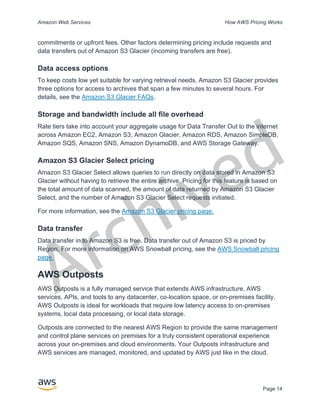
Outposts are connected to the nearest AWS Region to provide the same management
and control plane services on premises for a truly consistent operational experience
across your on-premises and cloud environments. Your Outposts infrastructure and
AWS services are managed, monitored, and updated by AWS just like in the cloud.
Archived
Amazon Web Services How AWS Pricing Works
Page 15
Figure 1: Example AWS Outposts architecture
Pricing of Outposts configurations
Priced for Amazon EC2 and Amazon EBS capacity in the SKU. Three-year term with
partial upfront, all upfront, and no upfront options available. Price includes delivery,
installation, servicing, and removal at the end of term.
AWS Services running locally on AWS Outposts will be charged on usage only.
Amazon EC2 capacity and Amazon EBS storage upgrades available. Operating
system charges are billed based on usage as an uplift to cover the license fee and
no minimum fee required. Same AWS Region data ingress and egress charges
apply. No additional data transfer charges for local network.
Figure 2: AWS Outposts ingress/egress charges
For more information, see the AWS Outposts pricing page.
Archived
Amazon Web Services How AWS Pricing Works
Page 16
AWS Snow Family
The AWS Snow Family helps customers that need to run operations in austere, non-
data center environments, and in locations where there's lack of consistent network
connectivity. The Snow Family, comprised of AWS Snowcone, AWS Snowball, and
AWS Snowmobile, offers a number of physical devices and capacity points, most with
built-in computing capabilities. These services help physically transport up to exabytes
of data into and out of AWS. Snow Family devices are owned and managed by AWS
and integrate with AWS security, monitoring, storage management, and computing
capabilities.
AWS Snowcone
AWS Snowcone is the smallest member of the AWS Snow Family of edge computing
and data transfer devices. Snowcone is portable, rugged, and secure. You can use
Snowcone to collect, process, and move data to AWS, either offline by shipping the
device, or online with AWS DataSync.
With AWS Snowcone, you pay only for the use of the device and for data transfer out of
AWS. Data transferred offline into AWS with Snowcone does not incur any transfer
fees. For online data transfer pricing with AWS DataSync, please refer to the DataSync
pricing page. Standard pricing applies once data is stored in the AWS Cloud.
For AWS Snowcone, you pay a service fee per job, which includes five days usage on-
site, and for any extra days you have the device on-site. For high-volume deployments,
contact your AWS sales team.
For pricing details, see AWS Snowcone Pricing.
AWS Snowball
AWS Snowball is a data migration and edge computing device that comes in two device
options: Compute Optimized and Storage Optimized.
Snowball Edge Storage Optimized devices provide 40 vCPUs of compute capacity
coupled with 80 terabytes of usable block or Amazon S3-compatible object storage. It is
well-suited for local storage and large-scale data transfer. Snowball Edge Compute
Optimized devices provide 52 vCPUs, 42 terabytes of usable block or object storage,
and an optional GPU for use cases such as advanced machine learning and full motion
video analysis in disconnected environments. Customers can use these two options for
data collection, machine learning and processing, and storage in environments with
Archived
Amazon Web Services How AWS Pricing Works
Page 17
intermittent connectivity (such as manufacturing, industrial, and transportation) or in
extremely remote locations (such as military or maritime operations) before shipping it
back to AWS. These devices may also be rack mounted and clustered together to build
larger, temporary installations.
AWS Snowball has three pricing elements to consider: usage, device type, and term of
use.
First, understand your planned use case. Is it data transfer only, or will you be running
compute on the device? You can use either device for data transfer or computing, but it
is more cost-effective to use a Snowball Edge Storage Optimized for data transfer jobs.
Second, choose your device, either Snowball Edge Storage Optimized or Snowball
Edge Compute Optimized. You can also select the option to run GPU instances on
Snowball Edge Compute Optimized for edge applications.
For on-demand use, you pay a service fee per data transfer job, which includes 10 days
of on-site Snowball Edge device usage. Shipping days, including the day the device is
received and the day it is shipped back to AWS, are not counted toward the 10 days.
After the 10 days, you pay a low per-day fee for each additional day you keep the
device.
For 1-year or 3-year commitments, please contact your sales team; you cannot make
this selection in the AWS Console.
Data transferred into AWS does not incur any data transfer fees, and standard pricing
applies for data stored in the AWS Cloud.
For pricing details, see AWS Snowball Pricing.
AWS Snowmobile
AWS Snowmobile moves up to 100 PB of data in a 45-foot long ruggedized shipping
container and is ideal for multi-petabyte or Exabyte-scale digital media migrations and
data center shutdowns. A Snowmobile arrives at the customer site and appears as a
network-attached data store for more secure, high-speed data transfer. After data is
transferred to Snowmobile, it is driven back to an AWS Region where the data is loaded
into Amazon S3.
Snowmobile pricing is based on the amount of data stored on the truck per month.
Archived
Amazon Web Services How AWS Pricing Works
Page 18
Snowmobile can be made available for use with AWS services in select AWS regions.
Please follow up with AWS Sales to discuss data transport needs for your specific
region and schedule an evaluation.
For pricing details, see AWS Snowmobile Pricing.
Amazon RDS
Amazon RDS is a web service that makes it easy to set up, operate, and scale a
relational database in the cloud. It provides cost-efficient and resizable capacity while
managing time-consuming database administration tasks, so you can focus on your
applications and business.
Estimating Amazon RDS costs
The factors that drive the costs of Amazon RDS include:
• Clock hours of server time: Resources incur charges when they are running—
for example, from the time you launch a DB instance until you terminate it.
• Database characteristics: The physical capacity of the database you choose
will affect how much you are charged. Database characteristics vary depending
on the database engine, size, and memory class.
• Database purchase type: When you use On-Demand DB Instances, you pay for
compute capacity for each hour your DB Instance runs, with no required
minimum commitments. With Reserved DB Instances, you can make a low, one-
time, upfront payment for each DB Instance you wish to reserve for a 1- or 3-year
term.
• Number of database instances: With Amazon RDS, you can provision multiple
DB instances to handle peak loads.
• Provisioned storage: There is no additional charge for backup storage of up to
100 percent of your provisioned database storage for an active DB Instance.
After the DB Instance is terminated, backup storage is billed per GB per month.
• Additional storage: The amount of backup storage in addition to the provisioned
storage amount is billed per GB per month.
Archived
Amazon Web Services How AWS Pricing Works
Page 19
• Long Term Retention: Long Term Retention is priced per vCPU per month for
each database instance in which it is enabled. The price depends on the RDS
instance type used by your database, and may vary by region. If Long Term
Retention is turned off, performance data older than 7 days is deleted.
• API Requests: The API free tier includes all calls from the Performance Insights
dashboard as well as 1 million calls outside of the Performance Insights
dashboard. API requests outside of the Performance Insights free tier are
charged at $0.01 per 1,000 requests.
• Deployment type: You can deploy your DB Instance to a single Availability Zone
(analogous to a standalone data center) or multiple Availability Zones (analogous
to a secondary data center for enhanced availability and durability). Storage and
I/O charges vary, depending on the number of Availability Zones you deploy to.
• Data transfer: Inbound data transfer is free, and outbound data transfer costs
are tiered.
Depending on your application’s needs, it’s possible to optimize your costs for Amazon
RDS database instances by purchasing reserved Amazon RDS database instances. To
purchase Reserved Instances, you make a low, one-time payment for each instance
you want to reserve and in turn receive a significant discount on the hourly usage
charge for that instance.
For more information, see Amazon RDS pricing.
Amazon DynamoDB
Amazon DynamoDB is a fast and flexible NoSQL database service for all applications
that need consistent, single-digit millisecond latency at any scale. It is a fully managed
cloud database and supports both document and key-value store models. Its flexible
data model, reliable performance, and automatic scaling of throughput capacity make it
a great fit for mobile, web, games, ad tech, IoT, and many other applications.
Amazon DynamoDB pricing at a glance
DynamoDB charges for reading, writing, and storing data in your DynamoDB tables,
along with any optional features you choose to enable. DynamoDB has two capacity
modes and those come with specific billing options for processing reads and writes on
your tables: on-demand capacity mode and provisioned capacity mode.
Archived
Amazon Web Services How AWS Pricing Works
Page 20
DynamoDB read requests can be either strongly consistent, eventually consistent, or
transactional.
On-Demand Capacity Mode
With on-demand capacity mode, you pay per request for the data reads and writes your
application performs on your tables. You do not need to specify how much read and
write throughput you expect your application to perform as DynamoDB instantly
accommodates your workloads as they ramp up or down. DynamoDB charges for the
core and optional features of DynamoDB.
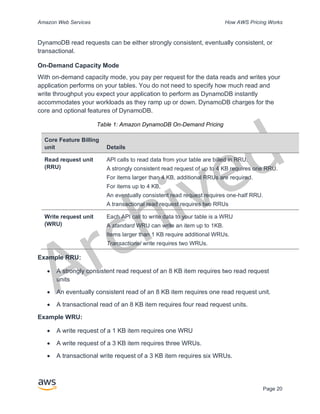
Table 1: Amazon DynamoDB On-Demand Pricing
Core Feature Billing
unit Details
Read request unit
(RRU)
API calls to read data from your table are billed in RRU.
A strongly consistent read request of up to 4 KB requires one RRU.
For items larger than 4 KB, additional RRUs are required.
For items up to 4 KB,
An eventually consistent read request requires one-half RRU.
A transactional read request requires two RRUs
Write request unit
(WRU)
Each API call to write data to your table is a WRU
A standard WRU can write an item up to 1KB.
Items larger than 1 KB require additional WRUs.
Transactional write requires two WRUs.
Example RRU:
• A strongly consistent read request of an 8 KB item requires two read request
units
• An eventually consistent read of an 8 KB item requires one read request unit.
• A transactional read of an 8 KB item requires four read request units.
Example WRU:
• A write request of a 1 KB item requires one WRU
• A write request of a 3 KB item requires three WRUs.
• A transactional write request of a 3 KB item requires six WRUs.
Archived
Amazon Web Services How AWS Pricing Works
Page 21
For details on how DynamoDB charges for the core and optional features of
DynamoDB, see Pricing for On-Demand Capacity.
Provisioned Capacity Mode
With provisioned capacity mode, you specify the number of data reads and writes per
second that you require for your application. You can use auto scaling to automatically
adjust your table’s capacity based on the specified utilization rate to ensure application
performance while reducing costs.
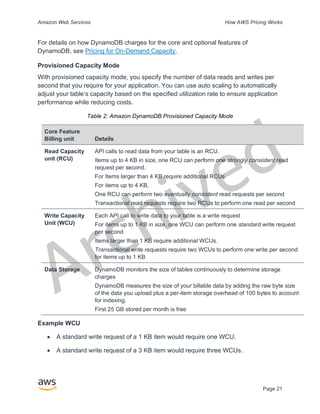
Table 2: Amazon DynamoDB Provisioned Capacity Mode
Core Feature
Billing unit Details
Read Capacity
unit (RCU)
API calls to read data from your table is an RCU.
Items up to 4 KB in size, one RCU can perform one strongly consistent read
request per second.
For Items larger than 4 KB require additional RCUs
For items up to 4 KB,
One RCU can perform two eventually consistent read requests per second
Transactional read requests require two RCUs to perform one read per second
Write Capacity
Unit (WCU)
Each API call to write data to your table is a write request
For items up to 1 KB in size, one WCU can perform one standard write request
per second
Items larger than 1 KB require additional WCUs.
Transactional write requests require two WCUs to perform one write per second
for items up to 1 KB
Data Storage DynamoDB monitors the size of tables continuously to determine storage
charges
DynamoDB measures the size of your billable data by adding the raw byte size
of the data you upload plus a per-item storage overhead of 100 bytes to account
for indexing.
First 25 GB stored per month is free
Example WCU
• A standard write request of a 1 KB item would require one WCU.
• A standard write request of a 3 KB item would require three WCUs.
Archived
Amazon Web Services How AWS Pricing Works
Page 22
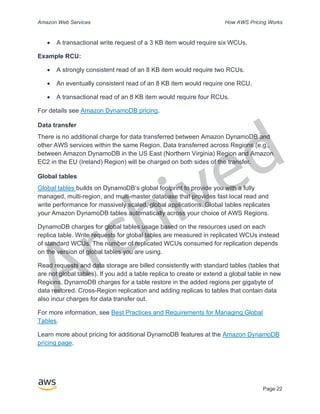
• A transactional write request of a 3 KB item would require six WCUs.
Example RCU:
• A strongly consistent read of an 8 KB item would require two RCUs.
• An eventually consistent read of an 8 KB item would require one RCU.
• A transactional read of an 8 KB item would require four RCUs.
For details see Amazon DynamoDB pricing.
Data transfer
There is no additional charge for data transferred between Amazon DynamoDB and
other AWS services within the same Region. Data transferred across Regions (e.g.,
between Amazon DynamoDB in the US East (Northern Virginia) Region and Amazon
EC2 in the EU (Ireland) Region) will be charged on both sides of the transfer.
Global tables
Global tables builds on DynamoDB’s global footprint to provide you with a fully
managed, multi-region, and multi-master database that provides fast local read and
write performance for massively scaled, global applications. Global tables replicates
your Amazon DynamoDB tables automatically across your choice of AWS Regions.
DynamoDB charges for global tables usage based on the resources used on each
replica table. Write requests for global tables are measured in replicated WCUs instead
of standard WCUs. The number of replicated WCUs consumed for replication depends
on the version of global tables you are using.
Read requests and data storage are billed consistently with standard tables (tables that
are not global tables). If you add a table replica to create or extend a global table in new
Regions, DynamoDB charges for a table restore in the added regions per gigabyte of
data restored. Cross-Region replication and adding replicas to tables that contain data
also incur charges for data transfer out.
For more information, see Best Practices and Requirements for Managing Global
Tables.
Learn more about pricing for additional DynamoDB features at the Amazon DynamoDB
pricing page.
Archived
Amazon Web Services How AWS Pricing Works
Page 23
Amazon CloudFront
Amazon CloudFront is a global content delivery network (CDN) service that securely
delivers data, videos, applications, and APIs to your viewers with low latency and high
transfer speeds.
Amazon CloudFront pricing
Amazon CloudFront charges are based on the data transfers and requests used to
deliver content to your customers. There are no upfront payments or fixed platform fees,
no long-term commitments, no premiums for dynamic content, and no requirements for
professional services to get started. There is no charge for data transferred from AWS
services such as Amazon S3 or Elastic Load Balancing. And, best of all, you can get
started with CloudFront for free.
When you begin to estimate the cost of Amazon CloudFront, consider the following:
• Data Transfer OUT (Internet/Origin): The amount of data transferred out of
your Amazon CloudFront edge locations.
• HTTP/HTTPS Requests: The number and type of requests (HTTP or HTTPS)
made and the geographic region in which the requests are made.
• Invalidation Requests: No additional charge for the first 1,000 paths requested
for invalidation each month. Thereafter, $0.005 per path requested for
invalidation.
• Field Level Encryption Requests: Field-level encryption is charged based on
the number of requests that need the additional encryption; you pay $0.02 for
every 10,000 requests that CloudFront encrypts using field-level encryption in
addition to the standard HTTPS request fee.
• Dedicated IP Custom SSL: $600 per month for each custom SSL certificate
associated with one or more CloudFront distributions using the Dedicated IP
version of custom SSL certificate support. This monthly fee is pro-rated by the
hour.
For more information, see Amazon CloudFront pricing.
Amazon Kendra
Amazon Kendra is a highly accurate and easy to use enterprise search service that’s
powered by machine learning. Amazon Kendra enables developers to add search
Archived
Amazon Web Services How AWS Pricing Works
Page 24
capabilities to their applications so their end users can discover information stored
within the vast amount of content spread across their company. When you type a
question, the service uses machine learning algorithms to understand the context and
return the most relevant results, whether that be a precise answer or an entire
document. For example, you can ask a question like "How much is the cash reward on
the corporate credit card?” and Amazon Kendra will map to the relevant documents and
return a specific answer like “2%”.
Amazon Kendra pricing
With the Amazon Kendra service, you pay only for what you use. There is no minimum
fee or usage requirement. Once you provision Amazon Kendra by creating an index,
you are charged for Amazon Kendra hours from the time an index is created until it is
deleted. Partial index instance-hours are billed in one-second increments. This applies
to Kendra Enterprise Edition and Kendra Developer Edition.
Amazon Kendra comes in two editions. Kendra Enterprise Edition provides a high-
availability service for production workloads. Kendra Developer Edition provides
developers with a lower-cost option to build a proof-of-concept; this edition is not
recommended for production workloads.
You can get started for free with the Amazon Kendra Developer Edition that provides
free usage of up to 750 hours for the first 30 days. Connector usage does not qualify for
free usage, regular run time and scanning pricing will apply. If you exceed the free tier
usage limits, you will be charged the Amazon Kendra Developer Edition rates for the
additional resources you use. See Amazon Kendra Pricing for pricing details.
Amazon Macie
Amazon Macie is a fully managed data security and data privacy service that uses
machine learning and pattern matching to discover and protect your sensitive data in
AWS. Amazon Macie uses machine learning and pattern matching to cost efficiently
discover sensitive data at scale. Macie automatically detects a large and growing list of
sensitive data types, including personally identifiable information (PII) such as names,
addresses, and credit card numbers. It also gives you constant visibility of the data
security and data privacy of your data stored in Amazon S3. Macie is easy to set up with
one click in the AWS Management Console or a single API call. Macie provides multi-
account support using AWS Organizations, so you can enable Macie across all of your
accounts with a few clicks.
Archived
Amazon Web Services How AWS Pricing Works
Page 25
Amazon Macie pricing
With Amazon Macie, you are charged based on the number of Amazon S3 buckets
evaluated for bucket-level security and access controls and the quantity of data
processed for sensitive data discovery.
When you enable Macie, the service will gather detail on all of your S3 buckets,
including bucket names, size, object count, resource tags, encryption status, access
controls, and region placement. Macie will then automatically and continually evaluate
all of your buckets for security and access control, alerting you to any unencrypted
buckets, publicly accessible buckets, or buckets shared with an AWS account outside of
your organization. You are charged based on the total number of buckets in your
account after the 30-day free trial and charges are pro-rated per day.
After enabling the service, you are able to configure and submit buckets for sensitive
data discovery. This is done by selecting the buckets you would like scanned,
configuring a one-time or periodic sensitive data discovery job, and submitting it to
Macie. Macie only charges for the bytes processed in supported object types it inspects.
As part of Macie sensitive data discovery jobs, you will also incur the standard Amazon
S3 charges for GET and LIST requests. See Requests and data retrievals pricing on the
Amazon S3 pricing page.
Free tier | Sensitive data discovery
For sensitive data discovery jobs, the first 1 GB processed every month in each account
comes at no cost. For each GB processed beyond the first 1 GB, charges will occur.
Please refer this link for pricing details. *You are only charged for jobs you configure
and submit to the service for sensitive data discovery
Amazon Kinesis
Amazon Kinesis makes it easy to collect, process, and analyze real-time, streaming
data so you can get timely insights and react quickly to new information. Amazon
Kinesis offers key capabilities to cost-effectively process streaming data at any scale,
along with the flexibility to choose the tools that best suit the requirements of your
application. With Amazon Kinesis, you can ingest real-time data such as video, audio,
application logs, website clickstreams, and IoT telemetry data for machine learning,
analytics, and other applications. Amazon Kinesis enables you to process and analyze
data as it arrives and respond instantly instead of having to wait until all your data is
collected before the processing can begin.
Archived
Amazon Web Services How AWS Pricing Works
Page 26
Amazon Kinesis Data Streams is a scalable and durable real-time data streaming
service that can continuously capture gigabytes of data per second from hundreds of
thousands of sources. See Amazon Kinesis Data Streams Pricing for pricing details.
Amazon Kinesis Data Firehose is the easiest way to capture, transform, and load data
streams into AWS data stores for near real-time analytics with existing business
intelligence tools. See Amazon Kinesis Data Firehose Pricing for pricing details.
Amazon Kinesis Data Analytics is the easiest way to process data streams in real
time with SQL or Apache Flink without having to learn new programming languages or
processing frameworks. See Amazon Kinesis Data Analytics Pricing for pricing details.
Amazon Kinesis Video Streams
Amazon Kinesis Video Streams makes it easy to securely stream media from
connected devices to AWS for storage, analytics, machine learning (ML), playback, and
other processing. Kinesis Video Streams automatically provisions and elastically scales
all the infrastructure needed to ingest streaming media from millions of devices. It
durably stores, encrypts, and indexes media in your streams, and allows you to access
your media through easy-to-use APIs. Kinesis Video Streams enables you to quickly
build computer vision and ML applications through integration with Amazon Rekognition
Video, Amazon SageMaker, and libraries for ML frameworks such as Apache MxNet,
TensorFlow, and OpenCV. For live and on-demand playback, Kinesis Video Streams
provides fully-managed capabilities for HTTP Live Streaming (HLS) and Dynamic
Adaptive Streaming over HTTP (DASH). Kinesis Video Streams also supports ultra-low
latency two-way media streaming with WebRTC, as a fully managed capability.
Kinesis Video Streams is ideal for building media streaming applications for camera-
enabled IoT devices and for building real-time computer vision-enabled ML applications
that are becoming prevalent in a wide range of use cases.
Amazon Kinesis Video Streams pricing
You pay only for the volume of data you ingest, store, and consume in your video
streams.
WebRTC pricing
If you use WebRTC capabilities, you pay for the number of signaling channels that are
active in a given month, number of signaling messages sent and received, and TURN
streaming minutes used for relaying media. A signaling channel is considered active in
Archived
Amazon Web Services How AWS Pricing Works
Page 27
a month if at any time during the month a device or an application connects to it. TURN
streaming minutes are metered in 1-minute increments.
Note: You will incur standard AWS data transfer charges when you retrieve data from
your video streams to destinations outside of AWS over the internet.
See Amazon Kinesis Video Streams Pricing for pricing details.
AWS IoT Events
AWS IoT Events helps companies continuously monitor their equipment and fleets of
devices for failure or changes in operation and trigger alerts to respond when events
occur. AWS IoT Events recognizes events across multiple sensors to identify
operational issues, such as equipment slowdowns, and generates alerts such as
notifying support teams of an issue. AWS IoT Events offers a managed complex event
detection service on the AWS Cloud, accessible through the AWS IoT Events console,
a browser-based GUI where you can define and manage your event detectors, or direct
ingest application program interfaces (APIs), code that allows two applications to
communicate with each other. Understanding equipment or a process based on
telemetry from a single sensor is often not possible; a complex event detection service
will combine multiple sources of telemetry to gain full insight into equipment and
processes. You define conditional logic and states inside AWS IoT Events to evaluate
incoming telemetry data to detect events in equipment or a process. When AWS IoT
Events detects an event, it can trigger pre-defined actions in another AWS service, such
as sending alerts through Amazon Simple Notification Service (Amazon SNS).
AWS IoT Events pricing
With AWS IoT Events, you pay only for what you use with no minimum fees or
mandatory service usage. When you create an event detector in AWS IoT Events, you
apply conditional logic such as if-then-else statements to understand events, such as
when a motor might be stuck. You are only charged for each message that is evaluated
in AWS IoT Events.
See AWS IoT Events Pricing for pricing details.
The AWS Free Tier is available to you for 12 months starting on the date you create
your AWS account. When your free usage expires or if your application use exceeds the
free usage tiers, you simply pay the above rates. Your usage is calculated each month
across all regions and is automatically applied to your bill. Note that free usage does not
accumulate from one billing period to the next.
Archived
Amazon Web Services How AWS Pricing Works
Page 28
AWS Cost Optimization
AWS enables you to take control of cost and continuously optimize your spend, while
building modern, scalable applications to meet your needs. AWS's breadth of services
and pricing options offer the flexibility to effectively manage your costs and still keep the
performance and capacity you require. AWS is dedicated to helping customers achieve
highest saving potential. During this period of crisis, we will work with you to develop a
plan that meets your financial needs. Get started with the steps below that will have an
immediate impact on your bill today.
Choose the right pricing models
Use Reserved Instances (RI) to reduce Amazon RDS, Amazon Redshift, Amazon
ElastiCache, and Amazon Elasticsearch costs
For certain services like Amazon EC2 and Amazon RDS, you can invest in reserved
capacity. With Reserved Instances, you can save up to 72% over equivalent on-demand
capacity. Reserved Instances are available in 3 options – All up-front (AURI), partial up-
front (PURI) or no upfront payments (NURI). Use the recommendations provided in
AWS Cost Explorer RI purchase recommendations, which is based on your Amazon
RDS, Amazon Redshift, Amazon ElastiCache, and Elasticsearch usage.
Amazon EC2 Cost Savings
Use Amazon EC2 Spot Instances to reduce EC2 costs or use Compute Savings
Plans to reduce EC2, Fargate and Lambda cost.
Match Capacity with Demand
Identify Amazon EC2 instances with low-utilization and reduce cost by stopping
or rightsizing
Use AWS Cost Explorer Resource Optimization to get a report of EC2 instances that
are either idle or have low utilization. You can reduce costs by either stopping or
downsizing these instances. Use AWS Instance Scheduler to automatically stop
instances. Use AWS Operations Conductor to automatically resize the EC2 instances
(based on the recommendations report from Cost Explorer).
Archived
Amazon Web Services How AWS Pricing Works
Page 29
Identify Amazon RDS, Amazon Redshift instances with low utilization and reduce
cost by stopping (RDS) and pausing (Redshift)
Use the Trusted Advisor Amazon RDS Idle DB instances check, to identify DB
instances which have not had any connection over the last 7 days. To reduce costs,
stop these DB instances using the automation steps described in this blog post. For
Redshift, use the Trusted Advisor Underutilized Redshift clusters check, to identify
clusters which have had no connections for the last 7 days, and less than 5% cluster
wide average CPU utilization for 99% of the last 7 days. To reduce costs, pause these
clusters using the steps in this blog.
Analyze Amazon DynamoDB usage and reduce cost by leveraging Autoscaling or
On-demand
Analyze your DynamoDB usage by monitoring 2 metrics, ConsumedReadCapacityUnits
and ConsumedWriteCapacityUnits, in CloudWatch. To automatically scale (in and out)
your DynamoDB table, use the AutoScaling feature. Using the steps here, you can
enable AutoScaling on your existing tables. Alternately, you can also use the on-
demand option. This option allows you to pay-per-request for read and write requests so
that you only pay for what you use, making it easy to balance costs and performance.
Implement processes to identify resource waste
Identify Amazon EBS volumes with low-utilization and reduce cost by
snapshotting then deleting them
EBS volumes that have very low activity (less than 1 IOPS per day) over a period of 7
days indicate that they are probably not in use. Identify these volumes using the Trusted
Advisor Underutilized Amazon EBS Volumes Check. To reduce costs, first snapshot the
volume (in case you need it later), then delete these volumes. You can automate the
creation of snapshots using the Amazon Data Lifecycle Manager. Follow the
steps here to delete EBS volumes.
Analyze Amazon S3 usage and reduce cost by leveraging lower cost
storage tiers
Use S3 Analytics to analyze storage access patterns on the object data set for 30 days
or longer. It makes recommendations on where you can leverage S3 Infrequently
Accessed (S3 IA) to reduce costs. You can automate moving these objects into lower
cost storage tier using Life Cycle Policies. Alternately, you can also use S3 Intelligent-
Archived
Amazon Web Services How AWS Pricing Works
Page 30
Tiering, which automatically analyzes and moves your objects to the appropriate
storage tier.
Review networking and reduce costs by deleting idle load balancers
Use the Trusted Advisor Idle Load Balancers check to get a report of load balancers
that have RequestCount of less than 100 over the past 7 days. Then, use the
steps here, to delete these load balancers to reduce costs. Additionally, use the steps
provided in this blog, review your data transfer costs using Cost Explorer.
AWS Support Plan Pricing
AWS Support provides a mix of tools and technology, people, and programs designed
to proactively help you optimize performance, lower costs, innovate faster and focused
on solving some of the toughest challenges that hold you back in your cloud journey.
There are three types of support plans available: Developer, Business, and Enterprise.
For more details, see Compare AWS Support Plans and AWS Support Plan Pricing.
Cost calculation examples
The following sections use the AWS Pricing Calculator to provide example cost
calculations for two use cases.
AWS Cloud cost calculation example
This example is a common use case of a dynamic website hosted on AWS using
Amazon EC2, AWS Auto Scaling, and Amazon RDS. The Amazon EC2 instance runs
the web and application tiers, and AWS Auto Scaling matches the number of instances
to the traffic load. Amazon RDS uses one DB instance for its primary storage, and this
DB instance is deployed across multiple Availability Zones.
Architecture
Elastic Load Balancing balances traffic to the Amazon EC2 Instances in an AWS Auto
Scaling group, which adds or subtracts Amazon EC2 Instances to match load.
Deploying Amazon RDS across multiple Availability Zones enhances data durability and
availability. Amazon RDS provisions and maintains a standby in a different Availability
Zone for automatic failover in the event of outages, planned or unplanned. The following
illustration shows the example architecture for a dynamic website using Amazon EC2,
Archived
Amazon Web Services How AWS Pricing Works
Page 31
AWS Auto Scaling, Security Groups to enforce least-privilege access to AWS
infrastructure and selected architecture components, and one Amazon RDS database
instance across multiple Availability Zones (Multi AZ deployment). All these components
are deployed into single region and VPC. The VPC is spread out into two availability
zones to support failover scenarios with and Route 53 Resolver to manage and route
requests for 1 hosted zone towards Elastic Load Balancer.
Figure 3: AWS Cloud deployment architecture
Daily usage profile
You can monitor daily usage for your application so that you can better estimate your
costs. For instance, you can look at the daily pattern to figure out how your application
handles traffic. For each hour, track how many hits you get on your website and how
many instances are running, and then add up the total number of hits for that day.
Hourly instance pattern = (hits per hour on website) / (number of instances)
VPC
Availability Zone
Private Subnet
Amazon RDS
DB Instance
Replication
Public Subnet
Application Server
Elastic Load Balancing
Amazon Route 53
Internet
gateway
AWS Auto Scaling Groups
Region
Availability Zone
Private Subnet
Amazon RDS
Standby DB Instance
Public Subnet
Application Server
Route Table
Users
DNS Resolution
Request
Archived
Amazon Web Services How AWS Pricing Works
Page 32
Examine the number of Amazon EC2 instances that run each hour, and then take the
average. You can use the number of hits per day and the average number of instances
for your calculations.
Daily profile = SUM(Hourly instance pattern) / 24
Amazon EC2 cost breakdown
The following table shows the characteristics for Amazon EC2 used for this dynamic site
in the US East Region.
Characteristic Estimated Usage Description
Utilization 100% All infrastructure
components run 24 hour per
day, 7 days per week
Instance t3a.xlarge 16 GB memory, 4 vCPU
Storage Amazon EBS SSD gp2 1 EBS volume per instance
with 30 GB of storage per
volume
Data backup Daily EBS snapshots 1 EBS volume per instance
with 30 GB of storage per
volume
Data transfer Data in: 1 Tb/month
Data out: 1 Tb/month
10% incremental change per
day
Instance scale 4 On average per day, there
are 4 instances running
Load Balancing 20 Gb/Hour Elastic Load Balancing is
used 24 hours per day, 7
days per week. It processes
a total of 20 Gb/Hour (data in
+ data out)
Database MySQL, db.m5.large
instance with 8 GB memory,
2 vCPUs, 100 GB storage
Multi-AZ deployment with
synchronous standby replica
in separate Availability Zone
The total cost for one month is the sum of the cost of the running services and data
transfer out, minus the AWS Free Tier discount. We calculated the total cost using the
AWS Pricing Calculator.
Archived
Amazon Web Services How AWS Pricing Works
Page 33
Table 3: Cost breakdown
Service Monthly Annually Configuration
Elastic Load
Balancing
$87.60 $1051.20 Number of Network Load Balancers (1),
Processed bytes per NLB for TCP (20
GB per hour)
Amazon EC2 $439.16 $5269.92 Operating system (Linux), Quantity (4),
Storage for each EC2 instance
(General Purpose SSD (gp2)), Storage
amount (30 GB), Instance type
(t3a.xlarge)
Amazon Elastic IP
address
$0 $0 Number of EC2 instances (1), Number
of EIPs per instance (1)
Amazon RDS for
MySQL
$272.66 $ 3271.92 Quantity (1) db.m5.large, Storage for
each RDS instance (General Purpose
SSD [gp2]), Storage amount (100 GB)
Amazon Route 53 $183.00 $2,196.00 Hosted Zones (1), Number of Elastic
Network Interfaces (2), Basic Checks
Within AWS (0)
Amazon Virtual
Private Cloud
(Amazon VPC)
$92.07 $1,104.84 Data Transfer cost, Inbound (from:
Internet) 1 TB per month
Outbound (to: Internet) 1 TB per month
Intra-Region 0 TB per month
Hybrid cloud cost calculation example
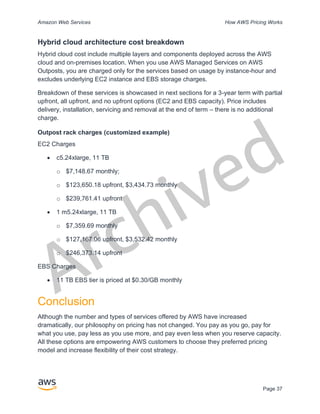
This example is a hybrid cloud use case of AWS Outposts deployed on-premises
connected to AWS Cloud using AWS Direct Connect. AWS Outposts extends the
existing VPC from the selected AWS Region to the customer data center. Selected
AWS services required to run on-premises (i.e. Amazon EKS) are available at AWS
Outposts inside the Outpost Availability Zone, deployed inside a separate subnet.
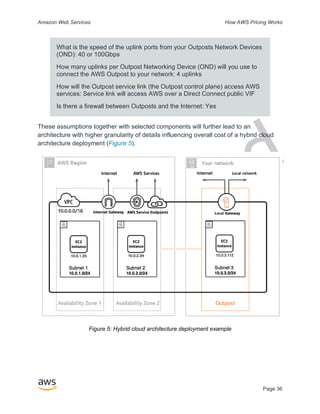
Hybrid architecture description
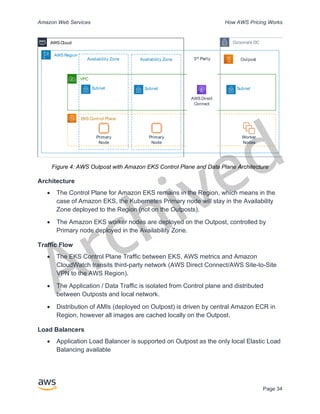
The following example shows Outpost deployment with distributed Amazon EKS service
extending to on-premises environments.
Archived
Amazon Web Services How AWS Pricing Works
Page 34
Figure 4: AWS Outpost with Amazon EKS Control Plane and Data Plane Architecture
Architecture
• The Control Plane for Amazon EKS remains in the Region, which means in the
case of Amazon EKS, the Kubernetes Primary node will stay in the Availability
Zone deployed to the Region (not on the Outposts).
• The Amazon EKS worker nodes are deployed on the Outpost, controlled by
Primary node deployed in the Availability Zone.
Traffic Flow
• The EKS Control Plane Traffic between EKS, AWS metrics and Amazon
CloudWatch transits third-party network (AWS Direct Connect/AWS Site-to-Site
VPN to the AWS Region).
• The Application / Data Traffic is isolated from Control plane and distributed
between Outposts and local network.
• Distribution of AMIs (deployed on Outpost) is driven by central Amazon ECR in
Region, however all images are cached locally on the Outpost.
Load Balancers
• Application Load Balancer is supported on Outpost as the only local Elastic Load
Balancing available
Outpost
AWS Region
VPC
Availability Zone
Subnet
Primary
Node
EKS Control Plane
Corporate DC
Availability Zone
Subnet Subnet
Worker
Nodes
Primary
Node
3rd
Party
3rd
Party
AWS Direct
Connect
AWS Cloud
Archived
Amazon Web Services How AWS Pricing Works
Page 35
• The Network Load Balancer and Classic Load Balancer stay in the Region, but
targets deployed at AWS Outposts are supported (including Application Load
Balancer).
• On-premises (inside corporate DC) Load Balancers (i.e. F5 BIG IP, NetScaler)
can be deployed and routed via Local Gateway (inside AWS Outpost).
Hybrid cloud components selection
Customers can choose from a range of pre-validated Outposts configurations (Figure 2)
offering a mix of EC2 and EBS capacity designed to meet a variety of application needs.
AWS can also work with customer to create a customized configuration designed for
their unique application needs.
To consider correct configuration, make sure to verify deployment and operational
parameters of the selected physical location for AWS Outpost rack installation. The
following example represents a set of parameters highlighting facility, networking and
power requirements needed for location validation (selected parameter: example value):
Purchase Option: All Upfront
Term: 3 Years
Max on premises power capacity: 20kVA
Max weight: 2,500lb
Networking uplink speed: 100Gbps
Number of Racks: 1
Average Power Draw per Rack: 9.34
Constraint (power draw/weight): Power Draw
Total Outpost vCPU: 480
Total Outpost Memory: 2,496GiB
In addition to minimum parameters, you should make deployment assumptions prior to
any order to minimize performance and security impact on existing infrastructure
landscape, deeply affecting existing cost of on-premises infrastructure (selected
question: example assumption).
Archived
Amazon Web Services How AWS Pricing Works
Page 36
What is the speed of the uplink ports from your Outposts Network Devices
(OND): 40 or 100Gbps
How many uplinks per Outpost Networking Device (OND) will you use to
connect the AWS Outpost to your network: 4 uplinks
How will the Outpost service link (the Outpost control plane) access AWS
services: Service link will access AWS over a Direct Connect public VIF
Is there a firewall between Outposts and the Internet: Yes
These assumptions together with selected components will further lead to an
architecture with higher granularity of details influencing overall cost of a hybrid cloud
architecture deployment (Figure 5).
Figure 5: Hybrid cloud architecture deployment example
Archived
Amazon Web Services How AWS Pricing Works
Page 37
Hybrid cloud architecture cost breakdown
Hybrid cloud cost include multiple layers and components deployed across the AWS
cloud and on-premises location. When you use AWS Managed Services on AWS
Outposts, you are charged only for the services based on usage by instance-hour and
excludes underlying EC2 instance and EBS storage charges.
Breakdown of these services is showcased in next sections for a 3-year term with partial
upfront, all upfront, and no upfront options (EC2 and EBS capacity). Price includes
delivery, installation, servicing and removal at the end of term – there is no additional
charge.
Outpost rack charges (customized example)
EC2 Charges
• c5.24xlarge, 11 TB
o $7,148.67 monthly;
o $123,650.18 upfront, $3,434.73 monthly
o $239,761.41 upfront
• 1 m5.24xlarge, 11 TB
o $7,359.69 monthly
o $127,167.06 upfront, $3,532.42 monthly
o $246,373.14 upfront
EBS Charges
• 11 TB EBS tier is priced at $0.30/GB monthly
Conclusion
Although the number and types of services offered by AWS have increased
dramatically, our philosophy on pricing has not changed. You pay as you go, pay for
what you use, pay less as you use more, and pay even less when you reserve capacity.
All these options are empowering AWS customers to choose they preferred pricing
model and increase flexibility of their cost strategy.
Archived
Amazon Web Services How AWS Pricing Works
Page 38
Projecting costs for a use case, such as web application hosting, can be challenging,
because a solution typically uses multiple features across multiple AWS products, which
in turn means there are more factors and purchase options to consider.
The best way to estimate costs is to examine the fundamental characteristics for each
AWS product, estimate your usage for each characteristic, and then map that usage to
the prices posted on the website.
You can use the AWS Pricing Calculator to estimate your monthly bill. The calculator
provides a per-service cost breakdown, as well as an aggregate monthly estimate. You
can also use the calculator to see an estimation and breakdown of costs for common
solutions.
Remember, you can get started with most AWS services at no cost using the AWS Free
Tier.
Contributors
Contributors to this document include:
• Vladimir Baranek, Principal Partner Solution Architect, Amazon Web Services
• Senthil Arumugam, Senior Partner Solutions Architect, Amazon Web Services
• Mihir Desai, Senior Partner Solutions Architect, Amazon Web Services
Further Reading
For additional information, see:
• AWS Pricing
• AWS Pricing Calculator
• AWS Free Tier
• AWS Cost Management
• AWS Cost and Usage Reports
• AWS Cloud Economics Center
Archived
Amazon Web Services How AWS Pricing Works
Page 39
Document Revisions
Date Description
October 2020 Updated and added service pricing details, options, calculation, and
examples.
June 2018 First publication

aws_pricing_overview.pdf

  • 1.
    Archived How AWS PricingWorks AWS Pricing Overview October 30, 2020 This paper has been archived. For the latest technical guidance on How AWS Pricing Works, see https://docs.aws.amazon.com/whitepapers/latest/how- aws-pricing-works/welcome.html
  • 2.
    Archived Notices Customers are responsiblefor making their own independent assessment of the information in this document. This document: (a) is for informational purposes only, (b) represents current AWS product offerings and practices, which are subject to change without notice, and (c) does not create any commitments or assurances from AWS and its affiliates, suppliers or licensors. AWS products or services are provided “as is” without warranties, representations, or conditions of any kind, whether express or implied. The responsibilities and liabilities of AWS to its customers are controlled by AWS agreements, and this document is not part of, nor does it modify, any agreement between AWS and its customers. © 2020 Amazon Web Services, Inc. or its affiliates. All rights reserved.
  • 3.
    Archived Contents Introduction..........................................................................................................................1 Key principles ......................................................................................................................1 Understandthe fundamentals of pricing..........................................................................1 Start early with cost optimization .....................................................................................2 Maximize the power of flexibility ......................................................................................2 Use the right pricing model for the job.............................................................................2 Get started with the AWS Free Tier....................................................................................3 12 Months Free ................................................................................................................3 Always Free......................................................................................................................4 Trials.................................................................................................................................4 AWS Pricing/TCO Tools......................................................................................................4 AWS Pricing Calculator....................................................................................................5 Migration Evaluator ..........................................................................................................5 Pricing details for individual services..................................................................................6 Amazon Elastic Compute Cloud (Amazon EC2).............................................................6 AWS Lambda .................................................................................................................10 Amazon Elastic Block Store (Amazon EBS) .................................................................11 Amazon Simple Storage Service (Amazon S3) ............................................................12 Amazon S3 Glacier ........................................................................................................13 AWS Outposts................................................................................................................14 AWS Snow Family..........................................................................................................16 Amazon RDS..................................................................................................................18 Amazon DynamoDB.......................................................................................................19 Amazon CloudFront .......................................................................................................23 Amazon Kendra..............................................................................................................23 Amazon Kinesis..............................................................................................................25
  • 4.
    Archived AWS IoT Events.............................................................................................................27 AWS Cost Optimization.....................................................................................................28 Choose the right pricing models ....................................................................................28 Match Capacity with Demand........................................................................................28 Implement processes to identify resource waste ..........................................................29 AWS Support Plan Pricing ................................................................................................30 Cost calculation examples ................................................................................................30 AWS Cloud cost calculation example............................................................................30 Hybrid cloud cost calculation example ..........................................................................33 Conclusion .........................................................................................................................37 Contributors .......................................................................................................................38 Further Reading.................................................................................................................38 Document Revisions..........................................................................................................39
  • 5.
    Archived Abstract Amazon Web Services(AWS) helps you move faster, reduce IT costs, and attain global scale through a broad set of global compute, storage, database, analytics, application, and deployment services. One of the main benefits of cloud services is the ability it gives you to optimize costs to match your needs, even as those needs change over time.
  • 6.
    Archived Amazon Web ServicesHow AWS Pricing Works Page 1 Introduction AWS has the services to help you build sophisticated applications with increased flexibility, scalability and reliability. Whether you're looking for compute power, database storage, content delivery, or other functionality, with AWS you pay only for the individual services you need, for as long as you use them, without complex licensing. AWS offers you a variety of pricing models for over 160 cloud services. You only pay for the services you consume, and once you stop using them, there are no additional costs or termination fees. This whitepaper provides an overview of how AWS pricing works across some of the most widely used services. The latest pricing information for each AWS service is available at http://aws.amazon.com/pricing/. Key principles Although pricing models vary across services, it’s worthwhile to review key principles and best practices that are broadly applicable. Understand the fundamentals of pricing There are three fundamental drivers of cost with AWS: compute, storage, and outbound data transfer. These characteristics vary somewhat, depending on the AWS product and pricing model you choose. In most cases, there is no charge for inbound data transfer or for data transfer between other AWS services within the same Region. There are some exceptions, so be sure to verify data transfer rates before beginning. Outbound data transfer is aggregated across services and then charged at the outbound data transfer rate. This charge appears on the monthly statement as AWS Data Transfer Out. The more data you transfer, the less you pay per GB. For compute resources, you pay hourly from the time you launch a resource until the time you terminate it, unless you have made a reservation for which the cost is agreed upon beforehand. For data storage and transfer, you typically pay per GB. Except as otherwise noted, AWS prices are exclusive of applicable taxes and duties, including VAT and sales tax. For customers with a Japanese billing address, use of AWS is subject to Japanese Consumption Tax. For more information, see Amazon Web Services Consumption Tax FAQ.
  • 7.
    Archived Amazon Web ServicesHow AWS Pricing Works Page 2 Start early with cost optimization The cloud allows you to trade fixed expenses (such as data centers and physical servers) for variable expenses, and only pay for IT as you consume it. And, because of the economies of scale, the variable expenses are much lower than what you would pay to do it yourself. Whether you started in the cloud, or you are just starting your migration journey to the cloud, AWS has a set of solutions to help you manage and optimize your spend. This includes services, tools, and resources to organize and track cost and usage data, enhance control through consolidated billing and access permission, enable better planning through budgeting and forecasts, and further lower cost with resources and pricing optimizations. To learn how you can optimize and save costs today, visit AWS Cost Optimization. Maximize the power of flexibility AWS services are priced independently, transparently, and available on-demand, so you can choose and pay for exactly what you need. You may also choose to save money through a reservation model. By paying for services on an as-needed basis, you can redirect your focus to innovation and invention, reducing procurement complexity and enabling your business to be fully elastic. One of the key advantages of cloud-based resources is that you don’t pay for them when they’re not running. By turning off instances you don’t use, you can reduce costs by 70 percent or more compared to using them 24/7. This enables you to be cost efficient and, at the same time, have all the power you need when workloads are active. Use the right pricing model for the job AWS offers several pricing models depending on product. These include: • On-Demand Instances let you pay for compute or database capacity by the hour or second (minimum of 60 seconds) depending on which instances you run with no long-term commitments or upfront payments. • Savings Plans are a flexible pricing model that offer low prices on Amazon EC2, AWS Lambda and AWS Fargate usage, in exchange for a commitment to a consistent amount of usage (measured in $/hour) for a one- or three-year term.
  • 8.
    Archived Amazon Web ServicesHow AWS Pricing Works Page 3 • Spot Instances are an Amazon EC2 pricing mechanism that let you request spare computing capacity with no upfront commitment and at discounted hourly rate (up to 90% off the on-demand price). • Reservations provide you with the ability to receive a greater discount, up to 75 percent, by paying for capacity ahead of time. For more details, see the Optimizing costs with reservations section. Get started with the AWS Free Tier The AWS Free Tier enables you to gain free, hands-on experience with more than 60 products on AWS platform. AWS Free Tier includes the following free offer types: • 12 Months Free – These tier offers include 12 months free usage following your initial sign-up date to AWS. When your 12 month free usage term expires, or if your application use exceeds the tiers, you simply pay standard, pay-as-you-go service rates. • Always Free – These free tier offers do not expire and are available to all AWS customers. • Trials – These offers are short term free trials starting from date you activate a particular service. Once the trial period expires, you simply pay standard, pay-as- you-go service rates. This section lists some of the most commonly used AWS Free Tier services. Terms and conditions apply. For the full list of AWS Free Tier services, see AWS Free Tier. 12 Months Free • Amazon Elastic Compute Cloud (Amazon EC2): 750 hours per month of Linux, RHEL, or SLES t2.micro/t3.micro instance usage or 750 hours per month of Windows t2.micro/t3.micro instance usage dependent on Region. • Amazon Simple Storage Service (Amazon S3): 5 GB of Amazon S3 standard storage, 20,000 Get Requests, and 2,000 Put Requests. • Amazon Relational Database Service (Amazon RDS): 750 hours of Amazon RDS Single-AZ db.t2.micro database usage for running MySQL, PostgreSQL, MariaDB, Oracle BYOL, or SQL Server (running SQL Server Express Edition); 20 GB of general purpose SSD database storage and 20 GB of storage for database backup and DB snapshots.
  • 9.
    Archived Amazon Web ServicesHow AWS Pricing Works Page 4 • Amazon CloudFront: 50 GB Data Transfer Out and 2,000,000 HTTP and HTTPS Requests each month. Always Free • Amazon DynamoDB: Up to 200 million requests per month (25 Write Capacity units and 25 Read Capacity units); 25 GB of storage. • Amazon S3 Glacier: Retrieve up to 10 GB of your Amazon S3 Glacier data per month for free (applies to standard retrievals using the Glacier API only). • AWS Lambda: 1 million free requests per month; up to 3.2 million seconds of compute time per month. Trials • Amazon SageMaker: 250 hours per month of t2.medium notebook,50 hours per month of m4.xlarge for training, 125 hours per month of m4.xlarge for hosting for the first two months. • Amazon Redshift: 750 hours per month for free, enough hours to continuously run one DC2.Large node with 160GB of compressed SSD storage. You can also build clusters with multiple nodes to test larger data sets, which will consume your free hours more quickly. Once your two month free trial expires or your usage exceeds 750 hours per month, you can shut down your cluster to avoid any charges, or keep it running at the standard On-Demand Rate. The AWS Free Tier is not available in the AWS GovCloud (US) Regions or the China (Beijing) Region at this time. The Lambda Free Tier is available in the AWS GovCloud (US) Region. AWS Pricing/TCO Tools To get the most out of your estimates, you should have a good idea of your basic requirements. For example, if you're going to try Amazon Elastic Compute Cloud (Amazon EC2), it might help if you know what kind of operating system you need, what your memory requirements are, and how much I/O you need. You should also decide whether you need storage, such as if you're going to run a database and how long you intend to use the servers. You don't need to make these decisions before generating an estimate, though. You can play around with the service configuration and parameters to
  • 10.
    Archived Amazon Web ServicesHow AWS Pricing Works Page 5 see which options fit your use case and budget best. For more information about AWS service pricing, see AWS Services Pricing. AWS offers couple of tools (free of cost) for you to use. If the workload details and services to be used are identified, AWS pricing calculator can help with calculating the total cost of ownership. Migration Evaluator helps with inventorying your existing environment, identifying workload information, and designing and planning your AWS migration. AWS Pricing Calculator AWS Pricing Calculator is a web based service that you can use to create cost estimates to suit your AWS use cases. AWS Pricing Calculator is useful both for people who have never used AWS and for those who want to reorganize or expand their usage. AWS Pricing Calculator allows you to explore AWS services based on your use cases and create a cost estimate. You can model your solutions before building them, explore the price points and calculations behind your estimate, and find the available instance types and contract terms that meet your needs. This enables you to make informed decisions about using AWS. You can plan your AWS costs and usage or price out setting up a new set of instances and services. AWS Pricing Calculator is free for use. It provides an estimate of your AWS fees and charges. The estimate doesn't include any taxes that might apply to the fees and charges. AWS Pricing Calculator provides pricing details for your information only. AWS Pricing Calculator provides a console interface at https://calculator.aws/#/. Migration Evaluator Migration Evaluator (Formerly TSO Logic) is a complimentary service to create data- driven business cases for AWS Cloud planning and migration. Creating business cases on your own can be a time-consuming process and does not always identify the most cost-effective deployment and purchasing options. Migration Evaluator quickly provides a business case to make sound AWS planning and migration decisions. With Migration Evaluator, your organization can build a data-driven business case for AWS, gets access to AWS expertise, visibility into the costs associated with multiple migration strategies, and insights on how reusing existing software licensing reduces costs further.
  • 11.
    Archived Amazon Web ServicesHow AWS Pricing Works Page 6 A business case is the first step in the AWS migration journey. Beginning with on- premises inventory discovery, you can choose to upload exports from 3rd party tools or install a complimentary agentless collector to monitor Windows, Linux and SQL Server footprints. As part of a white-gloved experience, Migration Evaluator includes a team of program managers and solution architects to capture your migration objective and use analytics to narrow down the subset of migration patterns best suited to your business needs. The results are captured in a transparent business case which aligns business and technology stakeholders to provide a prescriptive next step in your migration journey. Migration Evaluator service analyzes an enterprise’s compute footprint, including server configuration, utilization, annual costs to operate, eligibility for bring-your-own-license, and hundreds of other parameters. It then statistically models utilization patterns, matching each workload with optimized placements in the AWS Amazon Elastic Cloud Compute and Amazon Elastic Block Store. Finally, it outputs a business case with a comparison of the current-state against multiple future-state configurations showing the flexibility of AWS. For more information, see Migration Evaluator. Pricing details for individual services Different types of services lend themselves to different pricing models. For example, Amazon EC2 pricing varies by instance type, whereas the Amazon Aurora database service includes charges for data input/output (I/O) and storage. This section provides an overview of pricing concepts and examples for few AWS services. You can always find current price information for each AWS service at AWS Pricing. Amazon Elastic Compute Cloud (Amazon EC2) Amazon Elastic Compute Cloud (Amazon EC2) is a web service that provides secure, resizable compute capacity in the cloud. It is designed to make web-scale cloud computing easier for developers. The simple web service interface of Amazon EC2 allows you to obtain and configure capacity with minimal friction with complete control of your computing resources. Amazon EC2 reduces the time required to obtain and boot new server instances in minutes, allowing you to quickly scale capacity, both up and down, as your computing requirements change.
  • 12.
    Archived Amazon Web ServicesHow AWS Pricing Works Page 7 Pricing models for Amazon EC2 There are five ways to pay for Amazon EC2 instances: On-Demand Instances, Savings Plans, Reserved Instances, and Spot Instances. On-Demand Instances With On-Demand Instances, you pay for compute capacity per hour or per second, depending on which instances you run. No long-term commitments or upfront payments are required. You can increase or decrease your compute capacity to meet the demands of your application and only pay the specified hourly rates for the instance you use. On-Demand Instances are recommended for the following use cases: • Users who prefer the low cost and flexibility of Amazon EC2 without upfront payment or long-term commitments • Applications with short-term, spiky, or unpredictable workloads that cannot be interrupted • Applications being developed or tested on Amazon EC2 for the first time Savings Plans Savings Plans are a flexible pricing model that offer low prices on Amazon EC2, AWS Lambda, and AWS Fargate usage, in exchange for a commitment to a consistent amount of usage (measured in $/hour) for a 1 or 3 year term. Savings Plans is a flexible pricing model that provides savings of up to 72% on your AWS compute usage. This pricing model offers lower prices on Amazon EC2 instances usage, regardless of instance family, size, OS, tenancy or AWS Region, and also applies to AWS Fargate and AWS Lambda usage. For workloads that have predictable and consistent usage, Savings Plans can provide significant savings compared to On-Demand Instances. it is recommended for: • Workloads with a consistent and steady-state usage • Customers who want to use different instance types and compute solutions across different locations • Customers who can make monetary commitment to use EC2 over a one-or three-year term
  • 13.
    Archived Amazon Web ServicesHow AWS Pricing Works Page 8 Spot Instances Amazon EC2 Spot Instances allow you to request spare Amazon EC2 computing capacity for up to 90 percent off the On-Demand price. Spot Instances are recommended for: • Applications that have flexible start and end times • Applications that are only feasible at very low compute prices • Users with fault-tolerant and/or stateless workloads Spot Instance prices are set by Amazon EC2 and adjust gradually based on long-term trends in supply and demand for Spot Instance capacity. Reserved Instances Amazon EC2 Reserved Instances provide you with a significant discount (up to 75 percent) compared to On-Demand Instance pricing. In addition, when Reserved Instances are assigned to a specific Availability Zone, they provide a capacity reservation, giving you additional confidence in your ability to launch instances when you need them. Per-second billing Per-second billing saves money and has a minimum of 60 seconds billing. It is particularly effective for resources that have periods of low and high usage such as development and testing, data processing, analytics, batch processing, and gaming applications. Learn more about per-second billing. Estimating Amazon EC2 costs When you begin to estimate the cost of using Amazon EC2, consider the following: • Clock hours of server time: Resources incur charges when they are running— for example, from the time Amazon EC2 instances are launched until they are terminated, or from the time Elastic IP addresses are allocated until the time they are de-allocated.
  • 14.
    Archived Amazon Web ServicesHow AWS Pricing Works Page 9 • Instance type: Amazon EC2 provides a wide selection of instance types optimized to fit different use cases. Instance types comprise varying combinations of CPU, memory, storage, and networking capacity and give you the flexibility to choose the appropriate mix of resources for your applications. Each instance type includes at least one instance size, allowing you to scale your resources to the requirements of your target workload. • Pricing model: With On-Demand Instances, you pay for compute capacity by the hour with no required minimum commitments. • Number of instances: You can provision multiple instances of your Amazon EC2 and Amazon EBS resources to handle peak loads. • Load balancing: You can use Elastic Load Balancing to distribute traffic among Amazon EC2 Instances. The number of hours Elastic Load Balancing runs and the amount of data it processes contribute to the monthly cost. • Detailed monitoring: You can use Amazon CloudWatch to monitor your EC2 instances. By default, basic monitoring is enabled. For a fixed monthly rate, you can opt for detailed monitoring, which includes seven preselected metrics recorded once a minute. Partial months are charged on an hourly pro rata basis, at a per instance-hour rate. • Amazon EC2 Auto Scaling: Amazon EC2 Auto Scaling automatically adjusts the number of Amazon EC2 instances in your deployment according to the scaling policies you define. This service is available at no additional charge beyond Amazon CloudWatch fees. • Elastic IP addresses: You can have one Elastic IP address associated with a running instance at no charge. • Licensing: To run operating systems and applications on AWS, you can obtain variety of software licenses from AWS on a pay-as-you-go basis that are fully- compliant and do not require you to manage complex licensing terms and conditions. However, if you have existing licensing agreements with software vendors, you can bring your eligible licenses to the cloud to reduce total cost of ownership (TCO). AWS offers License Manager which makes it easier to manage your software licenses from vendors such as Microsoft, SAP, Oracle, and IBM across AWS and on-premises environments. For more information, see Amazon EC2 pricing.
  • 15.
    Archived Amazon Web ServicesHow AWS Pricing Works Page 10 AWS Lambda AWS Lambda lets you run code without provisioning or managing servers. You pay only for the compute time you consume—there is no charge when your code is not running. With Lambda, you can run code for virtually any type of application or backend service—all with zero administration. Just upload your code and Lambda takes care of everything required to run and scale your code with high availability. AWS Lambda pricing With AWS Lambda, you pay only for what you use. You are charged based on the number of requests for your functions and the time it takes for your code to execute. Lambda registers a request each time it starts executing in response to an event notification or invoke call, including test invokes from the console. You are charged for the total number of requests across all your functions. Duration is calculated from the time your code begins executing until it returns or otherwise terminates, rounded up to the nearest 100 milliseconds. The price depends on the amount of memory you allocate to your function. AWS Lambda participates in Compute Savings Plans, a flexible pricing model that offers low prices on Amazon EC2, AWS Fargate, and AWS Lambda usage, in exchange for a commitment to a consistent amount of usage (measured in $/hour) for a 1 or 3 year term. With Compute Savings Plans, you can save up to 17% on AWS Lambda. Savings apply to Duration, Provisioned Concurrency, and Duration (Provisioned Concurrency). Request pricing • Free Tier: 1 million requests per month, 400,000 GB-seconds of compute time per month • $0.20 per 1 million requests thereafter, or $0.0000002 per request Duration pricing • 400,000 GB-seconds per month free, up to 3.2 million seconds of compute time • $0.00001667 for every GB-second used thereafter
  • 16.
    Archived Amazon Web ServicesHow AWS Pricing Works Page 11 Additional charges You may incur additional charges if your Lambda function uses other AWS services or transfers data. For example, if your Lambda function reads and writes data to or from Amazon S3, you will be billed for the read/write requests and the data stored in Amazon S3. Data transferred into and out of your AWS Lambda functions from outside the Region the function executed in will be charged at the EC2 data transfer rates as listed on Amazon EC2 On-Demand Pricing under Data Transfer. Amazon Elastic Block Store (Amazon EBS) Amazon Elastic Block Store (Amazon EBS) an easy to use, high performance block storage service designed for use with Amazon EC2 instances. Amazon EBS volumes are off-instance storage that persists independently from the life of an instance. They are analogous to virtual disks in the cloud. Amazon EBS provides two volume types: • SSD-backed volumes are optimized for transactional workloads involving frequent read/write operations with small I/O size, where the dominant performance attribute is IOPS. • HDD-backed volumes are optimized for large streaming workloads where throughput (measured in megabits per second) is a better performance measure than IOPS. How Amazon EBS is priced Amazon EBS pricing includes three factors: • Volumes: Volume storage for all EBS volume types is charged by the amount of GB you provision per month, until you release the storage. • Snapshots: Snapshot storage is based on the amount of space your data consumes in Amazon S3. Because Amazon EBS does not save empty blocks, it is likely that the snapshot size will be considerably less than your volume size. Copying EBS snapshots is charged based on the volume of data transferred across Regions. For the first snapshot of a volume, Amazon EBS saves a full copy of your data to Amazon S3. For each incremental snapshot, only the changed part of your Amazon EBS volume is saved. After the snapshot is copied, standard EBS snapshot charges apply for storage in the destination Region.
  • 17.
    Archived Amazon Web ServicesHow AWS Pricing Works Page 12 • EBS Fast Snapshot Restore (FSR): This is charged in Date Services Unit- Hours (DSUs) for each Availability Zone in which it is enabled. DSUs are billed per minute with a 1 hour minimum. The price of 1 FSR DSU-hour is $0.75 per Availability Zone. (pricing based on us-east-1 (N.Virginia)). • EBS direct APIs for Snapshots: EBS direct APIs for Snapshots provide access to directly read EBS snapshot data and identify differences between two snapshots. The following charges apply for these APIs. o ListChangedBlocks and ListSnapshotBlocks APIs are charged per request. o GetSnapshotBlock API is charged per SnapshotAPIUnit (block size 512 KiB) • Data transfer: Consider the amount of data transferred out of your application. Inbound data transfer is free, and outbound data transfer charges are tiered. If you use external or cross-region data transfers, additional EC2 data transfer charges will apply. For more information, see the Amazon EBS pricing page. Amazon Simple Storage Service (Amazon S3) Amazon Simple Storage Service (Amazon S3) is object storage built to store and retrieve any amount of data from anywhere: websites, mobile apps, corporate applications, and data from IoT sensors or devices. It is designed to deliver 99.999999999 percent durability, and stores data for millions of applications used by market leaders in every industry. As with other AWS services, Amazon S3 provides the simplicity and cost-effectiveness of pay-as-you-go pricing. Estimating Amazon S3 storage costs With Amazon S3, you pay only for the storage you use, with no minimum fee. Prices are based on the location of your Amazon S3 bucket. When you begin to estimate the cost of Amazon S3, consider the following:
  • 18.
    Archived Amazon Web ServicesHow AWS Pricing Works Page 13 • Storage class: Amazon S3 offers a range of storage classes designed for different use cases. These include S3 Standard for general-purpose storage of frequently accessed data; S3 Intelligent-Tiering for data with unknown or changing access patterns; S3 Standard-Infrequent Access (S3 Standard- IA) and S3 One Zone-Infrequent Access (S3 One Zone-IA) for long-lived, but less frequently accessed data; and Amazon S3 Glacier (S3 Glacier) and Amazon S3 Glacier Deep Archive (S3 Glacier Deep Archive) for long-term archive and digital preservation. Amazon S3 also offers capabilities to manage your data throughout its lifecycle. Once an S3 Lifecycle policy is set, your data will automatically transfer to a different storage class without any changes to your application. • Storage: Costs vary with number and size of objects stored in your Amazon S3 buckets as well as type of storage. • Requests and Data retrievals: Requests costs made against S3 buckets and objects are based on request type and quantity of requests. • Data transfer: The amount of data transferred out of the Amazon S3 region. Transfers between S3 buckets or from Amazon S3 to any service(s) within the same AWS Region are free. • Management and replication: You pay for the storage management features (Amazon S3 inventory, analytics, and object tagging) that are enabled on your account’s buckets. For more information, see Amazon S3 pricing. You can estimate your monthly bill using the AWS Pricing Calculator. Amazon S3 Glacier Amazon S3 Glacier is a secure, durable, and extremely low-cost cloud storage service for data archiving and long-term backup. It is designed to deliver 99.999999999 percent durability, with comprehensive security and compliance capabilities that can help meet even the most stringent regulatory requirements. Amazon S3 Glacier provides query-in- place functionality, allowing you to run powerful analytics directly on your archived data at rest. Amazon S3 Glacier provides low-cost, long-term storage Starting at $0.004 per GB per month, Amazon S3 Glacier allows you to archive large amounts of data at a very low cost. You pay only for what you need, with no minimum
  • 19.
    Archived Amazon Web ServicesHow AWS Pricing Works Page 14 commitments or upfront fees. Other factors determining pricing include requests and data transfers out of Amazon S3 Glacier (incoming transfers are free). Data access options To keep costs low yet suitable for varying retrieval needs, Amazon S3 Glacier provides three options for access to archives that span a few minutes to several hours. For details, see the Amazon S3 Glacier FAQs. Storage and bandwidth include all file overhead Rate tiers take into account your aggregate usage for Data Transfer Out to the internet across Amazon EC2, Amazon S3, Amazon Glacier, Amazon RDS, Amazon SimpleDB, Amazon SQS, Amazon SNS, Amazon DynamoDB, and AWS Storage Gateway. Amazon S3 Glacier Select pricing Amazon S3 Glacier Select allows queries to run directly on data stored in Amazon S3 Glacier without having to retrieve the entire archive. Pricing for this feature is based on the total amount of data scanned, the amount of data returned by Amazon S3 Glacier Select, and the number of Amazon S3 Glacier Select requests initiated. For more information, see the Amazon S3 Glacier pricing page. Data transfer Data transfer in to Amazon S3 is free. Data transfer out of Amazon S3 is priced by Region. For more information on AWS Snowball pricing, see the AWS Snowball pricing page. AWS Outposts AWS Outposts is a fully managed service that extends AWS infrastructure, AWS services, APIs, and tools to any datacenter, co-location space, or on-premises facility. AWS Outposts is ideal for workloads that require low latency access to on-premises systems, local data processing, or local data storage. Outposts are connected to the nearest AWS Region to provide the same management and control plane services on premises for a truly consistent operational experience across your on-premises and cloud environments. Your Outposts infrastructure and AWS services are managed, monitored, and updated by AWS just like in the cloud.
  • 20.
    Archived Amazon Web ServicesHow AWS Pricing Works Page 15 Figure 1: Example AWS Outposts architecture Pricing of Outposts configurations Priced for Amazon EC2 and Amazon EBS capacity in the SKU. Three-year term with partial upfront, all upfront, and no upfront options available. Price includes delivery, installation, servicing, and removal at the end of term. AWS Services running locally on AWS Outposts will be charged on usage only. Amazon EC2 capacity and Amazon EBS storage upgrades available. Operating system charges are billed based on usage as an uplift to cover the license fee and no minimum fee required. Same AWS Region data ingress and egress charges apply. No additional data transfer charges for local network. Figure 2: AWS Outposts ingress/egress charges For more information, see the AWS Outposts pricing page.
  • 21.
    Archived Amazon Web ServicesHow AWS Pricing Works Page 16 AWS Snow Family The AWS Snow Family helps customers that need to run operations in austere, non- data center environments, and in locations where there's lack of consistent network connectivity. The Snow Family, comprised of AWS Snowcone, AWS Snowball, and AWS Snowmobile, offers a number of physical devices and capacity points, most with built-in computing capabilities. These services help physically transport up to exabytes of data into and out of AWS. Snow Family devices are owned and managed by AWS and integrate with AWS security, monitoring, storage management, and computing capabilities. AWS Snowcone AWS Snowcone is the smallest member of the AWS Snow Family of edge computing and data transfer devices. Snowcone is portable, rugged, and secure. You can use Snowcone to collect, process, and move data to AWS, either offline by shipping the device, or online with AWS DataSync. With AWS Snowcone, you pay only for the use of the device and for data transfer out of AWS. Data transferred offline into AWS with Snowcone does not incur any transfer fees. For online data transfer pricing with AWS DataSync, please refer to the DataSync pricing page. Standard pricing applies once data is stored in the AWS Cloud. For AWS Snowcone, you pay a service fee per job, which includes five days usage on- site, and for any extra days you have the device on-site. For high-volume deployments, contact your AWS sales team. For pricing details, see AWS Snowcone Pricing. AWS Snowball AWS Snowball is a data migration and edge computing device that comes in two device options: Compute Optimized and Storage Optimized. Snowball Edge Storage Optimized devices provide 40 vCPUs of compute capacity coupled with 80 terabytes of usable block or Amazon S3-compatible object storage. It is well-suited for local storage and large-scale data transfer. Snowball Edge Compute Optimized devices provide 52 vCPUs, 42 terabytes of usable block or object storage, and an optional GPU for use cases such as advanced machine learning and full motion video analysis in disconnected environments. Customers can use these two options for data collection, machine learning and processing, and storage in environments with
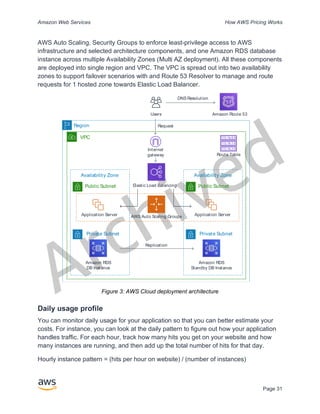
  • 22.
    Archived Amazon Web ServicesHow AWS Pricing Works Page 17 intermittent connectivity (such as manufacturing, industrial, and transportation) or in extremely remote locations (such as military or maritime operations) before shipping it back to AWS. These devices may also be rack mounted and clustered together to build larger, temporary installations. AWS Snowball has three pricing elements to consider: usage, device type, and term of use. First, understand your planned use case. Is it data transfer only, or will you be running compute on the device? You can use either device for data transfer or computing, but it is more cost-effective to use a Snowball Edge Storage Optimized for data transfer jobs. Second, choose your device, either Snowball Edge Storage Optimized or Snowball Edge Compute Optimized. You can also select the option to run GPU instances on Snowball Edge Compute Optimized for edge applications. For on-demand use, you pay a service fee per data transfer job, which includes 10 days of on-site Snowball Edge device usage. Shipping days, including the day the device is received and the day it is shipped back to AWS, are not counted toward the 10 days. After the 10 days, you pay a low per-day fee for each additional day you keep the device. For 1-year or 3-year commitments, please contact your sales team; you cannot make this selection in the AWS Console. Data transferred into AWS does not incur any data transfer fees, and standard pricing applies for data stored in the AWS Cloud. For pricing details, see AWS Snowball Pricing. AWS Snowmobile AWS Snowmobile moves up to 100 PB of data in a 45-foot long ruggedized shipping container and is ideal for multi-petabyte or Exabyte-scale digital media migrations and data center shutdowns. A Snowmobile arrives at the customer site and appears as a network-attached data store for more secure, high-speed data transfer. After data is transferred to Snowmobile, it is driven back to an AWS Region where the data is loaded into Amazon S3. Snowmobile pricing is based on the amount of data stored on the truck per month.
  • 23.
    Archived Amazon Web ServicesHow AWS Pricing Works Page 18 Snowmobile can be made available for use with AWS services in select AWS regions. Please follow up with AWS Sales to discuss data transport needs for your specific region and schedule an evaluation. For pricing details, see AWS Snowmobile Pricing. Amazon RDS Amazon RDS is a web service that makes it easy to set up, operate, and scale a relational database in the cloud. It provides cost-efficient and resizable capacity while managing time-consuming database administration tasks, so you can focus on your applications and business. Estimating Amazon RDS costs The factors that drive the costs of Amazon RDS include: • Clock hours of server time: Resources incur charges when they are running— for example, from the time you launch a DB instance until you terminate it. • Database characteristics: The physical capacity of the database you choose will affect how much you are charged. Database characteristics vary depending on the database engine, size, and memory class. • Database purchase type: When you use On-Demand DB Instances, you pay for compute capacity for each hour your DB Instance runs, with no required minimum commitments. With Reserved DB Instances, you can make a low, one- time, upfront payment for each DB Instance you wish to reserve for a 1- or 3-year term. • Number of database instances: With Amazon RDS, you can provision multiple DB instances to handle peak loads. • Provisioned storage: There is no additional charge for backup storage of up to 100 percent of your provisioned database storage for an active DB Instance. After the DB Instance is terminated, backup storage is billed per GB per month. • Additional storage: The amount of backup storage in addition to the provisioned storage amount is billed per GB per month.
  • 24.
    Archived Amazon Web ServicesHow AWS Pricing Works Page 19 • Long Term Retention: Long Term Retention is priced per vCPU per month for each database instance in which it is enabled. The price depends on the RDS instance type used by your database, and may vary by region. If Long Term Retention is turned off, performance data older than 7 days is deleted. • API Requests: The API free tier includes all calls from the Performance Insights dashboard as well as 1 million calls outside of the Performance Insights dashboard. API requests outside of the Performance Insights free tier are charged at $0.01 per 1,000 requests. • Deployment type: You can deploy your DB Instance to a single Availability Zone (analogous to a standalone data center) or multiple Availability Zones (analogous to a secondary data center for enhanced availability and durability). Storage and I/O charges vary, depending on the number of Availability Zones you deploy to. • Data transfer: Inbound data transfer is free, and outbound data transfer costs are tiered. Depending on your application’s needs, it’s possible to optimize your costs for Amazon RDS database instances by purchasing reserved Amazon RDS database instances. To purchase Reserved Instances, you make a low, one-time payment for each instance you want to reserve and in turn receive a significant discount on the hourly usage charge for that instance. For more information, see Amazon RDS pricing. Amazon DynamoDB Amazon DynamoDB is a fast and flexible NoSQL database service for all applications that need consistent, single-digit millisecond latency at any scale. It is a fully managed cloud database and supports both document and key-value store models. Its flexible data model, reliable performance, and automatic scaling of throughput capacity make it a great fit for mobile, web, games, ad tech, IoT, and many other applications. Amazon DynamoDB pricing at a glance DynamoDB charges for reading, writing, and storing data in your DynamoDB tables, along with any optional features you choose to enable. DynamoDB has two capacity modes and those come with specific billing options for processing reads and writes on your tables: on-demand capacity mode and provisioned capacity mode.
  • 25.
    Archived Amazon Web ServicesHow AWS Pricing Works Page 20 DynamoDB read requests can be either strongly consistent, eventually consistent, or transactional. On-Demand Capacity Mode With on-demand capacity mode, you pay per request for the data reads and writes your application performs on your tables. You do not need to specify how much read and write throughput you expect your application to perform as DynamoDB instantly accommodates your workloads as they ramp up or down. DynamoDB charges for the core and optional features of DynamoDB. Table 1: Amazon DynamoDB On-Demand Pricing Core Feature Billing unit Details Read request unit (RRU) API calls to read data from your table are billed in RRU. A strongly consistent read request of up to 4 KB requires one RRU. For items larger than 4 KB, additional RRUs are required. For items up to 4 KB, An eventually consistent read request requires one-half RRU. A transactional read request requires two RRUs Write request unit (WRU) Each API call to write data to your table is a WRU A standard WRU can write an item up to 1KB. Items larger than 1 KB require additional WRUs. Transactional write requires two WRUs. Example RRU: • A strongly consistent read request of an 8 KB item requires two read request units • An eventually consistent read of an 8 KB item requires one read request unit. • A transactional read of an 8 KB item requires four read request units. Example WRU: • A write request of a 1 KB item requires one WRU • A write request of a 3 KB item requires three WRUs. • A transactional write request of a 3 KB item requires six WRUs.
  • 26.
    Archived Amazon Web ServicesHow AWS Pricing Works Page 21 For details on how DynamoDB charges for the core and optional features of DynamoDB, see Pricing for On-Demand Capacity. Provisioned Capacity Mode With provisioned capacity mode, you specify the number of data reads and writes per second that you require for your application. You can use auto scaling to automatically adjust your table’s capacity based on the specified utilization rate to ensure application performance while reducing costs. Table 2: Amazon DynamoDB Provisioned Capacity Mode Core Feature Billing unit Details Read Capacity unit (RCU) API calls to read data from your table is an RCU. Items up to 4 KB in size, one RCU can perform one strongly consistent read request per second. For Items larger than 4 KB require additional RCUs For items up to 4 KB, One RCU can perform two eventually consistent read requests per second Transactional read requests require two RCUs to perform one read per second Write Capacity Unit (WCU) Each API call to write data to your table is a write request For items up to 1 KB in size, one WCU can perform one standard write request per second Items larger than 1 KB require additional WCUs. Transactional write requests require two WCUs to perform one write per second for items up to 1 KB Data Storage DynamoDB monitors the size of tables continuously to determine storage charges DynamoDB measures the size of your billable data by adding the raw byte size of the data you upload plus a per-item storage overhead of 100 bytes to account for indexing. First 25 GB stored per month is free Example WCU • A standard write request of a 1 KB item would require one WCU. • A standard write request of a 3 KB item would require three WCUs.
  • 27.
    Archived Amazon Web ServicesHow AWS Pricing Works Page 22 • A transactional write request of a 3 KB item would require six WCUs. Example RCU: • A strongly consistent read of an 8 KB item would require two RCUs. • An eventually consistent read of an 8 KB item would require one RCU. • A transactional read of an 8 KB item would require four RCUs. For details see Amazon DynamoDB pricing. Data transfer There is no additional charge for data transferred between Amazon DynamoDB and other AWS services within the same Region. Data transferred across Regions (e.g., between Amazon DynamoDB in the US East (Northern Virginia) Region and Amazon EC2 in the EU (Ireland) Region) will be charged on both sides of the transfer. Global tables Global tables builds on DynamoDB’s global footprint to provide you with a fully managed, multi-region, and multi-master database that provides fast local read and write performance for massively scaled, global applications. Global tables replicates your Amazon DynamoDB tables automatically across your choice of AWS Regions. DynamoDB charges for global tables usage based on the resources used on each replica table. Write requests for global tables are measured in replicated WCUs instead of standard WCUs. The number of replicated WCUs consumed for replication depends on the version of global tables you are using. Read requests and data storage are billed consistently with standard tables (tables that are not global tables). If you add a table replica to create or extend a global table in new Regions, DynamoDB charges for a table restore in the added regions per gigabyte of data restored. Cross-Region replication and adding replicas to tables that contain data also incur charges for data transfer out. For more information, see Best Practices and Requirements for Managing Global Tables. Learn more about pricing for additional DynamoDB features at the Amazon DynamoDB pricing page.
  • 28.
    Archived Amazon Web ServicesHow AWS Pricing Works Page 23 Amazon CloudFront Amazon CloudFront is a global content delivery network (CDN) service that securely delivers data, videos, applications, and APIs to your viewers with low latency and high transfer speeds. Amazon CloudFront pricing Amazon CloudFront charges are based on the data transfers and requests used to deliver content to your customers. There are no upfront payments or fixed platform fees, no long-term commitments, no premiums for dynamic content, and no requirements for professional services to get started. There is no charge for data transferred from AWS services such as Amazon S3 or Elastic Load Balancing. And, best of all, you can get started with CloudFront for free. When you begin to estimate the cost of Amazon CloudFront, consider the following: • Data Transfer OUT (Internet/Origin): The amount of data transferred out of your Amazon CloudFront edge locations. • HTTP/HTTPS Requests: The number and type of requests (HTTP or HTTPS) made and the geographic region in which the requests are made. • Invalidation Requests: No additional charge for the first 1,000 paths requested for invalidation each month. Thereafter, $0.005 per path requested for invalidation. • Field Level Encryption Requests: Field-level encryption is charged based on the number of requests that need the additional encryption; you pay $0.02 for every 10,000 requests that CloudFront encrypts using field-level encryption in addition to the standard HTTPS request fee. • Dedicated IP Custom SSL: $600 per month for each custom SSL certificate associated with one or more CloudFront distributions using the Dedicated IP version of custom SSL certificate support. This monthly fee is pro-rated by the hour. For more information, see Amazon CloudFront pricing. Amazon Kendra Amazon Kendra is a highly accurate and easy to use enterprise search service that’s powered by machine learning. Amazon Kendra enables developers to add search
  • 29.
    Archived Amazon Web ServicesHow AWS Pricing Works Page 24 capabilities to their applications so their end users can discover information stored within the vast amount of content spread across their company. When you type a question, the service uses machine learning algorithms to understand the context and return the most relevant results, whether that be a precise answer or an entire document. For example, you can ask a question like "How much is the cash reward on the corporate credit card?” and Amazon Kendra will map to the relevant documents and return a specific answer like “2%”. Amazon Kendra pricing With the Amazon Kendra service, you pay only for what you use. There is no minimum fee or usage requirement. Once you provision Amazon Kendra by creating an index, you are charged for Amazon Kendra hours from the time an index is created until it is deleted. Partial index instance-hours are billed in one-second increments. This applies to Kendra Enterprise Edition and Kendra Developer Edition. Amazon Kendra comes in two editions. Kendra Enterprise Edition provides a high- availability service for production workloads. Kendra Developer Edition provides developers with a lower-cost option to build a proof-of-concept; this edition is not recommended for production workloads. You can get started for free with the Amazon Kendra Developer Edition that provides free usage of up to 750 hours for the first 30 days. Connector usage does not qualify for free usage, regular run time and scanning pricing will apply. If you exceed the free tier usage limits, you will be charged the Amazon Kendra Developer Edition rates for the additional resources you use. See Amazon Kendra Pricing for pricing details. Amazon Macie Amazon Macie is a fully managed data security and data privacy service that uses machine learning and pattern matching to discover and protect your sensitive data in AWS. Amazon Macie uses machine learning and pattern matching to cost efficiently discover sensitive data at scale. Macie automatically detects a large and growing list of sensitive data types, including personally identifiable information (PII) such as names, addresses, and credit card numbers. It also gives you constant visibility of the data security and data privacy of your data stored in Amazon S3. Macie is easy to set up with one click in the AWS Management Console or a single API call. Macie provides multi- account support using AWS Organizations, so you can enable Macie across all of your accounts with a few clicks.
  • 30.
    Archived Amazon Web ServicesHow AWS Pricing Works Page 25 Amazon Macie pricing With Amazon Macie, you are charged based on the number of Amazon S3 buckets evaluated for bucket-level security and access controls and the quantity of data processed for sensitive data discovery. When you enable Macie, the service will gather detail on all of your S3 buckets, including bucket names, size, object count, resource tags, encryption status, access controls, and region placement. Macie will then automatically and continually evaluate all of your buckets for security and access control, alerting you to any unencrypted buckets, publicly accessible buckets, or buckets shared with an AWS account outside of your organization. You are charged based on the total number of buckets in your account after the 30-day free trial and charges are pro-rated per day. After enabling the service, you are able to configure and submit buckets for sensitive data discovery. This is done by selecting the buckets you would like scanned, configuring a one-time or periodic sensitive data discovery job, and submitting it to Macie. Macie only charges for the bytes processed in supported object types it inspects. As part of Macie sensitive data discovery jobs, you will also incur the standard Amazon S3 charges for GET and LIST requests. See Requests and data retrievals pricing on the Amazon S3 pricing page. Free tier | Sensitive data discovery For sensitive data discovery jobs, the first 1 GB processed every month in each account comes at no cost. For each GB processed beyond the first 1 GB, charges will occur. Please refer this link for pricing details. *You are only charged for jobs you configure and submit to the service for sensitive data discovery Amazon Kinesis Amazon Kinesis makes it easy to collect, process, and analyze real-time, streaming data so you can get timely insights and react quickly to new information. Amazon Kinesis offers key capabilities to cost-effectively process streaming data at any scale, along with the flexibility to choose the tools that best suit the requirements of your application. With Amazon Kinesis, you can ingest real-time data such as video, audio, application logs, website clickstreams, and IoT telemetry data for machine learning, analytics, and other applications. Amazon Kinesis enables you to process and analyze data as it arrives and respond instantly instead of having to wait until all your data is collected before the processing can begin.
  • 31.
    Archived Amazon Web ServicesHow AWS Pricing Works Page 26 Amazon Kinesis Data Streams is a scalable and durable real-time data streaming service that can continuously capture gigabytes of data per second from hundreds of thousands of sources. See Amazon Kinesis Data Streams Pricing for pricing details. Amazon Kinesis Data Firehose is the easiest way to capture, transform, and load data streams into AWS data stores for near real-time analytics with existing business intelligence tools. See Amazon Kinesis Data Firehose Pricing for pricing details. Amazon Kinesis Data Analytics is the easiest way to process data streams in real time with SQL or Apache Flink without having to learn new programming languages or processing frameworks. See Amazon Kinesis Data Analytics Pricing for pricing details. Amazon Kinesis Video Streams Amazon Kinesis Video Streams makes it easy to securely stream media from connected devices to AWS for storage, analytics, machine learning (ML), playback, and other processing. Kinesis Video Streams automatically provisions and elastically scales all the infrastructure needed to ingest streaming media from millions of devices. It durably stores, encrypts, and indexes media in your streams, and allows you to access your media through easy-to-use APIs. Kinesis Video Streams enables you to quickly build computer vision and ML applications through integration with Amazon Rekognition Video, Amazon SageMaker, and libraries for ML frameworks such as Apache MxNet, TensorFlow, and OpenCV. For live and on-demand playback, Kinesis Video Streams provides fully-managed capabilities for HTTP Live Streaming (HLS) and Dynamic Adaptive Streaming over HTTP (DASH). Kinesis Video Streams also supports ultra-low latency two-way media streaming with WebRTC, as a fully managed capability. Kinesis Video Streams is ideal for building media streaming applications for camera- enabled IoT devices and for building real-time computer vision-enabled ML applications that are becoming prevalent in a wide range of use cases. Amazon Kinesis Video Streams pricing You pay only for the volume of data you ingest, store, and consume in your video streams. WebRTC pricing If you use WebRTC capabilities, you pay for the number of signaling channels that are active in a given month, number of signaling messages sent and received, and TURN streaming minutes used for relaying media. A signaling channel is considered active in
  • 32.
    Archived Amazon Web ServicesHow AWS Pricing Works Page 27 a month if at any time during the month a device or an application connects to it. TURN streaming minutes are metered in 1-minute increments. Note: You will incur standard AWS data transfer charges when you retrieve data from your video streams to destinations outside of AWS over the internet. See Amazon Kinesis Video Streams Pricing for pricing details. AWS IoT Events AWS IoT Events helps companies continuously monitor their equipment and fleets of devices for failure or changes in operation and trigger alerts to respond when events occur. AWS IoT Events recognizes events across multiple sensors to identify operational issues, such as equipment slowdowns, and generates alerts such as notifying support teams of an issue. AWS IoT Events offers a managed complex event detection service on the AWS Cloud, accessible through the AWS IoT Events console, a browser-based GUI where you can define and manage your event detectors, or direct ingest application program interfaces (APIs), code that allows two applications to communicate with each other. Understanding equipment or a process based on telemetry from a single sensor is often not possible; a complex event detection service will combine multiple sources of telemetry to gain full insight into equipment and processes. You define conditional logic and states inside AWS IoT Events to evaluate incoming telemetry data to detect events in equipment or a process. When AWS IoT Events detects an event, it can trigger pre-defined actions in another AWS service, such as sending alerts through Amazon Simple Notification Service (Amazon SNS). AWS IoT Events pricing With AWS IoT Events, you pay only for what you use with no minimum fees or mandatory service usage. When you create an event detector in AWS IoT Events, you apply conditional logic such as if-then-else statements to understand events, such as when a motor might be stuck. You are only charged for each message that is evaluated in AWS IoT Events. See AWS IoT Events Pricing for pricing details. The AWS Free Tier is available to you for 12 months starting on the date you create your AWS account. When your free usage expires or if your application use exceeds the free usage tiers, you simply pay the above rates. Your usage is calculated each month across all regions and is automatically applied to your bill. Note that free usage does not accumulate from one billing period to the next.
  • 33.
    Archived Amazon Web ServicesHow AWS Pricing Works Page 28 AWS Cost Optimization AWS enables you to take control of cost and continuously optimize your spend, while building modern, scalable applications to meet your needs. AWS's breadth of services and pricing options offer the flexibility to effectively manage your costs and still keep the performance and capacity you require. AWS is dedicated to helping customers achieve highest saving potential. During this period of crisis, we will work with you to develop a plan that meets your financial needs. Get started with the steps below that will have an immediate impact on your bill today. Choose the right pricing models Use Reserved Instances (RI) to reduce Amazon RDS, Amazon Redshift, Amazon ElastiCache, and Amazon Elasticsearch costs For certain services like Amazon EC2 and Amazon RDS, you can invest in reserved capacity. With Reserved Instances, you can save up to 72% over equivalent on-demand capacity. Reserved Instances are available in 3 options – All up-front (AURI), partial up- front (PURI) or no upfront payments (NURI). Use the recommendations provided in AWS Cost Explorer RI purchase recommendations, which is based on your Amazon RDS, Amazon Redshift, Amazon ElastiCache, and Elasticsearch usage. Amazon EC2 Cost Savings Use Amazon EC2 Spot Instances to reduce EC2 costs or use Compute Savings Plans to reduce EC2, Fargate and Lambda cost. Match Capacity with Demand Identify Amazon EC2 instances with low-utilization and reduce cost by stopping or rightsizing Use AWS Cost Explorer Resource Optimization to get a report of EC2 instances that are either idle or have low utilization. You can reduce costs by either stopping or downsizing these instances. Use AWS Instance Scheduler to automatically stop instances. Use AWS Operations Conductor to automatically resize the EC2 instances (based on the recommendations report from Cost Explorer).
  • 34.
    Archived Amazon Web ServicesHow AWS Pricing Works Page 29 Identify Amazon RDS, Amazon Redshift instances with low utilization and reduce cost by stopping (RDS) and pausing (Redshift) Use the Trusted Advisor Amazon RDS Idle DB instances check, to identify DB instances which have not had any connection over the last 7 days. To reduce costs, stop these DB instances using the automation steps described in this blog post. For Redshift, use the Trusted Advisor Underutilized Redshift clusters check, to identify clusters which have had no connections for the last 7 days, and less than 5% cluster wide average CPU utilization for 99% of the last 7 days. To reduce costs, pause these clusters using the steps in this blog. Analyze Amazon DynamoDB usage and reduce cost by leveraging Autoscaling or On-demand Analyze your DynamoDB usage by monitoring 2 metrics, ConsumedReadCapacityUnits and ConsumedWriteCapacityUnits, in CloudWatch. To automatically scale (in and out) your DynamoDB table, use the AutoScaling feature. Using the steps here, you can enable AutoScaling on your existing tables. Alternately, you can also use the on- demand option. This option allows you to pay-per-request for read and write requests so that you only pay for what you use, making it easy to balance costs and performance. Implement processes to identify resource waste Identify Amazon EBS volumes with low-utilization and reduce cost by snapshotting then deleting them EBS volumes that have very low activity (less than 1 IOPS per day) over a period of 7 days indicate that they are probably not in use. Identify these volumes using the Trusted Advisor Underutilized Amazon EBS Volumes Check. To reduce costs, first snapshot the volume (in case you need it later), then delete these volumes. You can automate the creation of snapshots using the Amazon Data Lifecycle Manager. Follow the steps here to delete EBS volumes. Analyze Amazon S3 usage and reduce cost by leveraging lower cost storage tiers Use S3 Analytics to analyze storage access patterns on the object data set for 30 days or longer. It makes recommendations on where you can leverage S3 Infrequently Accessed (S3 IA) to reduce costs. You can automate moving these objects into lower cost storage tier using Life Cycle Policies. Alternately, you can also use S3 Intelligent-
  • 35.
    Archived Amazon Web ServicesHow AWS Pricing Works Page 30 Tiering, which automatically analyzes and moves your objects to the appropriate storage tier. Review networking and reduce costs by deleting idle load balancers Use the Trusted Advisor Idle Load Balancers check to get a report of load balancers that have RequestCount of less than 100 over the past 7 days. Then, use the steps here, to delete these load balancers to reduce costs. Additionally, use the steps provided in this blog, review your data transfer costs using Cost Explorer. AWS Support Plan Pricing AWS Support provides a mix of tools and technology, people, and programs designed to proactively help you optimize performance, lower costs, innovate faster and focused on solving some of the toughest challenges that hold you back in your cloud journey. There are three types of support plans available: Developer, Business, and Enterprise. For more details, see Compare AWS Support Plans and AWS Support Plan Pricing. Cost calculation examples The following sections use the AWS Pricing Calculator to provide example cost calculations for two use cases. AWS Cloud cost calculation example This example is a common use case of a dynamic website hosted on AWS using Amazon EC2, AWS Auto Scaling, and Amazon RDS. The Amazon EC2 instance runs the web and application tiers, and AWS Auto Scaling matches the number of instances to the traffic load. Amazon RDS uses one DB instance for its primary storage, and this DB instance is deployed across multiple Availability Zones. Architecture Elastic Load Balancing balances traffic to the Amazon EC2 Instances in an AWS Auto Scaling group, which adds or subtracts Amazon EC2 Instances to match load. Deploying Amazon RDS across multiple Availability Zones enhances data durability and availability. Amazon RDS provisions and maintains a standby in a different Availability Zone for automatic failover in the event of outages, planned or unplanned. The following illustration shows the example architecture for a dynamic website using Amazon EC2,
  • 36.
    Archived Amazon Web ServicesHow AWS Pricing Works Page 31 AWS Auto Scaling, Security Groups to enforce least-privilege access to AWS infrastructure and selected architecture components, and one Amazon RDS database instance across multiple Availability Zones (Multi AZ deployment). All these components are deployed into single region and VPC. The VPC is spread out into two availability zones to support failover scenarios with and Route 53 Resolver to manage and route requests for 1 hosted zone towards Elastic Load Balancer. Figure 3: AWS Cloud deployment architecture Daily usage profile You can monitor daily usage for your application so that you can better estimate your costs. For instance, you can look at the daily pattern to figure out how your application handles traffic. For each hour, track how many hits you get on your website and how many instances are running, and then add up the total number of hits for that day. Hourly instance pattern = (hits per hour on website) / (number of instances) VPC Availability Zone Private Subnet Amazon RDS DB Instance Replication Public Subnet Application Server Elastic Load Balancing Amazon Route 53 Internet gateway AWS Auto Scaling Groups Region Availability Zone Private Subnet Amazon RDS Standby DB Instance Public Subnet Application Server Route Table Users DNS Resolution Request
  • 37.
    Archived Amazon Web ServicesHow AWS Pricing Works Page 32 Examine the number of Amazon EC2 instances that run each hour, and then take the average. You can use the number of hits per day and the average number of instances for your calculations. Daily profile = SUM(Hourly instance pattern) / 24 Amazon EC2 cost breakdown The following table shows the characteristics for Amazon EC2 used for this dynamic site in the US East Region. Characteristic Estimated Usage Description Utilization 100% All infrastructure components run 24 hour per day, 7 days per week Instance t3a.xlarge 16 GB memory, 4 vCPU Storage Amazon EBS SSD gp2 1 EBS volume per instance with 30 GB of storage per volume Data backup Daily EBS snapshots 1 EBS volume per instance with 30 GB of storage per volume Data transfer Data in: 1 Tb/month Data out: 1 Tb/month 10% incremental change per day Instance scale 4 On average per day, there are 4 instances running Load Balancing 20 Gb/Hour Elastic Load Balancing is used 24 hours per day, 7 days per week. It processes a total of 20 Gb/Hour (data in + data out) Database MySQL, db.m5.large instance with 8 GB memory, 2 vCPUs, 100 GB storage Multi-AZ deployment with synchronous standby replica in separate Availability Zone The total cost for one month is the sum of the cost of the running services and data transfer out, minus the AWS Free Tier discount. We calculated the total cost using the AWS Pricing Calculator.
  • 38.
    Archived Amazon Web ServicesHow AWS Pricing Works Page 33 Table 3: Cost breakdown Service Monthly Annually Configuration Elastic Load Balancing $87.60 $1051.20 Number of Network Load Balancers (1), Processed bytes per NLB for TCP (20 GB per hour) Amazon EC2 $439.16 $5269.92 Operating system (Linux), Quantity (4), Storage for each EC2 instance (General Purpose SSD (gp2)), Storage amount (30 GB), Instance type (t3a.xlarge) Amazon Elastic IP address $0 $0 Number of EC2 instances (1), Number of EIPs per instance (1) Amazon RDS for MySQL $272.66 $ 3271.92 Quantity (1) db.m5.large, Storage for each RDS instance (General Purpose SSD [gp2]), Storage amount (100 GB) Amazon Route 53 $183.00 $2,196.00 Hosted Zones (1), Number of Elastic Network Interfaces (2), Basic Checks Within AWS (0) Amazon Virtual Private Cloud (Amazon VPC) $92.07 $1,104.84 Data Transfer cost, Inbound (from: Internet) 1 TB per month Outbound (to: Internet) 1 TB per month Intra-Region 0 TB per month Hybrid cloud cost calculation example This example is a hybrid cloud use case of AWS Outposts deployed on-premises connected to AWS Cloud using AWS Direct Connect. AWS Outposts extends the existing VPC from the selected AWS Region to the customer data center. Selected AWS services required to run on-premises (i.e. Amazon EKS) are available at AWS Outposts inside the Outpost Availability Zone, deployed inside a separate subnet. Hybrid architecture description The following example shows Outpost deployment with distributed Amazon EKS service extending to on-premises environments.
  • 39.
    Archived Amazon Web ServicesHow AWS Pricing Works Page 34 Figure 4: AWS Outpost with Amazon EKS Control Plane and Data Plane Architecture Architecture • The Control Plane for Amazon EKS remains in the Region, which means in the case of Amazon EKS, the Kubernetes Primary node will stay in the Availability Zone deployed to the Region (not on the Outposts). • The Amazon EKS worker nodes are deployed on the Outpost, controlled by Primary node deployed in the Availability Zone. Traffic Flow • The EKS Control Plane Traffic between EKS, AWS metrics and Amazon CloudWatch transits third-party network (AWS Direct Connect/AWS Site-to-Site VPN to the AWS Region). • The Application / Data Traffic is isolated from Control plane and distributed between Outposts and local network. • Distribution of AMIs (deployed on Outpost) is driven by central Amazon ECR in Region, however all images are cached locally on the Outpost. Load Balancers • Application Load Balancer is supported on Outpost as the only local Elastic Load Balancing available Outpost AWS Region VPC Availability Zone Subnet Primary Node EKS Control Plane Corporate DC Availability Zone Subnet Subnet Worker Nodes Primary Node 3rd Party 3rd Party AWS Direct Connect AWS Cloud
  • 40.
    Archived Amazon Web ServicesHow AWS Pricing Works Page 35 • The Network Load Balancer and Classic Load Balancer stay in the Region, but targets deployed at AWS Outposts are supported (including Application Load Balancer). • On-premises (inside corporate DC) Load Balancers (i.e. F5 BIG IP, NetScaler) can be deployed and routed via Local Gateway (inside AWS Outpost). Hybrid cloud components selection Customers can choose from a range of pre-validated Outposts configurations (Figure 2) offering a mix of EC2 and EBS capacity designed to meet a variety of application needs. AWS can also work with customer to create a customized configuration designed for their unique application needs. To consider correct configuration, make sure to verify deployment and operational parameters of the selected physical location for AWS Outpost rack installation. The following example represents a set of parameters highlighting facility, networking and power requirements needed for location validation (selected parameter: example value): Purchase Option: All Upfront Term: 3 Years Max on premises power capacity: 20kVA Max weight: 2,500lb Networking uplink speed: 100Gbps Number of Racks: 1 Average Power Draw per Rack: 9.34 Constraint (power draw/weight): Power Draw Total Outpost vCPU: 480 Total Outpost Memory: 2,496GiB In addition to minimum parameters, you should make deployment assumptions prior to any order to minimize performance and security impact on existing infrastructure landscape, deeply affecting existing cost of on-premises infrastructure (selected question: example assumption).
  • 41.
    Archived Amazon Web ServicesHow AWS Pricing Works Page 36 What is the speed of the uplink ports from your Outposts Network Devices (OND): 40 or 100Gbps How many uplinks per Outpost Networking Device (OND) will you use to connect the AWS Outpost to your network: 4 uplinks How will the Outpost service link (the Outpost control plane) access AWS services: Service link will access AWS over a Direct Connect public VIF Is there a firewall between Outposts and the Internet: Yes These assumptions together with selected components will further lead to an architecture with higher granularity of details influencing overall cost of a hybrid cloud architecture deployment (Figure 5). Figure 5: Hybrid cloud architecture deployment example
  • 42.
    Archived Amazon Web ServicesHow AWS Pricing Works Page 37 Hybrid cloud architecture cost breakdown Hybrid cloud cost include multiple layers and components deployed across the AWS cloud and on-premises location. When you use AWS Managed Services on AWS Outposts, you are charged only for the services based on usage by instance-hour and excludes underlying EC2 instance and EBS storage charges. Breakdown of these services is showcased in next sections for a 3-year term with partial upfront, all upfront, and no upfront options (EC2 and EBS capacity). Price includes delivery, installation, servicing and removal at the end of term – there is no additional charge. Outpost rack charges (customized example) EC2 Charges • c5.24xlarge, 11 TB o $7,148.67 monthly; o $123,650.18 upfront, $3,434.73 monthly o $239,761.41 upfront • 1 m5.24xlarge, 11 TB o $7,359.69 monthly o $127,167.06 upfront, $3,532.42 monthly o $246,373.14 upfront EBS Charges • 11 TB EBS tier is priced at $0.30/GB monthly Conclusion Although the number and types of services offered by AWS have increased dramatically, our philosophy on pricing has not changed. You pay as you go, pay for what you use, pay less as you use more, and pay even less when you reserve capacity. All these options are empowering AWS customers to choose they preferred pricing model and increase flexibility of their cost strategy.
  • 43.
    Archived Amazon Web ServicesHow AWS Pricing Works Page 38 Projecting costs for a use case, such as web application hosting, can be challenging, because a solution typically uses multiple features across multiple AWS products, which in turn means there are more factors and purchase options to consider. The best way to estimate costs is to examine the fundamental characteristics for each AWS product, estimate your usage for each characteristic, and then map that usage to the prices posted on the website. You can use the AWS Pricing Calculator to estimate your monthly bill. The calculator provides a per-service cost breakdown, as well as an aggregate monthly estimate. You can also use the calculator to see an estimation and breakdown of costs for common solutions. Remember, you can get started with most AWS services at no cost using the AWS Free Tier. Contributors Contributors to this document include: • Vladimir Baranek, Principal Partner Solution Architect, Amazon Web Services • Senthil Arumugam, Senior Partner Solutions Architect, Amazon Web Services • Mihir Desai, Senior Partner Solutions Architect, Amazon Web Services Further Reading For additional information, see: • AWS Pricing • AWS Pricing Calculator • AWS Free Tier • AWS Cost Management • AWS Cost and Usage Reports • AWS Cloud Economics Center
  • 44.
    Archived Amazon Web ServicesHow AWS Pricing Works Page 39 Document Revisions Date Description October 2020 Updated and added service pricing details, options, calculation, and examples. June 2018 First publication