0
CONFIDENTIAL Copyright 2011 LEVEL Studios. This document is confidential and proprietary property.
Please do not forward of release this document without prior consent from LEVEL Studios.
AVG | News Channel Content Governance Guide
07.28.2011
The AVG News Channel Governance Plan is a guidebook outlining the
administration, maintenance, and support of content. It identifies lines of
ownership for content and social media teams, defining who is responsible for
what areas of the system.
The primary goals of this project are to:
 Create an extensible, digital News Channel that brings to life the new
communications strategy for AVG
 Ensure content is managed and created in accordance with its designed intent
to prevent it from becoming an unmanageable system
 Communicate the need for an internal infrastructure to govern and support all
AVG content for all target audiences
 Document initial governing policies, procedures and best practices
 Provide a workflow and approval process specific to the new site
AVG News Channel | Project Objective
AVG News Channel
Contents
I. Introduction - Overview
II. Content Publication Roles and Workflow Recommendation
III. Content Workflow
IV. Concise WordPress Tutorial
V. Publishing Guide
VI. Brand: Recommended Tone of Voice and Messaging
VII. Online Writing Best Practices
VIII.Summary
Introduction
 The AVG News Channel Content Governance Guide is a resource for the writers and
editors developing copy for AVG and its associated digital properties.
 By establishing copywriting guidelines, you’re creating a consistent messaging strategy
across your lines of business and ensuring that all copy on the site is:
• Superior in quality and professional in nature
• Consistent in tone and voice
• Engaging to the online customer and drives user action
• Reflective of AVG brand standards and current online writing best practices
• Meets business objectives and user goals
 This guide has three components to guide content developers:
1. Content Publication Roles and Workflow Recommendation
2. AVG Recommended Tone of Voice
3. Online Writing Best Practices
Roles
The standard Web editorial team is composed of:
• A Managing Editor who establishes the digital content strategy, oversees the
development and promotion of all content across the digital properties, works with
the lines of businesses to defines the content requirements and establishes
governance
• A staff of writers, editors and/or producers who report to the Managing Editor
and are individually responsible for the development and maintenance of content
within a designated channel of the online property
• An established list of subject matter experts across the various lines of business
• Additional contributors include a social media strategist, a SEO specialist and
media producers
Content Publication Roles and Workflow Recommendation
Benefits
By establishing a Managing Editor, you are ensuring that all content integrated into
the digital properties is:
• Timely
• Relevant
• On brand
• Reflects business and customer needs
• Cohesive in thought and style
• Appropriately promoted across social media properties (Facebook, Twitter,
YouTube, LinkedIn, RSS feeds)
To effectively achieve this, it is critical to assign your staff of
Editors/Writers/Producers each a channel within the digital property to maintain on a
daily basis, like a “beat reporter.” These items include the Press Wall, Featured Wall,
Tech Wall, Conversations Wall and Government Wall. This individual will:
• Manage the content needs and relationships with the marketing and product
teams (subject matter experts)
• Be aware of ongoing and upcoming initiatives
• Identify opportunities to promote across channels
The Social Media Strategist, a SEO specialist and Media Producer assists to ensure
that content is interactive, searchable and engaging.
Benefits of Defined Roles
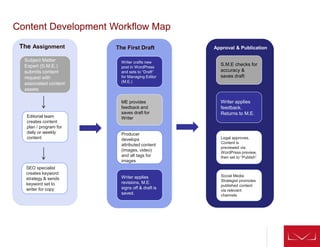
Content Development Workflow Map
Subject Matter
Expert (S.M.E.)
submits content
request with
associated content
assets
Editorial team
creates content
plan / program for
daily or weekly
content
Writer crafts new
post in WordPress
and sets to “Draft”
for Managing Editor
(M.E.)
ME provides
feedback and
saves draft for
Writer
Writer applies
revisions, M.E.
signs off & draft is
saved.
S.M.E checks for
accuracy &
saves draft
Writer applies
feedback.
Returns to M.E.
SEO specialist
creates keyword
strategy & sends
keyword set to
writer for copy
Producer
develops
attributed content
(images, video)
and alt tags for
images
Legal approves.
Content is
previewed via
WordPress preview,
then set to “Publish”
The Assignment The First Draft Approval & Publication
Social Media
Strategist promotes
published content
via relevant
channels
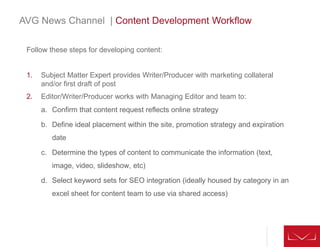
Follow these steps for developing content:
1. Subject Matter Expert provides Writer/Producer with marketing collateral
and/or first draft of post
2. Editor/Writer/Producer works with Managing Editor and team to:
a. Confirm that content request reflects online strategy
b. Define ideal placement within the site, promotion strategy and expiration
date
c. Determine the types of content to communicate the information (text,
image, video, slideshow, etc)
d. Select keyword sets for SEO integration (ideally housed by category in an
excel sheet for content team to use via shared access)
AVG News Channel | Content Development Workflow
AVG News Channel | WordPress Tutorial: First Draft
Create a New Post or First Draft by following these steps:
1. Writer crafts (or refines) the copy in WordPress. Click “Posts” for a list of all
blog posts (including drafts and published posts). Under the left hand side
dashboard, select “Add New” to create a new post. Write copy and integrate
SEO keywords within first 150 words. [Post length should not exceed 600
words.]
2. Select “Post Tags” from the left of the post for a list of existing tags for every
post created.
• Select “Categories” for the existing categories list to peruse and create new
categories for posts.
• Create a headline which will become the post’s permalink/URL. Fill in the
body copy and accompanying hyperlinks to previous posts or external
sites/sources.
• Write a brief excerpt of the post under “Excerpt” field which will appear as a
tease/opening sentence on each “Wall” prior to clicking on the full article.
• Select the appropriate category for the post. Categories appear on the right
hand side of the post. Select/check off applicable categories which map to
each “Wall.”
• Click “Save Draft” for the Managing Editor to review.
3. Once post is saved, the Managing Editor provides feedback / edits and saves
the draft for writer to apply revisions.
AVG News Channel | Content Workflow: Approval Process
Following content creation, follow these approval steps:
1. Once copy is approved by the Managing Editor and the associated content assets (video,
images, podcasts) have been recommended, the content is saved and the Subject Matter
Expert edits for accuracy.
• To add media, simply click on the “Add Media” gray icon above the Body Copy field. Follow
steps for each type of media. Upload to WordPress library and remember to use “alt tags”
for every image. Key in 1-2 common descriptive terms.
1. The Writer applies SEO tags – we recommend SEO-in-one pack plug-in. Writer can add tags
and send to the Managing Editor for final approval.
1. Content is reviewed and approved by Legal and Compliance. Copy and paste a draft of the post
via email if the Legal department doesn’t have a log in.
• Recommendation: Add Legal team members or reviewers to WordPress with Editor-level
access and permissions.
1. Finally, the Managing Editor will preview the post by clicking the “preview” button in the “publish”
box to the right of the post. If all copy, links, bylines, categories (Featured, Press, Tech,
Conversations, Government) tags and copy content assets look good, it’s time to select a
publication date.
• Under the “publish” box, you can either select a date for the content to be pushed live or
simply publish on the spot.
1. Once content is scheduled to publish, make sure the Social Media Strategist promotes the
content through the social media channels – Facebook, Twitter, LinkedIn, YouTube and other
channels. For the Conversations Wall, program/publish content based on relevance, timeliness
and
AVG News Channel | Content Workflow: WordPress
Summary of Roles:
WordPress has pre-defined Roles. Each Role is allowed to perform a set of tasks
called Capabilities. There are many Capabilities including publish_posts,
moderate_comments, and edit_users. The default Capabilities are pre-assigned to
each Role.
The tool that gives the blog owner this control is the ability to assign a Role to a
user. To minimize the amount of moderation needed and to streamline workflow
and created defined responsibilities, here’s what we recommend.
Suggested roles for AVG TEAM:
1. Subscriber – External, non-AVG
2. Contributor – Freelance Writer
3. Author – Online Writer, Producer
4. Editor – Online Writer, Producer, Legal team member, marketing team, SEO
Manager, Social Media Manager, SME
5. Administrator – Managing Editor
6. Super Admin – IT, Developer
11
• Super Admin - Someone with access to the blog network administration features
controlling the entire network. [Manage networks, themes, users, options, activate
and manage plug-ins, upload images and files.]
• Administrator - Someone who has access to all the administration features. [Adding
permissions / access for other users, changing pages, templates, moderate
comments, deleting posts, publishing posts, deleting users, activate plug-ins, delete
pages, manage categories and links, upload images and files.]
• Editor - Somebody who can publish and manage posts and pages as well as
manage other users' posts, etc. [Delete other posts, delete other pages, delete
published posts, edit pages and posts, manage categories and links, moderate
comments, upload images and files.]
• Author - Somebody who can publish and manage their own posts. [Delete posts,
delete published posts, edit posts, upload files.]
• Contributor - Somebody who can write and manage their posts but not publish
them. [Delete posts, edit posts, read posts.]
• Subscriber - Somebody who can only manage their profile and submit comments
and vote on posts.
AVG News Channel | Content Workflow: WordPress Roles
Benefits of a Publishing Calendar
 It is ideal to create a publishing calendar that represents reoccurring initiatives from the
marketing team and various lines of business so your editorial team can ensure a timely,
best in class delivery of communications across the digital platform.
 Each time content is integrated into the site structure, assign an expiration date in
WordPress that establishes either when the content needs to expire or be reviewed for
accuracy and other edits.
 The Content Matrix is an ideal tool to leverage as a publishing calendar or in tandem
with an editorial calendar since it is a thorough list of the page inventory integrated into
the site. Ideal data to track is: frequency of update, refresh date, expiration date,
content owner, subject matter expert. [See Content Matrix for specifics.]
Using the matrix:
AVG News Channel | Publishing Guide
1313
AVG News Channel | Content Lifecycle
Content lifetime depends on how well you can effectively measure the lifecycle of a
piece of content. The common denominator for all long lasting content is inbound links.
Dayparting and Programming Content
On a daily basis, we recommend programming four new blog posts or pieces of
content per day. Follow day parting best practices for social media and site content for
each platform – website, tablet and mobile:
• Content consumption typically occurs toward the end of the day (6PM –
9PM*) for tablet users. Tablet users tend to skim and save content to read
later*
• Consumption remains fairly constant between 8AM – 4PM, the number of
reads grows more sharply until noon and then begin to fall off until after work.
• On a desktop, users are more susceptible to discovering additional content
throughout the day (8AM – 4PM*)
• The highest levels of social media consumption typically occur from 12pm –
1:45 pm* (lunch hour).
• iphone users: There are four major spikes when most of the reading on an
iPhone is done:
6am - Early morning, breakfast
9am - The morning commute, start of the work day
5pm – 6pm - End of the work day and the commute home
8pm – 10pm – Couch time, prime time, bed time
*Data source: 100 million articles saved by Read It Later users across all major web and mobile platforms.
141414
AVG News Channel | Content Lifecycle
Overview
Posts which receives a lot of inbound links maintain their popularity over time. Not only
in the search engines as one might assume, but it is also shared over longer periods of
time in Social Media channels. Content lifetime is central to all KPIs online today as it
is not the content itself, but how it is use. This is especially true if AVG has short-term
campaign cycles designed to increase audience reach over time.
Content lifetime is also effected to some extent by the type of infrastructure or
marketing it has to support it. Not all campaigns go viral, yet they can be highly
successful as they manage to target the correct audience. Evergreen content has the
longest shelf-life. Which is why featured content and content which creates a
conversational / “domino” effect will also be timely and relevant as well as easy to
maintain.
Examples of content and their corresponding life span:
• Press releases – expire within 30-90 days max
• News pieces – expire within 1 day, hyperlink new pieces with similar topics to older
news pieces
• Newsletters – expire and archive within 30-60 days
• Promotional items/campaigns – expire and archive within 1 week
151515
AVG News Channel | Content Lifecycle
For content with a short life span, you’ll need an internal schedule to review:
• Analytics data - to evaluate engagement (by segment)
• SEO data - (highest keywords overall, and landing page entrance and exit
keywords)
• Tags and categories audit - to add to your taxonomy or scale back
Other considerations:
• The ownership meta data, success criteria and time stamp that was applied to the
original content submission will help to manage content at the end of the content
life cycle.
• The “Retire Phase” or Archival process will provide the opportunity to prune
irrelevant content through archiving or deletion, keeping the content system clear of
irrelevant information, streamlining visitors’ ability to browse and search for content.
16161616
AVG News Channel | Branded Tone of Voice
Brand Personality and Tone
Each time a visitor comes to AVG.com, you are given an opportunity to convey
information and inspire trust in the AVG brand.
Regardless of audience-type, it’s important to have a consistent point of view and
tone of voice throughout AVG.com.
The two brand elements that shape the personality of the content placed are the
Single Most Important Takeaway and the Tone of Voice.
The SMIT or single most important takeaway is that singular message that all of
your online visitors, regardless of their audience type, should leave the site thinking.
It’s your brand impression and the primary message you’re striving to communicate
through all content. It’s the cohesive, thematic narrative that ties together the
content from the digital platform, print collateral and personal customer experience
into a cohesive brand message.
17
AVG News Channel | Tone of Voice
There are four primary brand attributes that create the AVG.com brand personality.
Not every piece of content can or should convey each personality attribute.
Therefore, consider the overall objective of the content and then use the most
appropriate tone of voice for the subject matter and audience.
AVG should be helpful, friendly and supportive. Communication should be honest
and clear. AVG is not corporate and doesn’t write corporate-speak.
The following attributes create AVG.com brand personality and establish the overall
tone of voice for the site. The brand attributes should be applied across digital
properties to ensure consistency in conversation.
• Trustworthy
• Cutting Edge
• Valuable
• Ease
18
AVG News Channel | Brand Personality Attributes
Trustworthy
AVG is your partner in digital peace of mind.
Copy communicates our passion to delivering optimum solutions without being grandiose or over-
explanatory. Language is succinct yet welcoming, positioning AVG as a knowledgeable, trusted and
essential business partner to Consumers, SMBs, Partners, Government Elites and Opinion Leaders.
Cutting Edge
AVG is an innovator of digital peace of mind.
Copy should communicate the value and benefit behind products, brands and solution sets. Language
positions AVG as providing customers with resourceful guidance from a trusted authority and thought
leader in the industry.
Value: Free & More
AVG meets all consumer, partner and SMB needs with products people don't even have to pay for.
There's no catch, and they consistently update products free of charge and offer outstanding customer
support.
Copy should communicate that value is delivered not just through product excellence, but through
exceptional customer support and product development. Language demonstrates that AVG proactively
and reactively gives the customer more than they expect, while delivering products which give bang for
your buck. Upbeat, punchy and crisp copy is ideal for Consumers, SMBs and Partners.
Ease
AVG is discreet, efficient and stealth – quietly protecting against threats without interrupting users.
Copy conveys the same effect as AVG’s core products. It’s a silent bodyguard, fighting off threats in the
background, allowing customers to proceed with their daily digital activities. AVG is quick and easy to
install, so much so one doesn’t even notice it’s running. Language communicates benefits in an
informative way which help improve a user’s sense of security and protection.
19
AVG News Channel | Tips to Convey Brand Personality
Follow these tips:
1. Avoid overused marketing phrases and corporate speak and vocabulary
that’s only meaningful to people within the company
2. Demonstrate how solution-based selling and partnerships have led to
stronger outcomes
3. When appropriate, have tailored conversations with specific audience types
4. Succinctly communicate value. Increase user confidence by respecting their
online time. What is the service? What is the benefit to me, the client?
5. Provide concrete details to back up claims of quality. Use current and
verifiable data
6. Put innovation in context, to communicate customer benefit
7. Maintain high-quality content on the site, i.e., well written copy, relevant, hi-
resolution images, with impeccable design and implementation. The site may
be a user’s primary experience of the brand, and it should represent the
same level of quality as its products and business practices. This is especially
true of the Press.
20
AVG News Channel | Monitoring Comments
Guidelines for general comment moderation and posting content to the Conversation Wall:
Recommendation: Consider adding the Akismet plug-in to WordPress to filter spam and
unwanted/vulgar comments.
Use these guidelines for comment moderation:
Post comment guidelines as a blog article to inform users about appropriateness.
Personal information
Comments which include personally identifiable information such as email addresses and last
names are not recommended.
Links
Monitor and remove comments with links that direct our readers to irrelevant content. Only
insightful discourse that is absolutely relevant to the discussion should be allowed, but carefully
checked.
Disagreements
Encourage readers to leave comments if they disagree with AVG writers. Likewise, if they see a
typo or if AVG has otherwise slipped up in some way, encourage feedback. However, enforce that
it must be done respectfully. It should go without saying that writers have feelings too...
Trolls, Free Speech and Hate
This particular slice of the web is not an audiences’ personal property. Any comment that AVG
deems destructive will be removed. This includes but is not limited to libel, defamation, hate
speech, excessively sexual content, excessive profanity and harassment. Passion is good. Anger
is OK. Harassment is a no-no.
21
AVG News Channel | Content Maintenance
Guidelines for posting content to the Conversation Wall:
• Make content king – as an important part of the social media campaign, content
should focus on the benefits of products and not be offensive or outrageous.
• Carefully target online users. Do your homework and try to find out who the most
frequent commenters are on each social media channel. Users who retweet
frequently are of special importance and value. These are “super users” who can
easily become brand advocates and “recommend” AVG products, content and
provide tips. Peruse FB and other social media channels (twice daily if possible) to
find and review user comments, tips, lists, feedback and recommendations which
AVG can leverage and re-package as content on the Conversation Wall.
• Originality speaks volumes. Use a reward system such as highlighting and
promoting these users. Advertise a “AVG super fan” of the week as a post.
Consider a Weekly Roundup feature of the best, latest and greatest user
comments of the week. This will cut down on the content team’s time and
packaging content in a cool, exciting and fresh way. (Competitors lack this kind of
disruptive thinking within their content, too.)
22
AVG News Channel | Online Writing Best Practices
• Make it easy to read: Readers quickly scan Web pages to determine whether the
content is relevant and interesting to them. Copy that is succinct, broken into
digestible pieces (not lengthy paragraphs), and contains subheads makes it easy for
readers to find what they need. The most important information should be presented
clearly, concisely and early on the page.
• The right amount of content: Keep text 50% shorter than it would appear on
printed material and present information in digestible chunks. Regarding robust
article pages and extensive content on a page, a good rule of thumb (and trick of the
trade) to test length is to click on “Page Down” twice. Copy should not exceed more
than 2 clicks and posts should be kept to 300-600 words; press releases should not
exceed 800 words.
• Use appropriate terminology: Create a balance within each conversation so that
you are not isolating one audience in favor of another. Incorporate the language that
is natural to SMBs Partners. Consumers, IT professionals, Government Elites and
Opinion Leaders.
• Write to engage the reader: Use the active voice. Begin sentences and lists with
action verbs to empower the user. Do not sacrifice grammar in an effort to be
engaging.
• Make it accessible: Use gender-neutral pronouns and other language. Provide
clear, logical navigational mechanisms and use them consistently. Indicate when a
link will take the reader off the site.
• Keep it fresh: Create a publishing schedule for the content you manage, such as an
editorial calendar. Flag content for review, refresh or removal in WordPress.
Consider frequent editorial meetings and brainstorming sessions to plan content –
especially breaking news and / or trends to stay ahead of the curve.
23
AVG News Channel | Online Writing Best Practices
• Headline / Title (should be <h1>, clear and catchy, include primary keyword/phrase if
possible)
• First paragraph – What is the ONE thing you want the reader to understand after
they’ve read the copy? This ONE thing should be captured in the first couple
sentences followed by a summarization of the benefits on the rest of the page. This
paragraph should also include the payoff (a linked call-to-action for a new product,
beta test or affiliate program).
• Bolded Sub-Headline (Benefit #1) (should be <h2>, summarize the first main benefit
discussed in the following paragraph, and include keyword/phrase if possible) to back
up the main benefit with supporting point. May use bullets to highlight some features
or additional points.
• Bolded Sub-Headline (Benefit #2) (should be <h2>, summarize the second main
benefit discussed in the following paragraph, and include keyword/phrase if possible)
[Content block] back up the main benefit with supporting point.
• Provide a bolded, Linked Call-to-Action Line (provide clear direction as to where
the reader should go next)
• Append Images to each post that adds visual context (add alt tag with keywords, ex:
alt=”website content template image”)
• Use categories that are also good keywords – and 1-2 categories should be
selected per post. Use 3-5 tags per post and be sure to include long-tail phrases.
When you post consistently and constantly, search engines tend to index content
more frequently. Use keywords relevant to your target audience and think about
terms readers might type and use them organically in every post. This gives you a
better chance of being in the top search results.
24
AVG News Channel | Content Creation Checklist/QA
The following questions will help confirm that content has met the objectives for
AVG.com:
1. Are headlines specific and to the point? Do they incorporate subject matter keywords?
2. Does all the copy meet the objective of the page and overall category?
3. Is the copy appropriately balanced and complemented by additional content types, such
as images, videos, slideshows, diagrams, etc., in order to show and tell “Why AVG?”
4. Do all videos and images have a contextual introductory sentence or caption/alt tags?
5. Does the writing positively communicate the attributes of the AVG brand? Does the user
understand “Why AVG?”
6. Does the copy and writing style address the appropriate target audience without alienating
additional audience types?
7. Is there a logical flow and presentation of information with the most important takeaway
presented at the beginning of the conversation?
8. Is the copy succinct and to the point rather than overly conversational and wordy? Is the
content easy to read, i.e., can you pick out the main points by quickly scanning the page?
9. Does the style of writing hold the reader’s attention? (Would you read on further into the
content if you were the reader?)
10. Do the call-to-action links encourage the user to take action and clearly communicate the
type of information they will see next?
Thank You.

Avg news content_governance_plan_072811

  • 1.
    0 CONFIDENTIAL Copyright 2011LEVEL Studios. This document is confidential and proprietary property. Please do not forward of release this document without prior consent from LEVEL Studios. AVG | News Channel Content Governance Guide 07.28.2011
  • 2.
    The AVG NewsChannel Governance Plan is a guidebook outlining the administration, maintenance, and support of content. It identifies lines of ownership for content and social media teams, defining who is responsible for what areas of the system. The primary goals of this project are to:  Create an extensible, digital News Channel that brings to life the new communications strategy for AVG  Ensure content is managed and created in accordance with its designed intent to prevent it from becoming an unmanageable system  Communicate the need for an internal infrastructure to govern and support all AVG content for all target audiences  Document initial governing policies, procedures and best practices  Provide a workflow and approval process specific to the new site AVG News Channel | Project Objective
  • 3.
    AVG News Channel Contents I.Introduction - Overview II. Content Publication Roles and Workflow Recommendation III. Content Workflow IV. Concise WordPress Tutorial V. Publishing Guide VI. Brand: Recommended Tone of Voice and Messaging VII. Online Writing Best Practices VIII.Summary
  • 4.
    Introduction  The AVGNews Channel Content Governance Guide is a resource for the writers and editors developing copy for AVG and its associated digital properties.  By establishing copywriting guidelines, you’re creating a consistent messaging strategy across your lines of business and ensuring that all copy on the site is: • Superior in quality and professional in nature • Consistent in tone and voice • Engaging to the online customer and drives user action • Reflective of AVG brand standards and current online writing best practices • Meets business objectives and user goals  This guide has three components to guide content developers: 1. Content Publication Roles and Workflow Recommendation 2. AVG Recommended Tone of Voice 3. Online Writing Best Practices
  • 5.
    Roles The standard Webeditorial team is composed of: • A Managing Editor who establishes the digital content strategy, oversees the development and promotion of all content across the digital properties, works with the lines of businesses to defines the content requirements and establishes governance • A staff of writers, editors and/or producers who report to the Managing Editor and are individually responsible for the development and maintenance of content within a designated channel of the online property • An established list of subject matter experts across the various lines of business • Additional contributors include a social media strategist, a SEO specialist and media producers Content Publication Roles and Workflow Recommendation
  • 6.
    Benefits By establishing aManaging Editor, you are ensuring that all content integrated into the digital properties is: • Timely • Relevant • On brand • Reflects business and customer needs • Cohesive in thought and style • Appropriately promoted across social media properties (Facebook, Twitter, YouTube, LinkedIn, RSS feeds) To effectively achieve this, it is critical to assign your staff of Editors/Writers/Producers each a channel within the digital property to maintain on a daily basis, like a “beat reporter.” These items include the Press Wall, Featured Wall, Tech Wall, Conversations Wall and Government Wall. This individual will: • Manage the content needs and relationships with the marketing and product teams (subject matter experts) • Be aware of ongoing and upcoming initiatives • Identify opportunities to promote across channels The Social Media Strategist, a SEO specialist and Media Producer assists to ensure that content is interactive, searchable and engaging. Benefits of Defined Roles
  • 7.
    Content Development WorkflowMap Subject Matter Expert (S.M.E.) submits content request with associated content assets Editorial team creates content plan / program for daily or weekly content Writer crafts new post in WordPress and sets to “Draft” for Managing Editor (M.E.) ME provides feedback and saves draft for Writer Writer applies revisions, M.E. signs off & draft is saved. S.M.E checks for accuracy & saves draft Writer applies feedback. Returns to M.E. SEO specialist creates keyword strategy & sends keyword set to writer for copy Producer develops attributed content (images, video) and alt tags for images Legal approves. Content is previewed via WordPress preview, then set to “Publish” The Assignment The First Draft Approval & Publication Social Media Strategist promotes published content via relevant channels
  • 8.
    Follow these stepsfor developing content: 1. Subject Matter Expert provides Writer/Producer with marketing collateral and/or first draft of post 2. Editor/Writer/Producer works with Managing Editor and team to: a. Confirm that content request reflects online strategy b. Define ideal placement within the site, promotion strategy and expiration date c. Determine the types of content to communicate the information (text, image, video, slideshow, etc) d. Select keyword sets for SEO integration (ideally housed by category in an excel sheet for content team to use via shared access) AVG News Channel | Content Development Workflow
  • 9.
    AVG News Channel| WordPress Tutorial: First Draft Create a New Post or First Draft by following these steps: 1. Writer crafts (or refines) the copy in WordPress. Click “Posts” for a list of all blog posts (including drafts and published posts). Under the left hand side dashboard, select “Add New” to create a new post. Write copy and integrate SEO keywords within first 150 words. [Post length should not exceed 600 words.] 2. Select “Post Tags” from the left of the post for a list of existing tags for every post created. • Select “Categories” for the existing categories list to peruse and create new categories for posts. • Create a headline which will become the post’s permalink/URL. Fill in the body copy and accompanying hyperlinks to previous posts or external sites/sources. • Write a brief excerpt of the post under “Excerpt” field which will appear as a tease/opening sentence on each “Wall” prior to clicking on the full article. • Select the appropriate category for the post. Categories appear on the right hand side of the post. Select/check off applicable categories which map to each “Wall.” • Click “Save Draft” for the Managing Editor to review. 3. Once post is saved, the Managing Editor provides feedback / edits and saves the draft for writer to apply revisions.
  • 10.
    AVG News Channel| Content Workflow: Approval Process Following content creation, follow these approval steps: 1. Once copy is approved by the Managing Editor and the associated content assets (video, images, podcasts) have been recommended, the content is saved and the Subject Matter Expert edits for accuracy. • To add media, simply click on the “Add Media” gray icon above the Body Copy field. Follow steps for each type of media. Upload to WordPress library and remember to use “alt tags” for every image. Key in 1-2 common descriptive terms. 1. The Writer applies SEO tags – we recommend SEO-in-one pack plug-in. Writer can add tags and send to the Managing Editor for final approval. 1. Content is reviewed and approved by Legal and Compliance. Copy and paste a draft of the post via email if the Legal department doesn’t have a log in. • Recommendation: Add Legal team members or reviewers to WordPress with Editor-level access and permissions. 1. Finally, the Managing Editor will preview the post by clicking the “preview” button in the “publish” box to the right of the post. If all copy, links, bylines, categories (Featured, Press, Tech, Conversations, Government) tags and copy content assets look good, it’s time to select a publication date. • Under the “publish” box, you can either select a date for the content to be pushed live or simply publish on the spot. 1. Once content is scheduled to publish, make sure the Social Media Strategist promotes the content through the social media channels – Facebook, Twitter, LinkedIn, YouTube and other channels. For the Conversations Wall, program/publish content based on relevance, timeliness and
  • 11.
    AVG News Channel| Content Workflow: WordPress Summary of Roles: WordPress has pre-defined Roles. Each Role is allowed to perform a set of tasks called Capabilities. There are many Capabilities including publish_posts, moderate_comments, and edit_users. The default Capabilities are pre-assigned to each Role. The tool that gives the blog owner this control is the ability to assign a Role to a user. To minimize the amount of moderation needed and to streamline workflow and created defined responsibilities, here’s what we recommend. Suggested roles for AVG TEAM: 1. Subscriber – External, non-AVG 2. Contributor – Freelance Writer 3. Author – Online Writer, Producer 4. Editor – Online Writer, Producer, Legal team member, marketing team, SEO Manager, Social Media Manager, SME 5. Administrator – Managing Editor 6. Super Admin – IT, Developer
  • 12.
    11 • Super Admin- Someone with access to the blog network administration features controlling the entire network. [Manage networks, themes, users, options, activate and manage plug-ins, upload images and files.] • Administrator - Someone who has access to all the administration features. [Adding permissions / access for other users, changing pages, templates, moderate comments, deleting posts, publishing posts, deleting users, activate plug-ins, delete pages, manage categories and links, upload images and files.] • Editor - Somebody who can publish and manage posts and pages as well as manage other users' posts, etc. [Delete other posts, delete other pages, delete published posts, edit pages and posts, manage categories and links, moderate comments, upload images and files.] • Author - Somebody who can publish and manage their own posts. [Delete posts, delete published posts, edit posts, upload files.] • Contributor - Somebody who can write and manage their posts but not publish them. [Delete posts, edit posts, read posts.] • Subscriber - Somebody who can only manage their profile and submit comments and vote on posts. AVG News Channel | Content Workflow: WordPress Roles
  • 13.
    Benefits of aPublishing Calendar  It is ideal to create a publishing calendar that represents reoccurring initiatives from the marketing team and various lines of business so your editorial team can ensure a timely, best in class delivery of communications across the digital platform.  Each time content is integrated into the site structure, assign an expiration date in WordPress that establishes either when the content needs to expire or be reviewed for accuracy and other edits.  The Content Matrix is an ideal tool to leverage as a publishing calendar or in tandem with an editorial calendar since it is a thorough list of the page inventory integrated into the site. Ideal data to track is: frequency of update, refresh date, expiration date, content owner, subject matter expert. [See Content Matrix for specifics.] Using the matrix: AVG News Channel | Publishing Guide
  • 14.
    1313 AVG News Channel| Content Lifecycle Content lifetime depends on how well you can effectively measure the lifecycle of a piece of content. The common denominator for all long lasting content is inbound links. Dayparting and Programming Content On a daily basis, we recommend programming four new blog posts or pieces of content per day. Follow day parting best practices for social media and site content for each platform – website, tablet and mobile: • Content consumption typically occurs toward the end of the day (6PM – 9PM*) for tablet users. Tablet users tend to skim and save content to read later* • Consumption remains fairly constant between 8AM – 4PM, the number of reads grows more sharply until noon and then begin to fall off until after work. • On a desktop, users are more susceptible to discovering additional content throughout the day (8AM – 4PM*) • The highest levels of social media consumption typically occur from 12pm – 1:45 pm* (lunch hour). • iphone users: There are four major spikes when most of the reading on an iPhone is done: 6am - Early morning, breakfast 9am - The morning commute, start of the work day 5pm – 6pm - End of the work day and the commute home 8pm – 10pm – Couch time, prime time, bed time *Data source: 100 million articles saved by Read It Later users across all major web and mobile platforms.
  • 15.
    141414 AVG News Channel| Content Lifecycle Overview Posts which receives a lot of inbound links maintain their popularity over time. Not only in the search engines as one might assume, but it is also shared over longer periods of time in Social Media channels. Content lifetime is central to all KPIs online today as it is not the content itself, but how it is use. This is especially true if AVG has short-term campaign cycles designed to increase audience reach over time. Content lifetime is also effected to some extent by the type of infrastructure or marketing it has to support it. Not all campaigns go viral, yet they can be highly successful as they manage to target the correct audience. Evergreen content has the longest shelf-life. Which is why featured content and content which creates a conversational / “domino” effect will also be timely and relevant as well as easy to maintain. Examples of content and their corresponding life span: • Press releases – expire within 30-90 days max • News pieces – expire within 1 day, hyperlink new pieces with similar topics to older news pieces • Newsletters – expire and archive within 30-60 days • Promotional items/campaigns – expire and archive within 1 week
  • 16.
    151515 AVG News Channel| Content Lifecycle For content with a short life span, you’ll need an internal schedule to review: • Analytics data - to evaluate engagement (by segment) • SEO data - (highest keywords overall, and landing page entrance and exit keywords) • Tags and categories audit - to add to your taxonomy or scale back Other considerations: • The ownership meta data, success criteria and time stamp that was applied to the original content submission will help to manage content at the end of the content life cycle. • The “Retire Phase” or Archival process will provide the opportunity to prune irrelevant content through archiving or deletion, keeping the content system clear of irrelevant information, streamlining visitors’ ability to browse and search for content.
  • 17.
    16161616 AVG News Channel| Branded Tone of Voice Brand Personality and Tone Each time a visitor comes to AVG.com, you are given an opportunity to convey information and inspire trust in the AVG brand. Regardless of audience-type, it’s important to have a consistent point of view and tone of voice throughout AVG.com. The two brand elements that shape the personality of the content placed are the Single Most Important Takeaway and the Tone of Voice. The SMIT or single most important takeaway is that singular message that all of your online visitors, regardless of their audience type, should leave the site thinking. It’s your brand impression and the primary message you’re striving to communicate through all content. It’s the cohesive, thematic narrative that ties together the content from the digital platform, print collateral and personal customer experience into a cohesive brand message.
  • 18.
    17 AVG News Channel| Tone of Voice There are four primary brand attributes that create the AVG.com brand personality. Not every piece of content can or should convey each personality attribute. Therefore, consider the overall objective of the content and then use the most appropriate tone of voice for the subject matter and audience. AVG should be helpful, friendly and supportive. Communication should be honest and clear. AVG is not corporate and doesn’t write corporate-speak. The following attributes create AVG.com brand personality and establish the overall tone of voice for the site. The brand attributes should be applied across digital properties to ensure consistency in conversation. • Trustworthy • Cutting Edge • Valuable • Ease
  • 19.
    18 AVG News Channel| Brand Personality Attributes Trustworthy AVG is your partner in digital peace of mind. Copy communicates our passion to delivering optimum solutions without being grandiose or over- explanatory. Language is succinct yet welcoming, positioning AVG as a knowledgeable, trusted and essential business partner to Consumers, SMBs, Partners, Government Elites and Opinion Leaders. Cutting Edge AVG is an innovator of digital peace of mind. Copy should communicate the value and benefit behind products, brands and solution sets. Language positions AVG as providing customers with resourceful guidance from a trusted authority and thought leader in the industry. Value: Free & More AVG meets all consumer, partner and SMB needs with products people don't even have to pay for. There's no catch, and they consistently update products free of charge and offer outstanding customer support. Copy should communicate that value is delivered not just through product excellence, but through exceptional customer support and product development. Language demonstrates that AVG proactively and reactively gives the customer more than they expect, while delivering products which give bang for your buck. Upbeat, punchy and crisp copy is ideal for Consumers, SMBs and Partners. Ease AVG is discreet, efficient and stealth – quietly protecting against threats without interrupting users. Copy conveys the same effect as AVG’s core products. It’s a silent bodyguard, fighting off threats in the background, allowing customers to proceed with their daily digital activities. AVG is quick and easy to install, so much so one doesn’t even notice it’s running. Language communicates benefits in an informative way which help improve a user’s sense of security and protection.
  • 20.
    19 AVG News Channel| Tips to Convey Brand Personality Follow these tips: 1. Avoid overused marketing phrases and corporate speak and vocabulary that’s only meaningful to people within the company 2. Demonstrate how solution-based selling and partnerships have led to stronger outcomes 3. When appropriate, have tailored conversations with specific audience types 4. Succinctly communicate value. Increase user confidence by respecting their online time. What is the service? What is the benefit to me, the client? 5. Provide concrete details to back up claims of quality. Use current and verifiable data 6. Put innovation in context, to communicate customer benefit 7. Maintain high-quality content on the site, i.e., well written copy, relevant, hi- resolution images, with impeccable design and implementation. The site may be a user’s primary experience of the brand, and it should represent the same level of quality as its products and business practices. This is especially true of the Press.
  • 21.
    20 AVG News Channel| Monitoring Comments Guidelines for general comment moderation and posting content to the Conversation Wall: Recommendation: Consider adding the Akismet plug-in to WordPress to filter spam and unwanted/vulgar comments. Use these guidelines for comment moderation: Post comment guidelines as a blog article to inform users about appropriateness. Personal information Comments which include personally identifiable information such as email addresses and last names are not recommended. Links Monitor and remove comments with links that direct our readers to irrelevant content. Only insightful discourse that is absolutely relevant to the discussion should be allowed, but carefully checked. Disagreements Encourage readers to leave comments if they disagree with AVG writers. Likewise, if they see a typo or if AVG has otherwise slipped up in some way, encourage feedback. However, enforce that it must be done respectfully. It should go without saying that writers have feelings too... Trolls, Free Speech and Hate This particular slice of the web is not an audiences’ personal property. Any comment that AVG deems destructive will be removed. This includes but is not limited to libel, defamation, hate speech, excessively sexual content, excessive profanity and harassment. Passion is good. Anger is OK. Harassment is a no-no.
  • 22.
    21 AVG News Channel| Content Maintenance Guidelines for posting content to the Conversation Wall: • Make content king – as an important part of the social media campaign, content should focus on the benefits of products and not be offensive or outrageous. • Carefully target online users. Do your homework and try to find out who the most frequent commenters are on each social media channel. Users who retweet frequently are of special importance and value. These are “super users” who can easily become brand advocates and “recommend” AVG products, content and provide tips. Peruse FB and other social media channels (twice daily if possible) to find and review user comments, tips, lists, feedback and recommendations which AVG can leverage and re-package as content on the Conversation Wall. • Originality speaks volumes. Use a reward system such as highlighting and promoting these users. Advertise a “AVG super fan” of the week as a post. Consider a Weekly Roundup feature of the best, latest and greatest user comments of the week. This will cut down on the content team’s time and packaging content in a cool, exciting and fresh way. (Competitors lack this kind of disruptive thinking within their content, too.)
  • 23.
    22 AVG News Channel| Online Writing Best Practices • Make it easy to read: Readers quickly scan Web pages to determine whether the content is relevant and interesting to them. Copy that is succinct, broken into digestible pieces (not lengthy paragraphs), and contains subheads makes it easy for readers to find what they need. The most important information should be presented clearly, concisely and early on the page. • The right amount of content: Keep text 50% shorter than it would appear on printed material and present information in digestible chunks. Regarding robust article pages and extensive content on a page, a good rule of thumb (and trick of the trade) to test length is to click on “Page Down” twice. Copy should not exceed more than 2 clicks and posts should be kept to 300-600 words; press releases should not exceed 800 words. • Use appropriate terminology: Create a balance within each conversation so that you are not isolating one audience in favor of another. Incorporate the language that is natural to SMBs Partners. Consumers, IT professionals, Government Elites and Opinion Leaders. • Write to engage the reader: Use the active voice. Begin sentences and lists with action verbs to empower the user. Do not sacrifice grammar in an effort to be engaging. • Make it accessible: Use gender-neutral pronouns and other language. Provide clear, logical navigational mechanisms and use them consistently. Indicate when a link will take the reader off the site. • Keep it fresh: Create a publishing schedule for the content you manage, such as an editorial calendar. Flag content for review, refresh or removal in WordPress. Consider frequent editorial meetings and brainstorming sessions to plan content – especially breaking news and / or trends to stay ahead of the curve.
  • 24.
    23 AVG News Channel| Online Writing Best Practices • Headline / Title (should be <h1>, clear and catchy, include primary keyword/phrase if possible) • First paragraph – What is the ONE thing you want the reader to understand after they’ve read the copy? This ONE thing should be captured in the first couple sentences followed by a summarization of the benefits on the rest of the page. This paragraph should also include the payoff (a linked call-to-action for a new product, beta test or affiliate program). • Bolded Sub-Headline (Benefit #1) (should be <h2>, summarize the first main benefit discussed in the following paragraph, and include keyword/phrase if possible) to back up the main benefit with supporting point. May use bullets to highlight some features or additional points. • Bolded Sub-Headline (Benefit #2) (should be <h2>, summarize the second main benefit discussed in the following paragraph, and include keyword/phrase if possible) [Content block] back up the main benefit with supporting point. • Provide a bolded, Linked Call-to-Action Line (provide clear direction as to where the reader should go next) • Append Images to each post that adds visual context (add alt tag with keywords, ex: alt=”website content template image”) • Use categories that are also good keywords – and 1-2 categories should be selected per post. Use 3-5 tags per post and be sure to include long-tail phrases. When you post consistently and constantly, search engines tend to index content more frequently. Use keywords relevant to your target audience and think about terms readers might type and use them organically in every post. This gives you a better chance of being in the top search results.
  • 25.
    24 AVG News Channel| Content Creation Checklist/QA The following questions will help confirm that content has met the objectives for AVG.com: 1. Are headlines specific and to the point? Do they incorporate subject matter keywords? 2. Does all the copy meet the objective of the page and overall category? 3. Is the copy appropriately balanced and complemented by additional content types, such as images, videos, slideshows, diagrams, etc., in order to show and tell “Why AVG?” 4. Do all videos and images have a contextual introductory sentence or caption/alt tags? 5. Does the writing positively communicate the attributes of the AVG brand? Does the user understand “Why AVG?” 6. Does the copy and writing style address the appropriate target audience without alienating additional audience types? 7. Is there a logical flow and presentation of information with the most important takeaway presented at the beginning of the conversation? 8. Is the copy succinct and to the point rather than overly conversational and wordy? Is the content easy to read, i.e., can you pick out the main points by quickly scanning the page? 9. Does the style of writing hold the reader’s attention? (Would you read on further into the content if you were the reader?) 10. Do the call-to-action links encourage the user to take action and clearly communicate the type of information they will see next?
  • 26.

Editor's Notes

  • #3  ----- Meeting Notes (3/15/11 14:30) ----- branding exercise;
  • #4  ----- Meeting Notes (3/15/11 14:30) ----- Jim manager of trial process Nay primary touchpoint ( Nag Product manager
  • #5  ----- Meeting Notes (3/15/11 14:30) ----- Jim manager of trial process Nay primary touchpoint ( Nag Product manager
  • #9  ----- Meeting Notes (3/15/11 14:30) ----- Jim manager of trial process Nay primary touchpoint ( Nag Product manager
  • #11  ----- Meeting Notes (3/30/11 09:19) ----- Design SOW; Search being handled by Tom;
  • #12  ----- Meeting Notes (3/15/11 14:30) ----- Jim manager of trial process Nay primary touchpoint ( Nag Product manager
  • #14  ----- Meeting Notes (3/15/11 14:30) ----- Jim manager of trial process Nay primary touchpoint ( Nag Product manager