Autonomous
Customer Engagement
Implementing AI that is capable of autonomous human-like
customer engagement
Autonomous Customer Engagement
INTRODUCTION
Autonomous Customer Engagement can be defined as an engagement (either interactions
or conversation) between a customer (human) and a machine. The machine is capable of
engaging the customer, just how human agents did. They have memories and hence can
remember past events and co-relate it with current events. They can learn, decide, predict
and recommend just like the way human do. And like all sales agents, ensure customer
satisfaction, offer better deals and ensure purchases, with an objective to achieve higher
revenue per customer.
The deck covers the steps and its functions in implementing such a learning system over
your data to ensure greater customer satisfaction and increased revenue, at a fraction of
the cost spent today.
Plumb5 for Autonomous Customer
Engagement
Plumb5 is a Unified Data Platform that is built using the concepts of Real-time Decision
processes, which on a broad level helps businesses to automate decisions ranging from
recommendations to a customer to real-time dynamic pricing to serving personalized data
across touchpoints.
The Data Platform comes integrated with point applications to render seamless engagement
between touch-points like web, mobile, email, SMS, social notifications, push notifications,
browser notifications and other channels of communication
This allows the platform to quickly connect customer data, run models over incoming data
to understand the behavior of the customer, which computes a score based on past and
present behavior, to which a state is identified and based on that state, an appropriate
engagement is fired.
This allows the machine to learn to decide which engagement to trigger to entice the
customer to the next best goal.
INTRODUCTION
BUSINESS ADVANTAGE
More Customers, More Purchases, More Sales
Quarterly KPI Comparison: Q3 Jul – Sep’17- Q3 : Jul – Sep’16
69%
66%
56%
Infrastructure
Step 0
Data Preparation
Step 1
Machine Learning Workflow
Step 2
Engagement Automation
Step 3
Measuring AI Effectiveness
Step 4
Steps to Implement
Infrastructure
Step 0
Infrastructure - Systems Architecture
Step 0
This architecture is proposed to run real-time customer engagement using runtime analytics
Data Preparation
Step 1
Data Preparation
Step 1
The core objective of the data preparation exercise is to organize customer data
by each individual customer. Doing that will allow us easily learn patterns of each
individual customer and allows in quickly collaborating with other patterns to
arrive at predictions, recommendations and next best actions.
THE BIGGEST CHALLENGE
The biggest challenge unsolved in most business environment is that customer data, which is
classified as Structured and Unstructured cannot be connected, as they don’t have a common
unique Id to merge, in order to bring customer data together. In other words, structured data
where data can be merged either with a unique id like an email or phone number.
However, the unstructured data, which consists of web behavior data or advertising traffic
data stores user information by IP or some unique ID, which cannot be mapped to the unique
IDs of the structured data.
This problem exists in all data environments using multiple tools without a unification
strategy.
The Challenge seems overwhelming
The amount of customer data across various sources and interactions can be huge. But you can get
an absolute view of the customer, only if every related data source is combined .
Data Preparation
Step 1
LIMITATIONS
Because of structured and unstructured data in silos, customer data remains incomplete.
These data-sets when used for analysis or machine learning, presents limited or inaccurate
insights leading to ineffective customer strategies.
You may notice that data from the CRM might reveal multiple data parameters about the
customer like transactions, email/phone conversations, product purchased etc but lacks
information on products browsed, active channels, and other behavioral parameters.
This missing data not only takes out the relevance in subsequent communication but also
might not detect the opportunities to convert.
Connect all data sources containing customer data to Plumb5 Federated Layer to organize data by
individual customer. These individual sets are parsed through machine learning workflows to output
customer memories, which can be consumed for contextual personalization by any customer
touch-point
How do we need data to be organized?
Step 1
STEP 1 STEP 2 STEP 3
Get started by adding Plumb5 trackers to
collect behavior of both website/store or
mobile app interactions. Plumb5 creates a
unique ID for each user(machine) and
stacks data based on the unique ID.
Steps to merge
Step 1
PLUMB5 SCRIPTS AND SDK INTEGRATING CHANNEL TAGS
Pass these IDs across other touch-points like
Email, SMS, USSD, and other touch-points to
be able to track and merge user data based
on the ID. Plumb5 Engagement Layer comes
with embedded tags and saves time on
integration
Integrate DMP/DSP platforms to collect
audience profile data which again is merged
with a common identifier between DSP
platform and Plumb5 generated URLs
TRACKING DMP/DSP DATA MERGING OTHER STRUCTURED DATA
Using the email or phone number, import and
merge data based on email or phone number
match.
4 essential steps on how Plumb5 is used to merge structured data and unstructured data
With these steps, customer data across silos can be easily merged due to the availability of a unique
ID of an user
Unification Technique
Step 1
The following tagging map shows how IDs are merged to create single customer data
The Web/Mobile tracking resolves the Ad visitor
using Audience Profile ID embedded in the web
link.
The Web/Mobile tracking also resolves the
disconnect between anonymous user (defined by
IP) and user identifiable by email or phone
number. This is done by passing a tag in the link
of email and SMS templates.
Rest of the other structured data is resolved by
matching email addresses or phone numbers
Managing Schema
Step 1
Plumb5 Data Management interface allows the user to edit the existing schema or add new data
sources using a simple editor.
Merged Tables
Filters, Groups, Conditions
Edit Code
Modify Column Properties
Generate Data by Customer
Step 1
Unified Data generated can be viewed in Plumb5 Analytics Module. Developers can make API calls to
get the complete unified data of a single user
FOR MARKETERS FOR DEVELOPERS
Subsequent Data Streams
Step 1
Plumb5 Scripts / SDK streams data continuously in order to
analyze behavior data in real-time. The scripts take in all the
dynamic information from websites, ecommerce stores or
mobile application, where many interactions are recorded in a
single session.
Using API calls, other touch-point application data are updated
as and when the interaction or response is captured
Other Offline data is integrated using either API calls or by
using periodic schedulers
All these data are extracted, ranked in real-time as soon as it is
collected, keeping memory files updated at all time.
Most streaming systems are
dependent on data collection
sources
Current data infrastructure are
redundant with number of systems and
data has to hop to different systems
before an insight is generated
This creates latency and cannot serve
real-time decisions required to keep up
the context
The other problem also arises from the
fact that the streaming systems are
clueless of data relationships and hence
simply used to push data into the
centralized system.
This creates various hurdles in creating a
singular memory of a customer required
for autonomous customer engagement
KEEPING IT SMART
Planning for Single Customer
Data
Plumb5 which is designed to be
customer centric, stores data by unique
customers. This allows the platform to
directly store data by customer and
integrate data from other sources and
organize it by mapping unique IDs.
This saves the enterprise of creating a
different system just to merge to arrive
at a unique customer table.
The data organization in Plumb5 is
designed to primarily carry out AutoML,
where decisions and predictions are
automated using a machine learning
workflow, explained in the next section.
KEEPING IT SMARTSUMMARIZING THE STEPS
• Use Plumb5 scripts and mobile SDks to collect
data directly into the federated layer
• Implement Tags to touch-point
communication or use the pre-integrated
Plumb5 engagement Layer to connect data
from all customer channels.
• Integrate Ad platforms to connect audience
profiles and website/mobile visitor data.
• Connect other customer data from CRM, ECOM
platforms, Call Center applications, Point of Sale
Apps, using API or schedulers
• Visualize Single Customer Data
Machine Learning Workflow
Step 2
The second step involves transforming the single customer files to memories, which can be
consumed for contextual personalization by any customer touch-point. Though this step is more
machine driven, it also allows the user to supervise scores, in order to make learning faster.
Machine Learning Workflow
Step 2
STEP 1 STEP 2 STEP 3
• User Identifiers – to match and identify the user
• User Pattern – A string pattern depicting all
interactions of the user stacked by time
• Global Weights refer to aggregated net weight
(overall score of the user)
• Product Leads refers to product customer
relationships. Each product, where some interaction is
detected, is added to the memory with state, intent,
sentiment, buying prediction and recommended next
action
INFORMATION IN MEMORY FILES
What are memories?
Step 2
Forming memories in runtime allows the machine to stay relevant and contextual at all times.
Memories are consolidated data files (JSON), which holds key information like patterns, states,
aggregated weights and other identifiers to quickly detect and match against user behavior in the
current session.
•Key tags are keywords extracted from demographic
data, preferences, conversations and other keyword
data
• Custom Tags are slots to add any custom user
defined states that may have channel or source
information
• Predictions & Recommendation lists carry
information that is generated after comparing other
user patterns to predict a product or an event. Since
they do not have past relationship with the customer,
they are stacked distinctly.
How are memories created?
Step 2
The machine learning workflow employs several extraction techniques, scoring algorithms and
matching techniques to create memories from 1:1 customer data
1. Data Input are organized based on
channels and is stacked by time stamp.
2. With tags given to the unique event
interaction, the interaction data is
converted to a tag string to form a
temporal sequence, with interaction source
as markers
3. The scoring technique scores the tags to
deduce the intent score. Notice that the
relationship hierarchy takes each
relationship between the single user and all
related products independently. So it first
extracts the intent score for a particular
product and then sums it up with all
associated product to arrive at overall
customer score.
4. From these channel data, states are
extracted and updated against each
product
5. Notice that the customer state for each
product is independently extracted
6. This happens for each related product
The hierarchy in the model behaves like a network, in the sense, that as data is organized, extraction
and scoring happens in runtime, which helps in updating the memory files instantly where the latest
weights are available for personalizing next action
How the hierarchical model contributes?
Step 2
Memories when organized together gives us the opportunity to analyze both by individual users as
well as their associated users. The individual memory units hold the individual pattern and behavior
of a user over time and when each of these units are stacked together, they allow in
auto-segmentation by common attributes, or extraction of 2 occurring users in a common
namespace or apply collaborative filtering to predict next actions or products
Analysis in runtime
Step 2
Examples on how patterns help in auto-segmentation work in real-time
Analysis in runtime
Step 2
AUTOSEGMENTATION
The Auto-segmentation workflow takes
the unsupervised approach. For every
unique difference of a string, it creates a
new reference and auto-labels this unique
combination.  For every similarity of an
attribute within the patterns, the machine
groups similar attributes to create a
category. This allows the machine to
classify at every stage and maintain
clusters of similar attributes.
This helps in finding related users quickly so
that the patterns of these users can be
filtered to run predictions and
recommendations
 
Examples on how patterns help in predicting or recommending in real-time
Analysis in runtime
Step 2
PREDICTIONS
RECOMMENDATION
The patterns presents the entire sequence of unique
labels that denote interactions. Detecting the goal
and arranging all interactions leading to the goal is
key.
For example, a purchase interaction is possibly
labeled “M” as in the diagram. Notice when a random
string is presented, it compares with the patterns
available to predict the occurrence of the label’ M”.
So when a user interaction look like any of the
random string, it predicts the possibility of the
purchase by comparing with related patterns where
the interaction is common.
By checking other patterns that contain “M”, it can
also recommend the shortest path of interaction to
achieve M. Notice in the diagram that the random
strings presented are recommended with next best
interaction to achieve M. So when a user is dropping
off or deviating from the goal path, the machine can
detect and recommend to bring back the user to the
goal path.
Workflow Components
Step 2
Component What does it do?
Unique Event Extraction The component lists all events (which has a time-stamp)and
outputs all the unique events present. Converts the unique
event information to tags (three digit alphanumeric string).
The tags are arranged by time stamp, which forms a long
pattern of tags
Propensity Scoring The propensity scoring logic is capable of both unsupervised as
well as supervised learning. The supervised allows the data
scientists to set scores for the unique event. The unsupervised
technique uses reverse goal technique to understand the
related events which are closer/farther from a given goal and
allocates three staged scores based on their distance. These
scores are used to calculate the net current weight of the user
A brief overview on the components employed within the workflow
Workflow Components
Step 2
Component Function
State Detection Based on pre-set rules, these algorithms look for matches within
the stack. For example, if the data contains just an email but no
associated transactions then it would tag it as P (for Prospect).
In case it finds a linked transaction, it would update the state to
C (for Customer). Likewise, it detects product states, response
states, sentiment states to add up to customer memory.
Intent Scoring Intent Score of a customer against a particular product is
calculated from total unique events, total sessions, scores of the
unique events, which is further computed with negative scores
assigned to recency to get the final intent score
Sentiment Scoring Customer Conversations, Replies recorded as text or voice
(converted to text) are extracted and ranked to generate
sentiment states (positive, negative, neutral, ambiguous)which
is tagged to the customer against a related product
A brief overview on the components employed within the workflow
Workflow Components
Step 2
Component Function
Goal Prediction As explained in Slide 25, pattern matching is done to understand
the probability of achieving a goal
Named Entity recognition Named-entity recognition technique seeks to locate and
classify named entities in text into pre-defined categories such
as the names of persons, organizations, locations, expressions
of times, quantities, monetary values percentages, etc.
Collaborative Filtering As explained in Slide 25, pattern matching is done to identity
similar users and extract products that can be recommended
Recommended Next Action As explained in Slide 25, pattern matching is done to understand
the most probable next action that leads to a goal
Auto-segmentation As explained in Slide 24, pattern matching is done to extract
common attributes within matching pattern to arrive at
segments
Custom Tags These are user defined states, that can be added to memories
so that the machine can initiate a trigger if the user defined
condition is true.
A brief overview on the components employed within the workflow
Engagement Automation
Step 3
Engagement Automation
Step 3
Now that the machine is aware of customer stages, states, behavioral weights,
product affinity lists and preference tags, all it needs is to fire a communication,
when a certain state is achieved by the user.
Based on customer responses to these messages, the ML workflow scores and
readjusts its decision states, enabling continuous learning and decision
fine-tuning for best results
Technically , data collected as responses is immediately fed back to the Plumb5
federated layer for scoring by the ML workflow. This allows the machine to learn
continuously in real-time.
The manual task in this process is to assign dynamic templates to state
definitions so that engagement can be fired when the state of a particular user is
true.
MANUAL SUPERVISION
The second step involves transforming the single customer files to memories, which can be
consumed for contextual personalization by any customer touch-point. Though this step is more
machine driven, it also allows the user to supervise scores, in order to make learning faster.
Engagement Automation
Step 3
STEP 1 STEP 2 STEP 3
Engagement Automation
Step 3
This implementation step has 4 main aspects
1. OMNICHANNEL INTEGRATION 2. WORKFLOW EDITOR
3. DYNAMIC TEMPLATES 4. RESPONSE DATA INTEGRATION
Plumb5 Engagement Layer comes
pre-integrated with all available
touch-points. Users can plug it to their
chosen touch-point vendors like Email, SMS
or Click2Call service providers
An easy drag-and-drop workflow editor to
edit or create workflows that trigger based
on custom tags or states available in the
system
Users can easily embed tag labels to their
communication templates so that content
can be dynamically generated based on user
parameters
After a communication is triggered, it is
important to collect back data into the user
stack to close loop responses and integrate
it back to the learner.
Plumb5 Engagement Layer is tightly integrated with customer touch-points to deliver messages.
Based on past responses to communication, the machine prioritizes the most active channel for a
particular customer, to ensure higher effectiveness.
The Engagement Layer is
integrated or has connectors to
(1) Advertising Data (2)
Website, Store and Mobile
Channels (3) Social Sites (4)
Email (5) SMS, USSD (6)
Browser Notifications (7) OBD
and Click2Call APIs (8) CRM /
Lead Management System (9)
Site Chat and Bots, (10) POS
Systems, (11) Customer Service
Robots
The Developer can choose to integrate any desired touch-points as per the company’s marketing
strategy
Omni-channel Integration
Step 3
Once the data sources are connected, the machine is ready to fire personalized engagements based
on internal decision states. You can tweak the workflows by using the drag-and-drop flow editor in
case the marketers wants to add custom rules.
When the box is clicked, the dialog
box let the user to edit the template
assigned to a particular touch-point
Workflow Editor
Step 3
For dynamic personalization of messages, labels or tags can be directly embedded into the template
so content can be loaded based on conditions or states
Example of embedded labels. In this
case, the receiving user gets products
under top selling label that is relevant
to the user’s state
Dynamic Templates
Step 3
Collecting Responses of each interactions and updating it back to the ML workflow, allows in
seamless continuous learning. This allows the machine to update the memory which might change
the predictions based on the new responses.
Plumb5 uses the following techniques to collect and update memories on the fly
1. Web Engagement - The Web Trackers also track for Engagement events
2. Mobile Engagement - Mobile SDK tracks Engagements on the mobile
3. Email Engagement - Plumb5 tracks opens and clicks and collects delivery messages, bounces
and other failure errors from the provider
4. SMS Engagement - Plumb5 tracks the clicks using ShortURLs and the delivery message from
the provider
5. Browser Notification - Plumb5 tags collect browser notification responses
6. Social Notification - Plumb5 tracks responses through custom URLs
7. USSD Engagement - Plumb5 collects response data from the service provider
8. Beacon Data - Plumb5 collects data from beacons like Estimote
Response Data
Step 3
• One-time Integration of all Customer
Touch-points
• Template Tagging to State-based Customer
Segments
• Embedding Labels into Dynamic Templates
• Response Data Integration for continuous
learning
Reducing intelligence
workload on the engagement
layer.
The engagement layer requires only
minimal data parameters to perform as
all the intelligence is computed in the ML
stack. The key primary parameters that
needs to be passed to the engagement
layer are
(a) Who should the message be
delivered to?
(b) Which message should be
delivered?
(c) When should it be delivered?
Along with other state information for
conditional check.
This ensures that all learning activities
are performed in a single place, and
help avoid redundancies
KEEPING IT SMARTSUMMARIZING THE STEPS
Measuring AI Effectiveness
Step 4
Users can plot the stages and states to understand the progress of the users towards the goal and
monitor the progression of these users.
Measuring AI effectiveness
Step 4
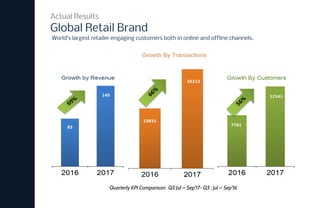
Quarterly KPI Comparison: Q3 Jul – Sep’17- Q3 : Jul – Sep’16
69%
66%
56%
Global Retail Brand
Actual Results
World’s largest retailer engaging customers both in online and offline channels.
Autonomous Customer Engagement
Summary
Implementing Autonomous Customer Engagement using Machine Learning can
be easy with Plumb5 and can be achieved in three steps
1. Unify all customer data sources and create a system of individual customer
records
2. Run these customer records through machine learning workflows to create
customer memories
3. Integrate engagement layer and initiate relevant customer conversation or
engagement
Once implemented, users can measure and monitor how machines are
conducting themselves with customers and manage their learning programs to
fine-tune machine learning for greater results.
Get started with a POC
Get in touch
If interested, email
pavank@plumb5.com or veer@plumb5.com

Autonomous Customer Engagement

  • 1.
    Autonomous Customer Engagement Implementing AIthat is capable of autonomous human-like customer engagement
  • 2.
    Autonomous Customer Engagement INTRODUCTION AutonomousCustomer Engagement can be defined as an engagement (either interactions or conversation) between a customer (human) and a machine. The machine is capable of engaging the customer, just how human agents did. They have memories and hence can remember past events and co-relate it with current events. They can learn, decide, predict and recommend just like the way human do. And like all sales agents, ensure customer satisfaction, offer better deals and ensure purchases, with an objective to achieve higher revenue per customer. The deck covers the steps and its functions in implementing such a learning system over your data to ensure greater customer satisfaction and increased revenue, at a fraction of the cost spent today.
  • 3.
    Plumb5 for AutonomousCustomer Engagement Plumb5 is a Unified Data Platform that is built using the concepts of Real-time Decision processes, which on a broad level helps businesses to automate decisions ranging from recommendations to a customer to real-time dynamic pricing to serving personalized data across touchpoints. The Data Platform comes integrated with point applications to render seamless engagement between touch-points like web, mobile, email, SMS, social notifications, push notifications, browser notifications and other channels of communication This allows the platform to quickly connect customer data, run models over incoming data to understand the behavior of the customer, which computes a score based on past and present behavior, to which a state is identified and based on that state, an appropriate engagement is fired. This allows the machine to learn to decide which engagement to trigger to entice the customer to the next best goal. INTRODUCTION
  • 4.
    BUSINESS ADVANTAGE More Customers,More Purchases, More Sales Quarterly KPI Comparison: Q3 Jul – Sep’17- Q3 : Jul – Sep’16 69% 66% 56%
  • 5.
    Infrastructure Step 0 Data Preparation Step1 Machine Learning Workflow Step 2 Engagement Automation Step 3 Measuring AI Effectiveness Step 4 Steps to Implement
  • 6.
  • 7.
    Infrastructure - SystemsArchitecture Step 0 This architecture is proposed to run real-time customer engagement using runtime analytics
  • 8.
  • 9.
    Data Preparation Step 1 Thecore objective of the data preparation exercise is to organize customer data by each individual customer. Doing that will allow us easily learn patterns of each individual customer and allows in quickly collaborating with other patterns to arrive at predictions, recommendations and next best actions. THE BIGGEST CHALLENGE The biggest challenge unsolved in most business environment is that customer data, which is classified as Structured and Unstructured cannot be connected, as they don’t have a common unique Id to merge, in order to bring customer data together. In other words, structured data where data can be merged either with a unique id like an email or phone number. However, the unstructured data, which consists of web behavior data or advertising traffic data stores user information by IP or some unique ID, which cannot be mapped to the unique IDs of the structured data. This problem exists in all data environments using multiple tools without a unification strategy.
  • 10.
    The Challenge seemsoverwhelming The amount of customer data across various sources and interactions can be huge. But you can get an absolute view of the customer, only if every related data source is combined .
  • 11.
    Data Preparation Step 1 LIMITATIONS Becauseof structured and unstructured data in silos, customer data remains incomplete. These data-sets when used for analysis or machine learning, presents limited or inaccurate insights leading to ineffective customer strategies. You may notice that data from the CRM might reveal multiple data parameters about the customer like transactions, email/phone conversations, product purchased etc but lacks information on products browsed, active channels, and other behavioral parameters. This missing data not only takes out the relevance in subsequent communication but also might not detect the opportunities to convert.
  • 12.
    Connect all datasources containing customer data to Plumb5 Federated Layer to organize data by individual customer. These individual sets are parsed through machine learning workflows to output customer memories, which can be consumed for contextual personalization by any customer touch-point How do we need data to be organized? Step 1 STEP 1 STEP 2 STEP 3
  • 13.
    Get started byadding Plumb5 trackers to collect behavior of both website/store or mobile app interactions. Plumb5 creates a unique ID for each user(machine) and stacks data based on the unique ID. Steps to merge Step 1 PLUMB5 SCRIPTS AND SDK INTEGRATING CHANNEL TAGS Pass these IDs across other touch-points like Email, SMS, USSD, and other touch-points to be able to track and merge user data based on the ID. Plumb5 Engagement Layer comes with embedded tags and saves time on integration Integrate DMP/DSP platforms to collect audience profile data which again is merged with a common identifier between DSP platform and Plumb5 generated URLs TRACKING DMP/DSP DATA MERGING OTHER STRUCTURED DATA Using the email or phone number, import and merge data based on email or phone number match. 4 essential steps on how Plumb5 is used to merge structured data and unstructured data With these steps, customer data across silos can be easily merged due to the availability of a unique ID of an user
  • 14.
    Unification Technique Step 1 Thefollowing tagging map shows how IDs are merged to create single customer data The Web/Mobile tracking resolves the Ad visitor using Audience Profile ID embedded in the web link. The Web/Mobile tracking also resolves the disconnect between anonymous user (defined by IP) and user identifiable by email or phone number. This is done by passing a tag in the link of email and SMS templates. Rest of the other structured data is resolved by matching email addresses or phone numbers
  • 15.
    Managing Schema Step 1 Plumb5Data Management interface allows the user to edit the existing schema or add new data sources using a simple editor. Merged Tables Filters, Groups, Conditions Edit Code Modify Column Properties
  • 16.
    Generate Data byCustomer Step 1 Unified Data generated can be viewed in Plumb5 Analytics Module. Developers can make API calls to get the complete unified data of a single user FOR MARKETERS FOR DEVELOPERS
  • 17.
    Subsequent Data Streams Step1 Plumb5 Scripts / SDK streams data continuously in order to analyze behavior data in real-time. The scripts take in all the dynamic information from websites, ecommerce stores or mobile application, where many interactions are recorded in a single session. Using API calls, other touch-point application data are updated as and when the interaction or response is captured Other Offline data is integrated using either API calls or by using periodic schedulers All these data are extracted, ranked in real-time as soon as it is collected, keeping memory files updated at all time. Most streaming systems are dependent on data collection sources Current data infrastructure are redundant with number of systems and data has to hop to different systems before an insight is generated This creates latency and cannot serve real-time decisions required to keep up the context The other problem also arises from the fact that the streaming systems are clueless of data relationships and hence simply used to push data into the centralized system. This creates various hurdles in creating a singular memory of a customer required for autonomous customer engagement KEEPING IT SMART
  • 18.
    Planning for SingleCustomer Data Plumb5 which is designed to be customer centric, stores data by unique customers. This allows the platform to directly store data by customer and integrate data from other sources and organize it by mapping unique IDs. This saves the enterprise of creating a different system just to merge to arrive at a unique customer table. The data organization in Plumb5 is designed to primarily carry out AutoML, where decisions and predictions are automated using a machine learning workflow, explained in the next section. KEEPING IT SMARTSUMMARIZING THE STEPS • Use Plumb5 scripts and mobile SDks to collect data directly into the federated layer • Implement Tags to touch-point communication or use the pre-integrated Plumb5 engagement Layer to connect data from all customer channels. • Integrate Ad platforms to connect audience profiles and website/mobile visitor data. • Connect other customer data from CRM, ECOM platforms, Call Center applications, Point of Sale Apps, using API or schedulers • Visualize Single Customer Data
  • 19.
  • 20.
    The second stepinvolves transforming the single customer files to memories, which can be consumed for contextual personalization by any customer touch-point. Though this step is more machine driven, it also allows the user to supervise scores, in order to make learning faster. Machine Learning Workflow Step 2 STEP 1 STEP 2 STEP 3
  • 21.
    • User Identifiers– to match and identify the user • User Pattern – A string pattern depicting all interactions of the user stacked by time • Global Weights refer to aggregated net weight (overall score of the user) • Product Leads refers to product customer relationships. Each product, where some interaction is detected, is added to the memory with state, intent, sentiment, buying prediction and recommended next action INFORMATION IN MEMORY FILES What are memories? Step 2 Forming memories in runtime allows the machine to stay relevant and contextual at all times. Memories are consolidated data files (JSON), which holds key information like patterns, states, aggregated weights and other identifiers to quickly detect and match against user behavior in the current session. •Key tags are keywords extracted from demographic data, preferences, conversations and other keyword data • Custom Tags are slots to add any custom user defined states that may have channel or source information • Predictions & Recommendation lists carry information that is generated after comparing other user patterns to predict a product or an event. Since they do not have past relationship with the customer, they are stacked distinctly.
  • 22.
    How are memoriescreated? Step 2 The machine learning workflow employs several extraction techniques, scoring algorithms and matching techniques to create memories from 1:1 customer data
  • 23.
    1. Data Inputare organized based on channels and is stacked by time stamp. 2. With tags given to the unique event interaction, the interaction data is converted to a tag string to form a temporal sequence, with interaction source as markers 3. The scoring technique scores the tags to deduce the intent score. Notice that the relationship hierarchy takes each relationship between the single user and all related products independently. So it first extracts the intent score for a particular product and then sums it up with all associated product to arrive at overall customer score. 4. From these channel data, states are extracted and updated against each product 5. Notice that the customer state for each product is independently extracted 6. This happens for each related product The hierarchy in the model behaves like a network, in the sense, that as data is organized, extraction and scoring happens in runtime, which helps in updating the memory files instantly where the latest weights are available for personalizing next action How the hierarchical model contributes? Step 2
  • 24.
    Memories when organizedtogether gives us the opportunity to analyze both by individual users as well as their associated users. The individual memory units hold the individual pattern and behavior of a user over time and when each of these units are stacked together, they allow in auto-segmentation by common attributes, or extraction of 2 occurring users in a common namespace or apply collaborative filtering to predict next actions or products Analysis in runtime Step 2
  • 25.
    Examples on howpatterns help in auto-segmentation work in real-time Analysis in runtime Step 2 AUTOSEGMENTATION The Auto-segmentation workflow takes the unsupervised approach. For every unique difference of a string, it creates a new reference and auto-labels this unique combination.  For every similarity of an attribute within the patterns, the machine groups similar attributes to create a category. This allows the machine to classify at every stage and maintain clusters of similar attributes. This helps in finding related users quickly so that the patterns of these users can be filtered to run predictions and recommendations  
  • 26.
    Examples on howpatterns help in predicting or recommending in real-time Analysis in runtime Step 2 PREDICTIONS RECOMMENDATION The patterns presents the entire sequence of unique labels that denote interactions. Detecting the goal and arranging all interactions leading to the goal is key. For example, a purchase interaction is possibly labeled “M” as in the diagram. Notice when a random string is presented, it compares with the patterns available to predict the occurrence of the label’ M”. So when a user interaction look like any of the random string, it predicts the possibility of the purchase by comparing with related patterns where the interaction is common. By checking other patterns that contain “M”, it can also recommend the shortest path of interaction to achieve M. Notice in the diagram that the random strings presented are recommended with next best interaction to achieve M. So when a user is dropping off or deviating from the goal path, the machine can detect and recommend to bring back the user to the goal path.
  • 27.
    Workflow Components Step 2 ComponentWhat does it do? Unique Event Extraction The component lists all events (which has a time-stamp)and outputs all the unique events present. Converts the unique event information to tags (three digit alphanumeric string). The tags are arranged by time stamp, which forms a long pattern of tags Propensity Scoring The propensity scoring logic is capable of both unsupervised as well as supervised learning. The supervised allows the data scientists to set scores for the unique event. The unsupervised technique uses reverse goal technique to understand the related events which are closer/farther from a given goal and allocates three staged scores based on their distance. These scores are used to calculate the net current weight of the user A brief overview on the components employed within the workflow
  • 28.
    Workflow Components Step 2 ComponentFunction State Detection Based on pre-set rules, these algorithms look for matches within the stack. For example, if the data contains just an email but no associated transactions then it would tag it as P (for Prospect). In case it finds a linked transaction, it would update the state to C (for Customer). Likewise, it detects product states, response states, sentiment states to add up to customer memory. Intent Scoring Intent Score of a customer against a particular product is calculated from total unique events, total sessions, scores of the unique events, which is further computed with negative scores assigned to recency to get the final intent score Sentiment Scoring Customer Conversations, Replies recorded as text or voice (converted to text) are extracted and ranked to generate sentiment states (positive, negative, neutral, ambiguous)which is tagged to the customer against a related product A brief overview on the components employed within the workflow
  • 29.
    Workflow Components Step 2 ComponentFunction Goal Prediction As explained in Slide 25, pattern matching is done to understand the probability of achieving a goal Named Entity recognition Named-entity recognition technique seeks to locate and classify named entities in text into pre-defined categories such as the names of persons, organizations, locations, expressions of times, quantities, monetary values percentages, etc. Collaborative Filtering As explained in Slide 25, pattern matching is done to identity similar users and extract products that can be recommended Recommended Next Action As explained in Slide 25, pattern matching is done to understand the most probable next action that leads to a goal Auto-segmentation As explained in Slide 24, pattern matching is done to extract common attributes within matching pattern to arrive at segments Custom Tags These are user defined states, that can be added to memories so that the machine can initiate a trigger if the user defined condition is true. A brief overview on the components employed within the workflow
  • 30.
  • 31.
    Engagement Automation Step 3 Nowthat the machine is aware of customer stages, states, behavioral weights, product affinity lists and preference tags, all it needs is to fire a communication, when a certain state is achieved by the user. Based on customer responses to these messages, the ML workflow scores and readjusts its decision states, enabling continuous learning and decision fine-tuning for best results Technically , data collected as responses is immediately fed back to the Plumb5 federated layer for scoring by the ML workflow. This allows the machine to learn continuously in real-time. The manual task in this process is to assign dynamic templates to state definitions so that engagement can be fired when the state of a particular user is true. MANUAL SUPERVISION
  • 32.
    The second stepinvolves transforming the single customer files to memories, which can be consumed for contextual personalization by any customer touch-point. Though this step is more machine driven, it also allows the user to supervise scores, in order to make learning faster. Engagement Automation Step 3 STEP 1 STEP 2 STEP 3
  • 33.
    Engagement Automation Step 3 Thisimplementation step has 4 main aspects 1. OMNICHANNEL INTEGRATION 2. WORKFLOW EDITOR 3. DYNAMIC TEMPLATES 4. RESPONSE DATA INTEGRATION Plumb5 Engagement Layer comes pre-integrated with all available touch-points. Users can plug it to their chosen touch-point vendors like Email, SMS or Click2Call service providers An easy drag-and-drop workflow editor to edit or create workflows that trigger based on custom tags or states available in the system Users can easily embed tag labels to their communication templates so that content can be dynamically generated based on user parameters After a communication is triggered, it is important to collect back data into the user stack to close loop responses and integrate it back to the learner.
  • 34.
    Plumb5 Engagement Layeris tightly integrated with customer touch-points to deliver messages. Based on past responses to communication, the machine prioritizes the most active channel for a particular customer, to ensure higher effectiveness. The Engagement Layer is integrated or has connectors to (1) Advertising Data (2) Website, Store and Mobile Channels (3) Social Sites (4) Email (5) SMS, USSD (6) Browser Notifications (7) OBD and Click2Call APIs (8) CRM / Lead Management System (9) Site Chat and Bots, (10) POS Systems, (11) Customer Service Robots The Developer can choose to integrate any desired touch-points as per the company’s marketing strategy Omni-channel Integration Step 3
  • 35.
    Once the datasources are connected, the machine is ready to fire personalized engagements based on internal decision states. You can tweak the workflows by using the drag-and-drop flow editor in case the marketers wants to add custom rules. When the box is clicked, the dialog box let the user to edit the template assigned to a particular touch-point Workflow Editor Step 3
  • 36.
    For dynamic personalizationof messages, labels or tags can be directly embedded into the template so content can be loaded based on conditions or states Example of embedded labels. In this case, the receiving user gets products under top selling label that is relevant to the user’s state Dynamic Templates Step 3
  • 37.
    Collecting Responses ofeach interactions and updating it back to the ML workflow, allows in seamless continuous learning. This allows the machine to update the memory which might change the predictions based on the new responses. Plumb5 uses the following techniques to collect and update memories on the fly 1. Web Engagement - The Web Trackers also track for Engagement events 2. Mobile Engagement - Mobile SDK tracks Engagements on the mobile 3. Email Engagement - Plumb5 tracks opens and clicks and collects delivery messages, bounces and other failure errors from the provider 4. SMS Engagement - Plumb5 tracks the clicks using ShortURLs and the delivery message from the provider 5. Browser Notification - Plumb5 tags collect browser notification responses 6. Social Notification - Plumb5 tracks responses through custom URLs 7. USSD Engagement - Plumb5 collects response data from the service provider 8. Beacon Data - Plumb5 collects data from beacons like Estimote Response Data Step 3
  • 38.
    • One-time Integrationof all Customer Touch-points • Template Tagging to State-based Customer Segments • Embedding Labels into Dynamic Templates • Response Data Integration for continuous learning Reducing intelligence workload on the engagement layer. The engagement layer requires only minimal data parameters to perform as all the intelligence is computed in the ML stack. The key primary parameters that needs to be passed to the engagement layer are (a) Who should the message be delivered to? (b) Which message should be delivered? (c) When should it be delivered? Along with other state information for conditional check. This ensures that all learning activities are performed in a single place, and help avoid redundancies KEEPING IT SMARTSUMMARIZING THE STEPS
  • 39.
  • 40.
    Users can plotthe stages and states to understand the progress of the users towards the goal and monitor the progression of these users. Measuring AI effectiveness Step 4
  • 41.
    Quarterly KPI Comparison:Q3 Jul – Sep’17- Q3 : Jul – Sep’16 69% 66% 56% Global Retail Brand Actual Results World’s largest retailer engaging customers both in online and offline channels.
  • 42.
    Autonomous Customer Engagement Summary ImplementingAutonomous Customer Engagement using Machine Learning can be easy with Plumb5 and can be achieved in three steps 1. Unify all customer data sources and create a system of individual customer records 2. Run these customer records through machine learning workflows to create customer memories 3. Integrate engagement layer and initiate relevant customer conversation or engagement Once implemented, users can measure and monitor how machines are conducting themselves with customers and manage their learning programs to fine-tune machine learning for greater results.
  • 43.
    Get started witha POC Get in touch If interested, email pavank@plumb5.com or veer@plumb5.com