AUTOMATIC PLANT WATERING SYSTEM
(ARDUINO)
Report for ZKT 223 Engineering Design Project
Akmal Hafizi bin Annuar
(148208)
July 2021
Universiti Sains Malaysia
2
Abstract
ZKT 223 Engineering Design Project:
Automatic Plant Watering System (Arduino)
The report of ZKT 233 project begins with the introduction, overview, objectives and the
whole timeline of the project. The problem statements of the project are simply to
comprehend and to brainstorm for the lines of codes and for the development of the product
successfully. The project proposed and reported is an automated plant watering system using
Arduino devices. Both the design specifications and the financial requirements are clearly
reported. The report also includes all the layout drawings of both the circuit and the physical
product. The engineering calculation and analysis are presented thoroughly in the report. The
details of the fabrication are explained in a step-by-step manner. All in all, the result is
achieved successfully with the utilisation of an LCD screen to display the soil moisture and
with the working function of the soil moisture sensor, the relay and the vertical pump.
Eventually, the demonstration and testing are done accordingly. To conclude, the ZKT 233
project has given the benefit of the opportunity in designing and devising a product through
the engineering approach in practicality.
3
Table of Content
Introduction 4
Problem Definition 7
Embodiment of Design 11
Prototyping 20
Conclusion 27
References 27
Appendices 29
4
1.0 INTRODUCTION
1.1 Overview of the Project
The project determinedly solves the problems surrounding daily struggles
through the application of electronics and software computations to creating
new useful products. In particular, the development of the automatic plant
watering system using Arduino software and hardware. The objectives are
intended for students to acquire skills and knowledge in a variety of contexts.
For instance, the analytical skills required using technology to solve
engineering design problem, and also the entrepreneurial skills and attributes
being learnt in the fabrication of a product.
1.2 Design Objectives
The automated plant watering system is opted as the product of the project to
set out in meeting the rubrics—the ZKT 233 project requires the use of relay
switch among other requirements such as the use of IoT (Internet of things)
technology, if possible. The particular automated system is preferred for its
appealing feature in promoting convenience through automation in the field of
gardening. This particular preference meets another objective of the project,
whereby, not only does it incorporate the compulsory Arduino IDE coding of
the soil sensor and the vertical water pump, but also the learning of coding the
LCD display in integrating it with the former hardware devices. On the whole,
the product developed meets the necessities of the rubrics alongside with the
determination to building a product of automated system through the use of
Arduino hardware and software.
1.3 Scopes of Project
This project proposes an automated plant watering system through the
application of Arduino software and hardware with entrepreneurial skills and
attributes injected with it. It is essentially a system that measures the soil
moisture using Arduino soil moisture sensor and activates the vertical water
pump to automatically water the plant at a certain moisture threshold coded in
5
the Arduino IDE. The codes are entirely developed through the software
Arduino IDE. The hardware consists of partially the Arduino and of general
electronics. The product is built with the economic attributes in mind and with
a reasonable quality. The automated system accompanying the plant in
watering it automatically is rather a conveniently hand-held product with an
easy-to-carry weight and fit-on-table size. The problems of creating a product
of an automated system are identified through the method of problem
identification. The process of design embodiment consists of layout design
and the necessary coding as well as a bit of analysis throughout the project.
The detail design includes the design, drawings, and assembly as well as the
cost analysis. The prototyping provides the details of fabrication and finally
the product testing result.
1.4 Significance of the Project
At the end of the project, it will influence positively to the students. The
significance is in terms of the practicality of syllabuses and the exposure to the
outlook of job prospect of an engineer. The mechanism is by way of the
process of applying the syllabuses to the design and development of X all the
way to the actual product completely built. In virtue of the problem statement,
the project gives the possibility to an X device with maker-culture and
tinkering attributes infused alongside with it.
1.5 Project Planning
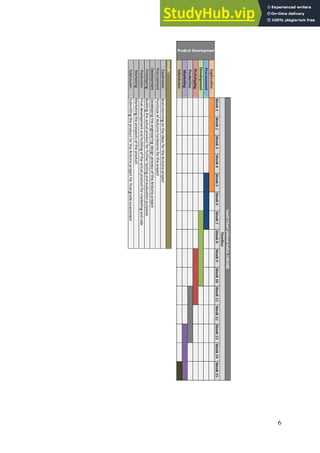
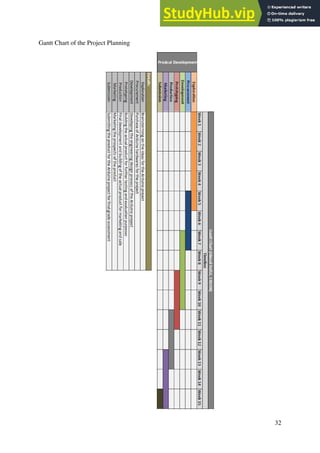
Table 1 shows the plan of the project throughout the semester.
Table 1. Project plan.
6
7
2.0 PROBLEM DEFINITION
2.1 Problem Statement
This project intends to tackle on daily struggles through the application of
electronics and software computations to creating new useful products. The
product developed is an automated plant watering system. The system is
proposed on one basic problem statement—to innovate from the daunting
problem of gardening and that is having to water the plant regularly.
Methodically, the project imposes challenges in comprehending of the
involved coding, the brainstorming of product design, and also the
procurement of components and the testing involved to making sure the
components function properly. Consequently, several researches are made to
learn related structures of codes pertaining to the design bases. Besides,
sketches and drafts were drawn to visualize the physical parameters and the
ergonomic factors of the final product. And, on the same note, purchase were
made for the involved components, as well as testing is done to each
component prior to the assembly process.
2.2 Product Design Specification
2.2.1 Product Identification
Performance
The product is programmed to perform the act of plant watering autonomously
and thus offers its selling feature in putting off the need of every avid
gardening enthusiasts to water their plants regularly. The Arduino IDE
programming involved is devised in such a way that the system is in loop and
continuous so long as there is a power supply.
Economy
According to the research made mostly on the Internet, the suitable price for
the product is reasonably within the range of RM30.00 and RM60.00. If the
product is managed to be sold at the price range given, it may yield a much
higher chance of customers buying the product.
8
Target Production Cost
The target production cost is about RM55 or so. The particular cost only
covers the cost of materials to making up the product, excluding the tools
needed in the process.
Product Life Span
It is estimated that the product will last in the market for approximately 7
years (on some circumstances, except for the plants). This is for the reason of
the normal reliability of the electronic components used to make up the
product.
Competition
Competition is expected to come from the experts in the maker-culture and the
tinkering community where they are potentially capable of producing a better
product.
Size and Weight
The product is of fit-on-table size and is of easy-to-carry weight—with an
approximate dimension of about 300x150x150 mm total in volume or so.
Materials
Besides the plant and its pot involved in this automated system, the main
materials are economically the plastic corrugated board and the essential
electronics components.
Appearance
The product is rather of boxy in dimension or in appearance, and it is basically
a platform that houses the electronics components and the water tank in place
for the plant in a pot.
Quality and Reliability
9
The quality is reasonable to the price given to the product. The reliability is
guaranteed as the components involved are not too complex, and is basically
of Arduino-level reliability so long as it is deemed as a tinkering activity and
product.
2.2.2 Physical Descriptions
The product is basically a device made out of Arduino that complements an
indoor plant—by which it performs an autonomous watering onto the plant it
is installed with. The soil moisture sensor is the main component to its feature
of watering the plant. Special feature of the product is it comes with an LCD
screen that displays live soil moisture. The whole Arduino hardware system
and the water tank are housed inside a housing designed using the plastic
corrugated board. The whole components including the water pump inside the
tank, the relay switch and the LCD screen are all placed compacted in the
designated housing or platform that is meant to be located just next to any
indoor plant it is installed to. Hence, with an approximate total volume of
300x150x150 mm, the whole product is of easy-to-carry weight and of fit-on-
table size.
The electronics are powered by a 9V battery or can also be powered by USB
cable connected to USB port of any laptop or devices. The sources supply
power to the pre-programmed Arduino board that incorporates all the
components. The soil moisture sensor is the main sensor that which sends
measurements to the LCD screen to display them and then to the relay for a
certain threshold for the relay to switch on the vertical water pump—
eventually watering the plant accordingly when needed.
2.2.3 Manufacturing Specifications
Arduino Board
Arduino products are the main components of the project. Arduino products
allow the tinkering process of this project to creating a tangible object that
works on some electronics and programming to solve daily problems. The
10
hardware use to provide the platform for the programing and circuitry is the
Arduino board. The software used to program the product is Arduino IDE.
Electronics Components
Electronics components are the second in importance for the product. They
connect and complete the circuit the Arduino board needs to function the soil
moisture sensor and the LCD screen via the breadboard and also with the relay
switch. The electronics components include a use of sensor, vertical water
pump, LCD screen, relay switch, 220-ohm resistors, rotary switch and
connecting wires.
Plastic Corrugated Board
Plastic corrugated board generally has low electrical and thermal conductivity.
To a certain extent, it has a good strength-to-weight ratio as it is often used as
a storage. Plastic corrugated board also is quite an absorber of shock or some
sort of an impact. It is certainly of good durability, low cost and easy to
manufacture. Thus, plastic corrugated board is opted as the main material for
the development of the housing for the electronics components, the plant’s pot
and the water tank.
2.2.4 Financial Requirements
Table 2 tabulates the financial requirements of the project including the tools
needed.
Table 2. Financial requirements of the project.
No. Item
Price per
unit (RM)
Quantity
Total Price
(RM)
1 Arduino board 24.90 1 24.90
2 220 Ohm resistor 0.05 8 0.40
3 9V battery 15.90 2 31.80
4 Connecting wires 5.90 set 5.90
11
5 Multimeter 25.90 1 25.90
6 Soldering iron 20.90 1 20.90
7 Breadboard 4.90 1 4.90
8 Glue gun 10.90 1 10.90
9
Indoor plant (with
pot)
9.90 1 9.90
10 Soil moisture sensor 3.70 1 3.70
11 Rotary switch 0.30 1 0.30
12 LCD screen 7.90 1 7.90
13 Relay switch 2.90 1 2.90
14 Vertical water pump 5.60 1 5.60
15 Crocodile clip wires 4.70 set 4.70
16 Water tube 2.90 2 5.80
17
Plastic corrugated
board
2.95 4 11.80
TOTAL (RM) 178.20
3.0 EMBODIMENT OF DESIGN
3.1 Layout Drawing
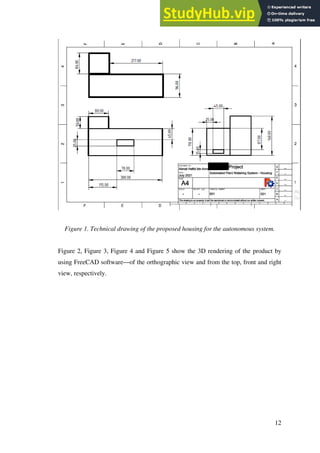
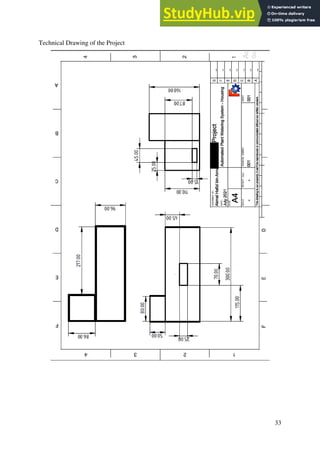
Figure 1 shows the technical drawing of the proposed housing designed to house the
electronics and the water tank of the autonomous system—by using FreeCAD
software.
12
Figure 1. Technical drawing of the proposed housing for the autonomous system.
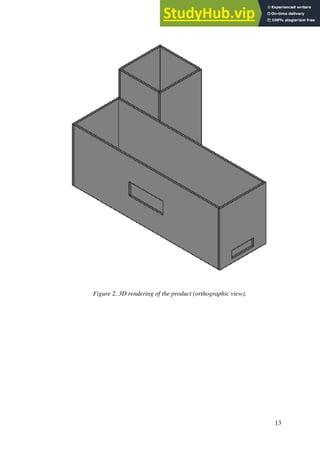
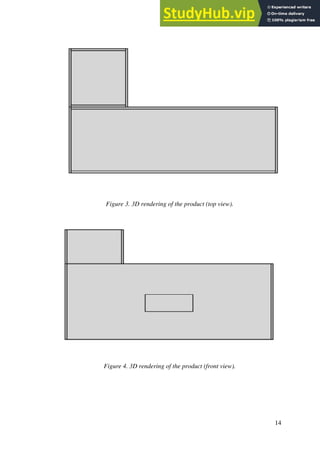
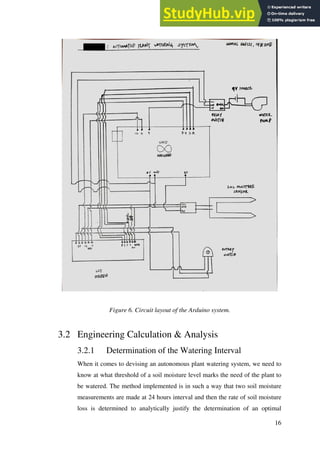
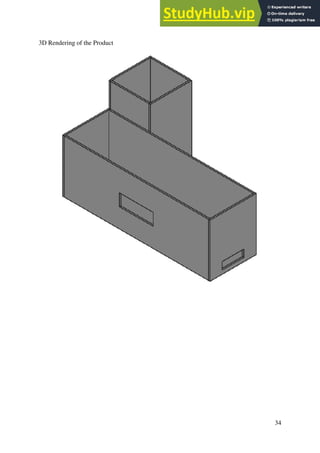
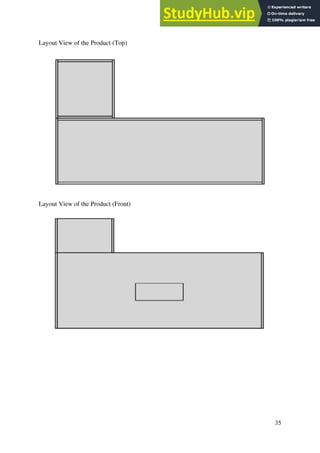
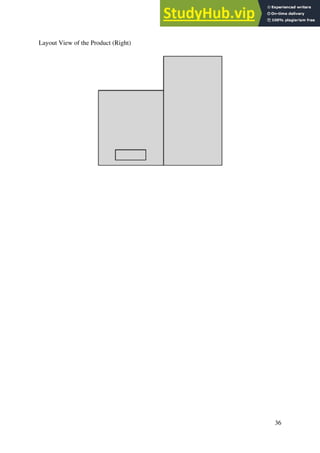
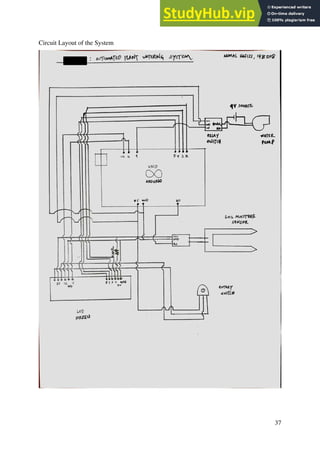
Figure 2, Figure 3, Figure 4 and Figure 5 show the 3D rendering of the product by
using FreeCAD software—of the orthographic view and from the top, front and right
view, respectively.
13
Figure 2. 3D rendering of the product (orthographic view).
14
Figure 3. 3D rendering of the product (top view).
Figure 4. 3D rendering of the product (front view).
15
Figure 5. 3D rendering of the product (right view).
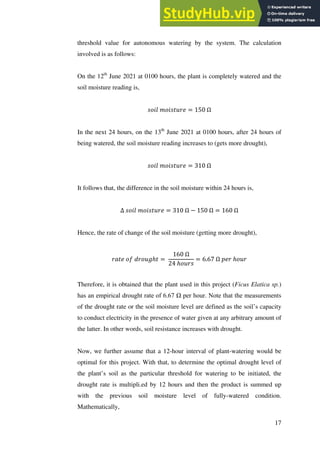
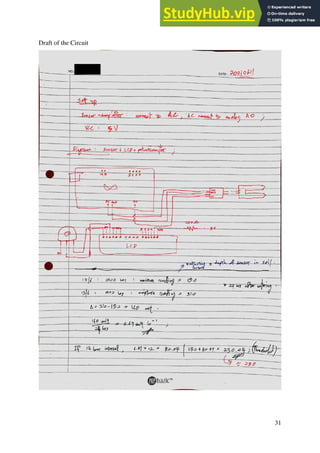
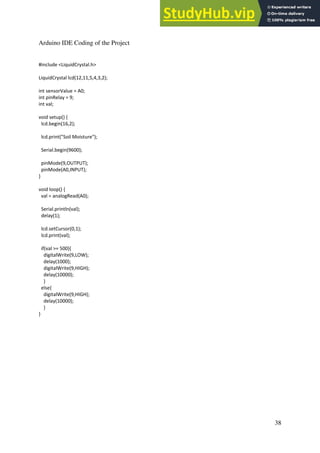
Figure 6 shows the layout drawing of the Arduino system circuit.
16
Figure 6. Circuit layout of the Arduino system.
3.2 Engineering Calculation & Analysis
3.2.1 Determination of the Watering Interval
When it comes to devising an autonomous plant watering system, we need to
know at what threshold of a soil moisture level marks the need of the plant to
be watered. The method implemented is in such a way that two soil moisture
measurements are made at 24 hours interval and then the rate of soil moisture
loss is determined to analytically justify the determination of an optimal
17
threshold value for autonomous watering by the system. The calculation
involved is as follows:
On the 12th
June 2021 at 0100 hours, the plant is completely watered and the
soil moisture reading is,
𝑠𝑜𝑖𝑙 𝑚𝑜𝑖𝑠𝑡𝑢𝑟𝑒 = 150 Ω
In the next 24 hours, on the 13th
June 2021 at 0100 hours, after 24 hours of
being watered, the soil moisture reading increases to (gets more drought),
𝑠𝑜𝑖𝑙 𝑚𝑜𝑖𝑠𝑡𝑢𝑟𝑒 = 310 Ω
It follows that, the difference in the soil moisture within 24 hours is,
Δ 𝑠𝑜𝑖𝑙 𝑚𝑜𝑖𝑠𝑡𝑢𝑟𝑒 = 310 Ω − 150 Ω = 160 Ω
Hence, the rate of change of the soil moisture (getting more drought),
𝑟𝑎𝑡𝑒 𝑜𝑓 𝑑𝑟𝑜𝑢𝑔ℎ𝑡 =
160 Ω
24 ℎ𝑜𝑢𝑟𝑠
= 6.67 Ω 𝑝𝑒𝑟 ℎ𝑜𝑢𝑟
Therefore, it is obtained that the plant used in this project (Ficus Elatica sp.)
has an empirical drought rate of 6.67 Ω per hour. Note that the measurements
of the drought rate or the soil moisture level are defined as the soil’s capacity
to conduct electricity in the presence of water given at any arbitrary amount of
the latter. In other words, soil resistance increases with drought.
Now, we further assume that a 12-hour interval of plant-watering would be
optimal for this project. With that, to determine the optimal drought level of
the plant’s soil as the particular threshold for watering to be initiated, the
drought rate is multipli.ed by 12 hours and then the product is summed up
with the previous soil moisture level of fully-watered condition.
Mathematically,
18
6.67 Ω 𝑝𝑒𝑟 ℎ𝑜𝑢𝑟 × 12 ℎ𝑜𝑢𝑟𝑠 = 80.04 Ω
And, the optimal drought level for watering is at the above amount plus with
the most moist level, as such,
𝑇ℎ𝑟𝑒𝑠ℎ𝑜𝑙𝑑 𝑣𝑎𝑙𝑢𝑒 = 150 Ω + 80.04 Ω = 230.04 Ω
Therefore, the threshold value to be coded in the Arduino IDE coding as the
optimal level for watering to be initiated is at 230.04 Ω—or rather, rounding it
up, at 250 Ω.
However, it is worth to note that there are many factors affecting the reading
of the soil moisture sensor—such as, the depth of the sensor being poked and
placed into the soil, the condition of the sensor rods, and some other more
sensitive and difficult to control factors.
For example, Figure 7 and Figure 8 below show one arbitrary set of
measurements made by using the soil moisture sensor through Arduino IDE
coding—observe the drop in resistance in Figure 8 after the plant is watered as
recorded by sensor, as compared to that of in Figure 7 before watering.
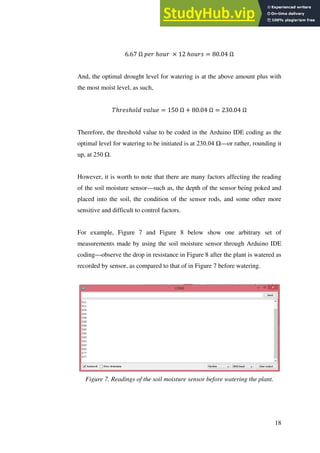
Figure 7. Readings of the soil moisture sensor before watering the plant.
19
As observed, the readings are within the range of about 500 Ω to 600 Ω,
before watering the plant or when the soil is very drought.
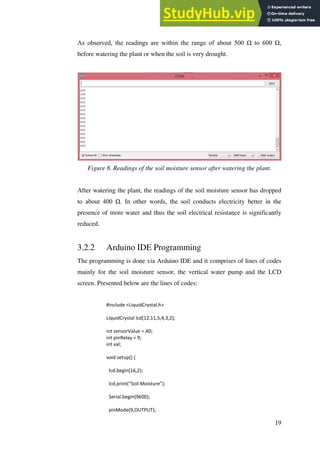
Figure 8. Readings of the soil moisture sensor after watering the plant.
After watering the plant, the readings of the soil moisture sensor has dropped
to about 400 Ω. In other words, the soil conducts electricity better in the
presence of more water and thus the soil electrical resistance is significantly
reduced.
3.2.2 Arduino IDE Programming
The programming is done via Arduino IDE and it comprises of lines of codes
mainly for the soil moisture sensor, the vertical water pump and the LCD
screen. Presented below are the lines of codes:
#include <LiquidCrystal.h>
LiquidCrystal lcd(12,11,5,4,3,2);
int sensorValue = A0;
int pinRelay = 9;
int val;
void setup() {
lcd.begin(16,2);
lcd.print(“Soil Moisture”);
Serial.begin(9600);
pinMode(9,OUTPUT);
20
pinMode(A0,INPUT);
}
void loop() {
val = analogRead(A0);
Serial.println(val);
delay(1);
lcd.setCursor(0,1);
lcd.print(val);
if(val > 250){
digitalWrite(9,LOW);
delay(3000);
digitalWrite(9,HIGH);
delay(10000);
}
else{
digitalWrite(9,HIGH);
delay(3000);
}
}
4.0 PROTOTYPING
4.1 Fabrication Details
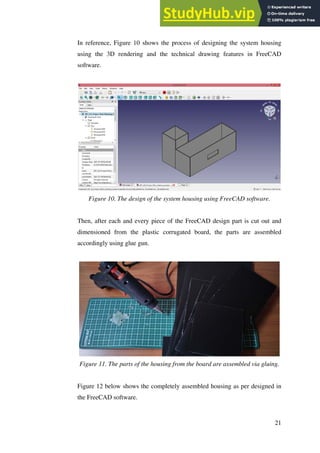
The fabrication works start with the plastic corrugated board being cut
according to the dimension designed in the FreeCAD software.
Figure 9. The cutting of the board according to the FreeCAD design.
21
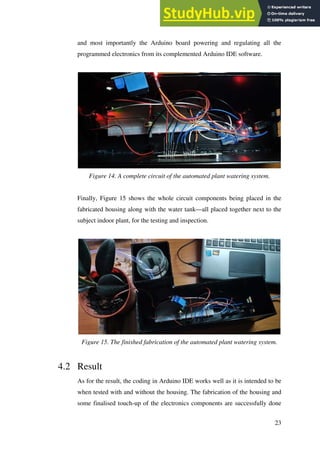
In reference, Figure 10 shows the process of designing the system housing
using the 3D rendering and the technical drawing features in FreeCAD
software.
Figure 10. The design of the system housing using FreeCAD software.
Then, after each and every piece of the FreeCAD design part is cut out and
dimensioned from the plastic corrugated board, the parts are assembled
accordingly using glue gun.
Figure 11. The parts of the housing from the board are assembled via gluing.
Figure 12 below shows the completely assembled housing as per designed in
the FreeCAD software.
22
Figure 12. Complete assembled parts making up the housing as per designed.
Next, the other fabrication involved is the soldering of the connecting wires to
the LCD screen. The wiring of the LCD screen to the Arduino board is
comparatively the most complex and most sensitive as opposed to the other
components set up.
Figure 13. Soldering of the connecting wires to the LCD screen.
Figure 14 shows the complete circuit with all components involved to devising
the automated plant watering system. Observed are the central breadboard, the
soil moisture sensor, the LCD screen and the accompanying rotary switch, the
relay switch connecting the external 9V source and the vertical water pump,
23
and most importantly the Arduino board powering and regulating all the
programmed electronics from its complemented Arduino IDE software.
Figure 14. A complete circuit of the automated plant watering system.
Finally, Figure 15 shows the whole circuit components being placed in the
fabricated housing along with the water tank—all placed together next to the
subject indoor plant, for the testing and inspection.
Figure 15. The finished fabrication of the automated plant watering system.
4.2 Result
As for the result, the coding in Arduino IDE works well as it is intended to be
when tested with and without the housing. The fabrication of the housing and
some finalised touch-up of the electronics components are successfully done
24
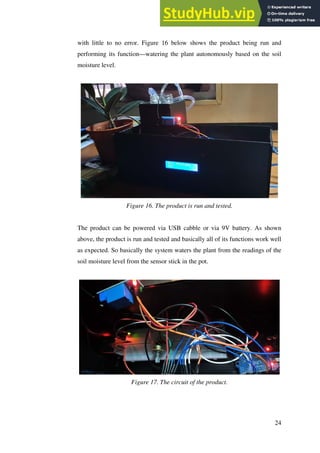
with little to no error. Figure 16 below shows the product being run and
performing its function—watering the plant autonomously based on the soil
moisture level.
Figure 16. The product is run and tested.
The product can be powered via USB cabble or via 9V battery. As shown
above, the product is run and tested and basically all of its functions work well
as expected. So basically the system waters the plant from the readings of the
soil moisture level from the sensor stick in the pot.
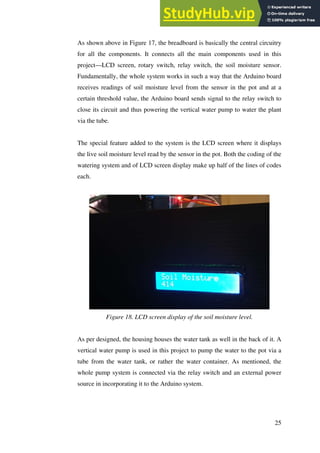
Figure 17. The circuit of the product.
25
As shown above in Figure 17, the breadboard is basically the central circuitry
for all the components. It connects all the main components used in this
project—LCD screen, rotary switch, relay switch, the soil moisture sensor.
Fundamentally, the whole system works in such a way that the Arduino board
receives readings of soil moisture level from the sensor in the pot and at a
certain threshold value, the Arduino board sends signal to the relay switch to
close its circuit and thus powering the vertical water pump to water the plant
via the tube.
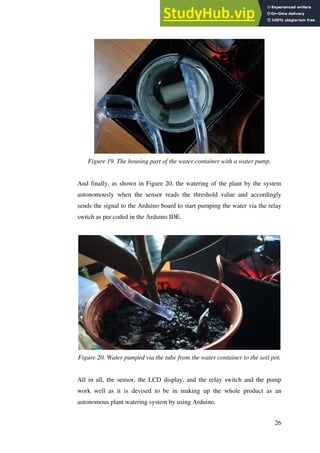
The special feature added to the system is the LCD screen where it displays
the live soil moisture level read by the sensor in the pot. Both the coding of the
watering system and of LCD screen display make up half of the lines of codes
each.
Figure 18. LCD screen display of the soil moisture level.
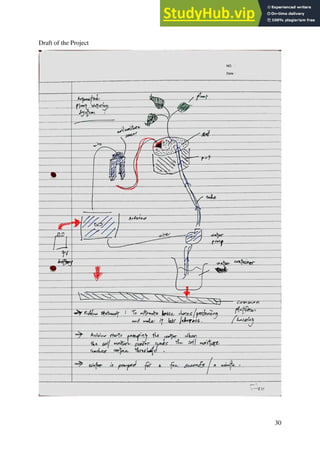
As per designed, the housing houses the water tank as well in the back of it. A
vertical water pump is used in this project to pump the water to the pot via a
tube from the water tank, or rather the water container. As mentioned, the
whole pump system is connected via the relay switch and an external power
source in incorporating it to the Arduino system.
26
Figure 19. The housing part of the water container with a water pump.
And finally, as shown in Figure 20, the watering of the plant by the system
autonomously when the sensor reads the threshold value and accordingly
sends the signal to the Arduino board to start pumping the water via the relay
switch as per coded in the Arduino IDE.
Figure 20. Water pumped via the tube from the water container to the soil pot.
All in all, the sensor, the LCD display, and the relay switch and the pump
work well as it is devised to be in making up the whole product as an
autonomous plant watering system by using Arduino.
27
5.0 CONCLUSION
In conclusion, the project meets the objectives. Firstly, the electronics knowledge and
skills are learnt and acquired in a very practical manner. Secondly, the knowledge and
skills of using both the Arduino IDE programming software and the Arduino board
are possessed through the hands-on experience. Lastly, the desired engineering design
process skills are successfully applied and learnt. The project does resolve the
problem statement it is meant to address—to innovate from the daunting problem of
gardening and that is having to water the plant regularly. The project or the system of
the product brings forth the solution to the problem statement by providing an
automated system that performs the watering of plant based on the soil moisture of the
plant. The product constantly runs and measures the soil moisture level and only at a
certain threshold value does the system initiate its watering feature system. All in all,
the project has given the benefit of the opportunity in designing and devising a
product through the engineering design process.
6.0 REFERENCES
[1] ElectronicsForu. Automated Plant Watering System.
<https://www.electronicsforu.com/electronics-projects/hardware-diy/automatic-plant-
watering-system>
[2] Youtube. Viral Science: Arduino Soil Moisture Sensor Relay Control.
<https://www.youtube.com/watch?v=Ta4eHHiX4-s>
[3] Viral Science. Arduino Soil Moisture Sensor Relay Control.
<https://www.viralsciencecreativity.com/post/arduino-soil-moisture-sensor-relay-
control>
[4] Arduino. Soil Sensor.
<https://www.arduino.cc/reference/en/libraries/soilsensor/>
28
[5] Arduino Project Hub. Automatic Watering System for Plants.
<https://create.arduino.cc/projecthub/lc_lab/automatic-watering-system-for-my-
plants-b73442>
[6] Intructables Circuits. Arduino Soil Moisture Sensor.
<https://www.instructables.com/Arduino-Soil-Moisture-
Sensor/#:~:text=Connect%20the%20two%20pins%20from,m%20interested%20in%2
0Analog%20Data).>
[7] Instructables Circuits. Automatically Water Your Small Indoor Plant Using
Arduino + Pump. <https://www.instructables.com/Automatically-water-your-small-
indoor-plant-using-/>
[8] Youtube. Wojciech Niedbala: Arduino Plant Watering System (Simple).
<https://www.youtube.com/watch?v=Y73twlAdcLs>
[9] Random Nerd Tutorials. Guide for Relay Module with Arduino.
<https://randomnerdtutorials.com/guide-for-relay-module-with-arduino/>
[10] Arduino Project Hub. How To Use A Soil Moisture Sensor.
<https://create.arduino.cc/projecthub/MisterBotBreak/how-to-use-a-soil-moisture-
sensor-ce769b>
29
Appendices
30
Draft of the Project
31
Draft of the Circuit
32
Gantt Chart of the Project Planning
33
Technical Drawing of the Project
34
3D Rendering of the Product
35
Layout View of the Product (Top)
Layout View of the Product (Front)
36
Layout View of the Product (Right)
37
Circuit Layout of the System
38
Arduino IDE Coding of the Project
#include <LiquidCrystal.h>
LiquidCrystal lcd(12,11,5,4,3,2);
int sensorValue = A0;
int pinRelay = 9;
int val;
void setup() {
lcd.begin(16,2);
lcd.print("Soil Moisture");
Serial.begin(9600);
pinMode(9,OUTPUT);
pinMode(A0,INPUT);
}
void loop() {
val = analogRead(A0);
Serial.println(val);
delay(1);
lcd.setCursor(0,1);
lcd.print(val);
if(val >= 500){
digitalWrite(9,LOW);
delay(1000);
digitalWrite(9,HIGH);
delay(10000);
}
else{
digitalWrite(9,HIGH);
delay(10000);
}
}
39
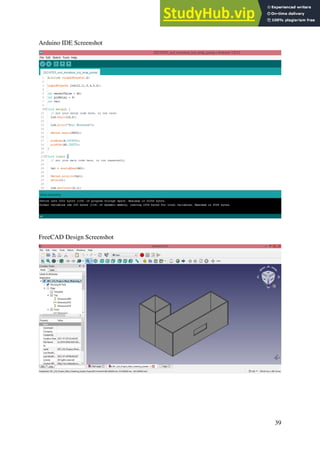
Arduino IDE Screenshot
FreeCAD Design Screenshot

Automated Plant Watering System.pdf

  • 1.
    AUTOMATIC PLANT WATERINGSYSTEM (ARDUINO) Report for ZKT 223 Engineering Design Project Akmal Hafizi bin Annuar (148208) July 2021 Universiti Sains Malaysia
  • 2.
    2 Abstract ZKT 223 EngineeringDesign Project: Automatic Plant Watering System (Arduino) The report of ZKT 233 project begins with the introduction, overview, objectives and the whole timeline of the project. The problem statements of the project are simply to comprehend and to brainstorm for the lines of codes and for the development of the product successfully. The project proposed and reported is an automated plant watering system using Arduino devices. Both the design specifications and the financial requirements are clearly reported. The report also includes all the layout drawings of both the circuit and the physical product. The engineering calculation and analysis are presented thoroughly in the report. The details of the fabrication are explained in a step-by-step manner. All in all, the result is achieved successfully with the utilisation of an LCD screen to display the soil moisture and with the working function of the soil moisture sensor, the relay and the vertical pump. Eventually, the demonstration and testing are done accordingly. To conclude, the ZKT 233 project has given the benefit of the opportunity in designing and devising a product through the engineering approach in practicality.
  • 3.
    3 Table of Content Introduction4 Problem Definition 7 Embodiment of Design 11 Prototyping 20 Conclusion 27 References 27 Appendices 29
  • 4.
    4 1.0 INTRODUCTION 1.1 Overviewof the Project The project determinedly solves the problems surrounding daily struggles through the application of electronics and software computations to creating new useful products. In particular, the development of the automatic plant watering system using Arduino software and hardware. The objectives are intended for students to acquire skills and knowledge in a variety of contexts. For instance, the analytical skills required using technology to solve engineering design problem, and also the entrepreneurial skills and attributes being learnt in the fabrication of a product. 1.2 Design Objectives The automated plant watering system is opted as the product of the project to set out in meeting the rubrics—the ZKT 233 project requires the use of relay switch among other requirements such as the use of IoT (Internet of things) technology, if possible. The particular automated system is preferred for its appealing feature in promoting convenience through automation in the field of gardening. This particular preference meets another objective of the project, whereby, not only does it incorporate the compulsory Arduino IDE coding of the soil sensor and the vertical water pump, but also the learning of coding the LCD display in integrating it with the former hardware devices. On the whole, the product developed meets the necessities of the rubrics alongside with the determination to building a product of automated system through the use of Arduino hardware and software. 1.3 Scopes of Project This project proposes an automated plant watering system through the application of Arduino software and hardware with entrepreneurial skills and attributes injected with it. It is essentially a system that measures the soil moisture using Arduino soil moisture sensor and activates the vertical water pump to automatically water the plant at a certain moisture threshold coded in
  • 5.
    5 the Arduino IDE.The codes are entirely developed through the software Arduino IDE. The hardware consists of partially the Arduino and of general electronics. The product is built with the economic attributes in mind and with a reasonable quality. The automated system accompanying the plant in watering it automatically is rather a conveniently hand-held product with an easy-to-carry weight and fit-on-table size. The problems of creating a product of an automated system are identified through the method of problem identification. The process of design embodiment consists of layout design and the necessary coding as well as a bit of analysis throughout the project. The detail design includes the design, drawings, and assembly as well as the cost analysis. The prototyping provides the details of fabrication and finally the product testing result. 1.4 Significance of the Project At the end of the project, it will influence positively to the students. The significance is in terms of the practicality of syllabuses and the exposure to the outlook of job prospect of an engineer. The mechanism is by way of the process of applying the syllabuses to the design and development of X all the way to the actual product completely built. In virtue of the problem statement, the project gives the possibility to an X device with maker-culture and tinkering attributes infused alongside with it. 1.5 Project Planning Table 1 shows the plan of the project throughout the semester. Table 1. Project plan.
  • 6.
  • 7.
    7 2.0 PROBLEM DEFINITION 2.1Problem Statement This project intends to tackle on daily struggles through the application of electronics and software computations to creating new useful products. The product developed is an automated plant watering system. The system is proposed on one basic problem statement—to innovate from the daunting problem of gardening and that is having to water the plant regularly. Methodically, the project imposes challenges in comprehending of the involved coding, the brainstorming of product design, and also the procurement of components and the testing involved to making sure the components function properly. Consequently, several researches are made to learn related structures of codes pertaining to the design bases. Besides, sketches and drafts were drawn to visualize the physical parameters and the ergonomic factors of the final product. And, on the same note, purchase were made for the involved components, as well as testing is done to each component prior to the assembly process. 2.2 Product Design Specification 2.2.1 Product Identification Performance The product is programmed to perform the act of plant watering autonomously and thus offers its selling feature in putting off the need of every avid gardening enthusiasts to water their plants regularly. The Arduino IDE programming involved is devised in such a way that the system is in loop and continuous so long as there is a power supply. Economy According to the research made mostly on the Internet, the suitable price for the product is reasonably within the range of RM30.00 and RM60.00. If the product is managed to be sold at the price range given, it may yield a much higher chance of customers buying the product.
  • 8.
    8 Target Production Cost Thetarget production cost is about RM55 or so. The particular cost only covers the cost of materials to making up the product, excluding the tools needed in the process. Product Life Span It is estimated that the product will last in the market for approximately 7 years (on some circumstances, except for the plants). This is for the reason of the normal reliability of the electronic components used to make up the product. Competition Competition is expected to come from the experts in the maker-culture and the tinkering community where they are potentially capable of producing a better product. Size and Weight The product is of fit-on-table size and is of easy-to-carry weight—with an approximate dimension of about 300x150x150 mm total in volume or so. Materials Besides the plant and its pot involved in this automated system, the main materials are economically the plastic corrugated board and the essential electronics components. Appearance The product is rather of boxy in dimension or in appearance, and it is basically a platform that houses the electronics components and the water tank in place for the plant in a pot. Quality and Reliability
  • 9.
    9 The quality isreasonable to the price given to the product. The reliability is guaranteed as the components involved are not too complex, and is basically of Arduino-level reliability so long as it is deemed as a tinkering activity and product. 2.2.2 Physical Descriptions The product is basically a device made out of Arduino that complements an indoor plant—by which it performs an autonomous watering onto the plant it is installed with. The soil moisture sensor is the main component to its feature of watering the plant. Special feature of the product is it comes with an LCD screen that displays live soil moisture. The whole Arduino hardware system and the water tank are housed inside a housing designed using the plastic corrugated board. The whole components including the water pump inside the tank, the relay switch and the LCD screen are all placed compacted in the designated housing or platform that is meant to be located just next to any indoor plant it is installed to. Hence, with an approximate total volume of 300x150x150 mm, the whole product is of easy-to-carry weight and of fit-on- table size. The electronics are powered by a 9V battery or can also be powered by USB cable connected to USB port of any laptop or devices. The sources supply power to the pre-programmed Arduino board that incorporates all the components. The soil moisture sensor is the main sensor that which sends measurements to the LCD screen to display them and then to the relay for a certain threshold for the relay to switch on the vertical water pump— eventually watering the plant accordingly when needed. 2.2.3 Manufacturing Specifications Arduino Board Arduino products are the main components of the project. Arduino products allow the tinkering process of this project to creating a tangible object that works on some electronics and programming to solve daily problems. The
  • 10.
    10 hardware use toprovide the platform for the programing and circuitry is the Arduino board. The software used to program the product is Arduino IDE. Electronics Components Electronics components are the second in importance for the product. They connect and complete the circuit the Arduino board needs to function the soil moisture sensor and the LCD screen via the breadboard and also with the relay switch. The electronics components include a use of sensor, vertical water pump, LCD screen, relay switch, 220-ohm resistors, rotary switch and connecting wires. Plastic Corrugated Board Plastic corrugated board generally has low electrical and thermal conductivity. To a certain extent, it has a good strength-to-weight ratio as it is often used as a storage. Plastic corrugated board also is quite an absorber of shock or some sort of an impact. It is certainly of good durability, low cost and easy to manufacture. Thus, plastic corrugated board is opted as the main material for the development of the housing for the electronics components, the plant’s pot and the water tank. 2.2.4 Financial Requirements Table 2 tabulates the financial requirements of the project including the tools needed. Table 2. Financial requirements of the project. No. Item Price per unit (RM) Quantity Total Price (RM) 1 Arduino board 24.90 1 24.90 2 220 Ohm resistor 0.05 8 0.40 3 9V battery 15.90 2 31.80 4 Connecting wires 5.90 set 5.90
  • 11.
    11 5 Multimeter 25.901 25.90 6 Soldering iron 20.90 1 20.90 7 Breadboard 4.90 1 4.90 8 Glue gun 10.90 1 10.90 9 Indoor plant (with pot) 9.90 1 9.90 10 Soil moisture sensor 3.70 1 3.70 11 Rotary switch 0.30 1 0.30 12 LCD screen 7.90 1 7.90 13 Relay switch 2.90 1 2.90 14 Vertical water pump 5.60 1 5.60 15 Crocodile clip wires 4.70 set 4.70 16 Water tube 2.90 2 5.80 17 Plastic corrugated board 2.95 4 11.80 TOTAL (RM) 178.20 3.0 EMBODIMENT OF DESIGN 3.1 Layout Drawing Figure 1 shows the technical drawing of the proposed housing designed to house the electronics and the water tank of the autonomous system—by using FreeCAD software.
  • 12.
    12 Figure 1. Technicaldrawing of the proposed housing for the autonomous system. Figure 2, Figure 3, Figure 4 and Figure 5 show the 3D rendering of the product by using FreeCAD software—of the orthographic view and from the top, front and right view, respectively.
  • 13.
    13 Figure 2. 3Drendering of the product (orthographic view).
  • 14.
    14 Figure 3. 3Drendering of the product (top view). Figure 4. 3D rendering of the product (front view).
  • 15.
    15 Figure 5. 3Drendering of the product (right view). Figure 6 shows the layout drawing of the Arduino system circuit.
  • 16.
    16 Figure 6. Circuitlayout of the Arduino system. 3.2 Engineering Calculation & Analysis 3.2.1 Determination of the Watering Interval When it comes to devising an autonomous plant watering system, we need to know at what threshold of a soil moisture level marks the need of the plant to be watered. The method implemented is in such a way that two soil moisture measurements are made at 24 hours interval and then the rate of soil moisture loss is determined to analytically justify the determination of an optimal
  • 17.
    17 threshold value forautonomous watering by the system. The calculation involved is as follows: On the 12th June 2021 at 0100 hours, the plant is completely watered and the soil moisture reading is, 𝑠𝑜𝑖𝑙 𝑚𝑜𝑖𝑠𝑡𝑢𝑟𝑒 = 150 Ω In the next 24 hours, on the 13th June 2021 at 0100 hours, after 24 hours of being watered, the soil moisture reading increases to (gets more drought), 𝑠𝑜𝑖𝑙 𝑚𝑜𝑖𝑠𝑡𝑢𝑟𝑒 = 310 Ω It follows that, the difference in the soil moisture within 24 hours is, Δ 𝑠𝑜𝑖𝑙 𝑚𝑜𝑖𝑠𝑡𝑢𝑟𝑒 = 310 Ω − 150 Ω = 160 Ω Hence, the rate of change of the soil moisture (getting more drought), 𝑟𝑎𝑡𝑒 𝑜𝑓 𝑑𝑟𝑜𝑢𝑔ℎ𝑡 = 160 Ω 24 ℎ𝑜𝑢𝑟𝑠 = 6.67 Ω 𝑝𝑒𝑟 ℎ𝑜𝑢𝑟 Therefore, it is obtained that the plant used in this project (Ficus Elatica sp.) has an empirical drought rate of 6.67 Ω per hour. Note that the measurements of the drought rate or the soil moisture level are defined as the soil’s capacity to conduct electricity in the presence of water given at any arbitrary amount of the latter. In other words, soil resistance increases with drought. Now, we further assume that a 12-hour interval of plant-watering would be optimal for this project. With that, to determine the optimal drought level of the plant’s soil as the particular threshold for watering to be initiated, the drought rate is multipli.ed by 12 hours and then the product is summed up with the previous soil moisture level of fully-watered condition. Mathematically,
  • 18.
    18 6.67 Ω 𝑝𝑒𝑟ℎ𝑜𝑢𝑟 × 12 ℎ𝑜𝑢𝑟𝑠 = 80.04 Ω And, the optimal drought level for watering is at the above amount plus with the most moist level, as such, 𝑇ℎ𝑟𝑒𝑠ℎ𝑜𝑙𝑑 𝑣𝑎𝑙𝑢𝑒 = 150 Ω + 80.04 Ω = 230.04 Ω Therefore, the threshold value to be coded in the Arduino IDE coding as the optimal level for watering to be initiated is at 230.04 Ω—or rather, rounding it up, at 250 Ω. However, it is worth to note that there are many factors affecting the reading of the soil moisture sensor—such as, the depth of the sensor being poked and placed into the soil, the condition of the sensor rods, and some other more sensitive and difficult to control factors. For example, Figure 7 and Figure 8 below show one arbitrary set of measurements made by using the soil moisture sensor through Arduino IDE coding—observe the drop in resistance in Figure 8 after the plant is watered as recorded by sensor, as compared to that of in Figure 7 before watering. Figure 7. Readings of the soil moisture sensor before watering the plant.
  • 19.
    19 As observed, thereadings are within the range of about 500 Ω to 600 Ω, before watering the plant or when the soil is very drought. Figure 8. Readings of the soil moisture sensor after watering the plant. After watering the plant, the readings of the soil moisture sensor has dropped to about 400 Ω. In other words, the soil conducts electricity better in the presence of more water and thus the soil electrical resistance is significantly reduced. 3.2.2 Arduino IDE Programming The programming is done via Arduino IDE and it comprises of lines of codes mainly for the soil moisture sensor, the vertical water pump and the LCD screen. Presented below are the lines of codes: #include <LiquidCrystal.h> LiquidCrystal lcd(12,11,5,4,3,2); int sensorValue = A0; int pinRelay = 9; int val; void setup() { lcd.begin(16,2); lcd.print(“Soil Moisture”); Serial.begin(9600); pinMode(9,OUTPUT);
  • 20.
    20 pinMode(A0,INPUT); } void loop() { val= analogRead(A0); Serial.println(val); delay(1); lcd.setCursor(0,1); lcd.print(val); if(val > 250){ digitalWrite(9,LOW); delay(3000); digitalWrite(9,HIGH); delay(10000); } else{ digitalWrite(9,HIGH); delay(3000); } } 4.0 PROTOTYPING 4.1 Fabrication Details The fabrication works start with the plastic corrugated board being cut according to the dimension designed in the FreeCAD software. Figure 9. The cutting of the board according to the FreeCAD design.
  • 21.
    21 In reference, Figure10 shows the process of designing the system housing using the 3D rendering and the technical drawing features in FreeCAD software. Figure 10. The design of the system housing using FreeCAD software. Then, after each and every piece of the FreeCAD design part is cut out and dimensioned from the plastic corrugated board, the parts are assembled accordingly using glue gun. Figure 11. The parts of the housing from the board are assembled via gluing. Figure 12 below shows the completely assembled housing as per designed in the FreeCAD software.
  • 22.
    22 Figure 12. Completeassembled parts making up the housing as per designed. Next, the other fabrication involved is the soldering of the connecting wires to the LCD screen. The wiring of the LCD screen to the Arduino board is comparatively the most complex and most sensitive as opposed to the other components set up. Figure 13. Soldering of the connecting wires to the LCD screen. Figure 14 shows the complete circuit with all components involved to devising the automated plant watering system. Observed are the central breadboard, the soil moisture sensor, the LCD screen and the accompanying rotary switch, the relay switch connecting the external 9V source and the vertical water pump,
  • 23.
    23 and most importantlythe Arduino board powering and regulating all the programmed electronics from its complemented Arduino IDE software. Figure 14. A complete circuit of the automated plant watering system. Finally, Figure 15 shows the whole circuit components being placed in the fabricated housing along with the water tank—all placed together next to the subject indoor plant, for the testing and inspection. Figure 15. The finished fabrication of the automated plant watering system. 4.2 Result As for the result, the coding in Arduino IDE works well as it is intended to be when tested with and without the housing. The fabrication of the housing and some finalised touch-up of the electronics components are successfully done
  • 24.
    24 with little tono error. Figure 16 below shows the product being run and performing its function—watering the plant autonomously based on the soil moisture level. Figure 16. The product is run and tested. The product can be powered via USB cabble or via 9V battery. As shown above, the product is run and tested and basically all of its functions work well as expected. So basically the system waters the plant from the readings of the soil moisture level from the sensor stick in the pot. Figure 17. The circuit of the product.
  • 25.
    25 As shown abovein Figure 17, the breadboard is basically the central circuitry for all the components. It connects all the main components used in this project—LCD screen, rotary switch, relay switch, the soil moisture sensor. Fundamentally, the whole system works in such a way that the Arduino board receives readings of soil moisture level from the sensor in the pot and at a certain threshold value, the Arduino board sends signal to the relay switch to close its circuit and thus powering the vertical water pump to water the plant via the tube. The special feature added to the system is the LCD screen where it displays the live soil moisture level read by the sensor in the pot. Both the coding of the watering system and of LCD screen display make up half of the lines of codes each. Figure 18. LCD screen display of the soil moisture level. As per designed, the housing houses the water tank as well in the back of it. A vertical water pump is used in this project to pump the water to the pot via a tube from the water tank, or rather the water container. As mentioned, the whole pump system is connected via the relay switch and an external power source in incorporating it to the Arduino system.
  • 26.
    26 Figure 19. Thehousing part of the water container with a water pump. And finally, as shown in Figure 20, the watering of the plant by the system autonomously when the sensor reads the threshold value and accordingly sends the signal to the Arduino board to start pumping the water via the relay switch as per coded in the Arduino IDE. Figure 20. Water pumped via the tube from the water container to the soil pot. All in all, the sensor, the LCD display, and the relay switch and the pump work well as it is devised to be in making up the whole product as an autonomous plant watering system by using Arduino.
  • 27.
    27 5.0 CONCLUSION In conclusion,the project meets the objectives. Firstly, the electronics knowledge and skills are learnt and acquired in a very practical manner. Secondly, the knowledge and skills of using both the Arduino IDE programming software and the Arduino board are possessed through the hands-on experience. Lastly, the desired engineering design process skills are successfully applied and learnt. The project does resolve the problem statement it is meant to address—to innovate from the daunting problem of gardening and that is having to water the plant regularly. The project or the system of the product brings forth the solution to the problem statement by providing an automated system that performs the watering of plant based on the soil moisture of the plant. The product constantly runs and measures the soil moisture level and only at a certain threshold value does the system initiate its watering feature system. All in all, the project has given the benefit of the opportunity in designing and devising a product through the engineering design process. 6.0 REFERENCES [1] ElectronicsForu. Automated Plant Watering System. <https://www.electronicsforu.com/electronics-projects/hardware-diy/automatic-plant- watering-system> [2] Youtube. Viral Science: Arduino Soil Moisture Sensor Relay Control. <https://www.youtube.com/watch?v=Ta4eHHiX4-s> [3] Viral Science. Arduino Soil Moisture Sensor Relay Control. <https://www.viralsciencecreativity.com/post/arduino-soil-moisture-sensor-relay- control> [4] Arduino. Soil Sensor. <https://www.arduino.cc/reference/en/libraries/soilsensor/>
  • 28.
    28 [5] Arduino ProjectHub. Automatic Watering System for Plants. <https://create.arduino.cc/projecthub/lc_lab/automatic-watering-system-for-my- plants-b73442> [6] Intructables Circuits. Arduino Soil Moisture Sensor. <https://www.instructables.com/Arduino-Soil-Moisture- Sensor/#:~:text=Connect%20the%20two%20pins%20from,m%20interested%20in%2 0Analog%20Data).> [7] Instructables Circuits. Automatically Water Your Small Indoor Plant Using Arduino + Pump. <https://www.instructables.com/Automatically-water-your-small- indoor-plant-using-/> [8] Youtube. Wojciech Niedbala: Arduino Plant Watering System (Simple). <https://www.youtube.com/watch?v=Y73twlAdcLs> [9] Random Nerd Tutorials. Guide for Relay Module with Arduino. <https://randomnerdtutorials.com/guide-for-relay-module-with-arduino/> [10] Arduino Project Hub. How To Use A Soil Moisture Sensor. <https://create.arduino.cc/projecthub/MisterBotBreak/how-to-use-a-soil-moisture- sensor-ce769b>
  • 29.
  • 30.
  • 31.
  • 32.
    32 Gantt Chart ofthe Project Planning
  • 33.
  • 34.
    34 3D Rendering ofthe Product
  • 35.
    35 Layout View ofthe Product (Top) Layout View of the Product (Front)
  • 36.
    36 Layout View ofthe Product (Right)
  • 37.
  • 38.
    38 Arduino IDE Codingof the Project #include <LiquidCrystal.h> LiquidCrystal lcd(12,11,5,4,3,2); int sensorValue = A0; int pinRelay = 9; int val; void setup() { lcd.begin(16,2); lcd.print("Soil Moisture"); Serial.begin(9600); pinMode(9,OUTPUT); pinMode(A0,INPUT); } void loop() { val = analogRead(A0); Serial.println(val); delay(1); lcd.setCursor(0,1); lcd.print(val); if(val >= 500){ digitalWrite(9,LOW); delay(1000); digitalWrite(9,HIGH); delay(10000); } else{ digitalWrite(9,HIGH); delay(10000); } }
  • 39.