Back to Basics Webinar Series:
Automate Best Practices
Your Presenters
Director of Document Management
Richard Schoen
HelpSystems
Pat Cameron
Director of Automation Technology
HelpSystems
HelpSystems. All rights reserved.
1. HelpSystems Overview
2. Automate Best Practices
3. Demo
4. Q&A
Broad Solutions in Growing Markets
Secure
• Risk Assessment
• Anti-virus
• Security Event
Monitoring
• Identity & Access
Management
• Compliance
Reporting
• Managed Security
Services
• Professional
Security
Services
• Managed File
Transfer
• Encryption
Inform
• Enterprise Data Access
• Mobile Data Access
• Operations Analytics
• Executive
Dashboards
& Reporting
• Data Warehousing
Automate
• Workload
Automation
• Business Process
Automation
• Network Monitoring
• Message & Event
Monitoring
• Performance
Monitoring
• Data Backup
Management
• Remote Monitoring
& Management
• Capacity Planning
• Document
Management
HelpSystems. All rights reserved.
Automate Best Practices
Focus on task building
Automate and Automate Enterprise
Create re-usable task logic
Automate Best Practices
We will focus on task building
Automate and Automate Enterprise
Create reusable task logic
Organize your task repository
Common task structure patterns
Variable naming
Integrations
Error Handling
Debugging
Automate Development Best Practices
Automate
Folder name by department
Task prefix by department
Meaningful naming
Automate Enterprise
Securable repository
Users and groups
Active Directory authentication
Change logging
These are just suggestions
Workflows for Automate Enterprise
Task and Workflow Organization and Naming Conventions
Folder Naming
Task Naming
Connect to desired service
FTP, Database, Email. Active Dir, Excel, CSV
List items to dataset
Loop through dataset items
Do individual item processing
Process remaining items
Disconnect from service
Log steps as needed
Workflows chain tasks together
General Task Structure and Flow
Allow parameter input
Drive tasks with input settings
Excel, CSV, Database, Global Constants
Makes tasks configurable
Call as subtasks
As workflow steps in Enterprise
Write functionality once
Use everywhere
Create Re-Usable Tasks
Automate variables are dynamically typed
Prefix variable names with var_
var_ExcelFile, var_Connection
Prefix variable names with type
iCount or numCount for numerics
strExcelFile or ExcelFile for file names
gblVarName for globals
oExcel – object name for ActiveX automation
There is no one right answer
Subjective and hotly debated
Use what works for your team
Task Variables
Automate
Execution event logging
Log extended step information
Log to database
User messages
Keep the auditors happy
Automate Enterprise
Audit logging
Workflow and task changes
Who is accessing the server
Web based operations console
Automate Built-In Logging
Write custom logs from tasks
Capture specific business metrics
Any custom business specific data
Ex: FTP transfer info, completion times, etc.
Aggregate to one or more log tables
Write to SQL Server database
Write to text file log
Write to Access database
Write to Excel file
What’s your favorite?
Automate Custom Task Logging
Self healing resilient tasks
Retries on error
Run selected error steps
Ignore error causes
Bypass selected errors
Set step error timeout
Stop after error
Continue to next step
Break out of a loop
Goto step or label on error
Step Level Error Handling
Add breakpoints
Add variable watches
Drill in to datasets (V11)
Copy and paste steps as XML
Attach files to tasks
Run until breakpoint
Step through task (F9)
Run selected steps only
Disable/comment out steps
Task Builder - Testing and Debugging
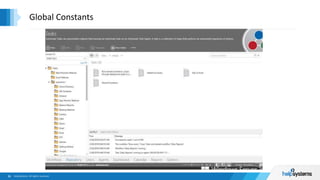
Environment variables
Value pairs (Name / Value)
Eliminate hard coding
Use in any task or workflow
Read-only values
Can be encrypted
Update in one place
Often better than settings database
Automate and Automate Enterprise
Global Constants
Global Constants
Central database connection strings
Eliminate hard coding
Use in any task or workflow
Read-only values
Can be encrypted/hidden
Update in one place
Store as Text or Data Link
Global Database Connections
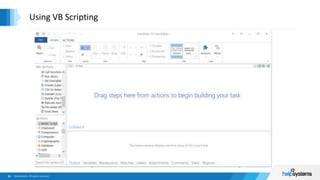
Internal VB scripts
External VB scripts
Internal IDE for testing
ActiveX Automation
Automate Word
Automate Outlook
Automate Excel
Lots of samples on the internet
Call VB functions just like actions
Using VB Scripting
Using VB Scripting
.Net APIs written VB or C#
Feels like calling custom actions
Call functions directly with DLL action
Runs in separate app domain
Unloads after each call
Call directly via COM/ActiveX automation
Keeps DLL in-process
Maintains DLL in-memory state
Use direct instead of ActiveX
Microsoft .Net Assemblies and Custom DLLs
Run any console application
Java
Python
Selenium
Perl
PowerShell
BAT files
Microsoft .Net
VB Scripting
Capture return codes
Capture stdout and stderr
Use skills you already know
External Scripting Languages and Executables
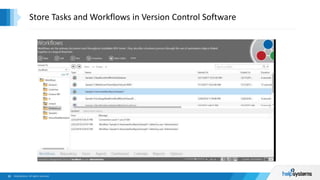
Manage AML task files (AML)
Manage workflows (AMPKG)
Automate AML files
Export tasks from Enterprise (AML)
Export Workflow packages (AMPKG)
Use Git, SVN, TFS, etc.
Add to repository
Manage with Git, SourceTree, etc.
Store Tasks and Workflows in Version Control Software
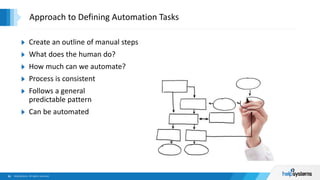
Create an outline of manual steps
What does the human do?
How much can we automate?
Process is consistent
Follows a general
predictable pattern
Can be automated
Approach to Defining Automation Tasks
HelpSystems. All rights reserved.
Demo Time
HelpSystems. All rights reserved.
Questions and Answers
Thank You for Attending!
Next steps:
Download FREE trial
Set up FREE automation consultation
Website:
http://www.helpsystems.com/automate
Telephone:
US Sales: 800-328-1000
Outside US: +44 (0) 870.120.3148
Support: 952-933-0609
Technical Experts:
richard.schoen@helpsystems.com
pat.cameron@helpsystems.com

Automate Best Practices

  • 1.
    Back to BasicsWebinar Series: Automate Best Practices
  • 2.
    Your Presenters Director ofDocument Management Richard Schoen HelpSystems Pat Cameron Director of Automation Technology HelpSystems
  • 3.
    HelpSystems. All rightsreserved. 1. HelpSystems Overview 2. Automate Best Practices 3. Demo 4. Q&A
  • 4.
    Broad Solutions inGrowing Markets Secure • Risk Assessment • Anti-virus • Security Event Monitoring • Identity & Access Management • Compliance Reporting • Managed Security Services • Professional Security Services • Managed File Transfer • Encryption Inform • Enterprise Data Access • Mobile Data Access • Operations Analytics • Executive Dashboards & Reporting • Data Warehousing Automate • Workload Automation • Business Process Automation • Network Monitoring • Message & Event Monitoring • Performance Monitoring • Data Backup Management • Remote Monitoring & Management • Capacity Planning • Document Management
  • 5.
    HelpSystems. All rightsreserved. Automate Best Practices
  • 6.
    Focus on taskbuilding Automate and Automate Enterprise Create re-usable task logic Automate Best Practices
  • 7.
    We will focuson task building Automate and Automate Enterprise Create reusable task logic Organize your task repository Common task structure patterns Variable naming Integrations Error Handling Debugging Automate Development Best Practices
  • 8.
    Automate Folder name bydepartment Task prefix by department Meaningful naming Automate Enterprise Securable repository Users and groups Active Directory authentication Change logging These are just suggestions Workflows for Automate Enterprise Task and Workflow Organization and Naming Conventions Folder Naming Task Naming
  • 9.
    Connect to desiredservice FTP, Database, Email. Active Dir, Excel, CSV List items to dataset Loop through dataset items Do individual item processing Process remaining items Disconnect from service Log steps as needed Workflows chain tasks together General Task Structure and Flow
  • 10.
  • 11.
    Allow parameter input Drivetasks with input settings Excel, CSV, Database, Global Constants Makes tasks configurable Call as subtasks As workflow steps in Enterprise Write functionality once Use everywhere Create Re-Usable Tasks
  • 12.
    Automate variables aredynamically typed Prefix variable names with var_ var_ExcelFile, var_Connection Prefix variable names with type iCount or numCount for numerics strExcelFile or ExcelFile for file names gblVarName for globals oExcel – object name for ActiveX automation There is no one right answer Subjective and hotly debated Use what works for your team Task Variables
  • 13.
    Automate Execution event logging Logextended step information Log to database User messages Keep the auditors happy Automate Enterprise Audit logging Workflow and task changes Who is accessing the server Web based operations console Automate Built-In Logging
  • 14.
    Write custom logsfrom tasks Capture specific business metrics Any custom business specific data Ex: FTP transfer info, completion times, etc. Aggregate to one or more log tables Write to SQL Server database Write to text file log Write to Access database Write to Excel file What’s your favorite? Automate Custom Task Logging
  • 15.
    Self healing resilienttasks Retries on error Run selected error steps Ignore error causes Bypass selected errors Set step error timeout Stop after error Continue to next step Break out of a loop Goto step or label on error Step Level Error Handling
  • 16.
  • 17.
    Add breakpoints Add variablewatches Drill in to datasets (V11) Copy and paste steps as XML Attach files to tasks Run until breakpoint Step through task (F9) Run selected steps only Disable/comment out steps Task Builder - Testing and Debugging
  • 18.
    Task Builder -Testing and Debugging
  • 19.
    Environment variables Value pairs(Name / Value) Eliminate hard coding Use in any task or workflow Read-only values Can be encrypted Update in one place Often better than settings database Automate and Automate Enterprise Global Constants
  • 20.
  • 21.
    Central database connectionstrings Eliminate hard coding Use in any task or workflow Read-only values Can be encrypted/hidden Update in one place Store as Text or Data Link Global Database Connections
  • 22.
  • 23.
    Internal VB scripts ExternalVB scripts Internal IDE for testing ActiveX Automation Automate Word Automate Outlook Automate Excel Lots of samples on the internet Call VB functions just like actions Using VB Scripting
  • 24.
  • 25.
    .Net APIs writtenVB or C# Feels like calling custom actions Call functions directly with DLL action Runs in separate app domain Unloads after each call Call directly via COM/ActiveX automation Keeps DLL in-process Maintains DLL in-memory state Use direct instead of ActiveX Microsoft .Net Assemblies and Custom DLLs
  • 26.
  • 27.
    Run any consoleapplication Java Python Selenium Perl PowerShell BAT files Microsoft .Net VB Scripting Capture return codes Capture stdout and stderr Use skills you already know External Scripting Languages and Executables
  • 28.
    Manage AML taskfiles (AML) Manage workflows (AMPKG) Automate AML files Export tasks from Enterprise (AML) Export Workflow packages (AMPKG) Use Git, SVN, TFS, etc. Add to repository Manage with Git, SourceTree, etc. Store Tasks and Workflows in Version Control Software
  • 29.
    Store Tasks andWorkflows in Version Control Software
  • 30.
    Create an outlineof manual steps What does the human do? How much can we automate? Process is consistent Follows a general predictable pattern Can be automated Approach to Defining Automation Tasks
  • 31.
    HelpSystems. All rightsreserved. Demo Time
  • 32.
    HelpSystems. All rightsreserved. Questions and Answers
  • 33.
    Thank You forAttending! Next steps: Download FREE trial Set up FREE automation consultation Website: http://www.helpsystems.com/automate Telephone: US Sales: 800-328-1000 Outside US: +44 (0) 870.120.3148 Support: 952-933-0609 Technical Experts: richard.schoen@helpsystems.com pat.cameron@helpsystems.com