Quansah Ekow
Mechanical Engineer
CAD Tutor
AUTOCAD MECHANICAL SOFTWARE SESSIONS
ENGINEERING DRAWING
Contents
Ekow Quansah
INTRODUCTION TO SOFTWARE
•
•
•
HOW TO USE SOME COMMANDS
SAMPLE EXERCISES
Powered by: CAD Dimensions
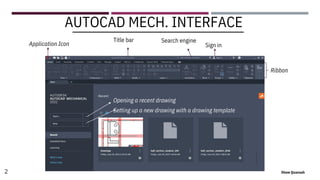
AUTOCAD MECHANICAL INTERFACE
1 Ekow Quansah
Application Icon
Opening a recent drawing
Setting up a new drawing with a drawing template
Ribbon
AUTOCAD MECH. INTERFACE
2 Ekow Quansah
Title bar Search engine
Sign in
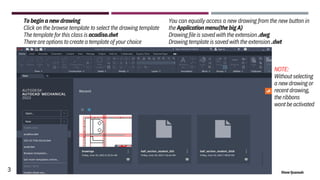
To begin a new drawing
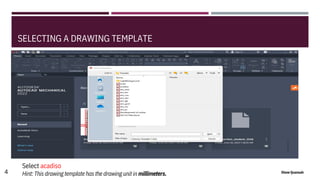
Click on the browse template to select the drawing template
The template for this class is acadiso.dwt
There are options to create a template of your choice
You can equally access a new drawing from the new button in
the Application menu(the big A)
Drawing file is saved with the extension .dwg
Drawing template is saved with the extension .dwt
NOTE:
Without selecting
a new drawing or
recent drawing,
the ribbons
wont be activated
3 Ekow Quansah
SELECTING A DRAWING TEMPLATE
Select acadiso
Hint: This drawing template has the drawing unit in millimeters.
4 Ekow Quansah
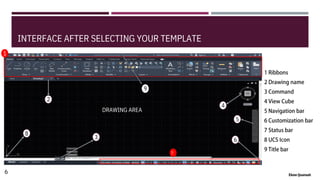
INTERFACE AFTER SELECTING YOUR TEMPLATE
1
8
2
DRAWING AREA
9
4
6
5
3
7
6 Ekow Quansah
8 Ekow Quansah
Video links
CLASS TUTORIAL LINK VIDEOS
On how to set up your title block, plot, using the tools for simple designs etc.
Click here for introduction
Click here to know more about commands
Click here to know about Title block
9 Ekow Quansah
10 Ekow Quansah
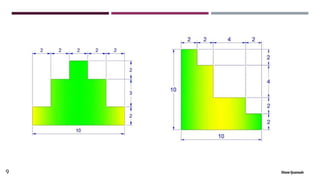
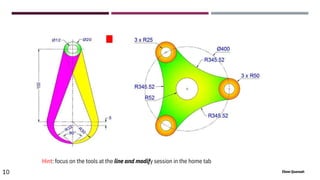
Hint: focus on the tools at the line and modify session in the home tab

THANK YOU
11 Ekow Quansah
Subscribe

AUTOCAD MECHANICAL 1(INTRODUCTION )).pdf

  • 1.
    Quansah Ekow Mechanical Engineer CADTutor AUTOCAD MECHANICAL SOFTWARE SESSIONS ENGINEERING DRAWING Contents Ekow Quansah INTRODUCTION TO SOFTWARE • • • HOW TO USE SOME COMMANDS SAMPLE EXERCISES Powered by: CAD Dimensions
  • 2.
  • 3.
    Application Icon Opening arecent drawing Setting up a new drawing with a drawing template Ribbon AUTOCAD MECH. INTERFACE 2 Ekow Quansah Title bar Search engine Sign in
  • 4.
    To begin anew drawing Click on the browse template to select the drawing template The template for this class is acadiso.dwt There are options to create a template of your choice You can equally access a new drawing from the new button in the Application menu(the big A) Drawing file is saved with the extension .dwg Drawing template is saved with the extension .dwt NOTE: Without selecting a new drawing or recent drawing, the ribbons wont be activated 3 Ekow Quansah
  • 5.
    SELECTING A DRAWINGTEMPLATE Select acadiso Hint: This drawing template has the drawing unit in millimeters. 4 Ekow Quansah
  • 6.
    INTERFACE AFTER SELECTINGYOUR TEMPLATE 1 8 2 DRAWING AREA 9 4 6 5 3 7 6 Ekow Quansah
  • 7.
    8 Ekow Quansah Videolinks CLASS TUTORIAL LINK VIDEOS On how to set up your title block, plot, using the tools for simple designs etc. Click here for introduction Click here to know more about commands Click here to know about Title block
  • 8.
  • 9.
    10 Ekow Quansah Hint:focus on the tools at the line and modify session in the home tab
  • 10.
     THANK YOU 11 EkowQuansah Subscribe