4 1 1 3 L I N E S O F S T Y L I N G G O O D N E S S
AT&T Web Storefront CSS
C L E A N S L A T E
CSS Reset
CSS Reset
 http://meyerweb.com/eric/tools/css/reset/
 The goal of a reset stylesheet is to reduce browser inconsistencies in things
like default line heights, margins and font sizes of headings, and so on
html, body, div, span, applet, object, iframe, h1, h2, h3, h4, h5, h6, p,
blockquote, pre, a, abbr, acronym, address, big, cite, code, del, dfn, em,
font, img, ins, kbd, q, s, samp, small, strike, strong, sub, sup, tt, var, b, u, i,
center, dl, dt, dd, ol, ul, li, fieldset, form, label, legend, table, caption, tbody,
tfoot, thead, tr, th, td
{
margin: 0;
padding: 0;
border: 0;
outline: 0;
font-size: 100%;
vertical-align: baseline;
background: transparent;
}
M A K E I T G O W H E R E I T N E E D S T O G O
CSS Layout
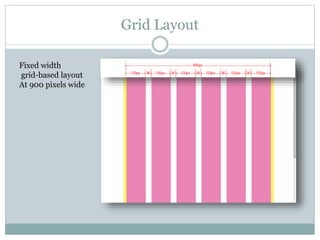
Grid Layout
Fixed width
grid-based layout
At 900 pixels wide
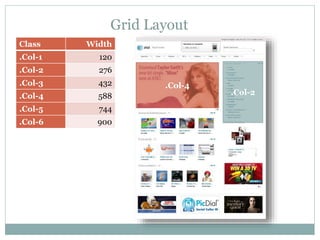
Grid Layout
Class Width
.Col-1 120
.Col-2 276
.Col-3 432
.Col-4 588
.Col-5 744
.Col-6 900
.Col-4
.Col-2
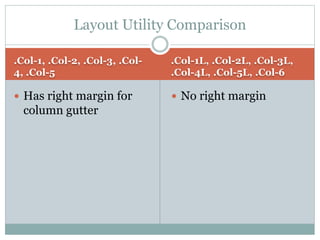
Layout Utility Comparison
.Col-1, .Col-2, .Col-3, .Col-
4, .Col-5
 Has right margin for
column gutter
.Col-1L, .Col-2L, .Col-3L,
.Col-4L, .Col-5L, .Col-6
 No right margin
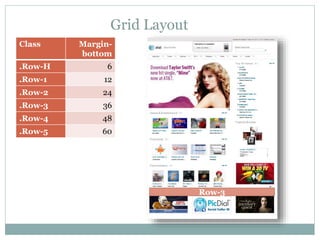
Class Margin-
bottom
.Row-H 6
.Row-1 12
.Row-2 24
.Row-3 36
.Row-4 48
.Row-5 60
Grid Layout
Row-3
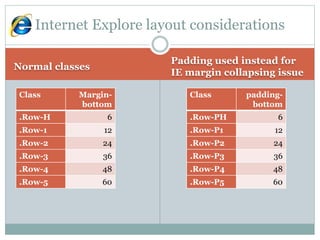
Normal classes
Padding used instead for
IE margin collapsing issue
Internet Explore layout considerations
Class Margin-
bottom
.Row-H 6
.Row-1 12
.Row-2 24
.Row-3 36
.Row-4 48
.Row-5 60
Class padding-
bottom
.Row-PH 6
.Row-P1 12
.Row-P2 24
.Row-P3 36
.Row-P4 48
.Row-P5 60
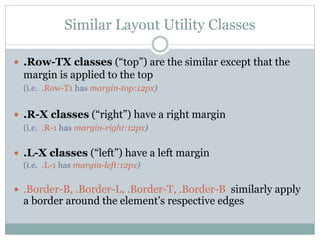
Similar Layout Utility Classes
 .Row-TX classes (“top”) are the similar except that the
margin is applied to the top
(i.e. .Row-T1 has margin-top:12px)
 .R-X classes (“right”) have a right margin
(i.e. .R-1 has margin-right:12px)
 .L-X classes (“left”) have a left margin
(i.e. .L-1 has margin-left:12px)
 .Border-B, .Border-L, .Border-T, .Border-B similarly apply
a border around the element’s respective edges
A L O O K A T T H E C S S “ Z - I N D E X ” P R O P E R T Y
Stacking Order
Stacking order z-index
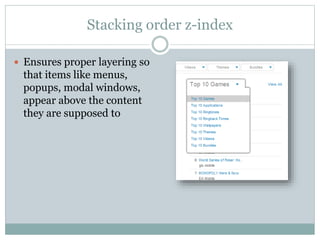
 Ensures proper layering so
that items like menus,
popups, modal windows,
appear above the content
they are supposed to
Stacking order z-index
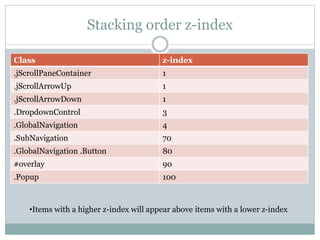
Class z-index
.jScrollPaneContainer 1
.jScrollArrowUp 1
.jScrollArrowDown 1
.DropdownControl 3
.GlobalNavigation 4
.SubNavigation 70
.GlobalNavigation .Button 80
#overlay 90
.Popup 100
•Items with a higher z-index will appear above items with a lower z-index
Internet Explorer z-index
 IE7 renders the stacking order incorrectly
 It reorders the z-index if it’s inside of a “positioned” element
 http://brenelz.com/blog/squish-the-internet-explorer-z-
index-bug/
F L O A T I N G G R A P H I C M E T H O D F O R D Y N A M I C
C O N T E N T
Sliding Doors
Sliding Doors (cont.)
Wrapping dynamic content
http://www.alistapart.com/articles/slidingdoors/More Info
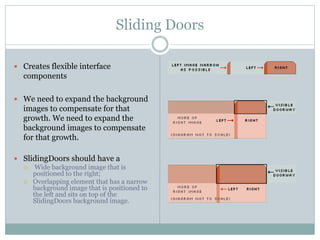
Sliding Doors
 Creates flexible interface
components
 We need to expand the background
images to compensate for that
growth. We need to expand the
background images to compensate
for that growth.
 SlidingDoors should have a
 Wide background image that is
positioned to the right;
 Overlapping element that has a narrow
background image that is positioned to
the left and sits on top of the
SlidingDoors background image.
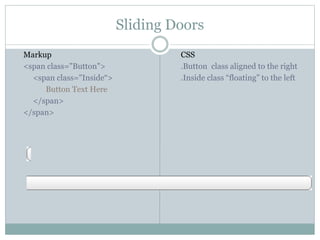
Sliding Doors
CSS
.Button class aligned to the right
.Inside class “floating” to the left
Markup
<span class="Button">
<span class="Inside“>
Button Text Here
</span>
</span>
I T ’ S P R O B A B L Y G O I N G T O M A K E Y O U C R Y
Onion Skinning
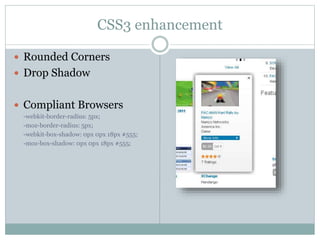
CSS3 enhancement
 Rounded Corners
 Drop Shadow
 Compliant Browsers
-webkit-border-radius: 5px;
-moz-border-radius: 5px;
-webkit-box-shadow: 0px 0px 18px #555;
-moz-box-shadow: 0px 0px 18px #555;
Onion Skinning
 To achieve this effect in
Internet Explorer we
need to use an image
with the desired effect
applied in a image
creation program like
Photoshop or Gimp.
Rounded rectangle with drop shadow graphic
Our friend Internet Explorer
Square Peg, Round Hole
<div class="Popup shadow-one PopMinIE" id="appPopup">
<div class="corner-a"></div>
<div class="corner-b"></div>
<div class="shadow-two">
<div class="shadow-three">
<div class="shadow-four">
Content Here
<div class="ClearFix"></div>
</div>
</div>
</div>
</div>
Onion Skinning
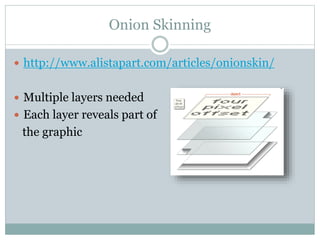
 http://www.alistapart.com/articles/onionskin/
 Multiple layers needed
 Each layer reveals part of
the graphic
Onion Skinning
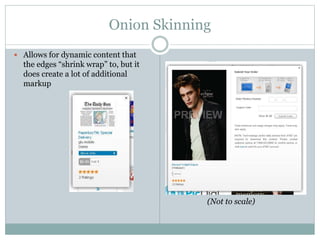
 Allows for dynamic content that
the edges “shrink wrap” to, but it
does create a lot of additional
markup
(Not to scale)
O P T I M I Z I N G C O M M O N G R A P H I C S
Sprites
Sprites
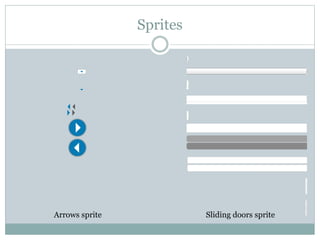
Sliding doors spriteArrows sprite
Sprites
 Reduces HTTP Requests for many individual images
 Greatly improves performance
 http://www.alistapart.com/articles/sprites
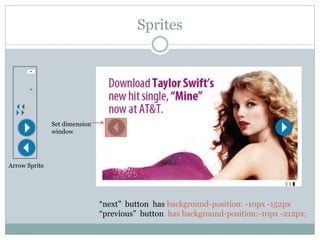
Sprites
“next” button has background-position: -10px -152px
“previous” button has background-position:-10px -212px;
Set dimension
window
Arrow Sprite

Attsf css kt

  • 1.
    4 1 13 L I N E S O F S T Y L I N G G O O D N E S S AT&T Web Storefront CSS
  • 2.
    C L EA N S L A T E CSS Reset
  • 3.
    CSS Reset  http://meyerweb.com/eric/tools/css/reset/ The goal of a reset stylesheet is to reduce browser inconsistencies in things like default line heights, margins and font sizes of headings, and so on html, body, div, span, applet, object, iframe, h1, h2, h3, h4, h5, h6, p, blockquote, pre, a, abbr, acronym, address, big, cite, code, del, dfn, em, font, img, ins, kbd, q, s, samp, small, strike, strong, sub, sup, tt, var, b, u, i, center, dl, dt, dd, ol, ul, li, fieldset, form, label, legend, table, caption, tbody, tfoot, thead, tr, th, td { margin: 0; padding: 0; border: 0; outline: 0; font-size: 100%; vertical-align: baseline; background: transparent; }
  • 4.
    M A KE I T G O W H E R E I T N E E D S T O G O CSS Layout
  • 5.
    Grid Layout Fixed width grid-basedlayout At 900 pixels wide
  • 6.
    Grid Layout Class Width .Col-1120 .Col-2 276 .Col-3 432 .Col-4 588 .Col-5 744 .Col-6 900 .Col-4 .Col-2
  • 7.
    Layout Utility Comparison .Col-1,.Col-2, .Col-3, .Col- 4, .Col-5  Has right margin for column gutter .Col-1L, .Col-2L, .Col-3L, .Col-4L, .Col-5L, .Col-6  No right margin
  • 8.
    Class Margin- bottom .Row-H 6 .Row-112 .Row-2 24 .Row-3 36 .Row-4 48 .Row-5 60 Grid Layout Row-3
  • 9.
    Normal classes Padding usedinstead for IE margin collapsing issue Internet Explore layout considerations Class Margin- bottom .Row-H 6 .Row-1 12 .Row-2 24 .Row-3 36 .Row-4 48 .Row-5 60 Class padding- bottom .Row-PH 6 .Row-P1 12 .Row-P2 24 .Row-P3 36 .Row-P4 48 .Row-P5 60
  • 10.
    Similar Layout UtilityClasses  .Row-TX classes (“top”) are the similar except that the margin is applied to the top (i.e. .Row-T1 has margin-top:12px)  .R-X classes (“right”) have a right margin (i.e. .R-1 has margin-right:12px)  .L-X classes (“left”) have a left margin (i.e. .L-1 has margin-left:12px)  .Border-B, .Border-L, .Border-T, .Border-B similarly apply a border around the element’s respective edges
  • 11.
    A L OO K A T T H E C S S “ Z - I N D E X ” P R O P E R T Y Stacking Order
  • 12.
    Stacking order z-index Ensures proper layering so that items like menus, popups, modal windows, appear above the content they are supposed to
  • 13.
    Stacking order z-index Classz-index .jScrollPaneContainer 1 .jScrollArrowUp 1 .jScrollArrowDown 1 .DropdownControl 3 .GlobalNavigation 4 .SubNavigation 70 .GlobalNavigation .Button 80 #overlay 90 .Popup 100 •Items with a higher z-index will appear above items with a lower z-index
  • 14.
    Internet Explorer z-index IE7 renders the stacking order incorrectly  It reorders the z-index if it’s inside of a “positioned” element  http://brenelz.com/blog/squish-the-internet-explorer-z- index-bug/
  • 15.
    F L OA T I N G G R A P H I C M E T H O D F O R D Y N A M I C C O N T E N T Sliding Doors
  • 16.
    Sliding Doors (cont.) Wrappingdynamic content http://www.alistapart.com/articles/slidingdoors/More Info
  • 17.
    Sliding Doors  Createsflexible interface components  We need to expand the background images to compensate for that growth. We need to expand the background images to compensate for that growth.  SlidingDoors should have a  Wide background image that is positioned to the right;  Overlapping element that has a narrow background image that is positioned to the left and sits on top of the SlidingDoors background image.
  • 18.
    Sliding Doors CSS .Button classaligned to the right .Inside class “floating” to the left Markup <span class="Button"> <span class="Inside“> Button Text Here </span> </span>
  • 19.
    I T ’S P R O B A B L Y G O I N G T O M A K E Y O U C R Y Onion Skinning
  • 20.
    CSS3 enhancement  RoundedCorners  Drop Shadow  Compliant Browsers -webkit-border-radius: 5px; -moz-border-radius: 5px; -webkit-box-shadow: 0px 0px 18px #555; -moz-box-shadow: 0px 0px 18px #555;
  • 21.
    Onion Skinning  Toachieve this effect in Internet Explorer we need to use an image with the desired effect applied in a image creation program like Photoshop or Gimp. Rounded rectangle with drop shadow graphic
  • 22.
    Our friend InternetExplorer Square Peg, Round Hole <div class="Popup shadow-one PopMinIE" id="appPopup"> <div class="corner-a"></div> <div class="corner-b"></div> <div class="shadow-two"> <div class="shadow-three"> <div class="shadow-four"> Content Here <div class="ClearFix"></div> </div> </div> </div> </div>
  • 23.
    Onion Skinning  http://www.alistapart.com/articles/onionskin/ Multiple layers needed  Each layer reveals part of the graphic
  • 24.
    Onion Skinning  Allowsfor dynamic content that the edges “shrink wrap” to, but it does create a lot of additional markup (Not to scale)
  • 25.
    O P TI M I Z I N G C O M M O N G R A P H I C S Sprites
  • 26.
  • 27.
    Sprites  Reduces HTTPRequests for many individual images  Greatly improves performance  http://www.alistapart.com/articles/sprites
  • 28.
    Sprites “next” button hasbackground-position: -10px -152px “previous” button has background-position:-10px -212px; Set dimension window Arrow Sprite