Prepared By: Scott Curley
                 3-3-13
   Up to 75 % of students with disabilities will be
    in regular classrooms (Cennamo, 2010)
   No two students are the same: they will have
    unique strengths and weaknesses
   Understand the strengths and
    weaknesses, and how certain methods and
    assessments carry a bias towards certain
    student types
   As educators, we should strive to incorporate
    universal design into our classrooms
   Data:
    ◦ Internal-obtained in your classroom
    ◦ External-retrieved from outside your classroom
    ◦ Formative-gathered from assessments at the end of
      a unit or academic year
    ◦ Summative-gathered as part of an instructional unit
      to provide feedback and opportunities to modify
      goals
   Use data to inform decision making and tailor
    instruction to accommodate all types of
    students
   Universal design for learning (UDL): flexible
    options for materials, assessment and
    methods of instruction to remove barriers to
    the educational process
   Flexibility= Accessibility
   Be creative!
    ◦ Focus on the learning outcome, not the methods
      you plan to use
    ◦ Be aware of the various needs in your
      classroom, and have a plan on how to
      accommodate a diverse range of students
   We are limited by traditional methods of
    instruction
   Textbooks, handouts, and pencil and paper
    quizzes limit the potential for success for a
    diverse classroom
   Digital media is the key factor for
    implementing UDL and breaking down
    educational barriers
   Traditional methods are ok as long as other
    instructional and assessment formats are
    offered (i.e. technology)
   Chartered under federal legislation:
    Individuals with Disabilities Education Act
    (IDEA) of 1990
   Individual education plan is written, and
    provided freely to all students who qualify
   Collaboration between teacher, parents, and
    school specialists (school psychologist,
    occupational therapist, guidance counselor)
   Written and agreed upon by all parties before
    going into effect
   For best results, IEP’s should be evaluated and
    reviewed on an annual basis
   Students’ needs change, so will their need for
    accommodation
   IEP may require the use of assistive
    technologies, inclusive treatment, concerted
    efforts of several professionals, and may pull the
    student from the classroom to work one on one
    with a specialist
   If assistive technology is part of one of your
    students IEP, check with your school
    administration for specialized training
   Can be low tech or high tech, electronic or
    not, computerized or simple
   It’s not about the tool itself, but how it is used to
    make accommodations for the learner!
   Can often require creativity on the instructional
    team rather than a large budget
   Consider simple approaches (modifications of
    existing printed materials) as well as more
    sophisticated ones (computerized
    adaptations, special equipment or learning
    software) if needed
   Examples of common low tech assistive technology
    include:
    ◦ Using a binder as a slanted writing surface
    ◦ Having students select from a series of printed images to tell a
      story
    ◦ Utilizing a stamp that students can use to draw the X and Y axis
      for algebra
   Possible Implications:
    ◦ Assist students who do not have a good range of motion with
      basic writing skills
    ◦ Aid students with poor writing or language skills in
      communicating
   Retrieved from the state of Washington’s Department of
    Education website:
    http://www.k12.wa.us/SpecialEd/Families/IEPs/pubdocs/L
    owTechAssistiveTechnology.pdf
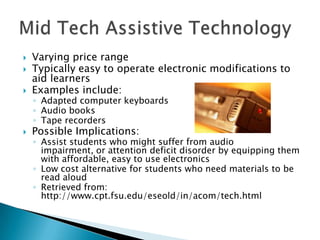
   Varying price range
   Typically easy to operate electronic modifications to
    aid learners
   Examples include:
    ◦ Adapted computer keyboards
    ◦ Audio books
    ◦ Tape recorders
   Possible Implications:
    ◦ Assist students who might suffer from audio
      impairment, or attention deficit disorder by equipping them
      with affordable, easy to use electronics
    ◦ Low cost alternative for students who need materials to be
      read aloud
    ◦ Retrieved from:
      http://www.cpt.fsu.edu/eseold/in/acom/tech.html
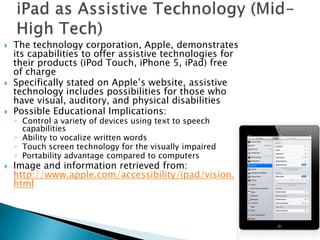
   The technology corporation, Apple, demonstrates
    its capabilities to offer assistive technologies for
    their products (iPod Touch, iPhone 5, iPad) free
    of charge
   Specifically stated on Apple’s website, assistive
    technology includes possibilities for those who
    have visual, auditory, and physical disabilities
   Possible Educational Implications:
    ◦ Control a variety of devices using text to speech
      capabilities
    ◦ Ability to vocalize written words
    ◦ Touch screen technology for the visually impaired
    ◦ Portability advantage compared to computers
   Image and information retrieved from:
    http://www.apple.com/accessibility/ipad/vision.
    html
   Approaches to differentiation are as varied as
    the students we work with
   We can not assume what works well for one
    student will work well with others
   Pay special attention to needs, monitor and
    modify as frequently as possible
   Cennamo, K.S., Ross, J.D., & Ertmer, P.A.
    (2010) Technology integration for meaningful
    classroom use: A standards based approach.
    Belmont, CA: Cengage.

Assistive Technology

  • 1.
    Prepared By: ScottCurley 3-3-13
  • 2.
    Up to 75 % of students with disabilities will be in regular classrooms (Cennamo, 2010)  No two students are the same: they will have unique strengths and weaknesses  Understand the strengths and weaknesses, and how certain methods and assessments carry a bias towards certain student types  As educators, we should strive to incorporate universal design into our classrooms
  • 3.
    Data: ◦ Internal-obtained in your classroom ◦ External-retrieved from outside your classroom ◦ Formative-gathered from assessments at the end of a unit or academic year ◦ Summative-gathered as part of an instructional unit to provide feedback and opportunities to modify goals  Use data to inform decision making and tailor instruction to accommodate all types of students
  • 4.
    Universal design for learning (UDL): flexible options for materials, assessment and methods of instruction to remove barriers to the educational process  Flexibility= Accessibility  Be creative! ◦ Focus on the learning outcome, not the methods you plan to use ◦ Be aware of the various needs in your classroom, and have a plan on how to accommodate a diverse range of students
  • 5.
    We are limited by traditional methods of instruction  Textbooks, handouts, and pencil and paper quizzes limit the potential for success for a diverse classroom  Digital media is the key factor for implementing UDL and breaking down educational barriers  Traditional methods are ok as long as other instructional and assessment formats are offered (i.e. technology)
  • 6.
    Chartered under federal legislation: Individuals with Disabilities Education Act (IDEA) of 1990  Individual education plan is written, and provided freely to all students who qualify  Collaboration between teacher, parents, and school specialists (school psychologist, occupational therapist, guidance counselor)  Written and agreed upon by all parties before going into effect
  • 7.
    For best results, IEP’s should be evaluated and reviewed on an annual basis  Students’ needs change, so will their need for accommodation  IEP may require the use of assistive technologies, inclusive treatment, concerted efforts of several professionals, and may pull the student from the classroom to work one on one with a specialist  If assistive technology is part of one of your students IEP, check with your school administration for specialized training
  • 8.
    Can be low tech or high tech, electronic or not, computerized or simple  It’s not about the tool itself, but how it is used to make accommodations for the learner!  Can often require creativity on the instructional team rather than a large budget  Consider simple approaches (modifications of existing printed materials) as well as more sophisticated ones (computerized adaptations, special equipment or learning software) if needed
  • 9.
    Examples of common low tech assistive technology include: ◦ Using a binder as a slanted writing surface ◦ Having students select from a series of printed images to tell a story ◦ Utilizing a stamp that students can use to draw the X and Y axis for algebra  Possible Implications: ◦ Assist students who do not have a good range of motion with basic writing skills ◦ Aid students with poor writing or language skills in communicating  Retrieved from the state of Washington’s Department of Education website: http://www.k12.wa.us/SpecialEd/Families/IEPs/pubdocs/L owTechAssistiveTechnology.pdf
  • 10.
    Varying price range  Typically easy to operate electronic modifications to aid learners  Examples include: ◦ Adapted computer keyboards ◦ Audio books ◦ Tape recorders  Possible Implications: ◦ Assist students who might suffer from audio impairment, or attention deficit disorder by equipping them with affordable, easy to use electronics ◦ Low cost alternative for students who need materials to be read aloud ◦ Retrieved from: http://www.cpt.fsu.edu/eseold/in/acom/tech.html
  • 11.
    The technology corporation, Apple, demonstrates its capabilities to offer assistive technologies for their products (iPod Touch, iPhone 5, iPad) free of charge  Specifically stated on Apple’s website, assistive technology includes possibilities for those who have visual, auditory, and physical disabilities  Possible Educational Implications: ◦ Control a variety of devices using text to speech capabilities ◦ Ability to vocalize written words ◦ Touch screen technology for the visually impaired ◦ Portability advantage compared to computers  Image and information retrieved from: http://www.apple.com/accessibility/ipad/vision. html
  • 12.
    Approaches to differentiation are as varied as the students we work with  We can not assume what works well for one student will work well with others  Pay special attention to needs, monitor and modify as frequently as possible
  • 13.
    Cennamo, K.S., Ross, J.D., & Ertmer, P.A. (2010) Technology integration for meaningful classroom use: A standards based approach. Belmont, CA: Cengage.