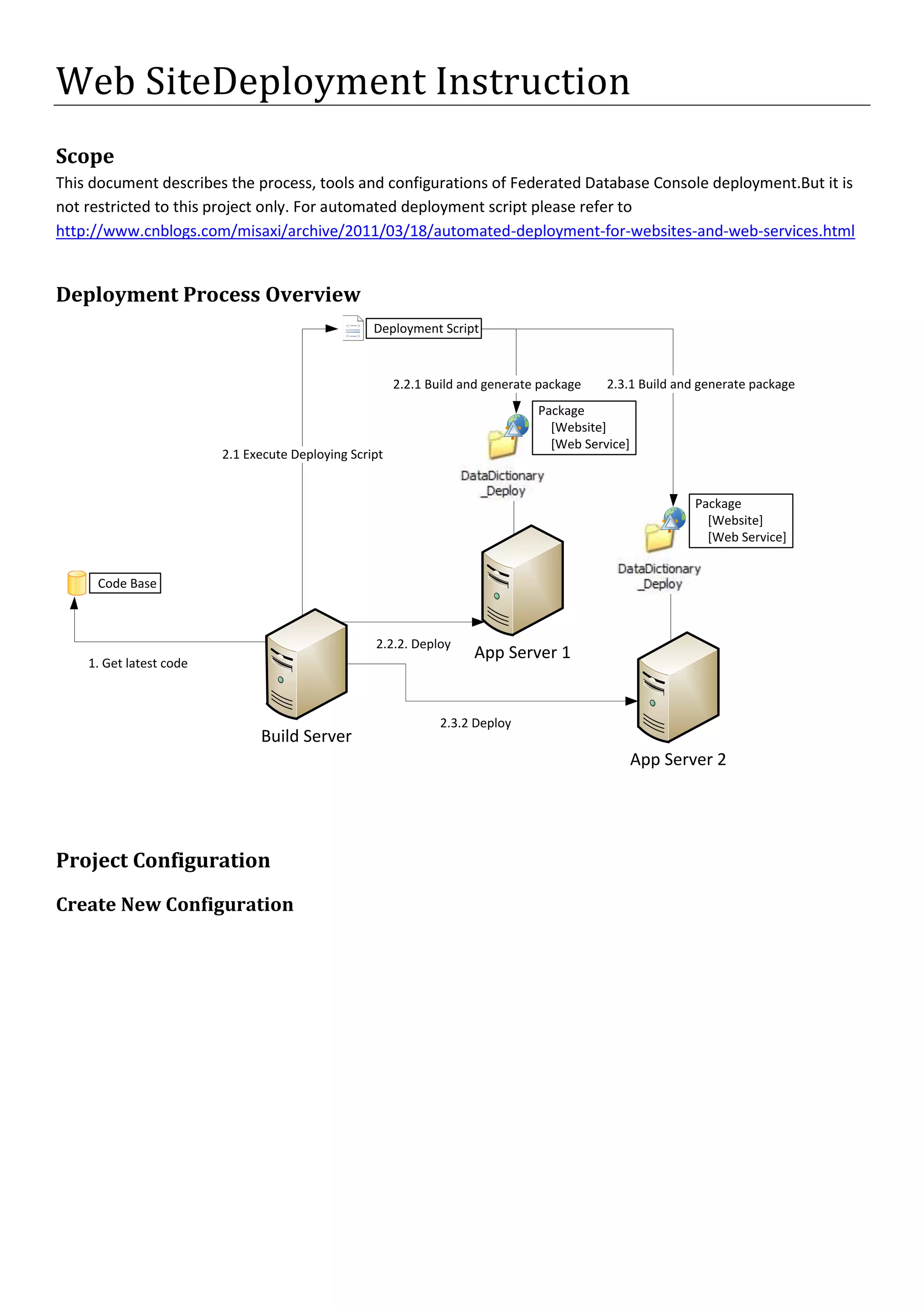
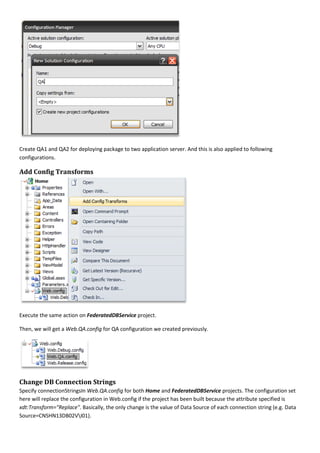
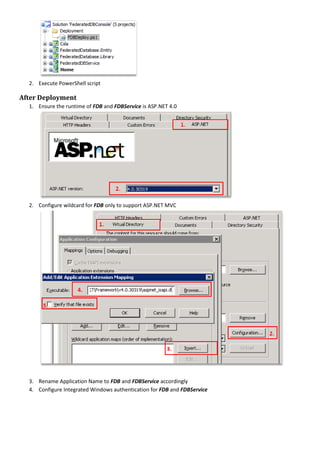
Web Site Deployment Instruction<br />Scope<br />This document describes the process, tools and configurations of Federated Database Console deployment. But it is not restricted to this project only. For automated deployment script please refer to http://www.cnblogs.com/misaxi/archive/2011/03/18/automated-deployment-for-websites-and-web-services.html<br />Deployment Process Overview<br />Project Configuration<br />Create New Configuration<br />Create QA1 and QA2 for deploying package to two application server. And this is also applied to following configurations.<br />Add Config Transforms<br />Execute the same action on FederatedDBService project.<br />Then, we will get a Web.QA.config for QA configuration we created previously.<br />Change DB Connection Strings<br />Specify connectionStrings In Web.QA.config for both Home and FederatedDBService projects. The configuration set here will replace the configuration in Web.config if the project has been built because the attribute specified is xdt:Transform=\"
Replace\"
. Basically, the only change is the value of Data Source of each connection string (e.g. Data Source=CNSHN13DB02V\I01).<br />Configure Package/Publish Web<br />Open properties window of website project
Configure parameters in the Package/Publish Web section as following
Home should be Default Web Site/FDB
FederatedDBService should be Default Web Site/FDBServiceDeployment<br />Before Deployment<br />Install PowerShell 2.0 on target servers
Enable PowerShell remoting on target servers
Install MSDeploy 1.0 on target servers ( HYPERLINK "file:///\\\\Cnshn13db04v\\share_sdc\\Mike%20He\\WebDeploy_x86_en-US.msi" MSDeploy 1.0 Installer x86)

ASP.NET Web Site Deployment Instruction

  • 1.
    Web Site DeploymentInstruction<br />Scope<br />This document describes the process, tools and configurations of Federated Database Console deployment. But it is not restricted to this project only. For automated deployment script please refer to http://www.cnblogs.com/misaxi/archive/2011/03/18/automated-deployment-for-websites-and-web-services.html<br />Deployment Process Overview<br />Project Configuration<br />Create New Configuration<br />Create QA1 and QA2 for deploying package to two application server. And this is also applied to following configurations.<br />Add Config Transforms<br />Execute the same action on FederatedDBService project.<br />Then, we will get a Web.QA.config for QA configuration we created previously.<br />Change DB Connection Strings<br />Specify connectionStrings In Web.QA.config for both Home and FederatedDBService projects. The configuration set here will replace the configuration in Web.config if the project has been built because the attribute specified is xdt:Transform=\" Replace\" . Basically, the only change is the value of Data Source of each connection string (e.g. Data Source=CNSHN13DB02V\I01).<br />Configure Package/Publish Web<br />Open properties window of website project
  • 2.
    Configure parameters inthe Package/Publish Web section as following
  • 3.
    Home should beDefault Web Site/FDB
  • 4.
    FederatedDBService should beDefault Web Site/FDBServiceDeployment<br />Before Deployment<br />Install PowerShell 2.0 on target servers
  • 5.
  • 6.
    Install MSDeploy 1.0on target servers ( HYPERLINK "file:///\\\\Cnshn13db04v\\share_sdc\\Mike%20He\\WebDeploy_x86_en-US.msi" MSDeploy 1.0 Installer x86)