CONFIDENTIAL
© Copyright 2011. Aruba Networks, Inc.
All rights reserved
CONFIDENTIAL
© Copyright 2011. Aruba Networks, Inc.
All rights reserved
Aruba Networks
Webinar
Dorm Wi-Fi Design
in the Era of BYOD
Brad Noblet
President of BN Consulting & Former CIO of Dartmouth College
Matthew Nocifore, Senior Director of Networking
Charles Rumford, Network Engineer
Information Resources & Technology, Drexel University
CONFIDENTIAL
© Copyright 2011. Aruba Networks, Inc.
All rights reserved2
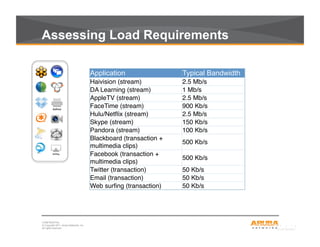
Assessing Load Requirements
Application Typical Bandwidth
Haivision (stream) ! 2.5 Mb/s !
DA Learning (stream) ! 1 Mb/s !
AppleTV (stream) ! 2.5 Mb/s !
FaceTime (stream) ! 900 Kb/s !
Hulu/Netflix (stream) ! 2.5 Mb/s !
Skype (stream) ! 150 Kb/s !
Pandora (stream) ! 100 Kb/s !
Blackboard (transaction +
multimedia clips) !
500 Kb/s !
Facebook (transaction +
multimedia clips) !
500 Kb/s !
Twitter (transaction) ! 50 Kb/s !
Email (transaction) ! 50 Kb/s !
Web surfing (transaction) ! 50 Kb/s !
CONFIDENTIAL
© Copyright 2011. Aruba Networks, Inc.
All rights reserved3
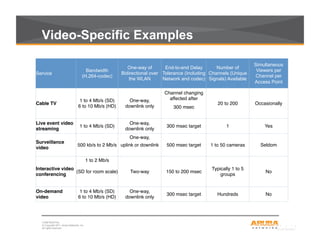
Video-Specific Examples
Service
Bandwidth
(H.264-codec)
One-way of
Bidirectional over
the WLAN
End-to-end Delay
Tolerance (Including
Network and codec)
Number of
Channels (Unique
Signals) Available
Simultaneous
Viewers per
Channel per
Access Point
Cable TV !
1 to 4 Mb/s (SD) !
6 to 10 Mb/s (HD) !
One-way, !
downlink only !
Channel changing
affected after!
20 to 200 ! Occasionally !
300 msec !


Live event video
streaming !
1 to 4 Mb/s (SD) !
One-way, !
downlink only !
300 msec target ! 1! Yes !
Surveillance
video !
500 kb/s to 2 Mb/s !
One-way,!
500 msec target ! 1 to 50 cameras ! Seldom !uplink or downlink !


Interactive video
conferencing !
1 to 2 Mb/s!
Two-way ! 150 to 200 msec !
Typically 1 to 5
groups !
No !(SD for room scale) !


On-demand
video !
1 to 4 Mb/s (SD) !
6 to 10 Mb/s (HD) !
One-way, !
downlink only !
300 msec target ! Hundreds ! No !
CONFIDENTIAL
© Copyright 2011. Aruba Networks, Inc.
All rights reserved4
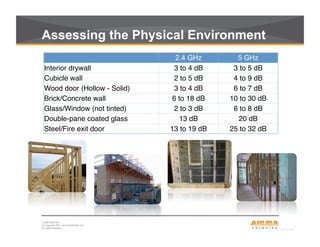
Assessing the Physical Environment
	
  	
   2.4 GHz 5 GHz
Interior drywall ! 3 to 4 dB ! 3 to 5 dB !
Cubicle wall ! 2 to 5 dB ! 4 to 9 dB !
Wood door (Hollow - Solid) ! 3 to 4 dB ! 6 to 7 dB !
Brick/Concrete wall ! 6 to 18 dB ! 10 to 30 dB !
Glass/Window (not tinted) ! 2 to 3 dB ! 6 to 8 dB !
Double-pane coated glass ! 13 dB ! 20 dB !
Steel/Fire exit door ! 13 to 19 dB ! 25 to 32 dB !
CONFIDENTIAL
© Copyright 2011. Aruba Networks, Inc.
All rights reserved5
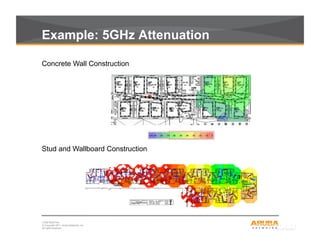
Example: 5GHz Attenuation
Stud and Wallboard Construction
Concrete Wall Construction
CONFIDENTIAL
© Copyright 2011. Aruba Networks, Inc.
All rights reserved6
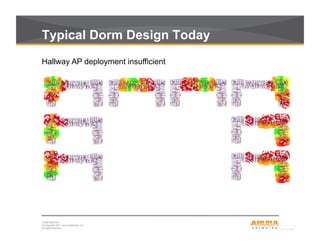
Typical Dorm Design Today
Hallway AP deployment insufficient
CONFIDENTIAL
© Copyright 2011. Aruba Networks, Inc.
All rights reserved7
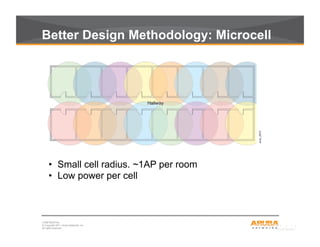
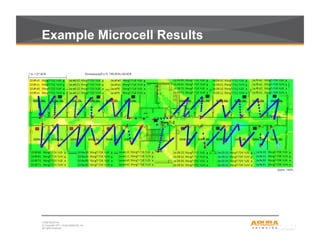
Better Design Methodology: Microcell
•  Small cell radius. ~1AP per room
•  Low power per cell
CONFIDENTIAL
© Copyright 2011. Aruba Networks, Inc.
All rights reserved8
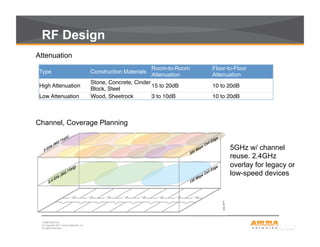
RF Design
Type Construction Materials
Room-to-Room
Attenuation
Floor-to-Floor
Attenuation
High Attenuation !
Stone, Concrete, Cinder
Block, Steel !
15 to 20dB ! 10 to 20dB !
Low Attenuation ! Wood, Sheetrock ! 3 to 10dB ! 10 to 20dB !
Attenuation
Channel, Coverage Planning
5GHz w/ channel
reuse. 2.4GHz
overlay for legacy or
low-speed devices
CONFIDENTIAL
© Copyright 2011. Aruba Networks, Inc.
All rights reserved9
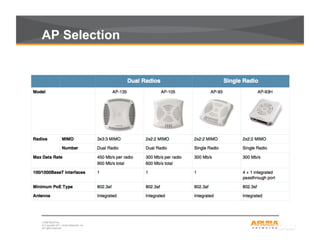
AP Selection
CONFIDENTIAL
© Copyright 2011. Aruba Networks, Inc.
All rights reserved10
Example Microcell Results
We make the education net work.
DragonFly Residence Hall Wireless
Next Generation Deployment
Aruba Webinar
Dorm Wi-Fi
●
July 24, 2012
Matthew Nocifore
Charles Rumford
CTI Network Infrastructure + Telecom
Office of Information Resources +Technology
About Drexel…
Drexel University, Philadelphia PA
•  Founded in 1891. The nation's 14th largest private
university with campuses located in University and
Center City Philadelphia
•  25,000 FTE Grad/Undergrad Students
Including medical, law, and on-line programs
•  5-year UnderGrad “Co-Op” Program
Offers educational and employment opportunities to students for study and
internship. Most UG programs operate on a quarters program using a 10
week term.
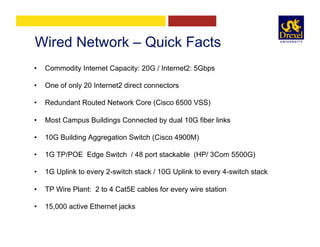
Wired Network – Quick Facts
•  Commodity Internet Capacity: 20G / Internet2: 5Gbps
•  One of only 20 Internet2 direct connectors
•  Redundant Routed Network Core (Cisco 6500 VSS)
•  Most Campus Buildings Connected by dual 10G fiber links
•  10G Building Aggregation Switch (Cisco 4900M)
•  1G TP/POE Edge Switch / 48 port stackable (HP/ 3Com 5500G)
•  1G Uplink to every 2-switch stack / 10G Uplink to every 4-switch stack
•  TP Wire Plant: 2 to 4 Cat5E cables for every wire station
•  15,000 active Ethernet jacks
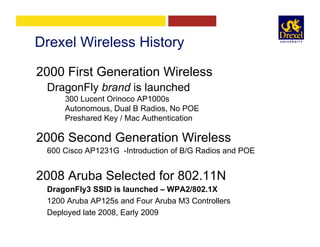
Drexel Wireless History
2000 First Generation Wireless
DragonFly brand is launched
300 Lucent Orinoco AP1000s
Autonomous, Dual B Radios, No POE
Preshared Key / Mac Authentication
2006 Second Generation Wireless
600 Cisco AP1231G -Introduction of B/G Radios and POE
2008 Aruba Selected for 802.11N
DragonFly3 SSID is launched – WPA2/802.1X
1200 Aruba AP125s and Four Aruba M3 Controllers
Deployed late 2008, Early 2009
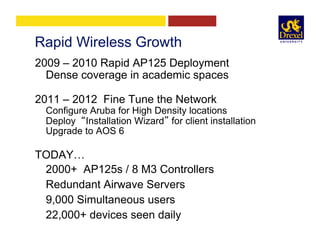
Rapid Wireless Growth
2009 – 2010 Rapid AP125 Deployment
Dense coverage in academic spaces
2011 – 2012 Fine Tune the Network
Configure Aruba for High Density locations
Deploy “Installation Wizard” for client installation
Upgrade to AOS 6
TODAY…
2000+ AP125s / 8 M3 Controllers
Redundant Airwave Servers
9,000 Simultaneous users
22,000+ devices seen daily
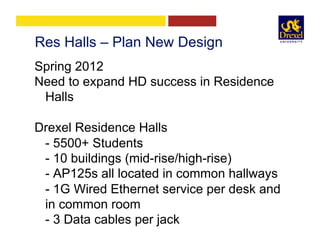
Res Halls – Plan New Design
Spring 2012
Need to expand HD success in Residence
Halls
Drexel Residence Halls
- 5500+ Students
- 10 buildings (mid-rise/high-rise)
- AP125s all located in common hallways
- 1G Wired Ethernet service per desk and
in common room
- 3 Data cables per jack
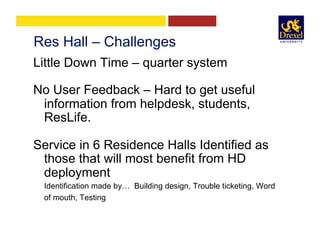
Res Hall – Challenges
Little Down Time – quarter system
No User Feedback – Hard to get useful
information from helpdesk, students,
ResLife.
Service in 6 Residence Halls Identified as
those that will most benefit from HD
deployment
Identification made by… Building design, Trouble ticketing, Word
of mouth, Testing
Meeting the Challenge
Need Radical New Thinking!
ü  Design
ü  Implementation
ü  Communication
Major change for networking staff!
-Many spirited conversations
-Aruba releases draft NG Res Hall Architecture
Keys to New Thinking
•  APs must go in student rooms
•  Design/Install must take place in occupied
rooms
•  Need new close relationship with ResLife
•  Must deploy in small trials
•  Must measure performance
•  Must survey and “speak” directly to
students during all phases of deployment
Goals
Upgrade service in 3 Halls by Fall Term
2012
Upon Completion …
IT staff should be able to hold town hall style,
face-to-face meetings in residence halls to
discuss wireless and know that our service is
excellent.
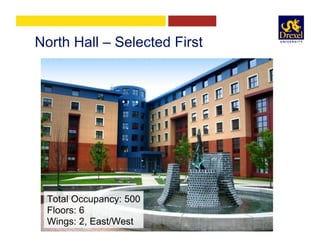
North Hall – Selected First
Total Occupancy: 500
Floors: 6
Wings: 2, East/West
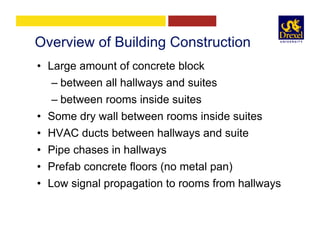
Overview of Building Construction
•  Large amount of concrete block
– between all hallways and suites
– between rooms inside suites
•  Some dry wall between rooms inside suites
•  HVAC ducts between hallways and suite
•  Pipe chases in hallways
•  Prefab concrete floors (no metal pan)
•  Low signal propagation to rooms from hallways
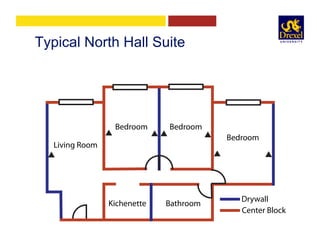
Typical North Hall Suite
Living Room
BedroomBedroom
Bedroom
BathroomKichenette
Drywall
Center Block
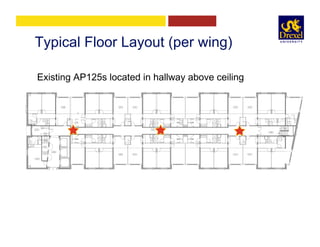
Typical Floor Layout (per wing)
Existing AP125s located in hallway above ceiling
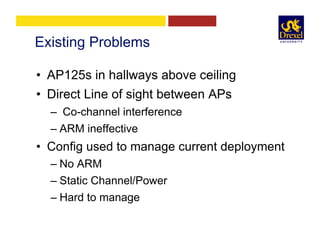
Existing Problems
•  AP125s in hallways above ceiling
•  Direct Line of sight between APs
–  Co-channel interference
– ARM ineffective
•  Config used to manage current deployment
– No ARM
– Static Channel/Power
– Hard to manage
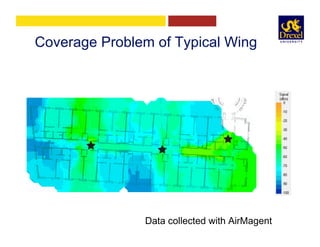
Coverage Problem of Typical Wing
Data collected with AirMagent
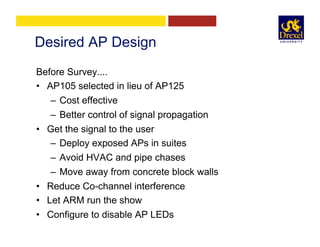
Desired AP Design
Before Survey....
•  AP105 selected in lieu of AP125
–  Cost effective
–  Better control of signal propagation
•  Get the signal to the user
–  Deploy exposed APs in suites
–  Avoid HVAC and pipe chases
–  Move away from concrete block walls
•  Reduce Co-channel interference
•  Let ARM run the show
•  Configure to disable AP LEDs
Survey RF in Sample Suites
Using AirMagnet…
•  Measure RF between rooms in suites
•  Measure RF between floors
•  Identify AP mounting locations
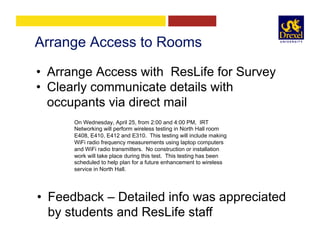
Arrange Access to Rooms
•  Arrange Access with ResLife for Survey
•  Clearly communicate details with
occupants via direct mail
On Wednesday, April 25, from 2:00 and 4:00 PM,  IRT
Networking will perform wireless testing in North Hall room
E408, E410, E412 and E310.  This testing will include making
WiFi radio frequency measurements using laptop computers  
and WiFi radio transmitters.  No construction or installation
work will take place during this test.  This testing has been
scheduled to help plan for a future enhancement to wireless
service in North Hall.
•  Feedback – Detailed info was appreciated
by students and ResLife staff
During Survey
•  Be minimally invasive
– Power from hallway ac outlets
–  Avoid moving furniture
Tripod mounted AP105
•  AP in RAP mode
•  Power Injector
Gather data from all adjacent suites using
AirMagnet
Analysis and Deployment Plan
•  Review the data collected from survey
– Run data through Aruba’s VisualRF Planner
•  Findings
– Between floor RF propagation was excellent
using ceiling mounted AP105
– RF propagation within suite was excellent
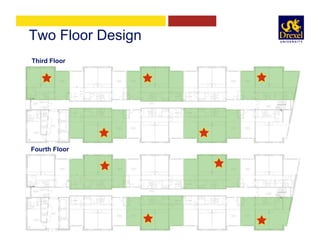
•  This suggested a two-floor design with
APs in alternating suites
Two Floor Design
Fourth Floor
Third Floor
Deployment in Occupied Rooms
•  One floor at a time
•  Fourth Floor, East Wing
•  Arrange Access & Email Students
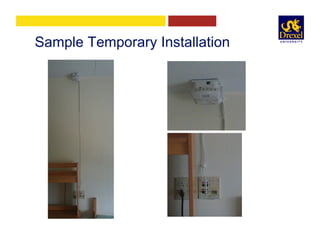
•  All aspects of installation temporary
– AP105 mounted to ceiling with Velcro
– Cable surface mounted to wall
– Used existing wiring station for net access
•  Existing hallway APs configured as air
monitors
Sample Temporary Installation
Repeat Deployment on Next Floor
•  Third Floor, East Wing
•  Arrange Access & Email Students
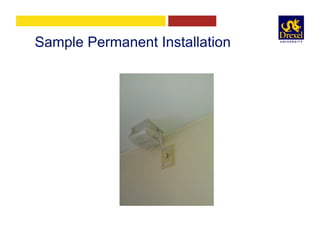
•  Previous success suggested permanent
installation
– AP permanently mounted to ceiling
– Cable from existing station re-used
– New jack installed for AP
Sample Permanent Installation
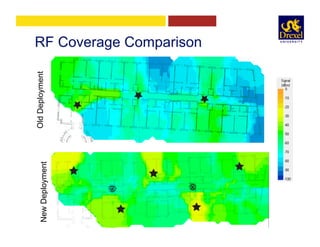
Survey New Deployment
•  AirMagnet Survey of both floors
•  Airwave Usage Reports
•  Student Survey by email
RF Coverage ComparisonNewDeploymentOldDeployment
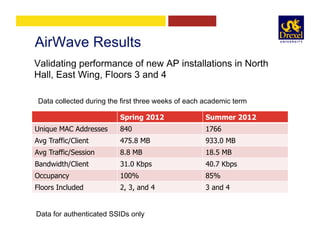
AirWave Results
Spring 2012 Summer 2012
Unique MAC Addresses 840 1766
Avg Traffic/Client 475.8 MB 933.0 MB
Avg Traffic/Session 8.8 MB 18.5 MB
Bandwidth/Client 31.0 Kbps 40.7 Kbps
Occupancy 100% 85%
Floors Included 2, 3, and 4 3 and 4
Data for authenticated SSIDs only
Validating performance of new AP installations in North
Hall, East Wing, Floors 3 and 4
Data collected during the first three weeks of each academic term
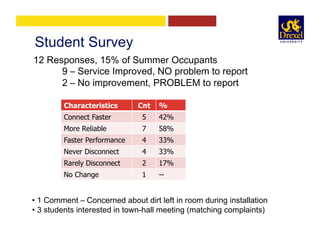
Student Survey
Characteristics Cnt %
Connect Faster 5 42%
More Reliable 7 58%
Faster Performance 4 33%
Never Disconnect 4 33%
Rarely Disconnect 2 17%
No Change 1 --
12 Responses, 15% of Summer Occupants
9 – Service Improved, NO problem to report
2 – No improvement, PROBLEM to report
• 1 Comment – Concerned about dirt left in room during installation
• 3 students interested in town-hall meeting (matching complaints)
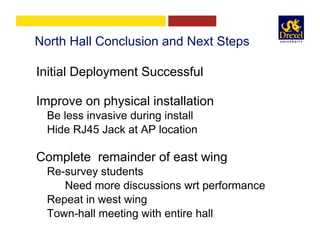
North Hall Conclusion and Next Steps
Initial Deployment Successful
Improve on physical installation
Be less invasive during install
Hide RJ45 Jack at AP location
Complete remainder of east wing
Re-survey students
Need more discussions wrt performance
Repeat in west wing
Town-hall meeting with entire hall
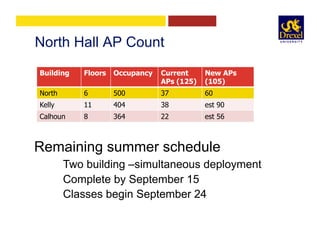
North Hall AP Count
Building Floors Occupancy Current
APs (125)
New APs
(105)
North 6 500 37 60
Kelly 11 404 38 est 90
Calhoun 8 364 22 est 56
Remaining summer schedule
Two building –simultaneous deployment
Complete by September 15
Classes begin September 24
Final Conclusion
•  IT/Networking returning to student rooms for
the first time in 19 years
•  New partnerships with ResLife
•  Direct dialog with satisfied students
•  More skilled at using analysis tools
•  Better prepared for future challenges
We make the education net work.
Questions?

Aruba webinar dorm wi fi design v4

  • 1.
    CONFIDENTIAL © Copyright 2011.Aruba Networks, Inc. All rights reserved CONFIDENTIAL © Copyright 2011. Aruba Networks, Inc. All rights reserved Aruba Networks Webinar Dorm Wi-Fi Design in the Era of BYOD Brad Noblet President of BN Consulting & Former CIO of Dartmouth College Matthew Nocifore, Senior Director of Networking Charles Rumford, Network Engineer Information Resources & Technology, Drexel University
  • 2.
    CONFIDENTIAL © Copyright 2011.Aruba Networks, Inc. All rights reserved2 Assessing Load Requirements Application Typical Bandwidth Haivision (stream) ! 2.5 Mb/s ! DA Learning (stream) ! 1 Mb/s ! AppleTV (stream) ! 2.5 Mb/s ! FaceTime (stream) ! 900 Kb/s ! Hulu/Netflix (stream) ! 2.5 Mb/s ! Skype (stream) ! 150 Kb/s ! Pandora (stream) ! 100 Kb/s ! Blackboard (transaction + multimedia clips) ! 500 Kb/s ! Facebook (transaction + multimedia clips) ! 500 Kb/s ! Twitter (transaction) ! 50 Kb/s ! Email (transaction) ! 50 Kb/s ! Web surfing (transaction) ! 50 Kb/s !
  • 3.
    CONFIDENTIAL © Copyright 2011.Aruba Networks, Inc. All rights reserved3 Video-Specific Examples Service Bandwidth (H.264-codec) One-way of Bidirectional over the WLAN End-to-end Delay Tolerance (Including Network and codec) Number of Channels (Unique Signals) Available Simultaneous Viewers per Channel per Access Point Cable TV ! 1 to 4 Mb/s (SD) ! 6 to 10 Mb/s (HD) ! One-way, ! downlink only ! Channel changing affected after! 20 to 200 ! Occasionally ! 300 msec !     Live event video streaming ! 1 to 4 Mb/s (SD) ! One-way, ! downlink only ! 300 msec target ! 1! Yes ! Surveillance video ! 500 kb/s to 2 Mb/s ! One-way,! 500 msec target ! 1 to 50 cameras ! Seldom !uplink or downlink !     Interactive video conferencing ! 1 to 2 Mb/s! Two-way ! 150 to 200 msec ! Typically 1 to 5 groups ! No !(SD for room scale) !     On-demand video ! 1 to 4 Mb/s (SD) ! 6 to 10 Mb/s (HD) ! One-way, ! downlink only ! 300 msec target ! Hundreds ! No !
  • 4.
    CONFIDENTIAL © Copyright 2011.Aruba Networks, Inc. All rights reserved4 Assessing the Physical Environment     2.4 GHz 5 GHz Interior drywall ! 3 to 4 dB ! 3 to 5 dB ! Cubicle wall ! 2 to 5 dB ! 4 to 9 dB ! Wood door (Hollow - Solid) ! 3 to 4 dB ! 6 to 7 dB ! Brick/Concrete wall ! 6 to 18 dB ! 10 to 30 dB ! Glass/Window (not tinted) ! 2 to 3 dB ! 6 to 8 dB ! Double-pane coated glass ! 13 dB ! 20 dB ! Steel/Fire exit door ! 13 to 19 dB ! 25 to 32 dB !
  • 5.
    CONFIDENTIAL © Copyright 2011.Aruba Networks, Inc. All rights reserved5 Example: 5GHz Attenuation Stud and Wallboard Construction Concrete Wall Construction
  • 6.
    CONFIDENTIAL © Copyright 2011.Aruba Networks, Inc. All rights reserved6 Typical Dorm Design Today Hallway AP deployment insufficient
  • 7.
    CONFIDENTIAL © Copyright 2011.Aruba Networks, Inc. All rights reserved7 Better Design Methodology: Microcell •  Small cell radius. ~1AP per room •  Low power per cell
  • 8.
    CONFIDENTIAL © Copyright 2011.Aruba Networks, Inc. All rights reserved8 RF Design Type Construction Materials Room-to-Room Attenuation Floor-to-Floor Attenuation High Attenuation ! Stone, Concrete, Cinder Block, Steel ! 15 to 20dB ! 10 to 20dB ! Low Attenuation ! Wood, Sheetrock ! 3 to 10dB ! 10 to 20dB ! Attenuation Channel, Coverage Planning 5GHz w/ channel reuse. 2.4GHz overlay for legacy or low-speed devices
  • 9.
    CONFIDENTIAL © Copyright 2011.Aruba Networks, Inc. All rights reserved9 AP Selection
  • 10.
    CONFIDENTIAL © Copyright 2011.Aruba Networks, Inc. All rights reserved10 Example Microcell Results
  • 11.
    We make theeducation net work. DragonFly Residence Hall Wireless Next Generation Deployment Aruba Webinar Dorm Wi-Fi ● July 24, 2012 Matthew Nocifore Charles Rumford CTI Network Infrastructure + Telecom Office of Information Resources +Technology
  • 12.
    About Drexel… Drexel University,Philadelphia PA •  Founded in 1891. The nation's 14th largest private university with campuses located in University and Center City Philadelphia •  25,000 FTE Grad/Undergrad Students Including medical, law, and on-line programs •  5-year UnderGrad “Co-Op” Program Offers educational and employment opportunities to students for study and internship. Most UG programs operate on a quarters program using a 10 week term.
  • 13.
    Wired Network –Quick Facts •  Commodity Internet Capacity: 20G / Internet2: 5Gbps •  One of only 20 Internet2 direct connectors •  Redundant Routed Network Core (Cisco 6500 VSS) •  Most Campus Buildings Connected by dual 10G fiber links •  10G Building Aggregation Switch (Cisco 4900M) •  1G TP/POE Edge Switch / 48 port stackable (HP/ 3Com 5500G) •  1G Uplink to every 2-switch stack / 10G Uplink to every 4-switch stack •  TP Wire Plant: 2 to 4 Cat5E cables for every wire station •  15,000 active Ethernet jacks
  • 14.
    Drexel Wireless History 2000First Generation Wireless DragonFly brand is launched 300 Lucent Orinoco AP1000s Autonomous, Dual B Radios, No POE Preshared Key / Mac Authentication 2006 Second Generation Wireless 600 Cisco AP1231G -Introduction of B/G Radios and POE 2008 Aruba Selected for 802.11N DragonFly3 SSID is launched – WPA2/802.1X 1200 Aruba AP125s and Four Aruba M3 Controllers Deployed late 2008, Early 2009
  • 15.
    Rapid Wireless Growth 2009– 2010 Rapid AP125 Deployment Dense coverage in academic spaces 2011 – 2012 Fine Tune the Network Configure Aruba for High Density locations Deploy “Installation Wizard” for client installation Upgrade to AOS 6 TODAY… 2000+ AP125s / 8 M3 Controllers Redundant Airwave Servers 9,000 Simultaneous users 22,000+ devices seen daily
  • 16.
    Res Halls –Plan New Design Spring 2012 Need to expand HD success in Residence Halls Drexel Residence Halls - 5500+ Students - 10 buildings (mid-rise/high-rise) - AP125s all located in common hallways - 1G Wired Ethernet service per desk and in common room - 3 Data cables per jack
  • 17.
    Res Hall –Challenges Little Down Time – quarter system No User Feedback – Hard to get useful information from helpdesk, students, ResLife. Service in 6 Residence Halls Identified as those that will most benefit from HD deployment Identification made by… Building design, Trouble ticketing, Word of mouth, Testing
  • 18.
    Meeting the Challenge NeedRadical New Thinking! ü  Design ü  Implementation ü  Communication Major change for networking staff! -Many spirited conversations -Aruba releases draft NG Res Hall Architecture
  • 19.
    Keys to NewThinking •  APs must go in student rooms •  Design/Install must take place in occupied rooms •  Need new close relationship with ResLife •  Must deploy in small trials •  Must measure performance •  Must survey and “speak” directly to students during all phases of deployment
  • 20.
    Goals Upgrade service in3 Halls by Fall Term 2012 Upon Completion … IT staff should be able to hold town hall style, face-to-face meetings in residence halls to discuss wireless and know that our service is excellent.
  • 21.
    North Hall –Selected First Total Occupancy: 500 Floors: 6 Wings: 2, East/West
  • 22.
    Overview of BuildingConstruction •  Large amount of concrete block – between all hallways and suites – between rooms inside suites •  Some dry wall between rooms inside suites •  HVAC ducts between hallways and suite •  Pipe chases in hallways •  Prefab concrete floors (no metal pan) •  Low signal propagation to rooms from hallways
  • 23.
    Typical North HallSuite Living Room BedroomBedroom Bedroom BathroomKichenette Drywall Center Block
  • 24.
    Typical Floor Layout(per wing) Existing AP125s located in hallway above ceiling
  • 25.
    Existing Problems •  AP125sin hallways above ceiling •  Direct Line of sight between APs –  Co-channel interference – ARM ineffective •  Config used to manage current deployment – No ARM – Static Channel/Power – Hard to manage
  • 26.
    Coverage Problem ofTypical Wing Data collected with AirMagent
  • 27.
    Desired AP Design BeforeSurvey.... •  AP105 selected in lieu of AP125 –  Cost effective –  Better control of signal propagation •  Get the signal to the user –  Deploy exposed APs in suites –  Avoid HVAC and pipe chases –  Move away from concrete block walls •  Reduce Co-channel interference •  Let ARM run the show •  Configure to disable AP LEDs
  • 28.
    Survey RF inSample Suites Using AirMagnet… •  Measure RF between rooms in suites •  Measure RF between floors •  Identify AP mounting locations
  • 29.
    Arrange Access toRooms •  Arrange Access with ResLife for Survey •  Clearly communicate details with occupants via direct mail On Wednesday, April 25, from 2:00 and 4:00 PM,  IRT Networking will perform wireless testing in North Hall room E408, E410, E412 and E310.  This testing will include making WiFi radio frequency measurements using laptop computers   and WiFi radio transmitters.  No construction or installation work will take place during this test.  This testing has been scheduled to help plan for a future enhancement to wireless service in North Hall. •  Feedback – Detailed info was appreciated by students and ResLife staff
  • 30.
    During Survey •  Beminimally invasive – Power from hallway ac outlets –  Avoid moving furniture Tripod mounted AP105 •  AP in RAP mode •  Power Injector Gather data from all adjacent suites using AirMagnet
  • 31.
    Analysis and DeploymentPlan •  Review the data collected from survey – Run data through Aruba’s VisualRF Planner •  Findings – Between floor RF propagation was excellent using ceiling mounted AP105 – RF propagation within suite was excellent •  This suggested a two-floor design with APs in alternating suites
  • 32.
    Two Floor Design FourthFloor Third Floor
  • 33.
    Deployment in OccupiedRooms •  One floor at a time •  Fourth Floor, East Wing •  Arrange Access & Email Students •  All aspects of installation temporary – AP105 mounted to ceiling with Velcro – Cable surface mounted to wall – Used existing wiring station for net access •  Existing hallway APs configured as air monitors
  • 34.
  • 35.
    Repeat Deployment onNext Floor •  Third Floor, East Wing •  Arrange Access & Email Students •  Previous success suggested permanent installation – AP permanently mounted to ceiling – Cable from existing station re-used – New jack installed for AP
  • 36.
  • 37.
    Survey New Deployment • AirMagnet Survey of both floors •  Airwave Usage Reports •  Student Survey by email
  • 38.
  • 39.
    AirWave Results Spring 2012Summer 2012 Unique MAC Addresses 840 1766 Avg Traffic/Client 475.8 MB 933.0 MB Avg Traffic/Session 8.8 MB 18.5 MB Bandwidth/Client 31.0 Kbps 40.7 Kbps Occupancy 100% 85% Floors Included 2, 3, and 4 3 and 4 Data for authenticated SSIDs only Validating performance of new AP installations in North Hall, East Wing, Floors 3 and 4 Data collected during the first three weeks of each academic term
  • 40.
    Student Survey Characteristics Cnt% Connect Faster 5 42% More Reliable 7 58% Faster Performance 4 33% Never Disconnect 4 33% Rarely Disconnect 2 17% No Change 1 -- 12 Responses, 15% of Summer Occupants 9 – Service Improved, NO problem to report 2 – No improvement, PROBLEM to report • 1 Comment – Concerned about dirt left in room during installation • 3 students interested in town-hall meeting (matching complaints)
  • 41.
    North Hall Conclusionand Next Steps Initial Deployment Successful Improve on physical installation Be less invasive during install Hide RJ45 Jack at AP location Complete remainder of east wing Re-survey students Need more discussions wrt performance Repeat in west wing Town-hall meeting with entire hall
  • 42.
    North Hall APCount Building Floors Occupancy Current APs (125) New APs (105) North 6 500 37 60 Kelly 11 404 38 est 90 Calhoun 8 364 22 est 56 Remaining summer schedule Two building –simultaneous deployment Complete by September 15 Classes begin September 24
  • 43.
    Final Conclusion •  IT/Networkingreturning to student rooms for the first time in 19 years •  New partnerships with ResLife •  Direct dialog with satisfied students •  More skilled at using analysis tools •  Better prepared for future challenges
  • 44.
    We make theeducation net work. Questions?