The document provides an overview of arrays and strings in C++, explaining their definition, declaration, and memory representation. It covers one-dimensional and multi-dimensional arrays, string manipulation through various library functions, and demonstrates practical examples including handling user input and array initialization. Additionally, it discusses operations on strings, array-size specifications, and an implementation example of an employee database using arrays of strings.

![• An array is a collection of variables of the same type
that are referred to by a common name.
• Arrays offer a convenient means of grouping
together several related variables, in one dimension
or more dimensions:
• product part numbers:
int part_numbers[] = {123, 326, 178, 1209};
• student scores:
int scores[10] = {1, 3, 4, 5, 1, 3, 2, 3, 4,
4};
• characters:
char alphabet[5] = {’A’, ’B’, ’C’, ’D’,
’E’};](https://image.slidesharecdn.com/arraysstrings-231002120300-36648dbc/85/Arrays-Strings-pptx-2-320.jpg)
![•names:
char names[][40] =
{“Peter”, “Mary”, “Lisa”,
“John”, "George-Simon"};
•3D coordinates:
vector coordinates[4][3] =
Back
{{0, 0, 0},
{1, 0, 1},
{1, 0, 5}
{4, 7, 9}};](https://image.slidesharecdn.com/arraysstrings-231002120300-36648dbc/85/Arrays-Strings-pptx-3-320.jpg)
![One-Dimensional Arrays
A one-dimensional array is a list of related variables
The general form of a one-dimensional array
declaration is:
type variable_name[size]
• type
:
• size:
• variable_name:
base type of the array,
determines the data type of
each element in the array
how many elements the
array will hold the name
of the array
Examples:
int sample[10];
float float_numbers[100];
char last_name[40];](https://image.slidesharecdn.com/arraysstrings-231002120300-36648dbc/85/Arrays-Strings-pptx-4-320.jpg)
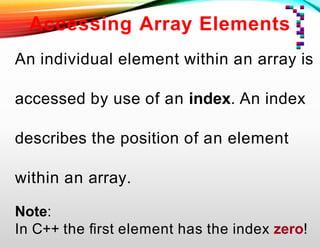
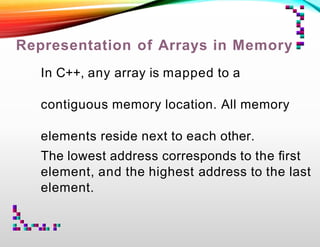
![Example:
int a[8];
int j;
for(j=0; j<8; j++) a[j] = 7-j;
Then the memory representation of array a looks like
this:
a[0] a[1] a[2] a[3] a[4] a[5] a[6] a[7]
7 6 5 4 3 2 1 0](https://image.slidesharecdn.com/arraysstrings-231002120300-36648dbc/85/Arrays-Strings-pptx-7-320.jpg)
![Example: Finding the Maximum
#include <iostream.h> int
main()
{
int i, max = 0; int
list[100];
// initialize the array with
random values
for(i=0; i<100; i++) list[i] = rand();
// findmaximum value
for(i=0; i<100; i++)
if(max < list[i]) max = list[i];
cout << “Maximum value: “ << max;
return(0);
}](https://image.slidesharecdn.com/arraysstrings-231002120300-36648dbc/85/Arrays-Strings-pptx-8-320.jpg)
![No Array-to-Array Assignments
You cannot assign one array to another in
C++. The following is illegal:
int a[10], b[10];
// do something
// assign all elements of array b to array a
a = b; // error -- illegal
Instead, you have to do the assignments for each element:
int i;
// assign all elements of array b to array a
for(i=0; i<10; i++) a[i] = b[i];](https://image.slidesharecdn.com/arraysstrings-231002120300-36648dbc/85/Arrays-Strings-pptx-9-320.jpg)
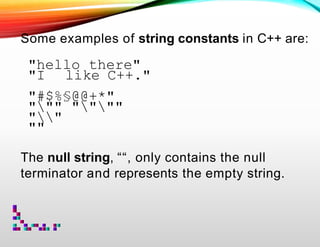
![Strings
The most common use for one-dimensional arrays is to store
strings of characters.
In C++, a string is defined as a character array terminated by
a null symbol ( ‘0’ ).
To declare an array str that could hold a 10-character string,
one would write:
char str[11];
Specifying the size as 11 makes room for the null at the end of
the string.
‘H’ ‘e’ ‘l’ ‘l’ ‘o’ ‘0’](https://image.slidesharecdn.com/arraysstrings-231002120300-36648dbc/85/Arrays-Strings-pptx-10-320.jpg)
![Reading a String from the Keyboard
How to read a string entered from the keyboard?
Make an array, that will receive the string, the target of a cin stream. The
following program reads (part of) a string entered by the user:
#include <stdio.h> int
main()
{
char str[80];
cout << “Enter a string: “;
cin >> str; // read string from keyboard
cout << “Here is your string: “;
Cout << str;
return(0);}](https://image.slidesharecdn.com/arraysstrings-231002120300-36648dbc/85/Arrays-Strings-pptx-12-320.jpg)
![Problem: Entering the string “This is a test”, the above program
only returns “This”, not the entire sentence.
Reason: The C++ input/output system stops reading a string
when the first whitespace character is encountered.
Solution: Use another C++ library function, gets().
#include <iostream.h>
#include <cstdio.h>
int main()
{
char str[80]; // long enough for user input?
cout << “Enter a string: “;
gets(str); // read a string from the keyboard
cout << “Here is your string: “;
cout << str << endl;
return(0);}](https://image.slidesharecdn.com/arraysstrings-231002120300-36648dbc/85/Arrays-Strings-pptx-13-320.jpg)
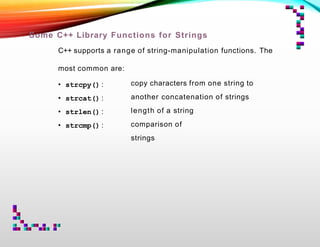
![strcpy(to_string, from_string) — String Copy:
#include <iostream.h>
#include <cstring.h>
int main()
{
char a[10];
strcpy(a, “hello”);
cout << a;
return(0);
}
a[0] a[1] a[2] a[3] a[4] a[5] a[6] a[7] a[8] a[9]
h e l l o 0 ? ? ? ?](https://image.slidesharecdn.com/arraysstrings-231002120300-36648dbc/85/Arrays-Strings-pptx-15-320.jpg)
![strlen(string) — String Length
strlen(str) returns the length of the string pointed to by str,
i.e., the number of characters excluding the null terminator.
#include <iostream.h>
#include <cstdio.h>
#include <cstring.h>
int main()
{
char str[80];
cout << “Enter a string: “;
gets(str);
cout << “Length is: “ << strlen(str);
return(0);}](https://image.slidesharecdn.com/arraysstrings-231002120300-36648dbc/85/Arrays-Strings-pptx-16-320.jpg)
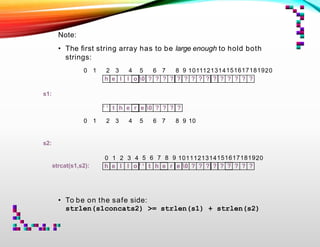
![strcat(string_1, string_2) — Concatenation of Strings
The strcat() function appends s2to the end of s1. String s2is
unchanged.
// includes ... int
main()
{
char s1[21], s2[11];
strcpy(s1, “hello”);
strcpy(s2, “ there”);
strcat(s1, s2);
cout << s1 << endl;
cout << s2 << endl;
return(0);
}](https://image.slidesharecdn.com/arraysstrings-231002120300-36648dbc/85/Arrays-Strings-pptx-17-320.jpg)
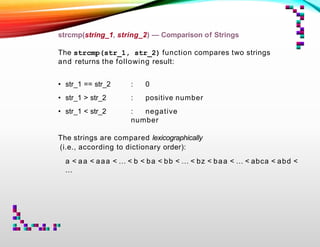
![// Comparing strings
#include <iostream.h>
#include <cstring.h>
#include <cstdio.h>
int main()
{
char str[80];
cout << “Enter password: “;
gets(str);
if(strcmp(str, “password”)) {
// strings differ
cout << “Invalid password.n”;}
else cout << “Logged on.n”;
return(0);
}](https://image.slidesharecdn.com/arraysstrings-231002120300-36648dbc/85/Arrays-Strings-pptx-20-320.jpg)
![Using the Null Terminator
Operations on strings can be simplified using the fact that all
strings are null-terminated.
// Convert a string to uppercase
// ... includes ...
int main()
{
charstr[80];
int i;
strcpy(str, “this is a test”);
for(i=0; str[i]; i++)
str[i] = toupper(str[i]);
cout << str; return(0); }](https://image.slidesharecdn.com/arraysstrings-231002120300-36648dbc/85/Arrays-Strings-pptx-21-320.jpg)
![Two-Dimensional Arrays
A two-dimensional array is a list of one-dimensional arrays.
To declare a two-dimensional integer array two_dim of size
10,20 we would write:
int matrix[3][4];
This corresponds to a table with 3 rows and 4 columns (for
example).
1 2 3 4
5 6 7 8
9 10 11 12
0 1 2 3
0
1
2
Left
Index
Right
Index
two_dim[1][2]](https://image.slidesharecdn.com/arraysstrings-231002120300-36648dbc/85/Arrays-Strings-pptx-22-320.jpg)
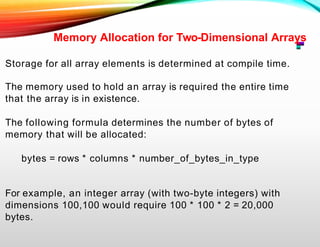
![We can generate the array above by using this program:
#include <iostream.h>
int main()
{
int row=3, col=4;
int matrix[row][col];
for(row=0; row < 3; ++row) {
for(col=0; col < 4; ++col) {
matrix[row][col] = (row*4)+ col +1;
cout << matrix[row][col] << ‘ ‘;
}
cout << ‘n’;
}
return(0);}](https://image.slidesharecdn.com/arraysstrings-231002120300-36648dbc/85/Arrays-Strings-pptx-23-320.jpg)
![Multidimensional Arrays
C++ allows arrays with more than two dimensions.
The general form of an N-dimensional array declaration is:
type array_name [size_1] [size_2] … [size_N];
For example, the following declaration creates a 4 x 10 x 20
character array, or a matrix of strings:
char string_matrix[4][10][20];
This requires 4 * 10 * 20 = 800 bytes.
If we scale the matrix by 10, i.e. to a 40 x 100 x 20 array, then
80,000 bytes are needed.](https://image.slidesharecdn.com/arraysstrings-231002120300-36648dbc/85/Arrays-Strings-pptx-25-320.jpg)
![Array Initialization
The general form of array initialization is similar to that of
other variables:
type array-name[size] = { list-of-values };
The list-of-values has to be a comma-separated list of
constants that are type-compatible with the base type of
the array.
In the following example, a 10-element float array is
initialized with the numbers 1.0 through 10.0:
float i[10] =
{1.,2.,3.,4.,5.,6,7,8,9,10};
Therefore, i[0] will have the value 1.0, and i[9] will
have the value 10.0.](https://image.slidesharecdn.com/arraysstrings-231002120300-36648dbc/85/Arrays-Strings-pptx-26-320.jpg)
![Character Array Initialization
Character arrays that will hold strings allow a shorthand
initialization that takes this form:
char array-name[size] = “string”;
For example, the following code fragment initializes str to
the phrase “hello”:
char str[6] = “hello”;
This is the same as writing
char str[6] =
{‘h’, ‘e’, ‘l’, ‘l’, ‘o’, ‘0’};
Remember that one has to make sure to make the array long
enough to include the null terminator.](https://image.slidesharecdn.com/arraysstrings-231002120300-36648dbc/85/Arrays-Strings-pptx-27-320.jpg)
![Multi-Dimensional Array Initialization
Multi-dimensional arrays are initialized the same way as one-
dimensional arrays.
For example, the following code fragment initializes an array
squares with the numbers 1 through 10 and their squares:
intsquares[9][2] =
{ 1, 1,
2, 4,
3, 9,
4, 16,
5, 25,
6, 36,
7, 49,
8, 64,
9, 81 };](https://image.slidesharecdn.com/arraysstrings-231002120300-36648dbc/85/Arrays-Strings-pptx-28-320.jpg)
![For better readability, especially for multi-dimensional arrays,
one can use subaggregate grouping by adding braces
accordingly.
The same declaration as above can also be written as:
int squares[10][2] =
{ {1, 1},
{2, 4},
{3, 9},
{4, 16},
{5, 25},
{6, 36},
{7, 49},
{8, 64},
{9, 81},
{10, 100}
};](https://image.slidesharecdn.com/arraysstrings-231002120300-36648dbc/85/Arrays-Strings-pptx-29-320.jpg)
![The following program uses the squares array to find the root
of a number entered by the user.
#include <iostream.h>
// declaration of squares array goes here
int main()
{
int i, j;
cout << “Enter a number 1<=i<=100: “;
cin >> i;
// look up i
for(j=0; j<10; j++)
if(squares[j][1] == i) {
cout << "Root: " << squares[j][0];
return(0);}
cout << "No integer root."; return(0);}](https://image.slidesharecdn.com/arraysstrings-231002120300-36648dbc/85/Arrays-Strings-pptx-30-320.jpg)
![© Christian Jacob
Unsized Array Initializations
It is possible to let C++automatically dimension the arrays
through the use of unsized arrays.
char error_1[] = “Divide by 0n”;
char error_2[] = “End-of-Filen”;
char error_3[] = “Access Deniedn”;
C++ will automatically create arrays large enough to hold all
the initializers present.
For a multi-dimensional array, all but the leftmost dimension
have to be specified. So we can write:
char errors[][20] = {
“Divide by 0n”,
“End-of-Filen”,
“Access Deniedn” };](https://image.slidesharecdn.com/arraysstrings-231002120300-36648dbc/85/Arrays-Strings-pptx-31-320.jpg)
![Arrays of Strings
An array of strings is a special form of a two-dimensional array.
• The size of the left index determines the number of strings.
• The size of the right index specifies the maximum length of
each string.
For example, the following declares an array of 30 strings,
each having a maximum length of 80 characters (with one
extra character for the null terminator):
char string_array[30][81];](https://image.slidesharecdn.com/arraysstrings-231002120300-36648dbc/85/Arrays-Strings-pptx-32-320.jpg)
![For accessing an individual string, one simply specifies only
the left index:
firstString = string_array[0];
sixthString = string_array[5];
The following example calls the gets() function with the third
string in the array:
gets(string_array[2]);](https://image.slidesharecdn.com/arraysstrings-231002120300-36648dbc/85/Arrays-Strings-pptx-33-320.jpg)
![This program accepts lines of text entered at the keyboard
and redisplays them after a blank line is entered.
// includes go here
int main()
{
int t, i;
char text[100][80];
// quit on blank line
for(t=0; t<100; t++) {
cout << t << “: “;
gets(text[t]);
if(!text[t][0]) break;
}
for(i=0; i<t; i++) // redisplay the strings
cout << text[i] << ‘n’;
return(0);}](https://image.slidesharecdn.com/arraysstrings-231002120300-36648dbc/85/Arrays-Strings-pptx-34-320.jpg)
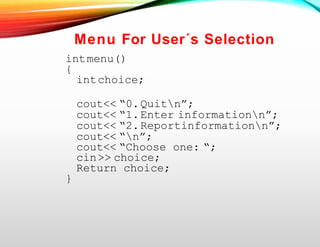
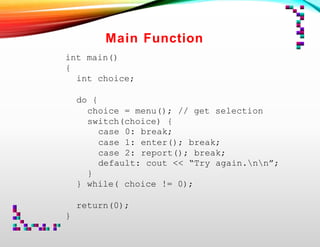
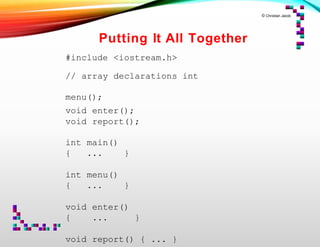
![An Example Using String Arrays
Arrays of strings are commonly used for handling
tables of information.
One such application would be an employee database that
stores
• the name
• telephone number
• hours worked per pay period, and
• hourly wage.
These data we could store in arrays:
charname[20][80]; // employee names
int phone[20]; // phone numbers
float hours[20];
loat wage[20];
// hours worked
// wage](https://image.slidesharecdn.com/arraysstrings-231002120300-36648dbc/85/Arrays-Strings-pptx-35-320.jpg)
![Entering Information
void enter()
{
inti;
for(i=0; i<20; i++)
{
cout<< “Lastname: “;
cin>>name[i];
cout<< “Phonenumber: “;
cin>>phone[i];
cout<< “Hoursworked: “;
cin>>hours[i];
cout<< “Wage:“;
cin>>wage[i];
}
}](https://image.slidesharecdn.com/arraysstrings-231002120300-36648dbc/85/Arrays-Strings-pptx-36-320.jpg)
![Displaying Database Contents
Void report()
{
inti;
for(i=0; i <20;i++)
{
cout<< "Name:"<<name[i]<<"/"<<"phone:"
<<phone[i] << ‘n’;
cout<< “Pay for theweek: “;
cout<< wage[i]*hours[i];
cout<<‘n’;
}
}](https://image.slidesharecdn.com/arraysstrings-231002120300-36648dbc/85/Arrays-Strings-pptx-37-320.jpg)