CO_IF_22412_CO1
Ms. Yogita Jore, Head of Information Technology, Vidyalankar Polytechnic
Date: 08th February 2021
Learning at your doorstep
Written by
Unit 1:
Basic Syntactical constructs in Java
Head, Department of Information Technology (NBA Accredited),
Vidyalankar Polytechnic, Mumbai
Yogita Jore
Unit Outcome 3:
Explain the function of the given
operator with example.
Learning Outcome 3:
Students should understand the use of
operators.
Maharashtra StateBoardof TechnicalEducation
Page 5
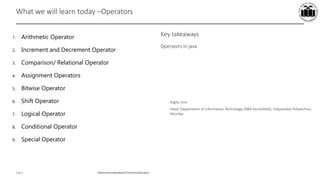
What we will learn today –Operators
Yogita Jore
Head, Department of Information Technology (NBA Accredited), Vidyalankar Polytechnic,
Mumbai
Key takeaways
Operators in java
1. Arithmetic Operator
2. Increment and Decrement Operator
3. Comparison/ Relational Operator
4. Assignment Operators
5. Bitwise Operator
6. Shift Operator
7. Logical Operator
8. Conditional Operator
9. Special Operator
Maharashtra StateBoardof TechnicalEducation
Page 6
Concept Map
Maharashtra StateBoardof TechnicalEducation
Page 7
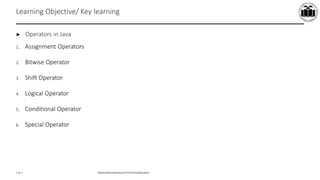
Learning Objective/ Key learning
► Operators in Java
1. Arithmetic Operator
2. Increment and Decrement Operator
3. Comparison/ Relational Operator
Maharashtra StateBoardof TechnicalEducation
Page 8
Operators: Arithmetic Operator
 Arithmetic operators are used in mathematical expression in the same way that they are used in algebra.
 Example:
public class Demo
{
public static void main(String args[])
{
int a=100;
int b=21;
System.out.println("Addition:="+(a+b));
System.out.println("Subtraction:="+(a-b));
System.out.println("Multiplication:="+(a*b));
System.out.println("Division:="+(a/b));
System.out.println("Modulo:="+(a%b));
}
}
Operator Description Example Explanation
+ Addition x = y + z Adds the value of y and z and stores the result in x.
- Subtraction x = y - z Subtracts z from y and store the result in x.
* Multiplication x = y * z Multiplies the values y and z and stores result in x.
/ Division x = y / z Divides y by z and stores the result in x.
% Modulo x = y % z Divides y by z and stores the remainder in x.
Maharashtra StateBoardof TechnicalEducation
Page 9
Operators: Increment and Decrement Operators
 Example:
public class Demo_In_De
{
public static void main(String[] args)
{
int number = 50;
System.out.println("Number is " + number);
number++; // Increment number.
System.out.println("Now, number is " + number);
number--; // Decrement number.
System.out.println("Now, number is " + number);
}
}
Operator Description Example Explanation
++ Increases the value of the operand by one. x++ Equivalent to x = x + 1
-- Decreases the value of the operand by one. x-- Equivalent to x = x - 1
Maharashtra StateBoardof TechnicalEducation
Page 10
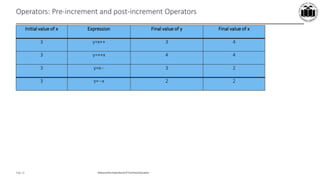
Operators: Pre-increment and post-increment Operators
Initial value of x Expression Final value of y Final value of x
3 y=x++ 3 4
3 y=++x 4 4
3 y=x-- 3 2
3 y=--x 2 2
Maharashtra StateBoardof TechnicalEducation
Page 11
Operators: Pre-increment and post-increment Operators-Example
public class Increment_Decrement
{
public static void main(String[] args)
{
int a=5, b, c, d, e;
b = ++a;
System.out.println("Result after Pre Increment a:"+a);
System.out.println("Result after Pre Increment b:"+b);
c = a++;
System.out.println("Result after Pre Increment a:"+a);
System.out.println("Result after Post Increment c:"+c);
d = --a;
System.out.println("Result after Pre Increment a:"+a);
System.out.println("Result after Pre Decrement d:"+d);
e = a--;
System.out.println("Result after Pre Increment a:"+a);
System.out.println("Result after Post Decrement e:"+e);
}
}
Maharashtra StateBoardof TechnicalEducation
Page 12
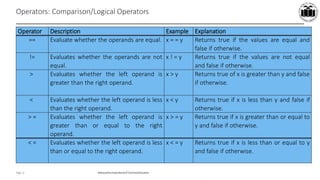
Operators: Comparison/Logical Operators
Operator Description Example Explanation
== Evaluate whether the operands are equal. x = = y Returns true if the values are equal and
false if otherwise.
!= Evaluates whether the operands are not
equal.
x ! = y Returns true if the values are not equal
and false if otherwise.
> Evaluates whether the left operand is
greater than the right operand.
x > y Returns true of x is greater than y and false
if otherwise.
< Evaluates whether the left operand is less
than the right operand.
x < y Returns true if x is less than y and false if
otherwise.
> = Evaluates whether the left operand is
greater than or equal to the right
operand.
x > = y Returns true if x is greater than or equal to
y and false if otherwise.
< = Evaluates whether the left operand is less
than or equal to the right operand.
x < = y Returns true if x is less than or equal to y
and false if otherwise.
Maharashtra StateBoardof TechnicalEducation
Page 13
Operators: Comparison/Logical Operators-Example
public class Demo_relational_op
{
public static void main(String args[])
{
int a = 10;
int b = 20;
System.out.println("a == b = " + (a == b) );
System.out.println("a != b = " + (a != b) );
System.out.println("a > b = " + (a > b) );
System.out.println("a < b = " + (a < b) );
System.out.println("b >= a = " + (b >= a) );
System.out.println("b <= a = " + (b <= a) );
}
}
CO_IF_22412_CO1
Ms. Yogita Jore, Head of Information Technology, Vidyalankar Polytechnic
Date: 08th February 2021
Learning at your doorstep
Written by
Unit 1:
Basic Syntactical constructs in Java
Head, Department of Information Technology (NBA Accredited),
Vidyalankar Polytechnic, Mumbai
Yogita Jore
Unit Outcome 3:
Explain the function of the given
operator with example.
Learning Outcome 3:
Students should understand the use of
operators
Maharashtra StateBoardof TechnicalEducation
Page 5
What we will learn today –Operators
Yogita Jore
Head, Department of Information Technology (NBA Accredited), Vidyalankar Polytechnic,
Mumbai
Key takeaways
Operators in java
1. Arithmetic Operator
2. Increment and Decrement Operator
3. Comparison/ Relational Operator
4. Assignment Operators
5. Bitwise Operator
6. Shift Operator
7. Logical Operator
8. Conditional Operator
9. Special Operator
Maharashtra StateBoardof TechnicalEducation
Page 6
Concept Map
Maharashtra StateBoardof TechnicalEducation
Page 7
Learning Objective/ Key learning
► Operators in Java
1. Assignment Operators
2. Bitwise Operator
3. Shift Operator
4. Logical Operator
5. Conditional Operator
6. Special Operator
Maharashtra StateBoardof TechnicalEducation
Page 8
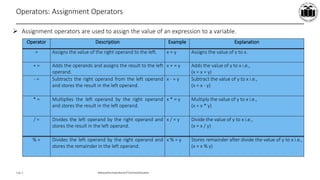
Operators: Assignment Operators
 Assignment operators are used to assign the value of an expression to a variable.
Operator Description Example Explanation
= Assigns the value of the right operand to the left. x = y Assigns the value of y to x.
+ = Adds the operands and assigns the result to the left
operand.
x + = y Adds the value of y to x i.e.,
(x = x + y)
- = Subtracts the right operand from the left operand
and stores the result in the left operand.
x - = y Subtract the value of y to x i.e.,
(x = x - y)
* = Multiplies the left operand by the right operand
and stores the result in the left operand.
x * = y Multiply the value of y to x i.e.,
(x = x * y)
/ = Divides the left operand by the right operand and
stores the result in the left operand.
x / = y Divide the value of y to x i.e.,
(x = x / y)
% = Divides the left operand by the right operand and
stores the remainder in the left operand.
x % = y Stores remainder after divide the value of y to x i.e.,
(x = x % y)
Maharashtra StateBoardof TechnicalEducation
Page 9
Operators: Assignment Operators - Example
public class Demo_assignment_op
{
public static void main(String[] args)
{
int x = 5;
x %= 3;
System.out.println(x);
x+= 3;
System.out.println(x);
}
}
Maharashtra StateBoardof TechnicalEducation
Page 10
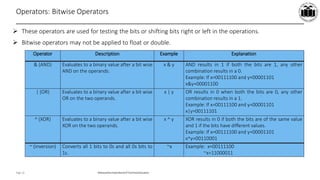
Operators: Bitwise Operators
 These operators are used for testing the bits or shifting bits right or left in the operations.
 Bitwise operators may not be applied to float or double.
Operator Description Example Explanation
& (AND) Evaluates to a binary value after a bit wise
AND on the operands.
x & y AND results in 1 if both the bits are 1, any other
combination results in a 0.
Example: If x=00111100 and y=00001101
x&y=00001100
| (OR) Evaluates to a binary value after a bit wise
OR on the two operands.
x | y OR results in 0 when both the bits are 0, any other
combination results in a 1.
Example: If x=00111100 and y=00001101
x|y=00111101
^ (XOR) Evaluates to a binary value after a bit wise
XOR on the two operands.
x ^ y XOR results in 0 if both the bits are of the same value
and 1 if the bits have different values.
Example: If x=00111100 and y=00001101
x^y=00110001
~ (inversion) Converts all 1 bits to 0s and all 0s bits to
1s.
~x Example: x=00111100
~x=11000011
Maharashtra StateBoardof TechnicalEducation
Page 11
Operators: Bitwise Operators- Example
public class Demo_Bitwise
{
public static void main(String args[])
{
int a = 60; /* 60 = 0011 1100 */
int b = 13; /* 13 = 0000 1101 */
int c = 0;
c = a & b; /* 12 = 0000 1100 */
System.out.println("a & b = " + c );
c = a | b; /* 61 = 0011 1101 */
System.out.println("a | b = " + c );
c = a ^ b; /* 49 = 0011 0001 */
System.out.println("a ^ b = " + c );
c = ~a; /*-61 = 1100 0011 */
System.out.println("~a = " + c );
}
}
Maharashtra StateBoardof TechnicalEducation
Page 12
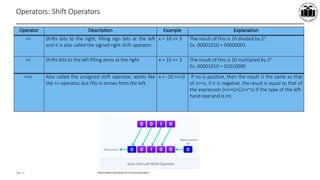
Operators: Shift Operators
Operator Description Example Explanation
>> Shifts bits to the right, filling sign bits at the left
and it is also called the signed right shift operator.
x = 10 >> 3 The result of this is 10 divided by 23.
Ex. 00001010 = 00000001
<< Shifts bits to the left filling zeros at the right. x = 10 << 3 The result of this is 10 multiplied by 23
Ex. 00001010 = 01010000
>>> Also called the unsigned shift operator, works like
the >> operator, but fills in zeroes from the left.
x = -10 >>>3 If no is positive, then the result is the same as that
of n>>s; if n is negative, the result is equal to that of
the expression (n>>s)+(2<<~s) if the type of the left-
hand operand is int.
Maharashtra StateBoardof TechnicalEducation
Page 13
Operators: Shift Operators-Example
class ShiftOperators
{
public static void main (String args[ ] )
{
int x = 7 ;
System.out.println ("x = " + x) ;
System.out.println ("x >> 2 = " + (x >> 2) ) ;
System.out.println ("x << 1 = " + (x << 1) ) ;
System.out.println ("x >>> 1 = " + (x >>> 1) ) ;
}
}
Maharashtra StateBoardof TechnicalEducation
Page 14
Operators: Logical Operators
Operator Description Example Explanation
&& Evaluates to true if both the conditions evaluate
to true, false if otherwise.
x > 5 && y < 10 The result is true if condition1 (x>5) and
condition2 (y<10) are both true. If one of them
is false, the result is false.
|| Evaluates to true if at least one of the conditions
evaluates to true, and false if none of the
conditions evaluates to true.
x > 5 || y < 10 The result is true if condition1 (x>5) or
condition2 (y<10) or both true. If both the
condition is false, the result is false.
Example: class Demo_Logical
{
public static void main(String[] args)
{
// && operator
System.out.println((5 > 3) && (8 > 5)); // true
System.out.println((5 > 3) && (8 < 5)); // false
// || operator
System.out.println((5 < 3) || (8 > 5)); // true
System.out.println((5 > 3) || (8 < 5)); // true
System.out.println((5 < 3) || (8 < 5)); // false
// ! operator
System.out.println(!(5 == 3)); // true
System.out.println(!(5 > 3)); // false
} }
Maharashtra StateBoardof TechnicalEducation
Page 15
Operators: Conditional/Ternary Operators
 The goal of the operator is to decide which value should be assigned to the variable.
 Ternary operator "? :" basically is used for an if-then-else as shorthand as:
 Syntax:
Boolean expression ? operand1: operand2;
 Example:
public class Demo_Ternary
{
public static void main(String[] args)
{
int number=13;
//Using ternary operator
String output=(number%2==0)?"even number":"odd number";
System.out.println(output);
}
}
if(number%2==0)
System.out.println("even number");
else
System.out.println("odd number");
Maharashtra StateBoardof TechnicalEducation
Page 16
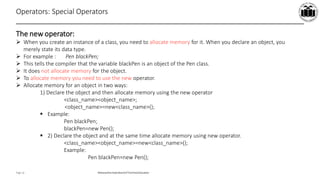
Operators: Special Operators
The new operator:
 When you create an instance of a class, you need to allocate memory for it. When you declare an object, you
merely state its data type.
 For example : Pen blackPen;
 This tells the compiler that the variable blackPen is an object of the Pen class.
 It does not allocate memory for the object.
 To allocate memory you need to use the new operator.
 Allocate memory for an object in two ways:
1) Declare the object and then allocate memory using the new operator
<class_name><object_name>;
<object_name>=new<class_name>();
 Example:
Pen blackPen;
blackPen=new Pen();
 2) Declare the object and at the same time allocate memory using new operator.
<class_name><object_name>=new<class_name>();
Example:
Pen blackPen=new Pen();
Maharashtra StateBoardof TechnicalEducation
Page 17
Operators: Special Operators
The . Operator:
 The dot (.) operator access instance members of an object or class members of a class.
 For example,
The () operator:
 When declaring or calling a method, we list the methods arguments between ( and ).
 We can specify an empty argument list by using () with nothing between them.
[] operator:
 We can use square brackets to declare arrays, to create arrays and to access particular elements in an array.
 For example, int name[];
Maharashtra StateBoardof TechnicalEducation
Page 18
Operators: Special Operators
Type operator:
 Casts (or “converts”) a value to the specified type.
Instanceof operator:
 The instanceof operator tests whether its first operand is an instance of the second operand.
 Example: x instanceof y; x must be the name of an object and y must be the name of a class.
 This operator is used only for object reference variables.
 Example:
class Vehicle
{ }
class Car extends Vehicle
{
public static void main(String args[])
{
Vehicle a = new Car();
boolean result = a instanceof Car;
System.out.println( result);
}
}

5_Operators.pdf

  • 1.
    CO_IF_22412_CO1 Ms. Yogita Jore,Head of Information Technology, Vidyalankar Polytechnic Date: 08th February 2021 Learning at your doorstep
  • 2.
    Written by Unit 1: BasicSyntactical constructs in Java Head, Department of Information Technology (NBA Accredited), Vidyalankar Polytechnic, Mumbai Yogita Jore
  • 3.
    Unit Outcome 3: Explainthe function of the given operator with example.
  • 4.
    Learning Outcome 3: Studentsshould understand the use of operators.
  • 5.
    Maharashtra StateBoardof TechnicalEducation Page5 What we will learn today –Operators Yogita Jore Head, Department of Information Technology (NBA Accredited), Vidyalankar Polytechnic, Mumbai Key takeaways Operators in java 1. Arithmetic Operator 2. Increment and Decrement Operator 3. Comparison/ Relational Operator 4. Assignment Operators 5. Bitwise Operator 6. Shift Operator 7. Logical Operator 8. Conditional Operator 9. Special Operator
  • 6.
  • 7.
    Maharashtra StateBoardof TechnicalEducation Page7 Learning Objective/ Key learning ► Operators in Java 1. Arithmetic Operator 2. Increment and Decrement Operator 3. Comparison/ Relational Operator
  • 8.
    Maharashtra StateBoardof TechnicalEducation Page8 Operators: Arithmetic Operator  Arithmetic operators are used in mathematical expression in the same way that they are used in algebra.  Example: public class Demo { public static void main(String args[]) { int a=100; int b=21; System.out.println("Addition:="+(a+b)); System.out.println("Subtraction:="+(a-b)); System.out.println("Multiplication:="+(a*b)); System.out.println("Division:="+(a/b)); System.out.println("Modulo:="+(a%b)); } } Operator Description Example Explanation + Addition x = y + z Adds the value of y and z and stores the result in x. - Subtraction x = y - z Subtracts z from y and store the result in x. * Multiplication x = y * z Multiplies the values y and z and stores result in x. / Division x = y / z Divides y by z and stores the result in x. % Modulo x = y % z Divides y by z and stores the remainder in x.
  • 9.
    Maharashtra StateBoardof TechnicalEducation Page9 Operators: Increment and Decrement Operators  Example: public class Demo_In_De { public static void main(String[] args) { int number = 50; System.out.println("Number is " + number); number++; // Increment number. System.out.println("Now, number is " + number); number--; // Decrement number. System.out.println("Now, number is " + number); } } Operator Description Example Explanation ++ Increases the value of the operand by one. x++ Equivalent to x = x + 1 -- Decreases the value of the operand by one. x-- Equivalent to x = x - 1
  • 10.
    Maharashtra StateBoardof TechnicalEducation Page10 Operators: Pre-increment and post-increment Operators Initial value of x Expression Final value of y Final value of x 3 y=x++ 3 4 3 y=++x 4 4 3 y=x-- 3 2 3 y=--x 2 2
  • 11.
    Maharashtra StateBoardof TechnicalEducation Page11 Operators: Pre-increment and post-increment Operators-Example public class Increment_Decrement { public static void main(String[] args) { int a=5, b, c, d, e; b = ++a; System.out.println("Result after Pre Increment a:"+a); System.out.println("Result after Pre Increment b:"+b); c = a++; System.out.println("Result after Pre Increment a:"+a); System.out.println("Result after Post Increment c:"+c); d = --a; System.out.println("Result after Pre Increment a:"+a); System.out.println("Result after Pre Decrement d:"+d); e = a--; System.out.println("Result after Pre Increment a:"+a); System.out.println("Result after Post Decrement e:"+e); } }
  • 12.
    Maharashtra StateBoardof TechnicalEducation Page12 Operators: Comparison/Logical Operators Operator Description Example Explanation == Evaluate whether the operands are equal. x = = y Returns true if the values are equal and false if otherwise. != Evaluates whether the operands are not equal. x ! = y Returns true if the values are not equal and false if otherwise. > Evaluates whether the left operand is greater than the right operand. x > y Returns true of x is greater than y and false if otherwise. < Evaluates whether the left operand is less than the right operand. x < y Returns true if x is less than y and false if otherwise. > = Evaluates whether the left operand is greater than or equal to the right operand. x > = y Returns true if x is greater than or equal to y and false if otherwise. < = Evaluates whether the left operand is less than or equal to the right operand. x < = y Returns true if x is less than or equal to y and false if otherwise.
  • 13.
    Maharashtra StateBoardof TechnicalEducation Page13 Operators: Comparison/Logical Operators-Example public class Demo_relational_op { public static void main(String args[]) { int a = 10; int b = 20; System.out.println("a == b = " + (a == b) ); System.out.println("a != b = " + (a != b) ); System.out.println("a > b = " + (a > b) ); System.out.println("a < b = " + (a < b) ); System.out.println("b >= a = " + (b >= a) ); System.out.println("b <= a = " + (b <= a) ); } }
  • 14.
    CO_IF_22412_CO1 Ms. Yogita Jore,Head of Information Technology, Vidyalankar Polytechnic Date: 08th February 2021 Learning at your doorstep
  • 15.
    Written by Unit 1: BasicSyntactical constructs in Java Head, Department of Information Technology (NBA Accredited), Vidyalankar Polytechnic, Mumbai Yogita Jore
  • 16.
    Unit Outcome 3: Explainthe function of the given operator with example.
  • 17.
    Learning Outcome 3: Studentsshould understand the use of operators
  • 18.
    Maharashtra StateBoardof TechnicalEducation Page5 What we will learn today –Operators Yogita Jore Head, Department of Information Technology (NBA Accredited), Vidyalankar Polytechnic, Mumbai Key takeaways Operators in java 1. Arithmetic Operator 2. Increment and Decrement Operator 3. Comparison/ Relational Operator 4. Assignment Operators 5. Bitwise Operator 6. Shift Operator 7. Logical Operator 8. Conditional Operator 9. Special Operator
  • 19.
  • 20.
    Maharashtra StateBoardof TechnicalEducation Page7 Learning Objective/ Key learning ► Operators in Java 1. Assignment Operators 2. Bitwise Operator 3. Shift Operator 4. Logical Operator 5. Conditional Operator 6. Special Operator
  • 21.
    Maharashtra StateBoardof TechnicalEducation Page8 Operators: Assignment Operators  Assignment operators are used to assign the value of an expression to a variable. Operator Description Example Explanation = Assigns the value of the right operand to the left. x = y Assigns the value of y to x. + = Adds the operands and assigns the result to the left operand. x + = y Adds the value of y to x i.e., (x = x + y) - = Subtracts the right operand from the left operand and stores the result in the left operand. x - = y Subtract the value of y to x i.e., (x = x - y) * = Multiplies the left operand by the right operand and stores the result in the left operand. x * = y Multiply the value of y to x i.e., (x = x * y) / = Divides the left operand by the right operand and stores the result in the left operand. x / = y Divide the value of y to x i.e., (x = x / y) % = Divides the left operand by the right operand and stores the remainder in the left operand. x % = y Stores remainder after divide the value of y to x i.e., (x = x % y)
  • 22.
    Maharashtra StateBoardof TechnicalEducation Page9 Operators: Assignment Operators - Example public class Demo_assignment_op { public static void main(String[] args) { int x = 5; x %= 3; System.out.println(x); x+= 3; System.out.println(x); } }
  • 23.
    Maharashtra StateBoardof TechnicalEducation Page10 Operators: Bitwise Operators  These operators are used for testing the bits or shifting bits right or left in the operations.  Bitwise operators may not be applied to float or double. Operator Description Example Explanation & (AND) Evaluates to a binary value after a bit wise AND on the operands. x & y AND results in 1 if both the bits are 1, any other combination results in a 0. Example: If x=00111100 and y=00001101 x&y=00001100 | (OR) Evaluates to a binary value after a bit wise OR on the two operands. x | y OR results in 0 when both the bits are 0, any other combination results in a 1. Example: If x=00111100 and y=00001101 x|y=00111101 ^ (XOR) Evaluates to a binary value after a bit wise XOR on the two operands. x ^ y XOR results in 0 if both the bits are of the same value and 1 if the bits have different values. Example: If x=00111100 and y=00001101 x^y=00110001 ~ (inversion) Converts all 1 bits to 0s and all 0s bits to 1s. ~x Example: x=00111100 ~x=11000011
  • 24.
    Maharashtra StateBoardof TechnicalEducation Page11 Operators: Bitwise Operators- Example public class Demo_Bitwise { public static void main(String args[]) { int a = 60; /* 60 = 0011 1100 */ int b = 13; /* 13 = 0000 1101 */ int c = 0; c = a & b; /* 12 = 0000 1100 */ System.out.println("a & b = " + c ); c = a | b; /* 61 = 0011 1101 */ System.out.println("a | b = " + c ); c = a ^ b; /* 49 = 0011 0001 */ System.out.println("a ^ b = " + c ); c = ~a; /*-61 = 1100 0011 */ System.out.println("~a = " + c ); } }
  • 25.
    Maharashtra StateBoardof TechnicalEducation Page12 Operators: Shift Operators Operator Description Example Explanation >> Shifts bits to the right, filling sign bits at the left and it is also called the signed right shift operator. x = 10 >> 3 The result of this is 10 divided by 23. Ex. 00001010 = 00000001 << Shifts bits to the left filling zeros at the right. x = 10 << 3 The result of this is 10 multiplied by 23 Ex. 00001010 = 01010000 >>> Also called the unsigned shift operator, works like the >> operator, but fills in zeroes from the left. x = -10 >>>3 If no is positive, then the result is the same as that of n>>s; if n is negative, the result is equal to that of the expression (n>>s)+(2<<~s) if the type of the left- hand operand is int.
  • 26.
    Maharashtra StateBoardof TechnicalEducation Page13 Operators: Shift Operators-Example class ShiftOperators { public static void main (String args[ ] ) { int x = 7 ; System.out.println ("x = " + x) ; System.out.println ("x >> 2 = " + (x >> 2) ) ; System.out.println ("x << 1 = " + (x << 1) ) ; System.out.println ("x >>> 1 = " + (x >>> 1) ) ; } }
  • 27.
    Maharashtra StateBoardof TechnicalEducation Page14 Operators: Logical Operators Operator Description Example Explanation && Evaluates to true if both the conditions evaluate to true, false if otherwise. x > 5 && y < 10 The result is true if condition1 (x>5) and condition2 (y<10) are both true. If one of them is false, the result is false. || Evaluates to true if at least one of the conditions evaluates to true, and false if none of the conditions evaluates to true. x > 5 || y < 10 The result is true if condition1 (x>5) or condition2 (y<10) or both true. If both the condition is false, the result is false. Example: class Demo_Logical { public static void main(String[] args) { // && operator System.out.println((5 > 3) && (8 > 5)); // true System.out.println((5 > 3) && (8 < 5)); // false // || operator System.out.println((5 < 3) || (8 > 5)); // true System.out.println((5 > 3) || (8 < 5)); // true System.out.println((5 < 3) || (8 < 5)); // false // ! operator System.out.println(!(5 == 3)); // true System.out.println(!(5 > 3)); // false } }
  • 28.
    Maharashtra StateBoardof TechnicalEducation Page15 Operators: Conditional/Ternary Operators  The goal of the operator is to decide which value should be assigned to the variable.  Ternary operator "? :" basically is used for an if-then-else as shorthand as:  Syntax: Boolean expression ? operand1: operand2;  Example: public class Demo_Ternary { public static void main(String[] args) { int number=13; //Using ternary operator String output=(number%2==0)?"even number":"odd number"; System.out.println(output); } } if(number%2==0) System.out.println("even number"); else System.out.println("odd number");
  • 29.
    Maharashtra StateBoardof TechnicalEducation Page16 Operators: Special Operators The new operator:  When you create an instance of a class, you need to allocate memory for it. When you declare an object, you merely state its data type.  For example : Pen blackPen;  This tells the compiler that the variable blackPen is an object of the Pen class.  It does not allocate memory for the object.  To allocate memory you need to use the new operator.  Allocate memory for an object in two ways: 1) Declare the object and then allocate memory using the new operator <class_name><object_name>; <object_name>=new<class_name>();  Example: Pen blackPen; blackPen=new Pen();  2) Declare the object and at the same time allocate memory using new operator. <class_name><object_name>=new<class_name>(); Example: Pen blackPen=new Pen();
  • 30.
    Maharashtra StateBoardof TechnicalEducation Page17 Operators: Special Operators The . Operator:  The dot (.) operator access instance members of an object or class members of a class.  For example, The () operator:  When declaring or calling a method, we list the methods arguments between ( and ).  We can specify an empty argument list by using () with nothing between them. [] operator:  We can use square brackets to declare arrays, to create arrays and to access particular elements in an array.  For example, int name[];
  • 31.
    Maharashtra StateBoardof TechnicalEducation Page18 Operators: Special Operators Type operator:  Casts (or “converts”) a value to the specified type. Instanceof operator:  The instanceof operator tests whether its first operand is an instance of the second operand.  Example: x instanceof y; x must be the name of an object and y must be the name of a class.  This operator is used only for object reference variables.  Example: class Vehicle { } class Car extends Vehicle { public static void main(String args[]) { Vehicle a = new Car(); boolean result = a instanceof Car; System.out.println( result); } }