Motion Detection
Using Arduino
By Ahmad Reshd & Sajad Ali
TABLE OF CONTENTS
01
03
02
04
INTRODUCTION Hardware Connection
How To Connect The
sensors.
Software
Implementation
Operation
What is The purpose of This
Project.
Implementation of the
Logic To Code.
How it Works.
INTRODUCTION
01
What is The purpose of This Project.
What is The purpose of
This Project.
The project is a motion-activated alarm system
using an Arduino board, a PIR (Passive Infrared)
motion sensor, and a buzzer. The purpose of the
project is to detect any movement within the
sensor's range and activate an alarm in the
form of a buzzer.
Hardware
Connections
02
How To Connect The sensors.
Hardware Connections
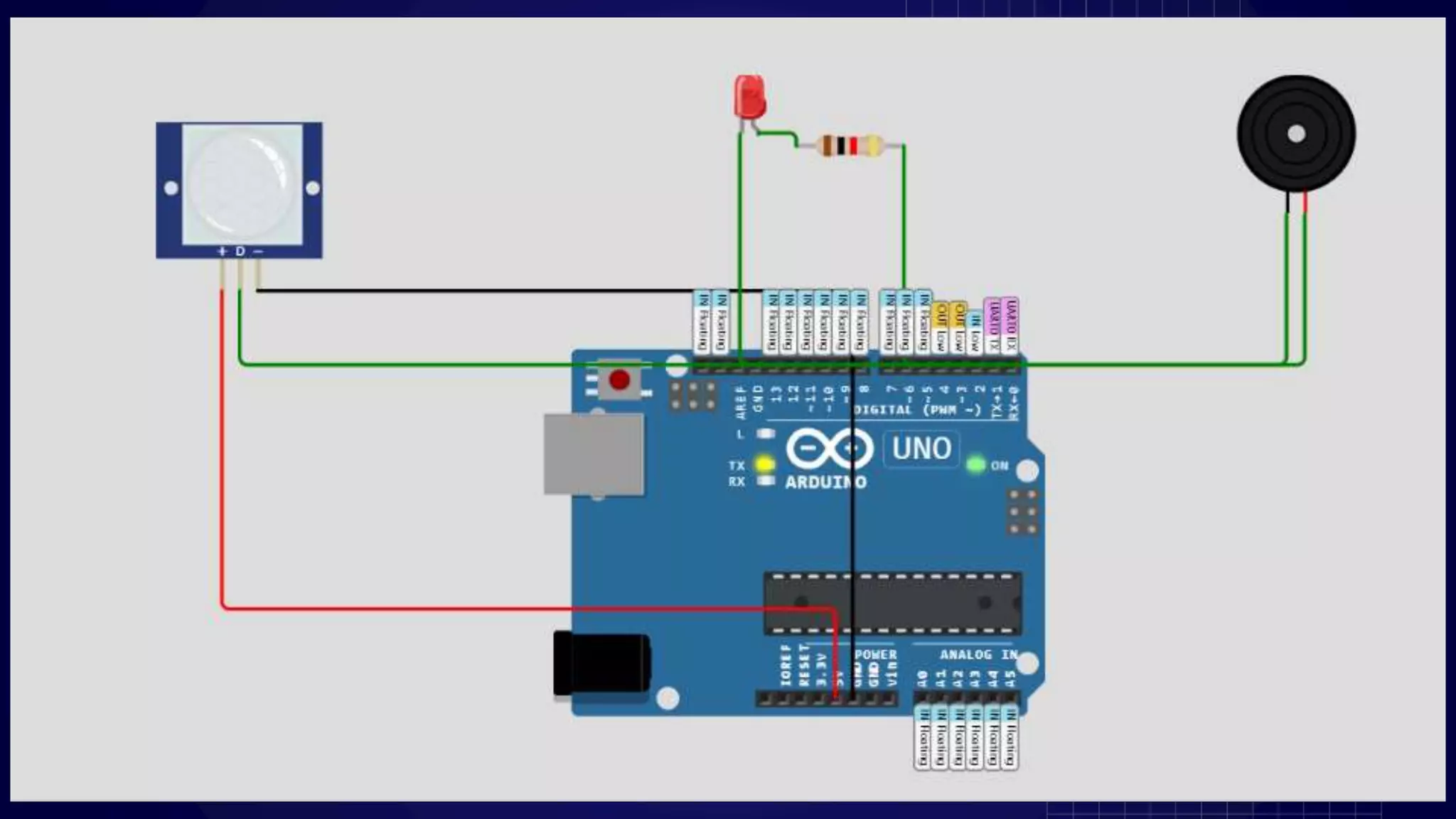
The PIR motion sensor is connected to a digital pin on the Arduino
board. In this project, it is connected to digital pin 2.
The buzzer is connected to another digital pin on the Arduino
board. In this project, it is connected to digital pin 3.
Hardware Connections
The PIR motion sensor is connected to a digital pin on the Arduino
board. In this project, it is connected to digital pin 2.
The buzzer is connected to another digital pin on the Arduino
board. In this project, it is connected to digital pin 3.
Software
Implementation
03
Implementation of the Logic To Code.
Software Implementation
The Arduino code sets up the necessary configurations in the
setup() function.
In the loop() function, it continuously checks for motion detected
by the PIR sensor.
If motion is detected, the buzzer is activated, producing a sound.
When no motion is detected, the buzzer remains silent.
Code…
#include <Adafruit_Sensor.h>
#include <Wire.h>
#include <Adafruit_MLX90614.h>
// Constants
#define PIR_PIN 2 // PIR motion sensor pin
#define BUZZER_PIN 3 // Buzzer pin
#define LED_PIN 4 // LED pin
// Variables
int pirState = LOW; // PIR sensor state
int alarmState = LOW; // Alarm state
Code…
// Initialize PIR motion sensor
int calibrationTime = 30;
long unsigned int lowIn;
long unsigned int pause = 5000;
boolean lockLow = true;
boolean takeLowTime;
int calibrationDelay = 5000;
// Initialize buzzer
const int buzzerFrequency = 2000; // Buzzer frequency in Hz
const int buzzerDuration = 2000; // Buzzer duration in milliseconds
Code…(void setup() )
void setup() {
// Initialize serial communication
Serial.begin(9600);
// Set pin modes
pinMode(PIR_PIN, INPUT);
pinMode(BUZZER_PIN, OUTPUT);
pinMode(LED_PIN, OUTPUT);
// Calibrate PIR motion sensor
digitalWrite(PIR_PIN, LOW);
delay(calibrationDelay);
lowIn = digitalRead(PIR_PIN);
delay(calibrationTime);
Code…(void setup())
// Initialize the buzzer
tone(BUZZER_PIN, buzzerFrequency);
delay(buzzerDuration);
noTone(BUZZER_PIN);
// Print initialization message
Serial.println("Motion Detection Alarm System Initialized");
Serial.println("----------------------------------------");
}
Code…(void loop())
// Read PIR motion sensor state
int pirReading = digitalRead(PIR_PIN);
if (pirReading == HIGH && pirState == LOW) {
// Motion detected
pirState = HIGH;
alarmState = HIGH;
Code…(void loop())
// Activate alarm
digitalWrite(LED_PIN, HIGH);
tone(BUZZER_PIN, buzzerFrequency);
Serial.println("Motion Detected! Alarm Activated");
Serial.println("----------------------------------------");
} else if (pirReading == LOW && pirState == HIGH) {
// Motion stopped
pirState = LOW;
alarmState = LOW;
Code…(void loop())
// Deactivate alarm
digitalWrite(LED_PIN, LOW);
noTone(BUZZER_PIN);
Serial.println("Motion Stopped! Alarm Deactivated");
Serial.println("----------------------------------------");
}
if (alarmState == HIGH) {
// Print alarm status
Serial.println("Alarm is active");
} else {
// Print alarm status
Serial.println("Alarm is inactive");
}
delay(100);
}
Operation
04
How The Project Works.
Operation
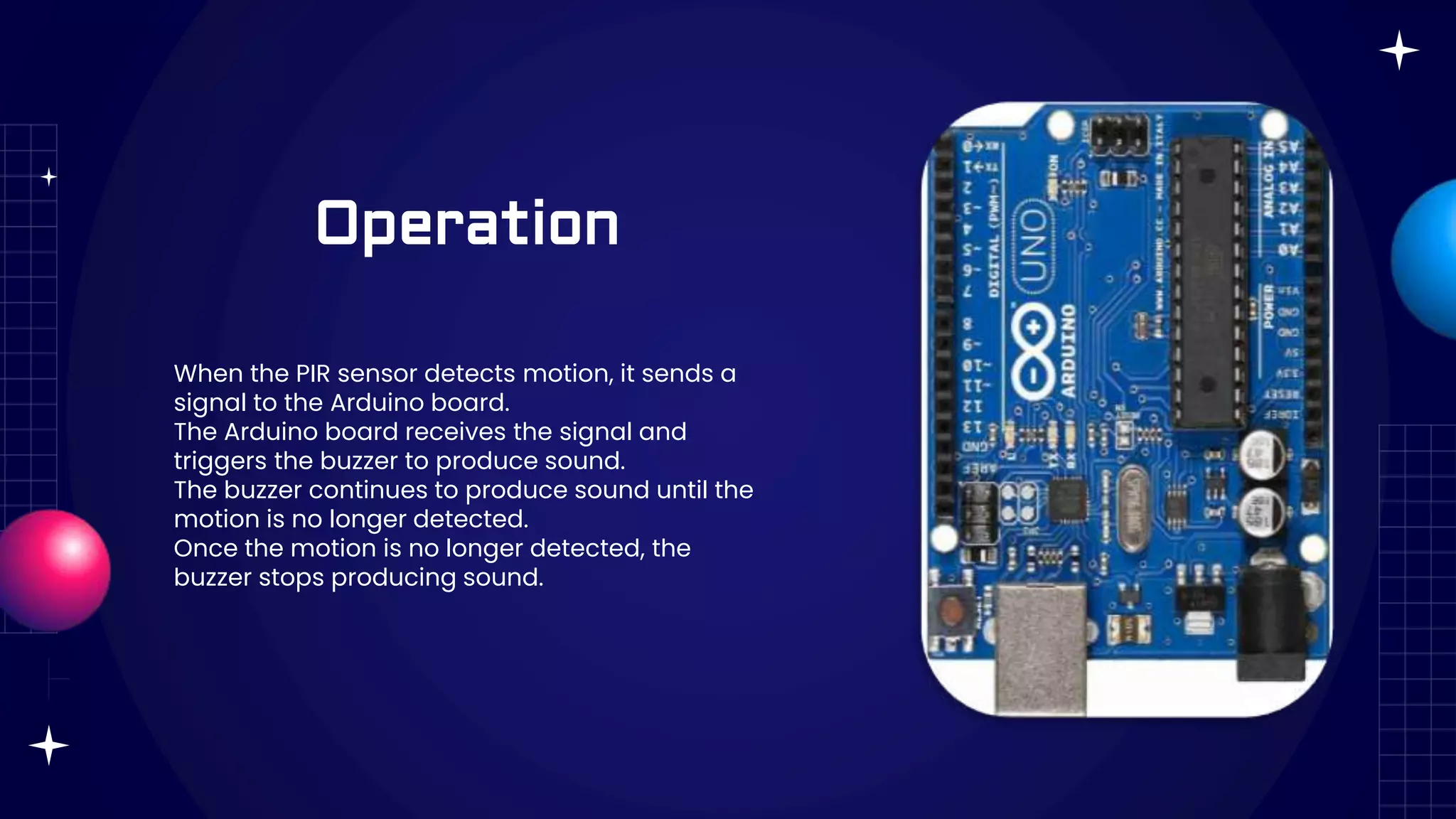
When the PIR sensor detects motion, it sends a
signal to the Arduino board.
The Arduino board receives the signal and
triggers the buzzer to produce sound.
The buzzer continues to produce sound until the
motion is no longer detected.
Once the motion is no longer detected, the
buzzer stops producing sound.
Continue…
This project can be used as a simple security system to detect
unauthorized movement in a specific area. It can be placed in a
room, hallway, or any other location where motion detection is
desired. The buzzer serves as an audible alert to draw attention to
the detected motion.
THANKS!
DO YOU HAVE ANY QUESTIONS?
Reshad@goldenlight.Af
AhmadSajad@gmail.com

ARDUINO MOTION SENSOR

  • 1.
    Motion Detection Using Arduino ByAhmad Reshd & Sajad Ali
  • 2.
    TABLE OF CONTENTS 01 03 02 04 INTRODUCTIONHardware Connection How To Connect The sensors. Software Implementation Operation What is The purpose of This Project. Implementation of the Logic To Code. How it Works.
  • 3.
    INTRODUCTION 01 What is Thepurpose of This Project.
  • 4.
    What is Thepurpose of This Project. The project is a motion-activated alarm system using an Arduino board, a PIR (Passive Infrared) motion sensor, and a buzzer. The purpose of the project is to detect any movement within the sensor's range and activate an alarm in the form of a buzzer.
  • 5.
  • 6.
    Hardware Connections The PIRmotion sensor is connected to a digital pin on the Arduino board. In this project, it is connected to digital pin 2. The buzzer is connected to another digital pin on the Arduino board. In this project, it is connected to digital pin 3.
  • 7.
    Hardware Connections The PIRmotion sensor is connected to a digital pin on the Arduino board. In this project, it is connected to digital pin 2. The buzzer is connected to another digital pin on the Arduino board. In this project, it is connected to digital pin 3.
  • 8.
  • 9.
    Software Implementation The Arduinocode sets up the necessary configurations in the setup() function. In the loop() function, it continuously checks for motion detected by the PIR sensor. If motion is detected, the buzzer is activated, producing a sound. When no motion is detected, the buzzer remains silent.
  • 10.
    Code… #include <Adafruit_Sensor.h> #include <Wire.h> #include<Adafruit_MLX90614.h> // Constants #define PIR_PIN 2 // PIR motion sensor pin #define BUZZER_PIN 3 // Buzzer pin #define LED_PIN 4 // LED pin // Variables int pirState = LOW; // PIR sensor state int alarmState = LOW; // Alarm state
  • 11.
    Code… // Initialize PIRmotion sensor int calibrationTime = 30; long unsigned int lowIn; long unsigned int pause = 5000; boolean lockLow = true; boolean takeLowTime; int calibrationDelay = 5000; // Initialize buzzer const int buzzerFrequency = 2000; // Buzzer frequency in Hz const int buzzerDuration = 2000; // Buzzer duration in milliseconds
  • 12.
    Code…(void setup() ) voidsetup() { // Initialize serial communication Serial.begin(9600); // Set pin modes pinMode(PIR_PIN, INPUT); pinMode(BUZZER_PIN, OUTPUT); pinMode(LED_PIN, OUTPUT); // Calibrate PIR motion sensor digitalWrite(PIR_PIN, LOW); delay(calibrationDelay); lowIn = digitalRead(PIR_PIN); delay(calibrationTime);
  • 13.
    Code…(void setup()) // Initializethe buzzer tone(BUZZER_PIN, buzzerFrequency); delay(buzzerDuration); noTone(BUZZER_PIN); // Print initialization message Serial.println("Motion Detection Alarm System Initialized"); Serial.println("----------------------------------------"); }
  • 14.
    Code…(void loop()) // ReadPIR motion sensor state int pirReading = digitalRead(PIR_PIN); if (pirReading == HIGH && pirState == LOW) { // Motion detected pirState = HIGH; alarmState = HIGH;
  • 15.
    Code…(void loop()) // Activatealarm digitalWrite(LED_PIN, HIGH); tone(BUZZER_PIN, buzzerFrequency); Serial.println("Motion Detected! Alarm Activated"); Serial.println("----------------------------------------"); } else if (pirReading == LOW && pirState == HIGH) { // Motion stopped pirState = LOW; alarmState = LOW;
  • 16.
    Code…(void loop()) // Deactivatealarm digitalWrite(LED_PIN, LOW); noTone(BUZZER_PIN); Serial.println("Motion Stopped! Alarm Deactivated"); Serial.println("----------------------------------------"); } if (alarmState == HIGH) { // Print alarm status Serial.println("Alarm is active"); } else { // Print alarm status Serial.println("Alarm is inactive"); } delay(100); }
  • 17.
  • 18.
    Operation When the PIRsensor detects motion, it sends a signal to the Arduino board. The Arduino board receives the signal and triggers the buzzer to produce sound. The buzzer continues to produce sound until the motion is no longer detected. Once the motion is no longer detected, the buzzer stops producing sound.
  • 19.
    Continue… This project canbe used as a simple security system to detect unauthorized movement in a specific area. It can be placed in a room, hallway, or any other location where motion detection is desired. The buzzer serves as an audible alert to draw attention to the detected motion.
  • 20.
    THANKS! DO YOU HAVEANY QUESTIONS? Reshad@goldenlight.Af AhmadSajad@gmail.com