Arab Open University
2nd
Semester, 2006-2007
M301
Unit 4.1
Approaches to Software
Development
rattas@arabou.org.sa
Reem AlAttas © 2
Topic Road Map
 Software and software engineering
An introduction to software development
Modeling
Analyzing simple requirements
Introduction to the CASE tool
Reem AlAttas © 3
System
An assembly of components that are
connected together in an organized way.
Examples:
 Telephone.
 Human body.
 Super market software system.
Reem AlAttas © 4
Software Characteristics
Malleability: easy to change.
Complexity.
Size.
 The number of errors in a system increases
with complexity and size.
Reem AlAttas © 5
Software System Characteristics
Useful: meets user’s requirements.
Usable: easy to use.
Reliable: does not contain errors.
Flexible: easy to change.
Available: in its target environment.
Affordable: on time and within budget.
Reem AlAttas © 6
Maintainability
Software system must be maintainable 
written and documented in such a way
that changes can readily be made.
 Important to minimize changing costs.
Reem AlAttas © 7
Legacy systems
 Particular software system continues to meet its users’
needs.
 There may be little or no motivation to change or replace
it.
 Characteristics:
 Large.
 Critical to the system.
 Have probably been changed a number of times since their
inception.
 Difficult to understand.
 difficult to maintain.
Reem AlAttas © 8
Divide and rule
Decompose a problem into smaller and
smaller parts or chunks until each one can
be comprehended or dealt with by an
individual.
Example:
 Hospital system = patient system + physician
system + pharmacy system.
Reem AlAttas © 9
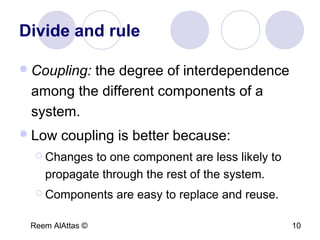
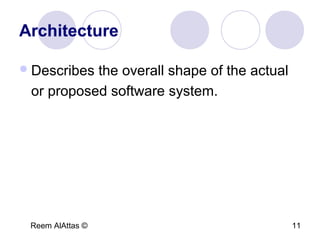
Divide and rule
 Partition  Projection
Reem AlAttas © 10
Divide and rule
Coupling: the degree of interdependence
among the different components of a
system.
Low coupling is better because:
 Changes to one component are less likely to
propagate through the rest of the system.
 Components are easy to replace and reuse.
Reem AlAttas © 11
Architecture
Describes the overall shape of the actual
or proposed software system.
Reem AlAttas © 12
Topic Road Map
Software and software engineering
 An introduction to software
development
Modeling
Analyzing simple requirements
Introduction to the CASE tool
Reem AlAttas © 13
Software Engineering
The establishment and use of sound
engineering principles in order to obtain
economically software that is reliable and
works efficiently on real machines.
Reem AlAttas © 14
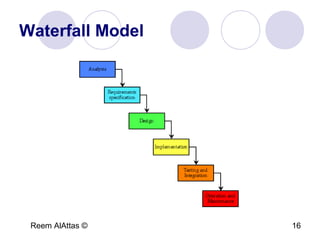
Software Development Activities
1. Analysis: includes requirements elicitation
where you identify the problem and
requirements specification where you decide
what needs to be done to solve the problem.
2. Design: how you will solve the problem.
3. Implementation.
4. Testing.
Reem AlAttas © 15
Software Development Activities
5. Integration.
6. Maintenance.
7. Quality Management.
8. Project Management.
Reem AlAttas © 16
Waterfall Model
Reem AlAttas © 17
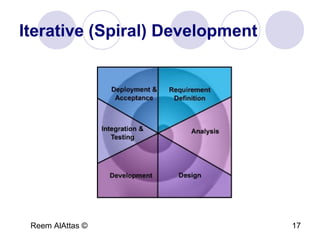
Iterative (Spiral) Development
Reem AlAttas © 18
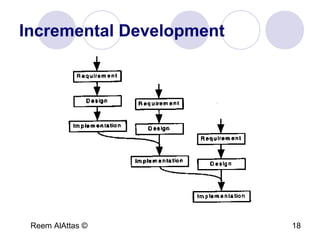
Incremental Development
Reem AlAttas © 19
Topic Road Map
Software and software engineering
An introduction to software development
 Modeling
Analyzing simple requirements
Introduction to the CASE tool
Reem AlAttas © 20
Modeling
A way of thinking about things and ideas
in the ‘real world’.
Example:
 Map.
Reem AlAttas © 21
Modeling Language Rules
Syntax: determines what diagrams and
symbols exist.
Semantics: determines what the diagrams
and symbols mean.
Reem AlAttas © 22
UML
Unified Modeling Language used to
develop object-oriented software systems.
Reem AlAttas © 23
Types of Models
Static Models: describe the objects in a
software system and their relationships to
other objects.
Dynamic Models: describe the behavior of
a software system over time.
Reem AlAttas © 24
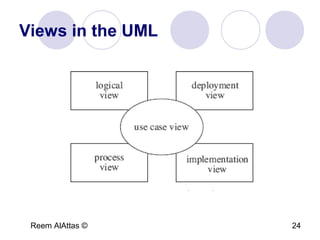
Views in the UML
Reem AlAttas © 25
Topic Road Map
Software and software engineering
An introduction to software development
Modeling
 Analyzing simple requirements
Introduction to the CASE tool
Reem AlAttas © 26
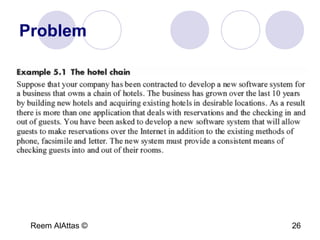
Problem
Reem AlAttas © 27
Tasks
1. Make reservation.
2. Check in.
3. Check out.
Reem AlAttas © 28
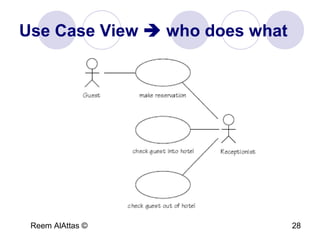
Use Case View  who does what
Reem AlAttas © 29
Main Elements
Actors.
Use Cases.
Relationships.
Reem AlAttas © 30
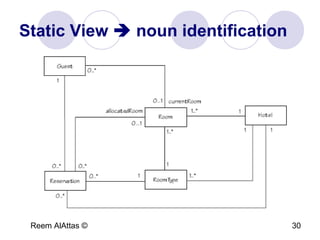
Static View  noun identification
Reem AlAttas © 31
Main Elements
Classes.
Associations.
Reem AlAttas © 32
Dynamic View
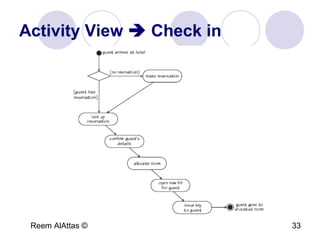
 Activity view: shows both sequential and
concurrent groups of activities of a specific task.
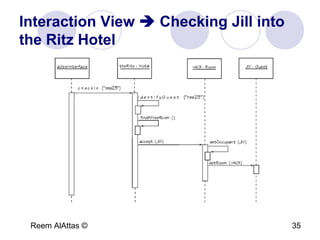
 Interaction view: concerned with the exchange of
messages between the objects in a software
system.
 State machine view: record the different
possibilities that might arise for all instances of a
particular class.
Reem AlAttas © 33
Activity View  Check in
Reem AlAttas © 34
Main Elements
Activities.
Transitions.
Decision points.
Start and end points.
Reem AlAttas © 35
Interaction View  Checking Jill into
the Ritz Hotel
Reem AlAttas © 36
Main Elements
Objects.
Messages.
Object’s life line.
Object is active.
Reem AlAttas © 37
State Machine View  Room Object
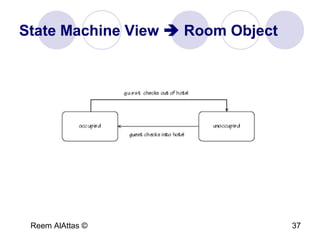
Reem AlAttas © 38
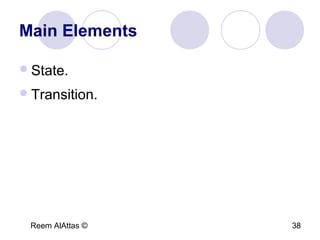
Main Elements
State.
Transition.
Reem AlAttas © 39
Topic Road Map
Software and software engineering
An introduction to software development
Modeling
Analyzing simple requirements
 Introduction to the CASE tool
Demo
TMA4 – Q1
Thank You!

Approaches to Software Development

  • 1.
    Arab Open University 2nd Semester,2006-2007 M301 Unit 4.1 Approaches to Software Development rattas@arabou.org.sa
  • 2.
    Reem AlAttas ©2 Topic Road Map  Software and software engineering An introduction to software development Modeling Analyzing simple requirements Introduction to the CASE tool
  • 3.
    Reem AlAttas ©3 System An assembly of components that are connected together in an organized way. Examples:  Telephone.  Human body.  Super market software system.
  • 4.
    Reem AlAttas ©4 Software Characteristics Malleability: easy to change. Complexity. Size.  The number of errors in a system increases with complexity and size.
  • 5.
    Reem AlAttas ©5 Software System Characteristics Useful: meets user’s requirements. Usable: easy to use. Reliable: does not contain errors. Flexible: easy to change. Available: in its target environment. Affordable: on time and within budget.
  • 6.
    Reem AlAttas ©6 Maintainability Software system must be maintainable  written and documented in such a way that changes can readily be made.  Important to minimize changing costs.
  • 7.
    Reem AlAttas ©7 Legacy systems  Particular software system continues to meet its users’ needs.  There may be little or no motivation to change or replace it.  Characteristics:  Large.  Critical to the system.  Have probably been changed a number of times since their inception.  Difficult to understand.  difficult to maintain.
  • 8.
    Reem AlAttas ©8 Divide and rule Decompose a problem into smaller and smaller parts or chunks until each one can be comprehended or dealt with by an individual. Example:  Hospital system = patient system + physician system + pharmacy system.
  • 9.
    Reem AlAttas ©9 Divide and rule  Partition  Projection
  • 10.
    Reem AlAttas ©10 Divide and rule Coupling: the degree of interdependence among the different components of a system. Low coupling is better because:  Changes to one component are less likely to propagate through the rest of the system.  Components are easy to replace and reuse.
  • 11.
    Reem AlAttas ©11 Architecture Describes the overall shape of the actual or proposed software system.
  • 12.
    Reem AlAttas ©12 Topic Road Map Software and software engineering  An introduction to software development Modeling Analyzing simple requirements Introduction to the CASE tool
  • 13.
    Reem AlAttas ©13 Software Engineering The establishment and use of sound engineering principles in order to obtain economically software that is reliable and works efficiently on real machines.
  • 14.
    Reem AlAttas ©14 Software Development Activities 1. Analysis: includes requirements elicitation where you identify the problem and requirements specification where you decide what needs to be done to solve the problem. 2. Design: how you will solve the problem. 3. Implementation. 4. Testing.
  • 15.
    Reem AlAttas ©15 Software Development Activities 5. Integration. 6. Maintenance. 7. Quality Management. 8. Project Management.
  • 16.
    Reem AlAttas ©16 Waterfall Model
  • 17.
    Reem AlAttas ©17 Iterative (Spiral) Development
  • 18.
    Reem AlAttas ©18 Incremental Development
  • 19.
    Reem AlAttas ©19 Topic Road Map Software and software engineering An introduction to software development  Modeling Analyzing simple requirements Introduction to the CASE tool
  • 20.
    Reem AlAttas ©20 Modeling A way of thinking about things and ideas in the ‘real world’. Example:  Map.
  • 21.
    Reem AlAttas ©21 Modeling Language Rules Syntax: determines what diagrams and symbols exist. Semantics: determines what the diagrams and symbols mean.
  • 22.
    Reem AlAttas ©22 UML Unified Modeling Language used to develop object-oriented software systems.
  • 23.
    Reem AlAttas ©23 Types of Models Static Models: describe the objects in a software system and their relationships to other objects. Dynamic Models: describe the behavior of a software system over time.
  • 24.
    Reem AlAttas ©24 Views in the UML
  • 25.
    Reem AlAttas ©25 Topic Road Map Software and software engineering An introduction to software development Modeling  Analyzing simple requirements Introduction to the CASE tool
  • 26.
    Reem AlAttas ©26 Problem
  • 27.
    Reem AlAttas ©27 Tasks 1. Make reservation. 2. Check in. 3. Check out.
  • 28.
    Reem AlAttas ©28 Use Case View  who does what
  • 29.
    Reem AlAttas ©29 Main Elements Actors. Use Cases. Relationships.
  • 30.
    Reem AlAttas ©30 Static View  noun identification
  • 31.
    Reem AlAttas ©31 Main Elements Classes. Associations.
  • 32.
    Reem AlAttas ©32 Dynamic View  Activity view: shows both sequential and concurrent groups of activities of a specific task.  Interaction view: concerned with the exchange of messages between the objects in a software system.  State machine view: record the different possibilities that might arise for all instances of a particular class.
  • 33.
    Reem AlAttas ©33 Activity View  Check in
  • 34.
    Reem AlAttas ©34 Main Elements Activities. Transitions. Decision points. Start and end points.
  • 35.
    Reem AlAttas ©35 Interaction View  Checking Jill into the Ritz Hotel
  • 36.
    Reem AlAttas ©36 Main Elements Objects. Messages. Object’s life line. Object is active.
  • 37.
    Reem AlAttas ©37 State Machine View  Room Object
  • 38.
    Reem AlAttas ©38 Main Elements State. Transition.
  • 39.
    Reem AlAttas ©39 Topic Road Map Software and software engineering An introduction to software development Modeling Analyzing simple requirements  Introduction to the CASE tool
  • 40.
  • 41.
  • 42.