CSC230 Software Design (Engineering)
• Dr. Ben Choi
• Ph.D. in EE (Computer Engineering),
The Ohio State University
• System Performance Engineer,
Lucent Technologies - Bell Labs Innovations
• Pilot, FAA certified pilot for
airplanes and helicopters
TECH
Computer Science
CH01: What is Software Engineering
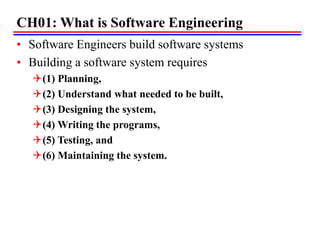
• Software Engineers build software systems
• Building a software system requires
(1) Planning,
(2) Understand what needed to be built,
(3) Designing the system,
(4) Writing the programs,
(5) Testing, and
(6) Maintaining the system.
What is CS 230
• Class Syllabus
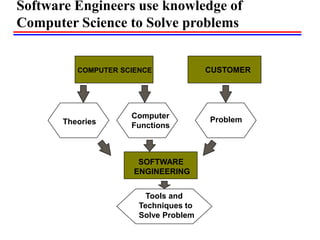
Software Engineers use knowledge of
Computer Science to Solve problems
COMPUTER SCIENCE
SOFTWARE
ENGINEERING
CUSTOMER
Theories
Tools and
Techniques to
Solve Problem
Problem
Computer
Functions
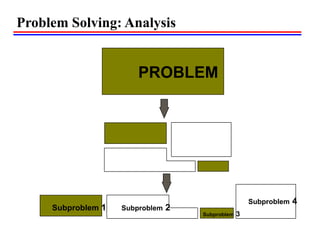
Problem Solving: Analysis
PROBLEM
Subproblem 1
Subproblem 3
Subproblem 2
Subproblem 4
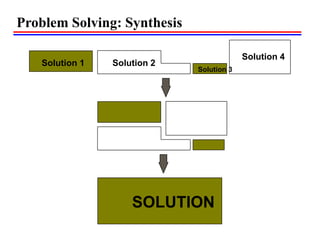
Problem Solving: Synthesis
SOLUTION
Solution 1
Solution 3
Solution 2
Solution 4
How successful have we been?
• Writing software is an art as well as a science.
• Software engineering is about designing high-quality
software.
• System Crash!!!
• Seeking wrong target!!!
• However, we have come a long way!!!
(Can’t leave home without a computer.)
What is Good software?
• Context helps to determine the answer
Games and Safety-critical systems have different
standard
• Evaluate software by evaluating
quality of the product
quality of the process
quality in the context of the business environment
Quality of the product
• Correctness
• Reliability
• Usability
• Testability
• Maintainability
Quality of the Process
• Many (development) activities will affect the ultimate
product quality, e.g.
• Talking to customers and users to understand what
they want
• Code reviews
• When to conduct testing
Quality in Context of the Business
Environment
• Return on investment
• Express in dollars
• Express in effort
schedule
productivity
customer
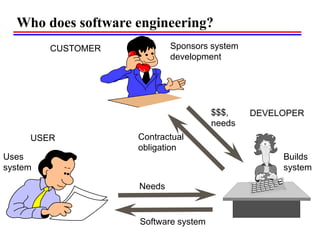
Who does software engineering?
CUSTOMER Sponsors system
development
USER
Uses
system
DEVELOPER
Builds
system
Contractual
obligation
$$$,
needs
Software system
Needs
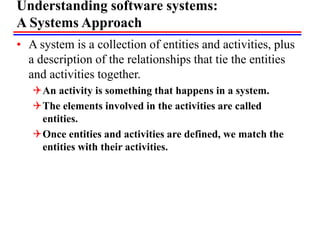
Understanding software systems:
A Systems Approach
• A system is a collection of entities and activities, plus
a description of the relationships that tie the entities
and activities together.
An activity is something that happens in a system.
The elements involved in the activities are called
entities.
Once entities and activities are defined, we match the
entities with their activities.
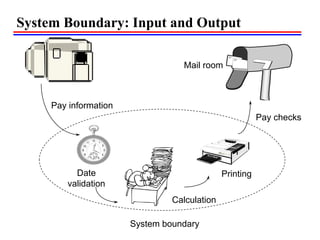
System Boundary: Input and Output
System boundary
Mail room
Date
validation
Calculation
Pay information
Pay checks
Printing
Building software systems:
An Engineering Approach
• Software projects progress in a way similar to the
house-building process.
Asking customers what house they want to build
Drawing floor plans (rooms) ((Model house))
Designing interior (e.g. where the light switch should be)
Testing each subsystem (e.g. testing each light switch,
electrical subsystem)
Testing everything work together
Maintaining the house
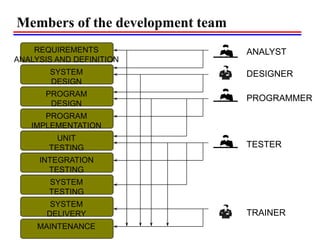
Software development process
requirements analysis and definition
system design
program design
writing the programs (program implementation)
unit testing
integration testing
system testing
system delivery
maintenance
Members of the development team
MAINTENANCE
SYSTEM
DESIGN
REQUIREMENTS
ANALYSIS AND DEFINITION
PROGRAM
DESIGN
PROGRAM
IMPLEMENTATION
UNIT
TESTING
INTEGRATION
TESTING
SYSTEM
TESTING
SYSTEM
DELIVERY
SOFTWARE
DEVELOPMENT
STEPS
DEVELOPER
ROLES
ANALYST
DESIGNER
PROGRAMMER
TESTER
TRAINER
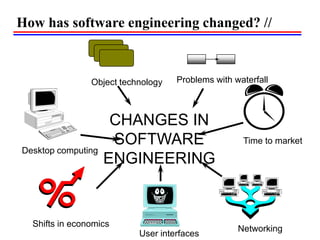
How has software engineering changed? //
Time to market
Shifts in economics
Desktop computing
Networking
Object technology Problems with waterfall
User interfaces
CHANGES IN
SOFTWARE
ENGINEERING
Fundamental notions in software engineering
Abstraction
Analysis and design methods and notations
User interface prototyping
Software Architecture
Software Process
Reuse
Measurement
Tools and Integrated Environments
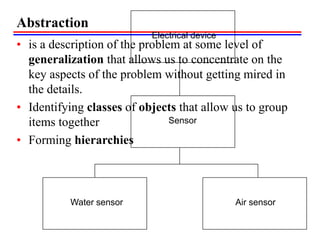
Abstraction
Electrical device
Sensor
Water sensor Air sensor
• is a description of the problem at some level of
generalization that allows us to concentrate on the
key aspects of the problem without getting mired in
the details.
• Identifying classes of objects that allow us to group
items together
• Forming hierarchies
Analysis and Design Methods and Notations
• build models and check them for completeness and
consistency
• use standard notation to help us communicate and to
document decisions
User interface prototyping
• Prototyping means building a small version of a
system to
help the user and customer identify the key
requirements of a system
demonstrate feasibility of a design or approach
• Does the user like the “looks and feels”?
Software Architecture
• A system’s architecture describes the system in terms
of a set of architectural units, and a map of how the
units relate to one another.
Software Architecture: Units
• Ways to partition the system into units:
modular decomposition: based on assigning functions to
modules
data-oriented decomposition: based on external data
structures
event-oriented decomposition: based on events that the
system must handle
outside-in design: based on user inputs to the system
object-oriented design: based on identifying classes of
objects and their interrelationships
Software Process
• Process of developing software (organization and
discipline in the activities)
• contribute to the quality of the software and the
speed with which it is developed
Reuse
• Take advantage of the commonalities across
applications by reusing items from previous
development
• Reusable components as business asset
Measurement
• By quantifying where we can and what we can, we
describe our actions and their outcomes in a common
mathematical language that allows us to evaluate our
progress.
Tools and Integrated Environments
• Use tools to enhance software development
tools to help tracking the progress of the development
tools to help debugging programs
tools to help testing the programs
Examples and What the chapter means for
you
• Information system example
• Real-Time example
• What this chapter means for you
• What this chapter means for your development team
• What this chapter means for your researchers
• Key References and Exercises
Ch01

Ch01

  • 1.
    CSC230 Software Design(Engineering) • Dr. Ben Choi • Ph.D. in EE (Computer Engineering), The Ohio State University • System Performance Engineer, Lucent Technologies - Bell Labs Innovations • Pilot, FAA certified pilot for airplanes and helicopters TECH Computer Science
  • 2.
    CH01: What isSoftware Engineering • Software Engineers build software systems • Building a software system requires (1) Planning, (2) Understand what needed to be built, (3) Designing the system, (4) Writing the programs, (5) Testing, and (6) Maintaining the system.
  • 3.
    What is CS230 • Class Syllabus
  • 4.
    Software Engineers useknowledge of Computer Science to Solve problems COMPUTER SCIENCE SOFTWARE ENGINEERING CUSTOMER Theories Tools and Techniques to Solve Problem Problem Computer Functions
  • 5.
    Problem Solving: Analysis PROBLEM Subproblem1 Subproblem 3 Subproblem 2 Subproblem 4
  • 6.
    Problem Solving: Synthesis SOLUTION Solution1 Solution 3 Solution 2 Solution 4
  • 7.
    How successful havewe been? • Writing software is an art as well as a science. • Software engineering is about designing high-quality software. • System Crash!!! • Seeking wrong target!!! • However, we have come a long way!!! (Can’t leave home without a computer.)
  • 8.
    What is Goodsoftware? • Context helps to determine the answer Games and Safety-critical systems have different standard • Evaluate software by evaluating quality of the product quality of the process quality in the context of the business environment
  • 9.
    Quality of theproduct • Correctness • Reliability • Usability • Testability • Maintainability
  • 10.
    Quality of theProcess • Many (development) activities will affect the ultimate product quality, e.g. • Talking to customers and users to understand what they want • Code reviews • When to conduct testing
  • 11.
    Quality in Contextof the Business Environment • Return on investment • Express in dollars • Express in effort schedule productivity customer
  • 12.
    Who does softwareengineering? CUSTOMER Sponsors system development USER Uses system DEVELOPER Builds system Contractual obligation $$$, needs Software system Needs
  • 13.
    Understanding software systems: ASystems Approach • A system is a collection of entities and activities, plus a description of the relationships that tie the entities and activities together. An activity is something that happens in a system. The elements involved in the activities are called entities. Once entities and activities are defined, we match the entities with their activities.
  • 14.
    System Boundary: Inputand Output System boundary Mail room Date validation Calculation Pay information Pay checks Printing
  • 15.
    Building software systems: AnEngineering Approach • Software projects progress in a way similar to the house-building process. Asking customers what house they want to build Drawing floor plans (rooms) ((Model house)) Designing interior (e.g. where the light switch should be) Testing each subsystem (e.g. testing each light switch, electrical subsystem) Testing everything work together Maintaining the house
  • 16.
    Software development process requirementsanalysis and definition system design program design writing the programs (program implementation) unit testing integration testing system testing system delivery maintenance
  • 17.
    Members of thedevelopment team MAINTENANCE SYSTEM DESIGN REQUIREMENTS ANALYSIS AND DEFINITION PROGRAM DESIGN PROGRAM IMPLEMENTATION UNIT TESTING INTEGRATION TESTING SYSTEM TESTING SYSTEM DELIVERY SOFTWARE DEVELOPMENT STEPS DEVELOPER ROLES ANALYST DESIGNER PROGRAMMER TESTER TRAINER
  • 18.
    How has softwareengineering changed? // Time to market Shifts in economics Desktop computing Networking Object technology Problems with waterfall User interfaces CHANGES IN SOFTWARE ENGINEERING
  • 19.
    Fundamental notions insoftware engineering Abstraction Analysis and design methods and notations User interface prototyping Software Architecture Software Process Reuse Measurement Tools and Integrated Environments
  • 20.
    Abstraction Electrical device Sensor Water sensorAir sensor • is a description of the problem at some level of generalization that allows us to concentrate on the key aspects of the problem without getting mired in the details. • Identifying classes of objects that allow us to group items together • Forming hierarchies
  • 21.
    Analysis and DesignMethods and Notations • build models and check them for completeness and consistency • use standard notation to help us communicate and to document decisions
  • 22.
    User interface prototyping •Prototyping means building a small version of a system to help the user and customer identify the key requirements of a system demonstrate feasibility of a design or approach • Does the user like the “looks and feels”?
  • 23.
    Software Architecture • Asystem’s architecture describes the system in terms of a set of architectural units, and a map of how the units relate to one another.
  • 24.
    Software Architecture: Units •Ways to partition the system into units: modular decomposition: based on assigning functions to modules data-oriented decomposition: based on external data structures event-oriented decomposition: based on events that the system must handle outside-in design: based on user inputs to the system object-oriented design: based on identifying classes of objects and their interrelationships
  • 25.
    Software Process • Processof developing software (organization and discipline in the activities) • contribute to the quality of the software and the speed with which it is developed
  • 26.
    Reuse • Take advantageof the commonalities across applications by reusing items from previous development • Reusable components as business asset
  • 27.
    Measurement • By quantifyingwhere we can and what we can, we describe our actions and their outcomes in a common mathematical language that allows us to evaluate our progress.
  • 28.
    Tools and IntegratedEnvironments • Use tools to enhance software development tools to help tracking the progress of the development tools to help debugging programs tools to help testing the programs
  • 29.
    Examples and Whatthe chapter means for you • Information system example • Real-Time example • What this chapter means for you • What this chapter means for your development team • What this chapter means for your researchers • Key References and Exercises