Oracle Server Virtualization Overview:
Application-Driven Virtualization
Ken Ellis
Sales Consultant – Linux and Virtualization
Ken.ellis@oracle.com
The following is intended to outline our general
product direction. It is intended for information
purposes only, and may not be incorporated into any
contract. It is not a commitment to deliver any
material, code, or functionality, and should not be
relied upon in making purchasing decisions.
The development, release, and timing of any
features or functionality described for Oracle’s
products remain at the sole discretion of Oracle.
Agenda

• Integrated System Strategy at Oracle
• Virtualization at Oracle
• Oracle Virtual Machine 3.0 Update
  • Considerations for Application Driven Virtualization
  • Optimizing Availability, Performance, Scalability and Reducing
    Costs
• Deploying Enterprise Applications Quickly and Easily
• Q&A
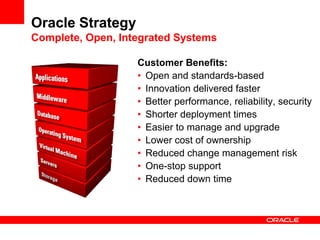
Oracle Strategy
Complete, Open, Integrated Systems

                   Customer Benefits:
                   • Open and standards-based
                   • Innovation delivered faster
                   • Better performance, reliability, security
                   • Shorter deployment times
                   • Easier to manage and upgrade
                   • Lower cost of ownership
                   • Reduced change management risk
                   • One-stop support
                   • Reduced down time
Virtualization Product
              Strategy
 Making Software Easier to
Deploy, Access, Manage, &
                  Support


                        5
Oracle Virtualization Strategy
Desktop To Data Center Virtualization
• Virtualization offers key cost savings benefits
  • Server consolidation
  • Lower energy, facility and labor costs

• Oracle’s virtualization strategy offers much more
  • Most comprehensive desktop to data center product portfolio
  • Integrated management of the full hardware and software
    stack from applications to disk
  • Integrated support

• Virtualization that makes software easier to deploy,
  easier to manage, and easier to support
  • Not Virtualization for Virtualization’s Sake
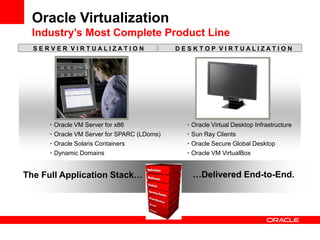
Oracle Virtualization
 Industry’s Most Complete Product Line
  SERVER VIRTUALIZATION                      DESKTOP VIRTUALIZATION


      • Oracle VM Server for x86               • Oracle Virtual Desktop Infrastructure
      • Oracle VM Server for SPARC (LDoms)     • Sun Ray Clients
      • Oracle Solaris Containers              • Oracle Secure Global Desktop
      • Dynamic Domains                        • Oracle VM VirtualBox


The Full Application Stack…                      …Delivered End-to-End.
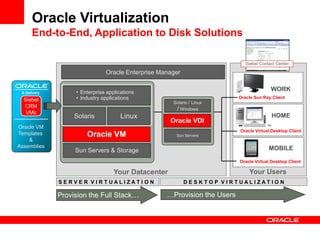
Oracle Virtualization
      End-to-End, Application to Disk Solutions

                                                                             Siebel Contact Center

                               Oracle Enterprise Manager


 E-Delivery        • Enterprise applications
                                                                                         WORK
  Siebel           • Industry applications                                Oracle Sun Ray Client
                                                     Solaris / Linux
  CRM
                                                      / Windows
   VMs
                   Solaris            Linux                                              HOME
                                                     Oracle VDI
Oracle VM
                                                                          Oracle Virtual Desktop Client
Templates              Oracle VM                      Sun Servers
    &
Assemblies                                                                              MOBILE
                   Sun Servers & Storage
                                                                          Oracle Virtual Desktop Client

                                   Your Datacenter                            Your Users
              SERVER VIRTUALIZATION                        DESKTOP VIRTUALIZATION

              Provision the Full Stack…            …Provision the Users
Oracle VM for x86
       Better, Full-Stack
Application Management
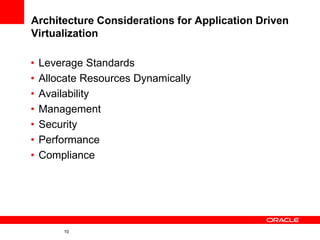
Architecture Considerations for Application Driven
Virtualization

•   Leverage Standards
•   Allocate Resources Dynamically
•   Availability
•   Management
•   Security
•   Performance
•   Compliance


         10
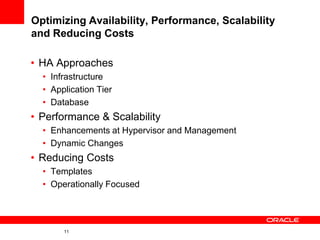
Optimizing Availability, Performance, Scalability
and Reducing Costs

• HA Approaches
  • Infrastructure
  • Application Tier
  • Database
• Performance & Scalability
  • Enhancements at Hypervisor and Management
  • Dynamic Changes
• Reducing Costs
  • Templates
  • Operationally Focused


       11
What is Oracle VM?
• Oracle VM is server virtualization software which
  fully supports both Oracle and non-Oracle
  Applications.
• Oracle VM includes two components :
     • Oracle VM Server
     • Oracle VM Manager
• Freely downloadable, freely redistributable and
  usable.
• Each VM consists of an operating system and a
  predefined set of resources from the hardware
  called a domain.
• Oracle VM Manager includes easy-to-use, rich,
  graphical interface for managing virtual server
  pools, running on x86 based systems.
What is New in Oracle VM 3.0
• Improved Scalability and Performance
  • Oracle VM can support physical servers totaling up to physical 160 CPUs and
    2TB memory and 128 virtual CPUs per VM.
• Automated Policy-Based Resource Management:
  • Improves application Quality of Service (QoS) and reduce power consumption for
    maximum operational efficiency by dynamically relocating running VMs across a
    server pool based on load.
• Distributed Resource Scheduling (DRS) for capacity
  management:
  • Provides real-time monitoring of Oracle VM Server utilization to rebalance a
    server pool and provide consistent resources to the running VMs. DRS migrates
    VMs away from heavily loaded Oracle VM Servers to those servers with more
    resources available.
• Distributed Power Management (DPM)
  • DPM complements DRS to reduce the number of powered-on servers in the pool
    when there are periods of low resource utilization. It can automatically power-on
    capacity as needed when resource utilization ramps up.
What is New in Oracle VM 3.0 ...cont’d
• Storage Connect Storage Configuration and Management
  • Oracle VM Storage Connect is a plug-in API
  • Allows the Oracle VM Manager to automatically discover available storage
  • Allows Oracle VM Manager to directly leverage the resources and
    functionality of customers’ existing storage systems in the Oracle VM
    environment
  • Supports native storage services such as SAN or NFS storage creation,
    deletion and expansion
  • Allows users of Oracle VM Manager to configure storage to be used with
    a virtual machine through various storage management vendors. Fujitsu,
    Hitachi Data Systems, and NetApp are among those enlisted to provide
    access to their systems through Oracle VM Storage Connect. Oracle's
    own Pillar Axiom SAN storage system and Sun ZFS Storage Appliance
    also work through the Storage Connect API)
What is New in Oracle VM 3.0 ...cont’d
• Centralized network configuration and management
  • Oracle VM Server logical network configuration and management is now
    performed using Oracle VM Manager; for example, NIC port bonding, and
    configuring VLAN Networks.
• Updated Xen 4.0 hypervisor
  • More efficient power management capabilities, broader hardware support,
    better performance, and greater scalability and security for both hardware-
    virtualized and para-virtualized guest operating systems.
• Updated Dom0 command and control kernel with the
  latest drivers
  • Enhanced hardware support for higher performance, leveraging the latest
    Oracle Unbreakable Enterprise Kernel.
• Updated OCFS2 1.8 cluster file system
  • Instant clone support that provides significantly faster virtual machine
    provisioning and cloning.
What is New in Oracle VM 3.0 ...cont’d
• Support for Open Virtualization Format (OVF)
  • OVF is an open standard for packaging and distributing virtual appliances.
  • Customers can now use Oracle VM Manager to import a broad range of
    OVF based software assemblies, all of which are produced by Oracle to
    accelerate application deployment.
• Browser Based Manageability from Anywhere
  • Oracle VM GUI is pure browser-based: with no client software required,
    and provides accessibility from “anywhere” on the web.
• Dynamic user interface
  • Based on the latest Oracle ADF dynamic html capabilities, the Oracle VM
    Manager now includes a fully interactive tree view and automatic refresh
    to show the real-time state of the physical and virtual environment.
• Server and storage discovery
  • Discover Oracle VM servers and storage in your environment to quickly
    get large numbers of servers up and running.
What is New in Oracle VM 3.0 ...cont’d
• Job management framework
  • Every Oracle VM Manager operation is performed as a “job”. A job
    consists of all the steps involved in the successful completion of the
    operation. For each job, Oracle VM Manager provides status, such as
    percent complete, each step completed, and the steps remaining.
    Through the GUI, an administrator can view and abort a job at any time,
    or if the job is aborted by the system because of a terminal failure, the
    state is rolled back to its original state.
• Extensive event logging
  • Oracle VM Manager maintains an extensive event or “job” history that is
    accessible through the Manager GUI, providing a simple way to see who
    made changes within the environment and to trace failures.
• Resource information
  • Performance statistics are available for CPU, memory, disk and network
    for each physical server and virtual machine Events are displayed for
    each physical and virtual object, such as port up/down status. IP address
    and other configuration information are displayed directly in the user
    interface.
Guest Operating Systems Supported Under
Oracle VM
Runs Linux, Solaris and Windows guest VMs. Supports:
                            Oracle Linux
                           Oracle Solaris
                       Red Hat Enterprise Linux
                         Microsoft Windows

 Hardware and Paravirtualized virtualization supported
               HV on x86 hardware with HVM support
              64-bit and 32-bit guest VMs
  Up to 128 virtual processors (vCPUs) per guest VM.
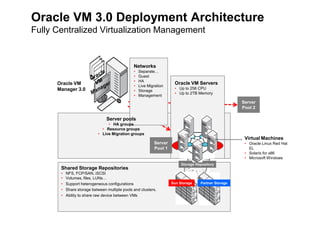
Oracle VM 3.0 Deployment Architecture
Fully Centralized Virtualization Management


                                                Networks
                                                •   Separate…
                                                •   Guest
                                                •   HA
      Oracle VM                                                       Oracle VM Servers
                                                •   Live Migration
      Manager 3.0                                                     • Up to 256 CPU
                                                •   Storage
                                                                      • Up to 2TB Memory
                                                •   Management
                                                                                                      Server
                                                                                                      Pool 2

                                 Server pools
                                 • HA groups
                              • Resource groups
                            • Live Migration groups
                                                                                                       Virtual Machines
                                                            Server                                     • Oracle Linux Red Hat
                                                            Pool 1                                       EL
                                                                                                       • Solaris for x86
                                                                                                       • Microsoft Windows
                                                                          Storage Repository
       Shared Storage Repositories
       •   NFS, FCP/SAN, iSCSI
       •   Volumes, files, LUNs…
       •   Support heterogeneous configurations                      Sun Storage    Partner Storage
       •   Share storage between multiple pools and clusters.
       •   Ability to share raw device between VMs
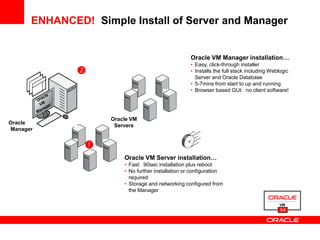
ENHANCED! Simple Install of Server and Manager


                                                     Oracle VM Manager installation…
                                                     • Easy, click-through installer
                                                    • Installs the full stack including Weblogic
                                                       Server and Oracle Database
                                                     • 5-7mins from start to up and running
                                                     • Browser based GUI: no client software!


                     Oracle VM
Oracle VM
                      Servers
Manager


                
                         Oracle VM Server installation…
                         • Fast: 90sec installation plus reboot
                         • No further installation or configuration
                           required
                         • Storage and networking configured from
                           the Manager


                                                                                             3.0
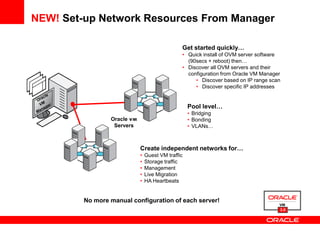
NEW! Set-up Network Resources From Manager

                                                Get started quickly…
                                                • Quick install of OVM server software
                                                  (90secs + reboot) then…
                                                • Discover all OVM servers and their
                                                  configuration from Oracle VM Manager
                                                     • Discover based on IP range scan
                                                     • Discover specific IP addresses


                                                    Pool level…
                                                    • Bridging
                 Oracle VM                          • Bonding
                  Servers                           • VLANs…


                             Create independent networks for…
                             •   Guest VM traffic
                             •   Storage traffic
                             •   Management
                             •   Live Migration
                             •   HA Heartbeats


         No more manual configuration of each server!
                                                                                     3.0
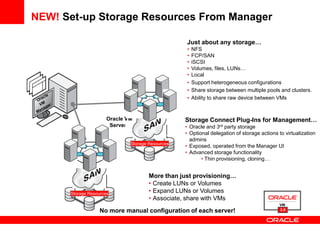
NEW! Set-up Storage Resources From Manager

                                                  Just about any storage…
                                                  •   NFS
                                                  •   FCP/SAN
                                                  •   iSCSI
                                                  •   Volumes, files, LUNs…
                                                  •   Local
                                                      Support heterogeneous configurations
                                                      Share storage between multiple pools and clusters.
                                                      Ability to share raw device between VMs


                      Oracle VM                   Storage Connect Plug-Ins for Management…
                       Servers                    • Oracle and 3rd party storage
                                                  • Optional delegation of storage actions to virtualization
                                                    admins
                              Storage Resources
                                                  • Exposed, operated from the Manager UI
                                                  • Advanced storage functionality
                                                         • Thin provisioning, cloning…


                                      More than just provisioning…
                                      • Create LUNs or Volumes
      Storage Resources
                                      • Expand LUNs or Volumes
                                      • Associate, share with VMs
                   No more manual configuration of each server!                             3.0
ENHANCED!
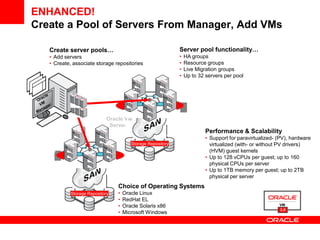
Create a Pool of Servers From Manager, Add VMs

    Create server pools…                                      Server pool functionality…
    • Add servers                                             •   HA groups
    • Create, associate storage repositories                  •   Resource groups
                                                              •   Live Migration groups
                                                              •   Up to 32 servers per pool


                                                                   Server
                                                                   Pool 2
                             Oracle VM
                              Servers
                                                                            Performance & Scalability
                                                                            • Support for paravirtualized- (PV), hardware
                                         Storage Repository                   virtualized (with- or without PV drivers)
 Server                                                                       (HVM) guest kernels
 Pool 1                                                                     • Up to 128 vCPUs per guest; up to 160
                                                                              physical CPUs per server
                                                                            • Up to 1TB memory per guest; up to 2TB
                                                                              physical per server
                                  Choice of Operating Systems
             Storage Repository   •   Oracle Linux
                                  •   RedHat EL
                                  •   Oracle Solaris x86
                                                                                                           3.0
                                  •   Microsoft Windows
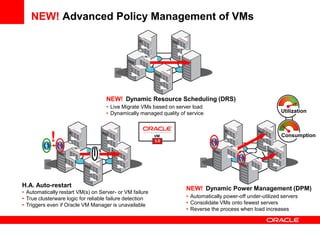
NEW! Advanced Policy Management of VMs


                               Server
                               Pool 1


                                    NEW! Dynamic Resource Scheduling (DRS)
                                    • Live Migrate VMs based on server load
                                    • Dynamically managed quality of service                                Utilization


            !                                             3.0
                                                                                                            Consumption


 Server                                                           Server
 Pool 1                                                           Pool 1


H.A. Auto-restart
                                                                    NEW! Dynamic Power Management (DPM)
• Automatically restart VM(s) on Server- or VM failure
• True clusterware logic for reliable failure detection             • Automatically power-off under-utilized servers
• Triggers even if Oracle VM Manager is unavailable                 • Consolidate VMs onto fewest servers
                                                                    • Reverse the process when load increases
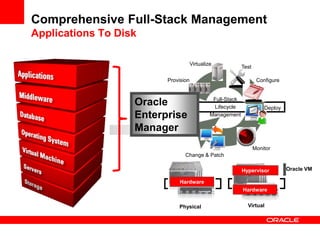
Comprehensive Full-Stack Management
Applications To Disk

                                     Virtualize
                                                            Test

                         Provision                                  Configure


                   Oracle                      Full-Stack
                                               Lifecycle               Deploy
                   Enterprise                 Management

                   Manager
                                                                   Monitor
                                Change & Patch

                                                            Hypervisor          Oracle VM

                              Hardware
                                                            Hardware


                             Physical                         Virtual
Faster Application
         Deployment
 Oracle VM Templates &
Validated Configurations
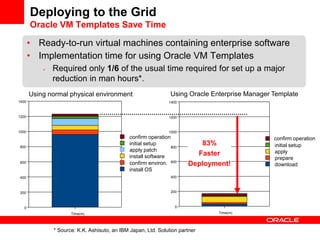
Deploying to the Grid
       Oracle VM Templates Save Time

       • Ready-to-run virtual machines containing enterprise software
       • Implementation time for using Oracle VM Templates
              Required only 1/6 of the usual time required for set up a major
               reduction in man hours*.
       Using normal physical environment                         Using Oracle Enterprise Manager Template
1400                                                            1400


1200                                                            1200


1000                                                            1000
                                               confirm operation                                 confirm operation
800
                                               initial setup
                                                                 800
                                                                          83%                    initial setup
                                               apply patch                                       apply
                                               install software          Faster
                                                                                                 prepare
600                                            confirm environ. 600    Deployment!               download
                                               install OS
400                                                              400


200                                                              200


   0                                                               0
                      Time(m)                                                   Time(m)


               * Source: K.K. Ashisuto, an IBM Japan, Ltd. Solution partner
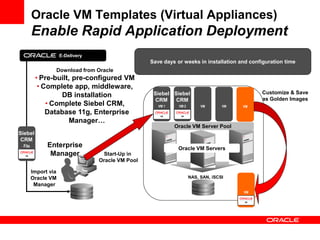
Oracle VM Templates (Virtual Appliances)
        Enable Rapid Application Deployment
                     E-Delivery
                                                   Save days or weeks in installation and configuration time
                 Download from Oracle
         • Pre-built, pre-configured VM
          • Complete app, middleware,
                                                    Siebel Siebel                             Customize & Save
                  DB installation                                                             as Golden Images
                                                     CRM    CRM
             • Complete Siebel CRM,                   VM 1    VM 2        VM       VM   VM
             Database 11g, Enterprise
                    Manager…
                                                             Oracle VM Server Pool
Siebel
 CRM
 File         Enterprise                                      Oracle VM Servers
               Manager             Start-Up in
                                  Oracle VM Pool

        Import via
        Oracle VM                                                    NAS, SAN, iSCSI
         Manager
                                                                                        VM
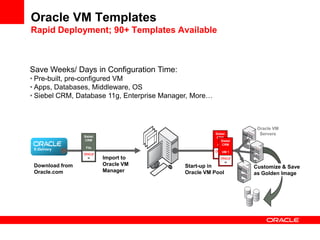
Oracle VM Templates
Rapid Deployment; 90+ Templates Available


Save Weeks/ Days in Configuration Time:
• Pre-built, pre-configured VM
• Apps, Databases, Middleware, OS
• Siebel CRM, Database 11g, Enterprise Manager, More…


                                                                      Oracle VM
                                                        Siebel         Servers
                 Siebel                                 CRM
                 CRM                                        Siebel
                                                            CRM
                                                         File
                  File
 E-Delivery
                                                            VM 1

                          Import to                                             Server
                          Oracle VM                                             Pool 2
 Download from                              Start-up in              Customize & Save
 Oracle.com               Manager           Oracle VM Pool           as Golden Image
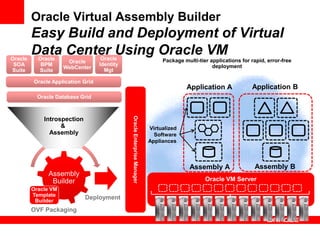
Oracle Virtual Assembly Builder
         Easy Build and Deployment of Virtual
Oracle
         Data Center Using Oracle VM
           Oracle                   Oracle
                      Oracle                                                   Package multi-tier applications for rapid, error-free
 SOA        BPM                    Identity                                                        deployment
                     WebCenter
Suite      Suite                     Mgt

         Oracle Application Grid
                                                                                        Application A              Application B
           Oracle Database Grid


             Introspection

                                              Oracle Enterprise Manager
                   &                                                      Virtualized
               Assembly                                                     Software
                                                                          Appliances


                                                                                          Assembly A                Assembly B
               Assembly
                Builder                                                                         Oracle VM Server
         Oracle VM
         Template
          Builder
                             Deployment
         OVF Packaging
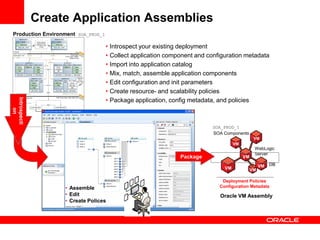
Create Application Assemblies
Production Environment SOA_PROD_1

                                    • Introspect your existing deployment
                                    • Collect application component and configuration metadata
                                    • Import into application catalog
                                    • Mix, match, assemble application components
                                    • Edit configuration and init parameters
                                    • Create resource- and scalability policies
                                    • Package application, config metadata, and policies
Introspecti
     on


                                                                         SOA_PROD_1
                                                                         SOA Components
                                                                                              VM
                                                                                   VM
                                                                                              WebLogic
                                                                                              Server
                                                              Package                   VM

                                                                                                  VM   DB
                                                                              VM             VM

                                                                             Deployment Policies
                   • Assemble                                               Configuration Metadata
                   • Edit                                                   Oracle VM Assembly
                   • Create Polices
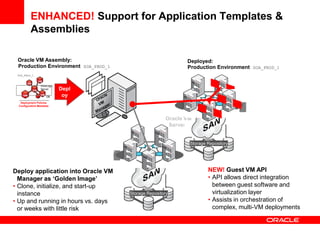
ENHANCED! Support for Application Templates &
          Assemblies

 Oracle VM Assembly:                                                Deployed:
 Production Environment SOA_PROD_1                                  Production Environment SOA_PROD_1
 SOA_PROD_1

                 VM
       VM
                  WebLogic
            VM
                  Server     Depl
     VM           VM
                      DB      oy
               VM
   Deployment Policies
  Configuration Metadata                                                                  Server
                                                                                          Pool 2
                                                             Oracle VM
                                                              Servers


                                                                     Storage Repository
                                    Server
                                    Pool 1

Deploy application into Oracle VM                                            NEW! Guest VM API
  Manager as ‘Golden Image’                                                  • API allows direct integration
• Clone, initialize, and start-up                                              between guest software and
  instance                                   Storage Repository                virtualization layer
• Up and running in hours vs. days                                           • Assists in orchestration of
  or weeks with little risk                                                    complex, multi-VM deployments
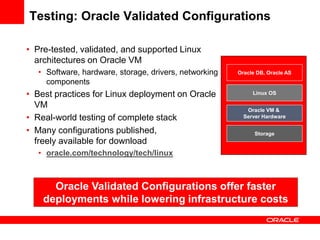
Testing: Oracle Validated Configurations

• Pre-tested, validated, and supported Linux
  architectures on Oracle VM
   • Software, hardware, storage, drivers, networking   Oracle DB, Oracle AS
     components
• Best practices for Linux deployment on Oracle              Linux OS

  VM                                                       Oracle VM &
• Real-world testing of complete stack                    Server Hardware

• Many configurations published,                              Storage
  freely available for download
   • oracle.com/technology/tech/linux


      Oracle Validated Configurations offer faster
    deployments while lowering infrastructure costs
34

Application-Driven Virtualization: Architectural Considerations

  • 1.
    Oracle Server VirtualizationOverview: Application-Driven Virtualization Ken Ellis Sales Consultant – Linux and Virtualization Ken.ellis@oracle.com
  • 2.
    The following isintended to outline our general product direction. It is intended for information purposes only, and may not be incorporated into any contract. It is not a commitment to deliver any material, code, or functionality, and should not be relied upon in making purchasing decisions. The development, release, and timing of any features or functionality described for Oracle’s products remain at the sole discretion of Oracle.
  • 3.
    Agenda • Integrated SystemStrategy at Oracle • Virtualization at Oracle • Oracle Virtual Machine 3.0 Update • Considerations for Application Driven Virtualization • Optimizing Availability, Performance, Scalability and Reducing Costs • Deploying Enterprise Applications Quickly and Easily • Q&A
  • 4.
    Oracle Strategy Complete, Open,Integrated Systems Customer Benefits: • Open and standards-based • Innovation delivered faster • Better performance, reliability, security • Shorter deployment times • Easier to manage and upgrade • Lower cost of ownership • Reduced change management risk • One-stop support • Reduced down time
  • 5.
    Virtualization Product Strategy Making Software Easier to Deploy, Access, Manage, & Support 5
  • 6.
    Oracle Virtualization Strategy DesktopTo Data Center Virtualization • Virtualization offers key cost savings benefits • Server consolidation • Lower energy, facility and labor costs • Oracle’s virtualization strategy offers much more • Most comprehensive desktop to data center product portfolio • Integrated management of the full hardware and software stack from applications to disk • Integrated support • Virtualization that makes software easier to deploy, easier to manage, and easier to support • Not Virtualization for Virtualization’s Sake
  • 7.
    Oracle Virtualization Industry’sMost Complete Product Line SERVER VIRTUALIZATION DESKTOP VIRTUALIZATION • Oracle VM Server for x86 • Oracle Virtual Desktop Infrastructure • Oracle VM Server for SPARC (LDoms) • Sun Ray Clients • Oracle Solaris Containers • Oracle Secure Global Desktop • Dynamic Domains • Oracle VM VirtualBox The Full Application Stack… …Delivered End-to-End.
  • 8.
    Oracle Virtualization End-to-End, Application to Disk Solutions Siebel Contact Center Oracle Enterprise Manager E-Delivery • Enterprise applications WORK Siebel • Industry applications Oracle Sun Ray Client Solaris / Linux CRM / Windows VMs Solaris Linux HOME Oracle VDI Oracle VM Oracle Virtual Desktop Client Templates Oracle VM Sun Servers & Assemblies MOBILE Sun Servers & Storage Oracle Virtual Desktop Client Your Datacenter Your Users SERVER VIRTUALIZATION DESKTOP VIRTUALIZATION Provision the Full Stack… …Provision the Users
  • 9.
    Oracle VM forx86 Better, Full-Stack Application Management
  • 10.
    Architecture Considerations forApplication Driven Virtualization • Leverage Standards • Allocate Resources Dynamically • Availability • Management • Security • Performance • Compliance 10
  • 11.
    Optimizing Availability, Performance,Scalability and Reducing Costs • HA Approaches • Infrastructure • Application Tier • Database • Performance & Scalability • Enhancements at Hypervisor and Management • Dynamic Changes • Reducing Costs • Templates • Operationally Focused 11
  • 12.
    What is OracleVM? • Oracle VM is server virtualization software which fully supports both Oracle and non-Oracle Applications. • Oracle VM includes two components : • Oracle VM Server • Oracle VM Manager • Freely downloadable, freely redistributable and usable. • Each VM consists of an operating system and a predefined set of resources from the hardware called a domain. • Oracle VM Manager includes easy-to-use, rich, graphical interface for managing virtual server pools, running on x86 based systems.
  • 13.
    What is Newin Oracle VM 3.0 • Improved Scalability and Performance • Oracle VM can support physical servers totaling up to physical 160 CPUs and 2TB memory and 128 virtual CPUs per VM. • Automated Policy-Based Resource Management: • Improves application Quality of Service (QoS) and reduce power consumption for maximum operational efficiency by dynamically relocating running VMs across a server pool based on load. • Distributed Resource Scheduling (DRS) for capacity management: • Provides real-time monitoring of Oracle VM Server utilization to rebalance a server pool and provide consistent resources to the running VMs. DRS migrates VMs away from heavily loaded Oracle VM Servers to those servers with more resources available. • Distributed Power Management (DPM) • DPM complements DRS to reduce the number of powered-on servers in the pool when there are periods of low resource utilization. It can automatically power-on capacity as needed when resource utilization ramps up.
  • 14.
    What is Newin Oracle VM 3.0 ...cont’d • Storage Connect Storage Configuration and Management • Oracle VM Storage Connect is a plug-in API • Allows the Oracle VM Manager to automatically discover available storage • Allows Oracle VM Manager to directly leverage the resources and functionality of customers’ existing storage systems in the Oracle VM environment • Supports native storage services such as SAN or NFS storage creation, deletion and expansion • Allows users of Oracle VM Manager to configure storage to be used with a virtual machine through various storage management vendors. Fujitsu, Hitachi Data Systems, and NetApp are among those enlisted to provide access to their systems through Oracle VM Storage Connect. Oracle's own Pillar Axiom SAN storage system and Sun ZFS Storage Appliance also work through the Storage Connect API)
  • 15.
    What is Newin Oracle VM 3.0 ...cont’d • Centralized network configuration and management • Oracle VM Server logical network configuration and management is now performed using Oracle VM Manager; for example, NIC port bonding, and configuring VLAN Networks. • Updated Xen 4.0 hypervisor • More efficient power management capabilities, broader hardware support, better performance, and greater scalability and security for both hardware- virtualized and para-virtualized guest operating systems. • Updated Dom0 command and control kernel with the latest drivers • Enhanced hardware support for higher performance, leveraging the latest Oracle Unbreakable Enterprise Kernel. • Updated OCFS2 1.8 cluster file system • Instant clone support that provides significantly faster virtual machine provisioning and cloning.
  • 16.
    What is Newin Oracle VM 3.0 ...cont’d • Support for Open Virtualization Format (OVF) • OVF is an open standard for packaging and distributing virtual appliances. • Customers can now use Oracle VM Manager to import a broad range of OVF based software assemblies, all of which are produced by Oracle to accelerate application deployment. • Browser Based Manageability from Anywhere • Oracle VM GUI is pure browser-based: with no client software required, and provides accessibility from “anywhere” on the web. • Dynamic user interface • Based on the latest Oracle ADF dynamic html capabilities, the Oracle VM Manager now includes a fully interactive tree view and automatic refresh to show the real-time state of the physical and virtual environment. • Server and storage discovery • Discover Oracle VM servers and storage in your environment to quickly get large numbers of servers up and running.
  • 17.
    What is Newin Oracle VM 3.0 ...cont’d • Job management framework • Every Oracle VM Manager operation is performed as a “job”. A job consists of all the steps involved in the successful completion of the operation. For each job, Oracle VM Manager provides status, such as percent complete, each step completed, and the steps remaining. Through the GUI, an administrator can view and abort a job at any time, or if the job is aborted by the system because of a terminal failure, the state is rolled back to its original state. • Extensive event logging • Oracle VM Manager maintains an extensive event or “job” history that is accessible through the Manager GUI, providing a simple way to see who made changes within the environment and to trace failures. • Resource information • Performance statistics are available for CPU, memory, disk and network for each physical server and virtual machine Events are displayed for each physical and virtual object, such as port up/down status. IP address and other configuration information are displayed directly in the user interface.
  • 18.
    Guest Operating SystemsSupported Under Oracle VM Runs Linux, Solaris and Windows guest VMs. Supports: Oracle Linux Oracle Solaris Red Hat Enterprise Linux Microsoft Windows Hardware and Paravirtualized virtualization supported HV on x86 hardware with HVM support 64-bit and 32-bit guest VMs Up to 128 virtual processors (vCPUs) per guest VM.
  • 19.
    Oracle VM 3.0Deployment Architecture Fully Centralized Virtualization Management Networks • Separate… • Guest • HA Oracle VM Oracle VM Servers • Live Migration Manager 3.0 • Up to 256 CPU • Storage • Up to 2TB Memory • Management Server Pool 2 Server pools • HA groups • Resource groups • Live Migration groups Virtual Machines Server • Oracle Linux Red Hat Pool 1 EL • Solaris for x86 • Microsoft Windows Storage Repository Shared Storage Repositories • NFS, FCP/SAN, iSCSI • Volumes, files, LUNs… • Support heterogeneous configurations Sun Storage Partner Storage • Share storage between multiple pools and clusters. • Ability to share raw device between VMs
  • 20.
    ENHANCED! Simple Installof Server and Manager Oracle VM Manager installation… • Easy, click-through installer  • Installs the full stack including Weblogic Server and Oracle Database • 5-7mins from start to up and running • Browser based GUI: no client software! Oracle VM Oracle VM Servers Manager  Oracle VM Server installation… • Fast: 90sec installation plus reboot • No further installation or configuration required • Storage and networking configured from the Manager 3.0
  • 21.
    NEW! Set-up NetworkResources From Manager Get started quickly… • Quick install of OVM server software (90secs + reboot) then… • Discover all OVM servers and their configuration from Oracle VM Manager • Discover based on IP range scan • Discover specific IP addresses Pool level… • Bridging Oracle VM • Bonding Servers • VLANs… Create independent networks for… • Guest VM traffic • Storage traffic • Management • Live Migration • HA Heartbeats No more manual configuration of each server! 3.0
  • 22.
    NEW! Set-up StorageResources From Manager Just about any storage… • NFS • FCP/SAN • iSCSI • Volumes, files, LUNs… • Local Support heterogeneous configurations Share storage between multiple pools and clusters. Ability to share raw device between VMs Oracle VM Storage Connect Plug-Ins for Management… Servers • Oracle and 3rd party storage • Optional delegation of storage actions to virtualization admins Storage Resources • Exposed, operated from the Manager UI • Advanced storage functionality • Thin provisioning, cloning… More than just provisioning… • Create LUNs or Volumes Storage Resources • Expand LUNs or Volumes • Associate, share with VMs No more manual configuration of each server! 3.0
  • 23.
    ENHANCED! Create a Poolof Servers From Manager, Add VMs Create server pools… Server pool functionality… • Add servers • HA groups • Create, associate storage repositories • Resource groups • Live Migration groups • Up to 32 servers per pool Server Pool 2 Oracle VM Servers Performance & Scalability • Support for paravirtualized- (PV), hardware Storage Repository virtualized (with- or without PV drivers) Server (HVM) guest kernels Pool 1 • Up to 128 vCPUs per guest; up to 160 physical CPUs per server • Up to 1TB memory per guest; up to 2TB physical per server Choice of Operating Systems Storage Repository • Oracle Linux • RedHat EL • Oracle Solaris x86 3.0 • Microsoft Windows
  • 24.
    NEW! Advanced PolicyManagement of VMs Server Pool 1 NEW! Dynamic Resource Scheduling (DRS) • Live Migrate VMs based on server load • Dynamically managed quality of service Utilization ! 3.0 Consumption Server Server Pool 1 Pool 1 H.A. Auto-restart NEW! Dynamic Power Management (DPM) • Automatically restart VM(s) on Server- or VM failure • True clusterware logic for reliable failure detection • Automatically power-off under-utilized servers • Triggers even if Oracle VM Manager is unavailable • Consolidate VMs onto fewest servers • Reverse the process when load increases
  • 25.
    Comprehensive Full-Stack Management ApplicationsTo Disk Virtualize Test Provision Configure Oracle Full-Stack Lifecycle Deploy Enterprise Management Manager Monitor Change & Patch Hypervisor Oracle VM Hardware Hardware Physical Virtual
  • 26.
    Faster Application Deployment Oracle VM Templates & Validated Configurations
  • 27.
    Deploying to theGrid Oracle VM Templates Save Time • Ready-to-run virtual machines containing enterprise software • Implementation time for using Oracle VM Templates  Required only 1/6 of the usual time required for set up a major reduction in man hours*. Using normal physical environment Using Oracle Enterprise Manager Template 1400 1400 1200 1200 1000 1000 confirm operation confirm operation 800 initial setup 800 83% initial setup apply patch apply install software Faster prepare 600 confirm environ. 600 Deployment! download install OS 400 400 200 200 0 0 Time(m) Time(m) * Source: K.K. Ashisuto, an IBM Japan, Ltd. Solution partner
  • 28.
    Oracle VM Templates(Virtual Appliances) Enable Rapid Application Deployment E-Delivery Save days or weeks in installation and configuration time Download from Oracle • Pre-built, pre-configured VM • Complete app, middleware, Siebel Siebel Customize & Save DB installation as Golden Images CRM CRM • Complete Siebel CRM, VM 1 VM 2 VM VM VM Database 11g, Enterprise Manager… Oracle VM Server Pool Siebel CRM File Enterprise Oracle VM Servers Manager Start-Up in Oracle VM Pool Import via Oracle VM NAS, SAN, iSCSI Manager VM
  • 29.
    Oracle VM Templates RapidDeployment; 90+ Templates Available Save Weeks/ Days in Configuration Time: • Pre-built, pre-configured VM • Apps, Databases, Middleware, OS • Siebel CRM, Database 11g, Enterprise Manager, More… Oracle VM Siebel Servers Siebel CRM CRM Siebel CRM File File E-Delivery VM 1 Import to Server Oracle VM Pool 2 Download from Start-up in Customize & Save Oracle.com Manager Oracle VM Pool as Golden Image
  • 30.
    Oracle Virtual AssemblyBuilder Easy Build and Deployment of Virtual Oracle Data Center Using Oracle VM Oracle Oracle Oracle Package multi-tier applications for rapid, error-free SOA BPM Identity deployment WebCenter Suite Suite Mgt Oracle Application Grid Application A Application B Oracle Database Grid Introspection Oracle Enterprise Manager & Virtualized Assembly Software Appliances Assembly A Assembly B Assembly Builder Oracle VM Server Oracle VM Template Builder Deployment OVF Packaging
  • 31.
    Create Application Assemblies ProductionEnvironment SOA_PROD_1 • Introspect your existing deployment • Collect application component and configuration metadata • Import into application catalog • Mix, match, assemble application components • Edit configuration and init parameters • Create resource- and scalability policies • Package application, config metadata, and policies Introspecti on SOA_PROD_1 SOA Components VM VM WebLogic Server Package VM VM DB VM VM Deployment Policies • Assemble Configuration Metadata • Edit Oracle VM Assembly • Create Polices
  • 32.
    ENHANCED! Support forApplication Templates & Assemblies Oracle VM Assembly: Deployed: Production Environment SOA_PROD_1 Production Environment SOA_PROD_1 SOA_PROD_1 VM VM WebLogic VM Server Depl VM VM DB oy VM Deployment Policies Configuration Metadata Server Pool 2 Oracle VM Servers Storage Repository Server Pool 1 Deploy application into Oracle VM NEW! Guest VM API Manager as ‘Golden Image’ • API allows direct integration • Clone, initialize, and start-up between guest software and instance Storage Repository virtualization layer • Up and running in hours vs. days • Assists in orchestration of or weeks with little risk complex, multi-VM deployments
  • 33.
    Testing: Oracle ValidatedConfigurations • Pre-tested, validated, and supported Linux architectures on Oracle VM • Software, hardware, storage, drivers, networking Oracle DB, Oracle AS components • Best practices for Linux deployment on Oracle Linux OS VM Oracle VM & • Real-world testing of complete stack Server Hardware • Many configurations published, Storage freely available for download • oracle.com/technology/tech/linux Oracle Validated Configurations offer faster deployments while lowering infrastructure costs
  • 34.