
APP Academy: Market
Get Started with AppExchange, Leads, & Campaigns
Kat An
AppExchange Marketing Manager
@takyttik
Dave Rigotti | Bizible
William Tyree | RingDNA
Safe Harbor
Safe harbor statement under the Private Securities Litigation Reform Act of 1995:
This presentation may contain forward-looking statements that involve risks, uncertainties, and assumptions. If any such uncertainties materialize or if any of
the assumptions proves incorrect, the results of salesforce.com, inc. could differ materially from the results expressed or implied by the forward-looking
statements we make. All statements other than statements of historical fact could be deemed forward-looking, including any projections of product or service
availability, subscriber growth, earnings, revenues, or other financial items and any statements regarding strategies or plans of management for future
operations, statements of belief, any statements concerning new, planned, or upgraded services or technology developments and customer contracts or use
of our services.
The risks and uncertainties referred to above include – but are not limited to – risks associated with developing and delivering new functionality for our service,
new products and services, our new business model, our past operating losses, possible fluctuations in our operating results and rate of growth, interruptions
or delays in our Web hosting, breach of our security measures, the outcome of any litigation, risks associated with completed and any possible mergers and
acquisitions, the immature market in which we operate, our relatively limited operating history, our ability to expand, retain, and motivate our employees and
manage our growth, new releases of our service and successful customer deployment, our limited history reselling non-salesforce.com products, and
utilization and selling to larger enterprise customers. Further information on potential factors that could affect the financial results of salesforce.com, inc. is
included in our annual report on Form 10-K for the most recent fiscal year and in our quarterly report on Form 10-Q for the most recent fiscal quarter. These
documents and others containing important disclosures are available on the SEC Filings section of the Investor Information section of our Web site.
Any unreleased services or features referenced in this or other presentations, press releases or public statements are not currently available and may not be
delivered on time or at all. Customers who purchase our services should make the purchase decisions based upon features that are currently available.
Salesforce.com, inc. assumes no obligation and does not intend to update these forward-looking statements.
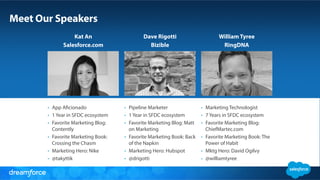
Meet Our Speakers
Kat An
Salesforce.com
Dave Rigotti
Bizible
William Tyree
RingDNA
•  Marketing Technologist
•  7 Years in SFDC ecosystem
•  Favorite Marketing Blog:
ChiefMartec.com
•  Favorite Marketing Book: The
Power of Habit
•  Mktg Hero: David Ogilvy
•  @williamtyree
•  Pipeline Marketer
•  1 Year in SFDC ecosystem
•  Favorite Marketing Blog: Matt
on Marketing
•  Favorite Marketing Book: Back
of the Napkin
•  Marketing Hero: Hubspot
•  @drigotti
•  App Aficionado
•  1 Year in SFDC ecosystem
•  Favorite Marketing Blog:
Contently
•  Favorite Marketing Book:
Crossing the Chasm
•  Marketing Hero: Nike
•  @takyttik
Kat An
AppExchange Marketing Manager
INTRO TO APPEXCHANGE
Understand how customers engage with the #1 business app marketplace
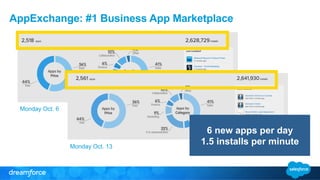
Monday Oct. 6
Monday Oct. 13
AppExchange: #1 Business App Marketplace
6 new apps per day
1.5 installs per minute
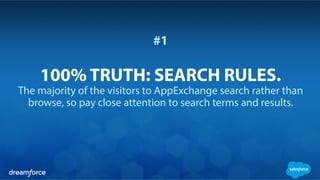
#1
100% TRUTH: SEARCH RULES.
The majority of the visitors to AppExchange search rather than
browse, so pay close attention to search terms and results.
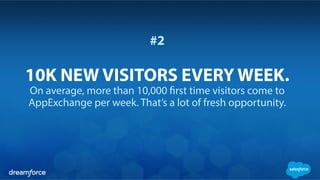
#2
10K NEW VISITORS EVERY WEEK.
On average, more than 10,000 first time visitors come to
AppExchange per week. That’s a lot of fresh opportunity.
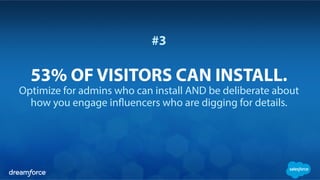
#3
53% OF VISITORS CAN INSTALL.
Optimize for admins who can install AND be deliberate about
how you engage influencers who are digging for details.
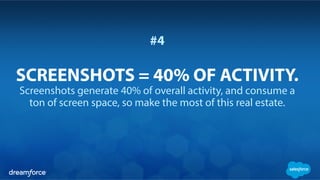
#4
SCREENSHOTS = 40% OF ACTIVITY.
Screenshots generate 40% of overall activity, and consume a
ton of screen space, so make the most of this real estate.
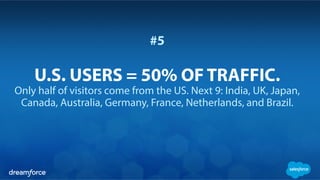
#5
U.S. USERS = 50% OF TRAFFIC.
Only half of visitors come from the US. Next 9: India, UK, Japan,
Canada, Australia, Germany, France, Netherlands, and Brazil.
Dave Rigotti
Head of Pipeline Marketing, Bizible
PUBLISHING CONSOLE
Make the Most of your AppExchange Listing
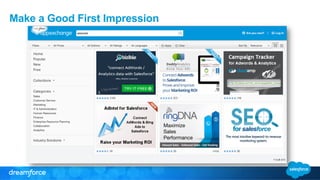
Make a Good First Impression
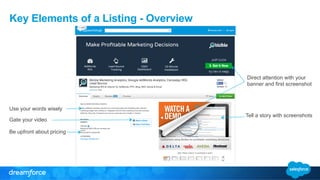
Key Elements of a Listing - Overview
Tell a story with screenshots
Direct attention with your
banner and first screenshot
Gate your video
Use your words wisely
Be upfront about pricing
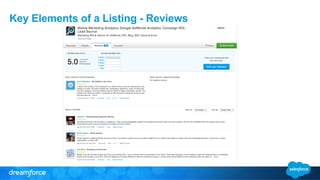
Key Elements of a Listing - Reviews
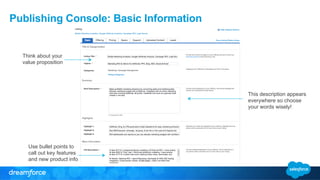
Publishing Console: Basic Information
Use bullet points to
call out key features
and new product info
Think about your
value proposition
This description appears
everywhere so choose
your words wisely!
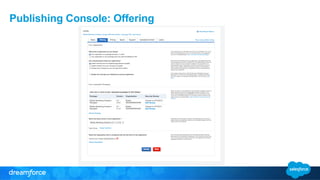
Publishing Console: Offering
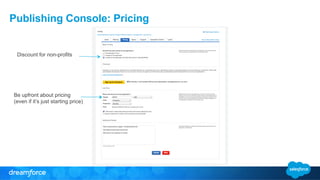
Publishing Console: Pricing
Be upfront about pricing
(even if it’s just starting price)
Discount for non-profits
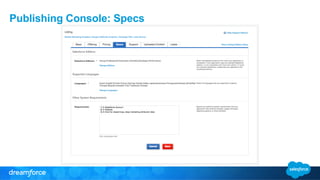
Publishing Console: Specs
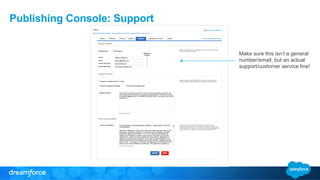
Publishing Console: Support
Make sure this isn’t a general
number/email, but an actual
support/customer service line!
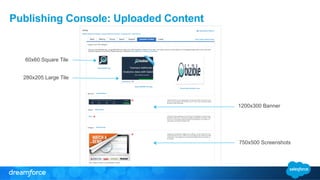
Publishing Console: Uploaded Content
60x60 Square Tile
280x205 Large Tile
1200x300 Banner
750x500 Screenshots
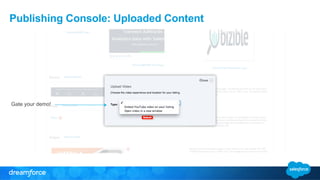
Publishing Console: Uploaded Content
Gate your demo!
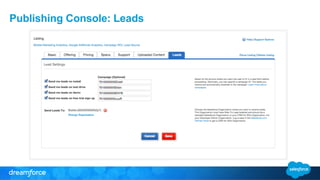
Publishing Console: Leads
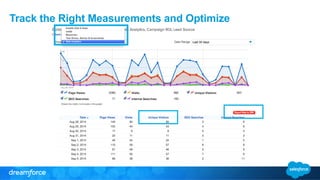
Track the Right Measurements and Optimize
William Tyree
CMO, RingDNA
CAMPAIGNS AND REPORTS
How to enable sales, gain mind blowing visibility into ROI and generally crush it
What is a Salesforce Campaign?
The link between Salesforce and your marketing initiatives that enables a wide
variety of helpful automated processes for sales and marketing teams.
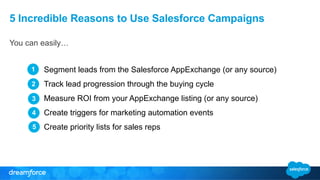
5 Incredible Reasons to Use Salesforce Campaigns
You can easily…
Segment leads from the Salesforce AppExchange (or any source)
Track lead progression through the buying cycle
Measure ROI from your AppExchange listing (or any source)
Create triggers for marketing automation events
Create priority lists for sales reps
1
2
3
4
5
Scenario 1: Measuring Basic ROI
How to quickly measure AppExchange lead ROI without reports or dashboards
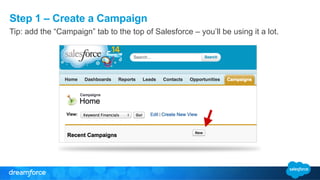
Step 1 – Create a Campaign
Tip: add the “Campaign” tab to the top of Salesforce – you’ll be using it a lot.
Step 2 – Assign owner, name, status and description
Tip: ensure you are consistent and clear in your campaign naming conventions.
Step 3 – Associate the Campaign with AppExchange Leads
Using Pardot is just one way to associate your campaign with AppExchange leads.
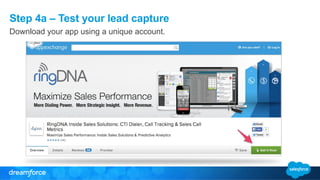
Step 4a – Test your lead capture
Download your app using a unique account.
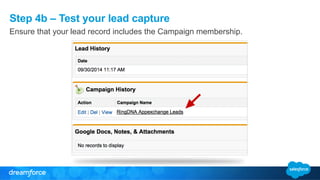
Step 4b – Test your lead capture
Ensure that your lead record includes the Campaign membership.
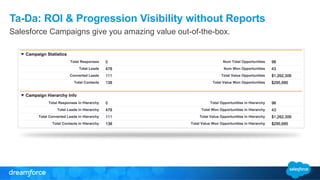
Ta-Da: ROI & Progression Visibility without Reports
Salesforce Campaigns give you amazing value out-of-the-box.
Scenario 2: Easy Dashboard Creation
Using Salesforce Campaigns with reports and dashboards
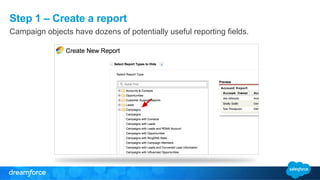
Step 1 – Create a report
Campaign objects have dozens of potentially useful reporting fields.
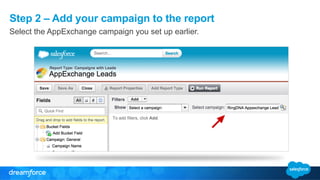
Step 2 – Add your campaign to the report
Select the AppExchange campaign you set up earlier.
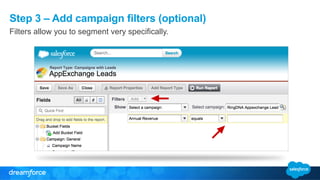
Step 3 – Add campaign filters (optional)
Filters allow you to segment very specifically.
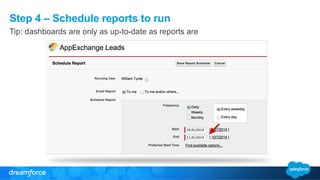
Step 4 – Schedule reports to run
Tip: dashboards are only as up-to-date as reports are
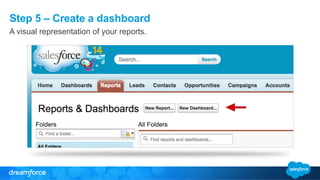
Step 5 – Create a dashboard
A visual representation of your reports.
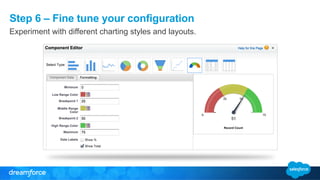
Step 6 – Fine tune your configuration
Experiment with different charting styles and layouts.
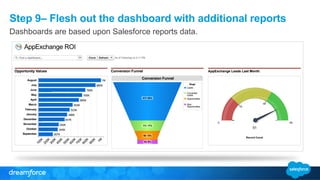
Step 9– Flesh out the dashboard with additional reports
Dashboards are based upon Salesforce reports data.
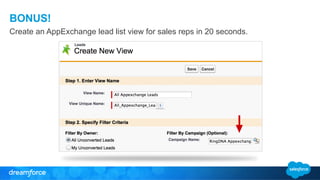
BONUS!
Create an AppExchange lead list view for sales reps in 20 seconds.
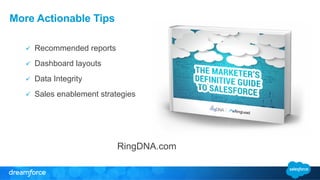
More Actionable Tips
ü  Recommended reports
ü  Dashboard layouts
ü  Data Integrity
ü  Sales enablement strategies
RingDNA.com
APP Academy: Market - Get Started with AppExchange, Leads, & Campaigns (October 13, 2014)

APP Academy: Market - Get Started with AppExchange, Leads, & Campaigns (October 13, 2014)

  • 1.
    APP Academy: Market GetStarted with AppExchange, Leads, & Campaigns Kat An AppExchange Marketing Manager @takyttik Dave Rigotti | Bizible William Tyree | RingDNA
  • 2.
    Safe Harbor Safe harborstatement under the Private Securities Litigation Reform Act of 1995: This presentation may contain forward-looking statements that involve risks, uncertainties, and assumptions. If any such uncertainties materialize or if any of the assumptions proves incorrect, the results of salesforce.com, inc. could differ materially from the results expressed or implied by the forward-looking statements we make. All statements other than statements of historical fact could be deemed forward-looking, including any projections of product or service availability, subscriber growth, earnings, revenues, or other financial items and any statements regarding strategies or plans of management for future operations, statements of belief, any statements concerning new, planned, or upgraded services or technology developments and customer contracts or use of our services. The risks and uncertainties referred to above include – but are not limited to – risks associated with developing and delivering new functionality for our service, new products and services, our new business model, our past operating losses, possible fluctuations in our operating results and rate of growth, interruptions or delays in our Web hosting, breach of our security measures, the outcome of any litigation, risks associated with completed and any possible mergers and acquisitions, the immature market in which we operate, our relatively limited operating history, our ability to expand, retain, and motivate our employees and manage our growth, new releases of our service and successful customer deployment, our limited history reselling non-salesforce.com products, and utilization and selling to larger enterprise customers. Further information on potential factors that could affect the financial results of salesforce.com, inc. is included in our annual report on Form 10-K for the most recent fiscal year and in our quarterly report on Form 10-Q for the most recent fiscal quarter. These documents and others containing important disclosures are available on the SEC Filings section of the Investor Information section of our Web site. Any unreleased services or features referenced in this or other presentations, press releases or public statements are not currently available and may not be delivered on time or at all. Customers who purchase our services should make the purchase decisions based upon features that are currently available. Salesforce.com, inc. assumes no obligation and does not intend to update these forward-looking statements.
  • 3.
    Meet Our Speakers KatAn Salesforce.com Dave Rigotti Bizible William Tyree RingDNA •  Marketing Technologist •  7 Years in SFDC ecosystem •  Favorite Marketing Blog: ChiefMartec.com •  Favorite Marketing Book: The Power of Habit •  Mktg Hero: David Ogilvy •  @williamtyree •  Pipeline Marketer •  1 Year in SFDC ecosystem •  Favorite Marketing Blog: Matt on Marketing •  Favorite Marketing Book: Back of the Napkin •  Marketing Hero: Hubspot •  @drigotti •  App Aficionado •  1 Year in SFDC ecosystem •  Favorite Marketing Blog: Contently •  Favorite Marketing Book: Crossing the Chasm •  Marketing Hero: Nike •  @takyttik
  • 4.
  • 5.
    INTRO TO APPEXCHANGE Understandhow customers engage with the #1 business app marketplace
  • 6.
    Monday Oct. 6 MondayOct. 13 AppExchange: #1 Business App Marketplace 6 new apps per day 1.5 installs per minute
  • 7.
    #1 100% TRUTH: SEARCHRULES. The majority of the visitors to AppExchange search rather than browse, so pay close attention to search terms and results.
  • 8.
    #2 10K NEW VISITORSEVERY WEEK. On average, more than 10,000 first time visitors come to AppExchange per week. That’s a lot of fresh opportunity.
  • 9.
    #3 53% OF VISITORSCAN INSTALL. Optimize for admins who can install AND be deliberate about how you engage influencers who are digging for details.
  • 10.
    #4 SCREENSHOTS = 40%OF ACTIVITY. Screenshots generate 40% of overall activity, and consume a ton of screen space, so make the most of this real estate.
  • 11.
    #5 U.S. USERS =50% OF TRAFFIC. Only half of visitors come from the US. Next 9: India, UK, Japan, Canada, Australia, Germany, France, Netherlands, and Brazil.
  • 12.
    Dave Rigotti Head ofPipeline Marketing, Bizible
  • 13.
    PUBLISHING CONSOLE Make theMost of your AppExchange Listing
  • 14.
    Make a GoodFirst Impression
  • 15.
    Key Elements ofa Listing - Overview Tell a story with screenshots Direct attention with your banner and first screenshot Gate your video Use your words wisely Be upfront about pricing
  • 16.
    Key Elements ofa Listing - Reviews
  • 17.
    Publishing Console: BasicInformation Use bullet points to call out key features and new product info Think about your value proposition This description appears everywhere so choose your words wisely!
  • 18.
  • 19.
    Publishing Console: Pricing Beupfront about pricing (even if it’s just starting price) Discount for non-profits
  • 20.
  • 21.
    Publishing Console: Support Makesure this isn’t a general number/email, but an actual support/customer service line!
  • 22.
    Publishing Console: UploadedContent 60x60 Square Tile 280x205 Large Tile 1200x300 Banner 750x500 Screenshots
  • 23.
    Publishing Console: UploadedContent Gate your demo!
  • 24.
  • 25.
    Track the RightMeasurements and Optimize
  • 26.
  • 27.
    CAMPAIGNS AND REPORTS Howto enable sales, gain mind blowing visibility into ROI and generally crush it
  • 28.
    What is aSalesforce Campaign? The link between Salesforce and your marketing initiatives that enables a wide variety of helpful automated processes for sales and marketing teams.
  • 29.
    5 Incredible Reasonsto Use Salesforce Campaigns You can easily… Segment leads from the Salesforce AppExchange (or any source) Track lead progression through the buying cycle Measure ROI from your AppExchange listing (or any source) Create triggers for marketing automation events Create priority lists for sales reps 1 2 3 4 5
  • 30.
    Scenario 1: MeasuringBasic ROI How to quickly measure AppExchange lead ROI without reports or dashboards
  • 31.
    Step 1 –Create a Campaign Tip: add the “Campaign” tab to the top of Salesforce – you’ll be using it a lot.
  • 32.
    Step 2 –Assign owner, name, status and description Tip: ensure you are consistent and clear in your campaign naming conventions.
  • 33.
    Step 3 –Associate the Campaign with AppExchange Leads Using Pardot is just one way to associate your campaign with AppExchange leads.
  • 34.
    Step 4a –Test your lead capture Download your app using a unique account.
  • 35.
    Step 4b –Test your lead capture Ensure that your lead record includes the Campaign membership.
  • 36.
    Ta-Da: ROI &Progression Visibility without Reports Salesforce Campaigns give you amazing value out-of-the-box.
  • 37.
    Scenario 2: EasyDashboard Creation Using Salesforce Campaigns with reports and dashboards
  • 38.
    Step 1 –Create a report Campaign objects have dozens of potentially useful reporting fields.
  • 39.
    Step 2 –Add your campaign to the report Select the AppExchange campaign you set up earlier.
  • 40.
    Step 3 –Add campaign filters (optional) Filters allow you to segment very specifically.
  • 41.
    Step 4 –Schedule reports to run Tip: dashboards are only as up-to-date as reports are
  • 42.
    Step 5 –Create a dashboard A visual representation of your reports.
  • 43.
    Step 6 –Fine tune your configuration Experiment with different charting styles and layouts.
  • 44.
    Step 9– Fleshout the dashboard with additional reports Dashboards are based upon Salesforce reports data.
  • 45.
    BONUS! Create an AppExchangelead list view for sales reps in 20 seconds.
  • 46.
    More Actionable Tips ü Recommended reports ü  Dashboard layouts ü  Data Integrity ü  Sales enablement strategies RingDNA.com