#Kscope
APIs Getting Added Value From HFM, Workspace,
FDM, Smartview, and Shared Services
Charles Beyer
Troubleshooting steps for diagnosing HFM, Workspace, and FDM
#Kscope
About the Speaker
 15+ years professional development
experience in various languages/technologies
(6 years w/ Hyperion products)
 Independently released commercial software
products
 Loves to help others solve problems
 Posts under beyerch2 on OTN Discussion
Boards
#Kscope
Before we Begin…..
 Code Samples for all examples are at end of
powerpoint (Download latest version!)
 To expedite session, we will use both screen
caps and live demos
 ‘All-in-one’ Virtual Machine created for session,
available upon request*
 If we hit time limit, there is enough shared
information that most should be able to perform
remainder of samples
#Kscope
Session Goals
 Gain High Level Exposure to Select EPM API
Libraries
 Recognize Added Value of APIs
 DO NOT FEAR APIs, They Are Your Friend!
#Kscope
Development Challenges
 Out Of The Box (OOTB) product functionality is
rarely a perfect fit
● Custom Workflow Requirements from Client
● Missing/Incomplete Product Functionality
 Limited Development Resources
● Tight Deadlines
● Limited Budgets for Custom Development
 Steep Learning Curves
● Difficult to Master Continually Evolving Software
● Introduces Software Defects
#Kscope
APIs to the Rescue!
 Enables Extensibility of Product
 Alleviates Development Pressures
● Lessens Development Time and Cost
● Simplifies Learning Curve
● Minimizes Defects
 ‘Future’ Proofs Your Work
 Grows Hair Back*
 Solves Economy Problems
 Extends Lifespan (yours)*
*Not evaluated by FDA
#Kscope
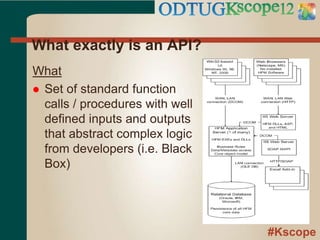
What exactly is an API?
What
 Set of standard function
calls / procedures with well
defined inputs and outputs
that abstract complex logic
from developers (i.e. Black
Box)
#Kscope
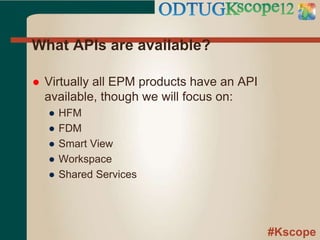
What APIs are available?
 Virtually all EPM products have an API
available, though we will focus on:
● HFM
● FDM
● Smart View
● Workspace
● Shared Services
#Kscope
HFM API
#Kscope
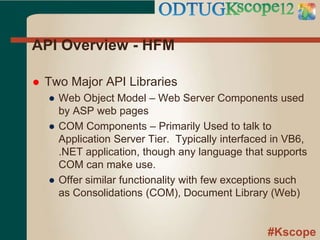
API Overview - HFM
 Two Major API Libraries
● Web Object Model – Web Server Components used
by ASP web pages
● COM Components – Primarily Used to talk to
Application Server Tier. Typically interfaced in VB6,
.NET application, though any language that supports
COM can make use.
● Offer similar functionality with few exceptions such
as Consolidations (COM), Document Library (Web)
#Kscope
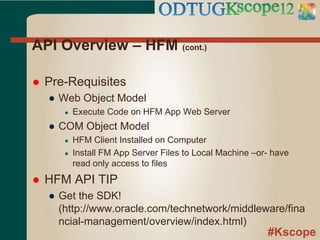
API Overview – HFM (cont.)
 Pre-Requisites
● Web Object Model
● Execute Code on HFM App Web Server
● COM Object Model
● HFM Client Installed on Computer
● Install FM App Server Files to Local Machine –or- have
read only access to files
 HFM API TIP
● Get the SDK!
(http://www.oracle.com/technetwork/middleware/fina
ncial-management/overview/index.html)
#Kscope
API Overview – HFM (cont.)
 Sample Programs
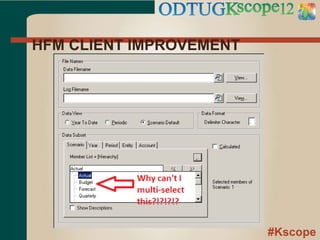
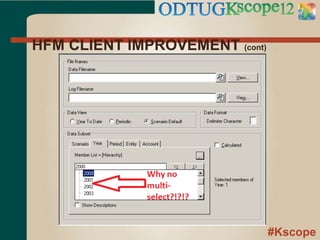
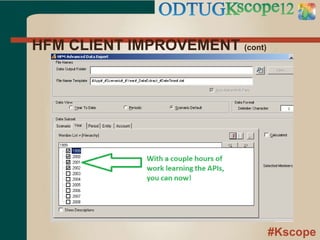
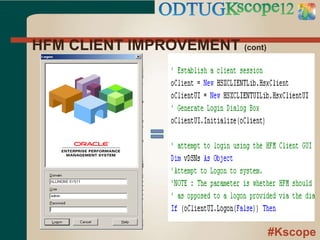
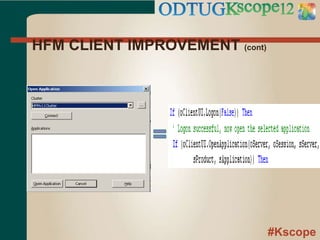
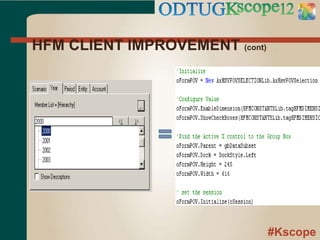
● HFM Client Utility Improvement – Multi Data Export
● Command Line / Scheduled Task (VBS)
● HFM-Batch
● C# Command Line Implementation of common API features
by Adam Gardiner
● https://github.com/agardiner/hfm-batch
Note : If you do not own Visual Studio, there are
free versions available.
(http://www.microsoft.com/visualstudio/en-
us/products/2010-editions/express)
#Kscope
HFM API DEMO
HFM CLIENT IMPROVEMENT
#Kscope
HFM CLIENT IMPROVEMENT
#Kscope
HFM CLIENT IMPROVEMENT (cont)
#Kscope
HFM CLIENT IMPROVEMENT (cont)
#Kscope
HFM CLIENT IMPROVEMENT (cont)
#Kscope
HFM CLIENT IMPROVEMENT (cont)
#Kscope
HFM CLIENT IMPROVEMENT (cont)
#Kscope
FDM API
#Kscope
API Overview - FDM
 One Object Model (COM), Multiple Ways to
Access
● FDM Scripts – Primary (Import, Custom, Event)
● External Program (Client or Server) in any language
supporting COM
#Kscope
API Overview – FDM (cont.)
 Pre-Requisites
● Execute Code from FDM Server
-OR-
● Install FDM Workbench on Computer
● Either Install FDM Application Server Files or Have
Read Access to File System With Files
#Kscope
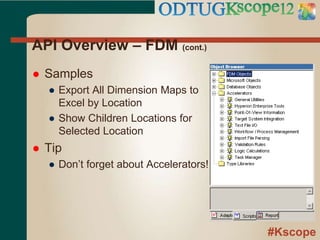
API Overview – FDM (cont.)
 Samples
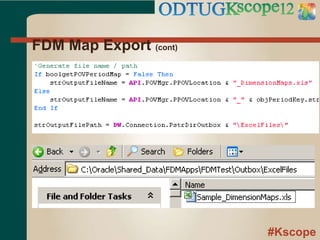
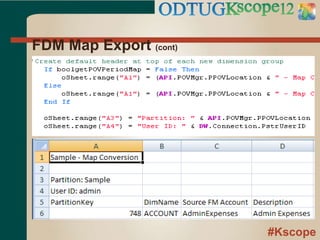
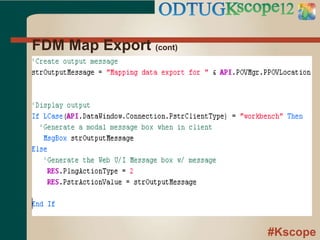
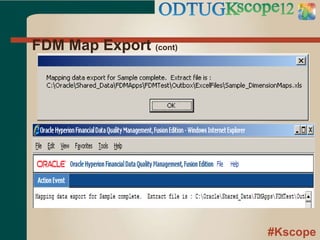
● Export All Dimension Maps to
Excel by Location
● Show Children Locations for
Selected Location
 Tip
● Don’t forget about Accelerators!
#Kscope
FDM API DEMO
Export All Dimension Maps
to Excel by Location
#Kscope
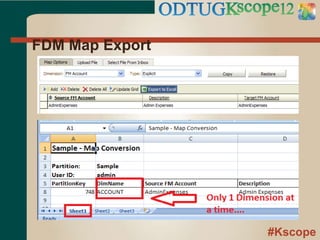
FDM Map Export
#Kscope
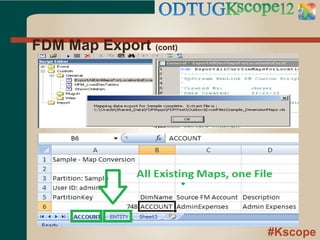
FDM Map Export (cont)
#Kscope
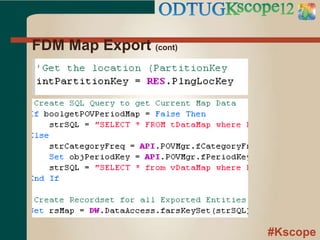
FDM Map Export (cont)
#Kscope
FDM Map Export (cont)
#Kscope
FDM Map Export (cont)
#Kscope
FDM Map Export (cont)
#Kscope
FDM Map Export (cont)
#Kscope
Smart View API
#Kscope
API Overview – Smart View
 API Functions Available From Inside of Smart
View Documents
● COM libraries used behind the scenes
● Smartview.BAS in
<HYPERION_HOME>SmartViewBin has
definitions of all calls, constants, etc.
● Theoretically could utilize libraries outside of Excel,
but have not attempted
#Kscope
API Overview – Smart View (cont.)
 COM Object Model
● Object Model Libraries
● HsAddin.dll – Kitchen Sink Library
● Pre-Requisites
● Smart View Installed
 Samples
● Auto Create Connection String in Connection
Manager
#Kscope
Smart View API DEMO
Auto Create Connection
String
#Kscope
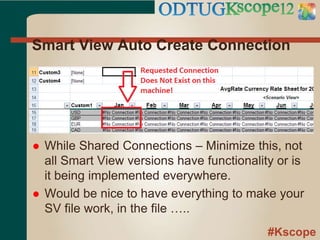
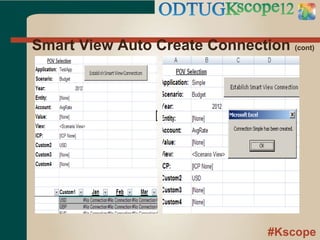
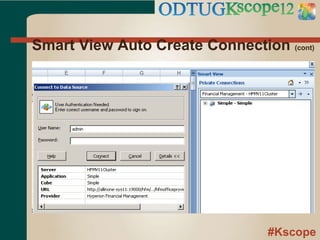
Smart View Auto Create Connection
 While Shared Connections – Minimize this, not
all Smart View versions have functionality or is
it being implemented everywhere.
 Would be nice to have everything to make your
SV file work, in the file …..
#Kscope
Smart View Auto Create Connection (cont)
#Kscope
Smart View Auto Create Connection (cont)
#Kscope
Smart View Auto Create Connection (cont)
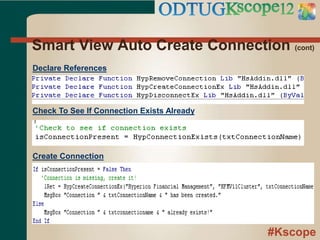
Declare References
Check To See If Connection Exists Already
Create Connection
#Kscope
Workspace API
#Kscope
API Overview – Workspace
 API Consists of Java Classes/Interfaces Used
Either on Command Line or in JSP Pages
 Significant amount of functionality exposed to
developers (see table in Appendix)
#Kscope
API Overview – Workspace (cont.)
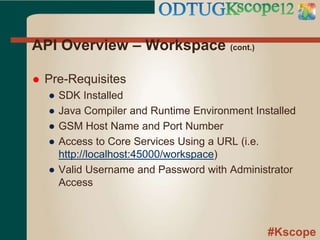
 Pre-Requisites
● SDK Installed
● Java Compiler and Runtime Environment Installed
● GSM Host Name and Port Number
● Access to Core Services Using a URL (i.e.
http://localhost:45000/workspace)
● Valid Username and Password with Administrator
Access
#Kscope
API Overview – Workspace (cont.)
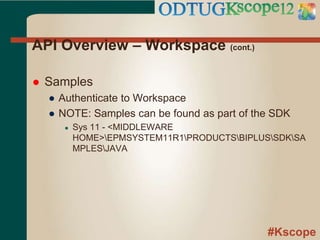
 Samples
● Authenticate to Workspace
● NOTE: Samples can be found as part of the SDK
● Sys 11 - <MIDDLEWARE
HOME>EPMSYSTEM11R1PRODUCTSBIPLUSSDKSA
MPLESJAVA
#Kscope
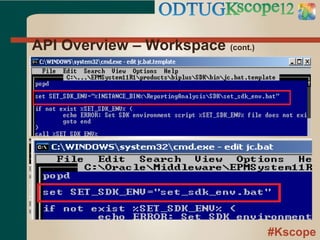
API Overview – Workspace (cont.)
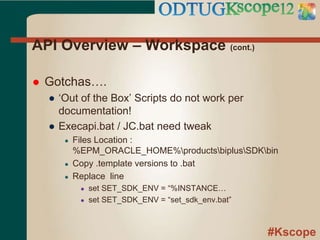
 Gotchas….
● ‘Out of the Box’ Scripts do not work per
documentation!
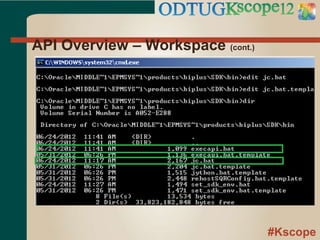
● Execapi.bat / JC.bat need tweak
● Files Location :
%EPM_ORACLE_HOME%productsbiplusSDKbin
● Copy .template versions to .bat
● Replace line
● set SET_SDK_ENV = “%INSTANCE…
● set SET_SDK_ENV = “set_sdk_env.bat”
#Kscope
API Overview – Workspace (cont.)
#Kscope
API Overview – Workspace (cont.)
#Kscope
API Overview – Workspace (cont.)
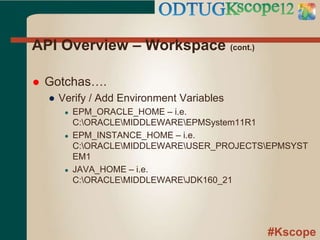
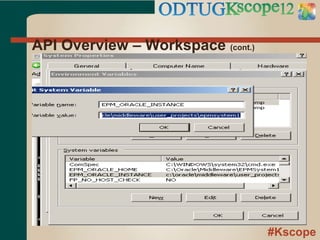
 Gotchas….
● Verify / Add Environment Variables
● EPM_ORACLE_HOME – i.e.
C:ORACLEMIDDLEWAREEPMSystem11R1
● EPM_INSTANCE_HOME – i.e.
C:ORACLEMIDDLEWAREUSER_PROJECTSEPMSYST
EM1
● JAVA_HOME – i.e.
C:ORACLEMIDDLEWAREJDK160_21
#Kscope
API Overview – Workspace (cont.)
#Kscope
Workspace API DEMO
AUTHENTICATE
#Kscope
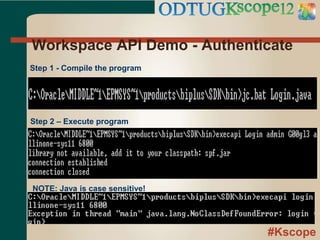
Workspace API Demo - Authenticate
Step 1 - Compile the program
Step 2 – Execute program
NOTE: Java is case sensitive!
#Kscope
Shared Services (Security)
API
#Kscope
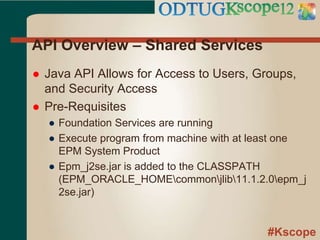
API Overview – Shared Services
 Java API Allows for Access to Users, Groups,
and Security Access
 Pre-Requisites
● Foundation Services are running
● Execute program from machine with at least one
EPM System Product
● Epm_j2se.jar is added to the CLASSPATH
(EPM_ORACLE_HOMEcommonjlib11.1.2.0epm_j
2se.jar)
#Kscope
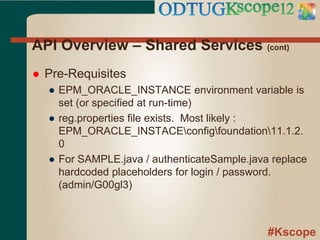
API Overview – Shared Services (cont)
 Pre-Requisites
● EPM_ORACLE_INSTANCE environment variable is
set (or specified at run-time)
● reg.properties file exists. Most likely :
EPM_ORACLE_INSTACEconfigfoundation11.1.2.
0
● For SAMPLE.java / authenticateSample.java replace
hardcoded placeholders for login / password.
(admin/G00gl3)
#Kscope
Shared Services (Security)
API DEMO
AUTHENTICATE
#Kscope
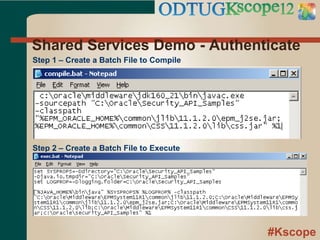
Shared Services Demo - Authenticate
Step 1 – Create a Batch File to Compile
Step 2 – Create a Batch File to Execute
#Kscope
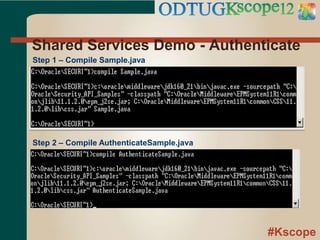
Shared Services Demo - Authenticate
Step 1 – Compile Sample.java
Step 2 – Compile AuthenticateSample.java
#Kscope
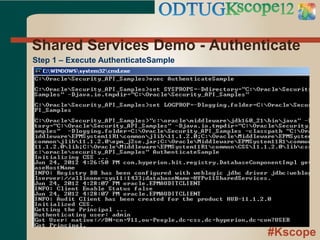
Shared Services Demo - Authenticate
Step 1 – Execute AuthenticateSample
#Kscope
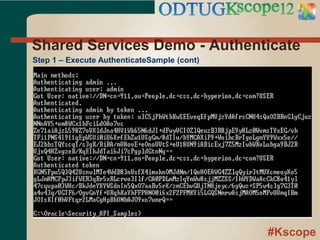
Shared Services Demo - Authenticate
Step 1 – Execute AuthenticateSample (cont)
#Kscope
Tips and Tricks
 Experiment in Development!
● If things go wrong, no worries
● Easier to debug as you are only user
● Can run additional debugging / monitoring tools
which would degrade production performance
 Leverage Existing Code!
● HFM Web (ASP), FDM Adapters/Scripts (VBScript),
Shared Services Web (JSP), and Workspace (JSP)
#Kscope
Questions?
 If you have any questions with the sample code
or presentation, feel free to ask/contact me
● charles@charlescbeyer.com
#Kscope
Supplemental Information
#Kscope
API Technology Summary
Figure 1 - Select Hyperion Product API Technology Overview
Product Description
Underlying
Technology
Interface
Technology
HFM Web Hyperion Financial Management - Web C/C++ ASP
HFM Client
Hyperion Financial Management -
Client/Server C/C++ VB6 / .NET
FDM Financial Data Quality Management C# VBScript / .NET
Smart View
Smart View Excel Add-In [Foundation
Services] C/C++ VBA
Workspace Hyperion Workspace [Foundation Services] Java .JSP / JAVA
Shared
Services
Hyperion Shared Services [Foundation
Services] Java .JSP / JAVA
#Kscope
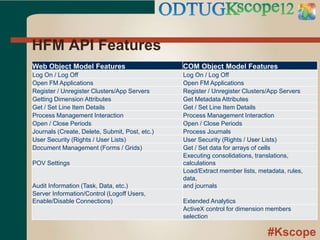
HFM API Features
Web Object Model Features COM Object Model Features
Log On / Log Off Log On / Log Off
Open FM Applications Open FM Applications
Register / Unregister Clusters/App Servers Register / Unregister Clusters/App Servers
Getting Dimension Attributes Get Metadata Attributes
Get / Set Line Item Details Get / Set Line Item Details
Process Management Interaction Process Management Interaction
Open / Close Periods Open / Close Periods
Journals (Create, Delete, Submit, Post, etc.) Process Journals
User Security (Rights / User Lists) User Security (Rights / User Lists)
Document Management (Forms / Grids) Get / Set data for arrays of cells
POV Settings
Executing consolidations, translations,
calculations
Audit Information (Task, Data, etc.)
Load/Extract member lists, metadata, rules,
data,
and journals
Server Information/Control (Logoff Users,
Enable/Disable Connections) Extended Analytics
ActiveX control for dimension members
selection
#Kscope
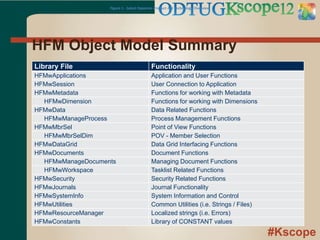
HFM Object Model Summary
Figure 1 - Select Hyperion Product API Technology Overview
Library File Functionality
HFMwApplications Application and User Functions
HFMwSession User Connection to Application
HFMwMetadata Functions for working with Metadata
HFMwDimension Functions for working with Dimensions
HFMwData Data Related Functions
HFMwManageProcess Process Management Functions
HFMwMbrSel Point of View Functions
HFMwMbrSelDim POV - Member Selection
HFMwDataGrid Data Grid Interfacing Functions
HFMwDocuments Document Functions
HFMwManageDocuments Managing Document Functions
HFMwWorkspace Tasklist Related Functions
HFMwSecurity Security Related Functions
HFMwJournals Journal Functionality
HFMwSystemInfo System Information and Control
HFMwUtilities Common Utilities (i.e. Strings / Files)
HFMwResourceManager Localized strings (i.e. Errors)
HFMwConstants Library of CONSTANT values
#Kscope
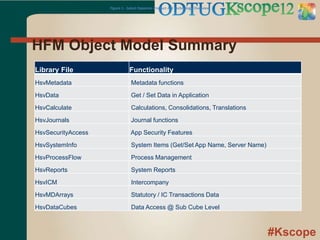
HFM Object Model Summary
Figure 1 - Select Hyperion Product API Technology Overview
Library File Functionality
HsvMetadata Metadata functions
HsvData Get / Set Data in Application
HsvCalculate Calculations, Consolidations, Translations
HsvJournals Journal functions
HsvSecurityAccess App Security Features
HsvSystemInfo System Items (Get/Set App Name, Server Name)
HsvProcessFlow Process Management
HsvReports System Reports
HsvICM Intercompany
HsvMDArrays Statutory / IC Transactions Data
HsvDataCubes Data Access @ Sub Cube Level
#Kscope
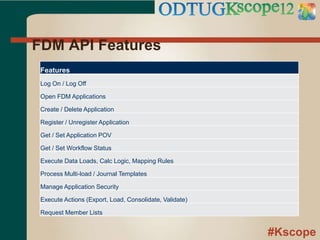
FDM API Features
Features
Log On / Log Off
Open FDM Applications
Create / Delete Application
Register / Unregister Application
Get / Set Application POV
Get / Set Workflow Status
Execute Data Loads, Calc Logic, Mapping Rules
Process Multi-load / Journal Templates
Manage Application Security
Execute Actions (Export, Load, Consolidate, Validate)
Request Member Lists
#Kscope
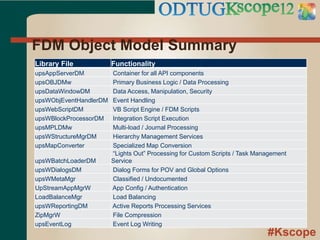
FDM Object Model Summary
Library File Functionality
upsAppServerDM Container for all API components
upsOBJDMw Primary Business Logic / Data Processing
upsDataWindowDM Data Access, Manipulation, Security
upsWObjEventHandlerDM Event Handling
upsWebScriptDM VB Script Engine / FDM Scripts
upsWBlockProcessorDM Integration Script Execution
upsMPLDMw Multi-load / Journal Processing
upsWStructureMgrDM Hierarchy Management Services
upsMapConverter Specialized Map Conversion
upsWBatchLoaderDM
“Lights Out” Processing for Custom Scripts / Task Management
Service
upsWDialogsDM Dialog Forms for POV and Global Options
upsWMetaMgr Classified / Undocumented
UpStreamAppMgrW App Config / Authentication
LoadBalanceMgr Load Balancing
upsWReportingDM Active Reports Processing Services
ZipMgrW File Compression
upsEventLog Event Log Writing
#Kscope
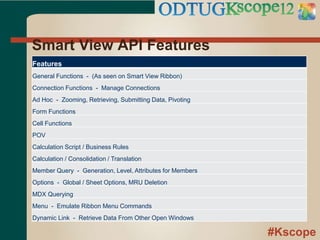
Smart View API Features
Features
General Functions - (As seen on Smart View Ribbon)
Connection Functions - Manage Connections
Ad Hoc - Zooming, Retrieving, Submitting Data, Pivoting
Form Functions
Cell Functions
POV
Calculation Script / Business Rules
Calculation / Consolidation / Translation
Member Query - Generation, Level, Attributes for Members
Options - Global / Sheet Options, MRU Deletion
MDX Querying
Menu - Emulate Ribbon Menu Commands
Dynamic Link - Retrieve Data From Other Open Windows
#Kscope
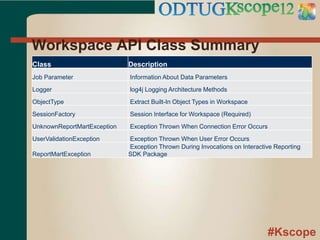
Workspace API Class Summary
Class Description
Job Parameter Information About Data Parameters
Logger log4j Logging Architecture Methods
ObjectType Extract Built-In Object Types in Workspace
SessionFactory Session Interface for Workspace (Required)
UnknownReportMartException Exception Thrown When Connection Error Occurs
UserValidationException Exception Thrown When User Error Occurs
ReportMartException
Exception Thrown During Invocations on Interactive Reporting
SDK Package
#Kscope
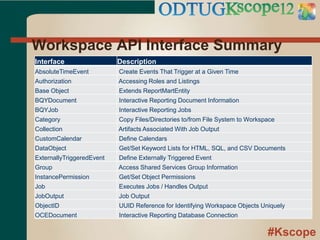
Workspace API Interface Summary
Interface Description
AbsoluteTimeEvent Create Events That Trigger at a Given Time
Authorization Accessing Roles and Listings
Base Object Extends ReportMartEntity
BQYDocument Interactive Reporting Document Information
BQYJob Interactive Reporting Jobs
Category Copy Files/Directories to/from File System to Workspace
Collection Artifacts Associated With Job Output
CustomCalendar Define Calendars
DataObject Get/Set Keyword Lists for HTML, SQL, and CSV Documents
ExternallyTriggeredEvent Define Externally Triggered Event
Group Access Shared Services Group Information
InstancePermission Get/Set Object Permissions
Job Executes Jobs / Handles Output
JobOutput Job Output
ObjectID UUID Reference for Identifying Workspace Objects Uniquely
OCEDocument Interactive Reporting Database Connection
#Kscope
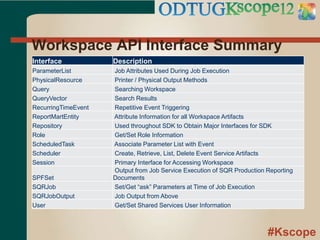
Workspace API Interface Summary
Interface Description
ParameterList Job Attributes Used During Job Execution
PhysicalResource Printer / Physical Output Methods
Query Searching Workspace
QueryVector Search Results
RecurringTimeEvent Repetitive Event Triggering
ReportMartEntity Attribute Information for all Workspace Artifacts
Repository Used throughout SDK to Obtain Major Interfaces for SDK
Role Get/Set Role Information
ScheduledTask Associate Parameter List with Event
Scheduler Create, Retrieve, List, Delete Event Service Artifacts
Session Primary Interface for Accessing Workspace
SPFSet
Output from Job Service Execution of SQR Production Reporting
Documents
SQRJob Set/Get “ask” Parameters at Time of Job Execution
SQRJobOutput Job Output from Above
User Get/Set Shared Services User Information
#Kscope
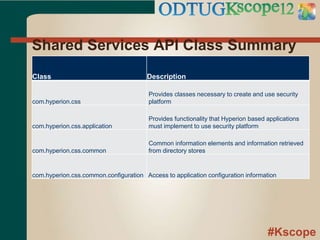
Shared Services API Class Summary
Class Description
com.hyperion.css
Provides classes necessary to create and use security
platform
com.hyperion.css.application
Provides functionality that Hyperion based applications
must implement to use security platform
com.hyperion.css.common
Common information elements and information retrieved
from directory stores
com.hyperion.css.common.configuration Access to application configuration information
#Kscope
Sample Files
#Kscope
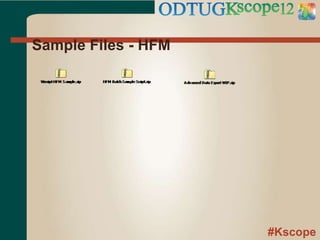
Sample Files - HFM
#Kscope
Sample Files - FDM
#Kscope
Sample Files – Smart View
#Kscope
Sample Files - Workspace
Login.java SampleLogin.java
#Kscope
Sample Files – Shared Services

Hyperion EPM APIs - Added value from HFM, Workspace, FDM, Smartview, and Shared Services

  • 1.
    #Kscope APIs Getting AddedValue From HFM, Workspace, FDM, Smartview, and Shared Services Charles Beyer Troubleshooting steps for diagnosing HFM, Workspace, and FDM
  • 2.
    #Kscope About the Speaker 15+ years professional development experience in various languages/technologies (6 years w/ Hyperion products)  Independently released commercial software products  Loves to help others solve problems  Posts under beyerch2 on OTN Discussion Boards
  • 3.
    #Kscope Before we Begin….. Code Samples for all examples are at end of powerpoint (Download latest version!)  To expedite session, we will use both screen caps and live demos  ‘All-in-one’ Virtual Machine created for session, available upon request*  If we hit time limit, there is enough shared information that most should be able to perform remainder of samples
  • 4.
    #Kscope Session Goals  GainHigh Level Exposure to Select EPM API Libraries  Recognize Added Value of APIs  DO NOT FEAR APIs, They Are Your Friend!
  • 5.
    #Kscope Development Challenges  OutOf The Box (OOTB) product functionality is rarely a perfect fit ● Custom Workflow Requirements from Client ● Missing/Incomplete Product Functionality  Limited Development Resources ● Tight Deadlines ● Limited Budgets for Custom Development  Steep Learning Curves ● Difficult to Master Continually Evolving Software ● Introduces Software Defects
  • 6.
    #Kscope APIs to theRescue!  Enables Extensibility of Product  Alleviates Development Pressures ● Lessens Development Time and Cost ● Simplifies Learning Curve ● Minimizes Defects  ‘Future’ Proofs Your Work  Grows Hair Back*  Solves Economy Problems  Extends Lifespan (yours)* *Not evaluated by FDA
  • 7.
    #Kscope What exactly isan API? What  Set of standard function calls / procedures with well defined inputs and outputs that abstract complex logic from developers (i.e. Black Box)
  • 8.
    #Kscope What APIs areavailable?  Virtually all EPM products have an API available, though we will focus on: ● HFM ● FDM ● Smart View ● Workspace ● Shared Services
  • 9.
  • 10.
    #Kscope API Overview -HFM  Two Major API Libraries ● Web Object Model – Web Server Components used by ASP web pages ● COM Components – Primarily Used to talk to Application Server Tier. Typically interfaced in VB6, .NET application, though any language that supports COM can make use. ● Offer similar functionality with few exceptions such as Consolidations (COM), Document Library (Web)
  • 11.
    #Kscope API Overview –HFM (cont.)  Pre-Requisites ● Web Object Model ● Execute Code on HFM App Web Server ● COM Object Model ● HFM Client Installed on Computer ● Install FM App Server Files to Local Machine –or- have read only access to files  HFM API TIP ● Get the SDK! (http://www.oracle.com/technetwork/middleware/fina ncial-management/overview/index.html)
  • 12.
    #Kscope API Overview –HFM (cont.)  Sample Programs ● HFM Client Utility Improvement – Multi Data Export ● Command Line / Scheduled Task (VBS) ● HFM-Batch ● C# Command Line Implementation of common API features by Adam Gardiner ● https://github.com/agardiner/hfm-batch Note : If you do not own Visual Studio, there are free versions available. (http://www.microsoft.com/visualstudio/en- us/products/2010-editions/express)
  • 13.
    #Kscope HFM API DEMO HFMCLIENT IMPROVEMENT
  • 14.
  • 15.
  • 16.
  • 17.
  • 18.
  • 19.
  • 20.
  • 21.
    #Kscope API Overview -FDM  One Object Model (COM), Multiple Ways to Access ● FDM Scripts – Primary (Import, Custom, Event) ● External Program (Client or Server) in any language supporting COM
  • 22.
    #Kscope API Overview –FDM (cont.)  Pre-Requisites ● Execute Code from FDM Server -OR- ● Install FDM Workbench on Computer ● Either Install FDM Application Server Files or Have Read Access to File System With Files
  • 23.
    #Kscope API Overview –FDM (cont.)  Samples ● Export All Dimension Maps to Excel by Location ● Show Children Locations for Selected Location  Tip ● Don’t forget about Accelerators!
  • 24.
    #Kscope FDM API DEMO ExportAll Dimension Maps to Excel by Location
  • 25.
  • 26.
  • 27.
  • 28.
  • 29.
  • 30.
  • 31.
  • 32.
  • 33.
    #Kscope API Overview –Smart View  API Functions Available From Inside of Smart View Documents ● COM libraries used behind the scenes ● Smartview.BAS in <HYPERION_HOME>SmartViewBin has definitions of all calls, constants, etc. ● Theoretically could utilize libraries outside of Excel, but have not attempted
  • 34.
    #Kscope API Overview –Smart View (cont.)  COM Object Model ● Object Model Libraries ● HsAddin.dll – Kitchen Sink Library ● Pre-Requisites ● Smart View Installed  Samples ● Auto Create Connection String in Connection Manager
  • 35.
    #Kscope Smart View APIDEMO Auto Create Connection String
  • 36.
    #Kscope Smart View AutoCreate Connection  While Shared Connections – Minimize this, not all Smart View versions have functionality or is it being implemented everywhere.  Would be nice to have everything to make your SV file work, in the file …..
  • 37.
    #Kscope Smart View AutoCreate Connection (cont)
  • 38.
    #Kscope Smart View AutoCreate Connection (cont)
  • 39.
    #Kscope Smart View AutoCreate Connection (cont) Declare References Check To See If Connection Exists Already Create Connection
  • 40.
  • 41.
    #Kscope API Overview –Workspace  API Consists of Java Classes/Interfaces Used Either on Command Line or in JSP Pages  Significant amount of functionality exposed to developers (see table in Appendix)
  • 42.
    #Kscope API Overview –Workspace (cont.)  Pre-Requisites ● SDK Installed ● Java Compiler and Runtime Environment Installed ● GSM Host Name and Port Number ● Access to Core Services Using a URL (i.e. http://localhost:45000/workspace) ● Valid Username and Password with Administrator Access
  • 43.
    #Kscope API Overview –Workspace (cont.)  Samples ● Authenticate to Workspace ● NOTE: Samples can be found as part of the SDK ● Sys 11 - <MIDDLEWARE HOME>EPMSYSTEM11R1PRODUCTSBIPLUSSDKSA MPLESJAVA
  • 44.
    #Kscope API Overview –Workspace (cont.)  Gotchas…. ● ‘Out of the Box’ Scripts do not work per documentation! ● Execapi.bat / JC.bat need tweak ● Files Location : %EPM_ORACLE_HOME%productsbiplusSDKbin ● Copy .template versions to .bat ● Replace line ● set SET_SDK_ENV = “%INSTANCE… ● set SET_SDK_ENV = “set_sdk_env.bat”
  • 45.
    #Kscope API Overview –Workspace (cont.)
  • 46.
    #Kscope API Overview –Workspace (cont.)
  • 47.
    #Kscope API Overview –Workspace (cont.)  Gotchas…. ● Verify / Add Environment Variables ● EPM_ORACLE_HOME – i.e. C:ORACLEMIDDLEWAREEPMSystem11R1 ● EPM_INSTANCE_HOME – i.e. C:ORACLEMIDDLEWAREUSER_PROJECTSEPMSYST EM1 ● JAVA_HOME – i.e. C:ORACLEMIDDLEWAREJDK160_21
  • 48.
    #Kscope API Overview –Workspace (cont.)
  • 49.
  • 50.
    #Kscope Workspace API Demo- Authenticate Step 1 - Compile the program Step 2 – Execute program NOTE: Java is case sensitive!
  • 51.
  • 52.
    #Kscope API Overview –Shared Services  Java API Allows for Access to Users, Groups, and Security Access  Pre-Requisites ● Foundation Services are running ● Execute program from machine with at least one EPM System Product ● Epm_j2se.jar is added to the CLASSPATH (EPM_ORACLE_HOMEcommonjlib11.1.2.0epm_j 2se.jar)
  • 53.
    #Kscope API Overview –Shared Services (cont)  Pre-Requisites ● EPM_ORACLE_INSTANCE environment variable is set (or specified at run-time) ● reg.properties file exists. Most likely : EPM_ORACLE_INSTACEconfigfoundation11.1.2. 0 ● For SAMPLE.java / authenticateSample.java replace hardcoded placeholders for login / password. (admin/G00gl3)
  • 54.
  • 55.
    #Kscope Shared Services Demo- Authenticate Step 1 – Create a Batch File to Compile Step 2 – Create a Batch File to Execute
  • 56.
    #Kscope Shared Services Demo- Authenticate Step 1 – Compile Sample.java Step 2 – Compile AuthenticateSample.java
  • 57.
    #Kscope Shared Services Demo- Authenticate Step 1 – Execute AuthenticateSample
  • 58.
    #Kscope Shared Services Demo- Authenticate Step 1 – Execute AuthenticateSample (cont)
  • 59.
    #Kscope Tips and Tricks Experiment in Development! ● If things go wrong, no worries ● Easier to debug as you are only user ● Can run additional debugging / monitoring tools which would degrade production performance  Leverage Existing Code! ● HFM Web (ASP), FDM Adapters/Scripts (VBScript), Shared Services Web (JSP), and Workspace (JSP)
  • 60.
    #Kscope Questions?  If youhave any questions with the sample code or presentation, feel free to ask/contact me ● charles@charlescbeyer.com
  • 61.
  • 62.
    #Kscope API Technology Summary Figure1 - Select Hyperion Product API Technology Overview Product Description Underlying Technology Interface Technology HFM Web Hyperion Financial Management - Web C/C++ ASP HFM Client Hyperion Financial Management - Client/Server C/C++ VB6 / .NET FDM Financial Data Quality Management C# VBScript / .NET Smart View Smart View Excel Add-In [Foundation Services] C/C++ VBA Workspace Hyperion Workspace [Foundation Services] Java .JSP / JAVA Shared Services Hyperion Shared Services [Foundation Services] Java .JSP / JAVA
  • 63.
    #Kscope HFM API Features WebObject Model Features COM Object Model Features Log On / Log Off Log On / Log Off Open FM Applications Open FM Applications Register / Unregister Clusters/App Servers Register / Unregister Clusters/App Servers Getting Dimension Attributes Get Metadata Attributes Get / Set Line Item Details Get / Set Line Item Details Process Management Interaction Process Management Interaction Open / Close Periods Open / Close Periods Journals (Create, Delete, Submit, Post, etc.) Process Journals User Security (Rights / User Lists) User Security (Rights / User Lists) Document Management (Forms / Grids) Get / Set data for arrays of cells POV Settings Executing consolidations, translations, calculations Audit Information (Task, Data, etc.) Load/Extract member lists, metadata, rules, data, and journals Server Information/Control (Logoff Users, Enable/Disable Connections) Extended Analytics ActiveX control for dimension members selection
  • 64.
    #Kscope HFM Object ModelSummary Figure 1 - Select Hyperion Product API Technology Overview Library File Functionality HFMwApplications Application and User Functions HFMwSession User Connection to Application HFMwMetadata Functions for working with Metadata HFMwDimension Functions for working with Dimensions HFMwData Data Related Functions HFMwManageProcess Process Management Functions HFMwMbrSel Point of View Functions HFMwMbrSelDim POV - Member Selection HFMwDataGrid Data Grid Interfacing Functions HFMwDocuments Document Functions HFMwManageDocuments Managing Document Functions HFMwWorkspace Tasklist Related Functions HFMwSecurity Security Related Functions HFMwJournals Journal Functionality HFMwSystemInfo System Information and Control HFMwUtilities Common Utilities (i.e. Strings / Files) HFMwResourceManager Localized strings (i.e. Errors) HFMwConstants Library of CONSTANT values
  • 65.
    #Kscope HFM Object ModelSummary Figure 1 - Select Hyperion Product API Technology Overview Library File Functionality HsvMetadata Metadata functions HsvData Get / Set Data in Application HsvCalculate Calculations, Consolidations, Translations HsvJournals Journal functions HsvSecurityAccess App Security Features HsvSystemInfo System Items (Get/Set App Name, Server Name) HsvProcessFlow Process Management HsvReports System Reports HsvICM Intercompany HsvMDArrays Statutory / IC Transactions Data HsvDataCubes Data Access @ Sub Cube Level
  • 66.
    #Kscope FDM API Features Features LogOn / Log Off Open FDM Applications Create / Delete Application Register / Unregister Application Get / Set Application POV Get / Set Workflow Status Execute Data Loads, Calc Logic, Mapping Rules Process Multi-load / Journal Templates Manage Application Security Execute Actions (Export, Load, Consolidate, Validate) Request Member Lists
  • 67.
    #Kscope FDM Object ModelSummary Library File Functionality upsAppServerDM Container for all API components upsOBJDMw Primary Business Logic / Data Processing upsDataWindowDM Data Access, Manipulation, Security upsWObjEventHandlerDM Event Handling upsWebScriptDM VB Script Engine / FDM Scripts upsWBlockProcessorDM Integration Script Execution upsMPLDMw Multi-load / Journal Processing upsWStructureMgrDM Hierarchy Management Services upsMapConverter Specialized Map Conversion upsWBatchLoaderDM “Lights Out” Processing for Custom Scripts / Task Management Service upsWDialogsDM Dialog Forms for POV and Global Options upsWMetaMgr Classified / Undocumented UpStreamAppMgrW App Config / Authentication LoadBalanceMgr Load Balancing upsWReportingDM Active Reports Processing Services ZipMgrW File Compression upsEventLog Event Log Writing
  • 68.
    #Kscope Smart View APIFeatures Features General Functions - (As seen on Smart View Ribbon) Connection Functions - Manage Connections Ad Hoc - Zooming, Retrieving, Submitting Data, Pivoting Form Functions Cell Functions POV Calculation Script / Business Rules Calculation / Consolidation / Translation Member Query - Generation, Level, Attributes for Members Options - Global / Sheet Options, MRU Deletion MDX Querying Menu - Emulate Ribbon Menu Commands Dynamic Link - Retrieve Data From Other Open Windows
  • 69.
    #Kscope Workspace API ClassSummary Class Description Job Parameter Information About Data Parameters Logger log4j Logging Architecture Methods ObjectType Extract Built-In Object Types in Workspace SessionFactory Session Interface for Workspace (Required) UnknownReportMartException Exception Thrown When Connection Error Occurs UserValidationException Exception Thrown When User Error Occurs ReportMartException Exception Thrown During Invocations on Interactive Reporting SDK Package
  • 70.
    #Kscope Workspace API InterfaceSummary Interface Description AbsoluteTimeEvent Create Events That Trigger at a Given Time Authorization Accessing Roles and Listings Base Object Extends ReportMartEntity BQYDocument Interactive Reporting Document Information BQYJob Interactive Reporting Jobs Category Copy Files/Directories to/from File System to Workspace Collection Artifacts Associated With Job Output CustomCalendar Define Calendars DataObject Get/Set Keyword Lists for HTML, SQL, and CSV Documents ExternallyTriggeredEvent Define Externally Triggered Event Group Access Shared Services Group Information InstancePermission Get/Set Object Permissions Job Executes Jobs / Handles Output JobOutput Job Output ObjectID UUID Reference for Identifying Workspace Objects Uniquely OCEDocument Interactive Reporting Database Connection
  • 71.
    #Kscope Workspace API InterfaceSummary Interface Description ParameterList Job Attributes Used During Job Execution PhysicalResource Printer / Physical Output Methods Query Searching Workspace QueryVector Search Results RecurringTimeEvent Repetitive Event Triggering ReportMartEntity Attribute Information for all Workspace Artifacts Repository Used throughout SDK to Obtain Major Interfaces for SDK Role Get/Set Role Information ScheduledTask Associate Parameter List with Event Scheduler Create, Retrieve, List, Delete Event Service Artifacts Session Primary Interface for Accessing Workspace SPFSet Output from Job Service Execution of SQR Production Reporting Documents SQRJob Set/Get “ask” Parameters at Time of Job Execution SQRJobOutput Job Output from Above User Get/Set Shared Services User Information
  • 72.
    #Kscope Shared Services APIClass Summary Class Description com.hyperion.css Provides classes necessary to create and use security platform com.hyperion.css.application Provides functionality that Hyperion based applications must implement to use security platform com.hyperion.css.common Common information elements and information retrieved from directory stores com.hyperion.css.common.configuration Access to application configuration information
  • 73.
  • 74.
  • 75.
  • 76.
  • 77.
    #Kscope Sample Files -Workspace Login.java SampleLogin.java
  • 78.
    #Kscope Sample Files –Shared Services

Editor's Notes

  • #2 This is your opening slide.
  • #3 Use this template for all your content slides. There are also other layout slides you can feel free to use.
  • #4 Use this template for all your content slides. There are also other layout slides you can feel free to use.
  • #5 Use this template for all your content slides. There are also other layout slides you can feel free to use.
  • #6 Use this template for all your content slides. There are also other layout slides you can feel free to use.
  • #7 Use this template for all your content slides. There are also other layout slides you can feel free to use.
  • #8 Use this template for all your content slides. There are also other layout slides you can feel free to use.
  • #9 Use this template for all your content slides. There are also other layout slides you can feel free to use.
  • #10 Use this template for all your content slides. There are also other layout slides you can feel free to use.
  • #11 Use this template for all your content slides. There are also other layout slides you can feel free to use.
  • #12 Use this template for all your content slides. There are also other layout slides you can feel free to use.
  • #13 Use this template for all your content slides. There are also other layout slides you can feel free to use.
  • #14 Use this template for all your content slides. There are also other layout slides you can feel free to use.
  • #15 Use this template for all your content slides. There are also other layout slides you can feel free to use.
  • #16 Use this template for all your content slides. There are also other layout slides you can feel free to use.
  • #17 Use this template for all your content slides. There are also other layout slides you can feel free to use.
  • #18 Use this template for all your content slides. There are also other layout slides you can feel free to use.
  • #19 Use this template for all your content slides. There are also other layout slides you can feel free to use.
  • #20 Use this template for all your content slides. There are also other layout slides you can feel free to use.
  • #21 Use this template for all your content slides. There are also other layout slides you can feel free to use.
  • #22 Use this template for all your content slides. There are also other layout slides you can feel free to use.
  • #23 Use this template for all your content slides. There are also other layout slides you can feel free to use.
  • #24 Use this template for all your content slides. There are also other layout slides you can feel free to use.
  • #25 Use this template for all your content slides. There are also other layout slides you can feel free to use.
  • #26 Use this template for all your content slides. There are also other layout slides you can feel free to use.
  • #27 Use this template for all your content slides. There are also other layout slides you can feel free to use.
  • #28 Use this template for all your content slides. There are also other layout slides you can feel free to use.
  • #29 Use this template for all your content slides. There are also other layout slides you can feel free to use.
  • #30 Use this template for all your content slides. There are also other layout slides you can feel free to use.
  • #31 Use this template for all your content slides. There are also other layout slides you can feel free to use.
  • #32 Use this template for all your content slides. There are also other layout slides you can feel free to use.
  • #33 Use this template for all your content slides. There are also other layout slides you can feel free to use.
  • #34 Use this template for all your content slides. There are also other layout slides you can feel free to use.
  • #35 Use this template for all your content slides. There are also other layout slides you can feel free to use.
  • #36 Use this template for all your content slides. There are also other layout slides you can feel free to use.
  • #37 Use this template for all your content slides. There are also other layout slides you can feel free to use.
  • #38 Use this template for all your content slides. There are also other layout slides you can feel free to use.
  • #39 Use this template for all your content slides. There are also other layout slides you can feel free to use.
  • #40 Use this template for all your content slides. There are also other layout slides you can feel free to use.
  • #41 Use this template for all your content slides. There are also other layout slides you can feel free to use.
  • #42 Use this template for all your content slides. There are also other layout slides you can feel free to use.
  • #43 Use this template for all your content slides. There are also other layout slides you can feel free to use.
  • #44 Use this template for all your content slides. There are also other layout slides you can feel free to use.
  • #45 Use this template for all your content slides. There are also other layout slides you can feel free to use.
  • #46 Use this template for all your content slides. There are also other layout slides you can feel free to use.
  • #47 Use this template for all your content slides. There are also other layout slides you can feel free to use.
  • #48 Use this template for all your content slides. There are also other layout slides you can feel free to use.
  • #49 Use this template for all your content slides. There are also other layout slides you can feel free to use.
  • #50 Use this template for all your content slides. There are also other layout slides you can feel free to use.
  • #51 Use this template for all your content slides. There are also other layout slides you can feel free to use.
  • #52 Use this template for all your content slides. There are also other layout slides you can feel free to use.
  • #53 Use this template for all your content slides. There are also other layout slides you can feel free to use.
  • #54 Use this template for all your content slides. There are also other layout slides you can feel free to use.
  • #55 Use this template for all your content slides. There are also other layout slides you can feel free to use.
  • #56 Use this template for all your content slides. There are also other layout slides you can feel free to use.
  • #57 Use this template for all your content slides. There are also other layout slides you can feel free to use.
  • #58 Use this template for all your content slides. There are also other layout slides you can feel free to use.
  • #59 Use this template for all your content slides. There are also other layout slides you can feel free to use.
  • #60 Use this template for all your content slides. There are also other layout slides you can feel free to use.
  • #61 Use this template for all your content slides. There are also other layout slides you can feel free to use.
  • #62 Use this template for all your content slides. There are also other layout slides you can feel free to use.
  • #63 Use this template for all your content slides. There are also other layout slides you can feel free to use.
  • #64 Use this template for all your content slides. There are also other layout slides you can feel free to use.
  • #65 Use this template for all your content slides. There are also other layout slides you can feel free to use.
  • #66 Use this template for all your content slides. There are also other layout slides you can feel free to use.
  • #67 Use this template for all your content slides. There are also other layout slides you can feel free to use.
  • #68 Use this template for all your content slides. There are also other layout slides you can feel free to use.
  • #69 Use this template for all your content slides. There are also other layout slides you can feel free to use.
  • #70 Use this template for all your content slides. There are also other layout slides you can feel free to use.
  • #71 Use this template for all your content slides. There are also other layout slides you can feel free to use.
  • #72 Use this template for all your content slides. There are also other layout slides you can feel free to use.
  • #73 Use this template for all your content slides. There are also other layout slides you can feel free to use.
  • #74 Use this template for all your content slides. There are also other layout slides you can feel free to use.
  • #75 Use this template for all your content slides. There are also other layout slides you can feel free to use.
  • #76 Use this template for all your content slides. There are also other layout slides you can feel free to use.
  • #77 Use this template for all your content slides. There are also other layout slides you can feel free to use.
  • #78 Use this template for all your content slides. There are also other layout slides you can feel free to use.
  • #79 Use this template for all your content slides. There are also other layout slides you can feel free to use.