FDMEE Custom Reports
Shaping Your Data!
15/January/2016
2
Safe Harbour
• The following is intended for information purposes only on
behalf of Infratects, and may not be incorporated into any
contract. It is not a commitment to deliver any services or
functionality, and should not be relied upon in making
purchasing decisions. This provides no warranties with
respect to the offerings described within. The development,
release, and timing of any features or functionality described
for Oracle’s products remains at the sole discretion of
Oracle. Any third-party names, trademarks and copyrights
contained in this document are the property of their
respective owners
3
Agenda
• Introduction
• Reporting in Legacy FDM
• Reporting in FDMEE
• FDMEE Custom Reports (some examples…)
• Let’s go into details
4
ODTUG Kscope16
©2015 | INFRATECTS.COM
5
Infratects TopGun16
• When? 10 & 11 March 2016
• Where? Adlon Kempinski, Berlin Germany
• Who?
– 2 Keynote speeches from Oracle's own Kash Mohammadi,
VP, EPM Product Development, and Rajesh Bhatia, VP, EPM
& BI Product Development
• 6 session blocks, giving you the choice to curate your own Top
Gun experience.
• 18 educationally focused and non sales driven presentations
on technical and functional Hyperion best practices as well as
Customer Stories to provide insight from the user perspective.
• To learn more go to : www.infratects.com/topgun
©2015 | INFRATECTS.COM
6
About Infratects
DEEP EXPERTISE
HOSTING
CLOUD
DESIGN
CONFIGURATION
INSTALLATION
STRESS TESTING
UPGRADES
MIGRATIONS
PATCHING
INTEGRATION
SUPPORT
TRAINING
INFRASTRUCTURE
FOLLOW THE SUN
SUPPORT
40+CONSULTANTS
15+ YEARS
EXPERIENCE
5 DATA
CENTERS
NA EMEA APAC
DEDICATED
MANAGED SERVICES
& SUPPPORT
TEAM
FOCUSED
15
IN BUSINESS
YEARS INFRATECTS FI
INFRATECTS UK
INFRATECTS NL2000
INFRATECTS AUS2008
2009
2012
INFRATECTS US2014
INFRATECTS SP2012
WWW.INFRATECTS.COM
7
About me
• Data Integration Lead @Infratects
• +9 years Hyperion Experience
focused on Data Integration
• Link between functional and
technical people
• FDMEE Blogger and Trainer
– fishing with FDMEE
• Oracle ACE
• Trail running lover
UTMB CCC (102KM 6500m+)
8
Current landscape
• FDMEE 11.1.2.3.700
– FDM Classic and/or FDMEE (IE 11 support)
• FDMEE 11.1.2.4.100 (Dec-2015)
– No FDM Classic available anymore
– FDM > FDMEE migration is a must (95% parity)
• Migration utility released on Aug-2015
– Built using ODI (standalone)
– Migrate 1 target application at a time
– FDM Classic 11.1.1.x/11.1.2.x > FDMEE 11.1.2.4
– FDM Metadata (locations, mappings, control tables, etc.)
– FDM Data (historical data, archived maps, process info)
– Not included (audit information, memo items, Security, Scripts, Custom Reports)
– Post-migration manual steps needed
Upstream
FDM
ERPI
FDMEE
9.3.x-11.1.2.3
11.1.1.3-11.1.2.2
11.1.2.3-∞
Reporting in Legacy FDM
10
Looking back at the past
• Crystal Reports
– SQL Query + RPX file
• Standard + Custom Reports
• FDM Workbench Client
– Report Designer
• Scripting capabilities
• Parameters
• API to publish reports from scripts
• Output as PDF, Excel, Word, RTF, or HTML
11
Looking back at the past
• Workbench Client
12
Looking back at the past
• Report Designer (Workbench Client)
13
Looking back at the past
• Custom FDM report for Hyperion Planning Validations
Reporting in FDMEE
15
New product, new life
• Oracle BI Publisher templates (RTF)
– No need of BIP license
– Templates located in FDMEE Server
• Not all standard reports migrated 
– Audit mapping monitor available from 11.1.2.4.100
• Custom Reports
– BI Publisher
– BIP Desktop (plugin for MS Word)
• Output as PDF, Excel, HTM, or XSLX
• LCM (+ copy templates)
16
Report Definition
OTHER
FDMEE
Query
Definition
Report
Definition
Source data
Target data
Other data
Report
Template
parameters
Report
Group
Role
Security
17
BIP Desktop for MS Word
• Used to create new RTF templates
• Does not require BIP installed
• Free download
• Install on client machine
– Version depends on MS Office 32-bit or 64-bit version
• Can import sample XML data generated from FDMEE
– Preview reports offline
18
RTF Templates
• Consume XML data
– Template content and layout must correspond to the content and
hierarchy of the input XML file
• Generates the output report dynamically
• Can be downloaded from FDMEE UI
19
RTF Templates
• Some basics
– Placeholders are used to map data fields (show data)
– Groups are used to designate repeating elements
• BIP supports two methods for creating RTF templates
• Basic RTF Method
– Use placeholders
– At runtime the placeholder is replaced by the value of XML element
– Syntax: <?XML element tag name?>
• MS Word’s Form Field Method
– Place the syntax in hidden form fields, rather than directly into the
design of your template.
20
RTF Templates
21
Report Execution
• WEB UI (Report Execution option)
• Command line utility runreport.bat/.sh (FDMEE Server)
– Can run the report during the FDMEE workflow (ex: custom validation)
– Can create the script from Report Execution
©2015 | INFRATECTS.COM
FDMEE Custom Reports
23
Why would we need them?
• Enhanced our data load workflow
– Custom Check Report
– HP/Essbase validations
– Check Exchange Rates loaded
– Etc.
• Enrich TB standard reports
– Include target member properties (Ex: account type or descriptions)
– Include additional FDMEE data
– Etc.
• Align with other business reports
– Add company logo
– Change header/footer
– Change colors/format
– Etc.
24
Creating a Custom Report
1. Define the Query definition
– Test in SQL tool (replace parameters with values)
– Export results to XML from FDMEE and import into RTF template
– May require some SQL work for complex queries (views, functions …)
2. Create the RTF template
– Copy existing template
– Import XML file with sample data (BIP Desktop)
– Configure the template as needed
– Run unit tests for each report item (header, footer, groups, etc.)
3. Define the Report definition
– Copy existing or create new one
– Assign Query definition
– Assign RTF Template
– Assign Report Group (+ security)
– Define parameters
4. Test report with parameters
25
Example 1: Check Report
26
Example 2: Exchange Rates
27
Example 3: TB for JDE Integration
28
Example 4: HFM Hierarchy with JDE Data
Let’s go into details
30
Requirement for custom report
• TB Report with both HFM and JDE descriptions
• Add company logo
• A similar report already existed in legacy FDM
• It needs enhancements
– Add JDE Account Descriptions
– Add company logo
31
Solution design
• HFM Account Description is stored in the HFM Database
• The SQL Queries are executed in the FDMEE Database
– Create SQL View in HFM database (Account properties)
– Create Synonym in FDMEE database
• Query Definition
– Join FDMEE tables and Synonym for the SQL View
– 2 parameters (Period and Data Load Rule)
– Generate XML
• RTF Template
– Copy existing template for TB Report
– Create new format
– User XML for unit tests
32
Solution design
FDMEE
Query
Definition
Report
Definition
JDE + Conversion
Report
Template
Param 1: Period
Param 2: DLR
Custom
Report Group
Role
Security
HFM Account Descriptions
HFM
DB Layer Presentation
Layer
Synonym
33
Query Definition
• SQL Query
34
Generating the XML for the RTF template
• Replace parameters with values in the query definition
35
Building the RTF template with BIP Desktop
• Import XML with sample data
• Fields available for the report and test the output file
36
Building the RTF template with BIP Desktop
• Header
37
Building the RTF template with BIP Desktop
• Table Header
38
Building the RTF template with BIP Desktop
• Table Header – Format
39
Building the RTF template with BIP Desktop
• Table Content: main group by
40
Building the RTF template with BIP Desktop
• Repeating elements
• For-each
41
Building the RTF template with BIP Desktop
• Data fields
42
Building the RTF template with BIP Desktop
• Data fields (amounts)
43
Building the RTF template with BIP Desktop
• Total for the entity (Sum)
44
Building the RTF template with BIP Desktop
• Table Content: Total
45
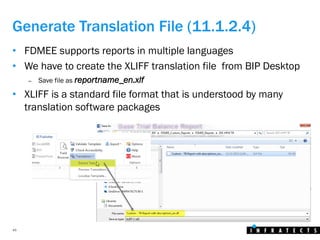
Generate Translation File (11.1.2.4)
• FDMEE supports reports in multiple languages
• We have to create the XLIFF translation file from BIP Desktop
– Save file as reportname_en.xlf
• XLIFF is a standard file format that is understood by many
translation software packages
46
Place RTF template in Server
• Copy the file in the server or upload through Web UI
• Copy XLF file in its language folder (ex: en)
47
Report Definition
• Create Report definition
48
Report Execution
• Test the report
– Parameters will take POV values by default
49
Report
50
Summary
• New reporting technology
• Custom reports in legacy FDM must be re-created
• Can meet complex reporting requirements
• Train yourself
– http://www.oracle.com/webfolder/technetwork/tutorials/obe/fmw/bi/bip/tb4word/tbwordbip.htm
51
Q&A
• You can always contact me
Email: francisco.amores@infratects.com
Mobile: +34674209000
LinkedIn: http://lnkd.in/dgpfvMW
Twitter: @akafdmee
Blog: http://fishingwithfdmee.blogspot.com
• Join LinkedIn Group Oracle|Hyperion FDMEE

FDMEE Custom Reports

  • 1.
    FDMEE Custom Reports ShapingYour Data! 15/January/2016
  • 2.
    2 Safe Harbour • Thefollowing is intended for information purposes only on behalf of Infratects, and may not be incorporated into any contract. It is not a commitment to deliver any services or functionality, and should not be relied upon in making purchasing decisions. This provides no warranties with respect to the offerings described within. The development, release, and timing of any features or functionality described for Oracle’s products remains at the sole discretion of Oracle. Any third-party names, trademarks and copyrights contained in this document are the property of their respective owners
  • 3.
    3 Agenda • Introduction • Reportingin Legacy FDM • Reporting in FDMEE • FDMEE Custom Reports (some examples…) • Let’s go into details
  • 4.
  • 5.
    5 Infratects TopGun16 • When?10 & 11 March 2016 • Where? Adlon Kempinski, Berlin Germany • Who? – 2 Keynote speeches from Oracle's own Kash Mohammadi, VP, EPM Product Development, and Rajesh Bhatia, VP, EPM & BI Product Development • 6 session blocks, giving you the choice to curate your own Top Gun experience. • 18 educationally focused and non sales driven presentations on technical and functional Hyperion best practices as well as Customer Stories to provide insight from the user perspective. • To learn more go to : www.infratects.com/topgun ©2015 | INFRATECTS.COM
  • 6.
    6 About Infratects DEEP EXPERTISE HOSTING CLOUD DESIGN CONFIGURATION INSTALLATION STRESSTESTING UPGRADES MIGRATIONS PATCHING INTEGRATION SUPPORT TRAINING INFRASTRUCTURE FOLLOW THE SUN SUPPORT 40+CONSULTANTS 15+ YEARS EXPERIENCE 5 DATA CENTERS NA EMEA APAC DEDICATED MANAGED SERVICES & SUPPPORT TEAM FOCUSED 15 IN BUSINESS YEARS INFRATECTS FI INFRATECTS UK INFRATECTS NL2000 INFRATECTS AUS2008 2009 2012 INFRATECTS US2014 INFRATECTS SP2012 WWW.INFRATECTS.COM
  • 7.
    7 About me • DataIntegration Lead @Infratects • +9 years Hyperion Experience focused on Data Integration • Link between functional and technical people • FDMEE Blogger and Trainer – fishing with FDMEE • Oracle ACE • Trail running lover UTMB CCC (102KM 6500m+)
  • 8.
    8 Current landscape • FDMEE11.1.2.3.700 – FDM Classic and/or FDMEE (IE 11 support) • FDMEE 11.1.2.4.100 (Dec-2015) – No FDM Classic available anymore – FDM > FDMEE migration is a must (95% parity) • Migration utility released on Aug-2015 – Built using ODI (standalone) – Migrate 1 target application at a time – FDM Classic 11.1.1.x/11.1.2.x > FDMEE 11.1.2.4 – FDM Metadata (locations, mappings, control tables, etc.) – FDM Data (historical data, archived maps, process info) – Not included (audit information, memo items, Security, Scripts, Custom Reports) – Post-migration manual steps needed Upstream FDM ERPI FDMEE 9.3.x-11.1.2.3 11.1.1.3-11.1.2.2 11.1.2.3-∞
  • 9.
  • 10.
    10 Looking back atthe past • Crystal Reports – SQL Query + RPX file • Standard + Custom Reports • FDM Workbench Client – Report Designer • Scripting capabilities • Parameters • API to publish reports from scripts • Output as PDF, Excel, Word, RTF, or HTML
  • 11.
    11 Looking back atthe past • Workbench Client
  • 12.
    12 Looking back atthe past • Report Designer (Workbench Client)
  • 13.
    13 Looking back atthe past • Custom FDM report for Hyperion Planning Validations
  • 14.
  • 15.
    15 New product, newlife • Oracle BI Publisher templates (RTF) – No need of BIP license – Templates located in FDMEE Server • Not all standard reports migrated  – Audit mapping monitor available from 11.1.2.4.100 • Custom Reports – BI Publisher – BIP Desktop (plugin for MS Word) • Output as PDF, Excel, HTM, or XSLX • LCM (+ copy templates)
  • 16.
    16 Report Definition OTHER FDMEE Query Definition Report Definition Source data Targetdata Other data Report Template parameters Report Group Role Security
  • 17.
    17 BIP Desktop forMS Word • Used to create new RTF templates • Does not require BIP installed • Free download • Install on client machine – Version depends on MS Office 32-bit or 64-bit version • Can import sample XML data generated from FDMEE – Preview reports offline
  • 18.
    18 RTF Templates • ConsumeXML data – Template content and layout must correspond to the content and hierarchy of the input XML file • Generates the output report dynamically • Can be downloaded from FDMEE UI
  • 19.
    19 RTF Templates • Somebasics – Placeholders are used to map data fields (show data) – Groups are used to designate repeating elements • BIP supports two methods for creating RTF templates • Basic RTF Method – Use placeholders – At runtime the placeholder is replaced by the value of XML element – Syntax: <?XML element tag name?> • MS Word’s Form Field Method – Place the syntax in hidden form fields, rather than directly into the design of your template.
  • 20.
  • 21.
    21 Report Execution • WEBUI (Report Execution option) • Command line utility runreport.bat/.sh (FDMEE Server) – Can run the report during the FDMEE workflow (ex: custom validation) – Can create the script from Report Execution ©2015 | INFRATECTS.COM
  • 22.
  • 23.
    23 Why would weneed them? • Enhanced our data load workflow – Custom Check Report – HP/Essbase validations – Check Exchange Rates loaded – Etc. • Enrich TB standard reports – Include target member properties (Ex: account type or descriptions) – Include additional FDMEE data – Etc. • Align with other business reports – Add company logo – Change header/footer – Change colors/format – Etc.
  • 24.
    24 Creating a CustomReport 1. Define the Query definition – Test in SQL tool (replace parameters with values) – Export results to XML from FDMEE and import into RTF template – May require some SQL work for complex queries (views, functions …) 2. Create the RTF template – Copy existing template – Import XML file with sample data (BIP Desktop) – Configure the template as needed – Run unit tests for each report item (header, footer, groups, etc.) 3. Define the Report definition – Copy existing or create new one – Assign Query definition – Assign RTF Template – Assign Report Group (+ security) – Define parameters 4. Test report with parameters
  • 25.
  • 26.
  • 27.
    27 Example 3: TBfor JDE Integration
  • 28.
    28 Example 4: HFMHierarchy with JDE Data
  • 29.
  • 30.
    30 Requirement for customreport • TB Report with both HFM and JDE descriptions • Add company logo • A similar report already existed in legacy FDM • It needs enhancements – Add JDE Account Descriptions – Add company logo
  • 31.
    31 Solution design • HFMAccount Description is stored in the HFM Database • The SQL Queries are executed in the FDMEE Database – Create SQL View in HFM database (Account properties) – Create Synonym in FDMEE database • Query Definition – Join FDMEE tables and Synonym for the SQL View – 2 parameters (Period and Data Load Rule) – Generate XML • RTF Template – Copy existing template for TB Report – Create new format – User XML for unit tests
  • 32.
    32 Solution design FDMEE Query Definition Report Definition JDE +Conversion Report Template Param 1: Period Param 2: DLR Custom Report Group Role Security HFM Account Descriptions HFM DB Layer Presentation Layer Synonym
  • 33.
  • 34.
    34 Generating the XMLfor the RTF template • Replace parameters with values in the query definition
  • 35.
    35 Building the RTFtemplate with BIP Desktop • Import XML with sample data • Fields available for the report and test the output file
  • 36.
    36 Building the RTFtemplate with BIP Desktop • Header
  • 37.
    37 Building the RTFtemplate with BIP Desktop • Table Header
  • 38.
    38 Building the RTFtemplate with BIP Desktop • Table Header – Format
  • 39.
    39 Building the RTFtemplate with BIP Desktop • Table Content: main group by
  • 40.
    40 Building the RTFtemplate with BIP Desktop • Repeating elements • For-each
  • 41.
    41 Building the RTFtemplate with BIP Desktop • Data fields
  • 42.
    42 Building the RTFtemplate with BIP Desktop • Data fields (amounts)
  • 43.
    43 Building the RTFtemplate with BIP Desktop • Total for the entity (Sum)
  • 44.
    44 Building the RTFtemplate with BIP Desktop • Table Content: Total
  • 45.
    45 Generate Translation File(11.1.2.4) • FDMEE supports reports in multiple languages • We have to create the XLIFF translation file from BIP Desktop – Save file as reportname_en.xlf • XLIFF is a standard file format that is understood by many translation software packages
  • 46.
    46 Place RTF templatein Server • Copy the file in the server or upload through Web UI • Copy XLF file in its language folder (ex: en)
  • 47.
  • 48.
    48 Report Execution • Testthe report – Parameters will take POV values by default
  • 49.
  • 50.
    50 Summary • New reportingtechnology • Custom reports in legacy FDM must be re-created • Can meet complex reporting requirements • Train yourself – http://www.oracle.com/webfolder/technetwork/tutorials/obe/fmw/bi/bip/tb4word/tbwordbip.htm
  • 51.
    51 Q&A • You canalways contact me Email: francisco.amores@infratects.com Mobile: +34674209000 LinkedIn: http://lnkd.in/dgpfvMW Twitter: @akafdmee Blog: http://fishingwithfdmee.blogspot.com • Join LinkedIn Group Oracle|Hyperion FDMEE